kanghelyu/dsh-deepseek-flow
Project Overview项目介绍
DeepSeek Flow is a native plugin built exclusively for the DeepSeek Harness Web UI. It converts plain Markdown workflow files stored as a root WORKFLOW.md and per-step STEP.md documents into an editable visual diagram right inside the DSH interface. To install the plugin, you run the command dsh plugin --profile web add "github:kanghelyu/dsh-deepseek-flow#main" in your terminal, then restart the dsh web process to activate it. You can confirm the plugin is mounted correctly with dsh web --dump-config | grep deepseek-flow after installation.
This plugin is designed for developers who want to visually design, inspect, and improve custom AI workflows for use with DeepSeek Harness. The bundled agent skill lets the DSH AI create and maintain workflows directly from your active session, while any manual edits you make on the visual canvas sync automatically back to the source Markdown files. It supports light and dark themes that match your DSH configuration, includes pan, zoom, and fit-to-view navigation for large workflows, and keeps each DSH session’s workflows fully isolated from each other. Deleted workflows are stored in a temporary trash folder so you can recover them if you make an accidental deletion.
DeepSeek Flow is released under the open source MIT license, and it includes automated tests for core functionality like graph conversion, bounded feedback loops, and boolean gate semantics. If you run into common issues like a missing plugin tab or a stale UI, you can usually fix them by rebuilding the plugin, restarting the dsh web process, and doing a hard refresh of your browser. For 404 errors on DeepSeek Flow API endpoints, a full restart of the dsh web process is required because the route table is snapshotted when the process starts. AI action errors can typically be fixed by selecting a working model in your active DSH session.
这是一个专为 DeepSeek Harness 开发的原生 Web 插件,提供基于 Markdown 的可视化工作流编辑功能。它会将 WORKFLOW.md 和对应的 STEP.md 文件转换为 DSH 内可编辑的流程图,同时保持画布编辑和 Markdown 源码双向同步,文件始终保持可移植性,不会锁定到私有格式。你可以通过 dsh 命令行从 GitHub 直接安装到 Web 配置文件,安装完成后重启 dsh web 就能启用。
适合需要设计、梳理和改进多步骤 AI 工作流的开发者使用,用户可以在 DSH 会话中让 AI 助手通过插件自带的 Skill 工具创建和维护工作流,也可以手动在画布上创建、移动、连接、删除节点和连线,调整工作流拓扑结构。工作流设计完成后,执行仍然交给当前 DSH 会话处理,插件本身仅负责编辑,不承担工作流运行的功能。
本插件采用 MIT 许可开源,支持明暗两种主题,适配 DSH WebUI 的当前语言设置,每个会话保持工作流隔离,支持平移、缩放、适配视图等流畅的大图操作。如果遇到界面不显示或 API 404 错误,一般需要重启 dsh web 进程并刷新浏览器即可解决,删除的工作流还可以从回收站恢复。
请帮我安装这个 DSH 插件。安装前先完成【兼容性检查 + 安全性检查】,检查通过再动手。

插件:dsh-deepseek-flow(kanghelyu/dsh-deepseek-flow)
仓库:https://github.com/kanghelyu/dsh-deepseek-flow
本站详情页:https://www.yhbd.top/plugins/kanghelyu-dsh-deepseek-flow/
本站登记:类型 plugin · 归类 原生 DSH 插件 · 许可证 MIT · ⭐ 73 · 最近提交 2026-08-19 · 主语言 JavaScript

按下面顺序执行,每步先把结论告诉我,再进入下一步:

【1 兼容性检查】
① 我这边:DSH 版本、Node 版本、操作系统、当前 profile(web / desktop)。
② 读它的 README、package.json、插件 manifest,列出它要求的 DSH 版本 / Node 版本 / 操作系统 / 外部依赖 / 需要另外先装的运行时。
③ 逐条比对,结论只写「满足 / 不满足 / 未知」三种;不满足的给出可行替代方案。
④ 检查是否和我已装的插件冲突:命令名重复、skill / tool 重名、端口占用、重复注册的 MCP server。

【2 安全性检查】
① 仓库可信度:和上面「本站登记」是否一致;star / fork 数、创建时间、最近提交,是否归档或长期停更。
② 安装脚本:逐行看 package.json 的 preinstall / install / postinstall,以及 install.sh、setup.ps1 之类脚本。出现 curl|bash、下载后直接执行、混淆代码、访问与插件功能无关的域名,立刻停下来告诉我,不要继续装。
③ 依赖:列出新增依赖,标出无人维护、或与知名包拼写近似的可疑包(typosquatting)。
④ 权限与副作用:它会读写哪些目录、访问哪些域名、需要哪些 DSH 权限(filesystem / network / shell / clipboard 等),以及怎么卸载和回滚。
⑤ 如果它要求 sudo / 管理员权限,或权限明显超出功能所需,先停下来问我。

【3 安装】
上面两步没有「不满足」和「高危项」时才执行;用官方推荐方式安装,不要自行提权。

【4 汇报】
用表格输出:检查项 / 结论 / 依据 / 是否需要我决策。拿不准的一律写「未知」并说明要我怎么确认——不要猜,也不要替我决定。
Send this message to DSH in your current session: it verifies compatibility and security first (answering met / not met / unknown item by item) and only installs once everything checks out — it will stop and ask you if it finds a high-risk item. The box scrolls; the copy is the full prompt. CLI install commands may not be accurate across systems, so DSH is the safer route.把上面这条消息直接发给当前会话里的 DSH:它会先核对兼容性与安全性(逐条给「满足 / 不满足 / 未知」),确认没问题再安装,有高危项会停下来问你。框内可滚动,复制到的是完整提示词;安装命令不一定准确,发给 DSH 更稳。
- This site's static screen found no obvious risk signal (stars, license, activity, manifest)本站静态筛查没发现明显风险信号(星标、许可证、更新活跃度、清单完整度)
DSH walks through these 9 checksDSH 会逐条核对这 9 项
Compatibility兼容性
- DSH, Node, OS and profile requirementsDSH 版本 / Node 版本 / 操作系统 / profile 是否满足要求
- External dependencies and runtimes (Electron / Python / Docker, ...)外部依赖与运行时(Electron / Python / Docker 等)是否齐备
- Conflicts with installed plugins: command names, skill / tool names, ports, duplicate MCP registration与已装插件是否冲突:命令名、skill / tool 重名、端口占用、重复 MCP 注册
Security安全性
- Repo matches the facts registered here; archived or abandoned?仓库是否与页面登记一致,是否归档或长期停更
- Safety of preinstall / install / postinstall and install.sh / setup.ps1preinstall / install / postinstall 与 install.sh、setup.ps1 是否安全
- curl|bash, download-then-execute, obfuscation, unrelated domains → stop immediatelycurl|bash、下载即执行、混淆代码、无关域名 → 立刻停止
- Typosquatting or unmaintained packages among the new dependencies新增依赖里有没有 typosquatting 或无人维护的包
- Requested permissions vs. what the feature actually needs申请了哪些权限、是否超出功能所需(filesystem / network / shell / clipboard)
- Any sudo / admin requirement, plus uninstall and rollback是否要求 sudo / 管理员权限,以及卸载与回滚方式
Anything uncertain must be marked unknown with a note on how to confirm it. This site's signal screen is a static snapshot, not a security audit.拿不准的必须标「未知」并说明要我怎么确认。本站的信号筛查是静态快照,不能替代安全审计。
Or use CLI install (for developers)或使用命令行安装(适合开发者)
CLI Install命令行安装
dsh plugin --profile web add "github:kanghelyu/dsh-deepseek-flow#main"把 kanghelyu/dsh-deepseek-flow 加入你的 DSH 配置(web profile)即可启用。
READMEREADME
DeepSeek Flow
See the workflow. Keep Markdown portable. Review only real canvas edits.
A visual, Markdown-first workflow editor built for the DeepSeek Harness Web UI.
🌐 Official website — deepseekflow.kanghelyu.org




English · 简体中文
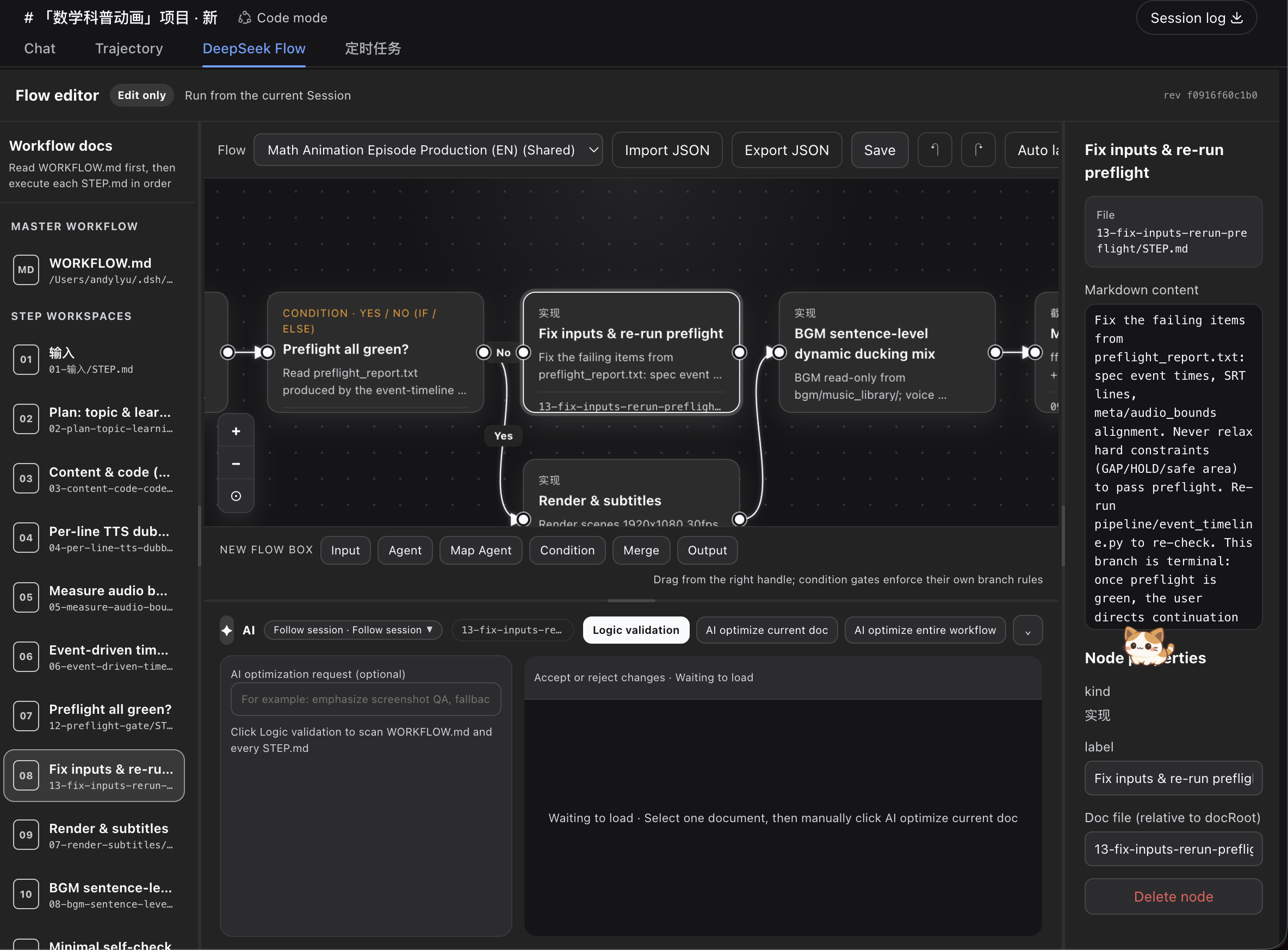
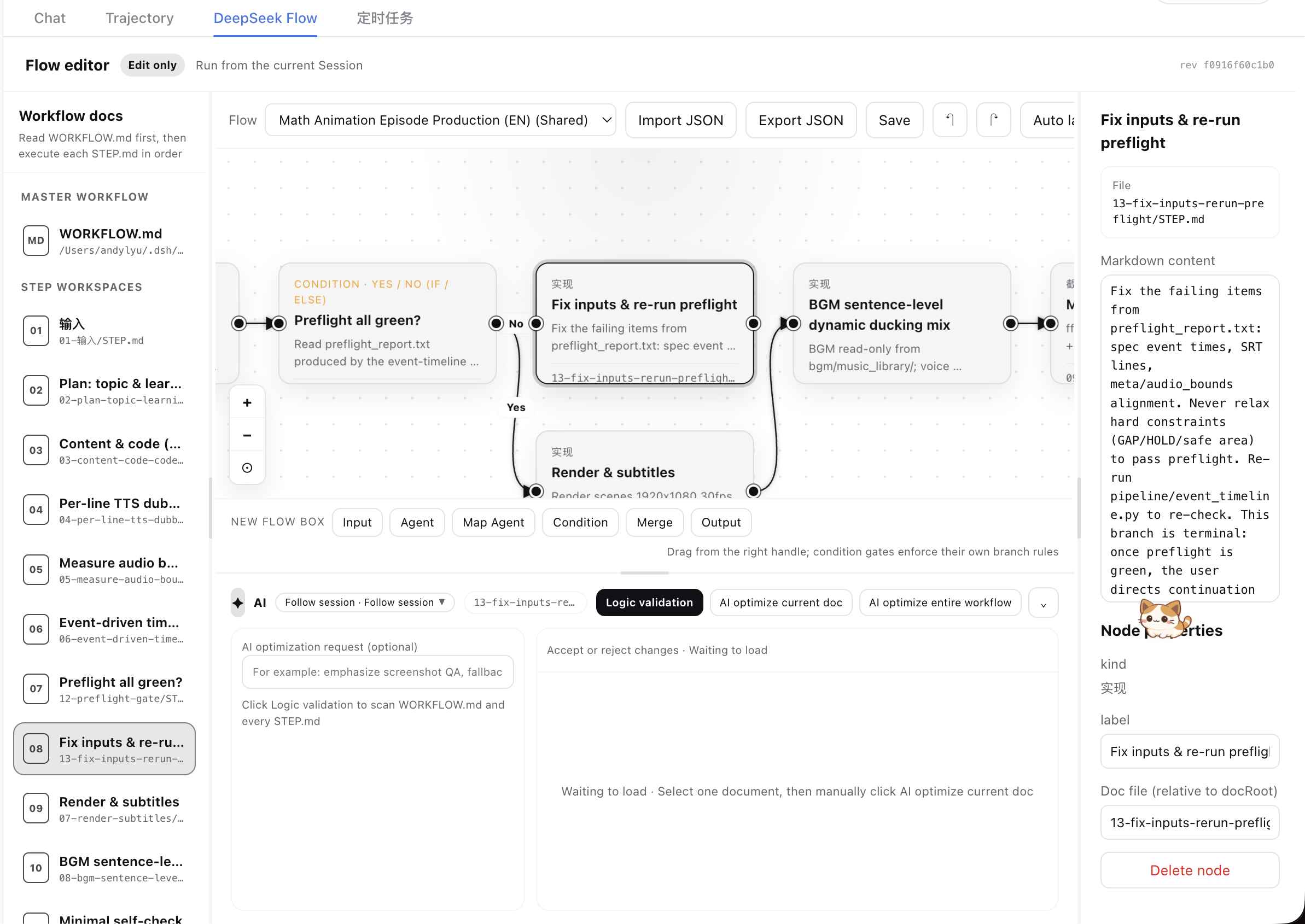
DeepSeek Flow turns a WORKFLOW.md and its step-level STEP.md files into an editable diagram inside DeepSeek Harness. The bundled Skill lets the current Session create and maintain workflows through tools, while the diagram and Markdown remain synchronized and portable.
It is intentionally an editor—not a workflow runtime. DeepSeek Flow helps you design, inspect, and improve a workflow; execution remains in the current Session.
What it gives you
- Markdown as the source of truth — one master
WORKFLOW.md, plus oneSTEP.mdworkspace for each step. - A real visual editor — create, move, connect, reconnect, label, and delete nodes and arrows.
- Two-way synchronization — edits made on the canvas and in the Markdown editor are written back to the workflow files.
- Source-aware topology transactions — human canvas edits receive a full current-Session review; topology produced by direct Session file edits can use an invisible deterministic finalize path instead of being sent back to the same Session.
- Executable gate semantics — the exported contract includes formulas, operands, predicates, and deterministic Boolean results without running Agent steps.
- Per-session isolation — each Harness session keeps its own workflows, with optional shared templates; the canvas toolbar can delete the current workflow or shared template behind a guarded confirm (managed workspaces move to a trash area and can be recovered).
- Comfortable large-flow navigation — collapsible and resizable side panels, pan and zoom, fit-to-view, animated node focus, and independent scrolling regions; node drags commit once on pointer release and background sync polls lightweight revisions, so large graphs stay smooth.
- Native theme support — the interface follows Harness light and dark themes and the active WebUI language.
- Manual AI assistance — run logic validation, optimize one document with review, or optimize the complete workflow.
- Background AI jobs — switching documents, views, or sessions does not interrupt accepted jobs; document proposals are restored when you return.
- Persistent results and drafts — logic-validation findings, AI proposals, and unapplied canvas drafts are persisted to disk: view switches, session switches, and
dsh webrestarts lose nothing; they are cleared only by an explicit discard or a successful commit. Markdown edits inside the 650 ms autosave window are flushed immediately when you leave the view. - I/O and memory safeguards — unchanged documents are never rewritten (autosaves no longer grind the SSD), assist history and drafts live in separate files, result polling uses single-key queries with failure and duration caps, every background poll is cancellable with no leaks, and subagents get a 10-minute default timeout.
- A bundled Agent Skill — installs with the plugin, documents every workflow tool, and includes executable IF/ELSE and Boolean-gate examples.
Showing the opening section of the README — the full document lives in the repository以上为 README 开头摘要,完整文档在仓库内 · View the full README on GitHub →在 GitHub 查看完整 README →
Related相关推荐
-
 dream-num/dsh-univer-office
Give DeepSeek Harness a real office environment. Univer Office Plugin brings spreadsheets, docs, slides, canvases, rela…
dream-num/dsh-univer-office
Give DeepSeek Harness a real office environment. Univer Office Plugin brings spreadsheets, docs, slides, canvases, rela…
- Aampidy/dsh-mcmp Deepseek-Harness数学建模竞赛论文全自动撰写流水线插件。Deepseek-Harness fully automatic pipeline plugin for writing mathematical modeling co…
-
 tt-a1i/archify
Agent skill for beautiful, verifiable architecture, workflow, sequence, data-flow, and lifecycle diagrams—self-contained…
tt-a1i/archify
Agent skill for beautiful, verifiable architecture, workflow, sequence, data-flow, and lifecycle diagrams—self-contained…
-
 LiPu-jpg/Openwrite
dsh-Openwrite:OpenWrite 的 DeepSeek Harness 小说创作插件,含统一创作 Agent、90 个小说工具、原生工作台与标准审稿 DAG
LiPu-jpg/Openwrite
dsh-Openwrite:OpenWrite 的 DeepSeek Harness 小说创作插件,含统一创作 Agent、90 个小说工具、原生工作台与标准审稿 DAG
-
 taxueseek/dsh-files
DeepSeek Harness 插件:原生上传管线上的文件夹按钮 + read_document 文档解析(PDF/DOCX/XLSX)。The folder button on the native upload pipeline, p…
taxueseek/dsh-files
DeepSeek Harness 插件:原生上传管线上的文件夹按钮 + read_document 文档解析(PDF/DOCX/XLSX)。The folder button on the native upload pipeline, p…
-
 ChongCyrus/Vibe-Mathematics
Vibe Mathematics —— 多代理数学问题求解与形式化验证框架
ChongCyrus/Vibe-Mathematics
Vibe Mathematics —— 多代理数学问题求解与形式化验证框架
-
 sailoumili/novel-writer
小说创作模式:一个统筹队长统领全局,5 个专职子代理各司其职——架构世界、策划剧情、管理人物、执笔写文、质检复核——协同写作。
sailoumili/novel-writer
小说创作模式:一个统筹队长统领全局,5 个专职子代理各司其职——架构世界、策划剧情、管理人物、执笔写文、质检复核——协同写作。
-
 alib8b8/aflare
Local-first automation Agent & deterministic workflow engine — the secure control layer between AI and your data. Data s…
alib8b8/aflare
Local-first automation Agent & deterministic workflow engine — the secure control layer between AI and your data. Data s…