taxueseek/dsh-files
DeepSeek 双面插件:会话隔离的文件上传,彩色编辑器卡片 + read_document 工具(文本/PDF/DOCX/XLSX),支持内容嗅探和 LRU 缓存
Project Overview项目介绍
This is a native plugin built exclusively for DeepSeek Harness (DSH) that adds a read_document tool to the DSH toolset. DSH’s native built-in file reading tool rejects binary document formats like PDF, DOCX, and XLSX, so this plugin was created to fill that gap by extracting structured text from these unsupported file types. It integrates seamlessly with DSH’s native file system, session sandbox, and output card system, so it works just like any other built-in DSH tool after installation. It also includes extra features like encoding fallback, paged reading, and sheet-level access for XLSX workbooks that are not available in the base DSH toolset.
The plugin detects file formats directly from file bytes, rather than relying only on file extensions, which means it can catch misnamed or disguised files and reject malicious archives that are pretending to be common documents. It supports auto-detection for multiple common text encodings, including GB18030/GBK, UTF-16 with and without BOM, so it can read most text-based documents correctly even if they use non-standard encoding. If a PDF is a scanned document with no embedded text layer, it returns an explicit error message instead of returning an empty string that confuses the model. It also automatically rejects any file that does not match the expected binary header for the claimed format, adding an extra layer of safety for the DSH environment.
To install the plugin, you need to run a simple curl command piped to shell, or use the native DSH plugin add command with the repository URL, then restart your DSH web server to activate it. The plugin requires DSH version 0.1.3-alpha.1 or newer, and users can customize multiple configuration options including maximum file size, read line limit, output character cap, and per-call timeout. It uses three popular open source parsing dependencies: pdfjs-dist, mammoth, and read-excel-file, and is released under the permissive MIT open source license. It is important to note that the npm package named dsh-files is unrelated, so you must only install it via the official DSH plugin method from this GitHub repository.
这是专为 DeepSeek Harness (DSH) 开发的原生插件,提供 read_document 工具,填补了 DSH 原生读取工具无法处理 PDF、DOCX、XLSX 等二进制文档的空白。它可以从这类二进制文件中提取结构化文本,同时还增加了编码回退、分页读取、XLSX 工作表级访问等增强功能,能够完美适配 DSH 原生文件系统和沙箱权限机制,输出结果也遵循 DSH 原生卡片规范。
插件会自动检测文件真实格式,仅在无法从字节判断格式时才依赖文件扩展名,能直接识别多种常见文本编码,包括GB18030/GBK、带BOM和不带BOM的UTF-16等,对伪装成文档的恶意压缩文件会直接拒绝处理,不含文本层的扫描版PDF也会返回明确提示而非空结果。
插件要求 DSH 版本不低于 0.1.3-alpha.1,支持通过官方脚本或DSH原生命令行一键安装,安装完成后重启DSH Web服务即可使用,所有解析依赖都是开源可靠的,代码遵循MIT许可证,用户还可以自定义单文件大小上限、单次读取行数、输出字符限额等多项配置。
请帮我安装这个 DSH 插件。安装前先完成【兼容性检查 + 安全性检查】,检查通过再动手。

插件:dsh-files(taxueseek/dsh-files)
仓库:https://github.com/taxueseek/dsh-files
本站详情页:https://www.yhbd.top/plugins/taxueseek-dsh-files/
本站登记:类型 plugin · 归类 原生 DSH 插件 · 许可证 MIT · ⭐ 40 · 最近提交 2026-10-01 · 主语言 TypeScript

按下面顺序执行,每步先把结论告诉我,再进入下一步:

【1 兼容性检查】
① 我这边:DSH 版本、Node 版本、操作系统、当前 profile(web / desktop)。
② 读它的 README、package.json、插件 manifest,列出它要求的 DSH 版本 / Node 版本 / 操作系统 / 外部依赖 / 需要另外先装的运行时。
③ 逐条比对,结论只写「满足 / 不满足 / 未知」三种;不满足的给出可行替代方案。
④ 检查是否和我已装的插件冲突:命令名重复、skill / tool 重名、端口占用、重复注册的 MCP server。

【2 安全性检查】
① 仓库可信度:和上面「本站登记」是否一致;star / fork 数、创建时间、最近提交,是否归档或长期停更。
② 安装脚本:逐行看 package.json 的 preinstall / install / postinstall,以及 install.sh、setup.ps1 之类脚本。出现 curl|bash、下载后直接执行、混淆代码、访问与插件功能无关的域名,立刻停下来告诉我,不要继续装。
③ 依赖:列出新增依赖,标出无人维护、或与知名包拼写近似的可疑包(typosquatting)。
④ 权限与副作用:它会读写哪些目录、访问哪些域名、需要哪些 DSH 权限(filesystem / network / shell / clipboard 等),以及怎么卸载和回滚。
⑤ 如果它要求 sudo / 管理员权限,或权限明显超出功能所需,先停下来问我。

【3 安装】
上面两步没有「不满足」和「高危项」时才执行;用官方推荐方式安装,不要自行提权。

【4 汇报】
用表格输出:检查项 / 结论 / 依据 / 是否需要我决策。拿不准的一律写「未知」并说明要我怎么确认——不要猜,也不要替我决定。
Send this message to DSH in your current session: it verifies compatibility and security first (answering met / not met / unknown item by item) and only installs once everything checks out — it will stop and ask you if it finds a high-risk item. The box scrolls; the copy is the full prompt. CLI install commands may not be accurate across systems, so DSH is the safer route.把上面这条消息直接发给当前会话里的 DSH:它会先核对兼容性与安全性(逐条给「满足 / 不满足 / 未知」),确认没问题再安装,有高危项会停下来问你。框内可滚动,复制到的是完整提示词;安装命令不一定准确,发给 DSH 更稳。
- 40 stars - an early-stage project星标 40,属于早期项目
DSH walks through these 9 checksDSH 会逐条核对这 9 项
Compatibility兼容性
- DSH, Node, OS and profile requirementsDSH 版本 / Node 版本 / 操作系统 / profile 是否满足要求
- External dependencies and runtimes (Electron / Python / Docker, ...)外部依赖与运行时(Electron / Python / Docker 等)是否齐备
- Conflicts with installed plugins: command names, skill / tool names, ports, duplicate MCP registration与已装插件是否冲突:命令名、skill / tool 重名、端口占用、重复 MCP 注册
Security安全性
- Repo matches the facts registered here; archived or abandoned?仓库是否与页面登记一致,是否归档或长期停更
- Safety of preinstall / install / postinstall and install.sh / setup.ps1preinstall / install / postinstall 与 install.sh、setup.ps1 是否安全
- curl|bash, download-then-execute, obfuscation, unrelated domains → stop immediatelycurl|bash、下载即执行、混淆代码、无关域名 → 立刻停止
- Typosquatting or unmaintained packages among the new dependencies新增依赖里有没有 typosquatting 或无人维护的包
- Requested permissions vs. what the feature actually needs申请了哪些权限、是否超出功能所需(filesystem / network / shell / clipboard)
- Any sudo / admin requirement, plus uninstall and rollback是否要求 sudo / 管理员权限,以及卸载与回滚方式
Anything uncertain must be marked unknown with a note on how to confirm it. This site's signal screen is a static snapshot, not a security audit.拿不准的必须标「未知」并说明要我怎么确认。本站的信号筛查是静态快照,不能替代安全审计。
Or use CLI install (for developers)或使用命令行安装(适合开发者)
CLI Install命令行安装
dsh plugin --profile web add git+https://github.com/taxueseek/dsh-files.git把 taxueseek/dsh-files 加入你的 DSH 配置(web profile)即可启用。
READMEREADME
dsh-files
In one line
Let the AI actually read the documents you upload — and let your files come back out.
The two annoyances it removes
You have probably hit both:
- You hand the AI a contract PDF or a spreadsheet, and it says "I can't read this file." The file is fine — the built-in read tool only accepts plain text and refuses binary content outright.
- You want the AI to look at that attachment you uploaded days ago, but the attachment store is write-only: you cannot browse it, and you cannot pull the file back onto your machine.
dsh-files fills exactly those two holes. Read: the AI gets the text out of PDF / Word / Excel. Fetch back: you and the AI both see what is in the store, and you can pull a file back out.
What changed in this release
- SDK aligned with the host at 0.2.0-rc.2: fixes "the plugin button is missing and native upload is dead in the desktop App" — the plugin used to be built against the old SDK, colliding with the host's newer bundled components in the client module graph
- Errors now speak plainly: a failure used to hand you a cold error code; now it tells you what to change next. Reach the server over your LAN and the attachment routes answer 403 — the response prints the exact
trustedHostsline to add, ready to copy - LAN / domain deployments are documented now: that section used to be blank, leaving you to guess
- The division of work with the host is written down: what the host already does (upload, images, document preview) versus what remains unique to this plugin — so the wheel is not reinvented
Here is a file's four-stage session lifecycle, one official gap filled per stage:
- Ingest: the folder button next to the native paperclip (plus a same-named entry in the official "+" command menu) — the browser flattens the directory (Office lock files,
.DS_Store,.envand other system/hidden files are filtered), and every file enters the official native attachment pipeline - Read: the
read_documenttool — structured text extraction for binary documents (PDF / DOC / DOCX / XLSX) plus enhanced text reading (encoding fallback, paging, sheet-level access) - Manage: the
attachment_list/export_attachmenttools — make the attachment store visible to the model (name/size/sha) and copy a file into the workspace for read/edit/bash to work on - Fetch back: the attachment dock (one official pill below the composer card) plus download/export routes and an
@attachment source — the store becomes visible to users and files can be pulled into the browser (the right path for remote/LAN deployments); the@menu inserts the official handle line, identical to what the model saw at upload
Showing the opening section of the README — the full document lives in the repository以上为 README 开头摘要,完整文档在仓库内 · View the full README on GitHub →在 GitHub 查看完整 README →
Related相关推荐
-
 LiPu-jpg/Openwrite
dsh-Openwrite:OpenWrite 的 DeepSeek Harness 小说创作插件,含统一创作 Agent、90 个小说工具、原生工作台与标准审稿 DAG
LiPu-jpg/Openwrite
dsh-Openwrite:OpenWrite 的 DeepSeek Harness 小说创作插件,含统一创作 Agent、90 个小说工具、原生工作台与标准审稿 DAG
-
 dream-num/dsh-univer-office
Give DeepSeek Harness a real office environment. Univer Office Plugin brings spreadsheets, docs, slides, canvases, rela…
dream-num/dsh-univer-office
Give DeepSeek Harness a real office environment. Univer Office Plugin brings spreadsheets, docs, slides, canvases, rela…
-
 kanghelyu/dsh-deepseek-flow
-
 sailoumili/novel-writer
小说创作模式:一个统筹队长统领全局,5 个专职子代理各司其职——架构世界、策划剧情、管理人物、执笔写文、质检复核——协同写作。
sailoumili/novel-writer
小说创作模式:一个统筹队长统领全局,5 个专职子代理各司其职——架构世界、策划剧情、管理人物、执笔写文、质检复核——协同写作。
-
 x2802490130-prog/dsh-tool-writing
Writing engine for DeepSeek Harness: long-form web-novel orchestration with a separate DeepSeek key, lore management, se…
x2802490130-prog/dsh-tool-writing
Writing engine for DeepSeek Harness: long-form web-novel orchestration with a separate DeepSeek key, lore management, se…
- KurohaneKaoruko/DSH-Novelist 小说作家智能体预设,用于在DeepSeek Herness里让AI写小说。
- zuoyunlai/lunheng-article-pipeline-dsh 论衡(lunheng-article-pipeline)DeepSeek Harness bundle 插件(DSH 适配版)
-
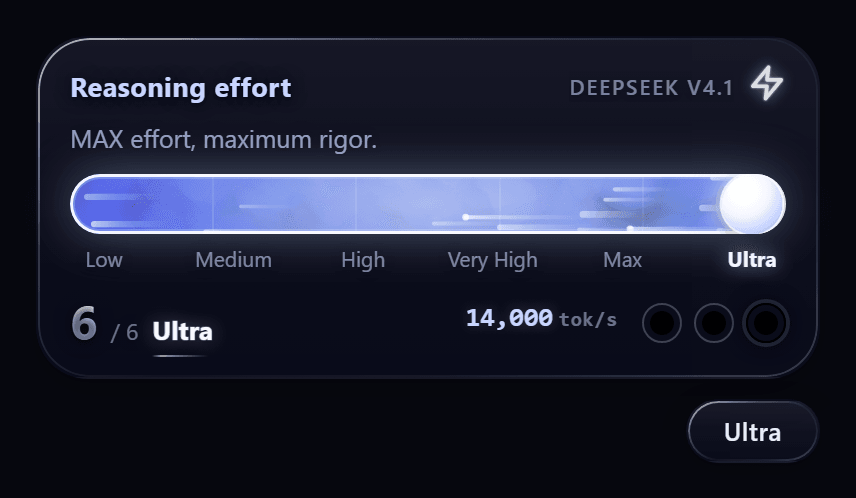 yuhub233/dsh-effort-slider
科幻推理等级滑条 for DeepSeek Harness:Ultra 档 + 闪电编排模式 + 子代理 tok/s 读数 / A sci-fi reasoning-effort slider for DSH
yuhub233/dsh-effort-slider
科幻推理等级滑条 for DeepSeek Harness:Ultra 档 + 闪电编排模式 + 子代理 tok/s 读数 / A sci-fi reasoning-effort slider for DSH