kevinforge/orbit
Orbit turns a local project directory into a collaborative AI workbench. You define a team of digital employees, give each employee a role and an execution runtime, and coordinate their work through a shared conversation. Orbit keeps the user in control while the employees clarify requirements, design a plan,
catalog 简介 / catalog descriptioncatalog description:A local-first workspace for human-led collaboration with multiple AI employees.
项目介绍Project Overview
Orbit 是本地优先的 DSH 插件,把项目目录变成多 AI 员工协作工作台。它通过 Agent Client Protocol 协调 Claude Code、Codex、CodeBuddy,统一管理路由、队列、会话、审批与历史。当需要在一次对话里让多个 AI 角色分工并由用户主导时即可启用。注意:模型访问与工具执行仍由各供应商运行时负责,账户与网络策略遵循对应 CLI。
Orbit is a local-first DSH plugin that turns a project directory into a collaborative AI workbench. It coordinates Claude Code, Codex, and CodeBuddy through the Agent Client Protocol, managing routing, queues, sessions, approvals, and history in one shared conversation. Use it when a user wants multiple AI roles to collaborate under human direction within a single workspace. Note: model access and tool execution remain governed by each vendor CLI, so network and account policies follow the chosen runtime.
请帮我了解并安装插件:【orbit】【https://github.com/kevinforge/orbit】把上面这条消息直接发给当前会话里的 DSH,让它帮你了解并安装。安装命令不一定准确,发给 DSH 更稳。Send this message to DSH in your current session. CLI install commands may not be accurate across systems — DSH will figure it out for you.
或使用命令行安装(适合开发者)Or use CLI install (for developers)
命令行安装CLI Install
dsh plugin --profile web add github:kevinforge/orbit把 kevinforge/orbit 加入你的 DSH 配置(web profile)即可启用。
READMEREADME
Orbit
中文 · English
A local-first workspace for human-led collaboration with multiple AI employees.
Coordinate Claude Code, Codex, and CodeBuddy in one conversation, one workspace at a time.


What Orbit is
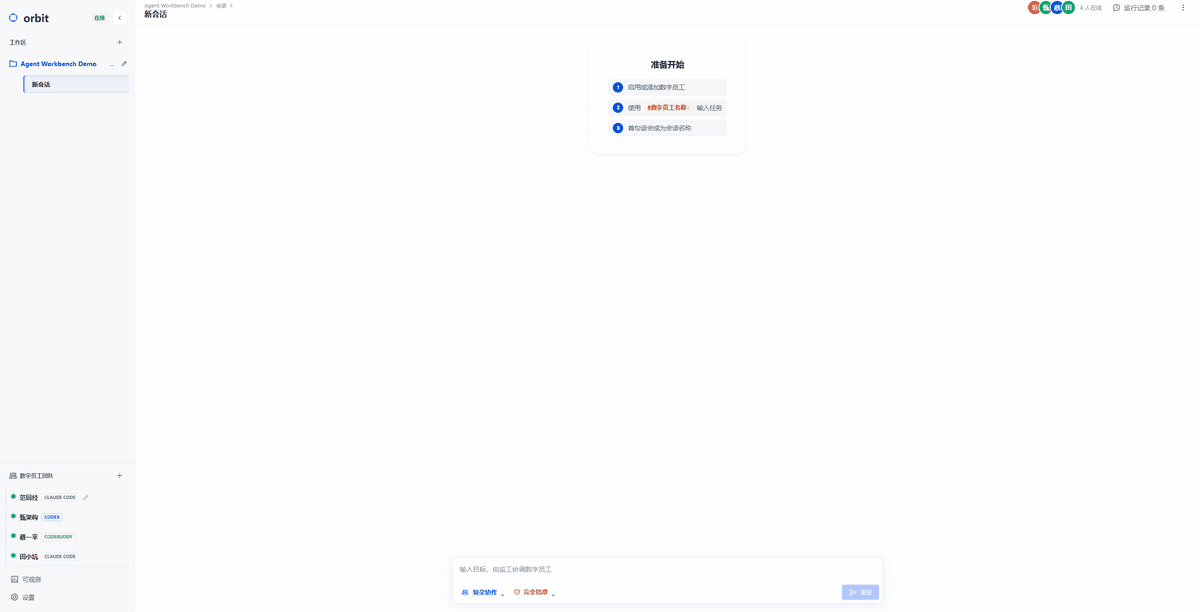
Orbit turns a local project directory into a collaborative AI workbench. You define a team of digital employees, give each employee a role and an execution runtime, and coordinate their work through a shared conversation. Orbit keeps the user in control while the employees clarify requirements, design a plan, implement changes, verify results, and hand work to one another.
The employees are powered by Claude Code, Codex, or CodeBuddy through the Agent Client Protocol (ACP). Orbit owns the workspace, conversation history, routing, queues, approvals, session continuity, and UI; each vendor runtime remains responsible for its own model access and tool execution.
📦 Installation
If you already use Claude Code, Codex, or CodeBuddy locally, copy this prompt to your agent:
Please install Orbit for me with npm using the remote package:
npm install -g @kevinforge/orbit
Then run orbit and verify that http://localhost:4317 is available. Do not
install the unrelated public package named orbit.
See it in action
Orbit can turn one unassigned goal into a supervised multi-agent workflow: the supervisor decomposes the work, specialists investigate in parallel, a verification employee checks the deliverables, and the supervisor produces the final synthesis in the same conversation.
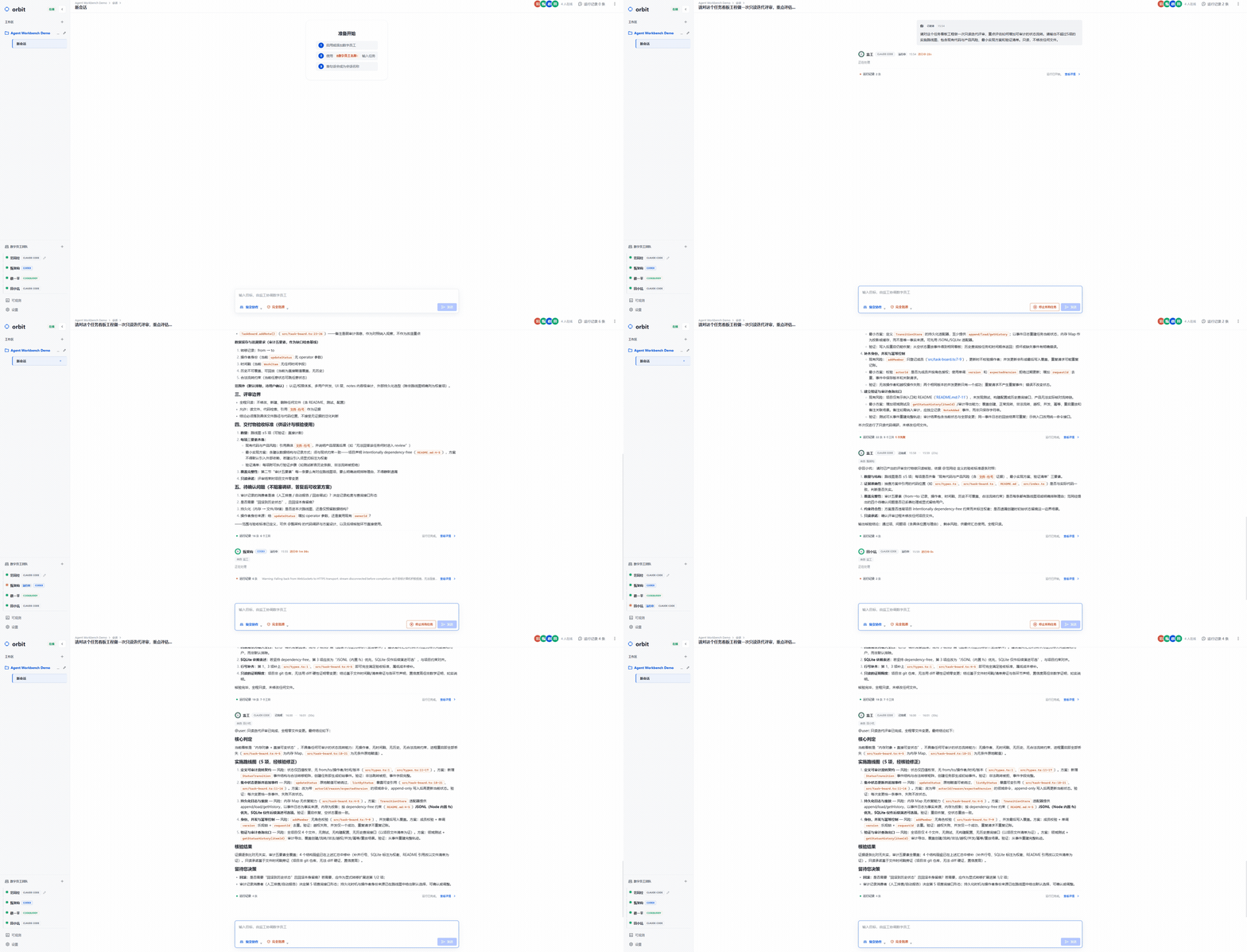
This demo was recorded from a real ACP/model run with Claude Code, Codex, and
CodeBuddy in the 复杂协作 mode. The demonstration project is isolated from
the Orbit source tree and contains no private workspace information.
Why use it
- One conversation, several specialists. Keep requirements, design, implementation, and verification in the same visible work stream.
- Human-directed routing. Assign work explicitly with the employee's display name, or let supervised mode coordinate an unassigned goal.
- Runtime choice per employee. Mix Claude Code, Codex, and CodeBuddy in one team and change the assignment later from the UI.
- Local-first state. Workspaces, messages, configuration, runtime sessions,
attachments, and transcripts are stored under
~/.orbit. - Recoverable execution. Runs are queued per employee, streamed to the UI, cancellable, approval-aware, and isolated by workspace and conversation.
How it works
flowchart LR
    User[User] --> UI[Orbit web workbench]
    UI --> Router[Message router]
    Router --> Queue[Per-employee run queue]
    Queue --> Adapter[Shared ACP runtime layer]
    Adapter --> Claude[Claude Code]
    Adapter --> Codex[Codex]
    Adapter --> CodeBuddy[CodeBuddy]
    Claude --> Events[ACP events and results]
    Codex --> Events
    CodeBuddy --> Events
    Events --> UI
    Router --> Store[(Local message store)]
    Events --> Store
All three runtimes use ACP v1 over newline-delimited JSON-RPC on stdio. Orbit maps their streamed updates into a common activity model, while runtime-specific behavior stays inside the corresponding adapter.
Core concepts
| Concept | Meaning |
|---|---|
| Workspace | A local project directory with its own employee configuration and collaboration data. |
| Conversation | A durable channel inside a workspace. Multiple conversations can run independently. |
| Digital employee | A user-configurable role with a display name, prompt, enabled state, and selected runtime. |
| Assignment | Work addressed with @display-name:. The display name is the public routing key; internal IDs are not. |
| Runtime session | The vendor-side ACP session restored for an employee when the next run starts. |
Three interaction modes
Every conversation has a mode. The mode affects how messages are routed; it does not erase an employee's persisted runtime session.
| Mode | Best for | Routing behavior |
|---|---|---|
| 普通对话 (direct) | A focused conversation with one employee | Assign one employee with @display-name:. Later unmarked messages continue with that employee. |
| 简单协作 (collaborative) | Explicit multi-person teamwork | Assign one or more employees. Employees can hand work to one another when needed. |
| 复杂协作 (supervised) | A goal that needs decomposition and follow-up | Send an unassigned goal to the internal supervisor, which schedules the configured employees. |
The supervisor in supervised mode is an internal coordinator, not a fifth
employee. Plain @name text is a reference; only @name: starts an assignment.
Dependency-aware prompts apply to every team: independent tasks may run in parallel, but dependent tasks wait for prerequisite results. Direct mode still talks to one employee.
Built-in team
The software-development template starts with four editable digital employees:
| Display name | Default responsibility |
|---|---|
范同经 |
Clarify goals, scope, and acceptance criteria. |
甄架构 |
Design solutions and evaluate implementation risk. |
蔡一平 |
Edit files, run commands, and implement changes. |
田小坑 |
Verify behavior and report regressions. |
Names, prompts, enabled state, and runtimes are configurable. You can also start with a blank workspace and create your own team.
Quick start
Requirements
- Node.js 22 or newer.
- At least one installed and authenticated runtime: Claude Code, Codex, or CodeBuddy with ACP support.
- Bun is also required when building the standalone executable from source.
Orbit includes the ACP protocol adapters for Claude Code and Codex. You do not
need to install claude-agent-acp or codex-acp separately. CodeBuddy is
installed separately, for example with npm install -g @tencent-ai/codebuddy-code,
and must be able to run its ACP mode on the local machine.
Run from a source checkout
git clone https://github.com/kevinforge/orbit.git
cd orbit
npm ci
npm run build
npm run dev
Open http://localhost:4317 in your browser.
Install a release package
Download the package for your operating system from GitHub Releases, then install it locally:
npm install -g .\orbit-<version>-windows-x64.tgz
orbit
Linux and macOS users should use the package matching their platform. The
scoped npm package will be available as @kevinforge/orbit after public npm
publishing is enabled. Do not install the unrelated public package named
orbit.
Send the first task
- Create a workspace and select the local project directory.
- Choose the software development team template, or create a blank team.
- Open employee settings and confirm that each selected runtime is available.
- Send an explicit assignment using the exact display name shown in the UI:
@甄架构: Inspect this project and propose a small implementation plan.
To request independent work in parallel:
@蔡一平: Implement the fix. @田小坑: Prepare the regression checklist.
For a supervised task, omit the assignment marker and describe the goal in 复杂协作 mode. The internal supervisor will coordinate the enabled team.
For the full first-run walkthrough, see the English Quickstart or 中文快速上手.
Features
- Three interaction modes for direct work, explicit collaboration, and supervised collaboration.
- Configurable digital employees and reusable workspace team templates.
- Claude Code ACP, Codex ACP, and CodeBuddy ACP runtime adapters.
- Per-message approval modes: ask before tool operations or approve the current task automatically.
- Human-in-the-loop permission requests and structured elicitation forms or external URLs.
- Per-employee FIFO run queues, cancellation, interruption, and failure state.
- Multiple conversations with background execution and live activity updates.
- Durable message history, runtime session restoration, attachments, and terminal transcripts.
- Collaboration Insights for task outcomes, execution timelines, and duration trends.
- A local HTTP server, React UI, SSE event stream, and standalone binaries for supported platforms.
Data and privacy
Orbit's own product data is stored locally under ~/.orbit; it is not stored in
this repository. Runtime authentication and model-provider behavior are owned by
the vendor CLI you choose, so network access and account policies depend on
that runtime.
Read Local Data before backing up, moving, retaining, or resetting Orbit data. Read Terminology And Routing before building integrations around employee names or assignment markers.
Documentation map
| Need | Document |
|---|---|
| First run | Quickstart · 中文快速上手 |
| Runtime and module design | Architecture |
Files under ~/.orbit |
Data Directory |
| Public terms and routing | Terminology And Routing |
| Standalone packaging | Standalone Build |
| Development and pull requests | Contributing |
| Release verification | Release Checklist |
| Support and reporting | Support · Security |
Development
npm ci
npm run dev
npm run test
npm run build
npm run smoke:start
npm run smoke:port-conflict
npm run release:check
npm run build type-checks the source, builds the Vite UI, and compiles the
standalone executable with Bun. npm run build:all produces packages for all
supported platform targets. Before opening a pull request, run the checks that
match the changed surface and report exactly what was run.
Project status
Orbit is being prepared as an open-source 1.0 release. The repository already contains the CI, release, support, security, and contribution workflows used to validate the project. See Open Source Readiness and the release notes for current gaps and release-candidate context.
Contributing
Bug reports, feature requests, and pull requests are welcome. Please read
CONTRIBUTING.md before changing the code. The project keeps
shared coding-agent instructions in AGENTS.md; CLAUDE.md and
CODEBUDDY.md are thin host-specific entry points that import the same source.
License
Orbit is released under the MIT License.
Support and security
Use GitHub Issues for reproducible bugs and feature requests. For security issues, follow SECURITY.md instead of posting sensitive details publicly. General support expectations are described in SUPPORT.md.
相关推荐Related
-
 nexu-io/open-design
🎨 Best DeepSeek Harness Design Plugin. The open-source Claude Design alternative. 🖥️ Local-first desktop app. 🖼️ Your…
nexu-io/open-design
🎨 Best DeepSeek Harness Design Plugin. The open-source Claude Design alternative. 🖥️ Local-first desktop app. 🖼️ Your…
-
 ruvnet/ruflo
🌊 The original agent meta-harness. Deploy intelligent multi-player swarms, coordinate autonomous workflows, and build c…
ruvnet/ruflo
🌊 The original agent meta-harness. Deploy intelligent multi-player swarms, coordinate autonomous workflows, and build c…
-
 amruthpillai/reactive-resume
A one-of-a-kind resume builder that keeps your privacy in mind. Completely secure, customizable, portable, open-source a…
amruthpillai/reactive-resume
A one-of-a-kind resume builder that keeps your privacy in mind. Completely secure, customizable, portable, open-source a…
-
 esengine/DeepSeek-Reasonix
DeepSeek-native AI coding agent for your terminal. Engineered around prefix-cache stability — leave it running.
esengine/DeepSeek-Reasonix
DeepSeek-native AI coding agent for your terminal. Engineered around prefix-cache stability — leave it running.
-
 volcengine/OpenViking
Self-evolving Context Database for AI Agents. Unify Agent Memory, Knowledge RAG and Skills.
volcengine/OpenViking
Self-evolving Context Database for AI Agents. Unify Agent Memory, Knowledge RAG and Skills.
-
 Molunerfinn/PicGo
:rocket: The Ultimate Image Uploader for Efficient Creators. Supports Obsidian, Typora, VS Code etc. and 60+ image hosti…
Molunerfinn/PicGo
:rocket: The Ultimate Image Uploader for Efficient Creators. Supports Obsidian, Typora, VS Code etc. and 60+ image hosti…
-
 titanwings/colleague-skill
将冰冷的离别化为温暖的 Skill,欢迎加入数字生命1.0!Transforming cold farewells into warm skills? It's giving rebirth era. Welcome to Digital …
titanwings/colleague-skill
将冰冷的离别化为温暖的 Skill,欢迎加入数字生命1.0!Transforming cold farewells into warm skills? It's giving rebirth era. Welcome to Digital …
-
 nocobase/nocobase
NocoBase is an open-source AI + no-code platform for building business systems fast. Instead of generating everything fr…
nocobase/nocobase
NocoBase is an open-source AI + no-code platform for building business systems fast. Instead of generating everything fr…