komoai2026/dsh-kolmopdf
用于DeepSeek Harness的KolmoPDF工具,支持持久的API密钥设置与CLI配置。
Project Overview项目介绍
This is a DSH-native plugin that integrates the KolmoPDF API service into DeepSeek Harness. It offers five core tools: PDF to Markdown parsing, layout-preserving PDF translation, Markdown conversion to other formats, credit cost estimation, and balance checking. To install, you can run the dsh plugin add command directly from GitHub, the npm registry, or a local checked out copy of the repository. After installation, it automatically adds a dedicated settings page to your DSH instance that refreshes credit balance and task status every 10 to 30 seconds. It also stores the last 200 most recent tasks in a local JSON file.
This plugin is designed for DeepSeek Harness users who regularly work with PDF documents, whether you need to extract content from PDFs for writing or translate full PDF files while retaining their original layout. Before you can use any of the tools, you need a paid KolmoPDF Plus or Pro account and an API key generated from the KolmoPDF website. There are three supported ways to configure your API key: DSH GUI credentials, a CLI command, or an environment variable, with CLI configuration taking highest precedence over the other two methods.
The plugin requires Node.js version 20 or higher and is compatible with DeepSeek Harness 0.1.1-rc.2 and newer versions. It enforces several security and size limits: it validates inputs locally before upload, caps PDFs at 300MB and 800 pages, and restricts ZIP extraction to avoid path traversal attacks. It also caps uncompressed ZIP outputs at 4 GiB and 10,000 entries, and never exposes your API key in logs or settings output, following strict security best practices. It is released under the open source MIT license, so anyone can use, modify, or redistribute it per the terms of that license.
这是一款专为DeepSeek Harness开发的原生插件,集成了KolmoPDF服务,提供高保真PDF转Markdown、保留布局的PDF翻译、Markdown格式转换、额度估算和余额查询功能。用户可通过DSH CLI命令从GitHub、npm注册表或本地检出安装,安装后会在DSH中新增专属设置面板,自动刷新余额和任务状态,任务历史默认保存在$DSH_HOME/kolmopdf/tasks.json中,最多保留最近200条任务记录。
这款插件适合需要处理PDF文档、提取内容或翻译PDF的DeepSeek Harness用户使用。使用前需要先拥有KolmoPDF Plus或Pro账户,并从KolmoPDF官网获取API密钥。API密钥可通过DSH图形界面、CLI命令或环境变量三种方式配置,优先级为CLI配置>图形界面/环境变量配置,配置后即可调用各类工具处理PDF文档。
该插件要求Node.js版本不低于20,兼容DeepSeek Harness 0.1.1-rc.2及以上版本。插件在上传前会本地验证输入,最大支持300MB、800页的PDF文档,输出解压也有文件大小和数量限制,保障使用安全。项目采用MIT许可证开源,可免费使用,遵循协议要求即可。
请帮我安装这个 DSH 插件。安装前先完成【兼容性检查 + 安全性检查】,检查通过再动手。

插件:dsh-kolmopdf(komoai2026/dsh-kolmopdf)
仓库:https://github.com/komoai2026/dsh-kolmopdf
本站详情页:https://www.yhbd.top/plugins/komoai2026-dsh-kolmopdf/
本站登记:类型 plugin · 归类 原生 DSH 插件 · 许可证 MIT · ⭐ 3 · 最近提交 2026-09-16 · 主语言 TypeScript

按下面顺序执行,每步先把结论告诉我,再进入下一步:

【1 兼容性检查】
① 我这边:DSH 版本、Node 版本、操作系统、当前 profile(web / desktop)。
② 读它的 README、package.json、插件 manifest,列出它要求的 DSH 版本 / Node 版本 / 操作系统 / 外部依赖 / 需要另外先装的运行时。
③ 逐条比对,结论只写「满足 / 不满足 / 未知」三种;不满足的给出可行替代方案。
④ 检查是否和我已装的插件冲突:命令名重复、skill / tool 重名、端口占用、重复注册的 MCP server。

【2 安全性检查】
① 仓库可信度:和上面「本站登记」是否一致;star / fork 数、创建时间、最近提交,是否归档或长期停更。
② 安装脚本:逐行看 package.json 的 preinstall / install / postinstall,以及 install.sh、setup.ps1 之类脚本。出现 curl|bash、下载后直接执行、混淆代码、访问与插件功能无关的域名,立刻停下来告诉我,不要继续装。
③ 依赖:列出新增依赖,标出无人维护、或与知名包拼写近似的可疑包(typosquatting)。
④ 权限与副作用:它会读写哪些目录、访问哪些域名、需要哪些 DSH 权限(filesystem / network / shell / clipboard 等),以及怎么卸载和回滚。
⑤ 如果它要求 sudo / 管理员权限,或权限明显超出功能所需,先停下来问我。

【3 安装】
上面两步没有「不满足」和「高危项」时才执行;用官方推荐方式安装,不要自行提权。

【4 汇报】
用表格输出:检查项 / 结论 / 依据 / 是否需要我决策。拿不准的一律写「未知」并说明要我怎么确认——不要猜,也不要替我决定。
Send this message to DSH in your current session: it verifies compatibility and security first (answering met / not met / unknown item by item) and only installs once everything checks out — it will stop and ask you if it finds a high-risk item. The box scrolls; the copy is the full prompt. CLI install commands may not be accurate across systems, so DSH is the safer route.把上面这条消息直接发给当前会话里的 DSH:它会先核对兼容性与安全性(逐条给「满足 / 不满足 / 未知」),确认没问题再安装,有高危项会停下来问你。框内可滚动,复制到的是完整提示词;安装命令不一定准确,发给 DSH 更稳。
- Only 3 stars - very few users, little community feedback星标只有 3,几乎没人在用,遇到问题缺少社区反馈
DSH walks through these 9 checksDSH 会逐条核对这 9 项
Compatibility兼容性
- DSH, Node, OS and profile requirementsDSH 版本 / Node 版本 / 操作系统 / profile 是否满足要求
- External dependencies and runtimes (Electron / Python / Docker, ...)外部依赖与运行时(Electron / Python / Docker 等)是否齐备
- Conflicts with installed plugins: command names, skill / tool names, ports, duplicate MCP registration与已装插件是否冲突:命令名、skill / tool 重名、端口占用、重复 MCP 注册
Security安全性
- Repo matches the facts registered here; archived or abandoned?仓库是否与页面登记一致,是否归档或长期停更
- Safety of preinstall / install / postinstall and install.sh / setup.ps1preinstall / install / postinstall 与 install.sh、setup.ps1 是否安全
- curl|bash, download-then-execute, obfuscation, unrelated domains → stop immediatelycurl|bash、下载即执行、混淆代码、无关域名 → 立刻停止
- Typosquatting or unmaintained packages among the new dependencies新增依赖里有没有 typosquatting 或无人维护的包
- Requested permissions vs. what the feature actually needs申请了哪些权限、是否超出功能所需(filesystem / network / shell / clipboard)
- Any sudo / admin requirement, plus uninstall and rollback是否要求 sudo / 管理员权限,以及卸载与回滚方式
Anything uncertain must be marked unknown with a note on how to confirm it. This site's signal screen is a static snapshot, not a security audit.拿不准的必须标「未知」并说明要我怎么确认。本站的信号筛查是静态快照,不能替代安全审计。
Or use CLI install (for developers)或使用命令行安装(适合开发者)
CLI Install命令行安装
dsh plugin --profile web add @kolmopdf/dsh-kolmopdf把 komoai2026/dsh-kolmopdf 加入你的 DSH 配置(web profile)即可启用。
READMEREADME
kolmopdf
English | 中文
KolmoPDF tools for DeepSeek Harness: high-fidelity PDF→Markdown parsing, layout-preserving PDF translation, Markdown conversion, credit estimates, and balance checks.
Repository: https://github.com/komoai2026/dsh-kolmopdf
Features
| Tool | Capability |
|---|---|
kolmopdf_parse_pdf |
PDF → Markdown, optional translation, formulas, tables, images, enrichment sidecars |
kolmopdf_translate_pdf |
Layout-preserving PDF translation (translated-only or side-by-side) |
kolmopdf_convert_markdown |
Markdown/ZIP → DOCX, HTML, PDF, LaTeX |
kolmopdf_estimate_cost |
Local page-count + balance estimate (does not spend credits) |
kolmopdf_check_balance |
Current credit balance |
kolmopdf_get_task_status |
Inspect a task by id |
- The GUI stores the API key through DSH credentials (
KOLMOPDF_API_KEY). The value never rides settings describe responses. - Settings → KolmoPDF is a dedicated settings page (configured / missing, save, clear) with a live credits card and a task overview list — balance and task statuses refresh automatically (30 s / 10 s) and manually, with a clear-log action. Task history lives in
$DSH_HOME/kolmopdf/tasks.json(newest 200). - Tools check the key lazily. A missing key tells the user to open Settings or run the CLI.
KOLMOPDF_API_KEYin the process environment is also accepted. An env key shadows the GUI credential and makes the settings page read-only.- HTTP upload, poll, download, and ZIP extract honor the tool abort signal.
Requirements
- Node.js >= 20
- DeepSeek Harness
0.1.1-rc.2compatible (0.1.1-rc.2 client-modules format:dsh.clientmanifest +exports["./client"]lazy-CJS bundle) - KolmoPDF Plus or Pro account
- An API key from https://www.kolmopdf.com/api-keys
Install
Install the package into the DSH profile you use (example: web). GitHub is the recommended path:
# From GitHub (recommended; no npm publish required)
dsh plugin --profile web add github:komoai2026/dsh-kolmopdf

# Equivalent
dsh plugin --profile web add https://github.com/komoai2026/dsh-kolmopdf.git
This is a git dependency that ships prebuilt lib/ (no prepare script, so dsh plugin add does not hit pnpm allowBuilds). The package also declares dsh.bundle, so dsh plugin add appends @kolmopdf/dsh-kolmopdf to the profile's dsh.profile.bundles and the plugin mounts on the next start — settings page and tools appear without a hand-written composition row.
Showing the opening section of the README — the full document lives in the repository以上为 README 开头摘要,完整文档在仓库内 · View the full README on GitHub →在 GitHub 查看完整 README →
Related相关推荐
-
 yogsoth-ai/de-anthropocentric-research-engine
A 267-skill research graph in pure markdown — 51 research operations built from 216 single-purpose steps, composed in an…
yogsoth-ai/de-anthropocentric-research-engine
A 267-skill research graph in pure markdown — 51 research operations built from 216 single-purpose steps, composed in an…
-
 ZSeven-W/dsh-openpencil
The DeepSeek Harness plugin for OpenPencil — preview, inspect, and edit real .op documents inside a conversation.
ZSeven-W/dsh-openpencil
The DeepSeek Harness plugin for OpenPencil — preview, inspect, and edit real .op documents inside a conversation.
-
 HanaAyane/dsh-reasoning-effort
DSH适用的Codex风格的思考强度滑块,以及大肥鱼跑步滑块。Codex-style model and reasoning-effort slider for DeepSeek Harness
HanaAyane/dsh-reasoning-effort
DSH适用的Codex风格的思考强度滑块,以及大肥鱼跑步滑块。Codex-style model and reasoning-effort slider for DeepSeek Harness
- T-Auto/dsh-std DSH Plugin Interoperability Meta-Protocol / DSH 插件互操作元协议
- FylarOpen/dsh-fylar-office-editor Office document preview, editing, and DOCX generation for DeepSeek Harness, powered by Fylar Office SDK.
- reddapidev/dsh-reddit-radar A dsh plugin that periodically scans reddapi.dev for new Reddit leads matching your one-sentence ICP, dedupes what you'v…
-
 HuanLinOTO/dsh-plugin-better-sidebar-plugin-office
为 better-sidebar 提供 Office 三件套预览(.docx/.xlsx/.pptx),独立 bundle 瘦身主体 | Provides Office-suite preview (.docx/.xlsx/.pptx) f…
HuanLinOTO/dsh-plugin-better-sidebar-plugin-office
为 better-sidebar 提供 Office 三件套预览(.docx/.xlsx/.pptx),独立 bundle 瘦身主体 | Provides Office-suite preview (.docx/.xlsx/.pptx) f…
-
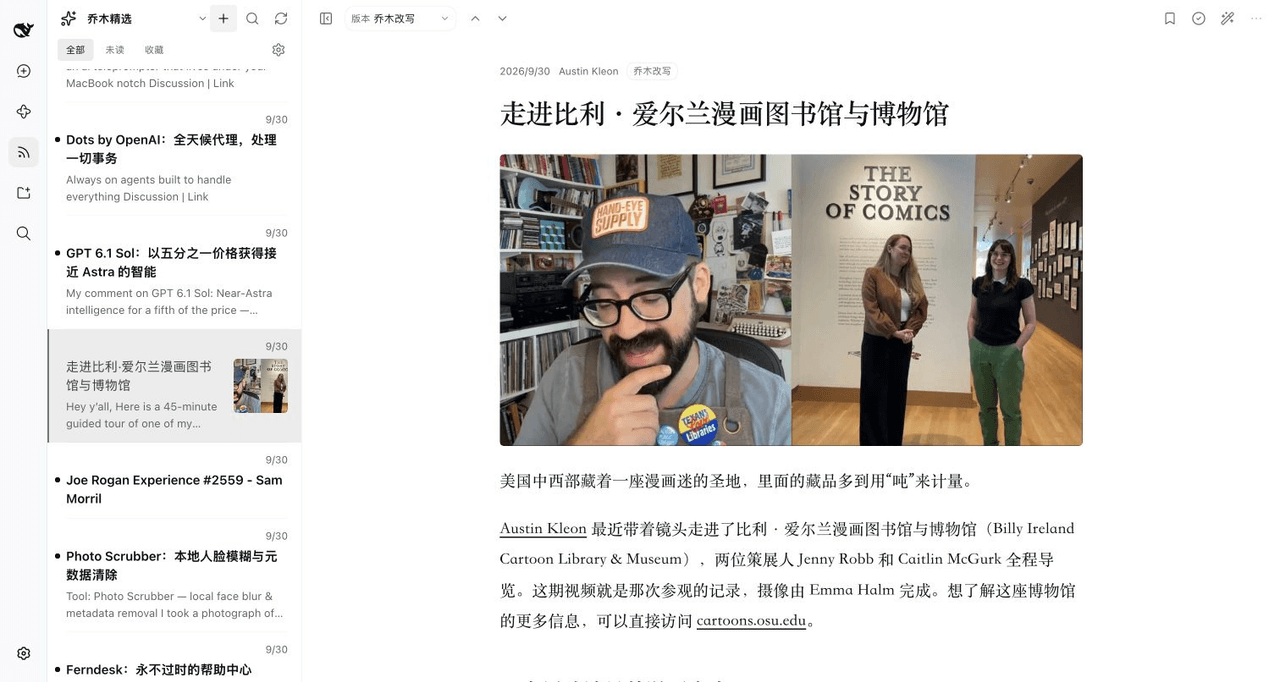 joeseesun/qiaomu-rss-dsh
在 DeepSeek Harness 中阅读 RSS,与原生 AI 对话伴读文章 | RSS reading with native AI companion for DeepSeek Harness
joeseesun/qiaomu-rss-dsh
在 DeepSeek Harness 中阅读 RSS,与原生 AI 对话伴读文章 | RSS reading with native AI companion for DeepSeek Harness