MistRain-1/dsh-reconnect
断线无限重新连接,适用于不稳定的API或者中转站
Project Overview项目介绍
dsh-reconnect is a native host plugin built exclusively for DeepSeek Harness (DSH) that retries failed model requests to avoid interrupting long-running tasks from temporary network or service failures. The plugin can be installed in one of three common ways: downloading the ZIP archive from the project’s GitHub page, cloning the full Git repository to your local machine, or pulling the ZIP archive directly via a terminal command. After downloading the plugin files, you must add an entry for it in your DSH Cordis composition configuration, specify the path to the extracted files, and restart DSH to load the plugin properly.
The plugin activates by listening to DSH’s agent/request-error waterfall event, and only runs after DSH’s built-in provider retry policy has exited. It is especially useful for users that rely on unstable proxy or relay services to connect to DeepSeek’s API, as it keeps long tasks running through intermittent connectivity drops. It applies an exponential backoff strategy to retries, starting at 1 second and capping out at a configurable maximum delay (default 60 seconds). It distinguishes between recoverable transient errors (rate limits, 5xx errors, timeouts, dropped connections) and permanent errors (invalid credentials, context overflow, bad request content), only retrying the recoverable category by default.
All configuration options can be adjusted directly in DSH’s built-in settings panel, with no restart required after changes. If you prefer manual configuration, you can also set options directly via your Cordis YAML configuration file, with all changes taking effect immediately. Users can toggle options like whether to retry on quota errors or enable indefinite retry for unknown errors, and set a custom maximum delay for backoff. The plugin is released under the permissive MIT open source license, is platform-independent, and never accesses or reads user credentials stored by DSH, so it poses no additional security risk for users.
dsh-reconnect 是 DeepSeek Harness(DSH)的原生主机端插件,核心功能是为失败的模型请求提供带退避策略的安全重试。当 DSH 内置的重试策略放弃后,该插件会监听 agent/request-error 事件,按照可配置的规则对空响应、速率限制、服务端错误、连接中断、超时等可恢复错误请求进行重试,避免临时网络中断打断当前代理会话或长时间运行的任务。
该插件特别适用于使用不稳定中转节点、反向代理、API 网关转发服务的场景,也适合应对间歇性网络波动、临时服务端 5xx 错误、速率限制这类常见问题。用户可以在 DSH 设置面板的插件配置页找到 dsh-reconnect 的配置卡片,直接在这里调整最大重试等待、是否重试配额错误等选项,修改无需重启 DSH 即可立即生效。
dsh-reconnect 遵循 MIT 许可,完全免费开源,它是平台无关的插件,可以通过下载 ZIP 压缩包或者 git clone 方式安装,安装后需要在 DSH 的 Cordis 配置文件中注册插件路径,完成后重启 DSH 即可加载使用。该插件不会读取用户凭证信息,仅基于错误事件码处理重试逻辑,对永久性错误如凭证失效、上下文溢出会直接终止,不会进行无效重试。
请帮我安装这个 DSH 插件。安装前先完成【兼容性检查 + 安全性检查】,检查通过再动手。

插件:dsh-reconnect(MistRain-1/dsh-reconnect)
仓库:https://github.com/MistRain-1/dsh-reconnect
本站详情页:https://www.yhbd.top/plugins/mistrain-1-dsh-reconnect/
本站登记:类型 plugin · 归类 原生 DSH 插件 · 许可证 MIT · ⭐ 4 · 最近提交 2026-08-21 · 主语言 JavaScript

按下面顺序执行,每步先把结论告诉我,再进入下一步:

【1 兼容性检查】
① 我这边:DSH 版本、Node 版本、操作系统、当前 profile(web / desktop)。
② 读它的 README、package.json、插件 manifest,列出它要求的 DSH 版本 / Node 版本 / 操作系统 / 外部依赖 / 需要另外先装的运行时。
③ 逐条比对,结论只写「满足 / 不满足 / 未知」三种;不满足的给出可行替代方案。
④ 检查是否和我已装的插件冲突:命令名重复、skill / tool 重名、端口占用、重复注册的 MCP server。

【2 安全性检查】
① 仓库可信度:和上面「本站登记」是否一致;star / fork 数、创建时间、最近提交,是否归档或长期停更。
② 安装脚本:逐行看 package.json 的 preinstall / install / postinstall,以及 install.sh、setup.ps1 之类脚本。出现 curl|bash、下载后直接执行、混淆代码、访问与插件功能无关的域名,立刻停下来告诉我,不要继续装。
③ 依赖:列出新增依赖,标出无人维护、或与知名包拼写近似的可疑包(typosquatting)。
④ 权限与副作用:它会读写哪些目录、访问哪些域名、需要哪些 DSH 权限(filesystem / network / shell / clipboard 等),以及怎么卸载和回滚。
⑤ 如果它要求 sudo / 管理员权限,或权限明显超出功能所需,先停下来问我。

【3 安装】
上面两步没有「不满足」和「高危项」时才执行;用官方推荐方式安装,不要自行提权。

【4 汇报】
用表格输出:检查项 / 结论 / 依据 / 是否需要我决策。拿不准的一律写「未知」并说明要我怎么确认——不要猜,也不要替我决定。
Send this message to DSH in your current session: it verifies compatibility and security first (answering met / not met / unknown item by item) and only installs once everything checks out — it will stop and ask you if it finds a high-risk item. The box scrolls; the copy is the full prompt. CLI install commands may not be accurate across systems, so DSH is the safer route.把上面这条消息直接发给当前会话里的 DSH:它会先核对兼容性与安全性(逐条给「满足 / 不满足 / 未知」),确认没问题再安装,有高危项会停下来问你。框内可滚动,复制到的是完整提示词;安装命令不一定准确,发给 DSH 更稳。
- Only 4 stars - very few users, little community feedback星标只有 4,几乎没人在用,遇到问题缺少社区反馈
DSH walks through these 9 checksDSH 会逐条核对这 9 项
Compatibility兼容性
- DSH, Node, OS and profile requirementsDSH 版本 / Node 版本 / 操作系统 / profile 是否满足要求
- External dependencies and runtimes (Electron / Python / Docker, ...)外部依赖与运行时(Electron / Python / Docker 等)是否齐备
- Conflicts with installed plugins: command names, skill / tool names, ports, duplicate MCP registration与已装插件是否冲突:命令名、skill / tool 重名、端口占用、重复 MCP 注册
Security安全性
- Repo matches the facts registered here; archived or abandoned?仓库是否与页面登记一致,是否归档或长期停更
- Safety of preinstall / install / postinstall and install.sh / setup.ps1preinstall / install / postinstall 与 install.sh、setup.ps1 是否安全
- curl|bash, download-then-execute, obfuscation, unrelated domains → stop immediatelycurl|bash、下载即执行、混淆代码、无关域名 → 立刻停止
- Typosquatting or unmaintained packages among the new dependencies新增依赖里有没有 typosquatting 或无人维护的包
- Requested permissions vs. what the feature actually needs申请了哪些权限、是否超出功能所需(filesystem / network / shell / clipboard)
- Any sudo / admin requirement, plus uninstall and rollback是否要求 sudo / 管理员权限,以及卸载与回滚方式
Anything uncertain must be marked unknown with a note on how to confirm it. This site's signal screen is a static snapshot, not a security audit.拿不准的必须标「未知」并说明要我怎么确认。本站的信号筛查是静态快照,不能替代安全审计。
Or use CLI install (for developers)或使用命令行安装(适合开发者)
CLI Install命令行安装
dsh plugin --profile web add github:MistRain-1/dsh-reconnect把 MistRain-1/dsh-reconnect 加入你的 DSH 配置(web profile)即可启用。
READMEREADME
dsh-reconnect
Safe model-request retry for DeepSeek Harness with exponential backoff, relay/proxy failure recovery, and a unified settings panel.
Version: 2.0.0
Project Description
dsh-reconnect is a Host-side plugin for DeepSeek Harness (DSH). It retries failed model requests so temporary network failures do not interrupt an agent turn or a long-running task.
The plugin listens to the DSH agent/request-error waterfall event. After the built-in normal Provider retry policy gives up, or when a Provider's always policy delegates recovery downstream, the Agent loop sends the same request again according to this plugin's policy.
Suitable Use Cases
- Unstable relay stations, reverse proxies, API gateways, or forwarding services
- Relay nodes that disconnect, reset connections, or return incomplete responses
- Intermittent network failures and transport errors
- Temporary provider outages, server-side 5xx errors, rate limits, and timeouts
- Long-running tasks that should survive short-lived provider or network failures
Retry Policy
| Condition | Behavior |
|---|---|
EMPTY_RESPONSE / RATE_LIMIT / SERVER / STREAM_CLOSED / TIMEOUT / TRANSPORT |
Retry indefinitely (transient connection/service failures) |
Model missing or not configured (MODEL_NOT_FOUND, MODEL_NOT_CONFIGURED, or matching Provider text) |
Retry indefinitely while waiting for model/account configuration to recover |
QUOTA (insufficient balance or exhausted quota) |
Do not retry by default; retried when retryQuota: true |
Unknown errors such as PI_AI_ERROR |
Retry indefinitely by default; disable retryUnknown to apply the configurable consecutive-failure cap |
| Tool/argument/unknown-tool/auth/credential/context-overflow/aborted | Never retried; step ends immediately |
Key design points:
- Only retries failures that "resending the same request" can fix — dropped connections, rate limits, timeouts, 5xx.
- Tool execution errors (
tool/result) are outside this plugin's retry boundary. Error routing uses the machine code fromagent/request-error, rather than guessing from message text; an unknown machine code uses the configured unknown-error path (bounded only whenretryUnknownis disabled). - Permanent errors (credentials, request content, context overflow) stop immediately; missing or unconfigured models are the deliberate exception and keep retrying while configuration recovers.
retryQuotaandretryUnknowncontrol this plugin's fallback chain. The Hostalwayspolicy delegates recovery to downstream waterfall listeners, so this plugin handles the recoverable failure categories once and does not create a second parallel retry loop.
Showing the opening section of the README — the full document lives in the repository以上为 README 开头摘要,完整文档在仓库内 · View the full README on GitHub →在 GitHub 查看完整 README →
Related相关推荐
- youqu68/dsh-delete-chat
- SiriusNEO/d.sh Minimal agent harness in one Bash file. One-line quick start. Bootloader agent for bare-metal servers.
-
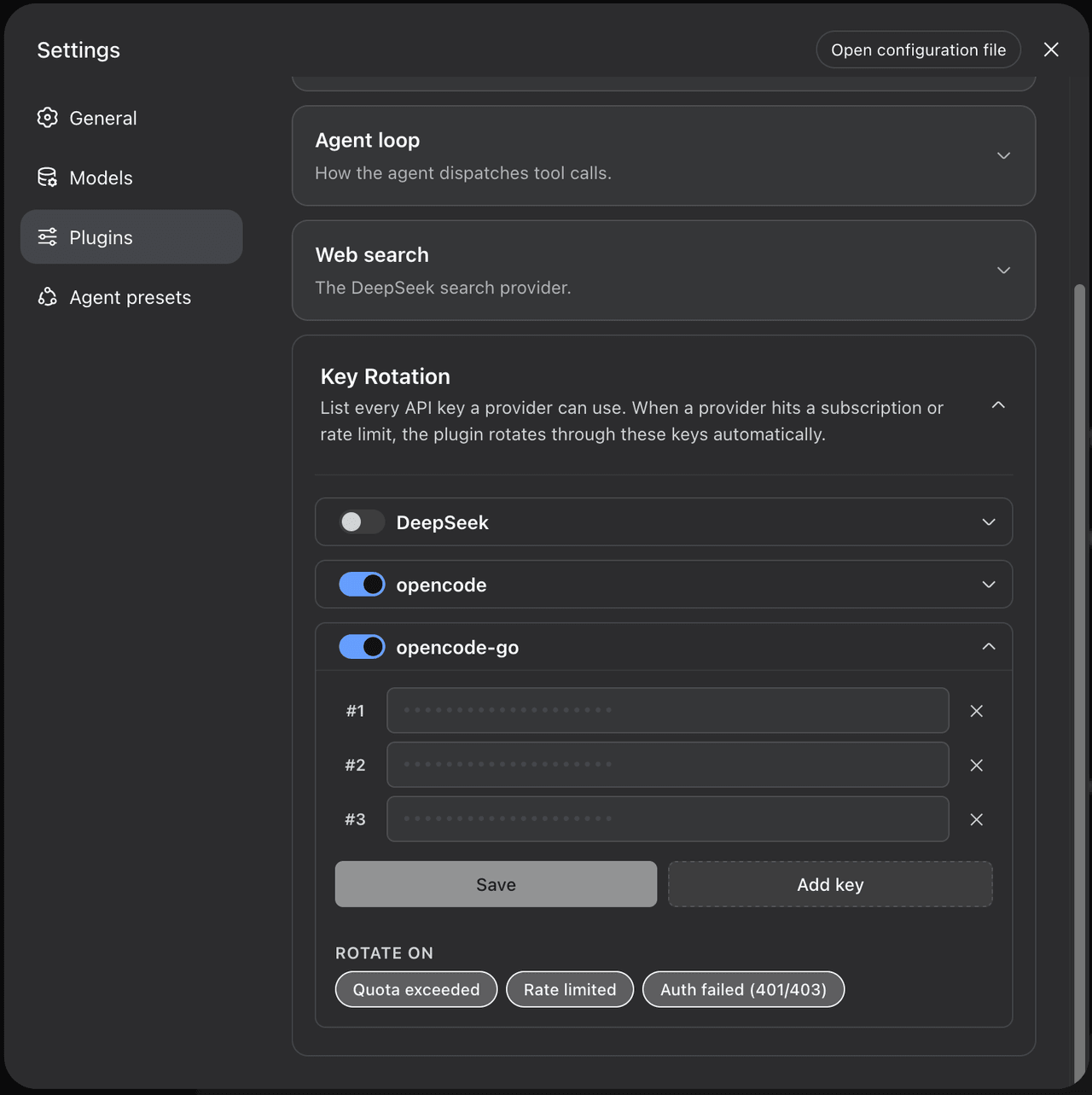 m1khal3v/dsh-llm-key-rotation
Seamless API-key rotation for DeepSeek Harness
m1khal3v/dsh-llm-key-rotation
Seamless API-key rotation for DeepSeek Harness
-
 MeowLynxSea/dsh-cot-summerization
- ranxianglei/billion-context 基本稳定可用 A context-compression plugin for small context windows (a 100K context is enough), token savings (5x fewer tokens…
-
 liangmianya/dsh-synapse
A visual, non-linear conversation workspace plugin for DeepSeek Harness ; A canvas-based session explorer and branching …
liangmianya/dsh-synapse
A visual, non-linear conversation workspace plugin for DeepSeek Harness ; A canvas-based session explorer and branching …
-
 alaliqing/claude-paper
📖 Cross-agent research paper toolkit for Claude Code, Codex, OpenCode, and DeepSeek Harness—quick summaries, deep study…
alaliqing/claude-paper
📖 Cross-agent research paper toolkit for Claude Code, Codex, OpenCode, and DeepSeek Harness—quick summaries, deep study…
-
 acryldev/acryl
ACRYL - Agent Context Relay Yielding Lifecycles. One persistent workspace, one canonical context, any coding agent.
acryldev/acryl
ACRYL - Agent Context Relay Yielding Lifecycles. One persistent workspace, one canonical context, any coding agent.