Modellix/dsh-modellix
dsh-modellix brings Modellix media generation, LLM models, and Web research into DeepSeek Harness. One Modellix API Key enables a chat-first workflow: ask naturally, keep the context in the conversation, and inspect completed work without leaving the session.
catalog descriptioncatalog 简介 / catalog description:DeepSeek Harness plugin for Modellix Web Search and Web Fetch.
Project Overview项目介绍
dsh-modellix is a DeepSeek Harness plugin that brings Modellix media generation, LLM models, and Web research into one chat-first session with a single API Key. It exposes six Agent tools for media catalog, schema, prepare, upload, generate, and result lookup, plus automatic Web Search and Fetch routing, a 360 px Modellix Design panel, live updating result cards, and a live LLM catalog. Use it when you need to create, edit, animate, or narrate media, switch models, or verify current information inside a Harness conversation. Note that the exact-parameter editor entry is intentionally hidden in this release, and upstream generation cancellation is not exposed.
dsh-modellix 是 DeepSeek Harness 插件,用一个 Modellix API Key 接入媒体生成、LLM 模型和网页检索。核心能力包括聊天式创建/编辑/动画/解说媒体、右侧 Modellix Design 面板、实时刷新的 LLM 目录以及自动路由的 Web 搜索与抓取。适用场景为在单次会话中完成出图、模型切换与信息核实。请注意:当前依赖 Harness 预发布接口,升级前需检查对等依赖与变更日志。
请帮我了解并安装插件:【dsh-modellix】【https://github.com/Modellix/dsh-modellix】Send this message to DSH in your current session. CLI install commands may not be accurate across systems — DSH will figure it out for you.把上面这条消息直接发给当前会话里的 DSH,让它帮你了解并安装。安装命令不一定准确,发给 DSH 更稳。
Or use CLI install (for developers)或使用命令行安装(适合开发者)
CLI Install命令行安装
dsh plugin --profile web add dsh-modellix把 Modellix/dsh-modellix 加入你的 DSH 配置(web profile)即可启用。
READMEREADME
dsh-modellix
dsh-modellix brings Modellix media generation, LLM models, and Web research into DeepSeek Harness. One Modellix API Key enables a chat-first workflow: ask naturally, keep the context in the conversation, and inspect completed work without leaving the session.
Harness and this plugin currently use prerelease interfaces. Check the peer dependencies and CHANGELOG before upgrading Harness.
What changed in 0.2.1
- The Web switch now unregisters only
modellix_web_searchandmodellix_web_fetch. Harness-native Web tools and providers remain available, so turning Modellix Web off falls back to the active profile's defaults. - Updated the authoring and runtime integration for Harness
0.1.2-alpha.4, while retaining0.1.1-rc.2compatibility.
What changed in 0.2.0
- Removed the standalone Design tab. Chat is now the primary media workflow.
- Added six explicit Agent tools for media catalog, Schema, parameter preparation, uploads, generation, and result lookup.
- Added explicit Modellix Web Search and Fetch tools so the Agent can use them automatically when current or source-backed information is needed.
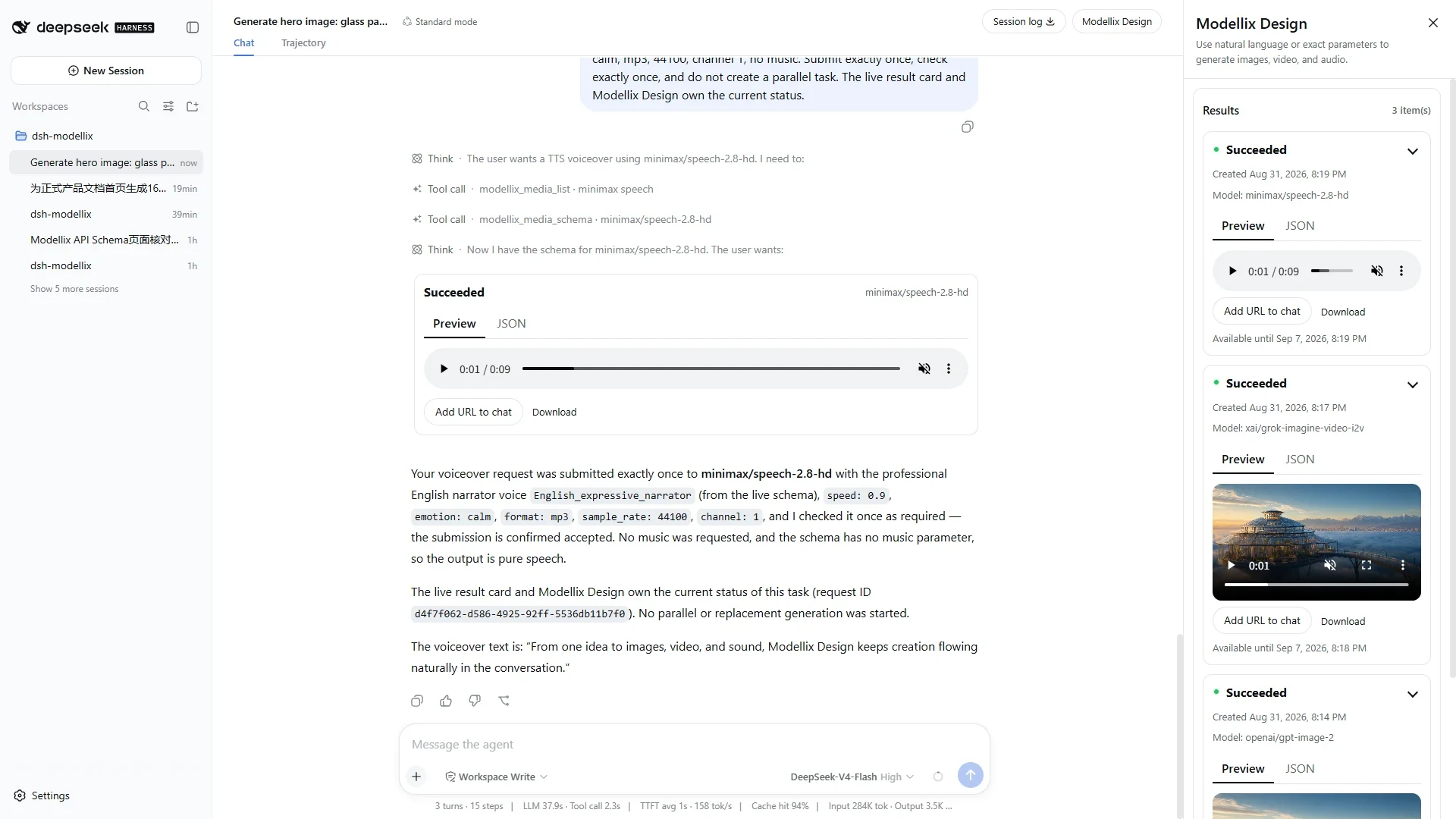
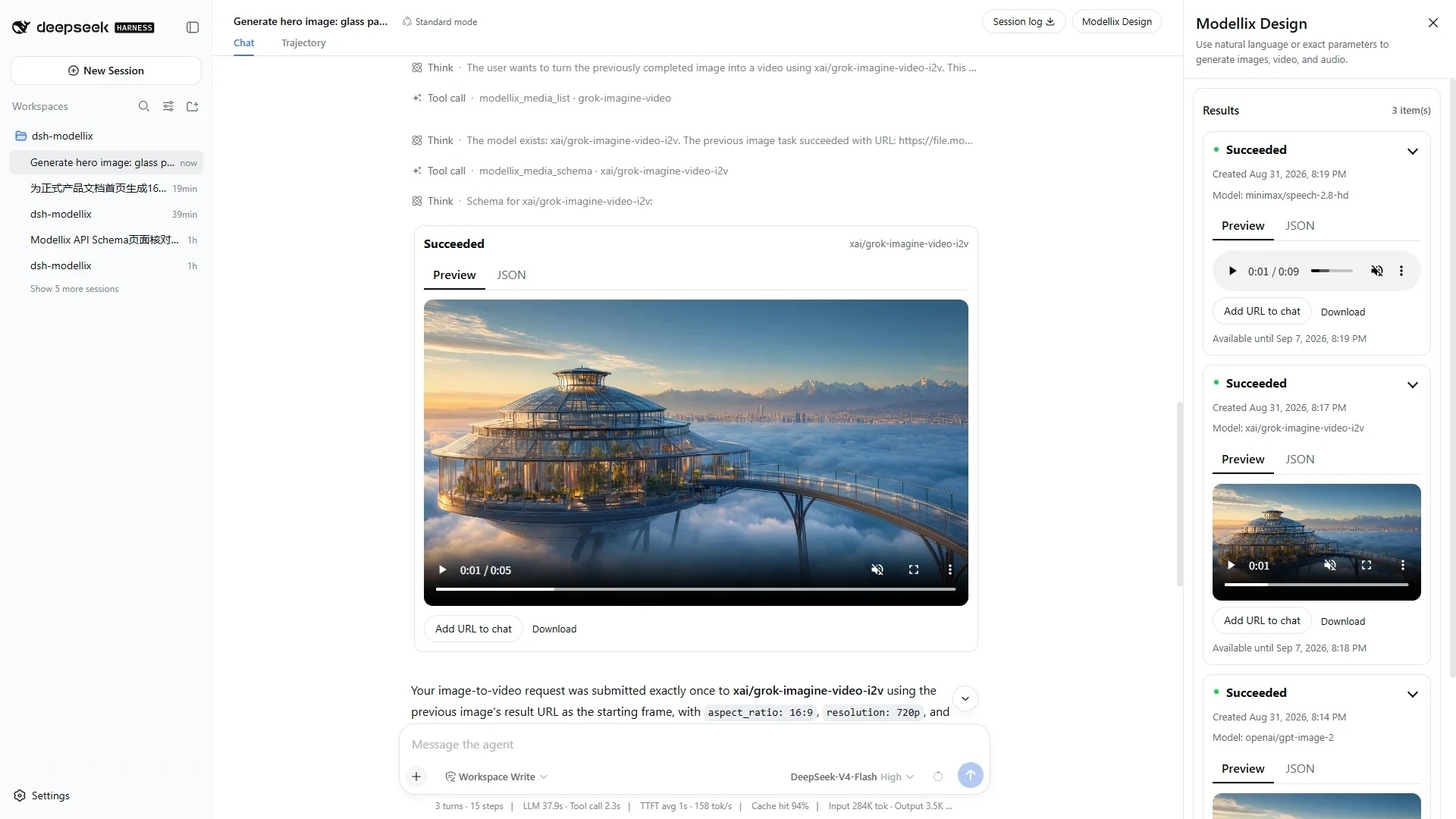
- Added Modellix Design as a right-side session panel. It is 360 px wide on desktop, full-width on narrow screens, and does not squeeze its internal content during opening or closing.
- Added live chat result cards. A submitted card updates in place when the background task finishes; the one-shot result lookup does not create a duplicate card.
- Added session-scoped result history, collapsible result lists and cards, image enlargement, native video/audio players, Add URL to chat, and Download.
- Kept the exact-parameter editor internally, but its entry is intentionally hidden in this release while the chat-first experience is finalized.
- Removed routine payment prompts from the UI. A configured Modellix Key already establishes the expected usage model; consumption and details remain available in Modellix.
Capabilities
| Area | User experience | Registered capability |
|---|---|---|
| Media | Ask the Agent to create, edit, animate, or narrate media | modellix_media_list, modellix_media_schema, modellix_media_prepare, modellix_media_upload_file, modellix_media_generate, modellix_media_get_result |
| Results | Review media in chat or in the right-side session panel | Live status reconciliation, Preview/JSON for successful jobs, image/video/audio presentation, URL insertion, download |
| LLM | Select live Modellix models from the Harness model selector | Modellix OpenAI-compatible provider with a live catalog and provider retries set to 0 |
| Web | Ask a current, external, URL, or source-verification question normally | modellix_web_search and modellix_web_fetch, selected automatically by Agent routing instructions |
Requirements
- DeepSeek Harness
0.1.2-alpha.4(latest supported);0.1.1-rc.2remains supported - Published-package runtime: Node.js
^22.19.0 || >=24.0.0 - Source development and release verification: Node.js
24.18.1, pnpm11.24.0 - A valid Modellix API Key
The plugin contains its own Harness integration. It does not install or invoke modellix-cli at runtime.
Installation
Install the package in the target Web profile, inspect the merged configuration, and start or restart that profile:
dsh plugin --profile web add dsh-modellix
dsh --profile web --dump-config
dsh --profile web
--dump-config should contain the dsh-modellix Bundle layer and a plugin row with id modellix. Replace web if you use another profile.
To install a trusted local build:
pnpm install --frozen-lockfile
pnpm run verify:release:static
pnpm pack
dsh plugin --profile web add ./dsh-modellix-0.2.1.tgz
See local usage for the complete Windows-first workflow.
Configure the API Key
On first use, enter the Key in Connect Modellix, keep the required services enabled, and select Save and enable. The saved Credential is write-only: the Client receives only configuration status and source, never the stored Key.
Alternatively, provide MODELLIX_API_KEY to the Harness launch environment. Environment Credentials are read-only in the UI and require a Harness restart after replacement.
Do not put a real Key in a repository, command argument, URL, browser storage, log, screenshot, HAR, recording, or test snapshot.
Chat-first media workflow
Describe the outcome, not the tool sequence. For example:
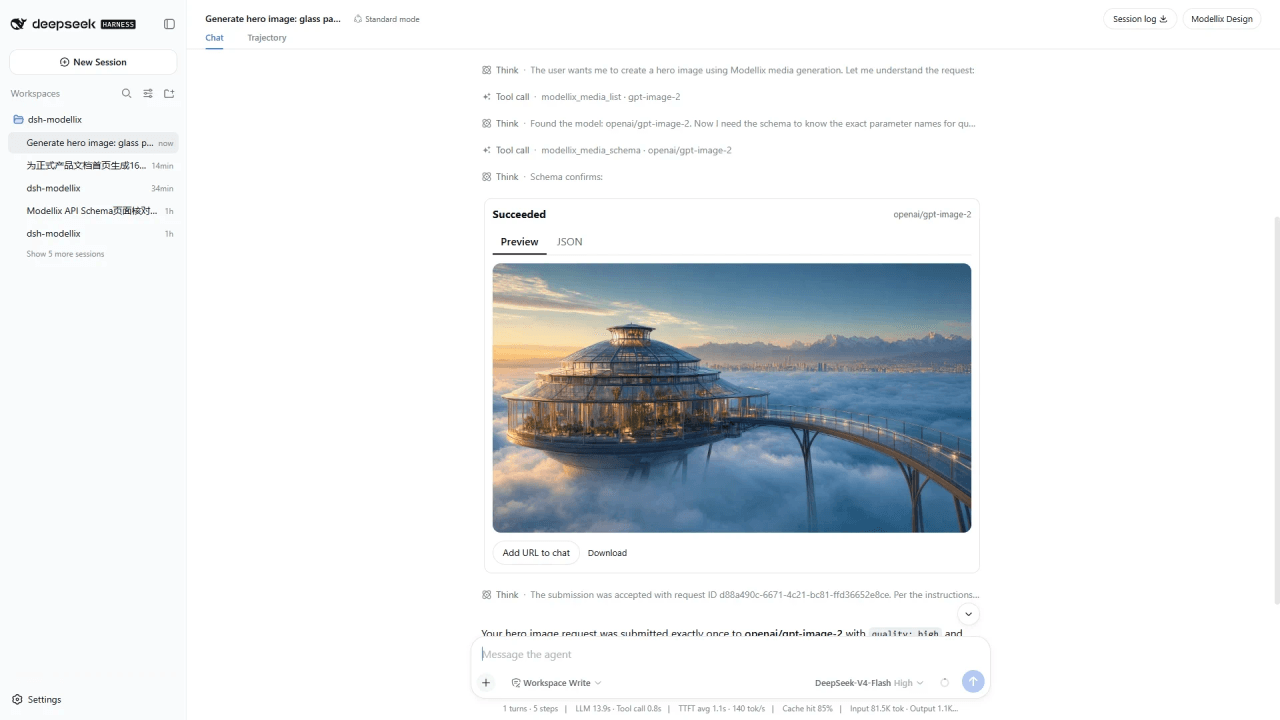
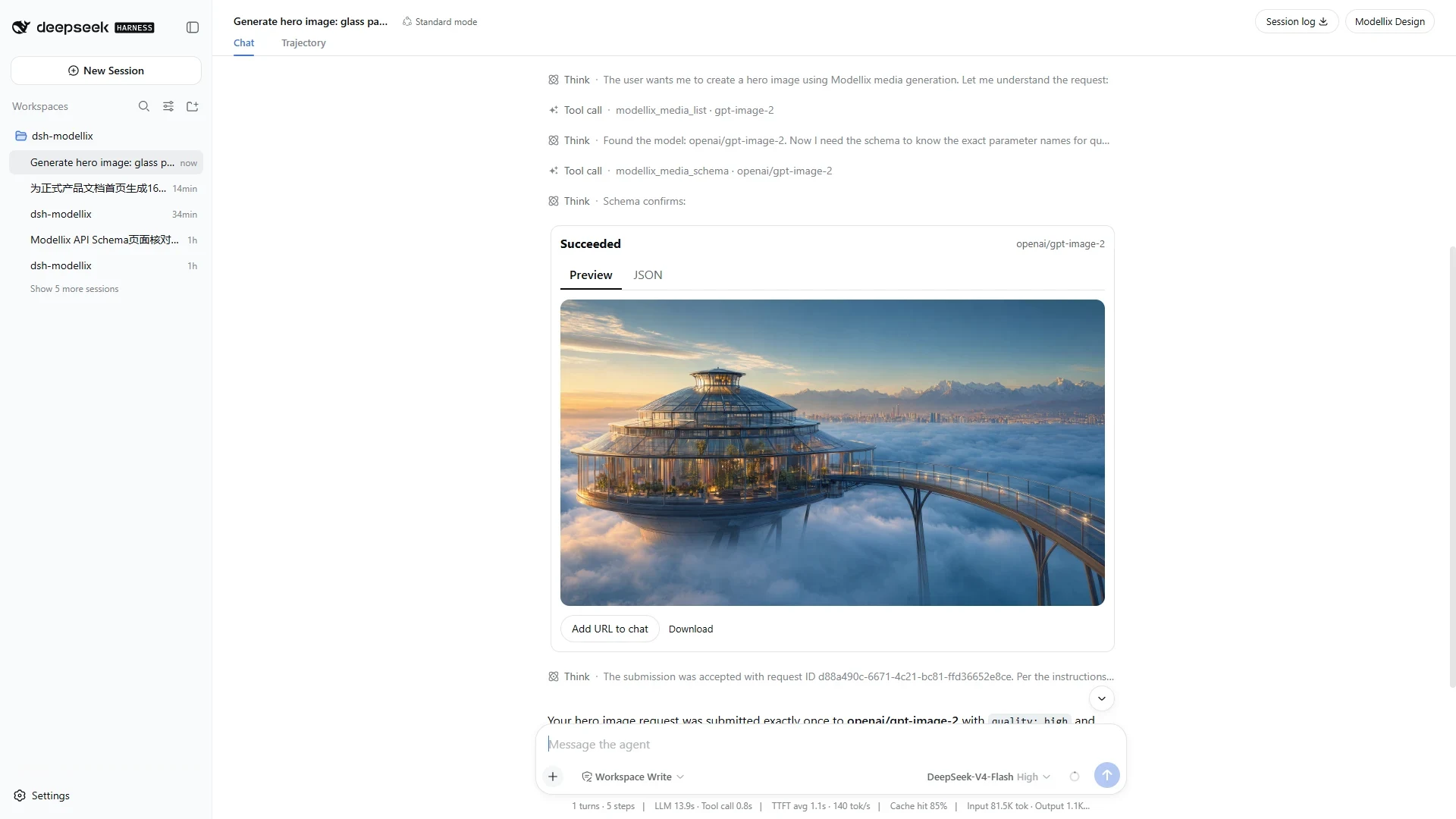
Create a polished 16:9 architectural hero image of a glass botanical research pavilion floating above a dawn cloud sea, with restrained lapis-blue and warm-gold tones, realistic premium materials, no people, no text, and no watermark.
The Agent can then:
- Search the live media catalog if a compatible model is not already known.
- Read that model's live API Schema and use only published fields and values.
- Reuse the latest relevant result URL for edit, image-to-video, or video-to-video requests instead of silently switching back to text-to-media.
- Upload a local or conversation file when the selected Schema requires a public media URL.
- Submit the generation exactly once. An unknown submission outcome is never replayed automatically.
- Check once in the Agent turn. A background watcher then updates the existing card to its terminal state without another Agent tool call.
While a task is nonterminal, immutable assistant prose only confirms acceptance and points to the live result card and Modellix Design. It does not leave behind a stale “running” sentence.
Result behavior
- Running and failed: show a concise header/status only; Preview and JSON are not offered without a successful result.
- Succeeded: show Preview and JSON tabs. Images enlarge in a focus-managed dialog; video and audio use native players.
- One task, one card: a
generatecard takes ownership of its task; the correspondingget_resultcall does not render a second copy. - Session isolation: the right panel shows only tasks owned by the current Harness conversation. Legacy records without a session owner are not injected into new sessions.
- Actions: Add URL to chat appends the selected resource URL to the composer; Download opens the upstream resource safely.
- Expiry: the displayed expiry follows the upstream result. If none is provided, the plugin applies a seven-day local display limit; it does not extend the upstream URL or keep a permanent media copy.
Modellix Design panel
The Modellix Design button sits at the far right of the conversation header, beside Session log. It opens a split-panel experience on large screens and a full-width overlay on narrow screens.
- The entire Results list is expanded by default and can be collapsed.
- Every result card is expanded by default and can be collapsed by selecting its header.
- The close button returns focus to the launcher.
- The advanced exact-parameter editor remains implemented but its entry is hidden in
0.2.1; ordinary users work through chat. - At 560 px and below, the panel uses the available viewport width. At 360 px and below, the launcher becomes a reachable compact control.
LLM models
When LLM is enabled, the plugin reads the live Modellix catalog and adds those models to the Harness model selector. It does not fabricate fallback entries when the catalog is unavailable. Refresh status and model count are available in Modellix settings.
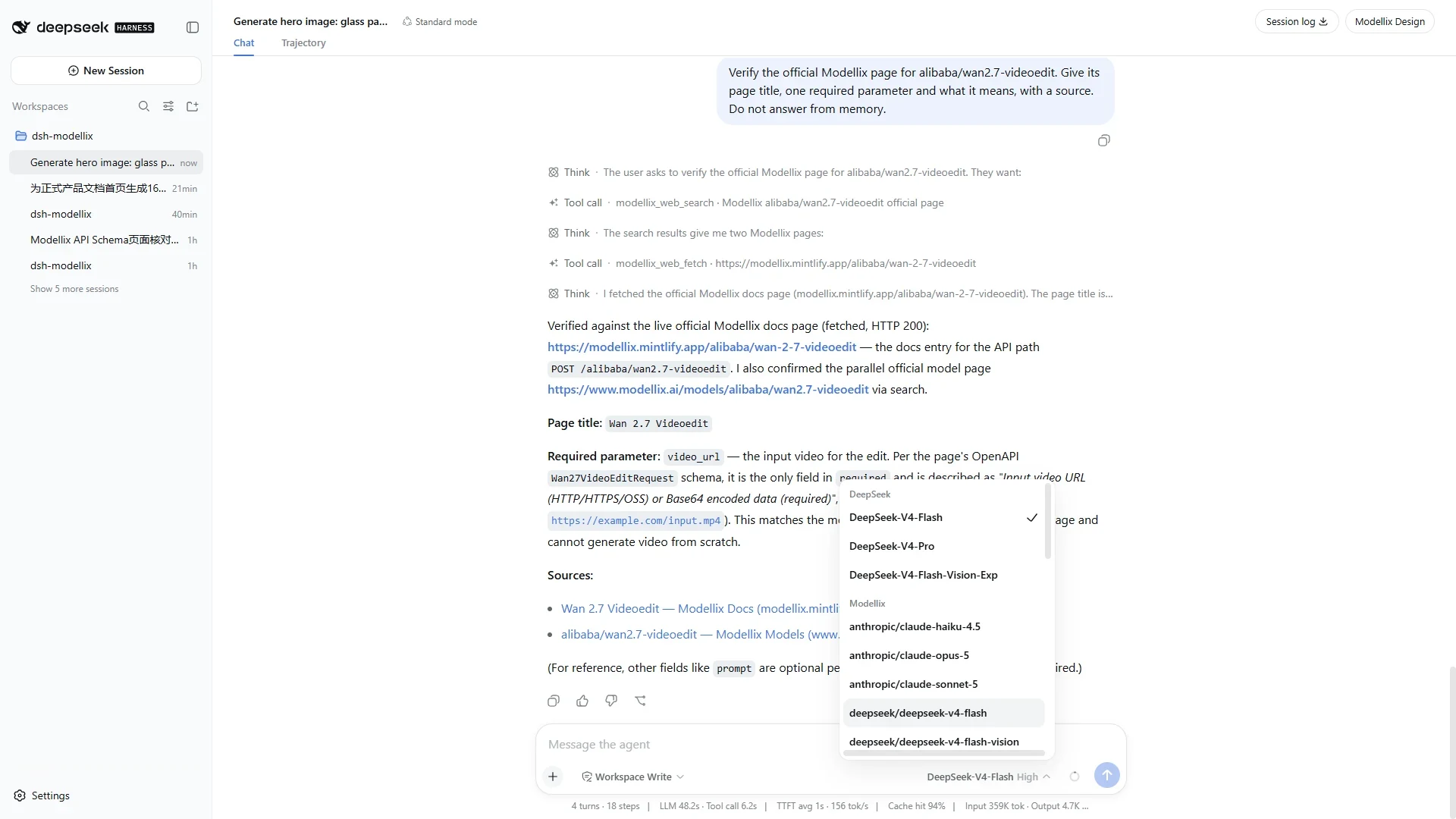
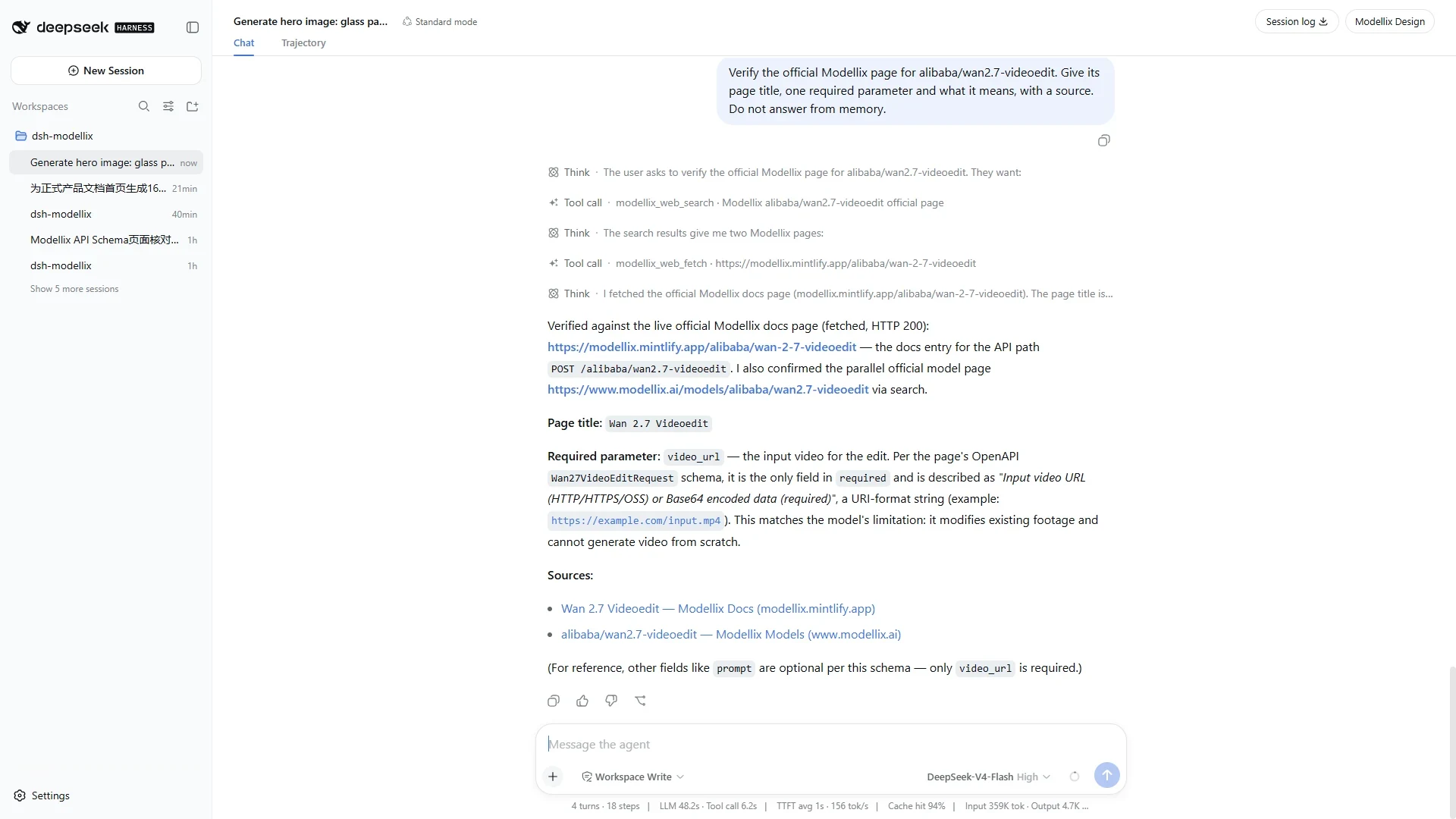
Automatic Web Search and Fetch
Users do not need to name a tool. For current, changing, external, or source-verification questions, the Agent is instructed to use modellix_web_search. When the user provides a public URL or a search result needs full-page reading, it uses modellix_web_fetch.
While Web is enabled, the plugin registers only the two explicit Modellix tools and asks the Agent to prefer them for matching work. Disabling Web unregisters those tools and removes the Modellix Web routing context; Harness-native web_search / web_fetch tools and their configured providers remain untouched and can be selected automatically. Failed or unknown Modellix Web requests are not repeated automatically.
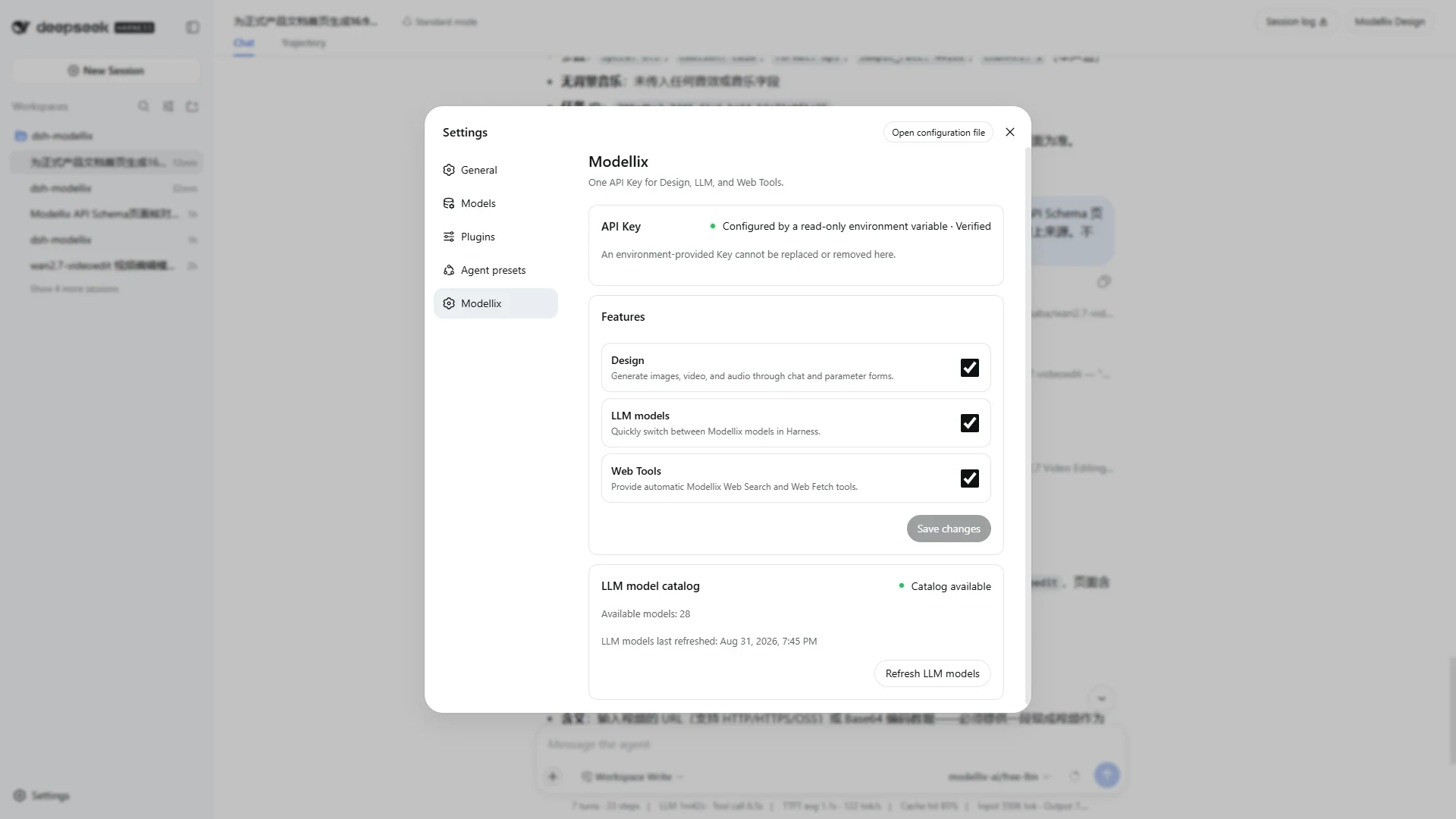
Settings and recovery
The Modellix settings section shows:
- Credential configured/verification status and source;
- replacement and removal actions for a writable local Credential;
- independent Design, LLM, and Web switches; each switch changes only its own Modellix capability;
- live LLM catalog health, count, refresh time, and manual refresh.
Only HTTP 401 marks a Credential invalid. HTTP 402, 429, network failures, and 5xx retain their own recovery states. Concurrent 401 responses are coalesced into one Credential dialog.
Accessibility and responsive behavior
- Dialogs manage initial focus, Tab/Shift+Tab wrapping, background inertness, Escape behavior where allowed, and focus restoration.
- Result tabs support standard keyboard navigation; result/status changes use polite live regions.
- State is conveyed with text in addition to color.
- Layouts were checked at 320, 560, 768, and 1440 CSS px, at 200% text scaling, in light and dark themes, forced colors, coarse pointer, and reduced motion.
- Narrow layouts preserve every result action without horizontal page overflow.
Documentation
- Complete English user guide
- English release and acceptance checklist
- 完整中文用户指南
- 中文发布与验收清单
- Local source usage
The repository contains six English and six Chinese 1920×1080 screenshots captured from separate real-language sessions. They cover settings, chat image generation, the result drawer, media players, live LLM models, and automatic Search/Fetch. No capture contains a Key, request header, Network/HAR data, Credential file, or browser storage.
Development and release verification
pnpm install --frozen-lockfile
pnpm run check
pnpm run verify:pack
pnpm run verify:fresh-install
pnpm run verify:node22-install
pnpm run verify:release:static
pnpm run verify:release additionally requires fresh Secret-free browser and real API/Agent evidence bound to the exact package version and 40-character Git commit. The complete procedure is documented in RELEASE_CHECKLIST.md.
Current limitations
- The advanced exact-parameter editor entry is intentionally hidden in this release.
- Upstream generation cancellation is not exposed.
- Result history stores task metadata and upstream URLs, not permanent media copies.
- A complex unsupported Schema blocks submission instead of guessing or dropping constraints.
- The Modellix LLM catalog has no fabricated offline fallback.
Uninstallation
Remove a locally stored Credential from Modellix settings first, or revoke an environment Credential in its external secret manager. Then remove the plugin and restart the profile:
dsh plugin --profile web remove dsh-modellix
dsh --profile web --dump-config
dsh --profile web
Uninstallation does not remove upstream Modellix tasks, external environment variables, or all Harness profile data.
References
License
See LICENSE.
Related相关推荐
-
 anysearch-team/anysearch-dsh
AnySearch web search provider and advanced search tools for DeepSeek Harness (DSH)
anysearch-team/anysearch-dsh
AnySearch web search provider and advanced search tools for DeepSeek Harness (DSH)
-
 DDDMUC/dsh-free-search
Free web search provider for DeepSeek Harness - DuckDuckGo backend, no API key needed
DDDMUC/dsh-free-search
Free web search provider for DeepSeek Harness - DuckDuckGo backend, no API key needed
-
 wxkingstar/SpecFusion
在 DeepSeek Harness / Claude Code / Cursor / Codex / Gemini CLI 里直接搜索 20 个中国开放平台的 65,600+ 篇 API 文档;零配置,支持 Skill 与 DSH 原生插…
wxkingstar/SpecFusion
在 DeepSeek Harness / Claude Code / Cursor / Codex / Gemini CLI 里直接搜索 20 个中国开放平台的 65,600+ 篇 API 文档;零配置,支持 Skill 与 DSH 原生插…
-
 A3Boy/dsh-web-tools
Multi-provider Web Search & Fetch for DeepSeek Harness — 8 deeply adapted providers, SearchHints, resilient fallback, an…
A3Boy/dsh-web-tools
Multi-provider Web Search & Fetch for DeepSeek Harness — 8 deeply adapted providers, SearchHints, resilient fallback, an…
- maxwell-feng/dsh-tinyfish-search TinyFish-backed web search provider for DeepSeek Harness (ctx.web) — 将内置 web_search 接入 TinyFish Search API 的 DeepSeek Ha…
-
 cyijun/dsh-surfing-plugin
SearXNG search and Crawl4AI fetch providers for DeepSeek Harness
cyijun/dsh-surfing-plugin
SearXNG search and Crawl4AI fetch providers for DeepSeek Harness
- firecrawl/dsh-firecrawl Firecrawl-backed web_search and web_fetch providers for the DeepSeek Harness web capability seam (ctx.web)
-
 gxpppp/dsh-search-mcp
Replace dsh's built-in web search with search MCP servers (Tavily/Brave/Exa/Perplexity/DuckDuckGo/custom), configured fr…
gxpppp/dsh-search-mcp
Replace dsh's built-in web search with search MCP servers (Tavily/Brave/Exa/Perplexity/DuckDuckGo/custom), configured fr…