
moyuer233/dsh-deepseek-monitor
DeepSeek usage monitor as a DeepSeek Harness (DSH) plugin: balance / day-month-all-time token & cost panel in the chat UI with drag-reorder config, plus an optional local usage proxy
项目介绍Project Overview
DSH Deepseek Monitor 是一款 DSH 插件,在会话头部、侧边栏与「用量」标签页实时展示 DeepSeek 平台余额、日/月/累计 Token 与费用,支持 60 秒自动刷新、拖拽排序与开关配置;并附带本地用量代理,可为走 Anthropic 兼容协议的子代理精确记账。适用于需要随时掌握 DeepSeek 消耗并审计子代理流量的开发者。注意:余额数据依赖 platform.deepseek.com 的非公开内部接口,平台变更可能导致失效。
DSH Deepseek Monitor is a DSH plugin that displays DeepSeek account balance plus daily, monthly, and cumulative token usage and cost in the session header, sidebar, and a Usage tab, with 60-second auto-refresh, drag-to-reorder fields, and per-item toggles. It also includes an optional local usage proxy that records token consumption for Anthropic-compatible sub-agents. Use it to track DeepSeek spend in real time and audit sub-agent traffic. Note: balance data relies on undocumented platform.deepseek.com endpoints, which may break when DeepSeek updates its site.
请帮我了解并安装插件:【dsh-deepseek-monitor】【https://github.com/moyuer233/dsh-deepseek-monitor】把上面这条消息直接发给当前会话里的 DSH,让它帮你了解并安装。安装命令不一定准确,发给 DSH 更稳。Send this message to DSH in your current session. CLI install commands may not be accurate across systems — DSH will figure it out for you.
或使用命令行安装(适合开发者)Or use CLI install (for developers)
命令行安装CLI Install
dsh plugin --profile web add dsh-deepseek-monitor-moyuer233把 moyuer233/dsh-deepseek-monitor 加入你的 DSH 配置(web profile)即可启用。
READMEREADME
DSH Deepseek Monitor
中文 | English

DeepSeek 用量监控 —— DeepSeek Harness (DSH) 插件:在会话头部/侧边栏/「用量」标签页 实时显示 DeepSeek 平台余额、日/月/累计 Token 总量与费用,支持拖拽排序与开关配置; 另附一个本地用量代理,为走 Anthropic 兼容协议的子代理(如 Claude Code)精确记账。
⚠️ 本插件使用 platform.deepseek.com Web 端内部接口(非公开契约)查询你自己的账户 数据,仅限个人使用;接口结构若被 DeepSeek 变更,需要同步更新
lib/platform.mjs。
快速安装
# 从 npm 安装(推荐)
dsh plugin --profile web add dsh-deepseek-monitor-moyuer233
# 或直接从 GitHub 安装
dsh plugin --profile web add github:moyuer233/dsh-deepseek-monitor
装完重启 DSH(宿主在启动时加载新 bundle;此后客户端改动走 HMR,刷新页面即可)。
预览
会话头部(横排信息段)

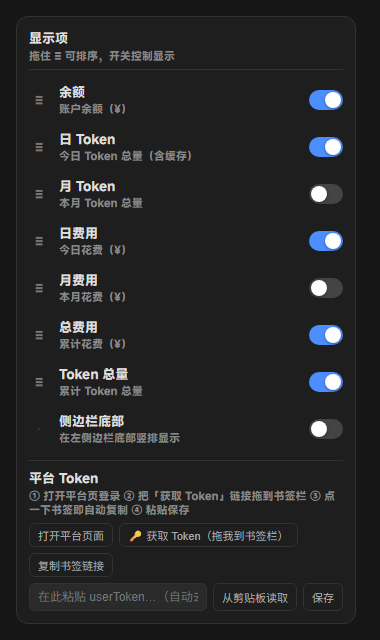
⚙ 配置面板(开关 + 拖拽排序)
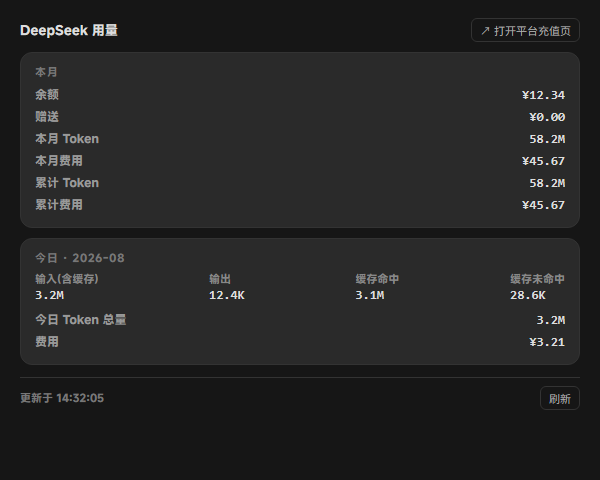
「用量」标签页(详情)
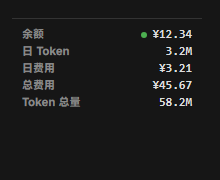
侧边栏底部(竖排)
如果觉得好用,请给个 ⭐ Star 支持一下!欢迎提交 Issue 和 Pull Request。
功能
- 📊 会话头部横排信息段:余额 / 日 Token / 月 Token / 日费用 / 月费用 / 总费用 / Token 总量, 每段独立开关、≡ 拖拽排序
- 📌 三个展示位:会话头部(横排)、侧边栏底部(竖排)、对话视图「用量」标签页(详情)
- 🔄 60 秒自动刷新;配置双通道持久化(localStorage + 宿主 config.json,与应用随机端口无关)
- 🔑 浏览器通用 Token 获取:书签一键复制 / 控制台代码 / 面板内粘贴保存(自动去引号,立即生效)
- 🧮 累计(总)数据:费用取平台
total_costs,Token 逐月累加并跨月缓存 - 🖥 本地用量代理(可选):拦截 Anthropic 兼容请求,精确解析 SSE/JSON 用量并记账
安装(DSH 插件)
标准 DSH bundle 格式(根包即插件,既可从 GitHub 一条命令安装,也可发布到 npm 后安装):
# 从 npm 安装(推荐)
dsh plugin --profile web add dsh-deepseek-monitor-moyuer233

# 或直接从 GitHub 安装
dsh plugin --profile web add github:moyuer233/dsh-deepseek-monitor
安装命令会把本仓库作为依赖装进 profile(
~/.dsh/profiles/web/), 其cordis.patch.yml自动向 profile 注入dsm-usage条目(宿主路由 + 浏览器端 bundle)。
- 重启 DSH(宿主代码在启动时加载;此后客户端 bundle 改动走 HMR,刷新页面即可)
旧版手工安装(
@local/dsh-host-deepseek-usage+@local/dsh-client-ui-deepseek-usage拷贝到 profile)已被本条命令取代;升级前请从~/.dsh/profiles/web/cordis.patch.yml移除对应的- insert:段, 并删除~/.dsh/profiles/node_modules/@local/下的两个旧目录。
获取平台 Token(浏览器通用,Edge/Chrome/桌面端均可)
- 打开 ⚙ 面板 → 「平台 Token」区
- 点 打开平台页面 并登录
- 把 🔑 获取 Token 链接拖到浏览器书签栏;之后登录平台页时点一下书签即自动复制 Token (备选:复制书签链接手动建书签,或复制控制台代码在 F12 里执行)
- 回到面板 粘贴(自动去引号)→ 保存 —— 立即生效,无需重启
保存走宿主 POST /dsm/token 原子写入 ~/.dsh/deepseek-monitor/platform-token。
配置
- 会话头部按 日 / 月 / 总量 显示 Token 与费用(余额另列);⚙ 面板每行左侧 ≡ 手柄 拖动排序、开关控制显隐,同步作用于头部横排与侧边栏竖排;「用量」标签页始终展示完整详情
- 配置持久化:
~/.dsh/deepseek-monitor/config.json(宿主,与应用端口无关)+ localStorage(会话内)
数据来源(platform.deepseek.com 内部 API)
| 接口 | 内容 |
|---|---|
GET /api/v0/users/get_user_summary |
余额 / 赠送 / 累计费用 |
GET /api/v0/usage/amount?month&year |
按天 token 用量 |
GET /api/v0/usage/cost?month&year |
按天费用 |
鉴权为平台登录 token(浏览器 userToken,非 API Key)。
本地用量代理(可选)
把子 Claude Code(或任何 Anthropic 兼容客户端)的 ANTHROPIC_BASE_URL 指向本地代理,
代理转发到 DeepSeek 并精确解析 token 用量记账:
客户端 ──▶ 本代理 (127.0.0.1:8899) ──▶ https://api.deepseek.com/anthropic
                │
                ▼
      usage.jsonl(每请求一条:token/费用/耗时)
node proxy.mjs       # 启动代理(默认 127.0.0.1:8899)
node stats.mjs       # totals | today | recent [n] | live | balance
node test/self-test.mjs   # 自测(内置 mock 上游,无需真实 Key)
接入 @deepseek-ai/dsh-subagent-claude-code 时,在 profile 补丁的 provider 行加:
- id: subagent-claude-code
  name: '@deepseek-ai/dsh-subagent-claude-code'
  config:
    env: !!js Object.fromEntries(Object.entries({
      ANTHROPIC_BASE_URL: 'http://127.0.0.1:8899',
      ANTHROPIC_AUTH_TOKEN: process.env.DEEPSEEK_API_KEY
    }).filter(([, v]) => v !== undefined && v !== ''))
环境变量
| 变量 | 默认值 | 说明 |
|---|---|---|
DS_MONITOR_PORT |
8899 |
代理监听端口 |
DS_MONITOR_HOST |
127.0.0.1 |
监听地址 |
DS_MONITOR_UPSTREAM |
https://api.deepseek.com/anthropic |
上游端点 |
DS_MONITOR_LOG |
~/.dsh/deepseek-monitor/usage.jsonl |
代理记账文件 |
DS_MONITOR_API_KEY |
回退 ANTHROPIC_AUTH_TOKEN/DEEPSEEK_API_KEY |
stats balance 用 |
DS_PLATFORM_TOKEN |
无 | 平台 token(也可写入 ~/.dsh/deepseek-monitor/platform-token) |
DS_PRICE_<MODEL>_IN/_CACHE_HIT/_OUT |
内置默认表 | 单价覆盖(元/百万 token) |
定价(默认,可用 DS_PRICE_* 覆盖)
| 模型 | 输入 | 缓存命中 | 输出 |
|---|---|---|---|
| deepseek-chat | 0.27 | 0.07 | 1.10 |
| deepseek-reasoner | 0.55 | 0.14 | 2.19 |
| deepseek-v4-pro | 1.00 | 0.25 | 3.00 |
| 未知模型 | 1.00 | 0.10 | 2.00 |
费用按 Anthropic 协议语义:cache_creation_input_tokens 按全价输入计,
cache_read_input_tokens 按缓存命中价计。
记账记录示例
{"ts":"2026-08-15T08:00:00.000Z","runId":"...","kind":"messages","streaming":true,"model":"deepseek-chat","status":200,"inputTokens":1000,"cacheCreation":200,"cacheRead":300,"outputTokens":500,"inputCost":0.00027,"cacheCreationCost":0.000054,"cacheReadCost":0.000021,"outputCost":0.00055,"totalCostCny":0.000895,"error":null,"durationMs":1234}
已知限制
- 代理只统计经过它的请求;直接访问 DeepSeek 的流量不计入
stats balance走 DeepSeek 原生余额端点(https://api.deepseek.com/user/balance),需有效 API Key- 子代理本身是"一次性"运行(
dsh-subagent-claude-code的限制),监控粒度到请求级 - 平台内部接口非公开契约,可能随平台更新而变化
License
MIT
相关推荐Related
-
 ruvnet/ruflo
🌊 The original agent meta-harness. Deploy intelligent multi-player swarms, coordinate autonomous workflows, and build c…
ruvnet/ruflo
🌊 The original agent meta-harness. Deploy intelligent multi-player swarms, coordinate autonomous workflows, and build c…
-
 amruthpillai/reactive-resume
A one-of-a-kind resume builder that keeps your privacy in mind. Completely secure, customizable, portable, open-source a…
amruthpillai/reactive-resume
A one-of-a-kind resume builder that keeps your privacy in mind. Completely secure, customizable, portable, open-source a…
-
 volcengine/OpenViking
Self-evolving Context Database for AI Agents. Unify Agent Memory, Knowledge RAG and Skills.
volcengine/OpenViking
Self-evolving Context Database for AI Agents. Unify Agent Memory, Knowledge RAG and Skills.
-
 Molunerfinn/PicGo
:rocket: The Ultimate Image Uploader for Efficient Creators. Supports Obsidian, Typora, VS Code etc. and 60+ image hosti…
Molunerfinn/PicGo
:rocket: The Ultimate Image Uploader for Efficient Creators. Supports Obsidian, Typora, VS Code etc. and 60+ image hosti…
-
 titanwings/colleague-skill
将冰冷的离别化为温暖的 Skill,欢迎加入数字生命1.0!Transforming cold farewells into warm skills? It's giving rebirth era. Welcome to Digital …
titanwings/colleague-skill
将冰冷的离别化为温暖的 Skill,欢迎加入数字生命1.0!Transforming cold farewells into warm skills? It's giving rebirth era. Welcome to Digital …
-
 nocobase/nocobase
NocoBase is an open-source AI + no-code platform for building business systems fast. Instead of generating everything fr…
nocobase/nocobase
NocoBase is an open-source AI + no-code platform for building business systems fast. Instead of generating everything fr…
-
 Tencent/WeKnora
Open-source LLM knowledge platform: turn raw documents into a queryable RAG, an autonomous reasoning agent, and a self-m…
Tencent/WeKnora
Open-source LLM knowledge platform: turn raw documents into a queryable RAG, an autonomous reasoning agent, and a self-m…
- Nagi-ovo/voyager Enhancement suite for Gemini, AI Studio, Claude & ChatGPT — plus a prompt manager for any web UI, DeepSeek Harness inclu…