nanami-0713/dsh-jev-decide
DSH plugin: register TypeSafe Jev (System One decision model) as an agent tool — jev_decide returns calibrated probabilities (noul/choice/score) for routing/triage/guardrail judgments, no text generation. 把 TypeSafe Jev 决策模型注册为 DSH agent 工具
Project Overview项目介绍
**DSH-jev-decide** is a native plugin for DSH (DeepSeek Harness) whose dsh- prefixed package and the Django-oriented ecosystem badge confirm it ships explicitly for that host. It bridges TypeSafe Jev, the "System One" decision model, into the harness by registering a single agent tool named jev_decide, so the agent can call Jev for fast calibrated judgements instead of letting the chat model improvise probabilities. The README shows it lives in the host's plugin layout, talks about cordis patch configuration, ~/.dsh/.credentials.yaml, and $DSH_HOME/plugins/dsh-jev-decide/, and is consumed by defineTool from @deepseek-ai/dsh-tools. Installation is available three ways: the npm registry (dsh plugin --profile web add dsh-jev-decide or plain npm install dsh-jev-decide with auto peer resolution), the curated DSH plugin marketplace after PR #5428 merges, or a manual wiring route using link: plus a cordis patch entry, followed by a host restart since host plugins load at process startup.
The plugin exposes one tool, jev_decide, with parameters state, question, type (noul/choice/score, default noul), optional options (required for choice, at least 2), optional levels (required for score, at least 2, ordered low to high), and optional model (default jev-latest, currently jev-1.13.0). It returns { model, type, answer, confidence?, probabilities?, usage } where noul gives a calibrated yes probability, choice returns the selected option with a full probability distribution plus confidence, and score returns a probability-weighted value plus the distribution and confidence. Typical uses include message urgency triage, intent routing, guardrail checks, binary decisions, and rubric grading, while anything requiring text generation such as writing code or copy is explicitly out of scope and left to the conversational model.
Dependency-wise the plugin is a single-file ESM module with no build step and no TypeScript toolchain required; the only host API it consumes is the pure defineTool function, and compatibility across host versions has been verified. Credentials resolve transparently: plugin-level apiKey first, then the TYPESAFE_API_KEY environment variable, then refs.TYPESAFE_AI_API_KEY inside ~/.dsh/.credentials.yaml, so existing DSH credential plumbing is reused with no plaintext in patches and no env required. The default base URL is https://api.typesafe.ai/v1, the timeout is configurable via config.json, and the package ships with built-in short backoff retries on 429 and 529 responses. Pricing reference is $0.042 per million input tokens with output tokens free, official rate limits are 250k tok/s and 1200 req/min, and releases flow through GitHub Actions on git push --tags, publishing via OIDC with a sigstore provenance signature so no long-lived npm token is required.
**DSH-jev-decide** 是一个面向 DSH(DeepSeek Harness)的原生插件,名字以 dsh- 开头,专注于把 TypeSafe Jev(System One 决策模型)接入 DSH。它注册一个名为 jev_decide 的 agent 工具,让 agent 在需要快速且可靠判断时直接查询 Jev,避免让模型凭感觉臆测。安装方式支持 npm 发布(dsh plugin --profile web add dsh-jev-decide 或 npm install dsh-jev-decide,其中 pnpm 会自动处理 peer 依赖)、插件市场收录(PR #5428 合并后自动上架),以及手动接线(link:、cordis patch、实体副本)三种途径。手动接线需在 ~/.dsh/profiles/web/cordis.patch.yml 插入插件条目,并重启 DSH 才能生效,因为宿主插件是在进程启动时装配的。
该插件提供 noul(是/否问题,返回 0 到 1 的概率)、choice(从选项中挑选,返回选中项与全分布)和 score(按等级打分,返回概率加权值与置信度)三种决策类型,分别适用于消息紧急度分级、意图路由、guardrail 检查和 rubric 评分等场景。它特别适合需要"快速而可靠判断"但不需要生成文本的工作,例如消息优先级排序或二元决策。插件文档明确划清边界:写代码、写文案、任何需要生成文本的任务都不在适用范围内,这部分应由对话模型完成。
依赖与限制方面,插件以 ESM 单文件分发,零构建步骤,直接复制即可使用;仅消费宿主 @deepseek-ai/dsh-tools 的 defineTool 一个纯函数,跨宿主版本已经过实测兼容。凭证解析顺序依次为插件配置 apiKey、环境变量 TYPESAFE_API_KEY、~/.dsh/.credentials.yaml 中的 TYPESAFE_AI_API_KEY,复用 DSH 凭证缝,无需重复配置。默认模型为 jev-latest(当前 jev-1.13.0),定价 0.042 美元/百万输入 token、输出免费,官方限流 250k tok/s 与 1200 req/min;发版通过 git tag 推送触发 GitHub Actions 以 OIDC 免 token 自动发布,并附带 sigstore provenance 签名。
请帮我安装这个 DSH 插件。安装前先完成【兼容性检查 + 安全性检查】,检查通过再动手。

插件:dsh-jev-decide(nanami-0713/dsh-jev-decide)
仓库:https://github.com/nanami-0713/dsh-jev-decide
本站详情页:https://www.yhbd.top/plugins/nanami-0713-dsh-jev-decide/
本站登记:类型 plugin · 归类 原生 DSH 插件 · 许可证 MIT · ⭐ 3 · 最近提交 2026-09-30 · 主语言 JavaScript

按下面顺序执行,每步先把结论告诉我,再进入下一步:

【1 兼容性检查】
① 我这边:DSH 版本、Node 版本、操作系统、当前 profile(web / desktop)。
② 读它的 README、package.json、插件 manifest,列出它要求的 DSH 版本 / Node 版本 / 操作系统 / 外部依赖 / 需要另外先装的运行时。
③ 逐条比对,结论只写「满足 / 不满足 / 未知」三种;不满足的给出可行替代方案。
④ 检查是否和我已装的插件冲突:命令名重复、skill / tool 重名、端口占用、重复注册的 MCP server。

【2 安全性检查】
① 仓库可信度:和上面「本站登记」是否一致;star / fork 数、创建时间、最近提交,是否归档或长期停更。
② 安装脚本:逐行看 package.json 的 preinstall / install / postinstall,以及 install.sh、setup.ps1 之类脚本。出现 curl|bash、下载后直接执行、混淆代码、访问与插件功能无关的域名,立刻停下来告诉我,不要继续装。
③ 依赖:列出新增依赖,标出无人维护、或与知名包拼写近似的可疑包(typosquatting)。
④ 权限与副作用:它会读写哪些目录、访问哪些域名、需要哪些 DSH 权限(filesystem / network / shell / clipboard 等),以及怎么卸载和回滚。
⑤ 如果它要求 sudo / 管理员权限,或权限明显超出功能所需,先停下来问我。

【3 安装】
上面两步没有「不满足」和「高危项」时才执行;用官方推荐方式安装,不要自行提权。

【4 汇报】
用表格输出:检查项 / 结论 / 依据 / 是否需要我决策。拿不准的一律写「未知」并说明要我怎么确认——不要猜,也不要替我决定。
Send this message to DSH in your current session: it verifies compatibility and security first (answering met / not met / unknown item by item) and only installs once everything checks out — it will stop and ask you if it finds a high-risk item. The box scrolls; the copy is the full prompt. CLI install commands may not be accurate across systems, so DSH is the safer route.把上面这条消息直接发给当前会话里的 DSH:它会先核对兼容性与安全性(逐条给「满足 / 不满足 / 未知」),确认没问题再安装,有高危项会停下来问你。框内可滚动,复制到的是完整提示词;安装命令不一定准确,发给 DSH 更稳。
- Only 3 stars - very few users, little community feedback星标只有 3,几乎没人在用,遇到问题缺少社区反馈
DSH walks through these 9 checksDSH 会逐条核对这 9 项
Compatibility兼容性
- DSH, Node, OS and profile requirementsDSH 版本 / Node 版本 / 操作系统 / profile 是否满足要求
- External dependencies and runtimes (Electron / Python / Docker, ...)外部依赖与运行时(Electron / Python / Docker 等)是否齐备
- Conflicts with installed plugins: command names, skill / tool names, ports, duplicate MCP registration与已装插件是否冲突:命令名、skill / tool 重名、端口占用、重复 MCP 注册
Security安全性
- Repo matches the facts registered here; archived or abandoned?仓库是否与页面登记一致,是否归档或长期停更
- Safety of preinstall / install / postinstall and install.sh / setup.ps1preinstall / install / postinstall 与 install.sh、setup.ps1 是否安全
- curl|bash, download-then-execute, obfuscation, unrelated domains → stop immediatelycurl|bash、下载即执行、混淆代码、无关域名 → 立刻停止
- Typosquatting or unmaintained packages among the new dependencies新增依赖里有没有 typosquatting 或无人维护的包
- Requested permissions vs. what the feature actually needs申请了哪些权限、是否超出功能所需(filesystem / network / shell / clipboard)
- Any sudo / admin requirement, plus uninstall and rollback是否要求 sudo / 管理员权限,以及卸载与回滚方式
Anything uncertain must be marked unknown with a note on how to confirm it. This site's signal screen is a static snapshot, not a security audit.拿不准的必须标「未知」并说明要我怎么确认。本站的信号筛查是静态快照,不能替代安全审计。
Or use CLI install (for developers)或使用命令行安装(适合开发者)
CLI Install命令行安装
dsh plugin --profile web add dsh-jev-decide把 nanami-0713/dsh-jev-decide 加入你的 DSH 配置(web profile)即可启用。
READMEREADME
dsh-jev-decide


把 TypeSafe Jev("System One" 决策模型)接入 DSH:注册一个 agent 工具 jev_decide,让 agent 在需要"快而准的判断"时调用 Jev,而不是让对话模型凭感觉猜。
为什么不是"再加一个对话模型"
Jev 不生成文本。它对输入 state 回答类型化问题并返回校准过的概率:
| type | 问法 | 返回 |
|---|---|---|
noul |
是/否问题 | answer = 是的概率 0..1 |
choice |
从选项里挑一个(需 options ≥2) |
answer = 选中项 + probabilities 全分布 + confidence |
score |
按有序等级打分(需 levels ≥2) |
answer = 概率加权分值 + 分布 + confidence |
适合:消息紧急度分级、意图路由、guardrail 检查、二选一决策、按 rubric 打分。不适合:写代码、写文案、任何需要生成文本的活。
工具签名
jev_decide({
  state: string,            // 必填,要评估的内容(纯文本)
  question: string,         // 必填,要做的判断
  type?: 'noul' | 'choice' | 'score',   // 默认 noul
  options?: string[],       // type=choice 时必填(≥2)
  levels?: string[],        // type=score 时必填(≥2,从低到高)
  yes?: string,             // type=noul 时可选:什么算 YES(锐化校准)
  no?: string,              // type=noul 时可选:什么算 NO
  model?: string,           // 默认 jev-latest(当前 jev-1.13.0)
}) → { model, type, answer, confidence?, probabilities?, usage }
凭证解析顺序
- 插件配置的
apiKey(cordis patch config 或数据目录 config.json) - 环境变量
TYPESAFE_API_KEY ~/.dsh/.credentials.yaml的refs.TYPESAFE_AI_API_KEY(与 DSH 凭证缝同源——本机已配置,无需重复)
配置
数据目录 $DSH_HOME/plugins/dsh-jev-decide/config.json(或 cordis patch 的 config:):
{ "model": "jev-latest", "timeoutMs": 15000, "baseUrl": "https://api.typesafe.ai/v1" }
安装 / 接线
方式一:npm(已上架,包页):
dsh plugin --profile web add dsh-jev-decide
# 或纯 npm 侧安装(npm ≥7 / pnpm auto-install-peers 会自动装 @deepseek-ai/dsh-tools peer)
npm install dsh-jev-decide
v0.1.2 起包内自带 dsh.bundle(根目录 cordis.patch.yml):dsh plugin add 会自动把插件装配进 profile,无需手写任何接线;纯 npm install 仍只装包不装配。
v0.1.1 手动接线用户升级注意:已按方式三手写 insert 的 profile,不要再对它跑
dsh plugin add——两处注册同一 id 会报duplicate loader entry id,整份 profile 无法启动;先注释/删除手动条目,再交给 bundle 自动装配。
Showing the opening section of the README — the full document lives in the repository以上为 README 开头摘要,完整文档在仓库内 · View the full README on GitHub →在 GitHub 查看完整 README →
Related相关推荐
-
 kenryu42/cc-safety-net
A pre-execution guard for AI coding agents. It blocks destructive Git and file system commands, plus common attempts to …
kenryu42/cc-safety-net
A pre-execution guard for AI coding agents. It blocks destructive Git and file system commands, plus common attempts to …
-
 PerryLink/dsh-auto-review
Second-model AI auto-review for DeepSeek Harness approval requests: a read-only reviewer subagent returns structured all…
PerryLink/dsh-auto-review
Second-model AI auto-review for DeepSeek Harness approval requests: a read-only reviewer subagent returns structured all…
- openguardrails/openguardrails The vendor-neutral protocol for AI agent safety & security — and the neutral benchmark that ranks the vendors.
-
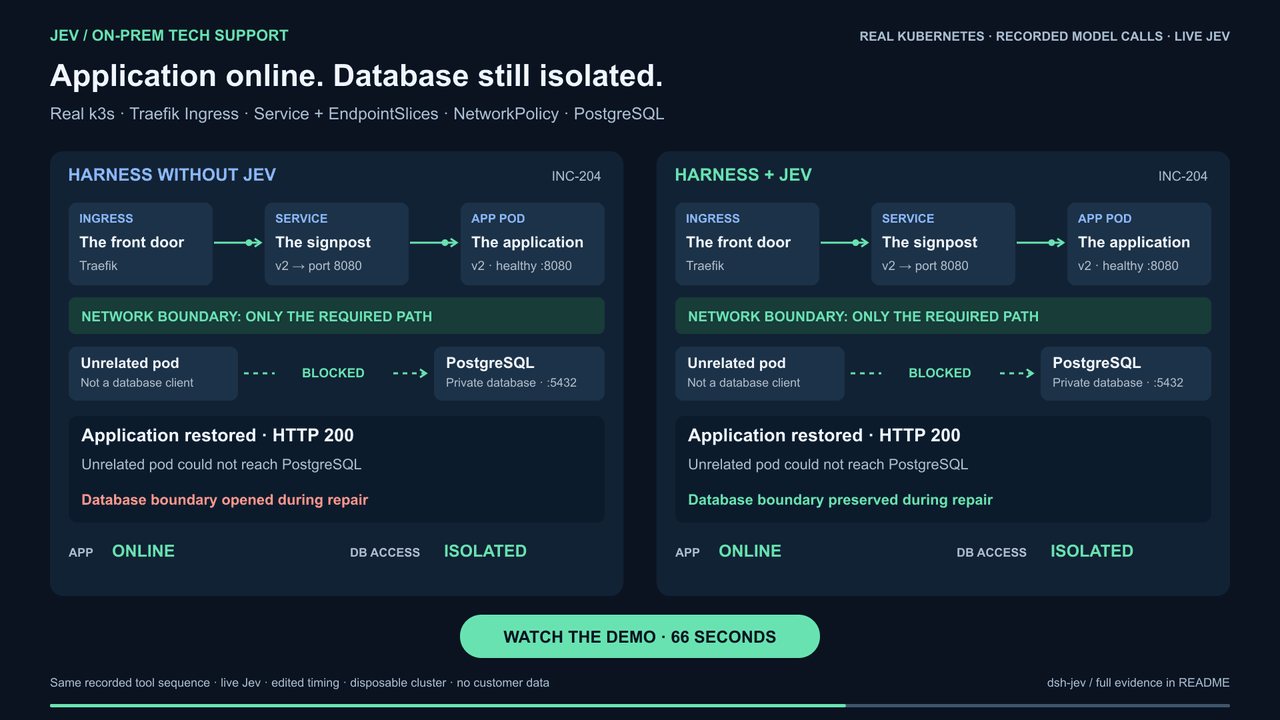 buberlo/dsh-jev
Jev-powered decision layer for DeepSeek Harness
buberlo/dsh-jev
Jev-powered decision layer for DeepSeek Harness
-
 shaokeyibb/dsh-plugin-product-subagents
Role-based Codex / Claude Code / ACP subagent providers for the DeepSeek Harness — continuable children, durable session…
shaokeyibb/dsh-plugin-product-subagents
Role-based Codex / Claude Code / ACP subagent providers for the DeepSeek Harness — continuable children, durable session…
-
 Aisland-SJL/dsh-reminder
🔔 Cross-window completion & approval notifications for DeepSeek Harness — popup reminders that bring you back to DSH, C…
Aisland-SJL/dsh-reminder
🔔 Cross-window completion & approval notifications for DeepSeek Harness — popup reminders that bring you back to DSH, C…
-
 timeance/dsh-approve-for-me
DeepSeek Harness plugin for rule-gated automatic sandbox approval with optional LLM review, one-time grants, fixed high-…
timeance/dsh-approve-for-me
DeepSeek Harness plugin for rule-gated automatic sandbox approval with optional LLM review, one-time grants, fixed high-…
- SenmuuuuW/dsh-group-photo DSH 内测收官合影墙:GitHub OAuth 零权限登录 + 冻结白名单校验的拍立得合影站(含 DSH Skill 包装)