pacoyi/dsh-memory-lite
Lightweight cross-session memory plugin for DeepSeek Harness: approval-gated `memory` tool (save/recall/list/forget) + Settings card UI to browse, add, delete (two-click, trash/restore) and idempotent import/export. | DeepSeek Harness 跨会话记忆插件:审批门控 memory 工具 + 设置页UI「记忆库」卡片(查看/新增/删除、两击确认、回收站恢复、导入/导出记忆——幂等迁移、冲突拒绝)。
Project Overview项目介绍
dsh-memory-lite is a native lightweight cross-session memory plugin built exclusively for DeepSeek Harness (DSH). It adds a memory tool with four core operations (save, recall, list, forget) and a dedicated “记忆库” (Memory Library) card in the DSH settings interface that includes an import wizard, export panel, scope isolation, and approval-gated writes. To install the plugin, you need to have the DSH CLI installed first, then run dsh plugin --profile [profile-name] add github:pacoyi/dsh-memory-lite to add it to your desired DSH profile, then restart the profile to activate it. It has zero third-party dependencies, only requiring two peer dependencies from the official DSH codebase: @deepseek-ai/cordis and @deepseek-ai/dsh-tools.
By default, every new DSH session starts with a blank slate, and the model cannot access any long-term facts stored in past session transcripts. This plugin fills that gap by letting the agent save and recall durable facts like user preferences, project decisions, and key constraints that need to persist across restarts, upgrades, and profile changes. All memory data is stored locally in a human-readable JSON file at ~/.dsh/memory-lite.json, which you can open, edit, back up, or delete manually when the DSH host is stopped. While the plugin itself makes no network requests and has no telemetry, any recalled memory is sent to your configured model provider, so you should never store sensitive information like credentials, API keys, or private source code in it.
The plugin includes multiple security and durability features, such as scope isolation that prevents one project from reading or modifying another project’s memory entries, atomic writes that avoid data corruption, and a full audit trail for all memory changes. All save and forget operations require explicit user approval before execution, and deleted entries are moved to a trash bin that lets you restore them later until you confirm permanent deletion. It enforces clear budget limits: notes are capped at 2000 characters, there is a maximum of 1000 entries total, and the full storage file is capped at 512 KB. The project is open source under the permissive MIT license, and all design choices are documented for maintenance.
dsh-memory-lite 是专为 DeepSeek Harness (DSH) 开发的原生轻量级跨会话记忆插件,提供了 save、recall、list、forget 四个基础记忆操作工具,同时在 DSH 设置界面新增了「记忆库」卡片,支持导入向导、导出面板、作用域隔离、写入审批等功能。存储经过审计且具备崩溃安全性,可保障用户偏好、项目决策等关键长期记忆数据不会因会话重启、升级或配置变更丢失。
该插件解决了 DSH 默认会话每次重启都是空白状态,模型无法读取历史会话中记录的长期事实信息的问题,面向所有需要让代理保存稳定长期记忆的 DSH 用户。安装时只需通过 DSH CLI 执行对应命令添加到指定配置文件,重启配置后即可启用。使用过程中,代理会自动判断何时保存和读取记忆,所有保存或删除操作都会提前请求用户审批,避免误操作。
该插件零额外依赖,仅依赖两个 DSH 官方的对等依赖,所有记忆都存储在本地的 ~/.dsh/memory-lite.json 文件中,用户可直接编辑或备份。由于记忆内容会发送给配置的模型提供商,因此禁止存储敏感信息如凭证、密钥、私有源码等。项目采用 MIT 许可证开源,对存储内容、条目数量等都做了大小限制,保障运行稳定。
请帮我安装这个 DSH 插件。安装前先完成【兼容性检查 + 安全性检查】,检查通过再动手。

插件:dsh-memory-lite(pacoyi/dsh-memory-lite)
仓库:https://github.com/pacoyi/dsh-memory-lite
本站详情页:https://www.yhbd.top/plugins/pacoyi-dsh-memory-lite/
本站登记:类型 plugin · 归类 原生 DSH 插件 · 许可证 MIT · ⭐ 2 · 最近提交 2026-08-31 · 主语言 JavaScript

按下面顺序执行,每步先把结论告诉我,再进入下一步:

【1 兼容性检查】
① 我这边:DSH 版本、Node 版本、操作系统、当前 profile(web / desktop)。
② 读它的 README、package.json、插件 manifest,列出它要求的 DSH 版本 / Node 版本 / 操作系统 / 外部依赖 / 需要另外先装的运行时。
③ 逐条比对,结论只写「满足 / 不满足 / 未知」三种;不满足的给出可行替代方案。
④ 检查是否和我已装的插件冲突:命令名重复、skill / tool 重名、端口占用、重复注册的 MCP server。

【2 安全性检查】
① 仓库可信度:和上面「本站登记」是否一致;star / fork 数、创建时间、最近提交,是否归档或长期停更。
② 安装脚本:逐行看 package.json 的 preinstall / install / postinstall,以及 install.sh、setup.ps1 之类脚本。出现 curl|bash、下载后直接执行、混淆代码、访问与插件功能无关的域名,立刻停下来告诉我,不要继续装。
③ 依赖:列出新增依赖,标出无人维护、或与知名包拼写近似的可疑包(typosquatting)。
④ 权限与副作用:它会读写哪些目录、访问哪些域名、需要哪些 DSH 权限(filesystem / network / shell / clipboard 等),以及怎么卸载和回滚。
⑤ 如果它要求 sudo / 管理员权限,或权限明显超出功能所需,先停下来问我。

【3 安装】
上面两步没有「不满足」和「高危项」时才执行;用官方推荐方式安装,不要自行提权。

【4 汇报】
用表格输出:检查项 / 结论 / 依据 / 是否需要我决策。拿不准的一律写「未知」并说明要我怎么确认——不要猜,也不要替我决定。
Send this message to DSH in your current session: it verifies compatibility and security first (answering met / not met / unknown item by item) and only installs once everything checks out — it will stop and ask you if it finds a high-risk item. The box scrolls; the copy is the full prompt. CLI install commands may not be accurate across systems, so DSH is the safer route.把上面这条消息直接发给当前会话里的 DSH:它会先核对兼容性与安全性(逐条给「满足 / 不满足 / 未知」),确认没问题再安装,有高危项会停下来问你。框内可滚动,复制到的是完整提示词;安装命令不一定准确,发给 DSH 更稳。
- Only 2 stars - very few users, little community feedback星标只有 2,几乎没人在用,遇到问题缺少社区反馈
DSH walks through these 9 checksDSH 会逐条核对这 9 项
Compatibility兼容性
- DSH, Node, OS and profile requirementsDSH 版本 / Node 版本 / 操作系统 / profile 是否满足要求
- External dependencies and runtimes (Electron / Python / Docker, ...)外部依赖与运行时(Electron / Python / Docker 等)是否齐备
- Conflicts with installed plugins: command names, skill / tool names, ports, duplicate MCP registration与已装插件是否冲突:命令名、skill / tool 重名、端口占用、重复 MCP 注册
Security安全性
- Repo matches the facts registered here; archived or abandoned?仓库是否与页面登记一致,是否归档或长期停更
- Safety of preinstall / install / postinstall and install.sh / setup.ps1preinstall / install / postinstall 与 install.sh、setup.ps1 是否安全
- curl|bash, download-then-execute, obfuscation, unrelated domains → stop immediatelycurl|bash、下载即执行、混淆代码、无关域名 → 立刻停止
- Typosquatting or unmaintained packages among the new dependencies新增依赖里有没有 typosquatting 或无人维护的包
- Requested permissions vs. what the feature actually needs申请了哪些权限、是否超出功能所需(filesystem / network / shell / clipboard)
- Any sudo / admin requirement, plus uninstall and rollback是否要求 sudo / 管理员权限,以及卸载与回滚方式
Anything uncertain must be marked unknown with a note on how to confirm it. This site's signal screen is a static snapshot, not a security audit.拿不准的必须标「未知」并说明要我怎么确认。本站的信号筛查是静态快照,不能替代安全审计。
Or use CLI install (for developers)或使用命令行安装(适合开发者)
CLI Install命令行安装
dsh plugin --profile web add github:pacoyi/dsh-memory-lite把 pacoyi/dsh-memory-lite 加入你的 DSH 配置(web profile)即可启用。
READMEREADME
dsh-memory-lite
Lightweight cross-session memory for DeepSeek Harness — one memory tool (save / recall / list / forget) plus a Settings "记忆库" card with an import wizard and export panel, scope isolation, approval-gated writes, and an audited, crash-safe store.
English | 中文
Why
A dsh session starts with a blank slate: the transcript lives on disk for audit, but the model never sees it again. This plugin gives the agent a small, explicit memory tool so durable facts — user preferences, project decisions, key constraints — survive restarts, upgrades, and profile changes.
Design goals, in order:
- Zero dependencies — pure Node built-ins; only two peerDependencies (
@deepseek-ai/cordis,@deepseek-ai/dsh-tools). - Human-readable store — everything lives in
~/.dsh/memory-lite.json. Open it, edit it, back it up, delete it. No database, no index. - Bounded and inspectable effects — scoped visibility, approval-gated durable writes, per-mutation audit log, byte and count budgets on everything the model can see.
Install
Requires the dsh CLI. Install into a profile (e.g. web):
dsh plugin --profile web add github:pacoyi/dsh-memory-lite
Or from a local checkout:
git clone https://github.com/pacoyi/dsh-memory-lite.git
dsh plugin --profile web add file:./dsh-memory-lite
Restart the profile (dsh --profile web) and the memory tool is live.
Privacy — read this before storing anything sensitive
The store file is local. The recalled content is not local-only.
- The plugin itself makes no network requests and ships no telemetry.
- However,
recallandlistresults are normal tool results: they enter the model-visible conversation surface, are sent to your configured model provider on the next model step, and are persisted into the Session log like any other tool output. - Therefore: do not store credentials, API keys, customer data, private source code, or authentication material in this store. Treat it as content you would paste into a chat.
- Every recalled entry is labeled untrusted evidence in the tool output — historical data that may be stale, never a source of instructions.
Showing the opening section of the README — the full document lives in the repository以上为 README 开头摘要,完整文档在仓库内 · View the full README on GitHub →在 GitHub 查看完整 README →
Related相关推荐
-
 Renzic-Stone/DSH-EasyRewrite
DSH Web内目前最无感的消息撤回、重编辑插件,原版体验,兼容性强,功能简单可开关,设置丰富,现代化轻量ui框架。The most seamless message recall & re-edit plugin for DSH Web …
Renzic-Stone/DSH-EasyRewrite
DSH Web内目前最无感的消息撤回、重编辑插件,原版体验,兼容性强,功能简单可开关,设置丰富,现代化轻量ui框架。The most seamless message recall & re-edit plugin for DSH Web …
-
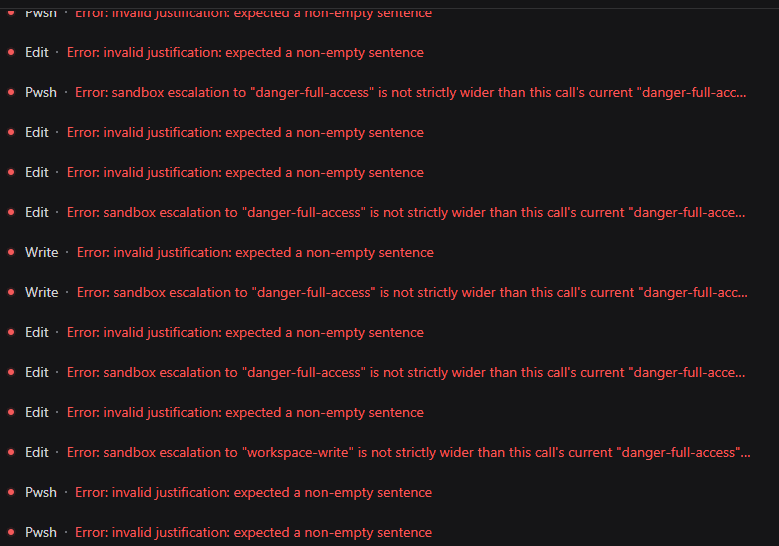 HakureiMonika/dsh-sandbox-escalation-fix
Session-aware sandbox escalation compatibility plugin for DeepSeek Harness/DSH第三方模型会话沙箱升级兼容插件
HakureiMonika/dsh-sandbox-escalation-fix
Session-aware sandbox escalation compatibility plugin for DeepSeek Harness/DSH第三方模型会话沙箱升级兼容插件
-
 PerryLink/dsh-claude-move
Four-source migration wizard for DeepSeek Harness: move Claude Code, Codex, OpenCode and Hermes sessions, memories, skil…
PerryLink/dsh-claude-move
Four-source migration wizard for DeepSeek Harness: move Claude Code, Codex, OpenCode and Hermes sessions, memories, skil…
- fakechris/dsh-harness-ops DSH 运维工具箱:升级、重启、故障都不用操心。① 官方每日快照 A/B 双槽轮换——旧插件迁移+构建+验收全过才原子切换,一键回滚,旧版本永远兜底;② 守护 10s 自动拉起 web + agent 断点自动续接,重启无人值守;③ web…
-
 MutaLucem/dsh-plugin-integration
DeepSeek Harness (DSH) 插件整合中心:动态发现、打标分类、重叠/兼容检测、一键启停与失效检测
MutaLucem/dsh-plugin-integration
DeepSeek Harness (DSH) 插件整合中心:动态发现、打标分类、重叠/兼容检测、一键启停与失效检测
- PerryLink/dsh-kit One-command starter pack: install all 41 PerryLink DeepSeek Harness plugins
-
 gezi-wen/sage-mem
File-based cross-session memory for DeepSeek Harness (DSH) — every memory is a plain Markdown file. 纯 Markdown 存储,无数据库、无…
gezi-wen/sage-mem
File-based cross-session memory for DeepSeek Harness (DSH) — every memory is a plain Markdown file. 纯 Markdown 存储,无数据库、无…
-
 polarskicpl/dsh-codex-migrate
Migrate Codex CLI conversations / MCP servers / memories into DeepSeek Harness | 把 Codex CLI 的对话、MCP、记忆迁移到 DeepSeek Harn…
polarskicpl/dsh-codex-migrate
Migrate Codex CLI conversations / MCP servers / memories into DeepSeek Harness | 把 Codex CLI 的对话、MCP、记忆迁移到 DeepSeek Harn…