pjy-20051012/dsh-file-preview
项目介绍Project Overview
为 DeepSeek Harness 网页端(dsh web)增加 Codex 风格的文件预览能力:侧边栏「文件预览」展示本会话最近 10 个产出文件,右侧浮动面板支持图片、PDF 内嵌预览以及 docx/xlsx/pptx 经本机 MS Office 转 PDF 预览(无法转换则回退文本),并提供用默认程序打开与定位文件夹;助手回复尾部新增文件操作行,每文件含预览、打开、显示位置三个动作。需 Windows + 本机安装的 MS Office 才能可视化预览 Office 文档;所有端点仅回环可达,请勿经反向代理暴露。
Adds Codex-style file capabilities to the DeepSeek Harness web UI (dsh web). A sidebar entry opens a panel listing the latest 10 session-produced files; a floating right-side overlay previews text, code (with truncation guards), images, and PDFs inline, and converts docx/xlsx/pptx to PDF via local MS Office for visual rendering, falling back to text when conversion fails. Each assistant turn gains a file action row with preview, open, and reveal-in-folder actions. Best used when working locally with files generated during a session. Caveat: Office document visual preview requires a Windows host with MS Office installed; all endpoints are loopback-only and must not be exposed via a reverse proxy.
请帮我了解并安装插件:【dsh-file-preview】【https://github.com/pjy-20051012/dsh-file-preview】把上面这条消息直接发给当前会话里的 DSH,让它帮你了解并安装。安装命令不一定准确,发给 DSH 更稳。Send this message to DSH in your current session. CLI install commands may not be accurate across systems — DSH will figure it out for you.
或使用命令行安装(适合开发者)Or use CLI install (for developers)
命令行安装CLI Install
dsh plugin --profile web add github:pjy-20051012/dsh-file-preview把 pjy-20051012/dsh-file-preview 加入你的 DSH 配置(web profile)即可启用。
READMEREADME
dsh-file-preview


为 DeepSeek Harness 网页端(dsh web)增加 Codex 风格的文件能力:
- 最近文件列表:点击侧边栏「文件预览」入口,右侧面板直接展示本会话最近 10 个产出文件,点任意一个即可预览。
- 右侧文件预览栏:像 Codex 一样「看文件长什么样」——图片/PDF 直接渲染,Word/Excel/PowerPoint(docx/xlsx/pptx)在服务端用本机 MS Office 转成 PDF 后可视化预览(转不了才退回文本);支持「用默认程序打开」和「打开所在文件夹」,可从预览一键返回最近文件列表。
- 对话中的文件操作行:每条助手回复下方(turn 尾部)展示该轮产出的文件,每个文件带三个动作:预览、打开、在文件夹中显示。
实现方式与 dsh-usage-stats 完全一致:服务端 Cordis 插件注册回环-only 的 HTTP 端点,浏览器端手写 __ModuleLoader__ bundle 注入界面,无构建步骤。
功能 / Features
| 功能 | 说明 |
|---|---|
| 最近文件列表 | 侧边栏入口打开后默认显示本会话最近 10 个产出文件(名称/路径/时间,可预览/打开/定位文件夹) |
| 右侧预览栏 | shell.overlay 全应用浮动层;文本/代码展示(截断保护)、图片、PDF 内嵌预览;Office 文档经 MS Office COM 转 PDF 可视化预览(带缓存,转不了回退文本);半透明毛玻璃质感,不遮挡视野 |
| 对话文件操作行 | conversation.chat.turnTail chain 条目(priority: -10,优先于内置 deliverables 行),每文件提供 预览/打开/文件夹 三动作 |
| 打开所在文件夹 | Windows explorer /select(windowsVerbatimArguments 精确传参,含空格/中文路径可定位)、macOS open -R、Linux 打开所在目录 |
| 默认程序打开 | 复用会话层 openFile(宿主 host.openPath);服务端也提供等价端点 |
| 安全边界 | 所有端点仅接受回环来源(peer socket + Host 双重校验);路径必须为绝对路径;预览只读 |
安装 / Installation
需要 DeepSeek Harness 的 web profile(@deepseek-ai/dsh >= 0.1.0-rc.6)以及随 Node.js 提供的 npx。
在 PowerShell、命令提示符或 macOS/Linux 终端运行同一条命令:
npx --yes github:pjy-20051012/dsh-file-preview
安装器会自动完成两件事:把运行文件复制到 ~/.dsh/profiles/node_modules/dsh-file-preview,并在 profiles/web/cordis.patch.yml 中幂等启用插件。重复运行同一命令即可更新,不会重复添加配置。
如设置了 DSH_HOME,安装器会使用该目录而不是 ~/.dsh。可先预览或只检查现有安装:
npx --yes github:pjy-20051012/dsh-file-preview --dry-run
npx --yes github:pjy-20051012/dsh-file-preview --check
如果不希望安装器修改 Cordis patch,可加 --no-enable,再自行配置。
无法使用 npx 时:从源码安装
git clone https://github.com/pjy-20051012/dsh-file-preview.git
cd dsh-file-preview
node scripts/install.mjs
重启
dsh web
浏览器硬刷新后生效:侧边栏底部出现「文件预览」入口;新产生的助手回复下方出现「文件操作」行。
使用 / Usage
- 点击侧边栏底部「文件预览」→ 右侧面板打开最近文件列表(本会话最近 10 个产出文件),点文件名直接预览。
- 对话中「文件操作」行:点击文件名 → 预览;↗ 用默认程序打开;📂 打开所在文件夹。
- 预览面板标题栏:← 返回最近文件、↗ 打开、📂 打开所在文件夹、刷新、关闭。
- 最近文件列表随对话实时更新(隐藏收集器监听会话快照),无需手动刷新。
Agent 友好安装 / Agent-friendly installation
可以把下面整段直接交给 Codex、Claude Code 或其他本地编码 Agent:
Install or update dsh-file-preview from:
https://github.com/pjy-20051012/dsh-file-preview

Constraints:
- Resolve DSH_HOME from the environment; otherwise use ~/.dsh.
- Do not read, print, edit, or request .credentials.yaml or any API key.
- Do not expose the plugin through a reverse proxy.
- Do not restart or terminate an existing dsh process without asking me.

Procedure:
1. Confirm node, npx, and dsh are available.
2. Run: npx --yes github:pjy-20051012/dsh-file-preview
3. Require the installer to report a verified package and exactly one Cordis patch entry.
4. Report the resolved install and patch paths.
5. If dsh web is already running, tell me a restart is needed and stop.
安装器本身提供清晰的退出码:未知参数返回 2;文件、版本或配置验证失败返回非零;成功时输出已验证版本、安装路径和 patch 路径。因此 Agent 不需要自行解析或重写 YAML。
开发与验证 / Development
node --check lib/index.js && node --check lib/client.js
npm run test            # 离线:服务端冒烟 + 安装器幂等测试
npm test 完全离线:用临时文件驱动真实 HTTP 路由,校验回环围栏、路径校验、分类与全部端点;
安装器测试在临时 DSH_HOME 下验证幂等性与 --check 行为。
API
| Method | Path | 说明 |
|---|---|---|
GET |
/api/file-preview/preview?path=<abs> |
文件元数据 + 文本内容(≤1MB,超长截断标记)或 图片/PDF 的 raw URL |
GET |
/api/file-preview/raw?path=<abs> |
原始字节流(图片/PDF 预览,≤64MB),Content-Disposition: inline |
POST |
/api/file-preview/open |
{path} 用系统默认程序打开 |
POST |
/api/file-preview/reveal |
{path} 在所在文件夹中定位 |
其他方法返回 405,非回环请求返回 403;preview/raw 仅 GET,open/reveal 仅 POST。
预览端点只读,绝不写文件。
隐私与安全 / Privacy & security
- 所有端点校验
req.socket.remoteAddress与 Host;仅回环可达,请勿经反向代理暴露到局域网/公网。 - 预览只读文件内容并回传浏览器;插件不读取凭据、不发送任何请求到外部网络。
open/reveal仅在本机启动系统程序(相当于你在本机执行打开操作)。
兼容性
当前版本 0.1.0。对话文件行依赖 ui-deliverables 发布的 deliverables turn 数据
(web roster 默认启用);若该插件被移除,文件操作行会自动隐藏,预览面板与侧边栏入口不受影响。
Harness 预发布版本升级后如内部接口变化,可能需要同步适配。
License
相关推荐Related
- SoMarkAI/dsh-tool-somark SoMark document parser tool (somark_parse) plugin for DeepSeek Harness
-
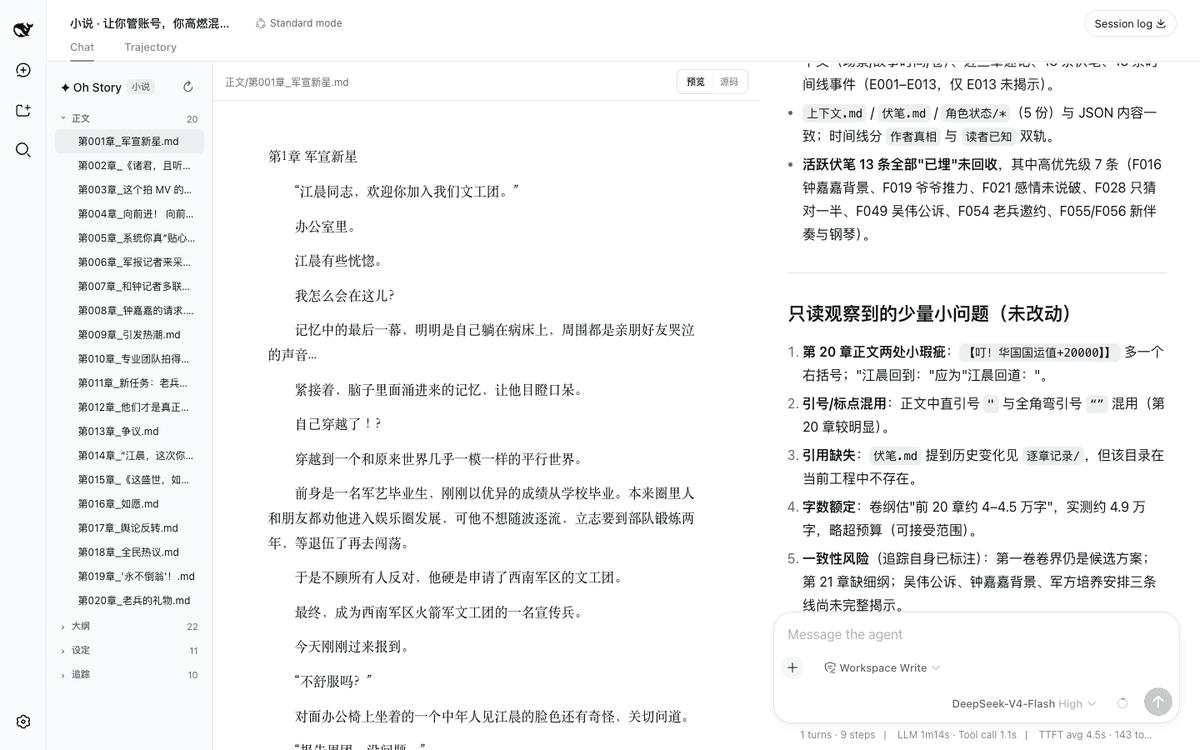 zenstory-ai/oh-story-dsh
A DSH plugin for novel writing and short-drama production, powered by Oh Story and Drama Skills.
zenstory-ai/oh-story-dsh
A DSH plugin for novel writing and short-drama production, powered by Oh Story and Drama Skills.
-
 ZSeven-W/dsh-openpencil
The DeepSeek Harness plugin for OpenPencil — preview, inspect, and edit real .op documents inside a conversation.
ZSeven-W/dsh-openpencil
The DeepSeek Harness plugin for OpenPencil — preview, inspect, and edit real .op documents inside a conversation.
-
 HanaAyane/dsh-reasoning-effort
DSH适用的Codex风格的思考强度滑块,以及大肥鱼跑步滑块。Codex-style model and reasoning-effort slider for DeepSeek Harness
HanaAyane/dsh-reasoning-effort
DSH适用的Codex风格的思考强度滑块,以及大肥鱼跑步滑块。Codex-style model and reasoning-effort slider for DeepSeek Harness
-
 HuanLinOTO/dsh-plugin-better-sidebar-plugin-office
为 better-sidebar 提供 Office 三件套预览(.docx/.xlsx/.pptx),独立 bundle 瘦身主体 | Provides Office-suite preview (.docx/.xlsx/.pptx) f…
HuanLinOTO/dsh-plugin-better-sidebar-plugin-office
为 better-sidebar 提供 Office 三件套预览(.docx/.xlsx/.pptx),独立 bundle 瘦身主体 | Provides Office-suite preview (.docx/.xlsx/.pptx) f…
-
 taxueseek/dsh-files
DeepSeek Harness dual-face plugin: session-isolated file upload with colorful composer cards + read_document tool (text/…
taxueseek/dsh-files
DeepSeek Harness dual-face plugin: session-isolated file upload with colorful composer cards + read_document tool (text/…
-
 dingyi222666/dsh-focus-chat
为 dsh 提供新的「聚焦会话」精简会话视图,更轻松易于阅读,只关注最终产出结果。
dingyi222666/dsh-focus-chat
为 dsh 提供新的「聚焦会话」精简会话视图,更轻松易于阅读,只关注最终产出结果。
-
 609476965/dsh-LorebookMD
DSH lorebook-driven fiction writer plugin: import Tavern/SillyTavern character cards & world books, save local Markdown …
609476965/dsh-LorebookMD
DSH lorebook-driven fiction writer plugin: import Tavern/SillyTavern character cards & world books, save local Markdown …