pk7j7sqryy-ops/dsh-token-pet
DSH动态Cordis插件:卡通用量小部件+天气/预报/预警(Token Pet布布玩偶)
Project Overview项目介绍
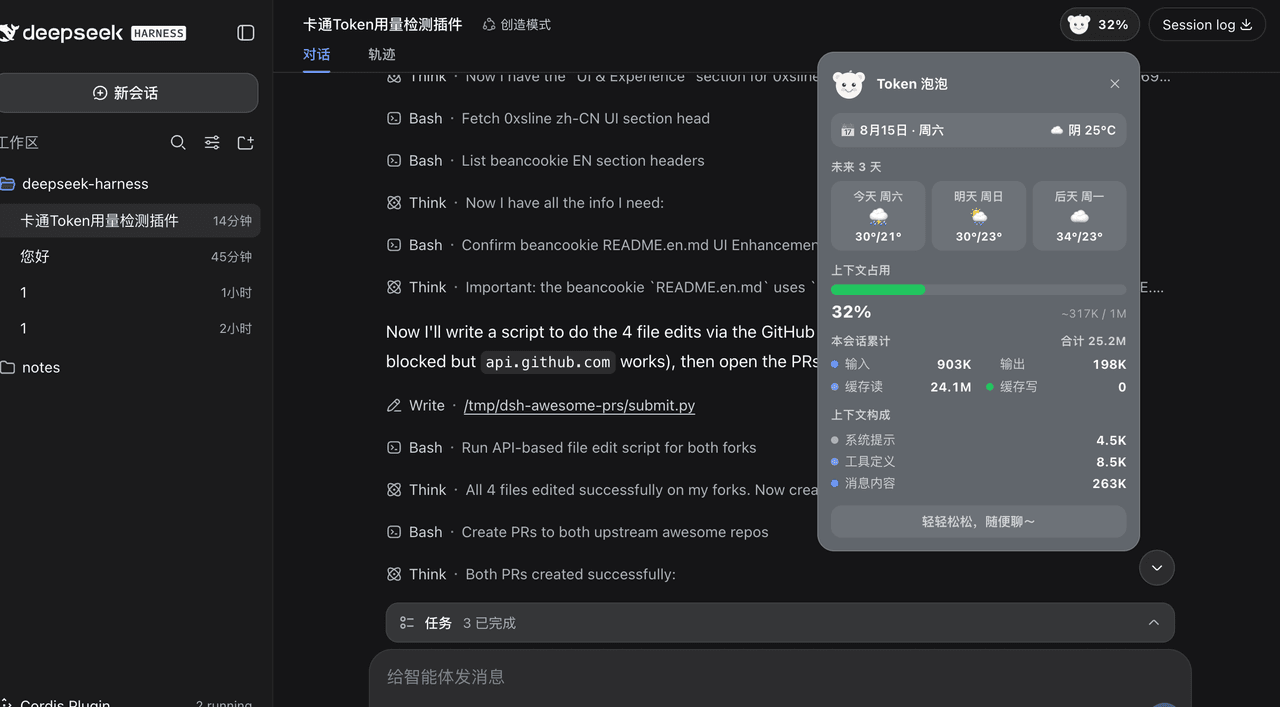
This repository hosts dsh-token-pet, a plugin built exclusively for DeepSeek Harness (DSH). It adds an interactive cartoon pet named Bubu to the top-right utilities section of the DSH conversation header. Bubu displays real-time token usage for the current active session, alongside helpful utilities like the current date and day of the week, real-time local weather, a 3-day forecast, and extreme weather warnings. All UI elements automatically adapt to DSH’s active theme color and dark/light mode setting.
The plugin integrates seamlessly with DSH’s native layout by mounting to the existing conversation header utilities slot, so it sits alongside native buttons like Download Log without altering core DSH functionality. It provides detailed breakdowns of token usage, including context window pressure, total session input and output tokens, and a breakdown of context composition by type. Bubu’s facial expression changes based on how much of the context window is used, giving users an intuitive at-a-glance reminder of their current token usage.
To install the plugin, users can run the DSH CLI command dsh plugin --profile web add github:pk7j7sqryy-ops/dsh-token-pet for a permanent install, or use the dynamic temporary installation method for testing. It reuses token data already projected by DSH to the frontend, so it does not generate any extra token requests. Weather data is pulled from Open-Meteo via IP-based location, cached for 30 minutes to avoid unnecessary API calls, and falls back gracefully if the fetch request fails. The project is open source under the permissive MIT license.
dsh-token-pet 是专为 DeepSeek Harness (DSH) 开发的原生插件,它会在 DSH 会话头部的右上角添加一个名为「布布」的卡通玩偶挂件,实时展示当前会话的 Token 用量,同时提供今日日期星期、实时天气、未来三天预报和极端天气预警功能,所有元素自动适配 DSH 的主题深浅色。
插件挂载在 DSH 原生会话头部工具区,和「下载日志」等原生按钮并排,不影响原有界面布局。它会展示详细的 Token 用量拆解,包括上下文占用占比、当前会话输入输出总用量、上下文构成明细。玩偶「布布」的表情会随着 Token 用量变化,从微笑到出汗,给用户直观的用量提醒。
安装方式简单,可通过 DSH 命令行直接安装为常驻包,也支持动态临时加载测试。插件复用 DSH 前端已投影的 Token 数据,不会产生额外的 Token 请求。天气数据通过 IP 定位获取,调用 Open-Meteo 接口,缓存 30 分钟,获取失败会优雅降级,项目采用 MIT 开源许可。
请帮我安装这个 DSH 插件。安装前先完成【兼容性检查 + 安全性检查】,检查通过再动手。

插件:dsh-token-pet(pk7j7sqryy-ops/dsh-token-pet)
仓库:https://github.com/pk7j7sqryy-ops/dsh-token-pet
本站详情页:https://www.yhbd.top/plugins/pk7j7sqryy-ops-dsh-token-pet/
本站登记:类型 plugin · 归类 原生 DSH 插件 · 许可证 MIT · ⭐ 3 · 最近提交 2026-08-15 · 主语言 JavaScript

按下面顺序执行,每步先把结论告诉我,再进入下一步:

【1 兼容性检查】
① 我这边:DSH 版本、Node 版本、操作系统、当前 profile(web / desktop)。
② 读它的 README、package.json、插件 manifest,列出它要求的 DSH 版本 / Node 版本 / 操作系统 / 外部依赖 / 需要另外先装的运行时。
③ 逐条比对,结论只写「满足 / 不满足 / 未知」三种;不满足的给出可行替代方案。
④ 检查是否和我已装的插件冲突:命令名重复、skill / tool 重名、端口占用、重复注册的 MCP server。

【2 安全性检查】
① 仓库可信度:和上面「本站登记」是否一致;star / fork 数、创建时间、最近提交,是否归档或长期停更。
② 安装脚本:逐行看 package.json 的 preinstall / install / postinstall,以及 install.sh、setup.ps1 之类脚本。出现 curl|bash、下载后直接执行、混淆代码、访问与插件功能无关的域名,立刻停下来告诉我,不要继续装。
③ 依赖:列出新增依赖,标出无人维护、或与知名包拼写近似的可疑包(typosquatting)。
④ 权限与副作用:它会读写哪些目录、访问哪些域名、需要哪些 DSH 权限(filesystem / network / shell / clipboard 等),以及怎么卸载和回滚。
⑤ 如果它要求 sudo / 管理员权限,或权限明显超出功能所需,先停下来问我。

【3 安装】
上面两步没有「不满足」和「高危项」时才执行;用官方推荐方式安装,不要自行提权。

【4 汇报】
用表格输出:检查项 / 结论 / 依据 / 是否需要我决策。拿不准的一律写「未知」并说明要我怎么确认——不要猜,也不要替我决定。
Send this message to DSH in your current session: it verifies compatibility and security first (answering met / not met / unknown item by item) and only installs once everything checks out — it will stop and ask you if it finds a high-risk item. The box scrolls; the copy is the full prompt. CLI install commands may not be accurate across systems, so DSH is the safer route.把上面这条消息直接发给当前会话里的 DSH:它会先核对兼容性与安全性(逐条给「满足 / 不满足 / 未知」),确认没问题再安装,有高危项会停下来问你。框内可滚动,复制到的是完整提示词;安装命令不一定准确,发给 DSH 更稳。
- Only 3 stars - very few users, little community feedback星标只有 3,几乎没人在用,遇到问题缺少社区反馈
DSH walks through these 9 checksDSH 会逐条核对这 9 项
Compatibility兼容性
- DSH, Node, OS and profile requirementsDSH 版本 / Node 版本 / 操作系统 / profile 是否满足要求
- External dependencies and runtimes (Electron / Python / Docker, ...)外部依赖与运行时(Electron / Python / Docker 等)是否齐备
- Conflicts with installed plugins: command names, skill / tool names, ports, duplicate MCP registration与已装插件是否冲突:命令名、skill / tool 重名、端口占用、重复 MCP 注册
Security安全性
- Repo matches the facts registered here; archived or abandoned?仓库是否与页面登记一致,是否归档或长期停更
- Safety of preinstall / install / postinstall and install.sh / setup.ps1preinstall / install / postinstall 与 install.sh、setup.ps1 是否安全
- curl|bash, download-then-execute, obfuscation, unrelated domains → stop immediatelycurl|bash、下载即执行、混淆代码、无关域名 → 立刻停止
- Typosquatting or unmaintained packages among the new dependencies新增依赖里有没有 typosquatting 或无人维护的包
- Requested permissions vs. what the feature actually needs申请了哪些权限、是否超出功能所需(filesystem / network / shell / clipboard)
- Any sudo / admin requirement, plus uninstall and rollback是否要求 sudo / 管理员权限,以及卸载与回滚方式
Anything uncertain must be marked unknown with a note on how to confirm it. This site's signal screen is a static snapshot, not a security audit.拿不准的必须标「未知」并说明要我怎么确认。本站的信号筛查是静态快照,不能替代安全审计。
Or use CLI install (for developers)或使用命令行安装(适合开发者)
CLI Install命令行安装
dsh plugin --profile web add github:pk7j7sqryy-ops/dsh-token-pet把 pk7j7sqryy-ops/dsh-token-pet 加入你的 DSH 配置(web profile)即可启用。
READMEREADME
Token 泡泡 (Token Pet) 🐻
DeepSeek Harness (DSH) 插件 ·
dsh-plugin
一个给 DeepSeek Harness (DSH) 用的插件,在会话头部右上角嵌一个卡通「布布」玩偶,实时展示当前会话的 Token 用量,并附带 今天日期/周几 + 实时天气 + 未来 3 天预报 + 极端天气预警,全程跟随主题色自适应深浅色。
功能特性
- 嵌入右上角,不悬浮:挂在
conversation.session.header.utilities(会话头部右上角工具区),和「下载日志」等原生按钮并排。 - 今天日期 / 周几:
📅 8月15日 · 周五,浏览器本地时区实时计算,零网络。 - 实时天气:
☀️ 晴 26°C(点击可刷新),IP 定位(ipwho.is)+ Open-Meteo,缓存 30 分钟,失败优雅降级。 - 未来 3 天预报:今天 / 明天 / 后天逐日天气(图标 + 最高/最低温)。
- 卡通用量小部件(展开态):
- 🎯 上下文占用:主题色进度条 +
已用 / 窗口上限。 - 📊 本会话累计:输入 / 输出 / 缓存读 / 缓存写(含合计)。
- 🧩 上下文构成:系统提示 / 工具定义 / 消息内容。
- 🎯 上下文占用:主题色进度条 +
- 表情玩偶「布布」:内联 SVG 圆脸小布偶,表情随用量变化(闭眼微笑 → 大笑 → 微笑 → 皱眉 → 快满冒汗)。
- 极端天气预警:暴雨 / 雷暴 / 大雪触发红色警告条 + 动画雨滴(🌧)或雪花(🌨)粒子;未来 3 天有严重天气也提前预警,折叠药丸上亮闪烁图标。
- 跟随主题色:全部颜色走
--dsw-alias-*CSS 变量,深浅色自适应。 - Token 零请求:token 数据直接复用宿主已投射到前端的投影。
安装
💡 直接复制这个仓库的 GitHub 地址(
github:pk7j7sqryy-ops/dsh-token-pet)发给 AI 助手,让它帮你安装,也可以按照以下方法:
方式 A(推荐):作为包安装
dsh plugin --profile web add github:pk7j7sqryy-ops/dsh-token-pet
安装后重启 dsh --profile web,会话头部右上角就会出现布布。也可以 dsh plugin --profile web add dsh-token-pet(若已发布到 npm)。
方式 B:动态插件(进程内临时)
把 dynamic/client.js 粘进 cordis_define 的 code.client、dynamic/host.js 粘进 code.host,再 cordis_run 即可(重启失效)。详见 dynamic/ 下两份文件头部的注释。
日常使用
- 折叠态:右上角小药丸 = 布布玩偶 + 占用百分比;有极端天气/未来预警时多一个闪烁图标。
- 展开:点药丸打开卡片;点外部 / 按
Esc/ 点✕收起。 - 天气刷新:点卡片里的天气那一格手动刷新(缓存 30 分钟)。
常见问题
- 天气显示「不可用」? 本机
web服务无 fetch provider 且curl不可用/被沙箱拦截;token 部分不受影响。 - 定位城市不对? 定位走 IP(ipwho.is),挂 VPN/代理会漂移;改
lib/index.js的locate()可固定经纬度。 - 为什么没有政府红/橙预警? 气象局/和风天气等官方预警需 API key,无法无 key 直连;当前用 WMO 代码判断当前 + 未来 3 天严重天气。
- 想要长期内置? 用方式 A 装成包即可随 profile 常驻。
技术实现
| 能力 | 选型 |
|---|---|
| 挂载位置 | conversation.session.header.utilities Slot(additive) |
| Token 数据 | useProjection 标准 prop(contextPressure / tokenUsage / contextBreakdown) |
| 占用口径 | projectedTokens ?? pressureTokens ÷ contextWindow |
| 天气 | Host RPC(connection.rpc.handle("/token-pet")):ipwho.is → Open-Meteo |
| 网络能力 | web.fetch 优先,回退 shell + curl |
| 主题 | --dsw-alias-* CSS 变量 |
文件结构
.
├── package.json        # npm 包 + dsh.bundle.patch / dsh.client 声明
├── cordis.patch.yml    # 组合补丁:把插件按 id 插进 profile
├── lib/
│   ├── index.js        # Host 半:天气 RPC(真实 ESM 模块)
│   └── client.js       # Client 半:UI + 布布玩偶(__ModuleLoader__ bundle)
├── dynamic/            # 动态插件源码(备选安装方式 B)
│   ├── client.js
│   └── host.js
├── LICENSE
└── README.md
衍生功能规划(Roadmap)
- 用量预警:70%/90% 时弹动 + toast,建议
/compact - 一键压缩:卡片内直接放「压缩上下文」按钮
- 成本估算:接模型单价,token 换算 ¥/$
- 天气增强:空气质量 / 手动指定城市 / 接官方预警 API key
- 用量历史曲线 / 工具调用成本拆解 / 跨会话汇总 / 宠物养成
许可
Related相关推荐
-
 ChisaAlter/WhaleIsle
鲸屿 Whale Isle · DeepSeek Harness 社区增强桌面版:官方核心功能齐备,扩展主题壁纸、鲸鱼娘桌宠、用量统计与手机远程连接。Community-enhanced DeepSeek Harness desktop c…
ChisaAlter/WhaleIsle
鲸屿 Whale Isle · DeepSeek Harness 社区增强桌面版:官方核心功能齐备,扩展主题壁纸、鲸鱼娘桌宠、用量统计与手机远程连接。Community-enhanced DeepSeek Harness desktop c…
-
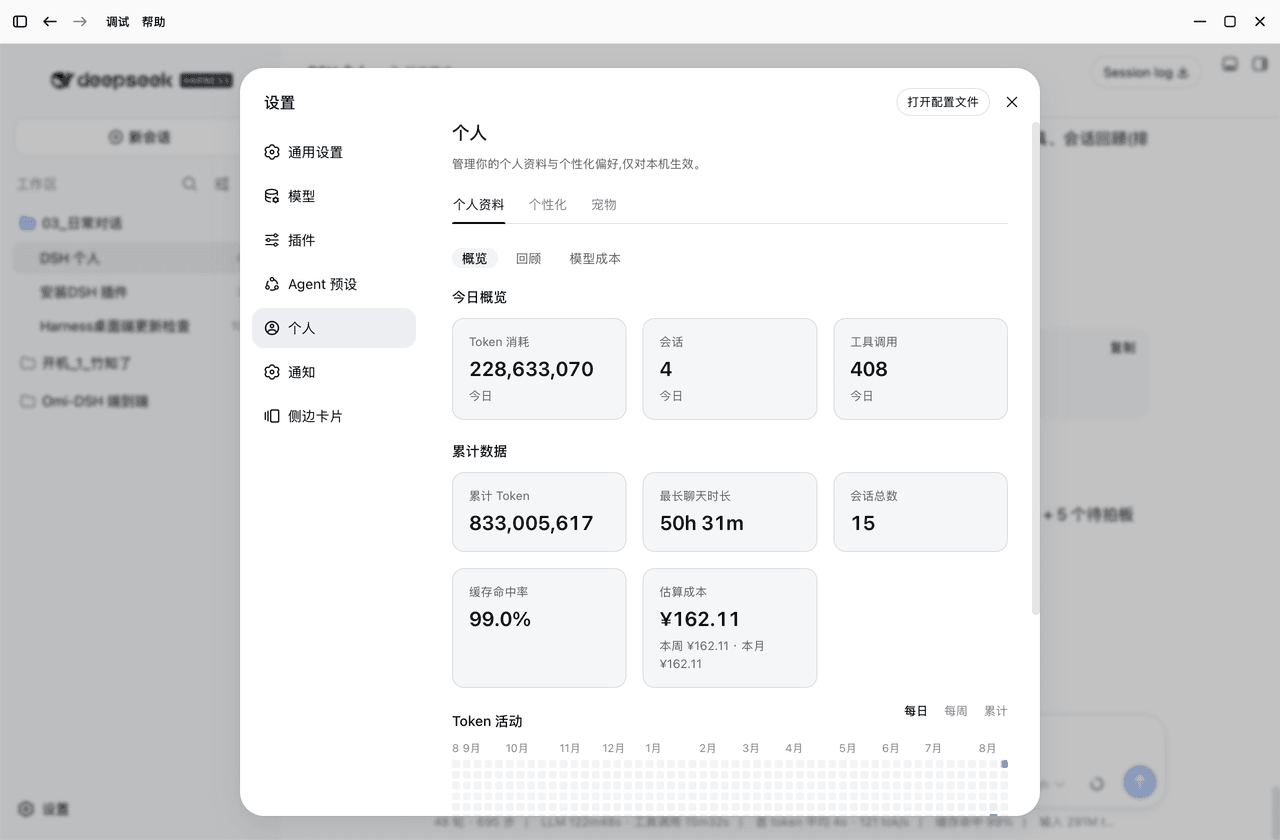 PolinniZhong/dsh-personal-center
DSH 个人配置:Token 用量统计 / 成本估算 / 自定义指令 / 外观全局字号 / 桌面宠物(含会话状态概览),纯本地不联网。Personal center for DSH: usage stats, cost estimation…
PolinniZhong/dsh-personal-center
DSH 个人配置:Token 用量统计 / 成本估算 / 自定义指令 / 外观全局字号 / 桌面宠物(含会话状态概览),纯本地不联网。Personal center for DSH: usage stats, cost estimation…
-
 Jimmy0123-ux/dsh-token-pet
Bilingual floating DeepSeek Harness pet with live context, lifetime token ledger, trends, opt-in completion sound, and e…
Jimmy0123-ux/dsh-token-pet
Bilingual floating DeepSeek Harness pet with live context, lifetime token ledger, trends, opt-in completion sound, and e…
-
 Suiwan/whale-purse
A cute whale desktop pet for DeepSeek Harness that keeps an eye on your DeepSeek balance and session usage/cost. Drag he…
Suiwan/whale-purse
A cute whale desktop pet for DeepSeek Harness that keeps an eye on your DeepSeek balance and session usage/cost. Drag he…
-
 louke6572/dsh-whale-widget-plus
基于DeepSeek-Balance-Whale-Widget开发,新增了不同版本的表情,需要那个版本的表情可以自己让agent帮你换,增加了火山coding plan额度查询,新增加台词自定义切换增加,增加了表情与台词手动切换
louke6572/dsh-whale-widget-plus
基于DeepSeek-Balance-Whale-Widget开发,新增了不同版本的表情,需要那个版本的表情可以自己让agent帮你换,增加了火山coding plan额度查询,新增加台词自定义切换增加,增加了表情与台词手动切换
-
 yanzwzz/dsh-whale-girl-pet
🐋 DeepSeek 娘桌宠:住进 DeepSeek Harness Web 界面的蓝发鲸鱼女仆。工作链路、任务完成统计(用时/消耗/花费)、睡眠系统、时间感知、余额/天气/喂食按钮、完整设置面板。
yanzwzz/dsh-whale-girl-pet
🐋 DeepSeek 娘桌宠:住进 DeepSeek Harness Web 界面的蓝发鲸鱼女仆。工作链路、任务完成统计(用时/消耗/花费)、睡眠系统、时间感知、余额/天气/喂食按钮、完整设置面板。
- YangShen-SWE/dsh-plugin-simple-pet A Windows desktop pet for official DeepSeek API balance, usage, and animated reactions in DSH.
-
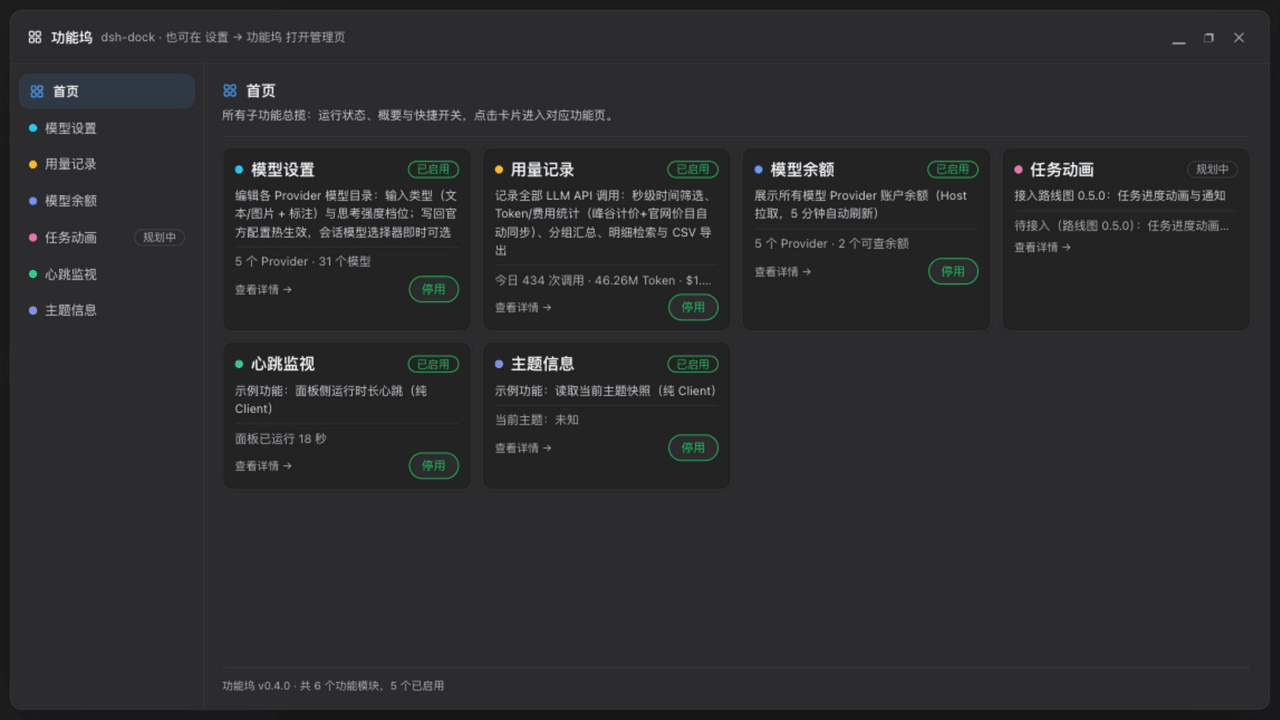 wycto/dsh-dock
dsh-dock · DeepSeek Harness 功能坞插件:一张面板统一注册/开关所有小功能——用量记账(自定义单价·分时价)、模型设置与余额、19 种任务动画、任务通知(钉钉/飞书)、运行状态、图片理解代理、账号密码远程访问、10…
wycto/dsh-dock
dsh-dock · DeepSeek Harness 功能坞插件:一张面板统一注册/开关所有小功能——用量记账(自定义单价·分时价)、模型设置与余额、19 种任务动画、任务通知(钉钉/飞书)、运行状态、图片理解代理、账号密码远程访问、10…