poiuyjie/dsh-md-preview
DeepSeek Harness plugin: open .md references from chat in a dockable side-by-side preview panel instead of the system editor; per-session recent-file tracking; pairs with dsh-vision-opencode for visual-verification workflows.
Project Overview项目介绍
dsh-md-preview is a DeepSeek Harness plugin that previews Markdown inside the chat UI. It adds an MD Preview entry in the session header; clicking an .md reference opens the source file in a side-by-side pane with live rendering, tracks files read or written in the current session only, and follows the shell's light or dark theme. Use it when you want to read, edit, or proofread Markdown without leaving the conversation window. Note: install via the native dsh plugin add command; editing package.json manually skips the bundle registration and the plugin will not load.
dsh-md-preview 是 DeepSeek Harness 的 Markdown 预览插件。它在会话头部新增「MD 预览」入口,点击对话中的 .md 引用时在右侧栏并排实时渲染源稿,自动跟踪本会话读写过的文件,并跟随 shell 主题切换深浅色。适合需要边对话边对照 Markdown 源稿的文档撰写与校对场景。注意:安装推荐使用 dsh plugin add 原生命令,手动改 package.json 不会登记到装配层、装了也不生效。
请帮我安装这个 DSH 插件。安装前先完成【兼容性检查 + 安全性检查】,检查通过再动手。

插件:dsh-md-preview(poiuyjie/dsh-md-preview)
仓库:https://github.com/poiuyjie/dsh-md-preview
本站详情页:https://www.yhbd.top/plugins/poiuyjie-dsh-md-preview/
本站登记:类型 plugin · 归类 原生 DSH 插件 · 许可证 MIT · ⭐ 2 · 最近提交 2026-08-20 · 主语言 JavaScript

按下面顺序执行,每步先把结论告诉我,再进入下一步:

【1 兼容性检查】
① 我这边:DSH 版本、Node 版本、操作系统、当前 profile(web / desktop)。
② 读它的 README、package.json、插件 manifest,列出它要求的 DSH 版本 / Node 版本 / 操作系统 / 外部依赖 / 需要另外先装的运行时。
③ 逐条比对,结论只写「满足 / 不满足 / 未知」三种;不满足的给出可行替代方案。
④ 检查是否和我已装的插件冲突:命令名重复、skill / tool 重名、端口占用、重复注册的 MCP server。

【2 安全性检查】
① 仓库可信度:和上面「本站登记」是否一致;star / fork 数、创建时间、最近提交,是否归档或长期停更。
② 安装脚本:逐行看 package.json 的 preinstall / install / postinstall,以及 install.sh、setup.ps1 之类脚本。出现 curl|bash、下载后直接执行、混淆代码、访问与插件功能无关的域名,立刻停下来告诉我,不要继续装。
③ 依赖:列出新增依赖,标出无人维护、或与知名包拼写近似的可疑包(typosquatting)。
④ 权限与副作用:它会读写哪些目录、访问哪些域名、需要哪些 DSH 权限(filesystem / network / shell / clipboard 等),以及怎么卸载和回滚。
⑤ 如果它要求 sudo / 管理员权限,或权限明显超出功能所需,先停下来问我。

【3 安装】
上面两步没有「不满足」和「高危项」时才执行;用官方推荐方式安装,不要自行提权。

【4 汇报】
用表格输出:检查项 / 结论 / 依据 / 是否需要我决策。拿不准的一律写「未知」并说明要我怎么确认——不要猜,也不要替我决定。
Send this message to DSH in your current session: it verifies compatibility and security first (answering met / not met / unknown item by item) and only installs once everything checks out — it will stop and ask you if it finds a high-risk item. The box scrolls; the copy is the full prompt. CLI install commands may not be accurate across systems, so DSH is the safer route.把上面这条消息直接发给当前会话里的 DSH:它会先核对兼容性与安全性(逐条给「满足 / 不满足 / 未知」),确认没问题再安装,有高危项会停下来问你。框内可滚动,复制到的是完整提示词;安装命令不一定准确,发给 DSH 更稳。
- Only 2 stars - very few users, little community feedback星标只有 2,几乎没人在用,遇到问题缺少社区反馈
DSH walks through these 9 checksDSH 会逐条核对这 9 项
Compatibility兼容性
- DSH, Node, OS and profile requirementsDSH 版本 / Node 版本 / 操作系统 / profile 是否满足要求
- External dependencies and runtimes (Electron / Python / Docker, ...)外部依赖与运行时(Electron / Python / Docker 等)是否齐备
- Conflicts with installed plugins: command names, skill / tool names, ports, duplicate MCP registration与已装插件是否冲突:命令名、skill / tool 重名、端口占用、重复 MCP 注册
Security安全性
- Repo matches the facts registered here; archived or abandoned?仓库是否与页面登记一致,是否归档或长期停更
- Safety of preinstall / install / postinstall and install.sh / setup.ps1preinstall / install / postinstall 与 install.sh、setup.ps1 是否安全
- curl|bash, download-then-execute, obfuscation, unrelated domains → stop immediatelycurl|bash、下载即执行、混淆代码、无关域名 → 立刻停止
- Typosquatting or unmaintained packages among the new dependencies新增依赖里有没有 typosquatting 或无人维护的包
- Requested permissions vs. what the feature actually needs申请了哪些权限、是否超出功能所需(filesystem / network / shell / clipboard)
- Any sudo / admin requirement, plus uninstall and rollback是否要求 sudo / 管理员权限,以及卸载与回滚方式
Anything uncertain must be marked unknown with a note on how to confirm it. This site's signal screen is a static snapshot, not a security audit.拿不准的必须标「未知」并说明要我怎么确认。本站的信号筛查是静态快照,不能替代安全审计。
Or use CLI install (for developers)或使用命令行安装(适合开发者)
CLI Install命令行安装
dsh plugin --profile web add github:poiuyjie/dsh-md-preview把 poiuyjie/dsh-md-preview 加入你的 DSH 配置(web profile)即可启用。
READMEREADME
dsh-md-preview
DeepSeek Harness 的 Markdown 预览插件
点击上方链接切换语言 · Click the links above to switch languages
对话里点开
.md,不再跳 VSCode——右侧并排预览,随手可读。
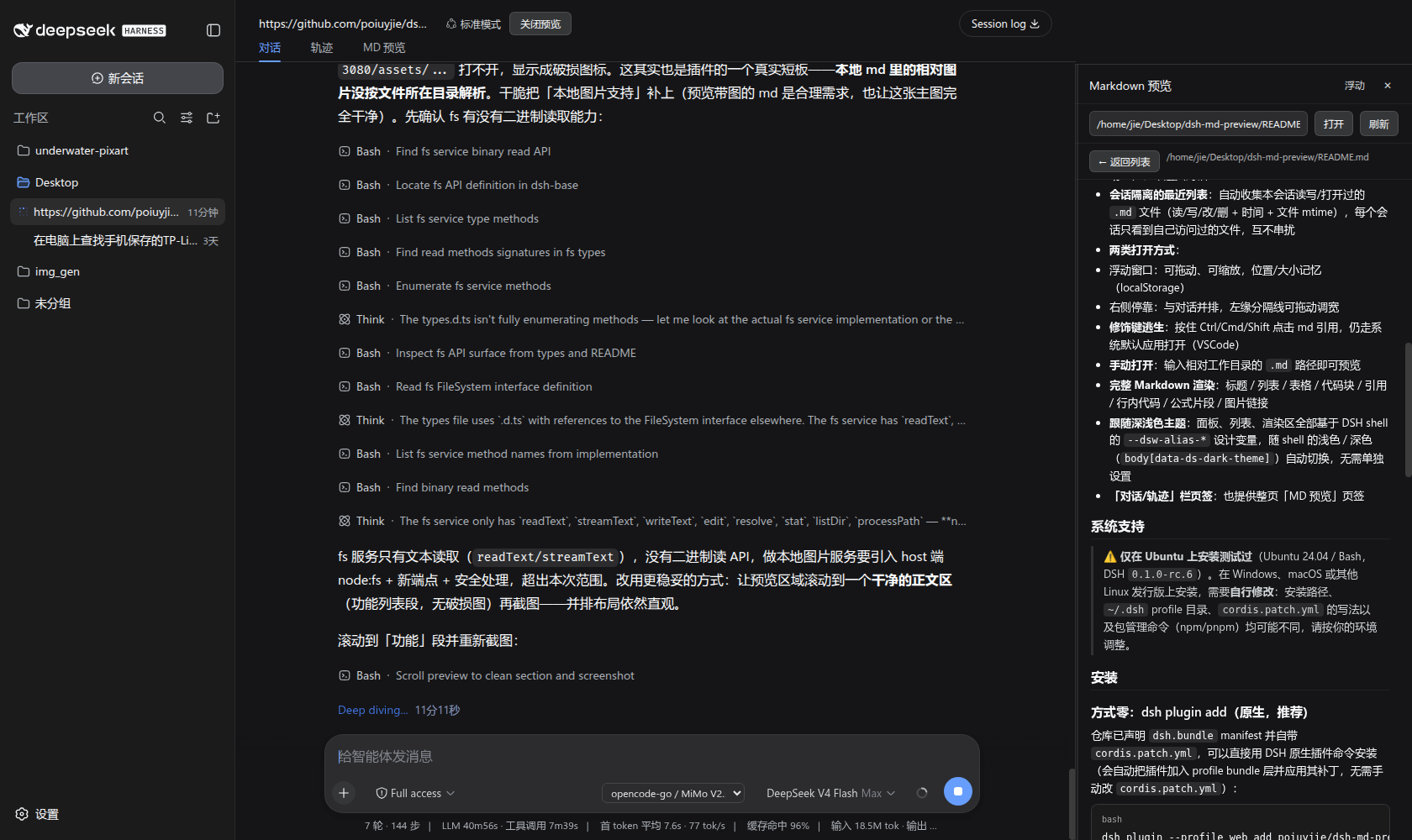
⚡ 核心体验 —— 与对话并排展示:左边继续你惯常的对话 / 写稿 / 校对工作流,右边在同一窗口内并排、实时渲染你点开的 .md 源稿——所见即所写、无需切换窗口;深色 / 浅色主题自动跟随 shell。
DeepSeek Harness(DSH)插件:在会话头部加一个「MD 预览」入口,自动跟踪本会话读写/打开过的 .md 文件,点击对话中的 md 引用时在右侧栏并排打开预览,而不是跳转到系统编辑器(如 VSCode)。
与 dsh-vision-opencode 协同
本插件与 dsh-vision-opencode 配合使用,效果成倍提升——它也是在这个视觉插件的能力基础上开发完善起来的:
- 视觉驱动的工作流闭环:
dsh-vision-opencode给纯文本主模型补上识图能力(vision_read_image),让模型能"看见"渲染出的文档页面;而本插件让你在右侧栏即时打开并排预览对应的.md源文件——先看渲染图,再对照源稿,改稿、验证、记录一气呵成 - 图文对照:左侧对话流里是视觉验证结论("表格 III 渲染干净、无溢出"),右侧预览栏里就是对应的 Markdown 源稿,边看边改
- 适合文档 / 论文工作流:LaTeX 编译检查、排版 QA、版本修订记录等场景下,视觉确认 + 源稿预览双栏并排,效果大大提高
两个插件搭配安装(推荐用 DSH 原生插件命令,它会从 GitHub 下载源码,并把包登记进 profile 的 dsh.profile.bundles 装配层、自动应用各自 cordis.patch.yml——只手改 package.json(npm pkg set)既不会真正下载,也登记不了装配层,装了也不会生效):
dsh plugin --profile web add github:poiuyjie/dsh-vision-opencode
dsh plugin --profile web add github:poiuyjie/dsh-md-preview
💡 Windows 下把
dsh换成dsh.ps1(或powershell dsh.ps1),profile 目录为%USERPROFILE%\.dsh\profiles\web。
功能
- 右侧并排预览:点击对话中的
.md文件引用(产物芯片 / 行内引用 / 工具卡片路径),在右侧栏打开预览,与对话内容顶部对齐、宽度可拖(支持拖到屏幕中间),布局自动让位、不遮挡对话 - 会话隔离的最近列表:自动收集本会话读写/打开过的
.md文件(读/写/改/删 + 时间 + 文件 mtime),每个会话只看到自己访问过的文件,互不串扰 - 两类打开方式:
- 浮动窗口:可拖动、可缩放,位置/大小记忆(localStorage)
- 右侧停靠:与对话并排,左缘分隔线可拖动调宽
- 修饰键逃生:按住 Ctrl/Cmd/Shift 点击 md 引用,仍走系统默认应用打开(VSCode)
- 手动打开:输入相对工作目录的
.md路径即可预览 - 完整 Markdown 渲染:标题 / 列表 / 表格 / 代码块 / 引用 / 行内代码 / 公式片段 / 图片链接
- 跟随深浅色主题:面板、列表、渲染区全部基于 DSH shell 的
--dsw-alias-*设计变量,随 shell 的浅色 / 深色(body[data-ds-dark-theme])自动切换,无需单独设置 - 「对话/轨迹」栏页签:也提供整页「MD 预览」页签
系统支持
⚠️ 主推
dsh plugin原生安装(Linux/macOS 用dsh,Windows 用dsh.ps1)。手动方式(克隆 +npm install+ 改cordis.patch.yml)在 Ubuntu(DSH0.1.0-rc.6)与 Windows 上验证过;其他发行版上安装路径、~/.dshprofile 目录、cordis.patch.yml写法可能不同,请按你的环境调整。
Showing the opening section of the README — the full document lives in the repository以上为 README 开头摘要,完整文档在仓库内 · View the full README on GitHub →在 GitHub 查看完整 README →
Related相关推荐
-
 MrMaii/knotline
把 Agent 从对话框搬到一张图上——连线即执行 / Orchestrate AI agents by drawing lines
MrMaii/knotline
把 Agent 从对话框搬到一张图上——连线即执行 / Orchestrate AI agents by drawing lines
-
 Devin-AXIS/iPolloWork
Enterprise-grade, local-first Agent Workbench for people and agent teams. A unified multi-engine workspace for Codex Har…
Devin-AXIS/iPolloWork
Enterprise-grade, local-first Agent Workbench for people and agent teams. A unified multi-engine workspace for Codex Har…
-
 EthanYoQ/AI-Novel-Writer
AI 小说创作软件:把灵感、角色、世界观、大纲、章节写作、审稿和修稿组织成可控流程;提供 Windows/macOS 桌面版,支持本地和在线模型。AI Novel Writing Software: Organizes inspiratio…
EthanYoQ/AI-Novel-Writer
AI 小说创作软件:把灵感、角色、世界观、大纲、章节写作、审稿和修稿组织成可控流程;提供 Windows/macOS 桌面版,支持本地和在线模型。AI Novel Writing Software: Organizes inspiratio…
-
 tong-io/tongflow
Modality-First GenAI Platform
tong-io/tongflow
Modality-First GenAI Platform
-
 shanliuling/dsh-image-gen
AI image studio for DeepSeek Harness — generate, edit & compare images in chat, with 500+ prompts, gallery, multi-model …
shanliuling/dsh-image-gen
AI image studio for DeepSeek Harness — generate, edit & compare images in chat, with 500+ prompts, gallery, multi-model …
-
 ZSeven-W/dsh-ios
DeepSeek Harness (DSH) plugin: a live iOS Simulator — and a USB-connected iPhone — inside the conversation. 22 agent too…
ZSeven-W/dsh-ios
DeepSeek Harness (DSH) plugin: a live iOS Simulator — and a USB-connected iPhone — inside the conversation. 22 agent too…
-
 ZSeven-W/dsh-crew
DeepSeek Harness (DSH) plugin: dispatch work to DSH agents from Claude Code / Codex — native subagent progress, in-host …
ZSeven-W/dsh-crew
DeepSeek Harness (DSH) plugin: dispatch work to DSH agents from Claude Code / Codex — native subagent progress, in-host …
-
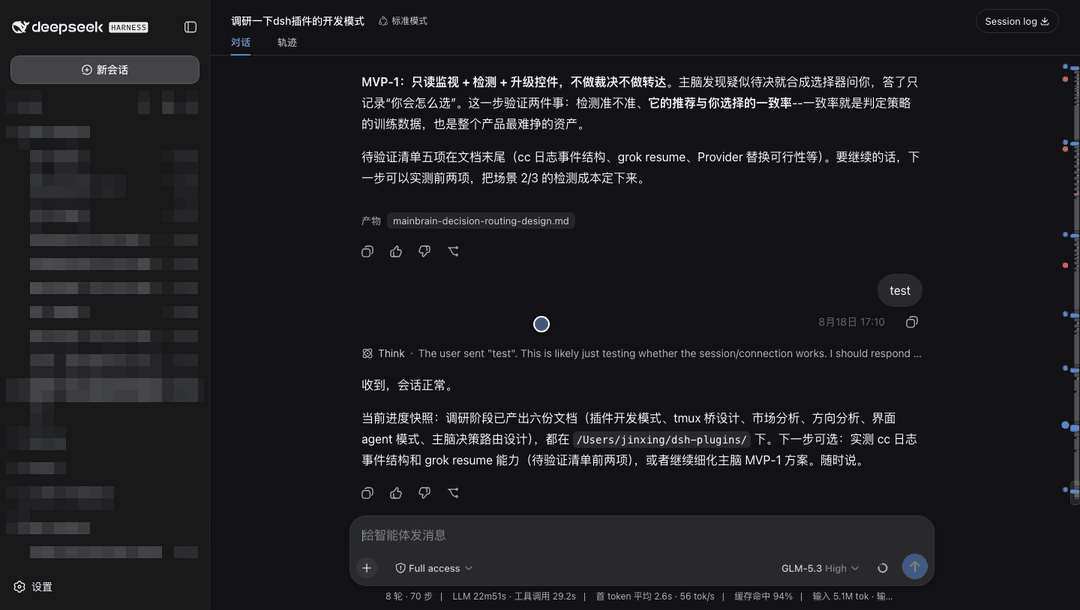 jsdvjx/dsh-strata
Session strata for the DeepSeek Harness Web GUI: the transcript's scrollbar becomes a to-scale, colour-coded map of the …
jsdvjx/dsh-strata
Session strata for the DeepSeek Harness Web GUI: the transcript's scrollbar becomes a to-scale, colour-coded map of the …