pyf2818/dsh-bili-widget
🎬 DSH (DeepSeek Harness) B站悬浮看片插件:边 coding 边刷视频。推荐/热门/排行/搜索/关注UP主、自动连播、迷你模式、历史持久化
项目介绍Project Overview
DSH B站浮窗插件是 DeepSeek Harness 上的 B 站视频悬浮窗。核心能力是提供置顶可拖动缩放的小窗,支持 6 大频道、搜索、关注 UP、自动连播、迷你模式、悬浮球后台播放与观看历史持久化。适合写代码时边听边看、或专注摸鱼。需要 DSH 桌面端 Web profile,仅 Windows(用 curl.exe/powershell.exe)可用。
DSH Bili Widget is a floating Bilibili video panel for DeepSeek Harness. It provides an always-on-top, draggable, resizable player with six channels, search, UP-master follow, auto-continuous playback, mini mode, floating-ball background play, and persisted watch history. Use it to watch videos while coding without losing the window on fullscreen. It requires the DSH desktop app on Windows (uses curl.exe and powershell.exe); Linux and macOS are not yet supported.
请帮我了解并安装插件:【dsh-bili-widget】【https://github.com/pyf2818/dsh-bili-widget】把上面这条消息直接发给当前会话里的 DSH,让它帮你了解并安装。安装命令不一定准确,发给 DSH 更稳。Send this message to DSH in your current session. CLI install commands may not be accurate across systems — DSH will figure it out for you.
或使用命令行安装(适合开发者)Or use CLI install (for developers)
命令行安装CLI Install
dsh plugin --profile web add github:pyf2818/dsh-bili-widget把 pyf2818/dsh-bili-widget 加入你的 DSH 配置(web profile)即可启用。
READMEREADME
🎬 DSH B站浮窗插件
在 DeepSeek Harness (DSH) 里悬浮看片的 B 站小窗 — 边 coding 边刷视频,专注摸鱼,快乐加倍 🐟


✨ 为什么值得装
在 DSH 里挂一个 永远置顶、可拖动缩放、自动连播 的 B 站小窗。写代码写累了,随手点开一个视频边听边写;摸鱼看番也不会被打扰——窗口永远在最上层,全屏也不丢。
📸 截图
主界面

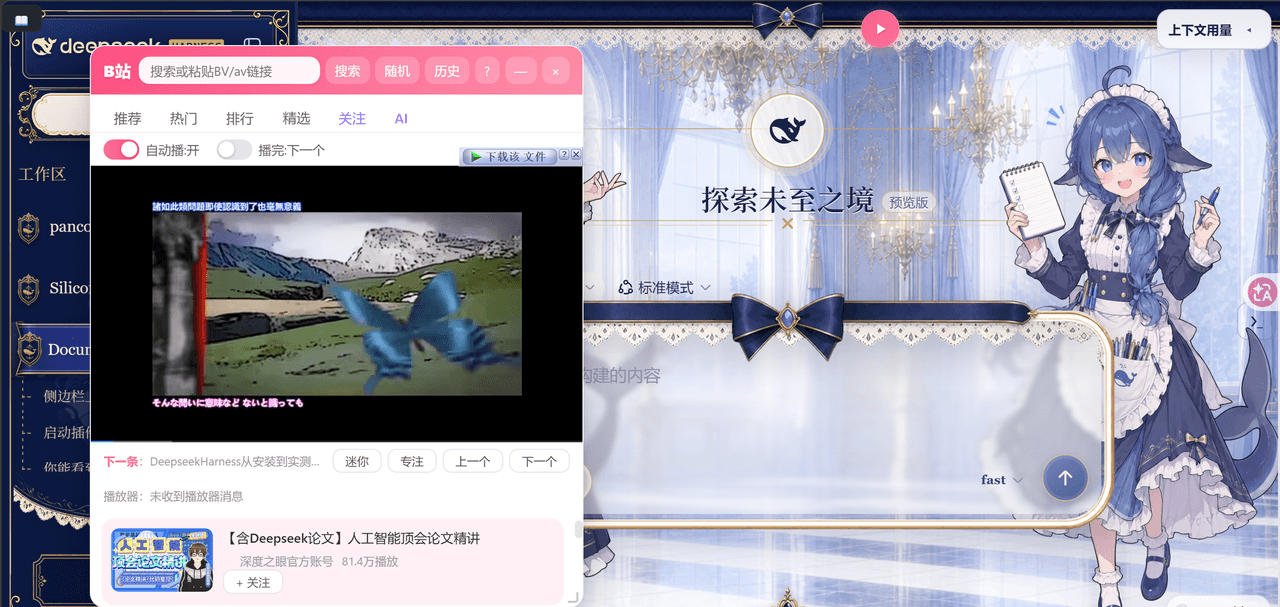
在 DSH 里悬浮一个 B 站小窗,推荐 / 热门 / 排行 / 精选 / 关注 / AI 六个频道,列表内直接播放,无缝切换。
观看历史

自动记录观看历史,本地持久化存储,重启 DSH 不丢失。
迷你模式
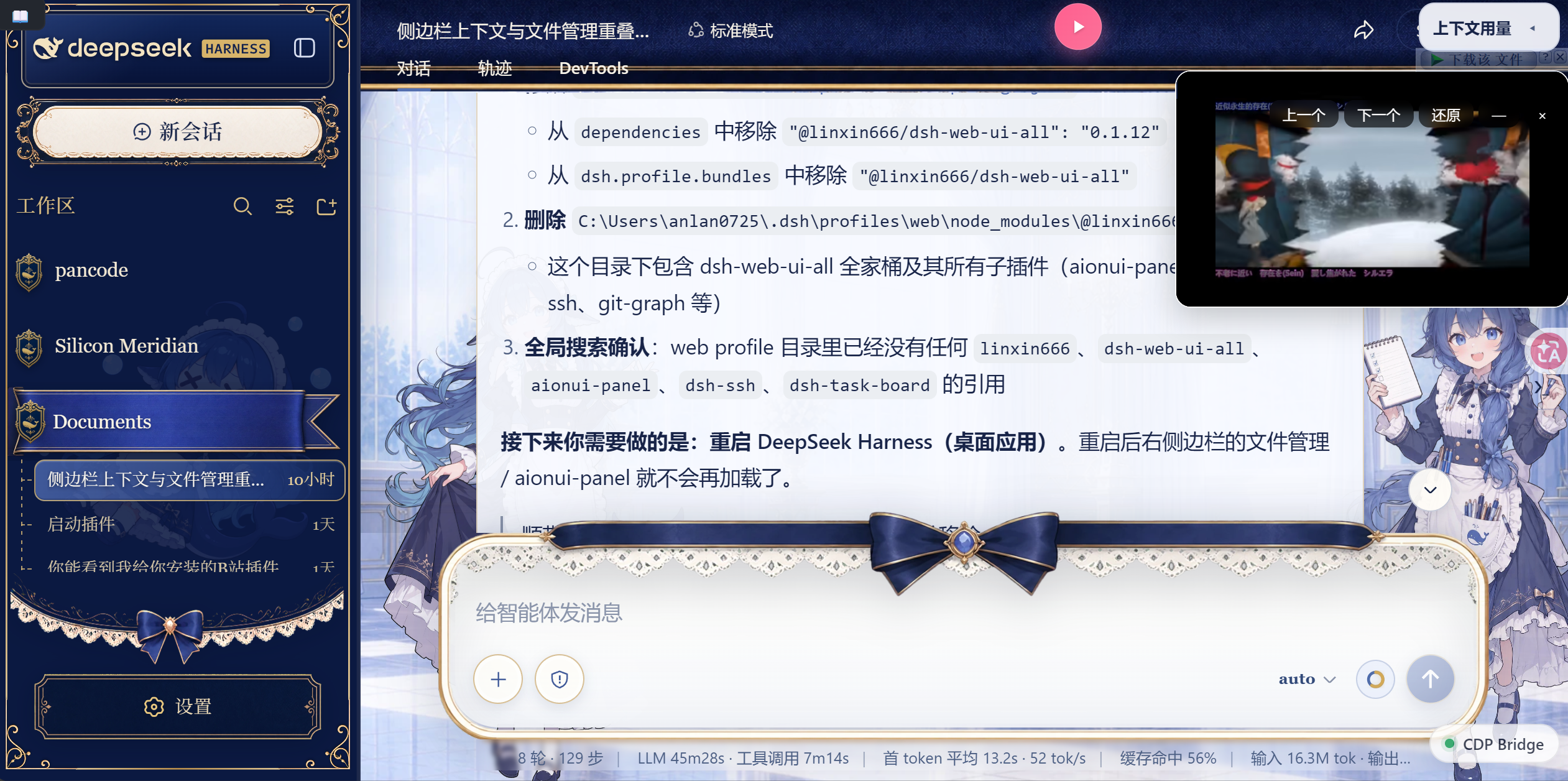
一键最小化到悬浮球,视频继续后台播放;点击悬浮球恢复窗口,进度完整保留。
快捷键面板

快捷键一目了然:←/→ 上下曲、M 迷你、N 专注、Esc 返回/关闭。
🚀 功能一览
🎯 内容发现
| 能力 | 说明 |
|---|---|
| 6 大频道 | 推荐 / 热门 / 排行 / 精选 / 关注 / AI,45 个话题 chip 快速切入 |
| 搜索 | 支持视频/番剧/UP主/影视,BV/av 号直达,搜索历史持久化 |
| ⭐ 关注 UP 主 | 一键关注,专属频道聚合你关注的 UP 主视频,追更不迷路 |
🎮 播放体验
| 能力 | 说明 |
|---|---|
| 自动连播 | 播完自动切下一个,或单集重播,无缝摸鱼 |
| 迷你 / 专注模式 | 迷你小窗仅 300×180,专注模式纯播放器 |
| ➖ 窗口最小化 | 一键最小化到悬浮球,视频继续播放,点球恢复 |
| 悬浮球 | 可拖动、可点击,点开/收起窗口不打断播放 |
🛠 工程细节
| 能力 | 说明 |
|---|---|
| 💾 数据持久化 | 关注列表 + 观看历史存服务端文件,重启 DSH 不丢失 |
| 已看标记 | 播放过的视频自动打「已看」,不重复追 |
| 骨架屏 + 重试 | 加载动画、错误重试按钮,体验顺滑 |
| 快捷键 | ←/→ 上一个/下一个 / M 迷你 / N 专注 / Esc 返回 |
📦 安装
方式一:DSH 内直接说(推荐)
在 DSH 对话里输入:
DSH 会自动完成安装,重启后即可在侧边栏找到「B站」。
方式二:手动安装
在你的 DSH profile 的 package.json 中添加:
{
  "dependencies": {
    "@dsh-external/dsh-bili-widget": "github:pyf2818/dsh-bili-widget"
  },
  "dsh": {
    "profile": {
      "bundles": [
        "@dsh-external/dsh-bili-widget"
      ]
    }
  }
}
然后 pnpm install 并重启 DSH。
⌨️ 快捷键
在窗口标题栏点击
?按钮,随时可以查看这份快捷键表。
| 按键 | 功能 |
|---|---|
← / → |
播放上一个 / 下一个 |
M |
切换迷你模式 |
N |
切换专注模式 |
Esc |
返回上一页 / 关闭 |
标题栏 — |
最小化到悬浮球(视频继续播放,点球恢复) |
🖥 环境要求
- Windows(使用
curl.exe/powershell.exe作为网络子进程) - DSH 桌面应用(web profile)
🤝 参与贡献
欢迎 PR!有想法可以在 Issues 提。
- 想加新频道 / 新话题?
- 想适配 Linux/macOS?
- 想要弹幕同步?
📄 许可证
如果这个插件帮到了你,点个 ⭐ 支持一下! ⭐
相关推荐Related
-
 nexu-io/open-design
🎨 Best DeepSeek Harness Design Plugin. The open-source Claude Design alternative. 🖥️ Local-first desktop app. 🖼️ Your…
nexu-io/open-design
🎨 Best DeepSeek Harness Design Plugin. The open-source Claude Design alternative. 🖥️ Local-first desktop app. 🖼️ Your…
-
 ruvnet/ruflo
🌊 The original agent meta-harness. Deploy intelligent multi-player swarms, coordinate autonomous workflows, and build c…
ruvnet/ruflo
🌊 The original agent meta-harness. Deploy intelligent multi-player swarms, coordinate autonomous workflows, and build c…
-
 amruthpillai/reactive-resume
A one-of-a-kind resume builder that keeps your privacy in mind. Completely secure, customizable, portable, open-source a…
amruthpillai/reactive-resume
A one-of-a-kind resume builder that keeps your privacy in mind. Completely secure, customizable, portable, open-source a…
-
 esengine/DeepSeek-Reasonix
DeepSeek-native AI coding agent for your terminal. Engineered around prefix-cache stability — leave it running.
esengine/DeepSeek-Reasonix
DeepSeek-native AI coding agent for your terminal. Engineered around prefix-cache stability — leave it running.
-
 volcengine/OpenViking
Self-evolving Context Database for AI Agents. Unify Agent Memory, Knowledge RAG and Skills.
volcengine/OpenViking
Self-evolving Context Database for AI Agents. Unify Agent Memory, Knowledge RAG and Skills.
-
 Molunerfinn/PicGo
:rocket: The Ultimate Image Uploader for Efficient Creators. Supports Obsidian, Typora, VS Code etc. and 60+ image hosti…
Molunerfinn/PicGo
:rocket: The Ultimate Image Uploader for Efficient Creators. Supports Obsidian, Typora, VS Code etc. and 60+ image hosti…
-
 titanwings/distilly
Distilly — Distill how they think into reusable Skills for any Agent or Bot. Formerly Colleague Skill(原同事 Skill).
titanwings/distilly
Distilly — Distill how they think into reusable Skills for any Agent or Bot. Formerly Colleague Skill(原同事 Skill).
-
 titanwings/colleague-skill