qinyre/dsh-plugin-atlas
Archive manager (browse / unarchive / auto-rules) plus a Codex-style fisheye conversation rail for dsh.·归档管理与对话刻度尺插件
项目介绍Project Overview
dsh-plugin-atlas 为 dsh 的 Web UI 提供三大增强:对话区左缘的轮次刻度尺支持点击跳转、悬停预览与 Alt+↑/↓ 逐条移动,长会话切换由宿主直接索引;输入框的 ↑/↓ 翻找历史走终端手感,绕开正文光标;设置页内可按工作区分组浏览已归档会话,批量还原后侧边栏实时更新。自动归档默认关闭,规则与每日核查需手动启用,依赖 dsh 公开 API。插件不删除任何会话或文件,写操作要求同源 POST,数值均有范围校验。
dsh-plugin-atlas adds three features to the dsh Web UI. A turn ruler on the left of the chat maps each round, supports click-to-jump with lazy loading and highlight, hover previews, and Alt+↑/↓ for round-by-round movement, with theme-aware colors. The input box offers terminal-style ↑/↓ history recall that avoids the editing cursor and restores the prior draft. The settings page groups archived sessions by workspace, with search and batch unarchive that updates the sidebar live. Auto-archive is off by default and calls dsh's public archiveSession. No sessions or files are deleted, write actions require same-origin POST, and numeric inputs are range-validated.
请帮我了解并安装插件:【dsh-plugin-atlas】【https://github.com/qinyre/dsh-plugin-atlas】把上面这条消息直接发给当前会话里的 DSH,让它帮你了解并安装。安装命令不一定准确,发给 DSH 更稳。Send this message to DSH in your current session. CLI install commands may not be accurate across systems — DSH will figure it out for you.
或使用命令行安装(适合开发者)Or use CLI install (for developers)
命令行安装CLI Install
dsh plugin --profile web add dsh-plugin-atlas把 qinyre/dsh-plugin-atlas 加入你的 DSH 配置(web profile)即可启用。
READMEREADME
dsh-plugin-atlas


为 dsh 的 Web UI 补上三件事:对话区左缘的轮次刻度尺、输入框里的 ↑/↓ 历史翻找,以及设置页里的会话归档管理。
对话刻度尺
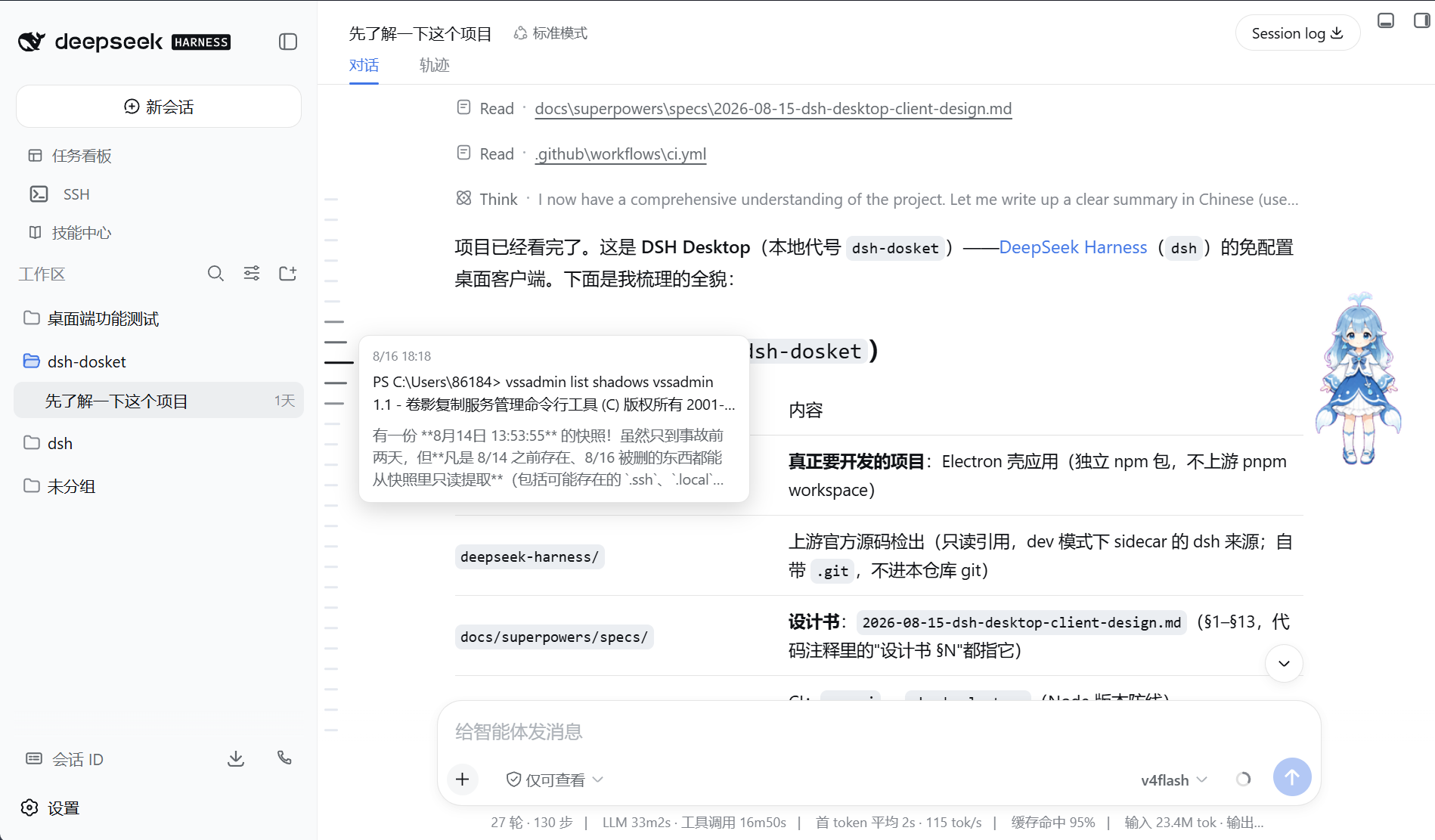
每轮对话对应刻度尺上的一个刻度,间距固定,超出可视高度后出现自带的细滚动条。整条历史的刻度由宿主端直接索引,长会话的切换与浏览不受加载拖累。
指针进入刻度尺时,最近的刻度伸长加深,邻近刻度随之递减伸缩;点击刻度跳转到对应消息,目标在尚未加载的历史里就先加载再滚动定位并短暂高亮;停留处显示该轮的输入与回复预览,Alt+↑/↓ 在轮次间逐条移动。配色跟随宿主主题。
输入历史
在输入框按 ↑,最近发送的消息直接填入,连按向更早翻找,↓ 返回,走回起点时恢复翻找前的草稿——和终端里翻历史命令一个手感。光标停在文本开头或末尾才触发翻找,光标在正文中时箭头照常移动,不打扰编辑。
归档管理
设置页的一级分区:已归档会话按工作区分组,支持搜索与批量取消归档,还原后侧边栏实时恢复、无需重启。标题与轮次数取自会话日志本体。
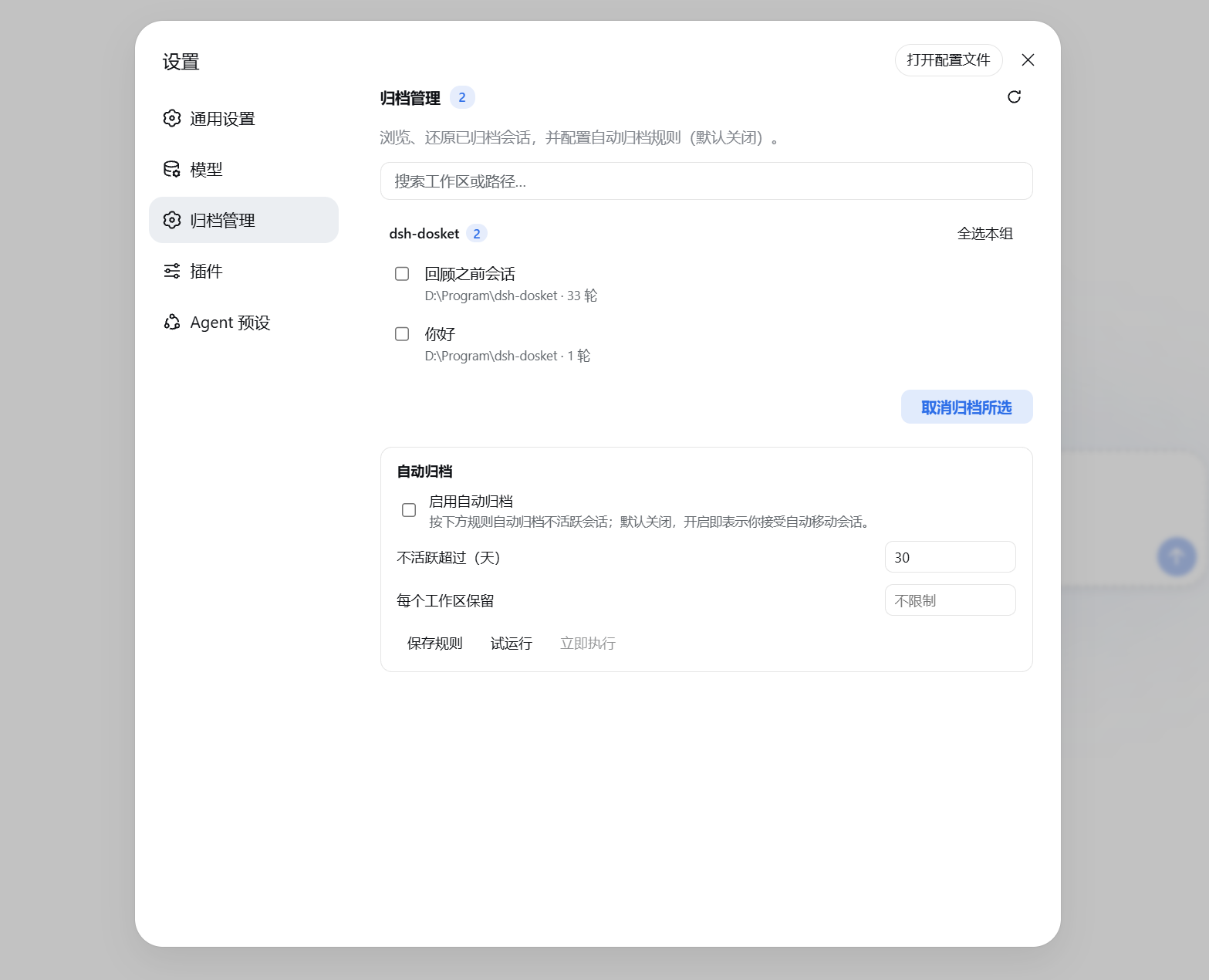
自动归档默认关闭,可配置「不活跃超过 N 天」与「每个工作区保留最近 M 条」,每日核查一次,执行前可试运行预览清单。
安装
dsh plugin --profile web add dsh-plugin-atlas
也可以在 Web UI 的 设置 → 插件 里按包名安装(经 dsh-plugin-install),或直接从 GitHub 装:
dsh plugin --profile web add github:qinyre/dsh-plugin-atlas
开发时 add file:/path/to/dsh-plugin-atlas 可装本地检出,包内 prepare 脚本会自动构建。卸载把 add 换成 remove 即可。
安全与边界
写操作要求同源 POST,规则数值有范围校验,自动归档只调用 dsh 公开的 archiveSession。取消归档经由注册表预留的状态写入路径完成——若未来 dsh 的改动使其失效,插件会明确报错而不是损坏数据,届时更新 dsh 与本插件即可。插件不删除任何会话或文件。
在 DSH Desktop 中
DSH Desktop 内嵌同一 Web UI,插件装上即在桌面内生效。
开发
pnpm install
pnpm run typecheck
pnpm test
pnpm run build
端到端 smoke 默认关闭,要求同级目录存在 deepseek-harness 源码检出且 Node ≥ 22.19:
DSH_ATLAS_PLUGIN_SMOKE=1 pnpm test
它会建临时 DSH_HOME、把本插件装入 web profile、启动 dsh web,并逐一探测各路由。
许可
相关推荐Related
-
 alaliqing/claude-paper
📖 Cross-agent research paper toolkit for Claude Code, Codex, OpenCode, and DeepSeek Harness—quick summaries, deep study…
alaliqing/claude-paper
📖 Cross-agent research paper toolkit for Claude Code, Codex, OpenCode, and DeepSeek Harness—quick summaries, deep study…
-
 liangmianya/dsh-synapse
A visual, non-linear conversation workspace plugin for DeepSeek Harness ; A canvas-based session explorer and branching …
liangmianya/dsh-synapse
A visual, non-linear conversation workspace plugin for DeepSeek Harness ; A canvas-based session explorer and branching …
-
 hanshenmesen/dsh-turn-delete
Delete one complete turn from a DeepSeek Harness session without deleting the session
hanshenmesen/dsh-turn-delete
Delete one complete turn from a DeepSeek Harness session without deleting the session
-
 Anionex/dsh-turn-rewind
deepseek harness对话和代码状态回退插件 | DSH — rewind conversation and workspace state, powered by a persistent Change Ledger
Anionex/dsh-turn-rewind
deepseek harness对话和代码状态回退插件 | DSH — rewind conversation and workspace state, powered by a persistent Change Ledger
-
 omdsh-dev/dsh-annotation
DSH Web 选中批注插件:选文字→批注→回车随消息发送;气泡隐藏批注块(零闪烁);回复按 Annotation N 逐条对照(可悬浮芯片)。官方 bundle,零核心改动
omdsh-dev/dsh-annotation
DSH Web 选中批注插件:选文字→批注→回车随消息发送;气泡隐藏批注块(零闪烁);回复按 Annotation N 逐条对照(可悬浮芯片)。官方 bundle,零核心改动
-
 Tyan66666/billion-context-dsh
Model-driven context management (Active Context Pruning / ACP) for the DeepSeek Harness — the model decides when and wha…
Tyan66666/billion-context-dsh
Model-driven context management (Active Context Pruning / ACP) for the DeepSeek Harness — the model decides when and wha…
-
 a179-sanae/dsh-auto-collapse
- PKUfudawei/dsh-capability-menu Unified capability menu for DeepSeek Harness: manage exposure level (context footprint) and execution mode of MCP tools …