QuantumKuba/dsh-graphify-plugin
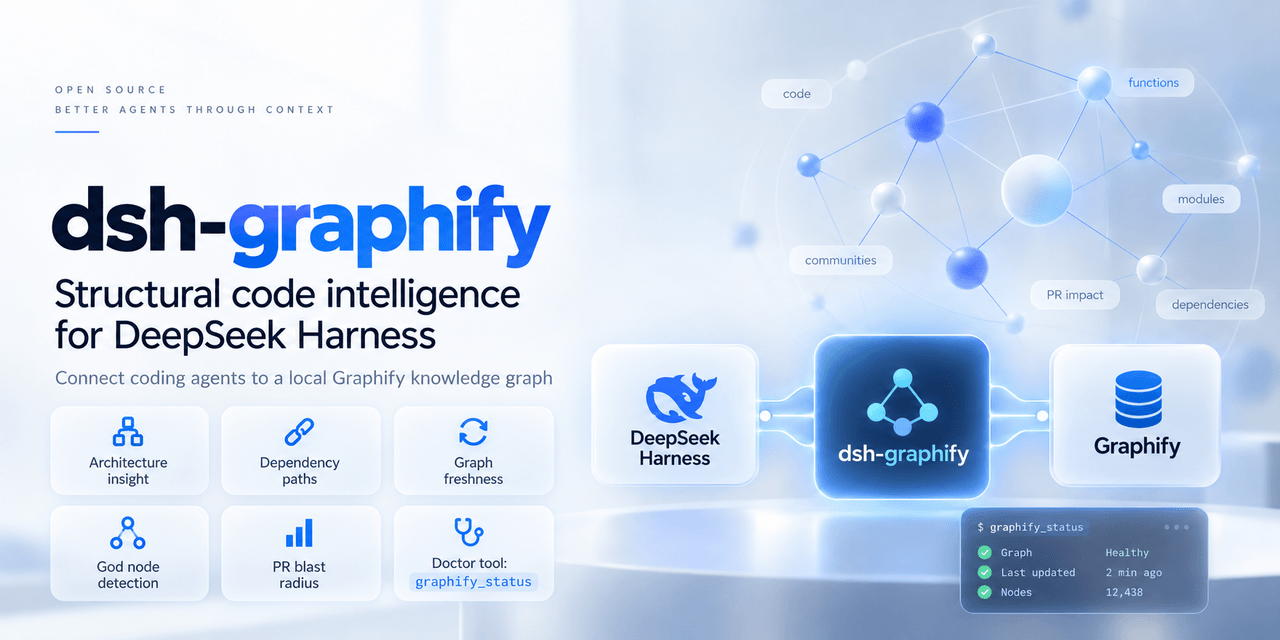
dsh-graphify connects Graphify's code knowledge graph to DeepSeek Harness (DSH). It helps an agent move from a question to the relevant symbols, dependencies, architectural communities, and change impact without treating a repository as an unstructured pile of files.
catalog descriptioncatalog 简介 / catalog description:Native Graphify knowledge graph plugin for DeepSeek Harness (DSH) — code intelligence, god nodes, and topological agent tools.
Project Overview项目介绍
This is a DeepSeek Harness plugin that connects to Graphify, a local knowledge graph tool. It supports architecture queries, dependency analysis, and pull request impact analysis for project code structure analysis. It requires Graphify with MCP extension and a pre-built knowledge graph, and use native Graphify CLI in headless mode.
这是DeepSeek Harness连接Graphify本地知识图的集成插件,核心能力是提供架构查询、依赖路径分析、PR影响分析等功能,适用于项目代码结构分析和拉取请求变动评估。注意使用前需先安装带MCP扩展的Graphify并构建项目知识图,无界面模式需用Graphify原生CLI。
请帮我了解并安装插件:【dsh-graphify-plugin】【https://github.com/QuantumKuba/dsh-graphify-plugin】Send this message to DSH in your current session. CLI install commands may not be accurate across systems — DSH will figure it out for you.把上面这条消息直接发给当前会话里的 DSH,让它帮你了解并安装。安装命令不一定准确,发给 DSH 更稳。
Or use CLI install (for developers)或使用命令行安装(适合开发者)
CLI Install命令行安装
dsh plugin --profile web add dsh-graphify把 QuantumKuba/dsh-graphify-plugin 加入你的 DSH 配置(web profile)即可启用。
READMEREADME
dsh-graphify
Give DeepSeek Harness a current, local map of your codebase.
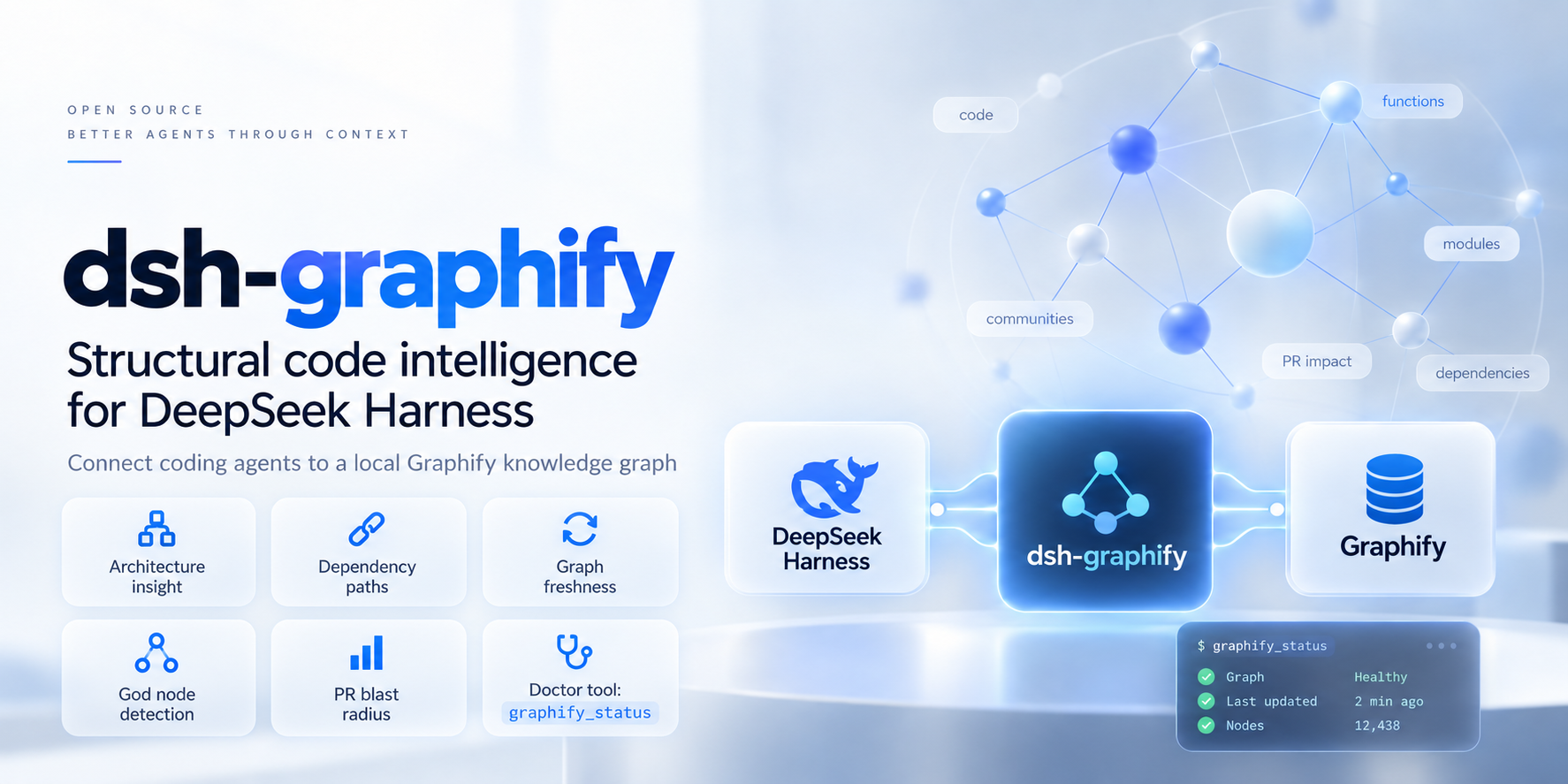
dsh-graphify connects Graphify's code knowledge graph to DeepSeek Harness (DSH). It helps an agent move from a question to the relevant symbols, dependencies, architectural communities, and change impact without treating a repository as an unstructured pile of files.
Why use it?
Graphify is the local graph engine; dsh-graphify is the DSH-native layer that makes it practical in an agent session.
| With a raw code search workflow | With dsh-graphify |
|---|---|
| The agent repeatedly guesses paths, greps, and reads broad files. | The agent can start from symbols, dependency paths, communities, and graph-backed project context. |
| A graph can silently describe an older checkout. | Freshness checks identify stale graphs and can warn or safely run an incremental code update. |
| Every graph capability is exposed, even when a smaller model needs only navigation. | Compact mode provides six focused tools for local 20B–30B models; full mode exposes the complete set. |
| MCP setup and failures are separate from the DSH session. | The plugin resolves the active session project, manages the Graphify process, and provides graphify_status for diagnosis. |
This is not a claim that a graph replaces source reading or tests. It gives the agent a reliable starting map, so it can spend its context budget on the code that matters.
Install and use it
Before you start
You need a working DSH profile, Node.js 22.18 or later, Python 3.10 or later, and uv. The plugin is tested on macOS and Ubuntu Linux; Windows is not yet verified.
1. Add the plugin to your DSH profile
dsh plugin --profile <profile> add dsh-graphify
For example, replace <profile> with the profile you normally use to run DSH. The bundle activates itself; you do not need to hand-edit a Cordis configuration for the default setup.
2. Install the local Graphify runtime
uv tool install 'graphifyy[mcp]==0.9.57'
If Graphify is unavailable, DSH can still start. Ask for graphify_status after installing it; the plugin discovers the runtime on the next check or tool call, without a DSH restart.
3. Build a graph for a repository
Start DSH from the repository you want to explore:
cd /path/to/your/repository
dsh --profile <profile>
Then, in the DSH conversation, run:
/graphify
The command performs a full build and writes graphify-out/graph.json in that repository. Check the result with:
graphify_status
4. Ask architectural questions
Try requests that benefit from relationships instead of filename matching:
What are this repository's entry points and the most connected modules?
Before I change this interface, show the dependency path to its callers and summarize the likely blast radius.
Which community owns authentication, and where does it connect to the API layer?
Pick a mode
The default full mode exposes the complete Graphify capability set, including communities, god nodes, and pull-request impact. Use it when your model has ample tool-selection capacity or you need those specialist queries.
For local 20B–30B models, use compact. It registers six high-frequency tools: status, graph query, node inspection, neighbours, shortest path, and the session-scoped graph resource. Fewer choices help smaller models use the graph consistently.
Add an override only when you need one:
- insert:
    - id: dsh-graphify
      name: dsh-graphify
      config:
        toolMode: compact
        freshness:
          mode: warn
freshness.mode is warn by default. Choose auto when you want the plugin to coalesce safe incremental updates before a query; choose off only when you deliberately accept a static graph. A full /graphify build is required after documentation or other non-code changes, because incremental Graphify updates cover code extraction only.
What the plugin adds
- Session-aware project resolution: graph requests follow the active DSH workspace. Model-invoked access outside that workspace is blocked by default.
- Freshness you can inspect:
graphify_statusreports the resolved project, graph path, runtime availability, connection state, and whether the graph matches the indexed source state. - Safe update policy: incremental updates run only for changes the plugin can prove are code-only; otherwise it keeps the graph marked stale and asks for a full build.
- DSH-native operation:
/graphifybuilds or updates the receiving session's project and shows its durable result in DSH Web. - Resilient local runtime: the plugin discovers Graphify automatically and reconnects after unexpected MCP-process exits.
Common tasks
| Goal | In DSH |
|---|---|
| Build or fully refresh the graph | /graphify or /graphify build |
| Update changed code files | /graphify update |
| Diagnose installation, project selection, or stale data | graphify_status |
| Find a symbol and related architecture | Ask the agent to query the graph, then inspect the returned nodes and paths. |
| Analyse a risky change | Ask for dependents, shortest paths, communities, or PR impact before editing. |
/graphify update is intentionally conservative. Run /graphify after changes to Markdown, package metadata, configuration, or any other non-code source that should be represented in the graph.
Configuration reference
The defaults work for most single-repository sessions. These are the settings users commonly change:
| Setting | Default | Use it when |
|---|---|---|
toolMode |
full |
Set compact for focused navigation with smaller local models. |
freshness.mode |
warn |
Set auto for safe pre-query code updates, or off for an intentionally static graph. |
graphifyVersion |
unset | Pin the Graphify version used by automatic uv fallback. |
graphPath |
auto-detected | Point to a non-standard graph.json location. |
cwd |
active session project | Supply a fallback project directory when a session has no workspace. |
allowExternalProjects |
false |
Allow model tools to access projects beyond the session workspace. |
toolPrefix |
empty | Avoid tool-name collisions in a larger DSH profile. |
See src/config.ts for the complete, typed configuration schema and defaults.
Troubleshooting
| Symptom | What to do |
|---|---|
graphify_status says the runtime is unavailable |
Run the uv tool install command above, then run graphify_status again. |
| No graph is found | Start DSH in the repository and run /graphify. |
| The graph is stale after docs or configuration edits | Run /graphify for a full build. |
| The wrong project is selected | Start DSH from the intended repository, or configure cwd or graphPath. |
| A model needs another checkout | Keep the default isolation where possible; otherwise set allowExternalProjects: true deliberately. |
Compatibility and development
The package supports @deepseek-ai/cordis >=4.0.0 <5 and is tested with Graphify 0.9.57. It ships a prebuilt DSH bundle and can be developed locally with:
pnpm run typecheck
pnpm run build
pnpm test
pnpm run test:drift
Use GRAPHIFY_E2E=1 pnpm run test:e2e to exercise a live local Graphify installation. Contribution guidance is in CONTRIBUTING.md.
Evidence and next steps
BENCHMARK.md defines the planned, reproducible evaluation of Graphify-assisted agents against the baseline. It is an experimental protocol, not performance results. For Graphify's graph engine, supported languages, and upstream CLI documentation, visit Graphify.
Related相关推荐
-
 modusensus/dsh-mneme
🧠 The memory that dreams — cross-session memory for DeepSeek Harness. Offline & private, auto-consolidates in its sleep…
modusensus/dsh-mneme
🧠 The memory that dreams — cross-session memory for DeepSeek Harness. Offline & private, auto-consolidates in its sleep…
-
 1841220388zzzcccxxx-star/dsh-git-graph
Embedded git repository graph visualizer for the DeepSeek Harness Web GUI | 嵌入式 Git 仓库图谱可视化插件(提交历史图 / 分支过滤 / 文件 diff / V…
1841220388zzzcccxxx-star/dsh-git-graph
Embedded git repository graph visualizer for the DeepSeek Harness Web GUI | 嵌入式 Git 仓库图谱可视化插件(提交历史图 / 分支过滤 / 文件 diff / V…
- Breeze136/dsh-kb-rag 本地优先的文献知识库 RAG(DeepSeek Harness 插件):混合检索正文与图注,把模糊记忆定位到具体段落与图表,DOI 一键直达原文。Local-first literature RAG for DSH — turn a fuz…
- CraZY222123/dsh-self-evolve Self-evolve memory plugin for DeepSeek Harness: learns from your own sessions, injects token-budgeted preference summari…
- Nzssm1/dsh-factor-investing A DeepSeek Harness (DSH) agent preset for institutional multi-factor stock-selection research: methodology knowledge bas…
- TindalosKorone/dsh-cheatengine DSH plugin bridging DeepSeek Harness agents to Cheat Engine: dynamic debugging, memory scanning, pointer analysis, break…
-
 VinsonWild/Wangdefa.Memory
Wangdefa.Memory 是一个为本地数字分身Agent 设计的五层记忆体组件,数据完全保留在本地,不依赖云端,达到轻量、白盒可控、可解释,未来将进一步往企业级原生记忆体方向拓展。
VinsonWild/Wangdefa.Memory
Wangdefa.Memory 是一个为本地数字分身Agent 设计的五层记忆体组件,数据完全保留在本地,不依赖云端,达到轻量、白盒可控、可解释,未来将进一步往企业级原生记忆体方向拓展。
-
 Max-Null/dsh-memory
Cross-session plaintext memory for DeepSeek Harness: suggested → human-approved, searchable, human owns the data · 跨会话明文…
Max-Null/dsh-memory
Cross-session plaintext memory for DeepSeek Harness: suggested → human-approved, searchable, human owns the data · 跨会话明文…