SA1992X/dsh-ctrl-enter-submit
DeepSeek Harness (DSH) 插件:将文本输入的提交快捷键从 Enter 改为 Ctrl/Cmd+Enter。覆盖主对话框与 Agent 提问卡片(askuserquestion)的所有输入控件;可在「设置 → 插件」中随时开关,禁用后恢复默认行为。
catalog descriptioncatalog 简介 / catalog description:轻松换行
Project Overview项目介绍
This is a plugin for DeepSeek Harness (DSH) that changes the input submit shortcut from Enter to Ctrl/Cmd+Enter. It works on all input controls in the main composer and agent question cards, can be toggled in DSH plugin settings, and requires DSH web v0.1.0-rc6 or later.
这是DeepSeek Harness(DSH)的插件,可将输入提交快捷键从Enter改为Ctrl/Cmd+Enter,覆盖主输入框和Agent提问卡片的所有输入控件,支持在插件设置中开关,禁用后恢复默认行为,要求DSH网页版0.1.0-rc6及以上版本。
请帮我了解并安装插件:【dsh-ctrl-enter-submit】【https://github.com/SA1992X/dsh-ctrl-enter-submit】Send this message to DSH in your current session. CLI install commands may not be accurate across systems — DSH will figure it out for you.把上面这条消息直接发给当前会话里的 DSH,让它帮你了解并安装。安装命令不一定准确,发给 DSH 更稳。
Or use CLI install (for developers)或使用命令行安装(适合开发者)
CLI Install命令行安装
dsh plugin --profile web add dsh-ctrl-enter-submit把 SA1992X/dsh-ctrl-enter-submit 加入你的 DSH 配置(web profile)即可启用。
READMEREADME
dsh-ctrl-enter-submit


English | 中文
DeepSeek Harness (DSH) 插件:将文本输入的提交快捷键从 Enter 改为 Ctrl/Cmd+Enter。覆盖主对话框与 Agent 提问卡片(ask_user_question)的所有输入控件;可在「设置 → 插件」中随时开关,禁用后恢复默认行为。
行为
| 按键 | 插件启用时 | 插件禁用后 |
|---|---|---|
| Enter | 多行框换行;单行框/选项按钮不动作 | 提交消息 / 回答 / 下一题 |
| Ctrl/Cmd+Enter | 提交消息 / 回答 / 下一题 | 提交(DSH 原本就支持) |
| Shift+Enter | 多行框换行 | 提交消息(DSH 原生行为) |
适用范围:主对话框 composer,以及 Agent 提问卡片(ask_user_question)的所有输入控件——多行 textarea(普通 Enter / Shift+Enter 换行)、单行自定义输入框(普通 Enter 不动作)、选项按钮(普通 Enter 不再选中/跳题,鼠标点击与空格选择不受影响)。
/ 和 @ 触发菜单打开时,Enter 仍然正常选择菜单项,不会被拦截。输入法组合状态下也不会被拦截。
安装
从插件市场安装:打开 Settings → Plugin Market,搜索 dsh-ctrl-enter-submit,一键安装。
或用命令行:
dsh plugin --profile web add dsh-ctrl-enter-submit
安装后刷新浏览器页面即可生效(纯客户端插件,无需重启服务)。
启用 / 禁用
在 DSH Web 界面的 设置 → 插件(Plugins) 中找到 ctrl-enter-submit,用开关切换:
- 关闭:立即恢复 Enter 提交(刷新页面后生效)
- 打开:恢复 Ctrl/Cmd+Enter 提交
卸载:
dsh plugin --profile web remove dsh-ctrl-enter-submit
工作原理
插件在浏览器端的 document 捕获阶段拦截 keydown 事件,因此一定早于编辑器根元素上的键盘监听与 React 在容器上的委托监听:
- 主对话框输入面按版本分两种:
- DSH ≥ 0.1.2:composer 是 Lexical
contenteditable([data-composer-input]),普通 Enter 会被伪装成 Shift+Enter,由 DSH 自己的INSERT_LINE_BREAK命令插入换行,与用户按住 Shift 按 Enter 完全一致;伪装失败时退化为阻断提交链路 - 更早版本:composer 是
textarea,普通 Enter 与 Shift+Enter 调用stopImmediatePropagation()阻止 React 的onKeyDown(即 DSH 的提交逻辑),但不调用preventDefault(),因此照常换行
- DSH ≥ 0.1.2:composer 是 Lexical
- Ctrl/Cmd+Enter:一律放行,由 DSH 正常提交
/、@触发菜单打开时不接管,Enter 仍然选择候选项;输入法组合状态(中文/日文/韩文输入等)也不接管- 无会话的工作区引导态(composer 不可编辑)不接管
- 插件 Host 端为空操作,所有功能均在浏览器 Client 端实现
兼容性
- 需要 dsh web
0.1.0-rc.6或更高版本;已在0.1.2-rc.1的 contenteditable composer 上验证 - 在 Windows、macOS、Linux 上均可工作(Ctrl 和 Cmd 都识别)
本地开发
用本地路径以链接方式安装,改完 client.js 后刷新浏览器即可看到效果,无需重新发布:
dsh plugin --profile web add ./dsh-ctrl-enter-submit
DSH Desktop 用的是 desktop profile,把 --profile web 换成 --profile desktop 即可。
English
A DeepSeek Harness (DSH) plugin that changes the submit shortcut from Enter to Ctrl/Cmd+Enter. It covers the main composer and every input control in the agent question card (ask_user_question). Toggle it on/off anytime in Settings → Plugins; disabling restores the default Enter-submit behavior.
Behavior
| Key | Plugin enabled | Plugin disabled |
|---|---|---|
| Enter | Newline in multiline fields; no action in single-line inputs / option buttons | Submits the message / answer / advances |
| Ctrl/Cmd+Enter | Submits the message / answer / advances | Submits (DSH supports this natively) |
| Shift+Enter | Newline in multiline fields | Submits the message (DSH native behavior) |
Scope: the main composer and the agent question card (ask_user_question) — multiline textarea (plain Enter / Shift+Enter insert a newline), single-line custom-answer input (plain Enter does nothing), and option buttons (plain Enter no longer selects/advances; mouse click and Space still select).
When the / or @ candidate menu is open, Enter selects the highlighted item as usual. IME composition is never intercepted.
Install
From the Plugin Market: open Settings → Plugin Market, search for dsh-ctrl-enter-submit, and install with one click.
Or from the command line:
dsh plugin --profile web add dsh-ctrl-enter-submit
Refresh the browser page after installing (client-only plugin, no restart needed).
Enable / Disable
Find ctrl-enter-submit in Settings → Plugins and toggle it:
- Off: Enter submits again (takes effect after a page refresh)
- On: Ctrl/Cmd+Enter submits
To uninstall:
dsh plugin --profile web remove dsh-ctrl-enter-submit
How it works
The plugin intercepts keydown on document during the capture phase, so it always runs before the editor root's keyboard listeners and React's delegated listeners:
- The composer input surface depends on the DSH version:
- DSH ≥ 0.1.2: the composer is a Lexical
contenteditablehost ([data-composer-input]); plain Enter is turned into a Shift+Enter gesture handled by DSH's ownINSERT_LINE_BREAKcommand, exactly like holding Shift while pressing Enter. If the gesture cannot be applied, the plugin falls back to blocking the submit chain. - Older versions: the composer is a
textarea; plain Enter and Shift+Enter callstopImmediatePropagation()so React'sonKeyDown(DSH's submit logic) never sees them, without callingpreventDefault(), so the textarea still inserts a newline.
- DSH ≥ 0.1.2: the composer is a Lexical
- Ctrl/Cmd+Enter is always left untouched and submits as usual.
- While the
/or@trigger menu is open the key is not intercepted, and IME composition is never intercepted. - The non-session workspace-trigger state (composer not editable) is left untouched.
- The host entry is a no-op; all behavior lives in the browser client.
Compatibility
- Requires dsh web
0.1.0-rc.6or later; verified against the contenteditable composer of0.1.2-rc.1. - Works on Windows, macOS, and Linux (both Ctrl and Cmd are recognized).
License
MIT
Related相关推荐
- xiaozhe7772222/dsh-opencode-zen 0 元接入 6 个免费大模型:OpenCode Zen 免费档模型零配置接入 DeepSeek Harness,免注册免充值,内置 6 个免费模型,多 Key 轮换与限流退避。
-
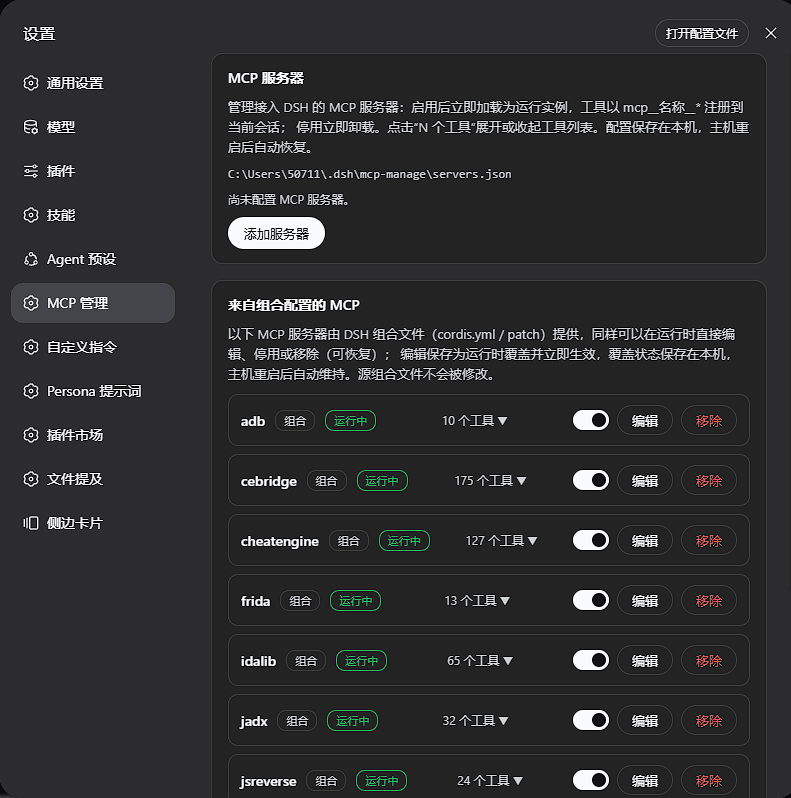 null119/dsh-mcp-manage
DSH(DeepSeek Harness)Web GUI 插件:在设置页管理 MCP 服务器——列出已安装工具,添加/编辑/删除、启用/停用;组合配置提供的 MCP 同样可在运行时直接编辑、停用、移除并恢复,无需重启宿主。
null119/dsh-mcp-manage
DSH(DeepSeek Harness)Web GUI 插件:在设置页管理 MCP 服务器——列出已安装工具,添加/编辑/删除、启用/停用;组合配置提供的 MCP 同样可在运行时直接编辑、停用、移除并恢复,无需重启宿主。
-
 HuanLinOTO/dsh-plugin-sleep
向模型暴露 sleep 工具,按指定毫秒暂停执行后返回,支持取消/clamp | Exposes a sleep tool that pauses for specified ms then returns, with cancellati…
HuanLinOTO/dsh-plugin-sleep
向模型暴露 sleep 工具,按指定毫秒暂停执行后返回,支持取消/clamp | Exposes a sleep tool that pauses for specified ms then returns, with cancellati…
- xx-hub/dsh-craft-your-textbook
-
 Apageoflove/DSH-changeproof
变更证明(ChangeProof)— DeepSeek Harness 插件:代码改动后确认改动的行真的被测试覆盖到
Apageoflove/DSH-changeproof
变更证明(ChangeProof)— DeepSeek Harness 插件:代码改动后确认改动的行真的被测试覆盖到
- xiaozhe7772222/dsh-api-key-pool API Key rotation pool for DeepSeek Harness: multi-key round-robin, failover on 401/403/429, cooldown & recovery, Web UI …
-
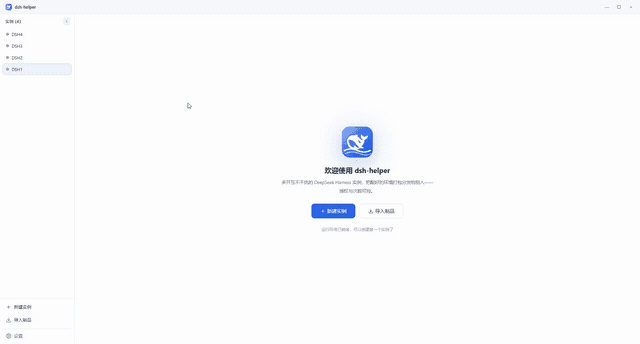 x102201/dsh-helper
🖥️ 一台电脑并行无限 DeepSeek Harness 实例 · 🔀 每个 dsh 一个专职实例 · 🪟 同一工作区并行 · 📦 .dshpack 配置交付
x102201/dsh-helper
🖥️ 一台电脑并行无限 DeepSeek Harness 实例 · 🔀 每个 dsh 一个专职实例 · 🪟 同一工作区并行 · 📦 .dshpack 配置交付
-
 kairoz9/dsh-mcp-admin
dsh plugin for MCP status inspection and server management | dsh 的 MCP状态查看与服务管理插件
kairoz9/dsh-mcp-admin
dsh plugin for MCP status inspection and server management | dsh 的 MCP状态查看与服务管理插件