sakuraqqq/dsh-auto-paste
一个DeepSeek Harness插件,可自动将粘贴的大段文本保存为附件文件
Project Overview项目介绍
dsh-auto-paste is a DSH plugin that intercepts large text pastes (default >500 chars) in the web client input, saves them to pastes/<timestamp>.txt in the session workspace, and inserts a path reference so the model can read the file. A save_paste tool is also registered for model-driven saves. Use it on the web profile when users paste long content. Caveat: pastes over 1 MiB are rejected and fall back to plain paste; full end-to-end tool calls require DEEPSEEK_API_KEY.
dsh-auto-paste 是 DSH 插件:web 客户端输入框粘贴超过 500 字符的文本时,自动存为当前会话工作区 pastes/<时间戳>.txt,并在消息里插入路径引用供模型读取;同步注册 save_paste 工具供模型主动调用。适用于 web profile 下贴长文本场景。注意:超过 1 MiB 的粘贴会被拒绝并回退为普通粘贴;端到端验证需 DEEPSEEK_API_KEY。
请帮我了解并安装插件:【dsh-auto-paste】【https://github.com/sakuraqqq/dsh-auto-paste】Send this message to DSH in your current session. CLI install commands may not be accurate across systems — DSH will figure it out for you.把上面这条消息直接发给当前会话里的 DSH,让它帮你了解并安装。安装命令不一定准确,发给 DSH 更稳。
Or use CLI install (for developers)或使用命令行安装(适合开发者)
CLI Install命令行安装
dsh plugin --profile web add dsh-auto-paste把 sakuraqqq/dsh-auto-paste 加入你的 DSH 配置(web profile)即可启用。
READMEREADME
dsh-auto-paste
A DeepSeek Harness plugin generated by
create-dsh-plugin(tool template) and extended with a web client paste listener. 由 create-dsh-plugin 生成并扩展的 DeepSeek Harness 插件:输入框大段粘贴自动存为附件文件。
Release / 发布状态
- npm:
dsh-auto-paste@0.1.3(npm 页面)—— 已发布到官方源registry.npmjs.org,dist-tag: latest。安装:npm i dsh-auto-paste(或--save-exact锁版)。 - 源仓库:
https://github.com/sakuraqqq/dsh-auto-paste,tagv0.1.0。 - 许可:MIT(见下)。
- 同步提示:npm 发布后国内镜像(npmmirror)同步有几秒到几分钟延迟,以官方 registry 为准。
License / 许可
MIT License — Copyright (c) 2026 misakamaster。 本插件以 MIT 许可开源:可自由使用、修改、再分发(含商用),需保留版权声明与许可文本。详见 LICENSE。 反馈(bug/建议)欢迎提交:QQ 群测试反馈或直接联系作者。
What it does / 功能
Web 客户端粘贴钩子(主路径) —
dsh.client.platform: web。在输入框粘贴超过阈值(默认 500 字符)的文本时:- 客户端拦截粘贴事件,通过现有 connection RPC(
/api→ Typert gateway)调用宿主pasteStore/savePaste; - 宿主把文本写入当前会话工作区的
pastes/<时间戳>.txt; - 输入框里插入文件路径引用(如
[已保存大段粘贴为附件: pastes/20260815-103000.txt (1234 字符)]),消息里引用该路径,模型可读该文件。其中 N 是 UTF-16 code units(即 JS 的字符串长度:emoji/代理对算 2,CJK 算 1),与 UTF-8 字节数不是一回事——这个口径是冻结的,已发消息里的引用数字不会被改写。 - 保存失败时会尝试把原始文本插回输入框,并如实说明是否插回成功:插回去了就说已按原样粘贴;没插回去会明说「没能自动插回、内容仍在剪贴板,请手动 Ctrl+V 重试」,不做未经验证的承诺。
- 超过 1 MiB 的文本会被服务端拒绝(大小上限,防资源耗尽):报错并回退为普通粘贴,不落盘。
- 客户端拦截粘贴事件,通过现有 connection RPC(
save_paste 工具(纪律兜底) — 宿主同时注册
save_paste工具,模型在用户贴大段文字时可主动调用,把文本持久化为pastes/<时间戳>.txt并在回复中引用路径。工具输出只含path/bytes/chars(不含本机绝对路径,RPC 结果同样收窄:绝对路径含用户名与目录结构,仅宿主内部使用)。建议在项目AGENTS.md加一行纪律:## dsh-auto-paste 纪律 用户粘贴大段文字(约 500 字符以上)时:若输入框钩子未拦截,主动调用 save_paste 工具 把文本存入 pastes/<时间戳>.txt,并在回复中引用该工作区相对路径,不要复述原文。
可选集成:dsh-better-sidebar(在侧栏查看/编辑粘贴文件)
装了 dsh-better-sidebar 时,粘贴后出现的药丸会多一个 「查看」 按钮 —— 点击在侧栏的编辑器里打开该 pastes/*.txt,改完可直接保存回原文件;没装则只显示「✕ 移除引用」,其余功能完全不受影响。集成走可选注入(ctx.inject(['betterSidebar']) + features.includes('openFile') 能力门控):服务缺席时既不会报错,也不会出现点不动的死按钮。
Install / 安装与激活
方式一:从 npm 安装(推荐)
npm i dsh-auto-paste                          # 最新版(dist-tag: latest);--save-exact 可锁版
npm i dsh-auto-paste@0.1.3                    # 或指定版本
# 在插件父目录执行,以包名注册到目标 profile:
dsh plugin --profile web add dsh-auto-paste
dsh --profile web            # 重启 web profile,观察: [dsh-auto-paste] host ready ...
# 刷新浏览器页面后,控制台可见: [dsh-auto-paste] client paste listener attached — threshold 500 chars until the host's config arrives
#                              随后: [dsh-auto-paste] config from host: minChars=500 (deployment), maxBytes=1048576
方式二:本地目录安装(开发/调试)
# 在插件父目录(本仓库根)执行;相对路径锚定调用目录:
dsh plugin --profile web add ./dsh-auto-paste
dsh --profile web
改动插件后:pnpm install && pnpm run build(tsc → dist/),然后重启 dsh --profile web 并刷新页面。
minChars 有两个入口:Settings → General 的「大段粘贴阈值」(存进 dsh 的设置文档,保存即生效、不用重启;旁边的「恢复默认」清掉这次覆盖),以及 cordis.patch.yml 的 row config(部署默认值,改完只需重启 dsh、不用重新构建)。用户设置优先,没设置时用部署默认值;部署里没有 settings 提供方时,设置行会说明原因并禁用保存。
host 始终是唯一权威:客户端半身拿不到 row config(dsh 的 dsh.client 只认 platform/inject/external/immediately,启动图里不带 config),它在启动时、以及每次保存设置后,都用 pasteStore/getConfig RPC 取生效值;取不到时用 500 兜底并在控制台标出来源。maxBytes 只有 row config 一个入口(属部署口径)。
Verification without an API key / 无 key 验证
dsh --profile web --dump-config | grep dsh-auto-paste   # 配置层含本行
dsh plugin --profile headless add ./dsh-auto-paste
dsh --profile headless "run a probe"                    # host 半身加载;模型调用会 MISSING_CREDENTIAL
Manifest checklist / 清单自查
-
dsh.bundle.patch→./cordis.patch.yml(dsh 加载插件的硬性要求,缺失只会被当作普通依赖安装) -
dsh.client.platform: web+exports["./client"]→dist/client.js -
exports["./typert"]→dist/typert.host.js(typert-loader 自动注册 remote 调用) - 代码无外发数据:插件不发起任何网络请求,只写工作区
pastes/下的本地文件
Dependencies pinned / 依赖锁定
@deepseek-ai/dsh-tools:0.1.0-rc.6(exact — thenext-tag line; npmlatestis stale).@deepseek-ai/cordis:^4.0.1(peerDependency — host provides it; runtime import ofServiceresolves through the profile's node_modules).zod:^4.4.3(Typert host schema instances, same line as in-box host remotes).
Pitfalls / 坑(从真实 spike 提炼,防呆)
- Node version: DSH requires Node ^22.19.0 || >=24.0.0. Older Node (e.g. v22.17) only warns EBADENGINE but may hit runtime issues — upgrade if you can.
- Node 版本:DSH 要求 ^22.19.0 || >=24.0.0。旧版本(如 v22.17)只告警 EBADENGINE,不阻断,但建议升级。
- npm dist-tag trap (the big one):
@deepseek-ai/dsh-toolslatestis a STALE 0.0.1-rc.1; the real line is under thenexttag (0.1.0-rc.x). This scaffold pins the next-tag version for you — nevernpm i @deepseek-ai/dsh-toolsover it.- npm dist-tag 坑(最大):
@deepseek-ai/dsh-tools的 latest 是过期的 0.0.1-rc.1,正确版本在 next tag。本脚手架已锁 next 版本,勿再手动 npm i 覆盖。
- npm dist-tag 坑(最大):
- Version-line alignment: keep every
@deepseek-ai/dsh-*package on the same0.1.0-rc.xline so pnpm does not install two module copies.- 版本线对齐:所有 @deepseek-ai/dsh-* 包统一用同一 0.1.0-rc.x 线,避免 pnpm 装两份模块。
@deepseek-ai/cordisis a peerDependency: import onlytype { Context }where possible (erased at compile). At runtime the host hands youctx— theServicebase class import resolves through the profile's node_modules.- @deepseek-ai/cordis 是 peerDep:尽量只 import type(编译期擦除),运行时 ctx 由宿主传入。
- Pure ESM: package.json must set
"type": "module"; build withmodule: esnext+moduleResolution: bundlerto keep bare specifiers.- 纯 ESM:package.json 必须 "type": "module";tsc 用 module:esnext + moduleResolution:bundler 保留 bare specifier。
dsh plugin add <dir>anchors relative paths to the INVOKING directory — run it from the parent directory, not from inside the plugin.- dsh plugin add
的相对路径锚定调用目录——要在插件的父目录执行。
- dsh plugin add
- In the bundle
cordis.patch.yml,nameis a package name (resolved via node_modules /$DSH_HOME/profiles/node_modules), not a relative path.- bundle 的 cordis.patch.yml 里 name 用包名(走 node_modules 解析),不要用相对路径。
- Registrations are effects:
ctx.tools.register()/ctx.on()auto-dispose on unload. Wrap your OWN resources (timers/connections) inctx.effect(() => { acquire; return cleanup }).- 注册是 effect:ctx.tools.register()/ctx.on() 卸载自动清理;自己的资源(timer/连接)要包 ctx.effect(() => {…; return cleanup})。
- Load order = service dependencies, never file order:
export const inject = ['tools']makes the plugin wait untilctx.toolsis ready.- 加载顺序靠服务依赖(inject),不靠文件顺序。
- Full end-to-end (model actually calls your tool) needs
DEEPSEEK_API_KEY; without it--verifyproves load/list/event, and the model call fails with MISSING_CREDENTIAL.- 端到端(模型真正调工具)需 DEEPSEEK_API_KEY;无 key 时 --verify 只能证明加载/列出/事件,模型调用会 MISSING_CREDENTIAL。
Related相关推荐
-
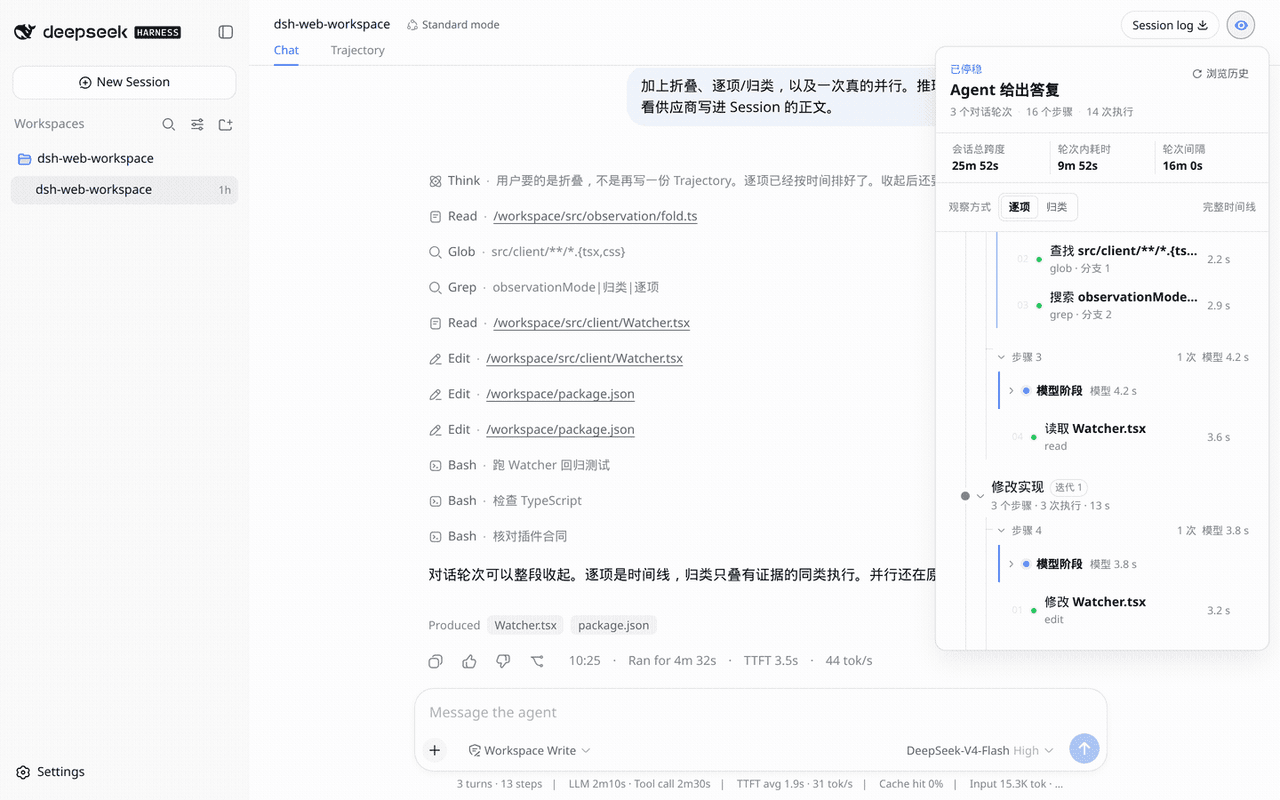 aa2246740/dsh-watcher
Read-only Agent work-path observer for DeepSeek Harness
aa2246740/dsh-watcher
Read-only Agent work-path observer for DeepSeek Harness
- CH4ACKO3/dsh-turn-fold Codex-style completed-turn folding for DeepSeek Harness, powered by dsh-harmony.
-
 chushixixin/dsh-harness-mcp-server
Expose DeepSeek Harness agent capabilities as an MCP server (brain=Hermes, arms=Harness)
chushixixin/dsh-harness-mcp-server
Expose DeepSeek Harness agent capabilities as an MCP server (brain=Hermes, arms=Harness)
- yefeng7531/dsh-whale-maid-mascot DeepSeek 娘 (whale maid) in-page mascot plugin for DeepSeek Harness web UI
-
 lehhair/dsh-split-panes
- WyxBUPT-22/dsh-plugin-edit-message
- renat3u/dsh-paseo DSH 的paseo插件扩展支持
- zerorigin-studio/dsh-deepseek-chat