simon300000/dsh-auto
使用审计代理自动批准
Project Overview项目介绍
dsh-auto is a native plugin built exclusively for DeepSeek Harness (DSH) that adds an Auto Approve permission preset to the DSH web UI. It replaces manual user approval for pending actions by spawning a restricted child DSH agent to review each escalation request and decide whether to allow or deny the action. To install the plugin, run the DSH CLI command dsh plugin --profile web add github:simon300000/dsh-auto, then restart the DSH web UI to activate the new permission preset.
Ordinary actions that fit within the workspace-write permission policy run directly without triggering the child reviewer. Only actions that require escalation get sent to the auto-approve reviewer, which runs in a read-only sandbox with a limited set of allowed tools. The reviewer can take at most four investigation steps before returning a structured decision, and three consecutive denials will interrupt the parent session’s turn. This plugin is ideal for DSH users who want to reduce the frequency of manual approval checks for their agent sessions.
The default configuration uses the deepseek-v4-flash model from deepseek-official with high reasoning effort, but users can customize the reviewer’s model provider, model, and all other runtime parameters. Language detection is automatic by default, but users can also force a specific language for the reviewer output. The plugin is released under the open source MIT license, currently only supports the DSH web UI, and requires a DSH restart after any changes to configuration or policy.
这是一个专门为 DeepSeek Harness (DSH) 开发的原生插件,为 DSH 网页端界面新增了「自动批准」权限预设。当会话中有操作需要批准时,插件会启动一个受限制的 DSH 子代理对操作进行审查,自动做出批准或拒绝的决定,无需用户手动介入。你可以通过 DSH CLI 命令 dsh plugin --profile web add github:simon300000/dsh-auto 完成安装,安装后重启网页端界面即可启用。
符合 workspace-write 规则的普通操作会直接执行,无需触发子代理审查,只有超出规则边界的操作才会进入自动审查流程。子代理采用只读沙箱运行,仅允许读写、搜索等有限工具,最多可进行 4 次调查步骤,最终输出结构化的决定结果。插件默认会中断连续 3 次被拒绝的父会话轮次,任意一次批准都会重置拒绝计数器,适合希望减少手动批准操作频率的 DSH 用户使用。
默认配置使用 deepseek-official 平台的 deepseek-v4-flash 模型,推理强度设为高,也支持用户自定义审查代理的服务商、模型和其他参数。语言默认自动检测,可强制指定为中文或英文。插件采用 MIT 许可开源,目前仅支持 DSH 网页端界面,修改配置或策略后需要重启 DSH 生效。
请帮我安装这个 DSH 插件。安装前先完成【兼容性检查 + 安全性检查】,检查通过再动手。

插件:dsh-auto(simon300000/dsh-auto)
仓库:https://github.com/simon300000/dsh-auto
本站详情页:https://www.yhbd.top/plugins/simon300000-dsh-auto/
本站登记:类型 plugin · 归类 原生 DSH 插件 · 许可证 MIT · ⭐ 6 · 最近提交 2026-09-10 · 主语言 JavaScript

按下面顺序执行,每步先把结论告诉我,再进入下一步:

【1 兼容性检查】
① 我这边:DSH 版本、Node 版本、操作系统、当前 profile(web / desktop)。
② 读它的 README、package.json、插件 manifest,列出它要求的 DSH 版本 / Node 版本 / 操作系统 / 外部依赖 / 需要另外先装的运行时。
③ 逐条比对,结论只写「满足 / 不满足 / 未知」三种;不满足的给出可行替代方案。
④ 检查是否和我已装的插件冲突:命令名重复、skill / tool 重名、端口占用、重复注册的 MCP server。

【2 安全性检查】
① 仓库可信度:和上面「本站登记」是否一致;star / fork 数、创建时间、最近提交,是否归档或长期停更。
② 安装脚本:逐行看 package.json 的 preinstall / install / postinstall,以及 install.sh、setup.ps1 之类脚本。出现 curl|bash、下载后直接执行、混淆代码、访问与插件功能无关的域名,立刻停下来告诉我,不要继续装。
③ 依赖:列出新增依赖,标出无人维护、或与知名包拼写近似的可疑包(typosquatting)。
④ 权限与副作用:它会读写哪些目录、访问哪些域名、需要哪些 DSH 权限(filesystem / network / shell / clipboard 等),以及怎么卸载和回滚。
⑤ 如果它要求 sudo / 管理员权限,或权限明显超出功能所需,先停下来问我。

【3 安装】
上面两步没有「不满足」和「高危项」时才执行;用官方推荐方式安装,不要自行提权。

【4 汇报】
用表格输出:检查项 / 结论 / 依据 / 是否需要我决策。拿不准的一律写「未知」并说明要我怎么确认——不要猜,也不要替我决定。
Send this message to DSH in your current session: it verifies compatibility and security first (answering met / not met / unknown item by item) and only installs once everything checks out — it will stop and ask you if it finds a high-risk item. The box scrolls; the copy is the full prompt. CLI install commands may not be accurate across systems, so DSH is the safer route.把上面这条消息直接发给当前会话里的 DSH:它会先核对兼容性与安全性(逐条给「满足 / 不满足 / 未知」),确认没问题再安装,有高危项会停下来问你。框内可滚动,复制到的是完整提示词;安装命令不一定准确,发给 DSH 更稳。
- Only 6 stars - very few users, little community feedback星标只有 6,几乎没人在用,遇到问题缺少社区反馈
DSH walks through these 9 checksDSH 会逐条核对这 9 项
Compatibility兼容性
- DSH, Node, OS and profile requirementsDSH 版本 / Node 版本 / 操作系统 / profile 是否满足要求
- External dependencies and runtimes (Electron / Python / Docker, ...)外部依赖与运行时(Electron / Python / Docker 等)是否齐备
- Conflicts with installed plugins: command names, skill / tool names, ports, duplicate MCP registration与已装插件是否冲突:命令名、skill / tool 重名、端口占用、重复 MCP 注册
Security安全性
- Repo matches the facts registered here; archived or abandoned?仓库是否与页面登记一致,是否归档或长期停更
- Safety of preinstall / install / postinstall and install.sh / setup.ps1preinstall / install / postinstall 与 install.sh、setup.ps1 是否安全
- curl|bash, download-then-execute, obfuscation, unrelated domains → stop immediatelycurl|bash、下载即执行、混淆代码、无关域名 → 立刻停止
- Typosquatting or unmaintained packages among the new dependencies新增依赖里有没有 typosquatting 或无人维护的包
- Requested permissions vs. what the feature actually needs申请了哪些权限、是否超出功能所需(filesystem / network / shell / clipboard)
- Any sudo / admin requirement, plus uninstall and rollback是否要求 sudo / 管理员权限,以及卸载与回滚方式
Anything uncertain must be marked unknown with a note on how to confirm it. This site's signal screen is a static snapshot, not a security audit.拿不准的必须标「未知」并说明要我怎么确认。本站的信号筛查是静态快照,不能替代安全审计。
Or use CLI install (for developers)或使用命令行安装(适合开发者)
CLI Install命令行安装
dsh plugin --profile web add github:simon300000/dsh-auto把 simon300000/dsh-auto 加入你的 DSH 配置(web profile)即可启用。
READMEREADME
dsh-auto
English | 中文
dsh-auto adds an Auto Approve permission preset to the DeepSeek Harness Web UI. Each action that requires approval is reviewed by a fresh, restricted DSH child Agent before the plugin allows or denies it.
The current release supports the Web UI only.
Screenshots
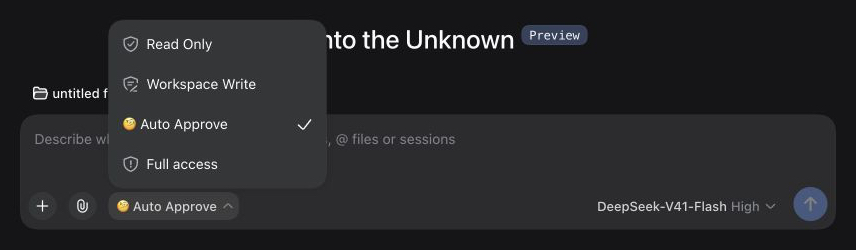
Select the 🧐 Auto Approve permission preset (DSH 0.1.5-rc.1, English UI):
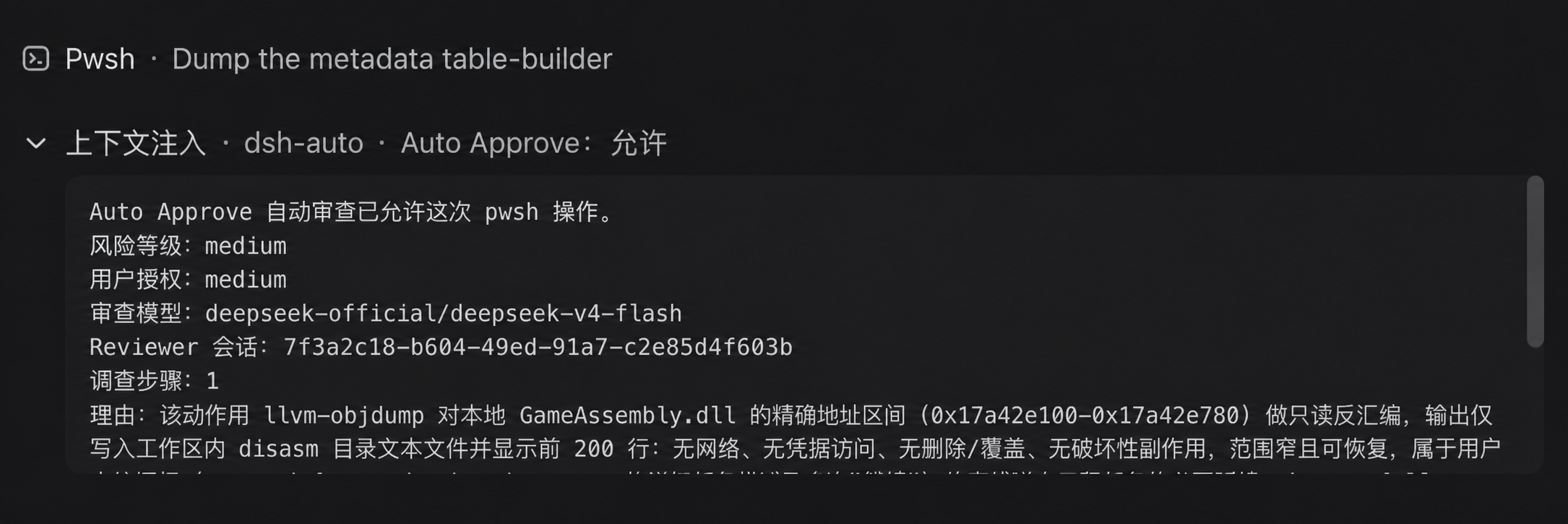
The Reviewer allows a bounded read-only action:
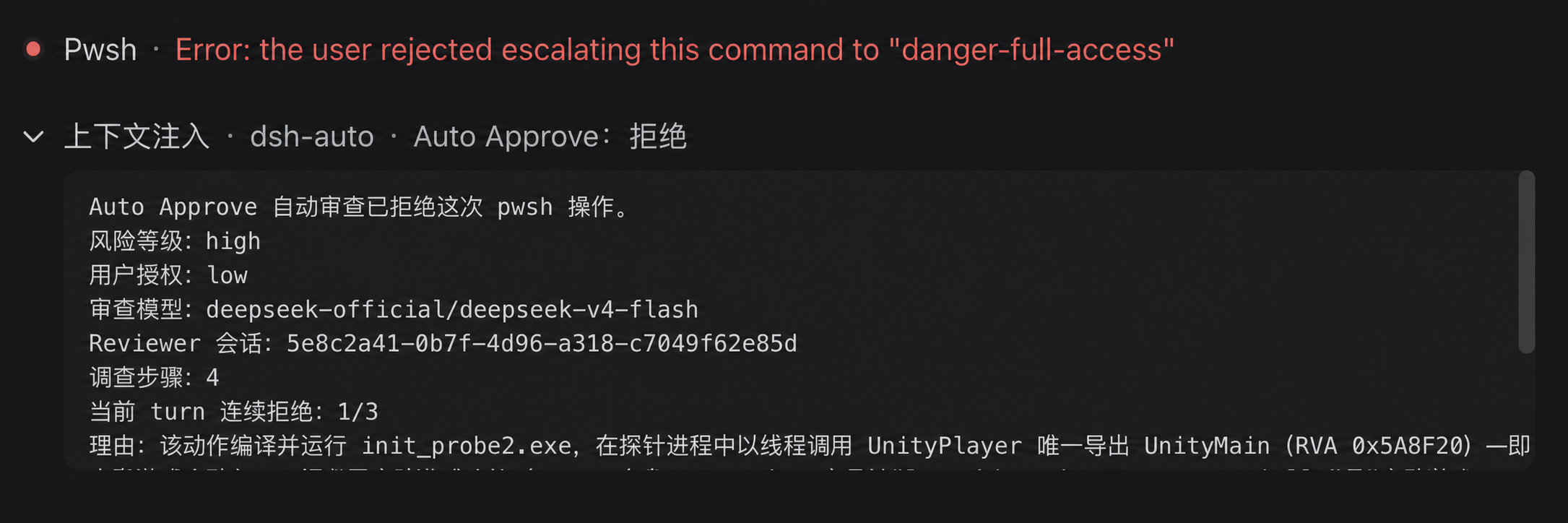
The Reviewer denies a high-risk action without sufficient user authorization:
How it works
flowchart TD
    action["Action"] --> sandbox{"Allowed by<br/>workspace-write?"}
    sandbox -- Yes --> execute["Execute directly"]
    sandbox -- "No: request escalation" --> review["🧐 Auto Approve"]
    review -- Allow --> approved["Execute this action once"]
    review -- Deny --> rejected["Reject the action"]
With Auto Approve selected, ordinary actions permitted by workspace-write run without a Reviewer call. The diagram shows the sandbox-escalation path; other tool approval rules can also trigger Auto Approve.
- The plugin handles
approval/requestonly when the session selectsAuto Approve. Other permission presets continue through DSH's existing approval chain. - Each approval starts one
spawnReviewer session. DSH's own agent loop handles any boundedread,glob, orgrepinvestigation and captures the final structured result; the plugin does not implement a separate model/tool loop. - The child is created with a read-only sandbox and
approval/policy = never. An execution guard denies every tool exceptread,glob,grep, and the scoped structured-output tool, permits no further subagents, and allows at most four investigation steps plus the final response step. Sensitive files may be inspected only when a minimal read-only check can change the decision. - The Reviewer receives the exact pending action, approval reason, current permissions, bounded raw session events, the main Agent's assembled system instructions, and AGENTS.md or equivalent workspace instructions. Stable instructions are serialized in a separate cacheable prefix before session identifiers, transcripts, permissions, and action data. Direct user messages, human answers returned by
ask_user_question, assembled system instructions, and workspace instructions can establish authorization; assistant content and other tool results remain untrusted evidence. - Only
outcomeis required in the structured result. A compact{"outcome":"allow"}defaults to low risk and unknown authorization; omitted fields on a denial default to high risk and unknown authorization. Explicit assessments may also containrisk_level,user_authorization, andrationale. The host always denies critical risk and denies high risk without at least medium user authorization. Invalid output, missing action data, timeout, cancellation-independent infrastructure failure, and tool failure all fail closed. - A successful model denial is not retried and never falls back to a user prompt. The default 90-second deadline covers child creation, all model steps, local read-only investigation, and final structured output.
- Three consecutive denials in the same parent turn interrupt that turn. Any allowed action resets the counter. Each approval is still isolated in its own child session.
Showing the opening section of the README — the full document lives in the repository以上为 README 开头摘要,完整文档在仓库内 · View the full README on GitHub →在 GitHub 查看完整 README →
Related相关推荐
-
 Minglink/dsh-infinite-gen-4
DeepSeek v4.1 flash 网络安全红队工具(无限四代) 求 Star 收藏 ⭐欢迎大家提交项目的改进
Minglink/dsh-infinite-gen-4
DeepSeek v4.1 flash 网络安全红队工具(无限四代) 求 Star 收藏 ⭐欢迎大家提交项目的改进
-
 kenryu42/cc-safety-net
A pre-execution guard for AI coding agents. It blocks destructive Git and file system commands, plus common attempts to …
kenryu42/cc-safety-net
A pre-execution guard for AI coding agents. It blocks destructive Git and file system commands, plus common attempts to …
-
 hyhmrright/brooks-lint
AI code reviews grounded in 12 classic engineering books — decay risk diagnostics with book citations, severity labels, …
hyhmrright/brooks-lint
AI code reviews grounded in 12 classic engineering books — decay risk diagnostics with book citations, severity labels, …
-
 toby-bridges/api-relay-audit
Local security audit for AI API relays and LLM proxies: detects prompt injection, model substitution, tool-call rewritin…
toby-bridges/api-relay-audit
Local security audit for AI API relays and LLM proxies: detects prompt injection, model substitution, tool-call rewritin…
-
 hashgraph-online/hol-guard
Open-source antivirus for AI agents: block risky tools, secret access, prompt injection, malicious packages, MCP servers…
hashgraph-online/hol-guard
Open-source antivirus for AI agents: block risky tools, secret access, prompt injection, malicious packages, MCP servers…
-
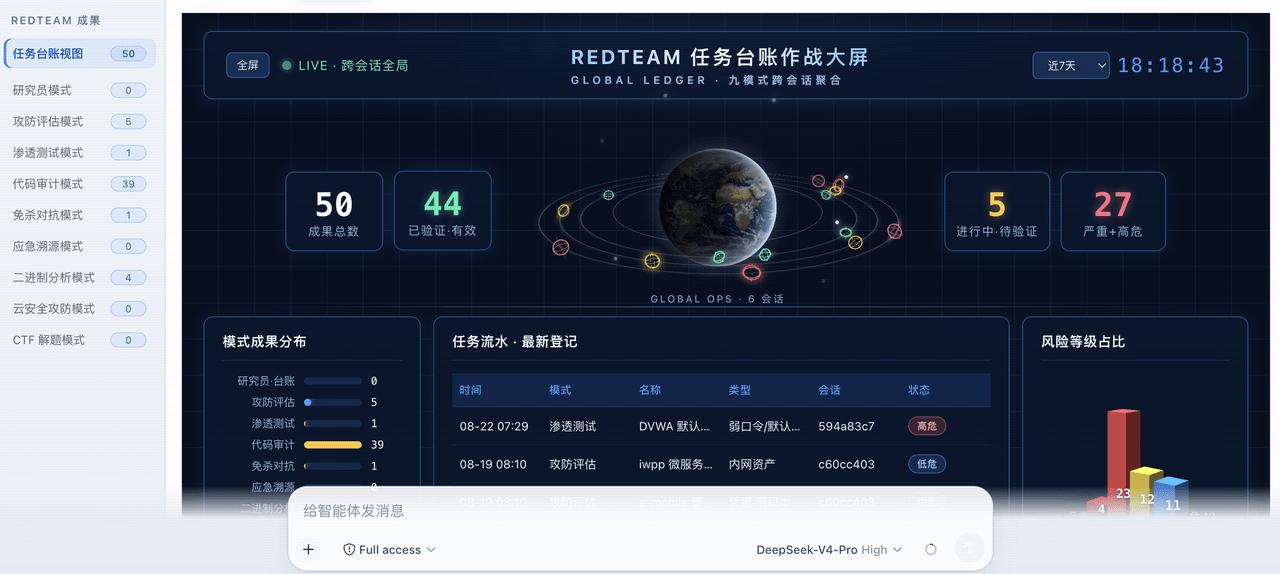 SeaOf0/dsh-redteam-model
基于dsh web实现的多种模式,目的是服务于redteam进行授权的安全研究,覆盖渗透测试、红队评估、代码审计等范围领域,请勿用于非法行为。(允许二开,赋予模块各位自己的业务逻辑,方法论只有自己熟练的才好用,好的方法论=好的生态)
SeaOf0/dsh-redteam-model
基于dsh web实现的多种模式,目的是服务于redteam进行授权的安全研究,覆盖渗透测试、红队评估、代码审计等范围领域,请勿用于非法行为。(允许二开,赋予模块各位自己的业务逻辑,方法论只有自己熟练的才好用,好的方法论=好的生态)
-
 howmp/dsh-pentest
面向 DeepSeek Harness(dsh)的渗透测试模式 @CloverSecLabs
howmp/dsh-pentest
面向 DeepSeek Harness(dsh)的渗透测试模式 @CloverSecLabs
-
 saya-ch/dsh-mobile
DeepSeek Harness 的 Android App 与安全远程访问插件,支持局域网/远程连接和高度自定义的移动界面与扩展能力。
saya-ch/dsh-mobile
DeepSeek Harness 的 Android App 与安全远程访问插件,支持局域网/远程连接和高度自定义的移动界面与扩展能力。