sluminositys/dsh-nested-followups
Ask a follow-up on any past answer in an isolated branch, keeping your main conversation clean. 针对任意历史回答发起追问,新问题在独立分支中展开,主对话保持干净。A conversation-tree plugin for DeepSeek Harness / DeepSeek Harness 会话树插件。
编辑导读Editor's Brief
## 核心特性
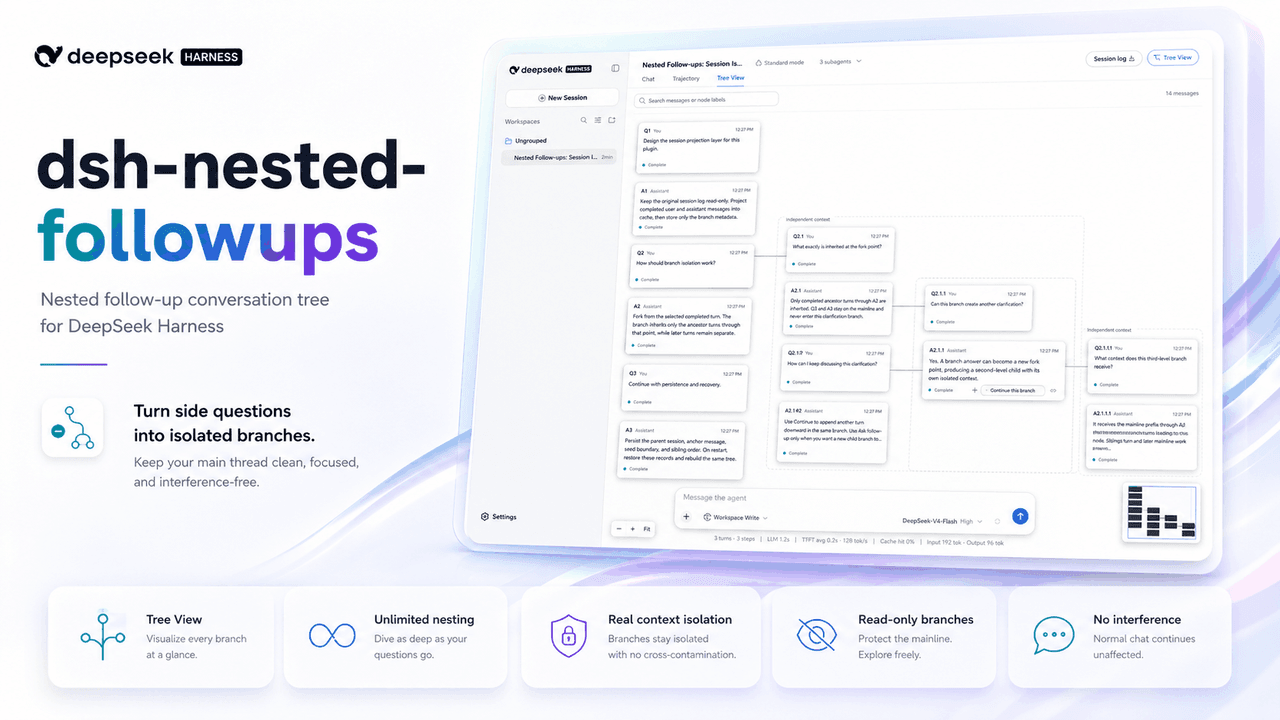
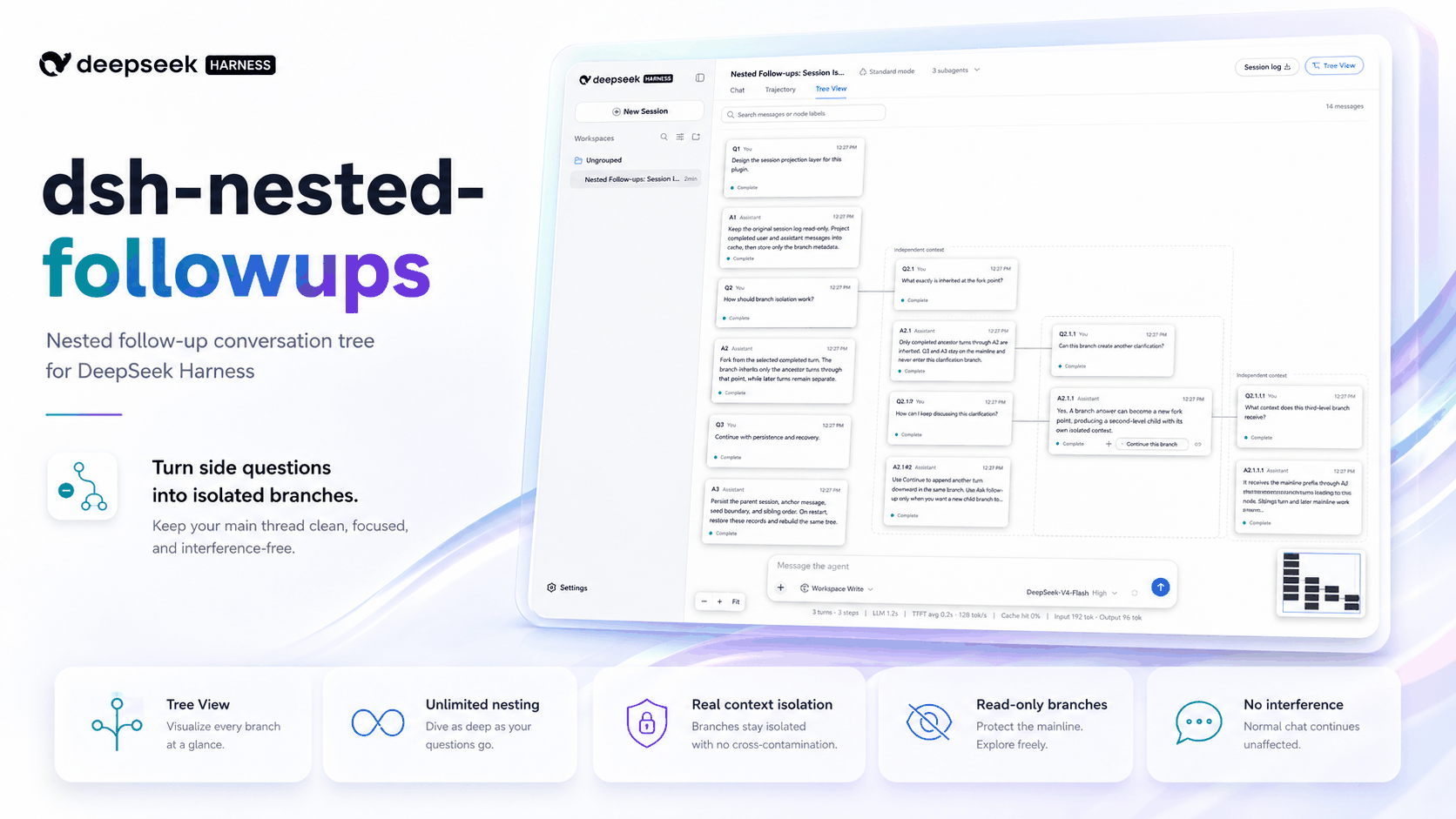
- 该插件为 DeepSeek Harness Web 界面添加树状视图,用户与助手消息以独立卡片展示,主对话向下延伸,分支向右生长。
- 可从任意已完成的助手回答发起追问,分支回答本身也可继续分叉,未声明嵌套限制。
- 每个分支通过官方 fork 机制创建为独立会话,仅继承到所选回答为止的对话,主对话与同级分支保持隔离。
- 分支以只读代理运行,可通过允许的读取和查询工具检查工作区,但不能修改工作区状态。
- 大型树使用渐进折叠,并提供圆点、胶囊、活动标记、搜索、聚焦、概览图、缩放控件,以及按会话恢复的布局。
## 使用场景
- 用户可以询问较早回答中某个术语的含义,而不会向主任务上下文添加无关问题。
- 用户可以在分支中询问某个文件的作用,因为分支可以读取工作区但不能修改它。
- 用户可以继续一个隔离分支,而不必新建会话并丢失到所选回答为止的上下文。
## 技术细节
- 分支会话被记录为 subagent-origin 会话,因此它们不会出现在侧边栏会话列表中,同时在主对话下保留分支历史。
- 只读执行在工具运行时强制执行,允许一组列出的读取、查询和检查工具,同时拒绝未识别工具和嵌套写入操作。
- 分支请求复用父会话预设,并保持工具定义、提示词段落和展示格式不变,使请求前缀与分支点处的主对话一致。
- 该插件通过 dsh plugin --profile web add dsh-nested-followups 集成到 DeepSeek Harness web profile,并在保持 Chat 视图不变的同时提供 Tree View。
## 注意事项
- README 说明其兼容未修改的 DeepSeek Harness 0.1.0-rc.7,并要求 Node.js 22.19 或更高版本以及 pnpm。
- 在此目标版本中,分支无法从标准聊天视图继续,因此读取和继续分支需在 Tree View 中进行。
- 分支可能会以内置 Subagent 菜单中的禁用行显示,尽管它们仍不会出现在侧边栏会话列表中。
## Core Features
- The plugin adds a tree view to the DeepSeek Harness web interface where user and assistant messages appear as separate cards, the main conversation runs downward, and branches grow to the right.
- Follow-up questions can be started from any completed assistant answer, and branch answers can themselves be branched without a stated nesting limit.
- Each branch is created as a separate session through the official fork mechanism, inheriting the conversation only up to the selected answer while the main conversation and sibling branches remain isolated.
- Branches run as read-only agents that may inspect the workspace through permitted read and query tools but cannot modify workspace state.
- Large trees use progressive collapse with dots, capsules, activity markers, search, focus, overview map, zoom controls, and restored layout per conversation.
## Use Cases
- A user can ask what a term in an earlier answer means without adding an unrelated question to the main task context.
- A user can ask what a file does from a branch because branches can read the workspace but cannot modify it.
- A user can continue an isolated branch instead of starting a new conversation that loses the context up to the selected answer.
## Technical Details
- Branch sessions are recorded as subagent-origin sessions so they stay out of the sidebar session list while preserving branch history under the main conversation.
- Read-only execution is enforced when tools run, permitting a listed set of read, query, and inspection tools while refusing unrecognized tools and nested write operations.
- Branch requests reuse the parent session preset and leave tool definitions, prompt sections, and presentation format unchanged so the request prefix matches the main conversation at the branch point.
- The plugin integrates with the DeepSeek Harness web profile through dsh plugin --profile web add dsh-nested-followups and provides Tree View alongside the unchanged Chat view.
## Notes
- The README states compatibility with an unmodified DeepSeek Harness 0.1.0-rc.7 and requires Node.js 22.19 or later with pnpm.
- Branches cannot be continued from the standard chat view in this target release, so reading and continuing branches happen in Tree View.
- Branches may appear as disabled rows in the built-in Subagent menu, although they remain excluded from the sidebar session list.
安装Install
dsh plugin --profile web add dsh-nested-followups把 sluminositys/dsh-nested-followups 加入你的 DSH 配置(web profile)即可启用。
READMEREADME
dsh-nested-followups
English | 中文
A plugin for DeepSeek Harness that adds a conversation tree to the web interface. Ask a follow-up question about any earlier answer, and it opens as an isolated branch instead of being appended to the end of your main conversation.




The problem it solves
A DeepSeek Harness conversation is linear. When you are part way through an engineering task and you want to ask what a term in an earlier answer means, you have two poor options: ask in the main conversation, which mixes an unrelated question into the task context and keeps sending it with every later request, or start a new conversation, which loses the context that made the question worth asking.
This plugin adds a third option. The follow-up becomes a branch that inherits the conversation up to the answer you asked about, and nothing else. Your main conversation never sees it.
Features
- A tree view of the current conversation. Every user and assistant message is a separate card. The main conversation runs downward; branches grow to the right.
- Follow-up questions at any depth. A branch answer can be branched from again, with no limit on nesting.
- Genuine context isolation. Each branch is a real, separate session created with the official fork mechanism, not a prompt-level instruction to ignore something.
- Read-only branches. A branch can read the workspace but cannot modify it, so a follow-up can never disturb work in progress in the main conversation.
- Progressive collapse for large trees. Each anchor folds to a dot, opens into one capsule per branch, and expands one level at a time, so a deep tree stays readable. Folded branches keep streaming and show activity markers.
- No interference with the standard interface. The regular chat view, the sidebar, and message rendering are unchanged. Branches do not appear in the session list.
- Reuses the model provider's cached context. A branch sends the same request prefix as the main conversation, so it does not pay to re-read the inherited history.
Requirements
| Requirement | Version |
|---|---|
| DeepSeek Harness | 0.1.0-rc.7 (unmodified) |
| Node.js | 22.19 or later |
| Package manager | pnpm |
Installation
dsh plugin --profile web add dsh-nested-followups
Restart the DeepSeek Harness web profile if it is already running.
Installing from source instead
git clone https://github.com/sluminositys/dsh-nested-followups.git
cd dsh-nested-followups
pnpm install
pnpm run check
dsh plugin --profile web add .
To uninstall:
dsh plugin --profile web remove dsh-nested-followups
Uninstalling removes the plugin's interface and services. It does not modify your main conversation and does not delete branch history.
Usage
Open a conversation as usual and select Tree View in the conversation header. Switching between Chat and Tree View changes only how the conversation is displayed; no data is copied or converted.
In Tree View:
- Move the pointer over a completed assistant message and select Ask follow-up.
- Type your question. It appears as a card to the right of the answer you asked about, and the reply is generated below it.
- To keep talking within that branch, select Continue this branch on its most recent answer. To isolate the context one level further, select Ask follow-up again.
- Select any card to read the full message. Use search, focus, collapse, the overview map, and the zoom controls to navigate larger trees.
Return to Chat whenever you want to continue the main task.
Collapsing a large tree
A tree opens fully folded the first time you see it: the main conversation plus one dot per answer that has branches. Select ⊕ to reveal one capsule per branch, then select a capsule to restore that branch's message cards. Opening a dot always starts from capsules, so you choose each level deliberately; sibling capsules stay folded until you open them. To return a card group to its capsule, select the up-arrow area along the inside bottom edge of its dashed frame. Select ⊖ to close a whole group back to its dot.
Alt-select ⊕ or a capsule to expand all descendants at once. Collapse all reduces every top-level anchor group to a dot. The layout is restored per conversation after a restart. A pulsing blue marker means a folded descendant is still generating; red means one has failed. Search automatically opens the folded ancestor chain before centering the matching message.
Two actions, two meanings
The difference between the two actions is structural, not just visual:
| Action | Direction | Effect |
|---|---|---|
| Ask follow-up | Grows right | Creates a new branch that inherits the conversation up to the selected answer |
| Continue this branch | Grows down | Adds the next exchange to the current branch |
Ask follow-up never appends to an existing branch, and Continue this branch never creates one. Continue this branch appears only on the most recent completed answer within a branch, never in the main conversation.
Deleting a branch
Deleting a branch also deletes every branch below it. The confirmation dialog states how many branches and messages will be removed. Your main conversation and any sibling branches are unaffected.
How it works
Branch isolation
Each branch is a real DeepSeek Harness session created from a completed turn in its parent. A branch created from answer A2 inherits the conversation from the beginning through A2. It does not receive anything the main conversation does afterwards, and the main conversation never receives anything from the branch. Sibling branches created from the same answer cannot see each other's messages.
Branches are recorded as subagent-origin sessions. This keeps them out of the session list while preserving their history, so a branch belongs to its main conversation rather than becoming a separate item you have to manage.
Read-only execution
A branch runs as a read-only agent: it can inspect the workspace, but it cannot change anything.
This is enforced when a tool actually runs, not by hiding tools from the model. The following tools are permitted:
read, read_image, glob, grep, lsp, the session_* query tools,
job_list, job_output, terminal_list, terminal_read, list_agents, and
get_goal.
Everything else is refused, including any tool the plugin does not recognise, so
a newly added tool is never permitted by omission. Code Mode's run_code remains
available because each tool a program calls is checked individually, which means
nested write operations are refused one by one.
Read access is deliberate: a follow-up question is often "what does this file do?". Write access is not, because a branch runs in the same working directory as the main conversation and could otherwise modify files while a task is still running.
Reusing the provider's cached context
The plugin does not alter the request a branch sends. It joins the same preset the parent session used and leaves tool definitions, prompt sections, and the presentation format untouched. As a result, the beginning of a branch's request is byte-for-byte identical to the main conversation's request at the point the branch was created.
This matters for speed. Model providers cache request prefixes, and tool definitions sit at the very front of a request. Removing a single tool definition would change the first bytes and lose the entire cached prefix, forcing the provider to re-read the whole inherited conversation before it can produce the first word of the answer. Restricting the visible tool list would have been simpler to implement and would have given up that saving for no gain in safety, because hiding a tool and refusing to run it stop the same call.
Compatibility with DeepSeek Harness 0.1.0-rc.7
This version targets an unmodified @deepseek-ai/dsh 0.1.0-rc.7. Two current
limitations follow from how that release treats subagent-origin sessions.
Branches cannot be continued from the standard chat view. DeepSeek Harness uses the subagent origin marker to decide which component owns a session, and it rejects messages sent to such a session from the standard chat view. The standard view can display a branch's history but cannot add to it. This version therefore has no "open branch in chat" action; reading and continuing branches both happen in Tree View.
Branches may be listed in the Subagent menu. Because the plugin does not install a subagent descriptor, the built-in Subagent menu inside a conversation may list branches as disabled rows. These rows cannot be selected, are skipped during keyboard navigation, and are excluded from the count of active child agents; the menu and the conversation continue to work normally. Branches still do not appear in the sidebar session list.
The plugin includes a check for a proposed future DeepSeek Harness capability that would allow branches to be continued from the standard chat view. It requires that release to provide both the capability and an explicit guarantee that user messages can be delivered, so that a partial implementation cannot silently re-enable a writable interface. Until then, this feature stays disabled.
Development
pnpm install
pnpm run check
pnpm run check runs linting, type checking for both the host and browser
builds, the test suite, a production build, and package validation.
| Command | Purpose |
|---|---|
pnpm run lint |
Static analysis |
pnpm run typecheck |
Type checking |
pnpm test |
Unit and integration tests |
pnpm run build |
Production build |
pnpm run check |
All of the above, plus package validation |
Contributing
Issues and pull requests are welcome. Please run pnpm run check before
submitting a pull request.
Project status
The implementation is verified against an unmodified DeepSeek Harness
0.1.0-rc.7. DeepSeek Harness is in developer preview, so later releases may
require updates even though this package declares a wider compatibility range.
License
相关推荐Related
- deepseek-ai/deepseek-harness DeepSeek Harness (dsh) — 由 DeepSeek AI 开发的开源 agent harness(智能体框架)。一切皆插件:核心 + 插件 + 技能 = 可热插拔的 AI 编程工作台。DeepSeek Harness: …
-
 amruthpillai/reactive-resume
A one-of-a-kind resume builder that keeps your privacy in mind. Completely secure, customizable, portable, open-source a…
amruthpillai/reactive-resume
A one-of-a-kind resume builder that keeps your privacy in mind. Completely secure, customizable, portable, open-source a…
-
 tt-a1i/archify
Agent skill for beautiful, verifiable architecture, workflow, sequence, data-flow, and lifecycle diagrams—self-contained…
tt-a1i/archify
Agent skill for beautiful, verifiable architecture, workflow, sequence, data-flow, and lifecycle diagrams—self-contained…
-
 zhu1090093659/dsh-web-ui
Plugin and skin collection for DeepSeek Harness (DSH) Web UI - task board, git graph, right-side panel, remote mobile UI…
zhu1090093659/dsh-web-ui
Plugin and skin collection for DeepSeek Harness (DSH) Web UI - task board, git graph, right-side panel, remote mobile UI…
-
 strukto-ai/mirage
The World's First Unified Virtual Filesystem For AI Agents
strukto-ai/mirage
The World's First Unified Virtual Filesystem For AI Agents
-
 liustack/modlens
The first vision plugin for DeepSeek Harness, and the vision bridge for every text-only coding agent. Paste an image, ge…
liustack/modlens
The first vision plugin for DeepSeek Harness, and the vision bridge for every text-only coding agent. Paste an image, ge…
-
 omdsh-dev/DSH-better-sidebar
开放的侧边栏底座,支持三方拓展注册新侧边栏页面。内置文件渲染编辑/终端/Git/子代理页面 | Open sidebar foundation, supports third-party extensions to register new…
omdsh-dev/DSH-better-sidebar
开放的侧边栏底座,支持三方拓展注册新侧边栏页面。内置文件渲染编辑/终端/Git/子代理页面 | Open sidebar foundation, supports third-party extensions to register new…
-
 ccch1mneyyy/dsh-TUI
DSH 官方公众号收录的 TUI 补位插件:Claude Code 风,鲸鱼顶栏/实时状态/流式思考/双击 Esc 回滚/上下文进度+TPS。npm 一键装。 DSH official WeChat featured TUI plugin…
ccch1mneyyy/dsh-TUI
DSH 官方公众号收录的 TUI 补位插件:Claude Code 风,鲸鱼顶栏/实时状态/流式思考/双击 Esc 回滚/上下文进度+TPS。npm 一键装。 DSH official WeChat featured TUI plugin…