starslittle/dsh-blue-whale
复刻 DeepSeek Chat 蓝鲸配色的皮肤,亮色/深色跟随系统外观。
项目介绍Project Overview
dsh-blue-whale 是一款 DeepSeek Chat 风格的蓝色鲸鱼皮肤,归属 web-ui 类别、采用 MIT 许可。它将边栏鲸鱼、首页大鲸鱼、deepseek 字样、标签页图标以及发送/品牌主色统一替换为 Chat 蓝 #4D6BFE,明暗主题继续使用内置 Appearance 设置。适合喜欢 Chat 蓝且仅想改主色不动布局的用户。安装后默认开启,关闭或卸载即可恢复。注:headless 与 TUI profile 无元素可着色。
dsh-blue-whale is a DeepSeek Chat-style blue-whale color skin in the web-ui category, released under MIT. It recolors the sidebar whale, hero whale, the deepseek wordmark, browser tab favicon, and brand/send accents to Chat blue #4D6BFE, while light and dark modes remain tied to the built-in Appearance setting. Use it when you want the Chat blue look without altering layout. The skin is on by default after install; turning it off or uninstalling restores stock colors. It does not affect layout, density, or desktop shell icons, and headless and TUI profiles have no elements to paint.
请帮我了解并安装插件:【dsh-blue-whale】【https://github.com/starslittle/dsh-blue-whale】把上面这条消息直接发给当前会话里的 DSH,让它帮你了解并安装。安装命令不一定准确,发给 DSH 更稳。Send this message to DSH in your current session. CLI install commands may not be accurate across systems — DSH will figure it out for you.
或使用命令行安装(适合开发者)Or use CLI install (for developers)
命令行安装CLI Install
dsh plugin --profile web add dsh-blue-whale把 starslittle/dsh-blue-whale 加入你的 DSH 配置(web profile)即可启用。
READMEREADME
dsh-blue-whale
English · 中文
A DeepSeek Chat-style blue-whale color skin. Light and dark follow the built-in appearance.
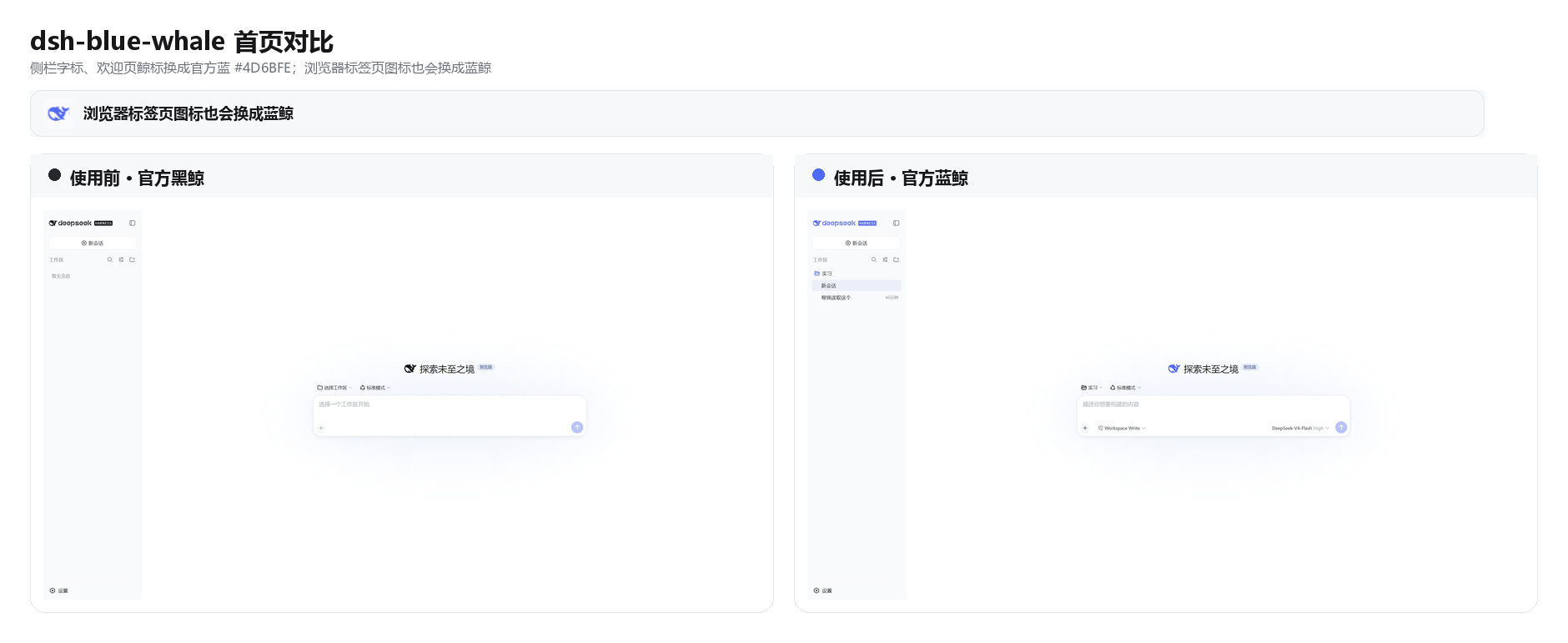
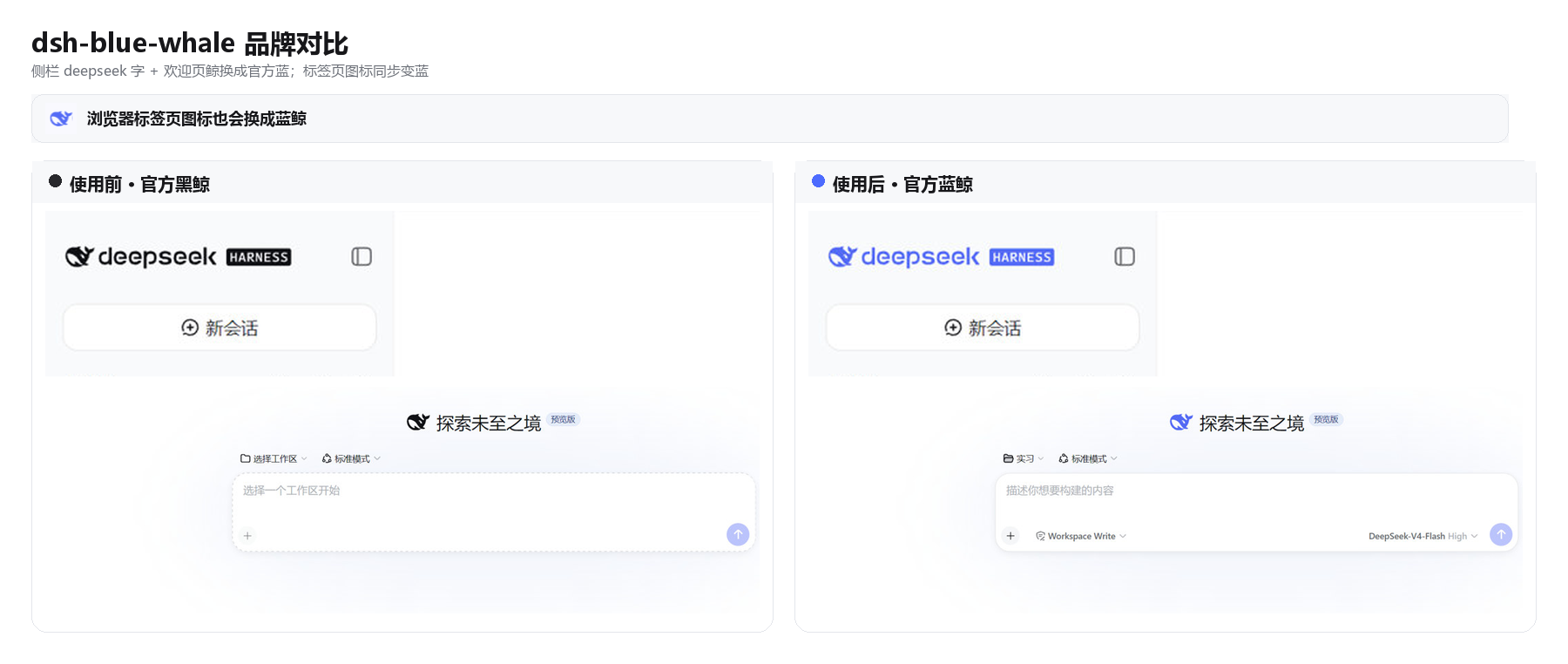
DSH ships as a black whale. chat.deepseek.com is a blue one. This plugin puts Chat blue #4D6BFE on the wordmark, hero fish, tab favicon, and primary actions. Light / dark / follow-system stay on the built-in Appearance setting.
Install
dsh plugin --profile web add dsh-blue-whale
GitHub fallback:
dsh plugin --profile web add github:starslittle/dsh-blue-whale
Restart dsh web, then hard-refresh the browser (Ctrl+Shift+R). The skin is on by default.
Open Settings → General → Blue Whale. A green dot means it is on. Turn off matches the stock capsule control; Turn on is the blue fill.
Check that it loaded
| What you see | What to do |
|---|---|
Sidebar whale and deepseek letters are blue |
It is on |
| Still the black whale | Restart, then hard-refresh |
| Turning the switch off restores the stock colors | Expected |
What it changes
| Stock DSH | This skin | |
|---|---|---|
Sidebar whale + deepseek |
near-black / near-white | #4D6BFE |
| Hero whale | same | #4D6BFE |
| Browser tab icon | black (white in OS dark) | #4D6BFE |
| Brand / send / accents | black or white | #4D6BFE |
| Page background | built-in light / dark | unchanged |
| Light / dark switch | built-in Appearance | still built-in |
Supporting colors come from DSH's own --dsw-static-deepseek-* scale.
What it does not do
- It does not change layout or density
- It does not change a desktop shell's window or tray icon
- Headless and TUI profiles have nothing to paint
Turning it off or uninstalling restores the stock colors immediately.
License
MIT
相关推荐Related
-
 ruvnet/ruflo
🌊 The original agent meta-harness. Deploy intelligent multi-player swarms, coordinate autonomous workflows, and build c…
ruvnet/ruflo
🌊 The original agent meta-harness. Deploy intelligent multi-player swarms, coordinate autonomous workflows, and build c…
-
 Tencent/WeKnora
Open-source LLM knowledge platform: turn raw documents into a queryable RAG, an autonomous reasoning agent, and a self-m…
Tencent/WeKnora
Open-source LLM knowledge platform: turn raw documents into a queryable RAG, an autonomous reasoning agent, and a self-m…
- Nagi-ovo/voyager Enhancement suite for Gemini, AI Studio, Claude & ChatGPT — plus a prompt manager for any web UI, DeepSeek Harness inclu…
-
 freestylefly/awesome-gpt-image-2
Prompt as Code | GPT-Image2 工业级提示词引擎与模板库,470+ 个案例逆向工程,20+ 套工业级模板,并提炼出Skills,持续更新中
freestylefly/awesome-gpt-image-2
Prompt as Code | GPT-Image2 工业级提示词引擎与模板库,470+ 个案例逆向工程,20+ 套工业级模板,并提炼出Skills,持续更新中
-
 EverMind-AI/EverOS
One portable memory layer for every AI agent: local-first, Markdown-native, user-owned, and self-evolving across apps, t…
EverMind-AI/EverOS
One portable memory layer for every AI agent: local-first, Markdown-native, user-owned, and self-evolving across apps, t…
-
 MemTensor/MemOS
Self-evolving memory OS for LLM & AI Agents: ultra-persistent memory, hybrid-retrieval, and cross-task skill reuse, with…
MemTensor/MemOS
Self-evolving memory OS for LLM & AI Agents: ultra-persistent memory, hybrid-retrieval, and cross-task skill reuse, with…
-
 zhu1090093659/dsh-web-ui
Plugin and skin collection for DeepSeek Harness (DSH) Web UI - task board, git graph, right-side panel, remote mobile UI…
zhu1090093659/dsh-web-ui
Plugin and skin collection for DeepSeek Harness (DSH) Web UI - task board, git graph, right-side panel, remote mobile UI…
-
 edison7009/EchoBird
One-click install + model switch:Claude Code,Codex CLI (OpenAI), Grok Build (xAI), DeepSeek Harness, Kimi Code (Moonshot…
edison7009/EchoBird
One-click install + model switch:Claude Code,Codex CLI (OpenAI), Grok Build (xAI), DeepSeek Harness, Kimi Code (Moonshot…