stevenx65/dsh-balance-plugin
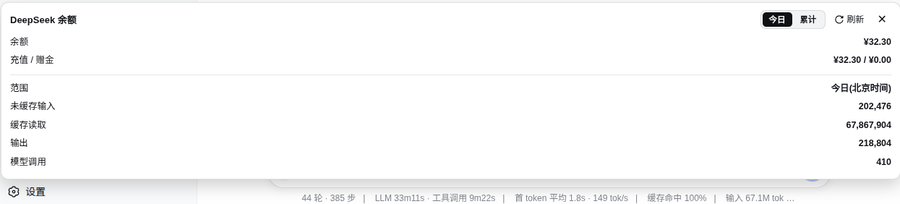
A DeepSeek Harness (dsh) web plugin: shows DeepSeek API balance and token usage at the bottom of the web sidebar (port 3080), with a Today / All-time toggle, filtered by provider (only deepseek-official, ignoring other vendors).
catalog 简介 / catalog descriptioncatalog description:—
项目介绍Project Overview
dsh-balance-plugin 是 DSH 的 Web 界面插件,在侧边栏底部显示 DeepSeek 官方 API 余额与 Token 用量(区分未缓存输入、缓存读取、输出、模型调用次数),支持今日 / 全部时间切换、按 provider 过滤(仅 deepseek-official),并自动适配明暗主题。它复用 dsh 已有的 ~/.dsh/.credentials.yaml 凭证,无需手动填 Key,适合随时查看消费与配额。需安装 zstd 命令行工具以解压 session.jsonl.zstd 日志。
dsh-balance-plugin is a DSH web UI plugin that shows the DeepSeek official API balance and token usage (uncached input, cache read, output, model call count) at the bottom of the sidebar, with a Today / All-time toggle and provider filtering (only deepseek-official), auto-adapting to light/dark themes. It reuses credentials from ~/.dsh/.credentials.yaml, so no manual key entry is needed, ideal for monitoring spend and quotas. Note: the zstd CLI must be installed to decompress session.jsonl.zstd logs.
请帮我了解并安装插件:【dsh-balance-plugin】【https://github.com/stevenx65/dsh-balance-plugin】把上面这条消息直接发给当前会话里的 DSH,让它帮你了解并安装。安装命令不一定准确,发给 DSH 更稳。Send this message to DSH in your current session. CLI install commands may not be accurate across systems — DSH will figure it out for you.
或使用命令行安装(适合开发者)Or use CLI install (for developers)
命令行安装CLI Install
dsh plugin --profile web add dsh-balance-plugin把 stevenx65/dsh-balance-plugin 加入你的 DSH 配置(web profile)即可启用。
READMEREADME
dsh-balance-plugin

A DeepSeek Harness (dsh) web plugin: shows DeepSeek API balance and token usage at the bottom of the web sidebar (port 3080), with a Today / All-time toggle, filtered by provider (only deepseek-official, ignoring other vendors).
Features
- 💰 Balance: calls DeepSeek's official
GET /user/balance, reusing dsh's credentials (~/.dsh/.credentials.yaml) — no manual key entry - 📊 Token usage: reads dsh session logs (
session.jsonl.zstd), aggregates by provider- Uncached input / cache read / output / model call count
- 🔄 Today / All-time toggle: today (Beijing time) or full history
- 🎨 Auto-adapts to light/dark theme
Screenshot
Install (from the plugin market)
dsh plugin --profile web add dsh-balance-plugin
Restart dsh web, then refresh the page — a balance button appears at the bottom of the sidebar.
Architecture
Browser (3080 page)
  client.js ──fetch──▶ /dsh-balance/data?scope=today|all
                              │
node side (index.js, inside the dsh process)
  ├── credentials.resolve("DEEPSEEK_API_KEY")  ← reuses dsh's key
  ├── fetch(https://api.deepseek.com/user/balance)
  └── decompress ~/.dsh/sessions/*/*/session.jsonl.zstd
      filter assistant/message rows + provider=deepseek-official
index.js: node-side cordis plugin, registers HTTP route/dsh-balance/dataclient.js: browser-side plugin, injects intosidebar.footer.action(sidebar bottom button + floating panel)package.json:dsh.bundle+dsh.client.platform: "web"+exports["./client"]cordis.patch.yml: bundle patch registering the node entry
Manual install
mkdir -p ~/.dsh/profiles/web/node_modules/dsh-balance-plugin
cp index.js client.js cordis.patch.yml package.json ~/.dsh/profiles/web/node_modules/dsh-balance-plugin/
Then add to ~/.dsh/profiles/web/cordis.patch.yml:
- insert:
    - id: dsh-balance
      name: dsh-balance-plugin
Restart dsh web and refresh the browser.
Dependencies
- node side: Node built-ins only (
node:fs,node:child_process,node:path); requires thezstdCLI for decompressing session logs - browser side:
@deepseek-ai/dsh-client-ui-primitives(peer dep, ships with dsh 0.1.0-rc.6)
Data source
Session logs at ~/.dsh/sessions/<scope>/<session-id>/session.jsonl.zstd. Each assistant/message row:
{
  "type": "assistant/message",
  "time": 1786635270943,
  "data": {
    "message": { "source": { "kind": "model", "provider": "deepseek-official", "model": "deepseek-v4-pro" } },
    "usage": { "inputTokens": 8702, "outputTokens": 298, "cacheReadTokens": 0 }
  }
}
Pack
npm pack # produces dsh-balance-plugin-0.1.0.tgz
License
MIT
相关推荐Related
-
 ruvnet/ruflo
🌊 The original agent meta-harness. Deploy intelligent multi-player swarms, coordinate autonomous workflows, and build c…
ruvnet/ruflo
🌊 The original agent meta-harness. Deploy intelligent multi-player swarms, coordinate autonomous workflows, and build c…
-
 amruthpillai/reactive-resume
A one-of-a-kind resume builder that keeps your privacy in mind. Completely secure, customizable, portable, open-source a…
amruthpillai/reactive-resume
A one-of-a-kind resume builder that keeps your privacy in mind. Completely secure, customizable, portable, open-source a…
-
 volcengine/OpenViking
Self-evolving Context Database for AI Agents. Unify Agent Memory, Knowledge RAG and Skills.
volcengine/OpenViking
Self-evolving Context Database for AI Agents. Unify Agent Memory, Knowledge RAG and Skills.
-
 Molunerfinn/PicGo
:rocket: The Ultimate Image Uploader for Efficient Creators. Supports Obsidian, Typora, VS Code etc. and 60+ image hosti…
Molunerfinn/PicGo
:rocket: The Ultimate Image Uploader for Efficient Creators. Supports Obsidian, Typora, VS Code etc. and 60+ image hosti…
-
 titanwings/colleague-skill
将冰冷的离别化为温暖的 Skill,欢迎加入数字生命1.0!Transforming cold farewells into warm skills? It's giving rebirth era. Welcome to Digital …
titanwings/colleague-skill
将冰冷的离别化为温暖的 Skill,欢迎加入数字生命1.0!Transforming cold farewells into warm skills? It's giving rebirth era. Welcome to Digital …
-
 nocobase/nocobase
NocoBase is an open-source AI + no-code platform for building business systems fast. Instead of generating everything fr…
nocobase/nocobase
NocoBase is an open-source AI + no-code platform for building business systems fast. Instead of generating everything fr…
-
 Tencent/WeKnora
Open-source LLM knowledge platform: turn raw documents into a queryable RAG, an autonomous reasoning agent, and a self-m…
Tencent/WeKnora
Open-source LLM knowledge platform: turn raw documents into a queryable RAG, an autonomous reasoning agent, and a self-m…
- Nagi-ovo/voyager Enhancement suite for Gemini, AI Studio, Claude & ChatGPT — plus a prompt manager for any web UI, DeepSeek Harness inclu…