TalkingRainTuT/dsh-VoiceChat
一个DSH的语音聊天插件 | Realtime voice chat plugin for DeepSeek Harness: configurable translate + multi-TTS + auto-start local servers.
Project Overview项目介绍
dsh-VoiceChat is a realtime voice plugin that makes DeepSeek Harness agents speak aloud. Core capability: automatic on-demand translation plus pluggable TTS (local Style-Bert-VITS2 / GPT-SoVITS, edge-tts, OpenAI, DashScope, Qwen-TTS, ElevenLabs) with per-message play/pause/resume/replay controls. Use it when you need multilingual speech output or flexible TTS backends for a text-based DSH agent. Caveat: non-npm installs must place the plugin in the session workspace and run npm install manually; local providers require a reachable nodePath and runtime service.
dsh-VoiceChat 是一款让 DeepSeek Harness 智能体开口说话的实时语音插件。核心能力:自动按需翻译、可插拔 TTS(本地 Style-Bert-VITS2/GPT-SoVITS、edge-tts、OpenAI、DashScope、Qwen-TTS、ElevenLabs),并在每条消息末尾注入播放/暂停/继续/重播按钮。适用场景:为文本类 DeepSeek Harness agent 增加多语种语音播报与本地/云端 TTS 接入。注意:非 npm 安装时需将插件放在 session workspace 下并手动 npm install;本地 TTS 需保证 nodePath 与依赖服务可用。
请帮我了解并安装插件:【dsh-VoiceChat】【https://github.com/TalkingRainTuT/dsh-VoiceChat】Send this message to DSH in your current session. CLI install commands may not be accurate across systems — DSH will figure it out for you.把上面这条消息直接发给当前会话里的 DSH,让它帮你了解并安装。安装命令不一定准确,发给 DSH 更稳。
Or use CLI install (for developers)或使用命令行安装(适合开发者)
CLI Install命令行安装
dsh plugin --profile web add dsh-VoiceChat把 TalkingRainTuT/dsh-VoiceChat 加入你的 DSH 配置(web profile)即可启用。
READMEREADME
dsh-VoiceChat
A realtime voice chat plugin that makes DeepSeek Harness agents speak out loud (dynamic Cordis plugin).
Every assistant message automatically: translate on demand → synthesize with the selected TTS → auto-play, with a 🔊/⏸/▶ button (play / pause / resume / replay) at the end of the message.
Features
- Conditional translation: only calls the translation API when
voiceLanguage≠aiLanguage; otherwise the original text is synthesized directly - OpenAI-compatible translation: configurable
baseUrl/model/apiKey(DeepSeek by default; switch to OpenAI by changingbaseUrl/model) - Multiple TTS providers: local (Style-Bert-VITS2 / GPT-SoVITS) + free cloud (edge-tts) + cloud (OpenAI / DashScope / Qwen-TTS / ElevenLabs)
- autoStart: automatically starts local TTS services on plugin activation (health-checked, never starts duplicates)
- Long text: chunks by each provider's
maxChunkand stitches the audio together
Installation
# from a local checkout
dsh plugin --profile web add "file:/path/to/dsh-VoiceChat"

# or, once published to npm
dsh plugin --profile web add dsh-VoiceChat
Directory structure
dsh-VoiceChat/
├── speak.mjs           # executor: translate + pluggable TTS + chunk/stitch
├── config.json         # configuration
├── config.example.json # configuration example
├── package.json        # dependencies (edge-tts needs ws / https-proxy-agent)
├── LICENSE             # MIT
├── played.json         # already-auto-played list (runtime artifact)
├── wav/                # generated audio (runtime artifact)
├── lib/
│   ├── host.mjs        # plugin Host half source
│   ├── client.mjs      # plugin Client half source
│   └── edge-tts.mjs    # edge-tts protocol implementation (from dsh-voice, MIT)
└── .gitignore
Quick start
- Put this directory under the session workspace (default
~/.dsh) as the.dsh-VoiceChatfolder (the Host locates it via the workspace-relative path.dsh-VoiceChat, portable across machines) npm install(or create a node_modules junction if deps already exist locally)- Copy
config.example.json→config.json, fill in keys and provider - Activate the plugin (see below)
Configuration (config.json)
{
  "translator": {            // OpenAI-compatible translation API
    "apiKey": "sk-...",      // DeepSeek or OpenAI key
    "baseUrl": "https://api.deepseek.com",  // or https://api.openai.com/v1
    "model": "deepseek-chat",               // or gpt-4o-mini
    "targetLanguage": "ja"
  },
  "aiLanguage": "zh",        // language the AI replies in
  "voiceLanguage": "ja",     // voice target language (configurable; skips translation when equal to aiLanguage)
  "ttsProvider": "opentts",  // voice generation model
  "nodePath": "",            // node executable (auto-resolved when empty)
  "autoStart": { "enabled": true, "servers": [ { "name": "...", "command": "...", "args": [...], "cwd": "...", "healthUrl": "..." } ] }
}
TTS providers
| provider | type | description | required config |
|---|---|---|---|
style-bert-vits2 |
local | server_fastapi /voice (default) |
url, modelId, speakerId |
gpt-sovits |
local | POST /tts (api_v2) |
url, refAudioPath |
edge-tts |
cloud free | Microsoft Edge TTS | voice (e.g. ja-JP-NanamiNeural) |
openai |
cloud/local | /audio/speech, OpenAI-protocol compatible local servers |
apiKey, voice |
dashscope |
cloud (Aliyun) | Tongyi sambert text2audio | apiKey, voice |
qwen-tts |
cloud (Aliyun) | Tongyi qwen-tts | apiKey, voice |
elevenlabs |
cloud | ElevenLabs | apiKey, voiceId |
License
MIT
Related相关推荐
-
 nexu-io/open-design
🎨 Best DeepSeek Harness Design Plugin. The open-source Claude Design alternative. 🖥️ Local-first desktop app. 🖼️ Your…
nexu-io/open-design
🎨 Best DeepSeek Harness Design Plugin. The open-source Claude Design alternative. 🖥️ Local-first desktop app. 🖼️ Your…
-
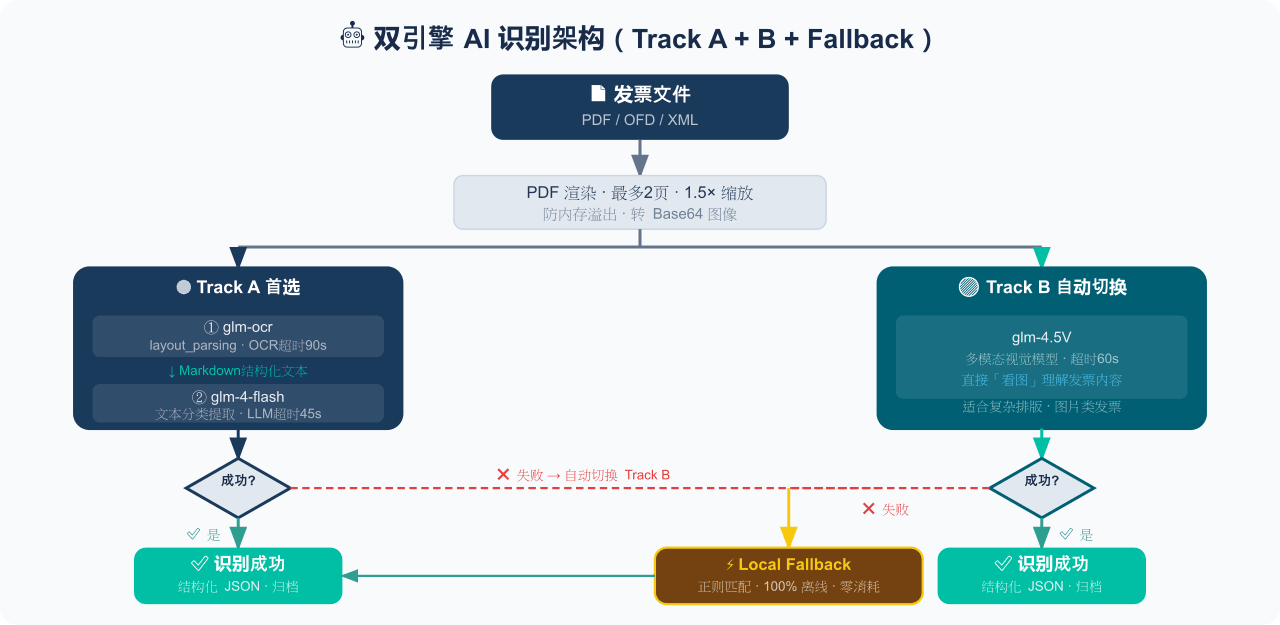 EthanYoQ/Invoice-Downloader
电子发票整理与报销准备工具:从邮箱批量收集 PDF/OFD/XML 发票,OCR 识别、分类归档并生成 Excel 汇总;提供 Windows/macOS 桌面版与 DSH 插件。
EthanYoQ/Invoice-Downloader
电子发票整理与报销准备工具:从邮箱批量收集 PDF/OFD/XML 发票,OCR 识别、分类归档并生成 Excel 汇总;提供 Windows/macOS 桌面版与 DSH 插件。
-
 THU-MAIC/dsh-openmaic
OpenMAIC for DeepSeek Harness: classrooms, slides, interactive widgets, and Socratic teaching
THU-MAIC/dsh-openmaic
OpenMAIC for DeepSeek Harness: classrooms, slides, interactive widgets, and Socratic teaching
-
 HuanLinOTO/dsh-plugin-mineru
向模型暴露 MinerU 文档解析工具,将 PDF/图片/DOCX/PPTX/XLSX 转为结构化 Markdown/JSON | Exposes MinerU document-parsing tools to the model, co…
HuanLinOTO/dsh-plugin-mineru
向模型暴露 MinerU 文档解析工具,将 PDF/图片/DOCX/PPTX/XLSX 转为结构化 Markdown/JSON | Exposes MinerU document-parsing tools to the model, co…
-
 hellodigua/dsh-share
DSH 对话分享插件,分享单轮或多轮对话,可导出为图片或 Markdown。Share DSH Q&As or selected conversation groups as PNG or Markdown.
hellodigua/dsh-share
DSH 对话分享插件,分享单轮或多轮对话,可导出为图片或 Markdown。Share DSH Q&As or selected conversation groups as PNG or Markdown.
-
 jing-hy/picturereader
DSH plugin: pixel-to-text image reading for text-only models. image_scan/image_ocr/image_sample tools + image-reading sk…
jing-hy/picturereader
DSH plugin: pixel-to-text image reading for text-only models. image_scan/image_ocr/image_sample tools + image-reading sk…
-
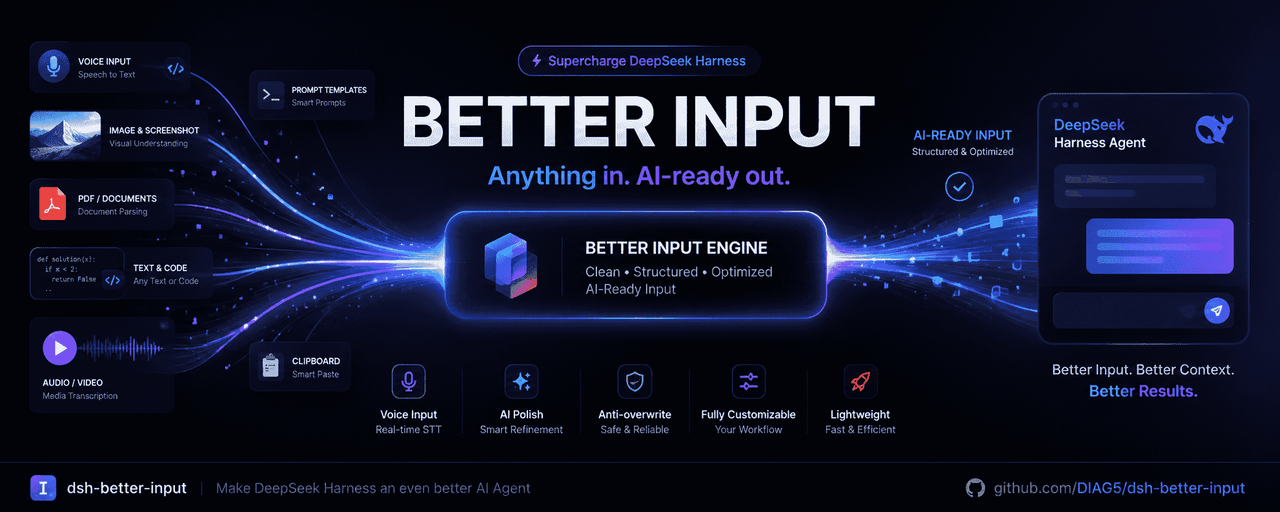 DIAG5/dsh-better-input
BetterInput是一套输入增强套件:语音识别、提示词优化、输入更多文件类型,各类文件转Md,交互体验优化等——把每一种喂给智能体的输入都变得更好。BetterInput is an input-enhancement suite — …
DIAG5/dsh-better-input
BetterInput是一套输入增强套件:语音识别、提示词优化、输入更多文件类型,各类文件转Md,交互体验优化等——把每一种喂给智能体的输入都变得更好。BetterInput is an input-enhancement suite — …
-
 kw78/dsh-office-tools
Model-facing Office tools for DeepSeek Harness: Word (.docx), Excel (.xlsx), and PowerPoint (.pptx) create/read/update w…
kw78/dsh-office-tools
Model-facing Office tools for DeepSeek Harness: Word (.docx), Excel (.xlsx), and PowerPoint (.pptx) create/read/update w…