VDERR/dsh-echocat-skill-panel
v5.1.3 · DSH Desktop Beta 的 cordis 插件:统计每轮对话用到了哪些 skill,并让你在应用里直接装卸、更新它们。
catalog descriptioncatalog 简介 / catalog description:DSH 技能调用审计 + 应用内 skill 管理器
Project Overview项目介绍
dsh-echocat-skill-panel is a cordis plugin purpose-built for DSH Desktop Beta, deriving which skills were used in each turn directly from the session event stream so the report stays accurate even when the model forgets to mention a call. The package exposes three coordinated surfaces — a collapsible strip directly above the composer, a persistent sidebar icon, and a full middle-pane report — and lets users install, update, enable, disable, or remove skills from inside the app by pasting a GitHub URL, ZIP link, SKILL.md, folder path, SSH address, or even an uploaded file.
In a typical workflow, the user reads the per-turn counters on the strip, opens the panel for a full skill catalogue and per-skill usage breakdown, then uses the inline "引用" button to append /skillname to the composer draft and trigger it manually. The 4.4 release adds a background customiser with live preview, four style families (liquid, gradient, solid, local image), six low-saturation presets, and eleven sliders that only render when relevant; images are resized locally to a 1920 long edge and never leave the client database. Each installed skill records its source — URL, branch, subdirectory, commit hash, and content fingerprint — in .echocat.json so updates can be detected via a single git ls-remote without re-downloading the contents.
Runtime has no bundled dependencies: @deepseek-ai/dsh-llm and @deepseek-ai/schemastery are marked optional peer dependencies supplied by the DSH host. A host-side change requires restarting DSH Desktop Beta, while a client-only change can be verified with a page refresh. Installation is handled either through a PowerShell script that performs backup, mirror, link, and manifest rewrites, or through dsh plugin --profile web add dsh-echocat-skill-panel plus the matching npm package. Removal is implemented as a soft move to a backup directory rather than a hard delete, the bundle ships 1364 assertions across nine test suites, and the project is released under the MIT license.
dsh-echocat-skill-panel 是一款专为 DSH Desktop Beta 设计的 cordis 插件,通过监听会话事件流判断每轮对话实际调用了哪些 skill,即便模型忘记声明也会如实呈现。插件提供三处统一入口:输入框正上方的折叠横栏、左栏常驻图标以及中栏完整报告面板,并支持在应用内一键安装、更新、停用与卸载 skill,地址、.zip、.md 文本、单文件夹链接与 SSH 地址均可直接粘贴解析。
典型工作流:用户先通过横栏查看本回合 skill 命中统计,再用引用按钮将 /技能名 一键追加到草稿,或前往安装面板粘贴远程仓库地址完成部署。新增的背景自定义模块提供液态、渐变、纯色与本地图片四类样式与六套低饱和预设,所有图像均在本机缩放并不上传;目标用户为重度依赖 DSH 自定义 skill 又希望集中管理安装、更新与可视化调用的中高级使用者。
运行时无依赖,@deepseek-ai/dsh-llm 与 @deepseek-ai/schemastery 由 DSH 宿主以 optional peer 形式提供;修改 host 端后必须重启 DSH Desktop Beta,仅改 client 端时刷新页面即可。源码通过 PowerShell 脚本以备份、镜像、链接与 manifest 修改的方式安装,npm 上亦发布同名包,并支持 dsh plugin --profile web add 命令;卸载采用移动到备份目录的软删除策略,项目遵循 MIT 许可。
请帮我安装这个 DSH 插件。安装前先完成【兼容性检查 + 安全性检查】,检查通过再动手。

插件:dsh-echocat-skill-panel(VDERR/dsh-echocat-skill-panel)
仓库:https://github.com/VDERR/dsh-echocat-skill-panel
本站详情页:https://www.yhbd.top/plugins/vderr-dsh-echocat-skill-panel/
本站登记:类型 plugin · 归类 原生 DSH 插件 · 许可证 MIT · ⭐ 196 · 最近提交 2026-09-24 · 主语言 JavaScript

按下面顺序执行,每步先把结论告诉我,再进入下一步:

【1 兼容性检查】
① 我这边:DSH 版本、Node 版本、操作系统、当前 profile(web / desktop)。
② 读它的 README、package.json、插件 manifest,列出它要求的 DSH 版本 / Node 版本 / 操作系统 / 外部依赖 / 需要另外先装的运行时。
③ 逐条比对,结论只写「满足 / 不满足 / 未知」三种;不满足的给出可行替代方案。
④ 检查是否和我已装的插件冲突:命令名重复、skill / tool 重名、端口占用、重复注册的 MCP server。

【2 安全性检查】
① 仓库可信度:和上面「本站登记」是否一致;star / fork 数、创建时间、最近提交,是否归档或长期停更。
② 安装脚本:逐行看 package.json 的 preinstall / install / postinstall,以及 install.sh、setup.ps1 之类脚本。出现 curl|bash、下载后直接执行、混淆代码、访问与插件功能无关的域名,立刻停下来告诉我,不要继续装。
③ 依赖:列出新增依赖,标出无人维护、或与知名包拼写近似的可疑包(typosquatting)。
④ 权限与副作用:它会读写哪些目录、访问哪些域名、需要哪些 DSH 权限(filesystem / network / shell / clipboard 等),以及怎么卸载和回滚。
⑤ 如果它要求 sudo / 管理员权限,或权限明显超出功能所需,先停下来问我。

【3 安装】
上面两步没有「不满足」和「高危项」时才执行;用官方推荐方式安装,不要自行提权。

【4 汇报】
用表格输出:检查项 / 结论 / 依据 / 是否需要我决策。拿不准的一律写「未知」并说明要我怎么确认——不要猜,也不要替我决定。
Send this message to DSH in your current session: it verifies compatibility and security first (answering met / not met / unknown item by item) and only installs once everything checks out — it will stop and ask you if it finds a high-risk item. The box scrolls; the copy is the full prompt. CLI install commands may not be accurate across systems, so DSH is the safer route.把上面这条消息直接发给当前会话里的 DSH:它会先核对兼容性与安全性(逐条给「满足 / 不满足 / 未知」),确认没问题再安装,有高危项会停下来问你。框内可滚动,复制到的是完整提示词;安装命令不一定准确,发给 DSH 更稳。
- This site's static screen found no obvious risk signal (stars, license, activity, manifest)本站静态筛查没发现明显风险信号(星标、许可证、更新活跃度、清单完整度)
DSH walks through these 9 checksDSH 会逐条核对这 9 项
Compatibility兼容性
- DSH, Node, OS and profile requirementsDSH 版本 / Node 版本 / 操作系统 / profile 是否满足要求
- External dependencies and runtimes (Electron / Python / Docker, ...)外部依赖与运行时(Electron / Python / Docker 等)是否齐备
- Conflicts with installed plugins: command names, skill / tool names, ports, duplicate MCP registration与已装插件是否冲突:命令名、skill / tool 重名、端口占用、重复 MCP 注册
Security安全性
- Repo matches the facts registered here; archived or abandoned?仓库是否与页面登记一致,是否归档或长期停更
- Safety of preinstall / install / postinstall and install.sh / setup.ps1preinstall / install / postinstall 与 install.sh、setup.ps1 是否安全
- curl|bash, download-then-execute, obfuscation, unrelated domains → stop immediatelycurl|bash、下载即执行、混淆代码、无关域名 → 立刻停止
- Typosquatting or unmaintained packages among the new dependencies新增依赖里有没有 typosquatting 或无人维护的包
- Requested permissions vs. what the feature actually needs申请了哪些权限、是否超出功能所需(filesystem / network / shell / clipboard)
- Any sudo / admin requirement, plus uninstall and rollback是否要求 sudo / 管理员权限,以及卸载与回滚方式
Anything uncertain must be marked unknown with a note on how to confirm it. This site's signal screen is a static snapshot, not a security audit.拿不准的必须标「未知」并说明要我怎么确认。本站的信号筛查是静态快照,不能替代安全审计。
Or use CLI install (for developers)或使用命令行安装(适合开发者)
CLI Install命令行安装
dsh plugin --profile web add dsh-echocat-skill-panel把 VDERR/dsh-echocat-skill-panel 加入你的 DSH 配置(web profile)即可启用。
READMEREADME
dsh-echocat-skill-panel
5.1.3 修复:新会话横栏被压成细线,以及窄窗口统计项只剩数字。详见 5.1.3 更新说明。
v5.1.3 · DSH Desktop Beta 的 cordis 插件:统计每轮对话用到了哪些 skill,并让你在应用里直接装卸、更新它们。
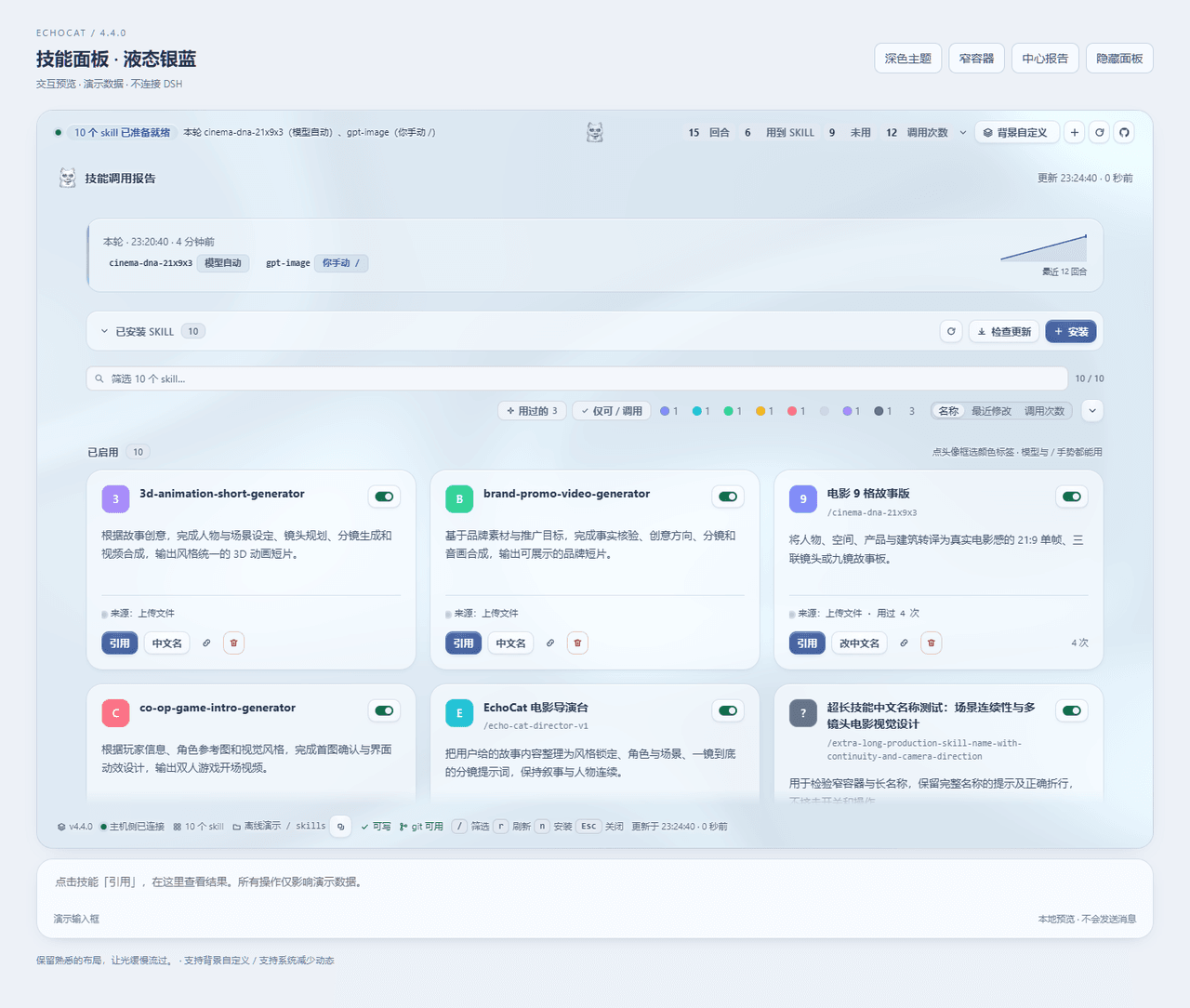
判定不依赖模型自觉 —— 插件从会话事件流推导本轮调了哪些 skill(模型自动、你手动 /name、或一个都没用),模型忘了说也照样报。
三个界面共用一份数据:
| 位置 | 说明 |
|---|---|
| 输入框正上方横栏 | 一行结论 + 四个计数,点开就地展开完整报告。唯一能一键引用 skill 的界面 |
| 左栏图标 | 常驻入口,点它在中间打开面板 |
| 中栏面板 | 完整报告 + skill 目录 |
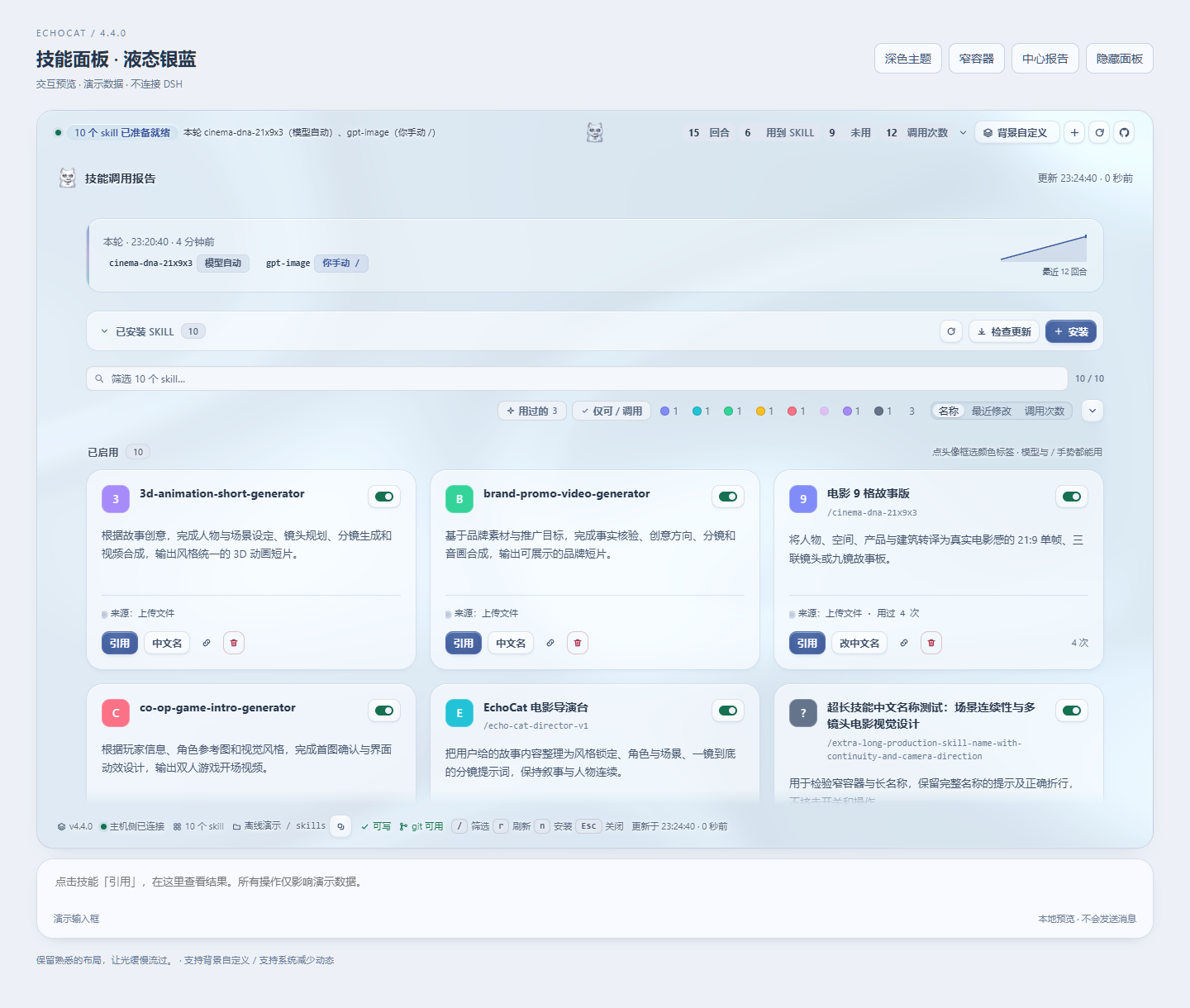
输入框上方这一条是折叠态,四个计数常驻;点它展开成完整报告,报告单独悬浮,不和横栏合成一个盒子:

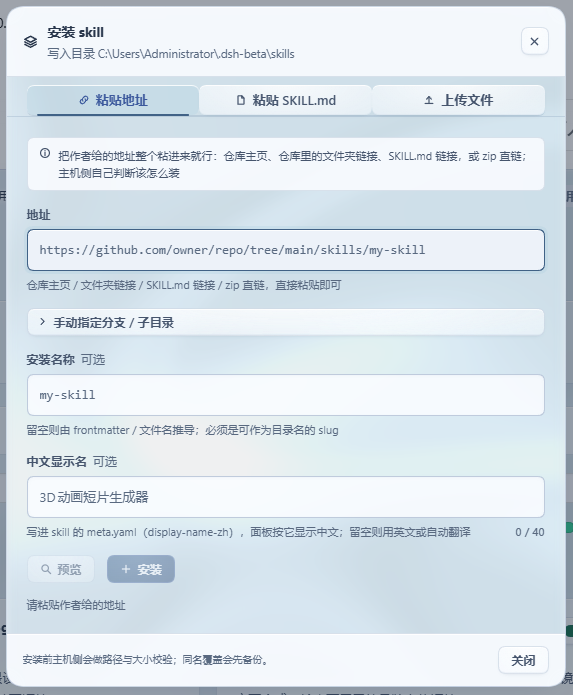
一键安装
把作者给的地址整个粘进来就行:
https://github.com/owner/repo/tree/main/skills/my-skill
仓库主页、仓库里的文件夹链接、SKILL.md 链接、zip 直链、owner/repo、SSH 地址都认 —— host 自己判断该克隆还是该下载,分支与子目录从地址里解析,不用你填三个框。也可以上传 .md/.zip,或直接粘贴整篇 SKILL.md。
同名不会静默覆盖:先备份再替换。装错了能删,删掉的进备份目录,永不硬删。
背景自定义(4.4)
面板可以有背景。横栏和报告右上角的「背景自定义」打开一张设置面板,左侧是实时预览,改一下看一眼,不满意随时取消 —— 预览、取消、恢复默认是三件不同的事,不会"改了就算数"。
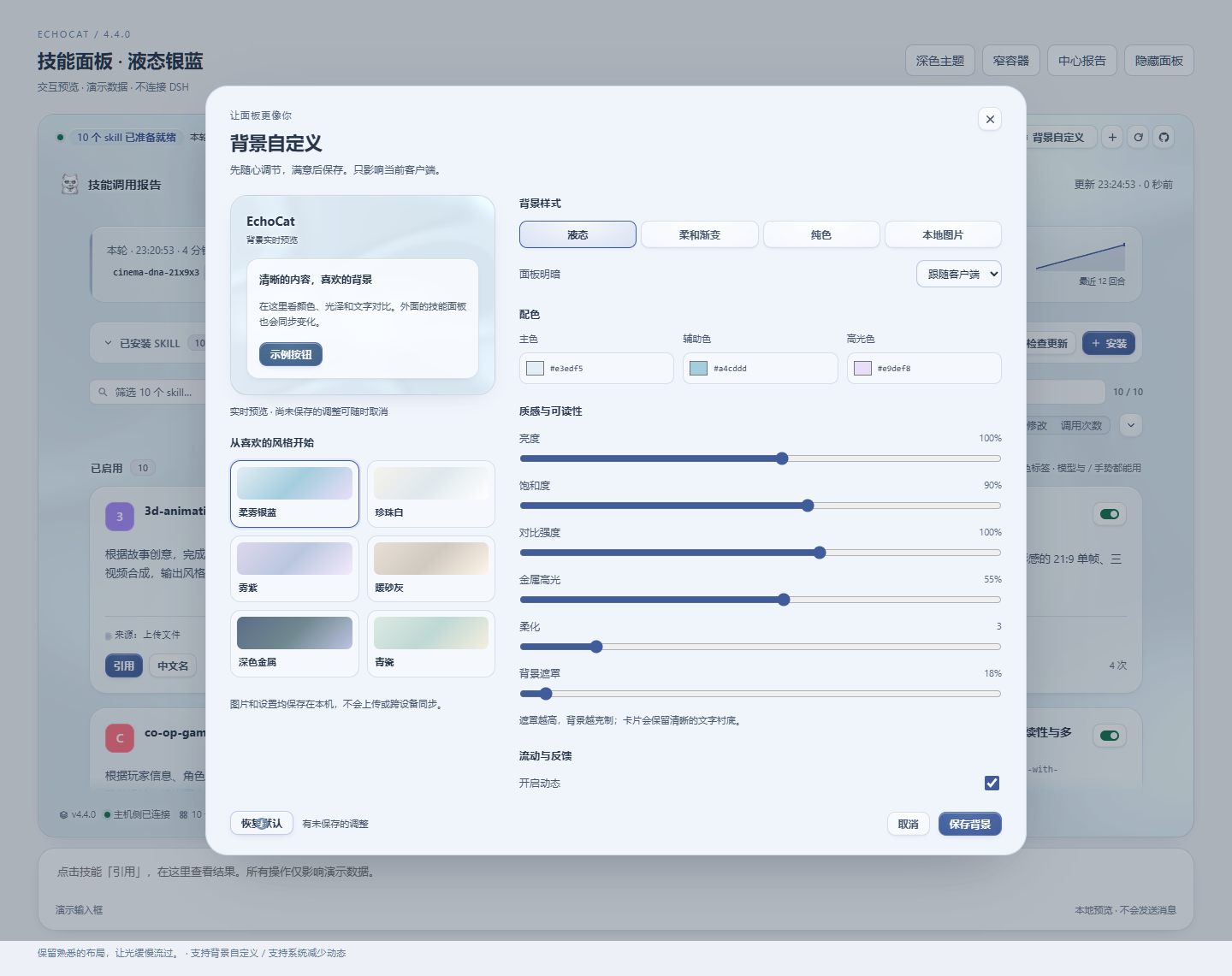
- 四类样式:液态、柔和渐变、纯色、本地图片;六套低饱和预设(柔柔银蓝、珍珠白、紫棠、暖砂灰、深色金属、青瓷)直接挑一个开始。
- 每个滑块都真的作用于背景:主色 / 辅助色 / 高光色,明暗、亮度、饱和度、对比、金属高光、柔化、遮罩、速度、形变、指针反馈 —— 而不适用的选项会隐藏,不是摆在那里让你调了没反应。
- 图片在本机处理:接受 JPG/PNG/WebP(上限 8 MB),在本机缩到长边 1920 以内,支持铺满裁切 / 完整显示 / 拉伸与位置。图片和设置单独存在客户端数据库里,不上传、不改动 skill 数据、不碰宿主配置。
- 只影响当前客户端:设置跨本插件的各个表面共享、刷新后保留,但不宣称跨设备同步 —— 因为它确实不跨。
- 静态模式下背景不持续渲染;隐藏、卸载和系统"减少动态"仍然照常生效。
装了之后能更新(4.0)
问题:3.0 把地址用一次就丢了(git 克隆还会被删掉)。作者发了修复,你无从判断新旧,只能删了重装 —— 而删除是移动到备份。
做法:安装时把来源写进该 skill 自己的 .echocat.json:地址、分支、子目录、安装时的 commit、以及一份内容指纹。于是:
- 卡片上多一行来源。远端有新 commit 时标成「可更新」,点两下即替换,旧版本先进备份。
- 判断只跑一次
git ls-remote,不重新下载内容;来源固定在某 commit 上时不会被误报成"有新版"。 - 你手改过这个 skill 的文件时,确认文案会明说"更新会覆盖它们" —— 这是唯一会丢改动的场景。
- 手工装的、或 2.x/3.0 装的 skill 没有这条记录,卡片上给一个「标记来源」,填一次地址即纳入更新。
- 中文显示名不受影响:更新沿用你为该 skill 设的
display-name-zh。
界面
- 宽度跟着界面缩放:横栏与面板的宽度由宿主自己的输入框宽度推导(
--dsh-composer-card-max-width减 16px),永远比输入框窄,并且和输入框共享同一条中轴 —— 宽窗口、窄窗口、嵌入式布局都对。 - 一套完整的设计语言:四个表面台阶(画布 / 卡片 / 抬升 / 下沉)、一个强调色(靛蓝,只用于主操作、选中和"有东西可做")、五级字阶(10.5 → 26px,字号越大字距越紧)、三级投影(每级两层低透明度叠加),发丝线用
color-mix从墨色推导。 - 485 条具名调整:215 项行为打磨(polish.js)+ 270 项设计重做(design.js),全部是带名字和理由的数据记录,样式表由它们生成,测试逐条核对真的生效。
- 插件自己也能检查更新:面板头部与横栏各有一组按钮 —— 「检查更新」问 npm 与 GitHub 谁更新(10 分钟缓存,只有点击才联网),旁边是 GitHub 发布页跳转。查到新版本时按钮带强调色和一个小圆点,头部还会直接写出「可更新 x.y.z」;"查不到"和"已是最新"是两句不同的话。
- skill 名字一行显示全:卡片是三行结构(名字行 / 说明 / 按钮行)。名字独占整行并且会换行、不会被省略号截断 —— 之前它和六个按钮抢一行,长名字只剩几个字符加省略号。
- 四个计数器就在横栏那一行里:展开横栏后,回合 / 用到 skill / 未用 / 调用次数 与结论、回合数同在一条线上,不再另起一行,也不再藏在展开的报告里。
- 每个 skill 一个开关:停用会把目录移出 DSH 监视的 skills 目录 —— 模型真的加载不到它,而文件一个不少,随时一键启用回来。已启用与已停用分两组列出,停用的卡片仍可改名、查来源、更新、删除。
- 深浅两套都验过:深色盘同时挂在系统偏好与应用内主题两条信号上;所有文字色都按 WCAG 算过对比度(正文 18.2:1、次级 6.4:1、元数据 5.3:1)。
prefers-reduced-motion、prefers-reduced-transparency、窄屏布局各自有覆盖。- 改界面的做法:
node tools/preview.mjs渲染真实面板并截图,加--measure打印计算样式 —— 先看见,再改。
Showing the opening section of the README — the full document lives in the repository以上为 README 开头摘要,完整文档在仓库内 · View the full README on GitHub →在 GitHub 查看完整 README →
Related相关推荐
-
 titanwings/distilly
Distilly — Distill how they think into reusable Skills for any Agent or Bot. Formerly Colleague Skill(原同事 Skill).
titanwings/distilly
Distilly — Distill how they think into reusable Skills for any Agent or Bot. Formerly Colleague Skill(原同事 Skill).
-
 YuJunZhiXue/dsh-purge
DeepSeek Harness 破甲:让所有模型都能破甲,不同模型可换不同提示词;默认提示词面向国模「小码酱」。Jailbreak for every model — swap prompts per model. 求 Star 收藏 ⭐
YuJunZhiXue/dsh-purge
DeepSeek Harness 破甲:让所有模型都能破甲,不同模型可换不同提示词;默认提示词面向国模「小码酱」。Jailbreak for every model — swap prompts per model. 求 Star 收藏 ⭐
- Tiger3807861189/J-Space-Cognition-Suite J-Space Cognition Suite — a model-agnostic inference-time control suite for deep reasoning, long-horizon work, verificat…
-
 Clearailhc/clearai-dsh
ClearAI is a native DSH plugin that brings the Epistemic Loop to DeepSeek Harness.
Clearailhc/clearai-dsh
ClearAI is a native DSH plugin that brings the Epistemic Loop to DeepSeek Harness.
- Tiger3807861189/GLM-5.3-Flash-J-Space-Capability-Realization-Report GLM-5.3-Flash × J-Space capability realization — benchmark presentation of the J-Space Cognition Suite
-
 yejiming/MuseAI
创建你的 AI 角色,进入你的故事世界。和角色聊天、冒险、穿书,让每一次互动都留下羁绊(支持 DeepSeek Harness 插件,欢迎使用)
yejiming/MuseAI
创建你的 AI 角色,进入你的故事世界。和角色聊天、冒险、穿书,让每一次互动都留下羁绊(支持 DeepSeek Harness 插件,欢迎使用)
-
 superdesigndev/superdesign-skill
The design skill for Claude Code, Cursor and any coding agent. Stop shipping AI-slop UI: turn it into shippable, tastefu…
superdesigndev/superdesign-skill
The design skill for Claude Code, Cursor and any coding agent. Stop shipping AI-slop UI: turn it into shippable, tastefu…
-
 Miaotofu01/Study-Mate
你的AI学习搭档:定路线、讲知识、做项目,边学边做,学透一门科目
Miaotofu01/Study-Mate
你的AI学习搭档:定路线、讲知识、做项目,边学边做,学透一门科目