violetdream/dsh-officecli
DeepSeek-Harness 插件:让 Agent 用自然语言创建、编辑 Office 文档(docx / xlsx / pptx),并把结果实时回显到 DSH Web 侧边栏。
catalog descriptioncatalog 简介 / catalog description:dsh插件-结合officecli命令实现在Deepseek Harness中操作office文档
Project Overview项目介绍
dsh-officecli is a native plugin built exclusively for DeepSeek Harness that enables AI agents to create and edit Office documents in docx, xlsx, and pptx formats using natural language. After any edit, the plugin automatically updates a live preview of the document in DSH’s web sidebar, so users can see changes immediately without switching applications. It leverages the local OfficeCLI command-line tool under the hood, and adds a custom PPT design layer that handles all layout calculations to fix common layout issues with AI-generated slides.
The design layer sits between the AI model and the underlying OfficeCLI tool, which addresses the core problem that AI models often misplace elements when working with OfficeCLI’s explicit positioning system. Instead of forcing the model to calculate coordinates and unit conversions, the model only needs to output a structured DeckSpec JSON that describes the content and overall theme of the presentation. The design layer then compiles this high-level description into hundreds of precise commands that are submitted as a single atomic batch to OfficeCLI. For docx and xlsx files, the plugin provides lower-level tools that map directly to OfficeCLI primitives for structured editing.
The plugin is released under the open-source MIT license, and requires several dependencies to run properly. Users must have OfficeCLI installed and available in their system PATH, or specify the absolute path to the OfficeCLI executable in the plugin’s configuration. It also requires Node.js version 18 or newer, a working DeepSeek Harness installation, and optionally Microsoft PowerPoint for native rendering and validation. Known limitations include lack of support for custom free-form layouts, no built-in image generation, and HMR disabled by default for stability.
dsh-officecli 是专为 DeepSeek Harness 开发的原生插件,支持 Agent 通过自然语言创建、编辑 docx/xlsx/pptx 格式的 Office 文档,并将编辑结果实时回显到 DSH Web 侧边栏。插件底层调用本地 OfficeCLI 命令行工具,额外自建了一套 PPT 设计层,统一计算所有元素的坐标、字号和配色,模型仅需填充内容,从根源解决了 AI 生成 PPT 排版崩坏的常见问题。
针对 OfficeCLI 无布局引擎、模型直接调用容易出错的问题,插件在模型和底层工具之间插入设计层,模型只需输出结构化的 DeckSpec JSON,无需处理具体单位和布局参数,设计层会自动编译成上百条带单位的操作命令批量提交。对于 docx 和 xlsx,插件提供贴近 OfficeCLI 原语的底层编辑工具,满足用户结构化编辑这两类文档的需求,适合需要 AI 辅助生成 Office 文档的办公用户与开发者。
本插件采用 MIT 许可开源,使用前需要先配置好本地 OfficeCLI(添加到 PATH 或指定绝对路径),同时要求 Node.js v18+ 以及完整的 DeepSeek Harness 运行环境。已知限制包括:默认模型不支持视觉输入,视觉自检需切换多模态模型;仅提供 19 种固定版式,不支持自由布局;HMR 默认关闭,修改代码后需要重新构建并重启 DSH。
请帮我安装这个 DSH 插件。安装前先完成【兼容性检查 + 安全性检查】,检查通过再动手。

插件:dsh-officecli(violetdream/dsh-officecli)
仓库:https://github.com/violetdream/dsh-officecli
本站详情页:https://www.yhbd.top/plugins/violetdream-dsh-officecli/
本站登记:类型 plugin · 归类 原生 DSH 插件 · 许可证 MIT · ⭐ 3 · 最近提交 2026-09-17 · 主语言 TypeScript

按下面顺序执行,每步先把结论告诉我,再进入下一步:

【1 兼容性检查】
① 我这边:DSH 版本、Node 版本、操作系统、当前 profile(web / desktop)。
② 读它的 README、package.json、插件 manifest,列出它要求的 DSH 版本 / Node 版本 / 操作系统 / 外部依赖 / 需要另外先装的运行时。
③ 逐条比对,结论只写「满足 / 不满足 / 未知」三种;不满足的给出可行替代方案。
④ 检查是否和我已装的插件冲突:命令名重复、skill / tool 重名、端口占用、重复注册的 MCP server。

【2 安全性检查】
① 仓库可信度:和上面「本站登记」是否一致;star / fork 数、创建时间、最近提交,是否归档或长期停更。
② 安装脚本:逐行看 package.json 的 preinstall / install / postinstall,以及 install.sh、setup.ps1 之类脚本。出现 curl|bash、下载后直接执行、混淆代码、访问与插件功能无关的域名,立刻停下来告诉我,不要继续装。
③ 依赖:列出新增依赖,标出无人维护、或与知名包拼写近似的可疑包(typosquatting)。
④ 权限与副作用:它会读写哪些目录、访问哪些域名、需要哪些 DSH 权限(filesystem / network / shell / clipboard 等),以及怎么卸载和回滚。
⑤ 如果它要求 sudo / 管理员权限,或权限明显超出功能所需,先停下来问我。

【3 安装】
上面两步没有「不满足」和「高危项」时才执行;用官方推荐方式安装,不要自行提权。

【4 汇报】
用表格输出:检查项 / 结论 / 依据 / 是否需要我决策。拿不准的一律写「未知」并说明要我怎么确认——不要猜,也不要替我决定。
Send this message to DSH in your current session: it verifies compatibility and security first (answering met / not met / unknown item by item) and only installs once everything checks out — it will stop and ask you if it finds a high-risk item. The box scrolls; the copy is the full prompt. CLI install commands may not be accurate across systems, so DSH is the safer route.把上面这条消息直接发给当前会话里的 DSH:它会先核对兼容性与安全性(逐条给「满足 / 不满足 / 未知」),确认没问题再安装,有高危项会停下来问你。框内可滚动,复制到的是完整提示词;安装命令不一定准确,发给 DSH 更稳。
- Only 3 stars - very few users, little community feedback星标只有 3,几乎没人在用,遇到问题缺少社区反馈
DSH walks through these 9 checksDSH 会逐条核对这 9 项
Compatibility兼容性
- DSH, Node, OS and profile requirementsDSH 版本 / Node 版本 / 操作系统 / profile 是否满足要求
- External dependencies and runtimes (Electron / Python / Docker, ...)外部依赖与运行时(Electron / Python / Docker 等)是否齐备
- Conflicts with installed plugins: command names, skill / tool names, ports, duplicate MCP registration与已装插件是否冲突:命令名、skill / tool 重名、端口占用、重复 MCP 注册
Security安全性
- Repo matches the facts registered here; archived or abandoned?仓库是否与页面登记一致,是否归档或长期停更
- Safety of preinstall / install / postinstall and install.sh / setup.ps1preinstall / install / postinstall 与 install.sh、setup.ps1 是否安全
- curl|bash, download-then-execute, obfuscation, unrelated domains → stop immediatelycurl|bash、下载即执行、混淆代码、无关域名 → 立刻停止
- Typosquatting or unmaintained packages among the new dependencies新增依赖里有没有 typosquatting 或无人维护的包
- Requested permissions vs. what the feature actually needs申请了哪些权限、是否超出功能所需(filesystem / network / shell / clipboard)
- Any sudo / admin requirement, plus uninstall and rollback是否要求 sudo / 管理员权限,以及卸载与回滚方式
Anything uncertain must be marked unknown with a note on how to confirm it. This site's signal screen is a static snapshot, not a security audit.拿不准的必须标「未知」并说明要我怎么确认。本站的信号筛查是静态快照,不能替代安全审计。
Or use CLI install (for developers)或使用命令行安装(适合开发者)
CLI Install命令行安装
dsh plugin --profile web add github:violetdream/dsh-officecli把 violetdream/dsh-officecli 加入你的 DSH 配置(web profile)即可启用。
READMEREADME
dsh-officecli
DeepSeek-Harness 插件:让 Agent 用自然语言创建、编辑 Office 文档(docx / xlsx / pptx),并把结果实时回显到 DSH Web 侧边栏。
底层调用本地 OfficeCLI 命令行;在此之上插件自建了一套 PPT 设计层——坐标、字号、配色、网格全部由插件计算,模型只填内容,从而把「AI 生成的 PPT 排版崩坏」这个老大难问题关进笼子里。
目录
- 1. 项目定位
- 2. 核心特性
- 3. 前置要求
- 4. 安装与构建
- 5. 挂载到 DSH Profile
- 6. 验证与排错
- 7. 使用方式
- 8. 配置参考
- 9. 工具清单
- 10. PPT 设计层
- 11. 架构
- 12. 项目结构
- 13. 构建体系
- 14. 开发、测试与调试
- 15. 设计决策与踩坑记录
- 16. 已知限制
- 17. 许可
1. 项目定位
OfficeCLI 是一个「没有布局引擎」的命令行工具——官方原话是 "Positioning is explicit — no layout engine, you own the grid math"。这句话的直接后果是:如果让模型直接调用底层 add shape 并自己填坐标,它几乎必然摆歪。
本插件因此在中间插了一层:
模型(只写内容) → 插件设计层(算坐标/字号/配色) → officecli(执行) → pptx
模型看到的接口是一个 DeckSpec JSON:{"theme":"tech-cyan","slides":[{"layout":"cover","title":"..."}]}。它不需要知道 1pt 等于多少、卡片该放第几栏。设计层负责把这份意图编译成上百条带单位的 add shape 命令,再一次性 batch 原子提交。
对 docx / xlsx,插件提供的是贴近 OfficeCLI 原语的底层工具(路径寻址 + 属性读写),因为这两种文档的结构化编辑不需要布局数学。
2. 核心特性
| 特性 | 说明 |
|---|---|
| 16 个 AI 工具 | 12 个底层原语工具 + 4 个高层 PPT 工具(含 office_deck_lint),覆盖文档全生命周期 |
| PPT 设计层 | 960×540pt 画布、12 栏网格、8pt 基线、8 套主题、19 种版式模板、12 套专业模板;坐标与字号由插件计算 |
| 原生元素层 | 除 shape 外接入 officecli 的 chart(18 种图表)/ table / picture / diagram(mermaid)/ connector / animation / notes 七类原生元素,图表表格不再是手拼形状 |
| 设计门禁 | 字数上下限、叙事角色预算、非对称占比、数据必须落点;office_deck_lint 在生成前后做结构化体检 |
| 模板库 | deck.template 一键套用专业感外衣(咨询简报/产品发布/学术答辩/极简/政务报告/年度报告…),含内容页装饰、页码格式与默认转场;支持 templates.json 外置自定义与企业 VI |
| 样式协议 | deck.style 注入演示文稿元数据、默认转场、默认背景、"{n} / {total}" 页码格式;每页可单独覆盖背景/转场/隐藏 |
| --prop 富注入 | 形状级支持渐变/图案/不透明度/线宽线型/箭头/字距/高亮/大小写/列表/链接等 20+ 项 OfficeCLI 属性面 |
| 字数红线 | 逐字段的字数上限随设计指南下发给模型,从源头抑制溢出 |
| 视觉自检闭环 | office_screenshot 渲染 PNG 并把图片回传到对话,模型能真正看到自己的产出并修正 |
| 主题继承 | office_slide_add 追加页面时自动还原原文件配色,不会突然换肤 |
| 实时预览 | 侧边栏 iframe 嵌入 OfficeCLI watch 页面,Agent 编辑后内容自动刷新(不重载) |
| 边改边看 | 挂钩 DSH 工具事件(tools/execute + tools/result),新生成/编辑的文件自动打开预览、面板显示 Agent 忙碌态与页数徽标 |
| 宿主视觉一致 | 预览面板与侧栏按钮全部使用 DSH 主题变量(--dsw-*)与 dsh-client-ui-primitives 图标/状态点,随宿主浅深色主题自动适配 |
| 双通道 SSE | 插件自有通道传元事件(文件增删改 + 工具状态 + watch 状态),OfficeCLI watch 通道传内容刷新 |
| 会话隔离 | 每个对话会话独立工作区;生成的文件直接落进 DSH 会话工作区(exec.agent.session.cwd),无 cwd 时回退 workspaceDir/系统临时目录 |
| 安全执行 | spawn 参数数组执行,无 shell 拼接;文件名白名单校验防路径逃逸 |
| 可选 HTTP | 无 HTTP 的 profile(如 headless 一次性任务)下工具照常工作,只是没有侧边栏 |
Showing the opening section of the README — the full document lives in the repository以上为 README 开头摘要,完整文档在仓库内 · View the full README on GitHub →在 GitHub 查看完整 README →
Related相关推荐
-
 yogsoth-ai/de-anthropocentric-research-engine
A 267-skill research graph in pure markdown — 51 research operations built from 216 single-purpose steps, composed in an…
yogsoth-ai/de-anthropocentric-research-engine
A 267-skill research graph in pure markdown — 51 research operations built from 216 single-purpose steps, composed in an…
-
 ZSeven-W/dsh-openpencil
The DeepSeek Harness plugin for OpenPencil — preview, inspect, and edit real .op documents inside a conversation.
ZSeven-W/dsh-openpencil
The DeepSeek Harness plugin for OpenPencil — preview, inspect, and edit real .op documents inside a conversation.
-
 HanaAyane/dsh-reasoning-effort
DSH适用的Codex风格的思考强度滑块,以及大肥鱼跑步滑块。Codex-style model and reasoning-effort slider for DeepSeek Harness
HanaAyane/dsh-reasoning-effort
DSH适用的Codex风格的思考强度滑块,以及大肥鱼跑步滑块。Codex-style model and reasoning-effort slider for DeepSeek Harness
- T-Auto/dsh-std DSH Plugin Interoperability Meta-Protocol / DSH 插件互操作元协议
- FylarOpen/dsh-fylar-office-editor Office document preview, editing, and DOCX generation for DeepSeek Harness, powered by Fylar Office SDK.
- reddapidev/dsh-reddit-radar A dsh plugin that periodically scans reddapi.dev for new Reddit leads matching your one-sentence ICP, dedupes what you'v…
-
 HuanLinOTO/dsh-plugin-better-sidebar-plugin-office
为 better-sidebar 提供 Office 三件套预览(.docx/.xlsx/.pptx),独立 bundle 瘦身主体 | Provides Office-suite preview (.docx/.xlsx/.pptx) f…
HuanLinOTO/dsh-plugin-better-sidebar-plugin-office
为 better-sidebar 提供 Office 三件套预览(.docx/.xlsx/.pptx),独立 bundle 瘦身主体 | Provides Office-suite preview (.docx/.xlsx/.pptx) f…
-
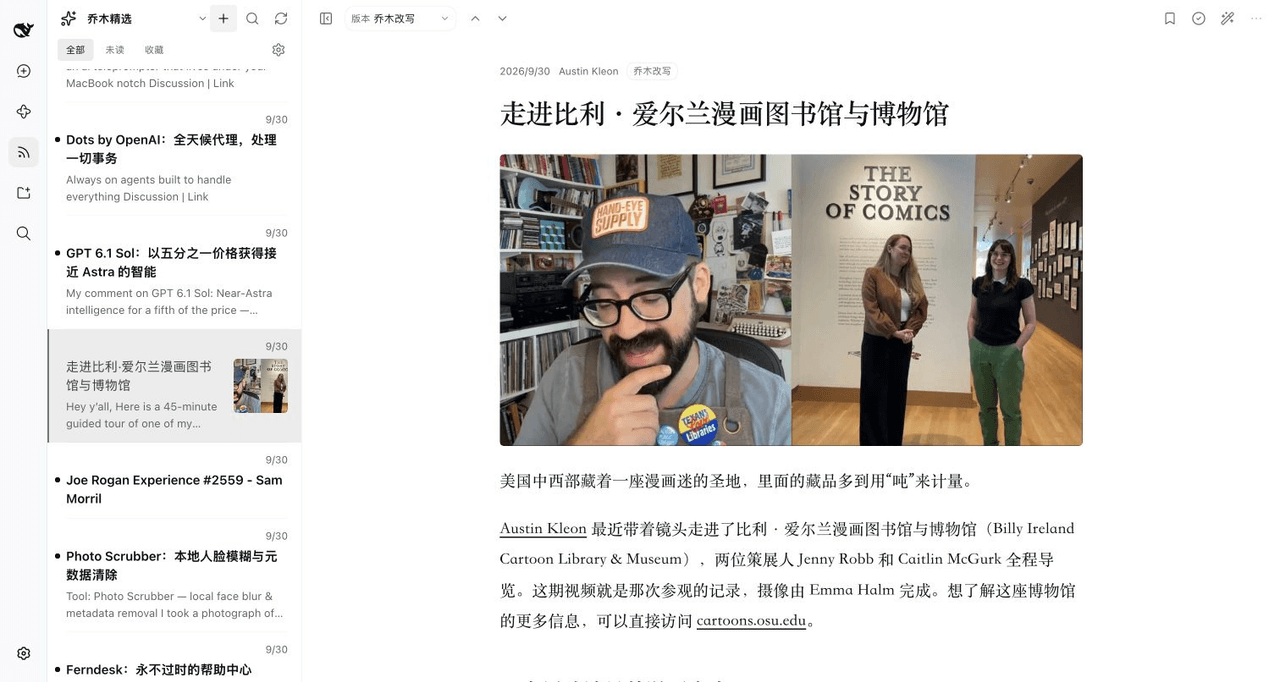 joeseesun/qiaomu-rss-dsh
在 DeepSeek Harness 中阅读 RSS,与原生 AI 对话伴读文章 | RSS reading with native AI companion for DeepSeek Harness
joeseesun/qiaomu-rss-dsh
在 DeepSeek Harness 中阅读 RSS,与原生 AI 对话伴读文章 | RSS reading with native AI companion for DeepSeek Harness