
watericetangcw/dsh-page-preview
一个Cordis插件,使DeepSeek Harness能够主动预览并显示网页。
Project Overview项目介绍
dsh-page-preview is a DeepSeek Harness web-bundle plugin that renders any html page-preview code block from the model into an interactive inline panel, and offers a draggable floating mini-window to preview local files, directories, or URLs with replace, refresh, and close tools. Use it to inspect generated HTML or debug local pages directly in the chat UI. Note that inline preview requires all CSS and JS to be inlined, and floating previews are isolated per conversation.
dsh-page-preview 是一款 DeepSeek Harness 网页端插件,提供两种页面预览能力:让模型输出的 html page-preview 代码块在消息下方直接渲染为可交互面板;或通过右下角浮动小窗实时预览本地文件、目录或网址,并支持替换、刷新、关闭与缩放。适用于需要即时查看生成 HTML 或调试本地页面的场景。需注意:行内预览要求 CSS 与 JS 全部内联,浮动小窗按会话隔离。
请帮我了解并安装插件:【dsh-page-preview】【https://github.com/watericetangcw/dsh-page-preview】Send this message to DSH in your current session. CLI install commands may not be accurate across systems — DSH will figure it out for you.把上面这条消息直接发给当前会话里的 DSH,让它帮你了解并安装。安装命令不一定准确,发给 DSH 更稳。
Or use CLI install (for developers)或使用命令行安装(适合开发者)
CLI Install命令行安装
dsh plugin --profile web add github:watericetangcw/dsh-page-preview把 watericetangcw/dsh-page-preview 加入你的 DSH 配置(web profile)即可启用。
READMEREADME


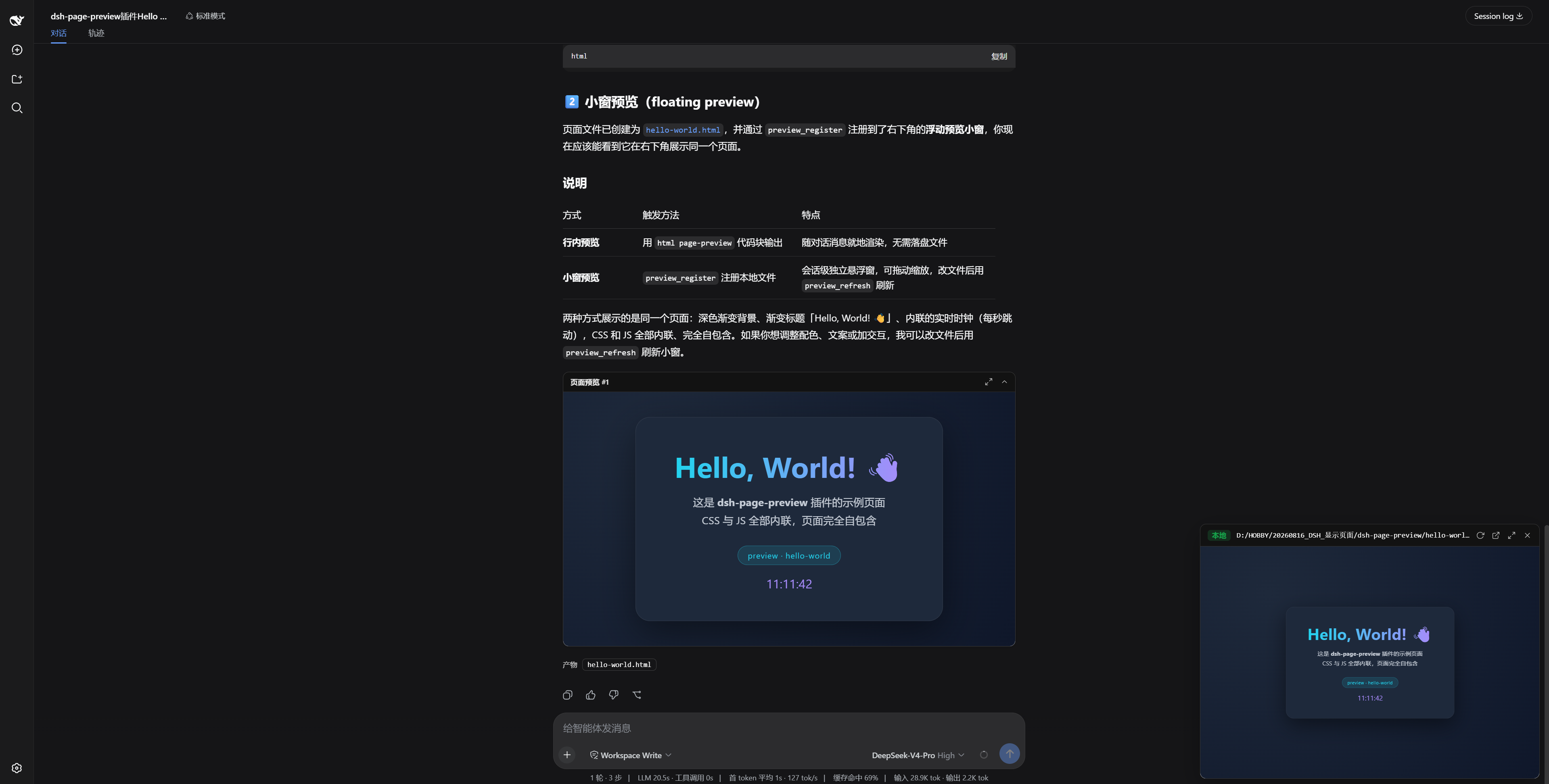
一次安装,永久可用:既能把模型生成的 HTML 代码块行内渲染成可交互预览,也能用右下角浮动小窗实时预览任意本地页面或网址。
✨ 功能亮点
🖥️ 行内预览
让 DSH 输出一个 html page-preview 代码块,答案发完后,它就会变成消息下方的一个可交互预览面板——全屏、收起、在新窗口打开,样样都行,而代码块本身依然是普通代码块。
🪟 浮动小窗
四个工具,随时预览:
| 工具 | 作用 |
|---|---|
preview_register |
注册并打开预览:本地 HTML 文件、含 index.html 的目录,或 http(s) 网址 |
preview_replace |
换一个页面继续预览 |
preview_refresh |
改完文件后一键刷新 |
preview_unregister |
解除注册并关闭 |
小窗可拖动、可缩放、可全屏;内容按虚拟桌面宽度等比缩放,小窗也不会把页面挤扁。关闭小窗时会「飞」向右上角,化成一枚带绿色呼吸灯的胶囊,点一下即恢复。预览按会话隔离,切换会话互不打扰。
🚀 快速安装
一条命令即可:
dsh plugin --profile web add github:watericetangcw/dsh-page-preview
安装完成后重启 dsh web,并刷新一次浏览器页面,即可使用。
🧪 快速体验
复制下面的提示词发给 DSH,立刻看到效果:
① 行内预览——生成并展示一个页面
请编写一个完整的静态 HTML 页面(CSS 与 JS 全部内联),用 `html page-preview` 代码块展示出来,内容是一个实时时钟卡片。
② 浮动小窗——预览一个在线页面
请用 preview_register 预览这个网页:https://watericetangcw.github.io/dsh-page-preview/hello-world
③ 浮动小窗——预览本地工程并刷新
请用 preview_register 预览 docs/demo-site 目录,然后把页面标题改成「dsh-page-preview 演示」,再调用 preview_refresh 让我看到更新。
📖 使用方式
- 行内预览:让 DSH 输出
```html page-preview ... ```(CSS 与 JS 需全部内联)。 - 浮动小窗:直接调用
preview_register传入路径或网址即可,其余三个工具用于替换、刷新与关闭。
🔗 链接
📄 许可证
MIT © 2026 WateRice
Related相关推荐
-
 Ephemeral-AI-Lab/dsh-plugins
Make Deepseek Harness Great
Ephemeral-AI-Lab/dsh-plugins
Make Deepseek Harness Great
-
 SenmuuuuW/dsh-whale-report
深迹 DeepTrace — Your Agent, in numbers. DSH 插件:从会话事件日志生成日报/周报/月报/年报/自定义区间,确定性洞察与协作复盘,只读、不改写历史。
SenmuuuuW/dsh-whale-report
深迹 DeepTrace — Your Agent, in numbers. DSH 插件:从会话事件日志生成日报/周报/月报/年报/自定义区间,确定性洞察与协作复盘,只读、不改写历史。
-
 openma-ai/deepseek-harness-acp
ACP server implementation for DeepSeek harness. dsh-acp
openma-ai/deepseek-harness-acp
ACP server implementation for DeepSeek harness. dsh-acp
-
 SnowCrescenter-tech/dsh-milestone
Git-style milestone timeline for DeepSeek Harness - hover for metadata, click to jump to any message. 会话里程碑导航条:像 Git 提交图…
SnowCrescenter-tech/dsh-milestone
Git-style milestone timeline for DeepSeek Harness - hover for metadata, click to jump to any message. 会话里程碑导航条:像 Git 提交图…
-
 PerryLink/dsh-checkpoint-rewind
Claude Code /rewind for DeepSeek Harness — git-first workspace snapshots before every mutation, turn-boundary session fo…
PerryLink/dsh-checkpoint-rewind
Claude Code /rewind for DeepSeek Harness — git-first workspace snapshots before every mutation, turn-boundary session fo…
-
 TFboy1/dsh-minecraft-ui
deepseek harness Minecraft UI
TFboy1/dsh-minecraft-ui
deepseek harness Minecraft UI
-
 XieZongChen/dsh-md-notes
A note-taking plugin for DeepSeek Harness (DSH). It provides a full MD notes manager and MD notes editor, letting you qu…
XieZongChen/dsh-md-notes
A note-taking plugin for DeepSeek Harness (DSH). It provides a full MD notes manager and MD notes editor, letting you qu…
-
 TencentCloud/tencentcloud-agentobs-sdk-dsh
tencentcloud-agentobs-sdk-dsh 是一个 DeepSeek Harness (DSH) 可观测插件,直接将 GenAI trace 数据上报到腾讯云日志服务 (CLS)。 它观察 DSH 原生的 session、…
TencentCloud/tencentcloud-agentobs-sdk-dsh
tencentcloud-agentobs-sdk-dsh 是一个 DeepSeek Harness (DSH) 可观测插件,直接将 GenAI trace 数据上报到腾讯云日志服务 (CLS)。 它观察 DSH 原生的 session、…