weibaohui/dsh-kb
dsh 插件 · 团队知识库:跨会话、跨人的知识共享与沉淀。侧栏入口进全页知识库——目录树浏览、全文搜索、markdown 阅读、raw 素材上传、任意条目 @ 给 agent。上传即自动蒸馏(v0.2+):素材入队后由 kb-bot 会话按 schema 串行加工成文,也可继续手动 @ 给 agent 精加工。
catalog descriptioncatalog 简介 / catalog description:dsh 插件 · 团队知识库:离线知识共享(FDE 盒子),浏览/全文检索/加工入口;写路径收口 agent,基于 Karpathy LLM Wiki 模式
Project Overview项目介绍
dsh-kb is a native team knowledge-base plugin for DeepSeek Harness (DSH), installed with the single command dsh plugin --profile web add @weibaohui/dsh-kb -w and activated by restarting dsh web. It adds a sidebar "📚 Knowledge Base" entry inside the DSH web profile that opens a full-page workspace with a lazy-loading directory tree, zero-dependency full-text search across the text-like files, Markdown rendering with frontmatter badges and clickable [[wikilink]] resolution, and a raw/ drop-zone for immutable source artefacts. Storage lives under ~/.dsh/kb/ (overridable via DSH_KB_ROOT) and follows the Karpathy LLM Wiki layout of raw → wiki → schema, with index.md, log.md and a per-library schema.md, so multiple libraries can coexist under the same root while keeping their own conventions and templates.
The intended workflow splits responsibility between humans and agents: people upload logs, screenshots and packet captures into raw/ (write-once, never overwritten) and then @-mention an entry, and the agent performs a two-step pipeline of analysis and authoring to attach the result into wiki/, registering it in index.md and appending to log.md. Since v0.2, uploads automatically enqueue into a kb-bot session that distils each artefact against the library's schema.md in series, surfaced through the global "⚗️ Distillation Queue" panel with pause, retry, backoff and jump-to-session controls. v0.7.0 introduces "🤖 Ask AI" (library-scoped retrieval that injects @-references into the input), version history with up to fifty snapshots per page, a feedback loop whose background agent auto-verifies and patches pages, and a staleness badge for content untouched for more than ninety days, all of which target operations, development and SRE-style teams that need shared, auditable knowledge across sessions and people.
No external search index is required because matching, Markdown rendering, directory browsing and file watching are all built in. The schema.md per library is editable from the top bar's "📐 Convention" button and is consulted by both the bot and interactive agents, with ⌘S save and a "restore default template" fallback. A companion skill/dsh-kb/ must be installed into DSH skills-management so agents know how to query, refine and log; the optional docs/lint-prompt.md adds a monthly dsh-tasks cron to flag dead links, orphan pages and stale entries. The plugin has been validated against @deepseek-ai/dsh@0.1.7-rc.2 and declares a minimum version via engines.dsh in package.json, with maintainer contact through a Feishu group link in the README.
dsh-kb 是面向 DeepSeek Harness(DSH)的原生团队知识库插件,安装命令为 dsh plugin --profile web add @weibaohui/dsh-kb -w,装完重启 dsh web 即生效。它在 DSH 侧栏新增「📚 知识库」入口,提供全页目录树浏览、零依赖全文搜索、Markdown 阅读(含 [[wikilink]] 与 frontmatter 徽章)、raw/ 素材上传以及任意条目一键 @ 注入对话。插件以 ~/.dsh/kb/ 为根目录,采用 raw(不可变素材)→ wiki(成文知识)→ schema(加工约定)的 Karpathy LLM Wiki 模式,多库共享同一根,约定每库独立可编辑。
典型用法由人丢素材、agent 两步加工(分析→成文)维护 index 与 log。v0.2 起上传即自动入队,由 kb-bot 会话按 schema 串行蒸馏成文,蒸馏队列面板支持查看进度、暂停、退避重试与跳转;v0.7.0 起新增「🤖 问 AI」(检索后 @ 引用入框)、版本历史(每页保留 50 份快照)、页面反馈闭环(后台 agent 自动核实修正)以及 90 天陈旧提示。该插件面向运维、研发与运营团队沉淀跨会话、跨人的工程知识,复用 DSH 的会话、settings 与文件监视能力完成蒸馏与回滚。
运行时无外部搜索依赖,全文检索、Markdown 渲染、目录树与文件监视均由插件自带能力提供;DSH_KB_ROOT 环境变量可覆盖根目录,但 raw/ 强制只读、禁止覆盖,多库共用同一根下 wiki/ 与 raw/ 子树。必须额外把 skill/dsh-kb/ 安装到 DSH skills-management,否则 agent 不会按两步流程加工沉淀;可选用 docs/lint-prompt.md 在 dsh-tasks 添加每月 lint 定时项检测死链、孤儿页与陈旧条目。已验证适配 @deepseek-ai/dsh@0.1.7-rc.2,package.json 中 engines.dsh 声明最低支持版本,仓库另有飞书群联系方式。
请帮我安装这个 DSH 插件。安装前先完成【兼容性检查 + 安全性检查】,检查通过再动手。

插件:dsh-kb(weibaohui/dsh-kb)
仓库:https://github.com/weibaohui/dsh-kb
本站详情页:https://www.yhbd.top/plugins/weibaohui-dsh-kb/
本站登记:类型 plugin · 归类 原生 DSH 插件 · 许可证未声明 · ⭐ 2 · 最近提交 2026-09-27 · 主语言 JavaScript

按下面顺序执行,每步先把结论告诉我,再进入下一步:

【1 兼容性检查】
① 我这边:DSH 版本、Node 版本、操作系统、当前 profile(web / desktop)。
② 读它的 README、package.json、插件 manifest,列出它要求的 DSH 版本 / Node 版本 / 操作系统 / 外部依赖 / 需要另外先装的运行时。
③ 逐条比对,结论只写「满足 / 不满足 / 未知」三种;不满足的给出可行替代方案。
④ 检查是否和我已装的插件冲突:命令名重复、skill / tool 重名、端口占用、重复注册的 MCP server。

【2 安全性检查】
① 仓库可信度:和上面「本站登记」是否一致;star / fork 数、创建时间、最近提交,是否归档或长期停更。
② 安装脚本:逐行看 package.json 的 preinstall / install / postinstall,以及 install.sh、setup.ps1 之类脚本。出现 curl|bash、下载后直接执行、混淆代码、访问与插件功能无关的域名,立刻停下来告诉我,不要继续装。
③ 依赖:列出新增依赖,标出无人维护、或与知名包拼写近似的可疑包(typosquatting)。
④ 权限与副作用:它会读写哪些目录、访问哪些域名、需要哪些 DSH 权限(filesystem / network / shell / clipboard 等),以及怎么卸载和回滚。
⑤ 如果它要求 sudo / 管理员权限,或权限明显超出功能所需,先停下来问我。

【3 安装】
上面两步没有「不满足」和「高危项」时才执行;用官方推荐方式安装,不要自行提权。

【4 汇报】
用表格输出:检查项 / 结论 / 依据 / 是否需要我决策。拿不准的一律写「未知」并说明要我怎么确认——不要猜,也不要替我决定。
Send this message to DSH in your current session: it verifies compatibility and security first (answering met / not met / unknown item by item) and only installs once everything checks out — it will stop and ask you if it finds a high-risk item. The box scrolls; the copy is the full prompt. CLI install commands may not be accurate across systems, so DSH is the safer route.把上面这条消息直接发给当前会话里的 DSH:它会先核对兼容性与安全性(逐条给「满足 / 不满足 / 未知」),确认没问题再安装,有高危项会停下来问你。框内可滚动,复制到的是完整提示词;安装命令不一定准确,发给 DSH 更稳。
- No license declared - all rights reserved by default; ask the author before commercial use or redistribution未声明开源许可证 —— 默认「保留所有权利」,商用或再分发前先问作者
- Only 2 stars - very few users, little community feedback星标只有 2,几乎没人在用,遇到问题缺少社区反馈
DSH walks through these 9 checksDSH 会逐条核对这 9 项
Compatibility兼容性
- DSH, Node, OS and profile requirementsDSH 版本 / Node 版本 / 操作系统 / profile 是否满足要求
- External dependencies and runtimes (Electron / Python / Docker, ...)外部依赖与运行时(Electron / Python / Docker 等)是否齐备
- Conflicts with installed plugins: command names, skill / tool names, ports, duplicate MCP registration与已装插件是否冲突:命令名、skill / tool 重名、端口占用、重复 MCP 注册
Security安全性
- Repo matches the facts registered here; archived or abandoned?仓库是否与页面登记一致,是否归档或长期停更
- Safety of preinstall / install / postinstall and install.sh / setup.ps1preinstall / install / postinstall 与 install.sh、setup.ps1 是否安全
- curl|bash, download-then-execute, obfuscation, unrelated domains → stop immediatelycurl|bash、下载即执行、混淆代码、无关域名 → 立刻停止
- Typosquatting or unmaintained packages among the new dependencies新增依赖里有没有 typosquatting 或无人维护的包
- Requested permissions vs. what the feature actually needs申请了哪些权限、是否超出功能所需(filesystem / network / shell / clipboard)
- Any sudo / admin requirement, plus uninstall and rollback是否要求 sudo / 管理员权限,以及卸载与回滚方式
Anything uncertain must be marked unknown with a note on how to confirm it. This site's signal screen is a static snapshot, not a security audit.拿不准的必须标「未知」并说明要我怎么确认。本站的信号筛查是静态快照,不能替代安全审计。
Or use CLI install (for developers)或使用命令行安装(适合开发者)
CLI Install命令行安装
dsh plugin --profile web add @weibaohui/dsh-kb -w把 weibaohui/dsh-kb 加入你的 DSH 配置(web profile)即可启用。
READMEREADME
@weibaohui/dsh-kb


dsh 插件 · 团队知识库:跨会话、跨人的知识共享与沉淀。侧栏入口进全页知识库——目录树浏览、全文搜索、markdown 阅读、raw 素材上传、任意条目 @ 给 agent。上传即自动蒸馏(v0.2+):素材入队后由 kb-bot 会话按 schema 串行加工成文,也可继续手动 @ 给 agent 精加工。
基于 Karpathy LLM Wiki 模式:raw(不可变素材)→ wiki(成文知识)→ schema(约定),人丢素材、agent 两步加工(分析 → 成文)维护 index 与 log。
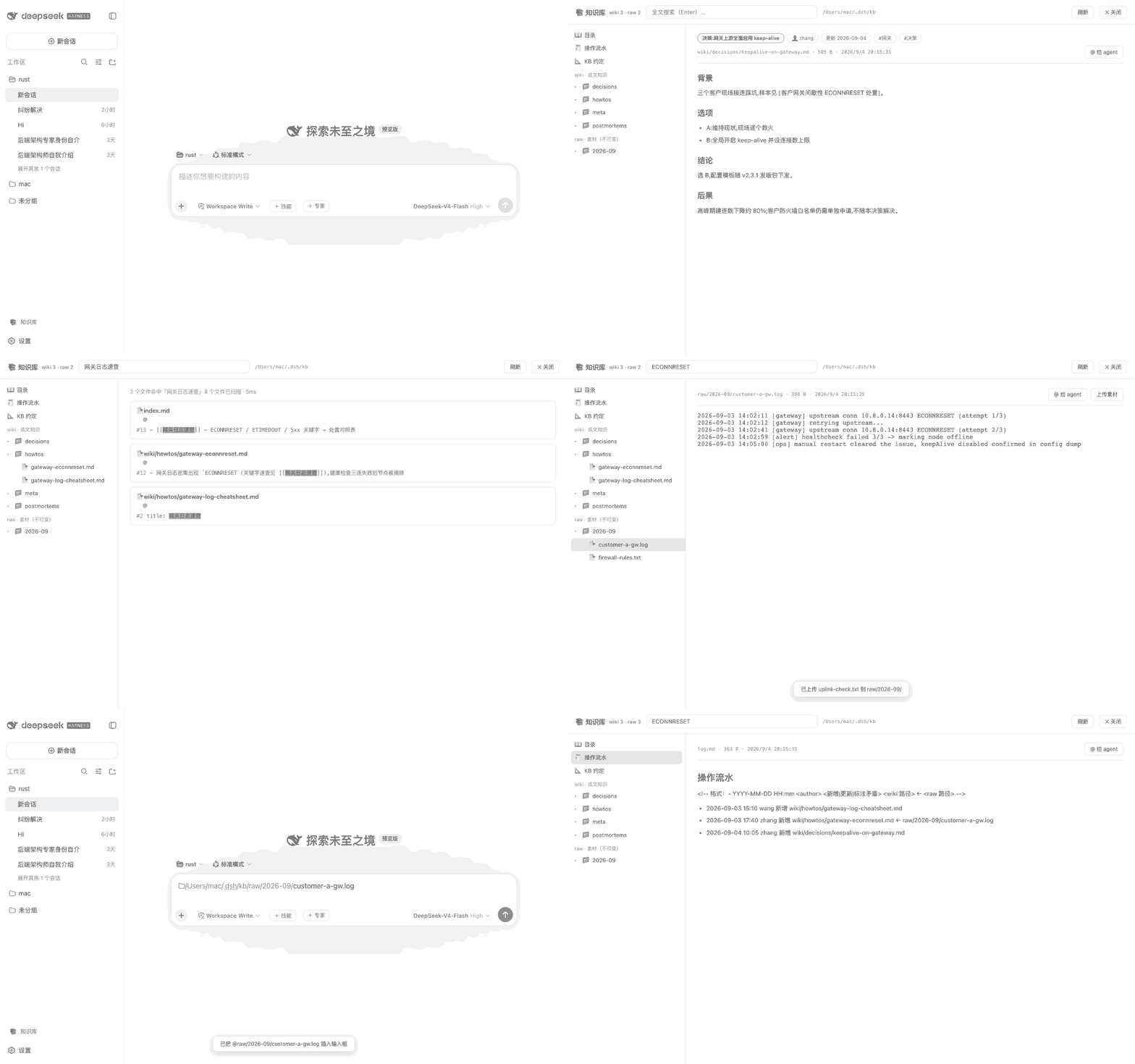
v0.2 自动蒸馏:上传即自动入队,bot 会话按 schema 串行加工成文——「⚗️ 蒸馏队列」看进度,蒸馏模型可在设置中指定:

核心功能
- 全页知识库:侧栏「📚 知识库」进入(工艺库下方);左栏目录树(wiki / raw 懒加载),右栏阅读或搜索
- 多知识库(v0.5.0+):左栏顶部下拉框切换库(v0.6.3+ 仅显示库名),旁边「+」弹出小框新建——素材库(建骨架、可上传、自动蒸馏)或产出库(只读浏览/搜索/@),确定后自动选中新库;选中非主库时旁边出现「✕」可移除(不删数据);对话里「📚 知识库」按钮同样按多库列出
- 库约定可编辑(v0.6.0+):每个知识库各有一份
schema.md加工约定,顶栏「📐 约定」或 schema.md 阅读页「✏️ 编辑约定」直接改——每库独立,各有特色(页面规范、目录用途、加工流程都可按库定制);kb-bot 自动蒸馏与交互 agent 加工前都以当前库的 schema.md 为最终权威,保存即对下次加工生效,支持 ⌘S / 恢复默认模板 - 自动蒸馏(v0.2+):raw/ 新素材自动入队(上传钩子 + 文件监视 + 周期兜底扫描),bot 会话逐个蒸馏;右上角「⚗️ 蒸馏队列」(全局入口,v0.6.2+)看进度/重试/取消/跳转会话,支持暂停、失败退避重试、重启自动恢复、大文件按章节分批成文
- 全文搜索:内置零依赖扫描(大小写不敏感,文本类文件,命中高亮),无需安装任何外部工具
- 问 AI(v0.7.0+):搜索框输入问题点「🤖 问 AI」——自动检索当前库,把命中页 @ 引用连同问题写入输入框,agent 带着依据作答并附来源
- 版本历史(v0.7.0+):宿主监视 wiki/ 自动快照(内容有变化才记版本,每页保留 50 份);阅读页「🕐 历史」查看/恢复任意版本,agent 或人的改动都可回滚
- 页面反馈闭环(v0.7.0+,v0.7.1 起自动执行):阅读页「⚠️ 反馈」记录问题到本库
wiki/meta/feedback.md;默认提交后后台 agent 自动处理——无人值守会话核实反馈、按 schema 修正页面、把该行标[done](进度看蒸馏队列面板「⚠️ 反馈处理」区块,可跳转会话);执行器不可用时自动降级为把指令写入输入框 - 陈旧提示(v0.7.0+):超过 90 天未更新的页面显示「⏳ N 天未更新」标记,救火前先核对
- 下载导出(v0.7.0+):任意文档可下载单页原文(markdown/文本/附件)
- markdown 阅读:frontmatter 徽章(标题/作者/标签/更新时间)、
[[wikilink]]、内部链接、图片内联、代码块、表格 - 素材上传:raw/ 区可上传(log/截图/抓包…),服务端强制只进 raw/、拒绝覆盖(raw 不可变)
- @ 给 agent:任意条目一键把
@绝对路径注入输入框,让 agent 阅读或加工 - 骨架自举:首次启动自动创建目录与约定文件(不覆盖已有),零配置
知识库布局
~/.dsh/kb/                # DSH_KB_ROOT 可覆盖(如 /var/lib/dsh/kb)
├── raw/                  # 原始素材,不可变(人上传,agent 只读)
├── wiki/
│   ├── howtos/           # 症状 → 原因 → 步骤 → 验证
│   ├── decisions/        # 背景 → 选项 → 结论 → 后果
│   ├── postmortems/      # 时间线 → 根因 → 改进项
│   └── notes/            # 读书摘记/成书笔记(自动蒸馏大文件落这里)
├── index.md              # 目录(agent 维护,每篇成文必须挂入)
├── log.md                # 操作流水(谁、何时、动了哪些篇)
└── schema.md             # 本库加工约定(可编辑,每库独立:页面规范 / 目录用途 / 加工流程)
Showing the opening section of the README — the full document lives in the repository以上为 README 开头摘要,完整文档在仓库内 · View the full README on GitHub →在 GitHub 查看完整 README →
Related相关推荐
-
 mindscale-noah/MindMemOS
- Amakurai/dsh-liketavern A DeepSeek Harness (dsh) plugin — turns dsh web into a SillyTavern-style roleplay frontend: character cards, prompt pres…
-
 Aik358/dsh-auto-memory
Proactive associative memory for DSH: system-prompt recall before the model speaks, three-layer auto-consolidation, skil…
Aik358/dsh-auto-memory
Proactive associative memory for DSH: system-prompt recall before the model speaks, three-layer auto-consolidation, skil…
-
 AskTheWay/dsh-auto-memory
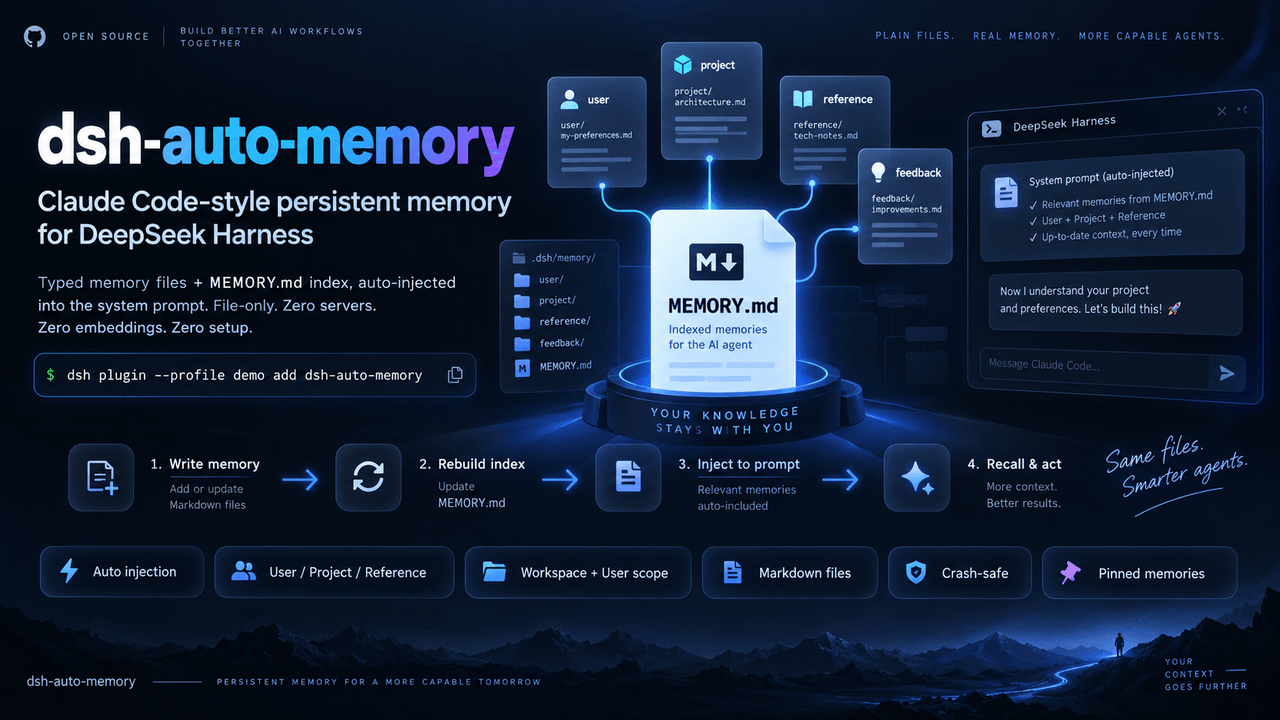
Claude Code-style auto-memory plugin for DeepSeek Harness (dsh): typed memory files + MEMORY.md index auto-injected into…
AskTheWay/dsh-auto-memory
Claude Code-style auto-memory plugin for DeepSeek Harness (dsh): typed memory files + MEMORY.md index auto-injected into…
- lna-lab/distill-kura 蒸留蔵 — distilled long-term memory for agents: recall by meaning, writing gated by evidence, one kura per agent mode. Ship…
-
 fishzjp/qa-skills
让 AI 像资深测试工程师一样工作:面向 AI Agent 的测试工程 Skill 框架——11 Skills + 共享知识库 + 类型决策矩阵(Claude Code / dsh 等 Agent 可用)
fishzjp/qa-skills
让 AI 像资深测试工程师一样工作:面向 AI Agent 的测试工程 Skill 框架——11 Skills + 共享知识库 + 类型决策矩阵(Claude Code / dsh 等 Agent 可用)
-
 WeirdSky924/agent-handoff-skill
Use this cross-platform skill in Codex or Claude Code to establish repository-local continuity memory so a future agent …
WeirdSky924/agent-handoff-skill
Use this cross-platform skill in Codex or Claude Code to establish repository-local continuity memory so a future agent …
- oliblue-evan/dsh-roleplay-preset DeepSeek 深度调校的沉浸式角色扮演 Agent 预设(dsh)——零工具纯对话、酒馆式演出格式、文件记忆库