wellcover/dsh-opencodego-quota
OpenCode Go (opencode.ai/zen/go) quota usage card for the DeepSeek Harness (DSH) Web GUI sidebar - day/week/month progress bars, DS peak/valley billing strip, customizable auto-refresh interval.
Project Overview项目介绍
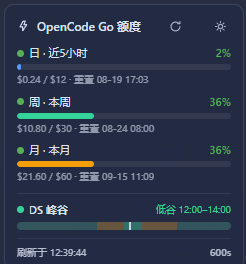
A DSH plugin that adds a persistent sidebar card showing OpenCode Go quota usage across daily (5h, $12), weekly ($30), and monthly ($60) windows, with progress bars, spent amounts, and reset times. It fetches data from the official /usage endpoint, auto-reading the API key from DSH credentials, env vars, or auth.json. Refresh interval defaults to 60s and is user-configurable (5–3600s) via a settings panel, persisted in localStorage. Progress bars gradient from green to red by usage; a peak/valley time indicator and last-refresh time are also shown. Note: requires an OpenCode Go API key configured in Settings → Models, and the card auto-hides in narrow sidebar mode (<110px).
DSH 的 OpenCode Go 额度用量插件,常驻左侧栏底部卡片,展示日(近5小时 $12)、周($30)、月($60)三窗口进度条、已用金额与重置时间。数据来自官方 usage 接口,自动从 DSH 凭据回退到环境变量与 CLI auth.json 零配置取 Key;默认 60 秒刷新,⚙ 弹层支持 5–3600 秒自由配置并写入 localStorage;进度条按已用比例绿→黄→红渐变,附峰谷时段与刷新时间显示。注意:需先在「设置 → 模型」配置 OpenCode Go API Key,窄栏(<110px)下卡片自动隐藏。
请帮我了解并安装插件:【dsh-opencodego-quota】【https://github.com/wellcover/dsh-opencodego-quota】Send this message to DSH in your current session. CLI install commands may not be accurate across systems — DSH will figure it out for you.把上面这条消息直接发给当前会话里的 DSH,让它帮你了解并安装。安装命令不一定准确,发给 DSH 更稳。
Or use CLI install (for developers)或使用命令行安装(适合开发者)
CLI Install命令行安装
dsh plugin --profile web add github:wellcover/dsh-opencodego-quota把 wellcover/dsh-opencodego-quota 加入你的 DSH 配置(web profile)即可启用。
READMEREADME
dsh-opencodego-quota
DeepSeek Harness(DSH)Web GUI 的 OpenCode Go 额度用量插件:在页面左侧栏底部常驻一张小卡片,展示 日(近5小时)/ 周 / 月 三个窗口的额度使用进度条、已用金额 / 配额、重置时间,以及显式的刷新时间;自动刷新间隔默认 60 秒,点标题栏 ⚙(或底部秒数)在弹出的设置层里自由输入 5–3600 秒,回车或保存生效,持久化到浏览器 localStorage,卡片底部只显示当前秒数。
数据来自 OpenCode 官方用量接口 GET https://opencode.ai/zen/go/v1/usage(与官网仪表盘口径一致),非本地估算。
功能
- 📍 左侧栏常驻卡片:跟随 DSH 壳层渲染自动复位(MutationObserver 自愈),窄栏(图标栏)模式下自动隐藏
- 📊 三窗口进度条:
日 · 近5小时($12)、周 · 本周($30)、月 · 本月($60) - 💰 每条显示已用百分比、已用美元 / 配额上限、重置时间(与官网一致)
- 🎨 进度条随额度渐变(v1.0.4):填充条、圆点与百分比文字颜色随已用额度 0→100% 由绿 → 黄 → 红 平滑渐变(HSL 色相 120→0),额度越高越偏红
- ⏱️ DS 峰谷进度条(v1.0.2):按北京时间实时显示当前计费时段——高峰 09:00–12:00、14:00–18:00(琥珀色),其余为低谷(绿色);24 小时色带 + 当前时刻标记,显示「高峰/低谷 · 时段区间(不含已过百分比)」,每 30 秒本地刷新
- ⏱️ 刷新时间(v1.0.3):卡片底部显示「刷新于 HH:MM:SS」与当前间隔秒数(如
60s,点击可打开设置);标题栏 ⚙ 按钮弹出设置层,可输入 5–3600 秒,回车/保存生效、localStorage 持久化;⟳ 按钮手动刷新 - 🔑 零配置取 Key:自动从 DSH 凭据(
OPENCODE_GO_API_KEY)读取,失败时回退到环境变量与 OpenCode CLI 的auth.json - 🔒 Key 仅经 HTTPS 发给官方接口(
Authorization: Bearer+x-api-key)
安装
从 GitHub 直接安装(推荐)
dsh plugin --profile web add github:wellcover/dsh-opencodego-quota
# 或锁定稳定版本 tag(推荐)
dsh plugin --profile web add github:wellcover/dsh-opencodego-quota#v1.0.5
配置
无需额外配置;唯一前置条件:已配置 OpenCode Go API Key 且能在「设置 → 模型」中选择 opencode-go 提供商(当前默认 provider 即可)。
Key 解析顺序:
| 顺序 | 来源 |
|---|---|
| 1 | DSH 凭据 OPENCODE_GO_API_KEY(~/.dsh/.credentials.yaml) |
| 2 | 环境变量 OPENCODE_GO_API_KEY / OPENCODE_API_KEY |
| 3 | ~/.local/share/opencode/auth.json(opencode-go,回退 opencode,type: "api") |
故障排查
| 现象 | 原因 / 处理 |
|---|---|
| 卡片显示「额度获取失败」 | 看工作区下 opencodego-quota-boot.log(宿主激活诊断);确认 cordis.patch.yml 行存在且 inject 列表完整 |
| 「未找到 OpenCode Go API Key」 | 在设置 → 模型配置 API Key,或确认 ~/.dsh/.credentials.yaml 有 OPENCODE_GO_API_KEY |
| 卡片不出现 | 插件未激活或 client 未加载:确认 profile package.json 的 dsh.profile.bundles 含本包名,重启后刷新页面 |
| 窄栏图标模式下卡片隐藏 | 设计如此:侧栏 <110px 时自动隐藏,展开侧栏即恢复 |
变更记录
- v1.0.5:消除定时“刷新闪动”——数据请求期间不再整卡 loading 重建;30s 本地时钟只在分钟变化时局部替换峰谷条,不再整卡重绘。
- v1.0.4:额度进度条颜色随已用额度 0→100% 由绿渐变到红(填充条、圆点、百分比同色)。
License
MIT
Related相关推荐
-
 Aisland-SJL/dsh-usage
🌊 Persistent dock & fully-customizable balance/usage panel for DeepSeek Harness — activity heatmap, dual-channel compar…
Aisland-SJL/dsh-usage
🌊 Persistent dock & fully-customizable balance/usage panel for DeepSeek Harness — activity heatmap, dual-channel compar…
-
 Witherwithwinter/DeepSeek-Balance-Whale-Widget-Bowl
DeepSeek Harness(DSH)Web 界面右下角的常驻余额挂件。基于 MeteorNOX/DeepSeek-Balance-Whale-Widget 修改的铁盆鲸鱼娘版。
Witherwithwinter/DeepSeek-Balance-Whale-Widget-Bowl
DeepSeek Harness(DSH)Web 界面右下角的常驻余额挂件。基于 MeteorNOX/DeepSeek-Balance-Whale-Widget 修改的铁盆鲸鱼娘版。
-
 jelly-000/dsh-balance-monitor
Multi-provider AI balance, quota, and token usage for the dsh sidebar, with a daily heatmap.
jelly-000/dsh-balance-monitor
Multi-provider AI balance, quota, and token usage for the dsh sidebar, with a daily heatmap.
-
 BeiZi6/dsh-opencodego-usage
DSH Web GUI plugin: OpenCodeGo quota breathing light + liquid-glass panel with rolling/weekly/monthly progress bars (作者 …
BeiZi6/dsh-opencodego-usage
DSH Web GUI plugin: OpenCodeGo quota breathing light + liquid-glass panel with rolling/weekly/monthly progress bars (作者 …
-
 283Gawin/dsh-heatmap
DSH Web GUI activity heatmap plugin: GitHub-style commit/token/spend heatmap in the sidebar with per-model cost estimati…
283Gawin/dsh-heatmap
DSH Web GUI activity heatmap plugin: GitHub-style commit/token/spend heatmap in the sidebar with per-model cost estimati…
-
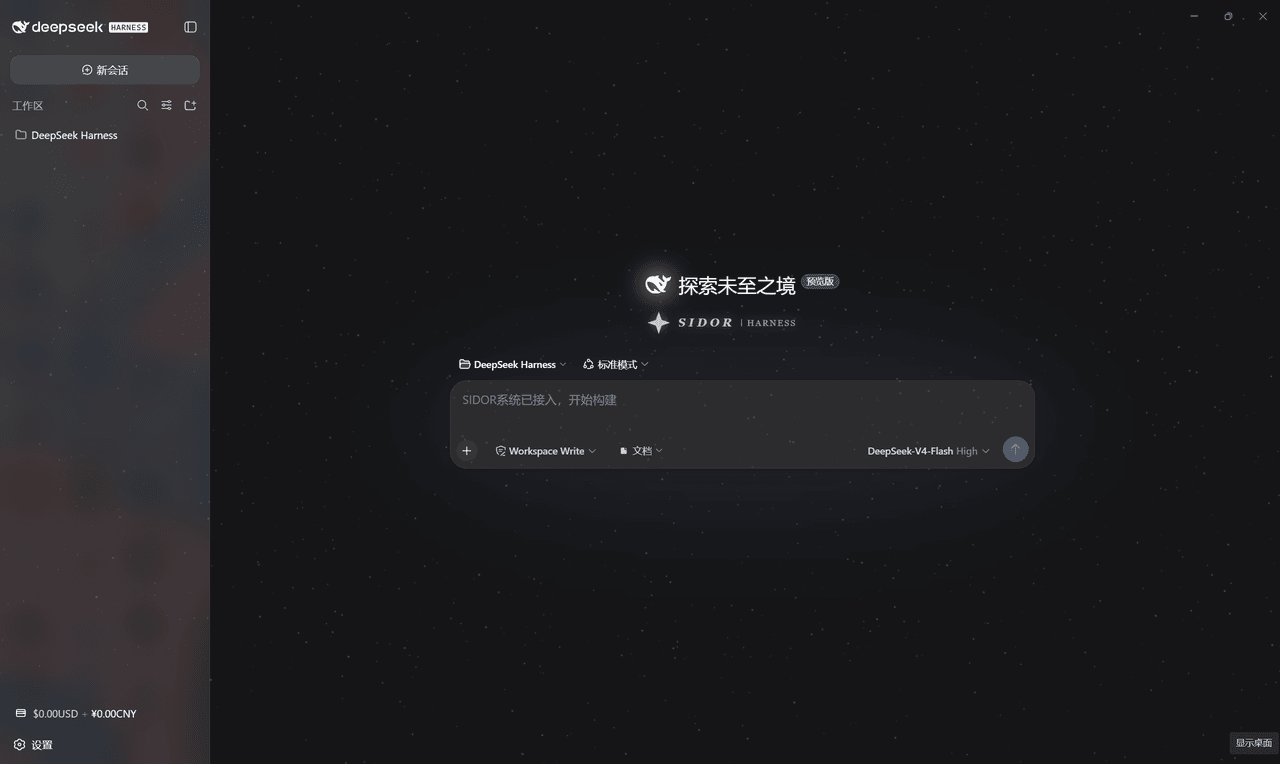 AKI2253/Sidor_UI
SIDOR starfield skin for DeepSeek Harness Web GUI: intro animation, starfield, balance badge, settings FX, low-balance a…
AKI2253/Sidor_UI
SIDOR starfield skin for DeepSeek Harness Web GUI: intro animation, starfield, balance badge, settings FX, low-balance a…
-
 SoDaZilla-zzz/dsh-liquid-glass-balance-card
Draggable liquid-glass DeepSeek API balance card plugin for DeepSeek Harness (DSH) web GUI / DSH ??????? DeepSeek ??????
SoDaZilla-zzz/dsh-liquid-glass-balance-card
Draggable liquid-glass DeepSeek API balance card plugin for DeepSeek Harness (DSH) web GUI / DSH ??????? DeepSeek ??????
- AppliedYuu/dsh-WallpaperAndCost a plugin for dsh to check cost and change backgroud