xiazhi88/dsh-onecompany
给 DeepSeek Harness(dsh)加一层「公司」:你当董事会,agent 当员工。 每个员工是一等的 dsh 会话 agent,有岗位说明书、模型路由、工位目录和一套公司协作工具; 公司服务(ctx.company)负责名册、任务、信箱、审批、定时排程、资料库权限与工作日志。
catalog descriptioncatalog 简介 / catalog description:一人公司 · DeepSeek Harness 多 agent 公司编排插件(CEO/项目群/大厅/@派活/审批/排班/工作日志)
Project Overview项目介绍
dsh-onecompany is a self-contained plugin built natively for DeepSeek Harness (dsh) that wraps the host in a "one-person company" abstraction: the user acts as the board of directors and every agent becomes an employee, with roster, tasks, mailbox, approvals, scheduling, library ACLs, and work logs exposed via a ctx.company service, a sidebar entry, a dedicated full-page panel, and /company slash commands. It installs into the dsh web profile via dsh plugin --profile web add github:xiazhi88/dsh-onecompany (or a local path link) and only depends on dsh's official core services (agents, tools, commands, systemPrompt, storageDomain, sessionPersistence, timer) with zero third-party plugins, while company tools are registered scoped per employee and return company_disabled when the master switch is off.
The typical workflow runs through closed loops: the board creates a task, the mailbox delivers it, the employee is lazily spawned on first message and resumes by demand, comments accumulate under the task, the employee reports back, and approval closes the cycle; a "CEO Si Nan" lobby session plus per-project group sessions become the main interaction surface in v2, with @employee mentions, /call, and /company assign dispatching work, while reports route by project ownership using either digest (one CEO model call) or record (zero-token archive append) delivery. Employees get an LRU-capped resident handle via maxResidentAgents but always retain their session logs for cold recovery.
Configuration lives in cordis.patch.yml (companyRoot, tickMs, maxResidentAgents, defaultDailyTokenCap, approvalsRequired, timeZone, reportDelivery, leanTools, compactPrompt), domain data sits in the onecompany v1 json storage domain, and the MIT-licensed client bundle ships at 535KB minified / 113KB gzipped (zod dominates because the generated Remote codec demands strict schemas); first-run caveats include restarting dsh --profile web, hiring staff before assigning work so lazy startup can bind the persona, and avoiding empty model routes that would leave {{model}} unresolvable, while panel render is roughly 90ms with 8-second polling that pauses on hidden tabs.
dsh-onecompany 是为 DeepSeek Harness(dsh)原生开发的一人公司插件,把 dsh 套上一层"公司"语义:用户扮演董事会,agent 担任员工,配套名册、任务、信箱、审批、定时排程、资料库权限与工作日志等公司服务,并通过侧边栏「一人公司」入口、整页面板与 /company 命令集成进 dsh 的 web profile,安装方式为 dsh plugin --profile web add github:xiazhi88/dsh-onecompany(或本地 link)。插件完全自包含,仅依赖 dsh 官方核心服务 agents、tools、commands、systemPrompt、storageDomain、sessionPersistence、timer,不依赖任何第三方插件;公司工具以 ctx.company 服务按员工作用域注册到模型工具目录,停用时返回 company_disabled。
典型工作流是董事会新建任务→信箱投递→员工懒启动会话并按岗位说明书(同时落 <工位>/AGENTS.md)执行→评论讨论→汇报→验收审批;面板支持「组织 / 任务 / 审批 / 资料库 / 排程 / 工作日志」六视图,常驻 agent 句柄按 maxResidentAgents LRU 回收、会话日志保留以便冷恢复。资料库按项目 ACL 控制读写,任务评论与信箱(info / question / request / report)支撑员工协作,审批专门处理越权动作(招聘、花钱、上线、高危),cron / every / at 三种排程到点由 host 替董事会向指定员工投消息,逾期只补最近一次。
依赖上要求 dsh web profile 与 Node/npm 构建链路,配置通过 cordis.patch.yml 注入(含 companyRoot、tickMs、maxResidentAgents、defaultDailyTokenCap、approvalsRequired、timeZone),领域数据落在 storage domain onecompany v1 的 json 后端;许可证为 MIT,包体 535KB(minify、gzip 113KB,主体为 zod),面板首开约 90ms、轮询 8s,首次使用注意重启 dsh --profile web,并在组织页招到员工后等首次消息触发懒启动再开始派活,模型路由字段留空即可继承部署默认。
请帮我安装这个 DSH 插件。安装前先完成【兼容性检查 + 安全性检查】,检查通过再动手。

插件:dsh-onecompany(xiazhi88/dsh-onecompany)
仓库:https://github.com/xiazhi88/dsh-onecompany
本站详情页:https://www.yhbd.top/plugins/xiazhi88-dsh-onecompany/
本站登记:类型 plugin · 归类 原生 DSH 插件 · 许可证 MIT · ⭐ 4 · 最近提交 2026-09-20 · 主语言 TypeScript

按下面顺序执行,每步先把结论告诉我,再进入下一步:

【1 兼容性检查】
① 我这边:DSH 版本、Node 版本、操作系统、当前 profile(web / desktop)。
② 读它的 README、package.json、插件 manifest,列出它要求的 DSH 版本 / Node 版本 / 操作系统 / 外部依赖 / 需要另外先装的运行时。
③ 逐条比对,结论只写「满足 / 不满足 / 未知」三种;不满足的给出可行替代方案。
④ 检查是否和我已装的插件冲突:命令名重复、skill / tool 重名、端口占用、重复注册的 MCP server。

【2 安全性检查】
① 仓库可信度:和上面「本站登记」是否一致;star / fork 数、创建时间、最近提交,是否归档或长期停更。
② 安装脚本:逐行看 package.json 的 preinstall / install / postinstall,以及 install.sh、setup.ps1 之类脚本。出现 curl|bash、下载后直接执行、混淆代码、访问与插件功能无关的域名,立刻停下来告诉我,不要继续装。
③ 依赖:列出新增依赖,标出无人维护、或与知名包拼写近似的可疑包(typosquatting)。
④ 权限与副作用:它会读写哪些目录、访问哪些域名、需要哪些 DSH 权限(filesystem / network / shell / clipboard 等),以及怎么卸载和回滚。
⑤ 如果它要求 sudo / 管理员权限,或权限明显超出功能所需,先停下来问我。

【3 安装】
上面两步没有「不满足」和「高危项」时才执行;用官方推荐方式安装,不要自行提权。

【4 汇报】
用表格输出:检查项 / 结论 / 依据 / 是否需要我决策。拿不准的一律写「未知」并说明要我怎么确认——不要猜,也不要替我决定。
Send this message to DSH in your current session: it verifies compatibility and security first (answering met / not met / unknown item by item) and only installs once everything checks out — it will stop and ask you if it finds a high-risk item. The box scrolls; the copy is the full prompt. CLI install commands may not be accurate across systems, so DSH is the safer route.把上面这条消息直接发给当前会话里的 DSH:它会先核对兼容性与安全性(逐条给「满足 / 不满足 / 未知」),确认没问题再安装,有高危项会停下来问你。框内可滚动,复制到的是完整提示词;安装命令不一定准确,发给 DSH 更稳。
- Only 4 stars - very few users, little community feedback星标只有 4,几乎没人在用,遇到问题缺少社区反馈
DSH walks through these 9 checksDSH 会逐条核对这 9 项
Compatibility兼容性
- DSH, Node, OS and profile requirementsDSH 版本 / Node 版本 / 操作系统 / profile 是否满足要求
- External dependencies and runtimes (Electron / Python / Docker, ...)外部依赖与运行时(Electron / Python / Docker 等)是否齐备
- Conflicts with installed plugins: command names, skill / tool names, ports, duplicate MCP registration与已装插件是否冲突:命令名、skill / tool 重名、端口占用、重复 MCP 注册
Security安全性
- Repo matches the facts registered here; archived or abandoned?仓库是否与页面登记一致,是否归档或长期停更
- Safety of preinstall / install / postinstall and install.sh / setup.ps1preinstall / install / postinstall 与 install.sh、setup.ps1 是否安全
- curl|bash, download-then-execute, obfuscation, unrelated domains → stop immediatelycurl|bash、下载即执行、混淆代码、无关域名 → 立刻停止
- Typosquatting or unmaintained packages among the new dependencies新增依赖里有没有 typosquatting 或无人维护的包
- Requested permissions vs. what the feature actually needs申请了哪些权限、是否超出功能所需(filesystem / network / shell / clipboard)
- Any sudo / admin requirement, plus uninstall and rollback是否要求 sudo / 管理员权限,以及卸载与回滚方式
Anything uncertain must be marked unknown with a note on how to confirm it. This site's signal screen is a static snapshot, not a security audit.拿不准的必须标「未知」并说明要我怎么确认。本站的信号筛查是静态快照,不能替代安全审计。
Or use CLI install (for developers)或使用命令行安装(适合开发者)
CLI Install命令行安装
dsh plugin --profile web add "github:xiazhi88/dsh-onecompany"把 xiazhi88/dsh-onecompany 加入你的 DSH 配置(web profile)即可启用。
READMEREADME
dsh-onecompany · 一人公司
给 DeepSeek Harness(dsh)加一层「公司」:你当董事会,agent 当员工。
每个员工是一等的 dsh 会话 agent,有岗位说明书、模型路由、工位目录和一套公司协作工具;
公司服务(ctx.company)负责名册、任务、信箱、审批、定时排程、资料库权限与工作日志。
完全自包含:只依赖 dsh 官方核心服务(agents/tools/commands/systemPrompt/storageDomain/sessionPersistence/timer),不依赖任何第三方插件。
安装
# 从 GitHub 安装(仓库自带 lib/ 构建产物,无需允许构建脚本)
dsh plugin --profile web add "github:xiazhi88/dsh-onecompany"

# 或本地开发用 link 安装
dsh plugin --profile web add /path/to/dsh-onecompany

dsh --profile web     # 重启后生效
重启后:
- 侧边栏底部出现「一人公司」入口(有未读审批时带角标);
- 点开是独立整页:总览 / 组织 / 任务 / 审批 / 资料库 / 动态;
- 会话里可用
/company命令:status、org、tasks、assign <员工> <任务>、inbox、approve|reject <id>、on|off。
总开关
页面右上「停用 / 启用」(等价于 /company off|on):
- 停用:调度与信箱投递立即停止,常驻员工全部卸载,公司工具对模型返回
company_disabled; - 数据、会话、资料库原样保留,重新启用即恢复;开关状态持久在领域全局槽位,重启后仍生效。
也就是说:不想用公司模式时,dsh 与你平时完全一样。
员工(agent)
在「组织」页招聘:姓名、职位、汇报对象、岗位说明书(persona → 同时落 <工位>/AGENTS.md)、模型、每日 token 预算。
- 招聘后首次收到消息才真正创建会话 agent(懒启动),之后按需
resume; - 常驻句柄按
maxResidentAgentsLRU 回收,会话日志始终保留,可随时冷恢复; - 模型路由留空 = 继承部署默认(
agent-default-model);不要留空到没有任何模型,否则提示词里的{{model}}无法求值、请求会失败(插件已在创建时自动继承默认路由); - 汇报线是逻辑模型(存领域表 + 注入提示词 + 由信箱/审批强制执行),员工会话同时是一等会话,你可以直接打开它的会话插话。
员工拿到的公司工具(按员工 scoped 注册)
| 工具 | 用途 |
|---|---|
company_org |
组织架构与通讯录 |
company_mail_send / company_mail_list |
公司信箱收发(info / question / request / report) |
company_task_create / _list / _update / _comment |
任务:建、查、认领与推进、评论区讨论 |
company_report |
向上级(无上级则达董事会)汇报 |
company_approval_request |
越权动作(花钱 / 上线 / 高危 / 招聘)申请审批 |
company_doc_list / _read / _write |
资料库读写(按项目 ACL 判定) |
company_schedule_create / _list / _delete |
自己的定时任务(cron / every / at) |
company_help |
协作协议速查 |
工具描述里写明了「什么时候用哪个」,配合岗位提示词里的协议段,员工会自己走完 收信 → 认领 → 执行 → 评论 → 提交验收 → 汇报 的闭环。
闭环能力
- 派工闭环:董事会新建任务 → 信箱投递 → 员工认领执行 → 置 review → 汇报 → 验收。
- 协作闭环:员工之间用信箱互问、在任务评论里沉淀讨论;子任务全完成自动关闭父任务。
- 审批闭环:员工提交审批 → 面板批准/驳回 → 结果以信箱消息回传发起人。
- 定时闭环:排程到点 → 系统消息投递 → 员工按 prompt 执行 → 汇报(cron 用 cron-parser,逾期只补最近一次)。
- 工作日志:
session/event折叠轮次与工时,llm/stream旁路捕获 token 四桶(输入/输出/缓存读/缓存写 + 推理),按员工与日期聚合;面板「组织 → 工作日志」可看明细。
Showing the opening section of the README — the full document lives in the repository以上为 README 开头摘要,完整文档在仓库内 · View the full README on GitHub →在 GitHub 查看完整 README →
Related相关推荐
-
 PerryLink/dsh-auto-review
Second-model AI auto-review for DeepSeek Harness approval requests: a read-only reviewer subagent returns structured all…
PerryLink/dsh-auto-review
Second-model AI auto-review for DeepSeek Harness approval requests: a read-only reviewer subagent returns structured all…
-
 PerryLink/dsh-mcp-panel
MCP management console for the official DeepSeek Harness MCP client: /mcp command with health diagnostics and pipeline t…
PerryLink/dsh-mcp-panel
MCP management console for the official DeepSeek Harness MCP client: /mcp command with health diagnostics and pipeline t…
- LaplaceYoung/oh-my-dsh oh-my-dsh:面向 DSH (DeepSeek Harness) 的插件生态——700+ 插件,只通过扩展接缝注册,不修改 agent-loop 骨架
-
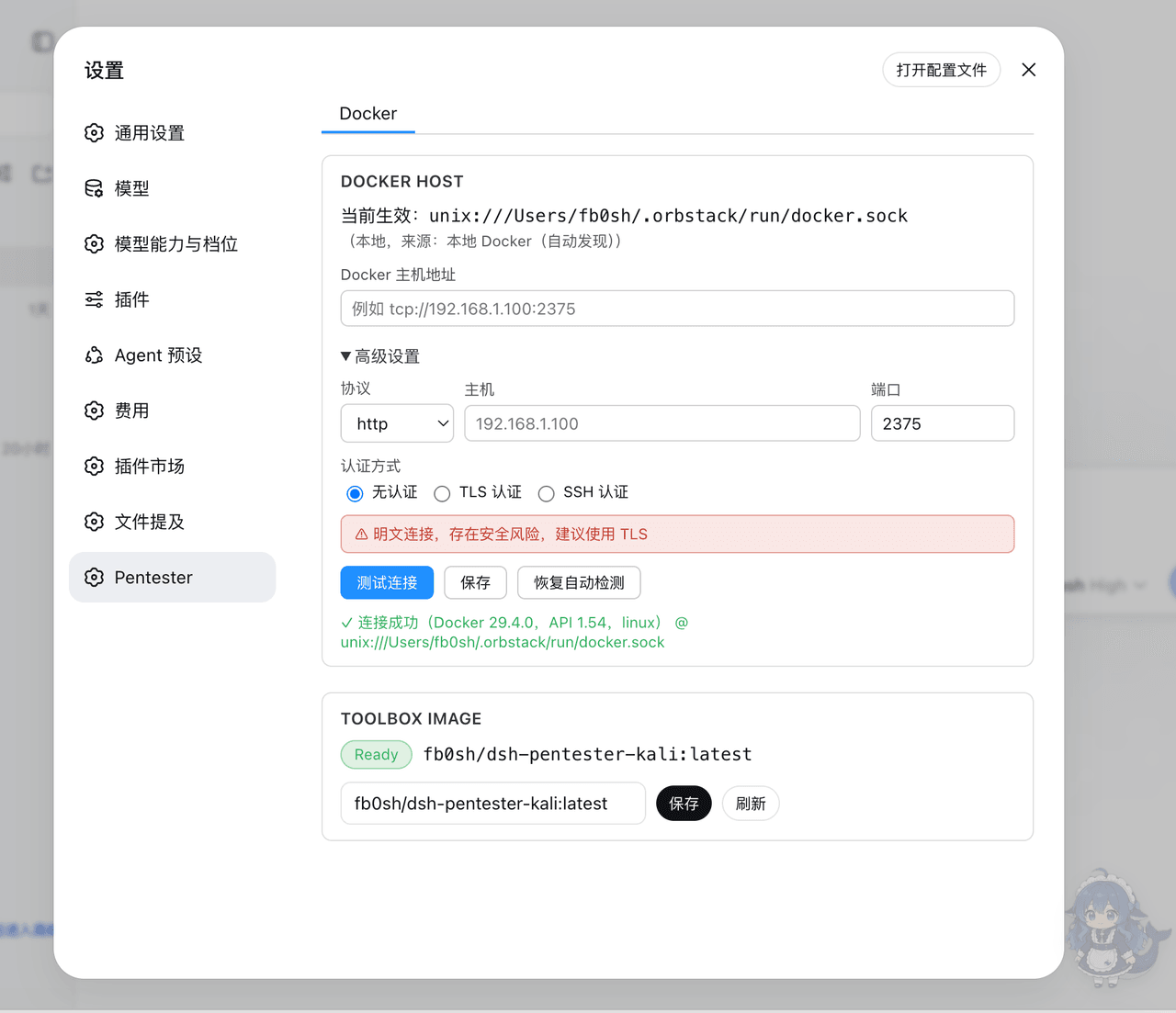 fb0sh/dsh-pentester
基于 DeepSeek Harness 的多 Agent PTES 渗透测试编排插件,支持自动化侦察、漏洞分析、验证与报告,使用 Docker/Kali 隔离工具箱 | Multi-agent PTES penetration testin…
fb0sh/dsh-pentester
基于 DeepSeek Harness 的多 Agent PTES 渗透测试编排插件,支持自动化侦察、漏洞分析、验证与报告,使用 Docker/Kali 隔离工具箱 | Multi-agent PTES penetration testin…
-
 shaokeyibb/dsh-plugin-product-subagents
Role-based Codex / Claude Code / ACP subagent providers for the DeepSeek Harness — continuable children, durable session…
shaokeyibb/dsh-plugin-product-subagents
Role-based Codex / Claude Code / ACP subagent providers for the DeepSeek Harness — continuable children, durable session…
- PerryLink/dsh-skill-pack-security Security-audit skill pack + plugin_vet supply-chain gate for DeepSeek Harness (dsh): 8 bilingual agent skills (secret sc…
-
 lusblead/dsh-Kingdom
在 DSH 中建立属于你的 Agent 王国——让 Agent 拥有角色、权限、领地与治理秩序,并通过事实验证机制与权威账本,让每一次执行、声明与裁决都可核验、可追溯。
lusblead/dsh-Kingdom
在 DSH 中建立属于你的 Agent 王国——让 Agent 拥有角色、权限、领地与治理秩序,并通过事实验证机制与权威账本,让每一次执行、声明与裁决都可核验、可追溯。
-
 JayZz210l/deepseek-harness-for-ide
把 DeepSeek Harness 完整搬进 JetBrains IDE:智能体对话、工具审批、目标与计划、子智能体与 Workflow。装插件、配一次 API Key,即可对话。DeepSeek Harness — agent chat…
JayZz210l/deepseek-harness-for-ide
把 DeepSeek Harness 完整搬进 JetBrains IDE:智能体对话、工具审批、目标与计划、子智能体与 Workflow。装插件、配一次 API Key,即可对话。DeepSeek Harness — agent chat…