yanglaofish/dsh-skill-manager
dsh-plugin,用于管理已启用的技能
Project Overview项目介绍
dsh-skill-manager is a native plugin for DeepSeek Harness (DSH) that provides a unified management plane for agent skills, which are Markdown files with YAML frontmatter packaged as directories containing a SKILL.md. It organizes skills into a strict three-layer model: a library at ~/.dsh/skill-manager/library/ that only stores skills and is never scanned by the engine, a workspace layer at <project-root>/.dsh/skills/ whose directory entries (symlinks or copies) are the sole enable switch and the only source the engine actually reads, and a session layer stored in JSON that defaults to the workspace whitelist but allows free selection from the entire library. Installation is performed through dsh plugin --profile web add @yanglaofish/dsh-skill-manager (npm) or dsh plugin --profile web add github:yanglaofish/dsh-skill-manager (GitHub), after which running dsh web exposes the management UI; the package itself is a DSH bundle shipped through a bundle-manifest and a cordis.patch.yml, confirming DSH-native packaging rather than cross-agent compatibility.
Typical workflow: the operator launches dsh web, opens Settings → Skill Manager, and uses the "Global Skills" tab to view, edit, or import skills (zip ≤50MB, extracted ≤100MB, folder batches supported) while the "Workspace Skills" tab toggles per-project enablement from a dropdown that auto-locates the current session's workspace; the session panel offers a third override layer with a "return to follow" reset. From the conversation side, the user can ask the agent things like "list my skills" or "enable markdown-formatter in this workspace" and the agent invokes any of 13 skill_manager_* tools registered by the plugin. Since v4.2, the /view endpoint calls the native ctx.skills.list({ cwd }) to validate what the engine actually loaded, flagging workspace-enabled skills as missing (red corner) or shadowed when another source overrides them; other Cordis plugins can inject: ['skillManager'] to call 17 host-side service-facade methods without going through HTTP.
The host side is plain native ESM and the client bundle is hand-written react.createElement, requiring no JSX, TypeScript, or bundler; the README explicitly confirms cross-platform deployment on Windows, Linux, and macOS since v4.0, with Windows cross-drive symlinks automatically degrading to full fs.cp directory copies. Safety gates include an isValidIdentifier whitelist for skill names and session IDs, an assertRegisteredWorkspace check that restricts writes to registered workspaces, 2MB HTTP body and 50MB/100MB zip limits, UTF-8 BOM stripping in parseSkillDoc, and a v4.3 browser-trust fence (loopback-only host binding plus sec-fetch-site: cross-site rejection and same-origin Origin enforcement mirroring dsh-client-connection's isTrustedApiRequest). Development uses node --check for syntax plus 165 isolated unit tests under a temporary DSH_HOME; license is MIT.
dsh-skill-manager 是 DeepSeek Harness(DSH)的原生插件,为 DSH 代理的"技能"提供统一管理平面。它围绕"技能库 / 工作区 / 会话"三层模型组织技能文件(YAML frontmatter + Markdown 目录),技能库只作为可用池,启用完全跟随项目工作区(<项目根>/.dsh/skills),会话层可临时自由勾选并支持一键回到跟随。安装方式为 dsh plugin --profile web add @yanglaofish/dsh-skill-manager 或 dsh plugin --profile web add github:yanglaofish/dsh-skill-manager,随后执行 dsh web 即可在设置页与会话页双标签页界面浏览、编辑、导入、搜索、启用技能。
典型工作流:用户启动 dsh web 后进入"设置 → 技能管理",在"全局技能"标签查看/编辑技能、导入 zip(≤50MB,解压 ≤100MB)或整个文件夹,切换"工作区技能"标签为当前项目勾选启用集,再在会话页"技能"tab 临时调整;也可直接对 agent 说"列出我有哪些技能"或"把 markdown-formatter 在工作区启用"触发 13 个 skill_manager_* 工具。v4.2 起 /view 调用原生 ctx.skills.list({ cwd }) 校验引擎实际加载集,对工作区已启用但引擎未加载(missing)或被其他来源覆盖(shadowed)的技能标红角标,其他 Cordis 插件可通过 inject: ['skillManager'] 调用宿主服务门面的 17 个方法。
宿主侧为原生 ESM、客户端侧为手写 react.createElement 的原生 JS bundle,无构建步骤;v4.0 起支持 Windows / Linux / macOS 跨平台部署,Windows 跨盘自动从目录 symlink 降级为 fs.cp 整目录复制。安全门禁包括技能名/sessionId 白名单、写操作仅限已登记工作区、HTTP body 2MB 上限、zip 50MB/解压 100MB 上限、loopback-only 监听配合 isTrustedPanelRequest confused-deputy 防线(203 条测试)。MIT 许可,开发模式下可用 dsh plugin --profile web add . 即时生效。
请帮我安装这个 DSH 插件。安装前先完成【兼容性检查 + 安全性检查】,检查通过再动手。

插件:dsh-skill-manager(yanglaofish/dsh-skill-manager)
仓库:https://github.com/yanglaofish/dsh-skill-manager
本站详情页:https://www.yhbd.top/plugins/yanglaofish-dsh-skill-manager/
本站登记:类型 plugin · 归类 原生 DSH 插件 · 许可证未声明 · ⭐ 2 · 最近提交 2026-09-23 · 主语言 JavaScript

按下面顺序执行,每步先把结论告诉我,再进入下一步:

【1 兼容性检查】
① 我这边:DSH 版本、Node 版本、操作系统、当前 profile(web / desktop)。
② 读它的 README、package.json、插件 manifest,列出它要求的 DSH 版本 / Node 版本 / 操作系统 / 外部依赖 / 需要另外先装的运行时。
③ 逐条比对,结论只写「满足 / 不满足 / 未知」三种;不满足的给出可行替代方案。
④ 检查是否和我已装的插件冲突:命令名重复、skill / tool 重名、端口占用、重复注册的 MCP server。

【2 安全性检查】
① 仓库可信度:和上面「本站登记」是否一致;star / fork 数、创建时间、最近提交,是否归档或长期停更。
② 安装脚本:逐行看 package.json 的 preinstall / install / postinstall,以及 install.sh、setup.ps1 之类脚本。出现 curl|bash、下载后直接执行、混淆代码、访问与插件功能无关的域名,立刻停下来告诉我,不要继续装。
③ 依赖:列出新增依赖,标出无人维护、或与知名包拼写近似的可疑包(typosquatting)。
④ 权限与副作用:它会读写哪些目录、访问哪些域名、需要哪些 DSH 权限(filesystem / network / shell / clipboard 等),以及怎么卸载和回滚。
⑤ 如果它要求 sudo / 管理员权限,或权限明显超出功能所需,先停下来问我。

【3 安装】
上面两步没有「不满足」和「高危项」时才执行;用官方推荐方式安装,不要自行提权。

【4 汇报】
用表格输出:检查项 / 结论 / 依据 / 是否需要我决策。拿不准的一律写「未知」并说明要我怎么确认——不要猜,也不要替我决定。
Send this message to DSH in your current session: it verifies compatibility and security first (answering met / not met / unknown item by item) and only installs once everything checks out — it will stop and ask you if it finds a high-risk item. The box scrolls; the copy is the full prompt. CLI install commands may not be accurate across systems, so DSH is the safer route.把上面这条消息直接发给当前会话里的 DSH:它会先核对兼容性与安全性(逐条给「满足 / 不满足 / 未知」),确认没问题再安装,有高危项会停下来问你。框内可滚动,复制到的是完整提示词;安装命令不一定准确,发给 DSH 更稳。
- No license declared - all rights reserved by default; ask the author before commercial use or redistribution未声明开源许可证 —— 默认「保留所有权利」,商用或再分发前先问作者
- Only 2 stars - very few users, little community feedback星标只有 2,几乎没人在用,遇到问题缺少社区反馈
DSH walks through these 9 checksDSH 会逐条核对这 9 项
Compatibility兼容性
- DSH, Node, OS and profile requirementsDSH 版本 / Node 版本 / 操作系统 / profile 是否满足要求
- External dependencies and runtimes (Electron / Python / Docker, ...)外部依赖与运行时(Electron / Python / Docker 等)是否齐备
- Conflicts with installed plugins: command names, skill / tool names, ports, duplicate MCP registration与已装插件是否冲突:命令名、skill / tool 重名、端口占用、重复 MCP 注册
Security安全性
- Repo matches the facts registered here; archived or abandoned?仓库是否与页面登记一致,是否归档或长期停更
- Safety of preinstall / install / postinstall and install.sh / setup.ps1preinstall / install / postinstall 与 install.sh、setup.ps1 是否安全
- curl|bash, download-then-execute, obfuscation, unrelated domains → stop immediatelycurl|bash、下载即执行、混淆代码、无关域名 → 立刻停止
- Typosquatting or unmaintained packages among the new dependencies新增依赖里有没有 typosquatting 或无人维护的包
- Requested permissions vs. what the feature actually needs申请了哪些权限、是否超出功能所需(filesystem / network / shell / clipboard)
- Any sudo / admin requirement, plus uninstall and rollback是否要求 sudo / 管理员权限,以及卸载与回滚方式
Anything uncertain must be marked unknown with a note on how to confirm it. This site's signal screen is a static snapshot, not a security audit.拿不准的必须标「未知」并说明要我怎么确认。本站的信号筛查是静态快照,不能替代安全审计。
Or use CLI install (for developers)或使用命令行安装(适合开发者)
CLI Install命令行安装
dsh plugin --profile web add @yanglaofish/dsh-skill-manager把 yanglaofish/dsh-skill-manager 加入你的 DSH 配置(web profile)即可启用。
READMEREADME
dsh-skill-manager
一个 DeepSeek Harness(DSH)插件:为 DSH 代理的技能提供完整的管理平面——统一查看、编辑、导入、管理,并按照「技能库 / 工作区 / 会话」三层模型精细控制每个技能在何时何地生效。技能库只存技能,启用跟着项目走:技能放进库中不会自动生效,只有某个工作区勾选启用后,该工作区(及其会话)才看得到它。
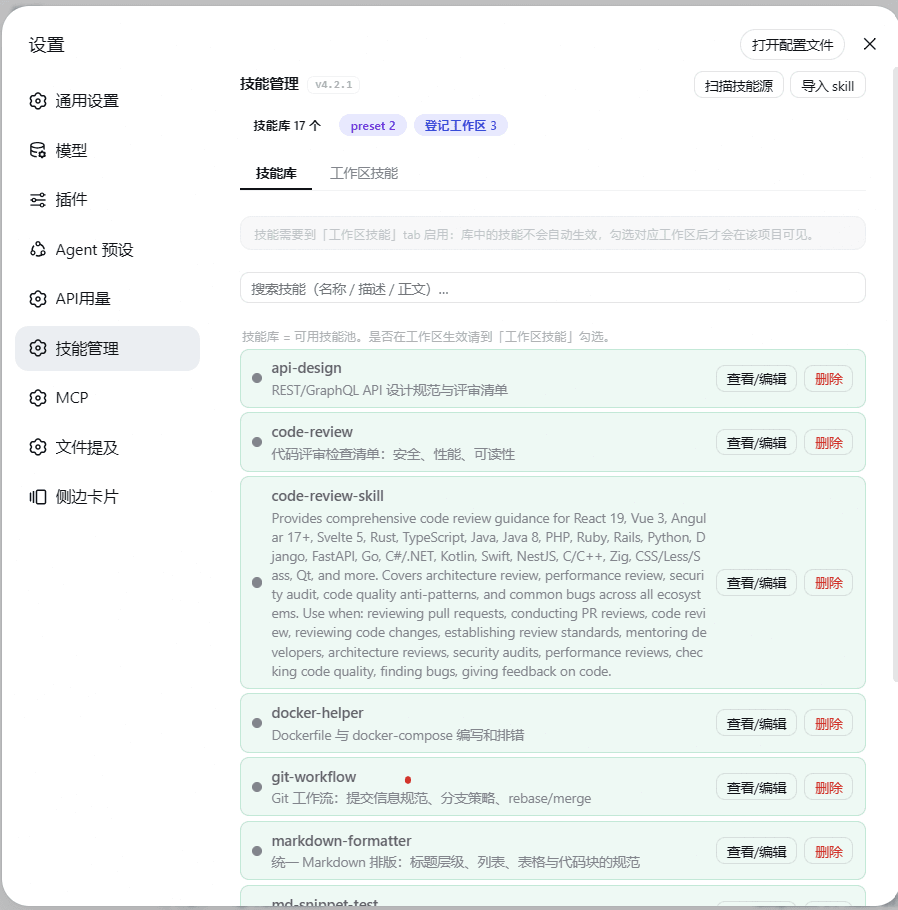
界面预览
设置面板 · 三层模型
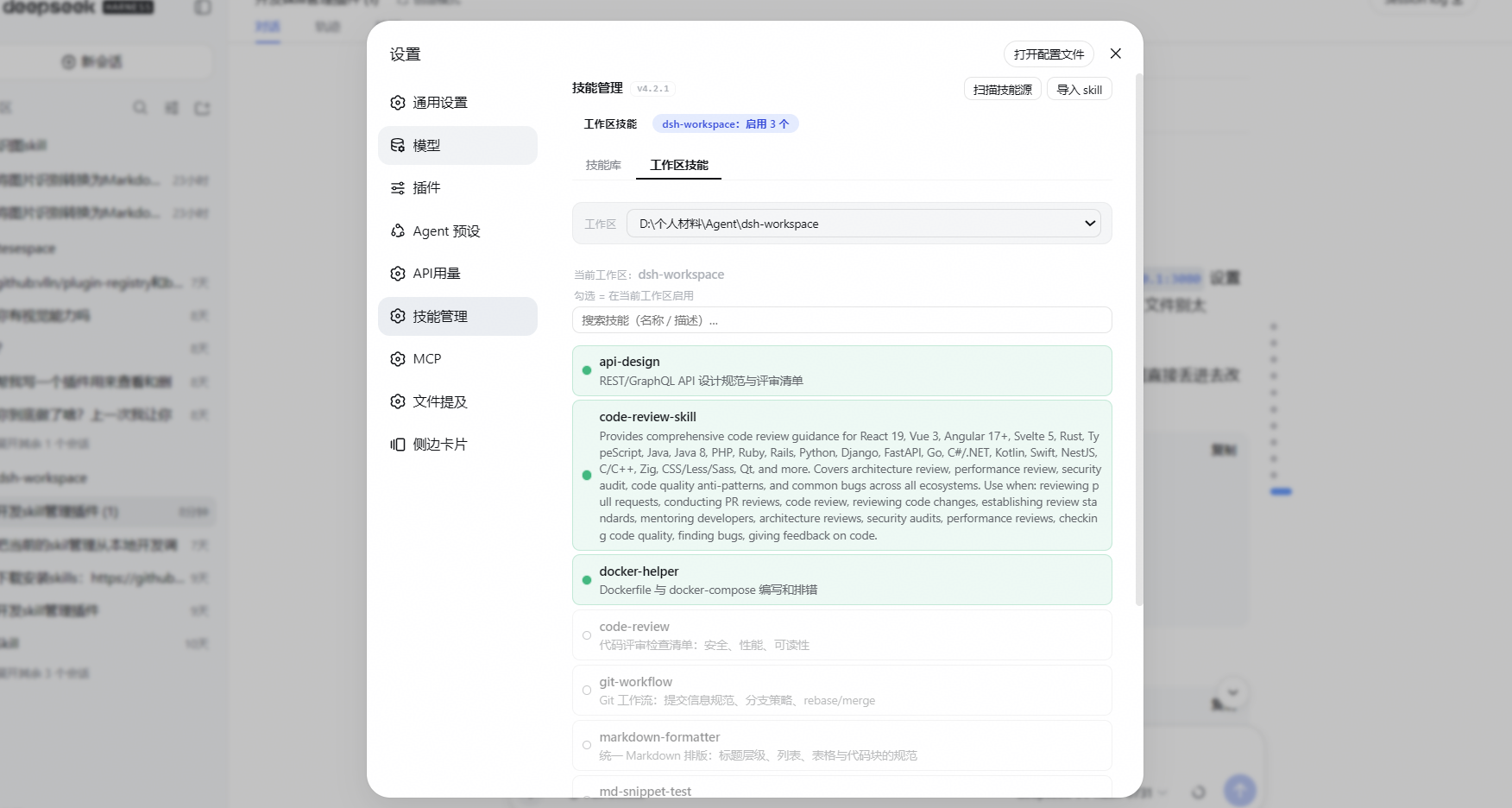
工作区启用白名单
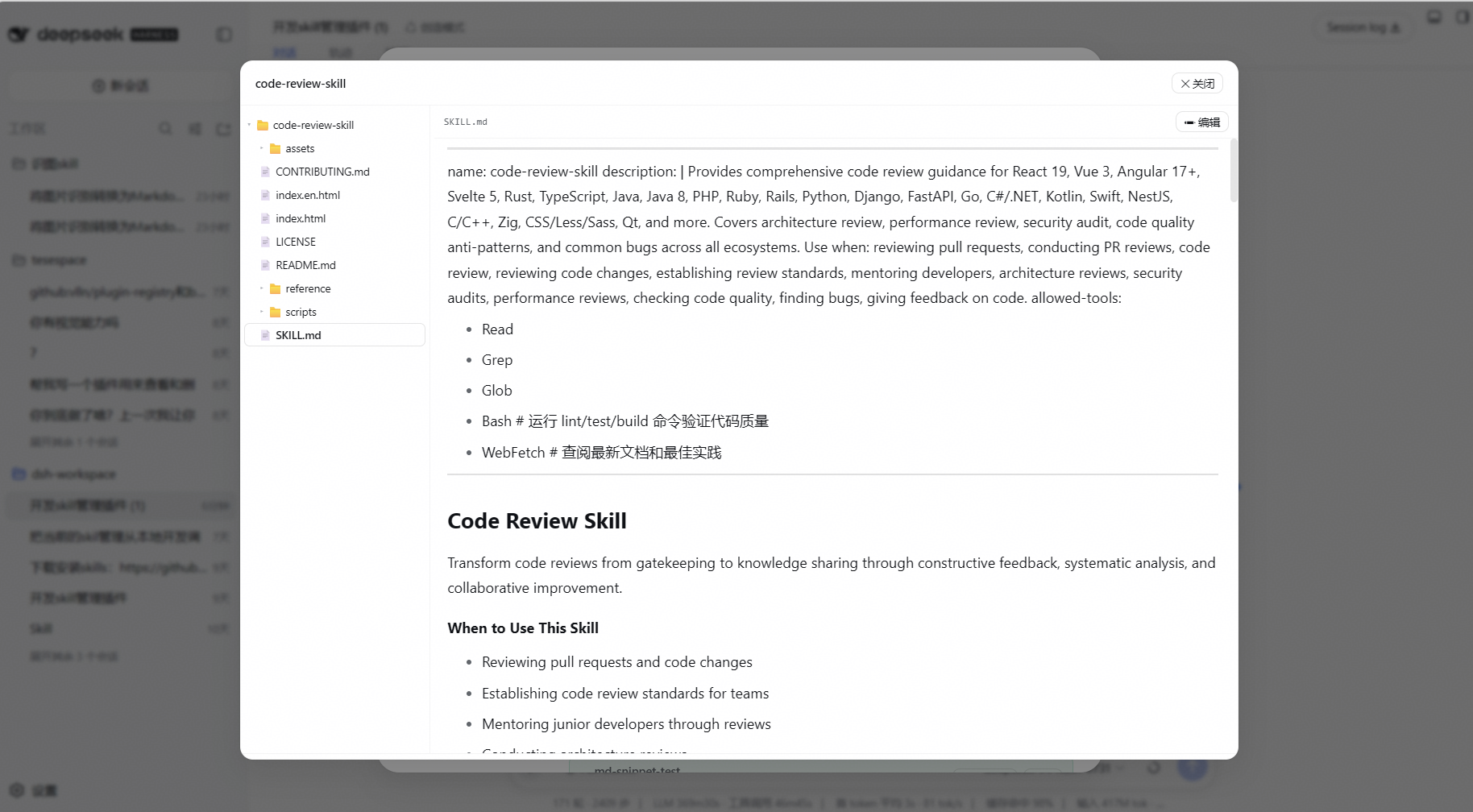
技能文件浏览/编辑
会话级勾选
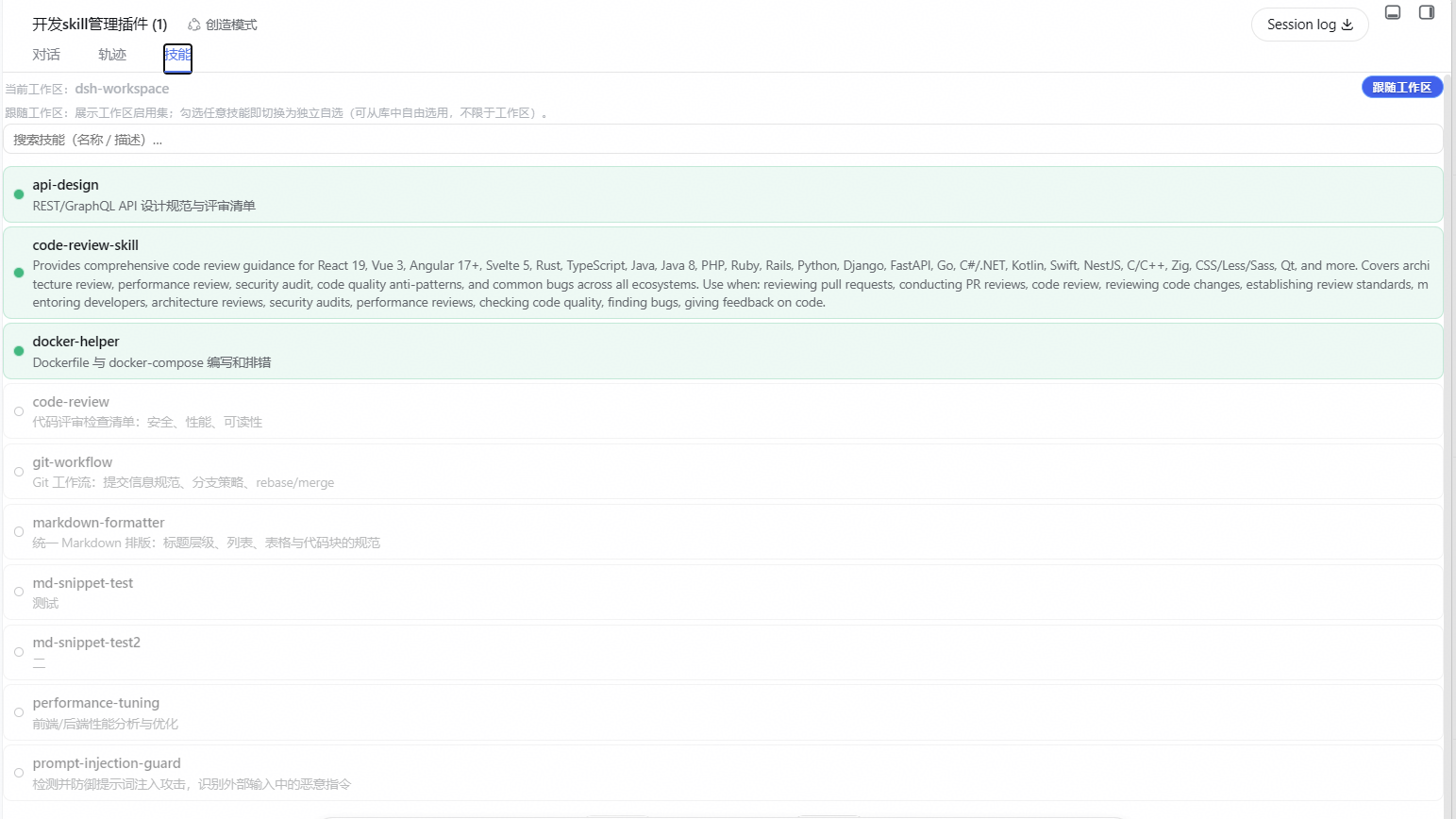
DSH 的「技能」是带 YAML frontmatter 的 Markdown 文件,是代理可复用的能力包。技能一多就会散落,难以统一管理。dsh-skill-manager 把这一切收拢成一个管理平面:
- 技能库 — 列出/查看/编辑/导入/删除全部技能(目录形式:文件夹 + SKILL.md)。库只是可用技能池,不负责启用。
- 工作区技能 — 每个项目独立维护自己的技能集合(跟随项目目录走),唯一的启用开关:勾选=该项目启用,未勾选=该项目完全不可见。
- 会话技能 — 针对当前会话临时勾选,默认跟随工作区,可固定自选(库全集自由勾选,不限于工作区启用集)。
- 跨层搜索 — 名称 / 描述 / 使用场景 / 正文全文匹配,带命中标注。
- 统一界面 — 设置页双标签页 + 会话页技能面板,三处共用同一套行组件(整行点击切换、启用高亮、停用置灰+描边、预设只读、自动分页)。
- 跨插件集成 — 宿主侧提供
skillManager服务门面,其他 Cordis 插件inject: ['skillManager']即可调用全部能力。
它不改变 DSH 的技能加载机制——它管理技能在磁盘上的组织方式,让 DSH 原生引擎读到的正是你想要的集合。
v4.3 里程碑:浏览器信任围栏——面板 API(
/skill-manager/api/*)接入与 dsh 官方/api一致的 confused-deputy 防线(isTrustedPanelRequest):Host 必须为 loopback(localhost / 127/8 / [::1],防 DNS rebinding)、sec-fetch-site: cross-site一律 403(防 CSRF)、带 Origin 时须同源;测试 203 条。此围栏镜像dsh-client-connection的isTrustedApiRequest(官方 RPC 通道内置,插件自建路由需自行复制),纯头判定、无额外依赖。v4.2 里程碑:引擎视角校验——
/view经原生ctx.skills.list({ cwd })查询引擎实际加载的技能集,工作区/会话面板对「工作区白名单已启用但引擎未加载(missing)」「同名被其他来源覆盖(shadowed)」的技能标红色角标(悬停显示原因);配套 host 纯函数engineLoadState/collectEngineLoaded;测试 190 条。原生 skills 接口仅作只读校验,磁盘白名单主链路保持不变。v4.2.1 语义修正(跟随审核修复):① 引擎查询返回空列表一律按
unknown处理(不亮角标)——宿主侧list()可能看不到挂在 scope 层的 provider,引擎实际仍加载着技能,空 ≠ 未加载,宁无声不误报;②missing/shadowed只对工作区白名单启用(引擎契约该加载的磁盘事实)判定,纯会话勾选(视图层,v4.1 语义)不再被标「未加载」。v4.1 里程碑:会话层放开为库全集自由勾选(「回到跟随」一键恢复,隐式回跟随移除);技能详情模态收束为单一文件浏览(Markdown 渲染预览、根目录节点、左右 15%/高度 30–80% 可拖);工作区列表自动补齐会话存储(含未打开面板的工作区)、死路径读即清、面板显示插件版本角标。
v4.0 里程碑:彻底移除单文件兼容(统一目录形式)、安全加固(路径穿越/zip 炸弹/越权 cwd 全防线)、平台兼容(Windows / Linux / macOS 均可部署)、前端体积预检、宿主服务门面、错误边界测试(165 条)。
安装
两种方式任选其一(npm 包已发布,拉取即用、免构建授权):
方式 A:npm 安装(推荐)
dsh plugin --profile web add @yanglaofish/dsh-skill-manager
方式 B:GitHub 源安装
Showing the opening section of the README — the full document lives in the repository以上为 README 开头摘要,完整文档在仓库内 · View the full README on GitHub →在 GitHub 查看完整 README →
Related相关推荐
-
 titanwings/distilly
Distilly — Distill how they think into reusable Skills for any Agent or Bot. Formerly Colleague Skill(原同事 Skill).
titanwings/distilly
Distilly — Distill how they think into reusable Skills for any Agent or Bot. Formerly Colleague Skill(原同事 Skill).
-
 YuJunZhiXue/dsh-purge
DeepSeek Harness 破甲:让所有模型都能破甲,不同模型可换不同提示词;默认提示词面向国模「小码酱」。Jailbreak for every model — swap prompts per model. 求 Star 收藏 ⭐
YuJunZhiXue/dsh-purge
DeepSeek Harness 破甲:让所有模型都能破甲,不同模型可换不同提示词;默认提示词面向国模「小码酱」。Jailbreak for every model — swap prompts per model. 求 Star 收藏 ⭐
- Tiger3807861189/J-Space-Cognition-Suite J-Space Cognition Suite — a model-agnostic inference-time control suite for deep reasoning, long-horizon work, verificat…
-
 Clearailhc/clearai-dsh
ClearAI is a native DSH plugin that brings the Epistemic Loop to DeepSeek Harness.
Clearailhc/clearai-dsh
ClearAI is a native DSH plugin that brings the Epistemic Loop to DeepSeek Harness.
- Tiger3807861189/GLM-5.3-Flash-J-Space-Capability-Realization-Report GLM-5.3-Flash × J-Space capability realization — benchmark presentation of the J-Space Cognition Suite
-
 yejiming/MuseAI
创建你的 AI 角色,进入你的故事世界。和角色聊天、冒险、穿书,让每一次互动都留下羁绊(支持 DeepSeek Harness 插件,欢迎使用)
yejiming/MuseAI
创建你的 AI 角色,进入你的故事世界。和角色聊天、冒险、穿书,让每一次互动都留下羁绊(支持 DeepSeek Harness 插件,欢迎使用)
-
 superdesigndev/superdesign-skill
The design skill for Claude Code, Cursor and any coding agent. Stop shipping AI-slop UI: turn it into shippable, tastefu…
superdesigndev/superdesign-skill
The design skill for Claude Code, Cursor and any coding agent. Stop shipping AI-slop UI: turn it into shippable, tastefu…
-
 Miaotofu01/Study-Mate
你的AI学习搭档:定路线、讲知识、做项目,边学边做,学透一门科目
Miaotofu01/Study-Mate
你的AI学习搭档:定路线、讲知识、做项目,边学边做,学透一门科目