yxv1203-collab/dsh-conversation-archive
Native workspace governance for DeepSeek Harness (DSH), bringing archived-session management, pre-deletion protection for important outputs, and verifiable local backups into the Settings interface. The plugin keeps DSH as the source of truth for session state and uses strict path validation, content hashes, and fail-closed safeguards to reduce risk when cleaning up archived work.
catalog descriptioncatalog 简介 / catalog description:Native archive, retention, safe deletion, and verified backup management for DeepSeek Harness.
Project Overview项目介绍
DSH Workspace Manager is a DeepSeek Harness plugin that completes the archive lifecycle. It adds native archive browsing, batch controls, and protected file retention, then produces audited local or network backups with manifests and checksums. Use it to manage archived chats, clean DSH-owned data via the Recycle Bin, and preserve valuable outputs through a model-assisted review. Caveat: Windows 10/11 only, verified against DSH 0.1.1-rc.2, and the retained-files library is a local safeguard, not a cloud backup.
DSH Workspace Manager 是 DeepSeek Harness 插件,用于完成归档生命周期管理。它在原生设置中提供归档搜索、批量操作与受保护文件保留,并通过校验清单生成本地或网络备份。适用于需要安全管理已归档对话、清理 DSH 拥有数据并生成可审计备份的用户。需注意:仅支持 Windows 10/11 且已验证 DSH 0.1.1-rc.2;删除会进入回收站,但保留文件仅作本地防护,并非云备份服务。
请帮我了解并安装插件:【dsh-conversation-archive】【https://github.com/yxv1203-collab/dsh-conversation-archive】Send this message to DSH in your current session. CLI install commands may not be accurate across systems — DSH will figure it out for you.把上面这条消息直接发给当前会话里的 DSH,让它帮你了解并安装。安装命令不一定准确,发给 DSH 更稳。
Or use CLI install (for developers)或使用命令行安装(适合开发者)
CLI Install命令行安装
dsh plugin --profile web add github:yxv1203-collab/dsh-conversation-archive#v1.1.0把 yxv1203-collab/dsh-conversation-archive 加入你的 DSH 配置(web profile)即可启用。
READMEREADME
DSH Workspace Manager



Native workspace governance for DeepSeek Harness (DSH), bringing archived-session management, pre-deletion protection for important outputs, and verifiable local backups into the Settings interface. The plugin keeps DSH as the source of truth for session state and uses strict path validation, content hashes, and fail-closed safeguards to reduce risk when cleaning up archived work.
Features
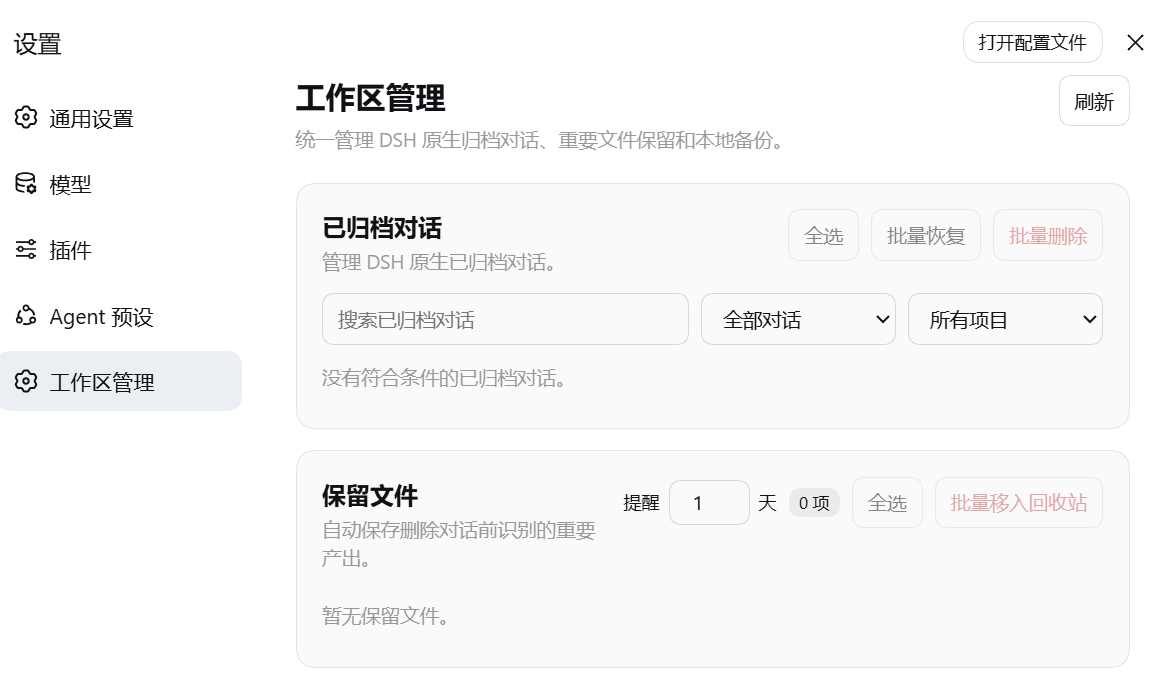
- Native archive management: browse, search, and filter DSH-archived conversations, then restore or delete them individually or in batches. Archive state always comes from DSH rather than a parallel plugin index.
- Protected output retention: before deletion, the configured DSH model reviews eligible workspace outputs. Selected files are copied into a shared, deduplicated library and verified by content hash, with restore, batch removal, and in-app reminders built in.
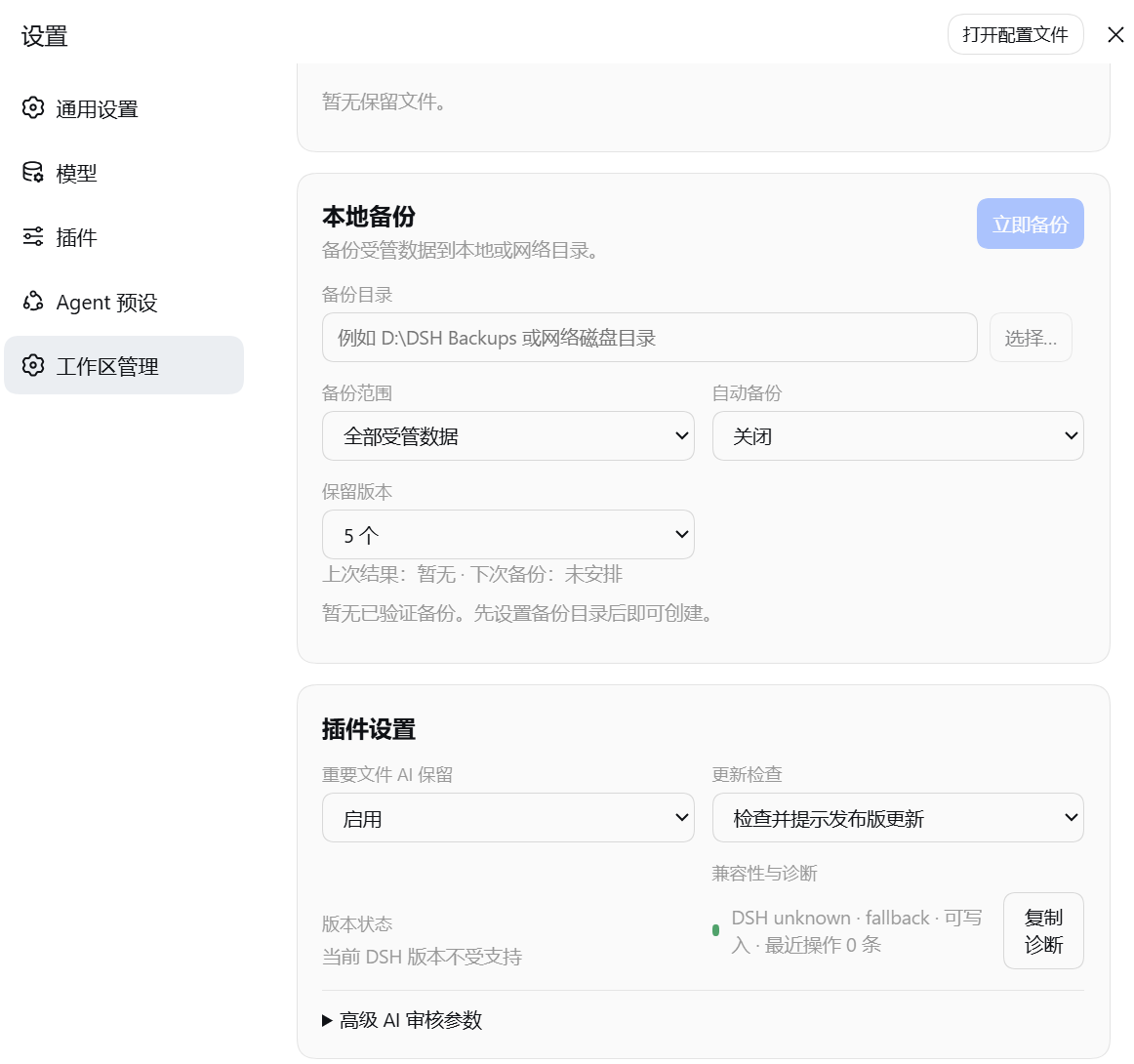
- Verified local backups: create ZIP backups manually, on a schedule, or before a clean shutdown. Each backup carries a manifest and hashes, restores only into an empty destination, and never overwrites existing files. Automatic backup is off by default; five verified backups are retained by default.
- Workspace and path safety: support DSH-registered workspaces across drives and independent project directories, backfill historical mappings from native metadata, and reject traversal through junctions or symbolic links.
Screenshots
Requirements
| Component | Requirement |
|---|---|
| Operating system | Windows 10 or 11 |
| DSH | Tested with 0.1.1-rc.2 through 0.1.2-rc.1; other versions are not yet verified |
| PowerShell | 5.1 or later |
| Node.js | 20 or later; also meet your DSH installation's requirements |
| Workspace | A readable and writable folder, not a drive or share root |
Installation
From GitHub
dsh plugin --profile web add github:yxv1203-collab/dsh-conversation-archive#v1.1.0
Restart DSH, then open Settings → Workspace Manager.
From a release package
Download dsh-conversation-archive-1.1.0.tgz and its .sha256 file from GitHub Releases.
Get-FileHash .\dsh-conversation-archive-1.1.0.tgz -Algorithm SHA256
Get-Content .\dsh-conversation-archive-1.1.0.tgz.sha256
Confirm the hashes match. For an offline installation, first copy the package to the profile's durable dependency directory, then install that retained copy:
$profileDeps = Join-Path $env:DSH_HOME 'profiles\web\deps'
New-Item -ItemType Directory -Force $profileDeps | Out-Null
$profilePackage = Join-Path $profileDeps 'dsh-conversation-archive-1.1.0.tgz'
Copy-Item .\dsh-conversation-archive-1.1.0.tgz $profilePackage
dsh plugin --profile web add $profilePackage
Keep this retained .tgz for as long as the file-based installation remains in the profile. Deleting or moving it makes pnpm re-resolution fail during later plugin installs. Installing from the GitHub tag above avoids a disposable local-file dependency.
Deletion and data protection
Unarchiving and deleting are separate operations. Deletion checks session ownership and paths, scans eligible outputs, asks the configured DSH model to assess their content, and verifies retained copies before recycling session data. Candidate file content may be sent to the model provider configured in DSH.
Original project folders and source files are not deletion targets. Review, copy, integrity, or path-validation failures stop the protected deletion workflow. AI retention is selective and does not replace a full project backup.
On supported DSH versions, session data is recycled while its archive marker remains in place. The next clean startup removes workspace references and finalizes deletion, preventing the conversation from reappearing in the active list.
Workspaces and metadata
Metadata not registered means a native archived session has no valid plugin workspace mapping. Startup and archive synchronization backfill mappings from DSH session metadata. If the warning remains, check workspace access and session metadata; complete workspace-output protection and backups require a valid mapping.
Native session paths are independent of the shared storage root. The plugin can infer that root from a canonical daily workspace on first use and records it for subsequent starts. Existing mappings and retained files are not automatically relocated. Explicit harnessRoot, DCA_HARNESS_ROOT, or DSH_HARNESS_ROOT settings take precedence.
Restoring a retained file to its original location requires a recognized DSH workspace. Otherwise, select an alternate destination. Existing files are never overwritten, and paths that escape through junctions or symbolic links are rejected.
Backup scope
Backups cover registered DSH session data and retained files, not entire source repositories. Targets may be local folders or supported network paths. Old backups are recycled only after the newest backup passes verification. Network availability, permissions, and Recycle Bin support depend on the destination.
Cloud accounts are not connected directly. External sync software may synchronize a backup folder. Reminders appear inside DSH, not as Windows notifications.
Removal
dsh plugin --profile web remove dsh-conversation-archive
Restart DSH after removal. Retained files and backups are preserved.
Development
With a compatible DSH installation available locally:
npm test
npm pack --dry-run --json
npm pack
Tests cover archive synchronization, historical metadata backfill, cross-drive path rules, retention, backups, deletion recovery, and release integrity.
Support and license
Report issues through GitHub Issues or contact yxv1203@gmail.com. Include DSH and plugin versions, reproduction steps, and sanitized diagnostics.
Licensed under MIT.
Related相关推荐
-
 liangmianya/dsh-synapse
A visual, non-linear conversation workspace plugin for DeepSeek Harness ; A canvas-based session explorer and branching …
liangmianya/dsh-synapse
A visual, non-linear conversation workspace plugin for DeepSeek Harness ; A canvas-based session explorer and branching …
-
 alaliqing/claude-paper
📖 Cross-agent research paper toolkit for Claude Code, Codex, OpenCode, and DeepSeek Harness—quick summaries, deep study…
alaliqing/claude-paper
📖 Cross-agent research paper toolkit for Claude Code, Codex, OpenCode, and DeepSeek Harness—quick summaries, deep study…
-
 omdsh-dev/dsh-annotation
DSH Web 选中批注插件:选文字→批注→回车随消息发送;气泡隐藏批注块(零闪烁);回复按 Annotation N 逐条对照(可悬浮芯片)。官方 bundle,零核心改动
omdsh-dev/dsh-annotation
DSH Web 选中批注插件:选文字→批注→回车随消息发送;气泡隐藏批注块(零闪烁);回复按 Annotation N 逐条对照(可悬浮芯片)。官方 bundle,零核心改动
-
 Anionex/dsh-turn-rewind
deepseek harness对话和代码状态回退插件 | DSH — rewind conversation and workspace state, powered by a persistent Change Ledger
Anionex/dsh-turn-rewind
deepseek harness对话和代码状态回退插件 | DSH — rewind conversation and workspace state, powered by a persistent Change Ledger
-
 hanshenmesen/dsh-turn-delete
Delete one complete turn from a DeepSeek Harness session without deleting the session
hanshenmesen/dsh-turn-delete
Delete one complete turn from a DeepSeek Harness session without deleting the session
-
 qkycir-123/dsh-run2skill
Automatically turn successful DeepSeek Harness sessions into reusable, reviewable Agent Skills.
qkycir-123/dsh-run2skill
Automatically turn successful DeepSeek Harness sessions into reusable, reviewable Agent Skills.
-
 Tyan66666/billion-context-dsh
Model-driven context management (Active Context Pruning / ACP) for the DeepSeek Harness — the model decides when and wha…
Tyan66666/billion-context-dsh
Model-driven context management (Active Context Pruning / ACP) for the DeepSeek Harness — the model decides when and wha…
-
 PKUfudawei/dsh-capability-menu
Unified capability menu for DeepSeek Harness: manage exposure level (context footprint) and execution mode of MCP tools …
PKUfudawei/dsh-capability-menu
Unified capability menu for DeepSeek Harness: manage exposure level (context footprint) and execution mode of MCP tools …