
zexadev/dsh-tether
Reach the DeepSeek Harness on your dev machine from your phone — across networks, through no server at all (iroh P2P)
编辑导读Editor's Brief
## 核心特性
- DSH Tether 通过点对点直连,将开发机上的 DeepSeek Harness Web 界面带到手机上。
- 手机端展示来自原始 DSH 界面的会话、工具调用、审批和设置,而不是单独重新实现的一套界面。
- 配对使用六位数字码,已配对设备可在不同网络间自动重连,无需用户自行部署中继。
- 手机应用可保存多台已配对机器,允许切换、重命名、移除或添加计算机,无需重新输入凭据。
- 等待审批状态可在手机上触发系统通知,而审批决策仍在 DSH 界面内完成。
## 使用场景
- 在离开开发机所在本地网络时,通过手机监控并审批 DeepSeek Harness 会话。
- 让 agent 继续运行在存放代码的机器上,同时通过蜂窝网络或其他网络使用手机进行控制。
- 当每台机器都运行 DSH Web profile 和 tether 插件时,用一部手机管理多台开发机。
## 技术细节
- 机器端以 DSH Web 插件形式安装,并包含一个负责 iroh 连接的 Rust sidecar。
- 网络穿透使用基于 QUIC/TLS 的 iroh 打洞,在直接穿透失败时回退到中继,且中继仅传输密文。
- 配对访问与手机的 iroh 公钥绑定,未配对节点在完成控制流握手前无法访问该界面。
- 插件的 HTTP 路由强制执行 loopback Host 规则,拒绝显式的跨站标记,并要求附带的 Origin 值与 Host 匹配。
## 注意事项
- iOS 构建为 beta 版本、未签名、仅在 CI 中构建,并且尚未在真实设备上运行;Android 已在真实硬件上验证。
- 应用会在打开时连接,不会维持后台连接。
- 开发机上的本地进程可以生成配对码并自行配对,因此不应在运行不可信代码的机器上使用该插件。
## Core Features
- DSH Tether carries the DeepSeek Harness web interface from a development machine to a phone through a direct peer-to-peer connection.
- The phone presents conversations, tool calls, approvals, and settings from the original DSH interface rather than a separate reimplementation.
- Pairing uses a six-digit code, and paired devices can reconnect automatically across different networks without a user-deployed relay.
- The phone app can store several paired machines, allowing switching, renaming, removing, or adding computers without re-entering credentials.
- Approval waiting states can raise system notifications on the phone, while approval decisions remain inside the DSH interface.
## Use Cases
- Monitoring and approving a DeepSeek Harness session from a phone while away from the development machine's local network.
- Keeping the agent running on the machine where code lives while using a phone over cellular or another network for control.
- Managing multiple development machines from one phone when each machine runs the DSH web profile and the tether plugin.
## Technical Details
- The machine side installs as a DSH web plugin and includes a Rust sidecar that owns the iroh connection.
- Network traversal uses iroh hole-punching over QUIC/TLS, with a fallback relay carrying only ciphertext when direct traversal fails.
- Pairing access is tied to the phone's iroh public key, and unpaired peers cannot reach the interface before completing the control-stream handshake.
- The plugin's HTTP routes enforce loopback Host rules, reject explicit cross-site markers, and require attached Origin values to match the Host.
## Notes
- The iOS build is beta, unsigned, built only in CI, and has not been run on a real device, while Android is verified on real hardware.
- The app connects when opened and does not maintain a background connection.
- A local process on the development machine can mint a pairing code and pair itself, so the plugin should not be used on machines running untrusted code.
安装Install
dsh plugin --profile web add github:zexadev/dsh-tether把 zexadev/dsh-tether 加入你的 DSH 配置(web profile)即可启用。
READMEREADME
DSH Tether
Use the DeepSeek Harness on your dev machine, from your phone.
Across networks, peer to peer, through no server at all.
No relay to configure, no shared Wi-Fi, no Linux on your phone.
An independent community project. Not affiliated with, partnered with, authorised by, or endorsed by DeepSeek.
No DeepSeek employee or upstream DeepSeek Harness team member is involved in this repository.
中文 · English






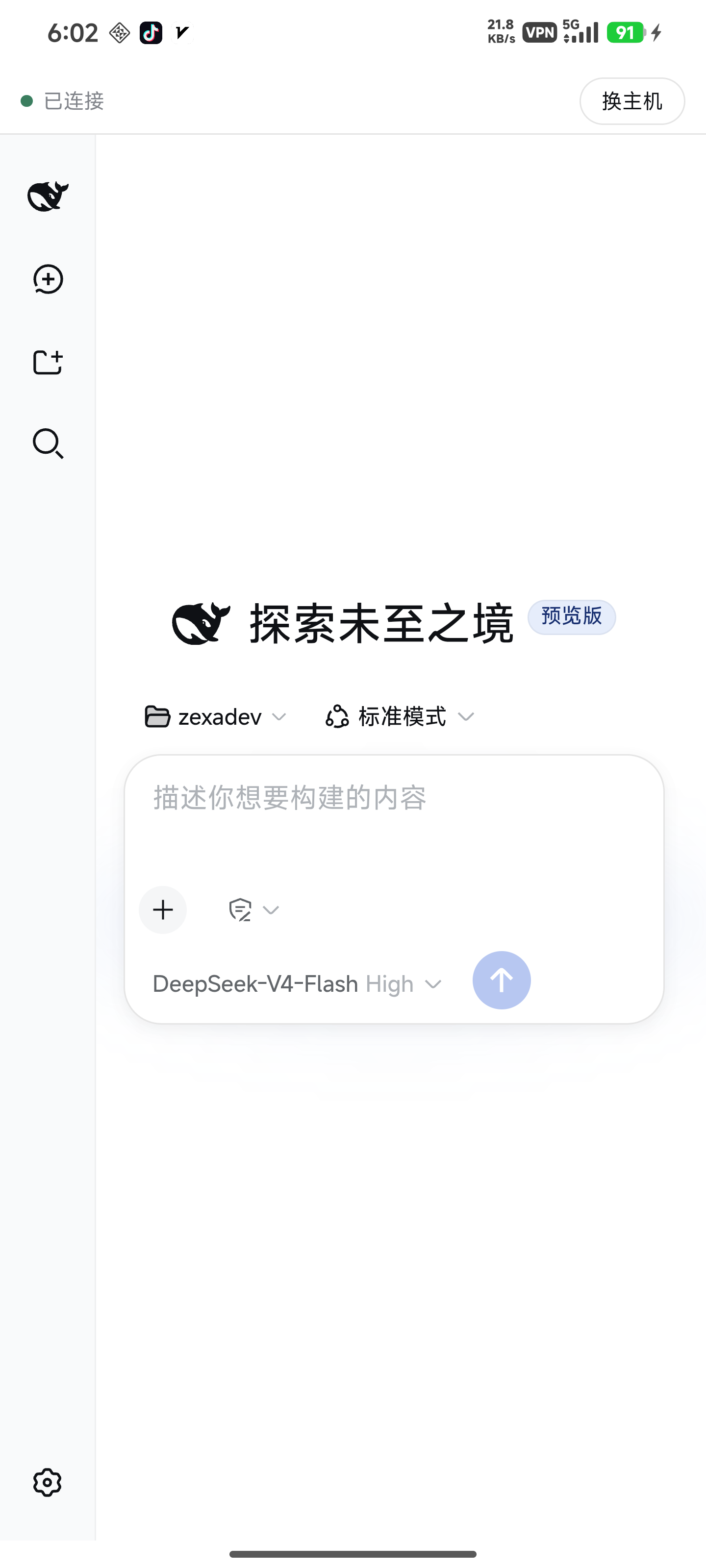
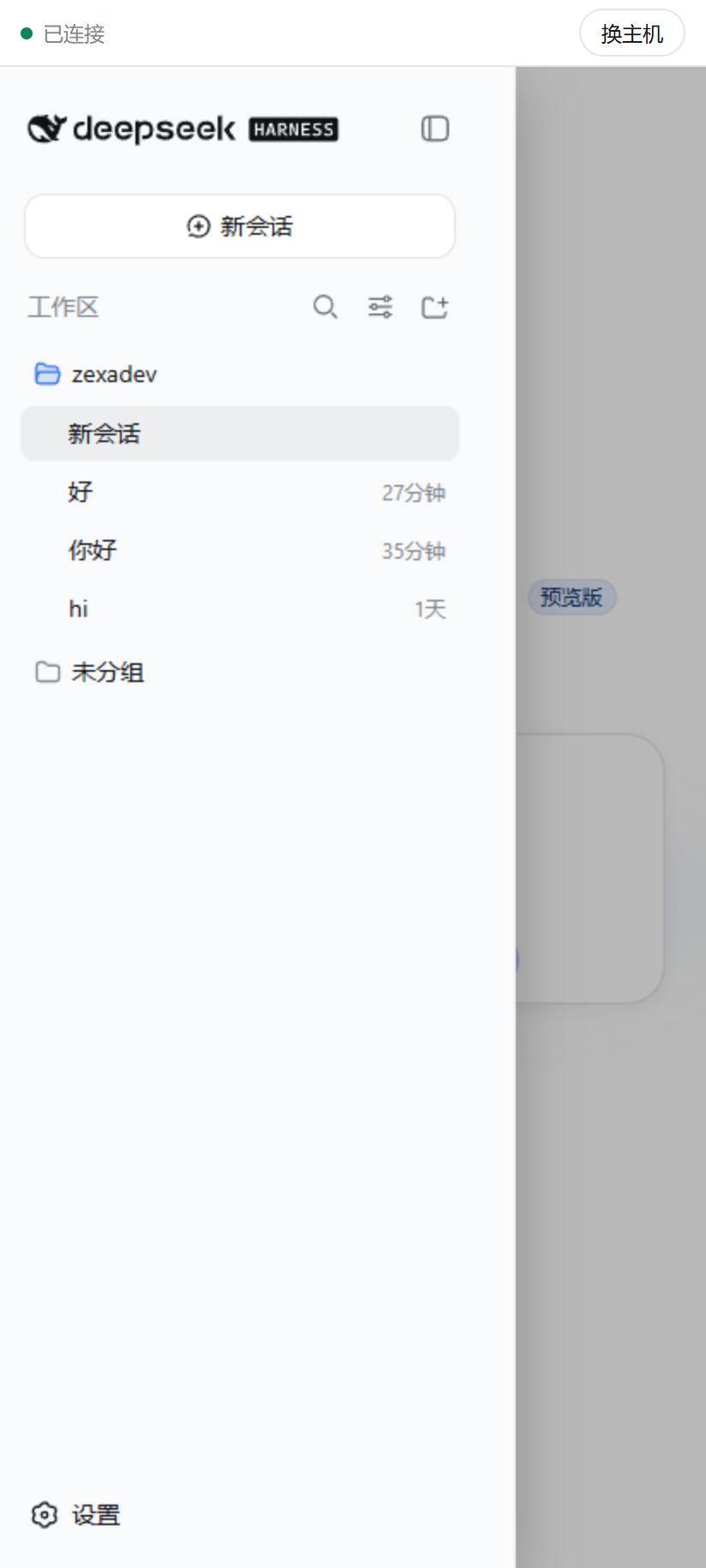
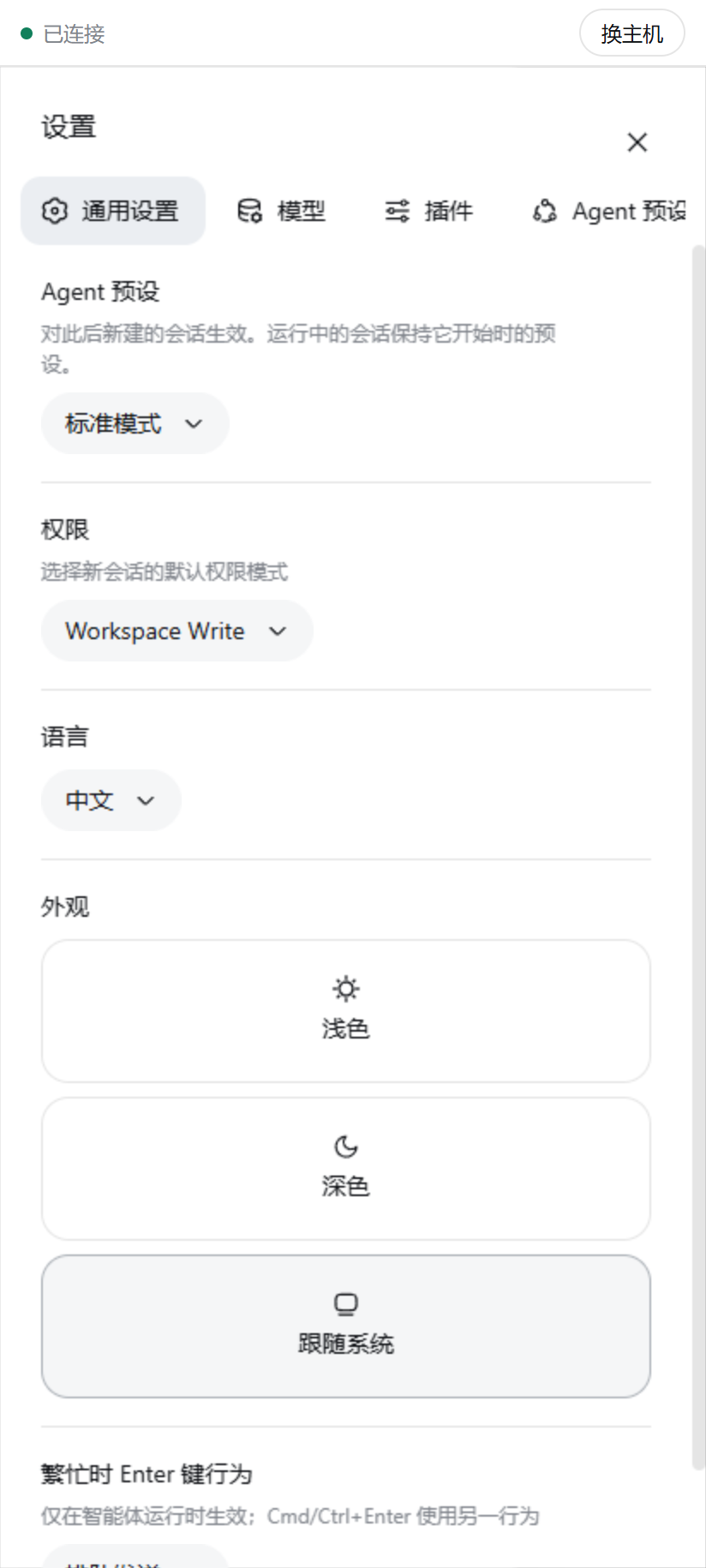
DSH Tether carries the DeepSeek Harness web interface to your phone over a direct peer-to-peer connection. The agent keeps running on the machine your code lives on, and the phone gets DSH's own full interface — conversations, tool calls, approvals and settings, not a reimplementation of them. Pair once with a 6-digit code; after that the two ends find each other whatever network they are on.
The case it solves
You are not on your machine's network, and you do not want a server in the middle.
Reaching your own dev machine from a phone usually asks for one of two things: both ends on the same LAN, or a relay you deploy, configure and trust. This asks for neither. The two ends hole-punch to each other through iroh, and once they do, nothing passes through a third party; the fallback relay only ever carries ciphertext it cannot read.
If you only use your phone on the same Wi-Fi as your machine, you don't need any of this — a LAN setup is simpler.
Download and install
| Where | Download | How |
|---|---|---|
| Machine | — | dsh plugin --profile web add dsh-plugin-tether |
| Phone | dsh-tether-<version>-arm64.apk from the Release |
Signed — install it directly |
| Phone (iOS) | dsh-tether-<version>-ios-unsigned.ipa from the Release |
Beta, unsigned — sign it yourself |
The plugin carries a small Rust sidecar that owns the iroh connection, shipped as one package per platform; installing pulls only the one matching your system, with nothing to choose.
The phone build is split by CPU architecture. Any Android phone from the last decade takes arm64; arm is for 32-bit legacy devices, and x86 / x86_64 are for emulators and ChromeOS. Picking the wrong one simply gets refused at install time.
The iOS build is beta: this project has no Mac, so the package is only ever built in CI and has never run on a real device. You sign it yourself with AltStore, Sideloadly or similar (a free Apple ID expires after 7 days). Please open an issue if you hit anything.
You can also build the sidecar from source (needs Rust):
git clone https://github.com/zexadev/dsh-tether && cd dsh-tether
cargo build --release -p tether-host
dsh plugin --profile web add .
Pair
Start dsh web as you normally would, then click Connect phone at the bottom of the sidebar. You get one line to copy:
On the phone, open DSH Tether → Add computer → paste that whole line → name the computer → connect.
From then on the app connects by itself when you open it.
Features
Direct across networksThe two ends hole-punch to each other through iroh, and once connected nothing passes through a third party. Phone on 4G/5G and machine on home broadband works — no public IP, no tunnel service, no relay of your own. Only a failed hole-punch falls back to a relay, which carries ciphertext it cannot read. |
DSH's own interfaceWhat runs on your phone is DSH's own web interface, not a reimplementation: conversations, tool calls, approvals and settings are all there. Narrow screens get adjustments — the sidebar becomes an overlay drawer, the settings dialog puts its navigation on top, and content takes the full width. |
Several machinesMy computers, at the bottom of the phone's sidebar, keeps every machine you have paired: switch, rename, remove, or add another. Changing machines never means re-entering credentials, and Connect phone on the computer mints a fresh code any time. |
Approval notificationsWhen the agent is waiting on your approval, the phone raises a system notification. You approve inside DSH's own interface — this plugin deliberately does not answer approvals for you; it only carries "it's waiting for you" to your lock screen. |
Security
- Pairing is a 6-digit CSPRNG code, valid 10 minutes, 3 attempts per window. After pairing, access is granted by the phone's iroh public key, which iroh's TLS verifies and nobody can forge.
- An unpaired peer cannot reach your interface: proxy streams are only served on a connection that already completed the control-stream handshake, and an unpaired connection may send at most 512 bytes before being rejected.
- Traffic is end-to-end encrypted by iroh (QUIC/TLS). When hole-punching succeeds it touches no third party; when it falls back, the relay only carries ciphertext it cannot read.
- The plugin's own two HTTP routes apply the same browser-trust rules dsh applies to
/api: theHostmust be a loopback authority, an explicit cross-site marker is refused, and an attachedOriginmust match the Host. Cross-site requests from a malicious page and DNS-rebinding attempts both get a 403. - Known limit: those rules stop a browser from being used as a confused deputy; they do not stop a local process. A local process presents a loopback
Host, so it can mint a pairing code and pair itself as a "phone" — meaning an attacker who can already run code on your dev machine can turn that into long-term access. Don't run this plugin on a machine where you run untrusted code.
Known limitations
- The iOS build is beta: built only in CI, never run on a real device, and you sign it yourself. Android is the one verified on real hardware.
- The app connects when you open it and holds no background connection — Android's doze would not let it anyway.
- The interface on the phone is DSH's own; the narrow-screen fit comes from minimal injected styles, so a dsh layout change may need a follow-up here.
- Verified against dsh
0.1.0-rc.7and0.1.0-rc.8. dsh is in developer preview — check this line before assuming a newer dsh works.
What has been verified
Direct cross-network connection is the whole point of the project, so here is the evidence rather than the claim. With the phone's Wi-Fi off and only 5G, and the machine on home broadband, the plugin reported a public address on the selected path — meaning the two ends punched through to each other and the relay was never used. The first screenshot above is the phone rendering DSH over that path; note the absent Wi-Fi icon in its status bar.
Pairing (including a wrong code being refused), approval delivery, and switching between saved machines were all verified on a real device. The relay fallback has not yet been triggered on a real network.
Relationship to DeepSeek Harness

DSH Tether is an independent community project built on DeepSeek Harness and its Cordis plugin mechanism. It does not modify upstream source: a pinned dsh runs unmodified, and this project joins it as an ordinary DSH plugin using only officially published extension points.
This repository is maintained independently by the community. It is not affiliated with, partnered with, authorised by, or endorsed by DeepSeek, and no DeepSeek employee or upstream team member is involved in its development, maintenance or governance. The DeepSeek Harness mark used in this README identifies the upstream this project serves; it does not imply any authorisation or endorsement. The phone app icon derives from that same upstream mark.
Upstream provides the agent capabilities, the plugin system and the web interface. This project provides:
- the peer-to-peer connection and pairing between machine and phone
- carrying that web interface to the phone, with a narrow-screen fit
- multi-machine management and system notifications on the phone
Building from source
Needs Node ^22.19 || >=24 and Rust; building the APK also needs JDK 21 and the Android SDK/NDK (scripts/setup-android-env.ps1 sets that up on Windows).
cargo build --release -p tether-host          # the machine-side sidecar
cd app && pnpm install
pnpm exec tauri android build --apk --target aarch64
License
MIT
Links
- LINUX DO — where this project is shared

相关推荐Related
- deepseek-ai/deepseek-harness DeepSeek Harness (dsh) — 由 DeepSeek AI 开发的开源 agent harness(智能体框架)。一切皆插件:核心 + 插件 + 技能 = 可热插拔的 AI 编程工作台。DeepSeek Harness: …
-
 amruthpillai/reactive-resume
A one-of-a-kind resume builder that keeps your privacy in mind. Completely secure, customizable, portable, open-source a…
amruthpillai/reactive-resume
A one-of-a-kind resume builder that keeps your privacy in mind. Completely secure, customizable, portable, open-source a…
-
 tt-a1i/archify
Agent skill for beautiful, verifiable architecture, workflow, sequence, data-flow, and lifecycle diagrams—self-contained…
tt-a1i/archify
Agent skill for beautiful, verifiable architecture, workflow, sequence, data-flow, and lifecycle diagrams—self-contained…
-
 zhu1090093659/dsh-web-ui
Plugin and skin collection for DeepSeek Harness (DSH) Web UI - task board, git graph, right-side panel, remote mobile UI…
zhu1090093659/dsh-web-ui
Plugin and skin collection for DeepSeek Harness (DSH) Web UI - task board, git graph, right-side panel, remote mobile UI…
-
 strukto-ai/mirage
The World's First Unified Virtual Filesystem For AI Agents
strukto-ai/mirage
The World's First Unified Virtual Filesystem For AI Agents
-
 liustack/modlens
The first vision plugin for DeepSeek Harness, and the vision bridge for every text-only coding agent. Paste an image, ge…
liustack/modlens
The first vision plugin for DeepSeek Harness, and the vision bridge for every text-only coding agent. Paste an image, ge…
-
 omdsh-dev/DSH-better-sidebar
开放的侧边栏底座,支持三方拓展注册新侧边栏页面。内置文件渲染编辑/终端/Git/子代理页面 | Open sidebar foundation, supports third-party extensions to register new…
omdsh-dev/DSH-better-sidebar
开放的侧边栏底座,支持三方拓展注册新侧边栏页面。内置文件渲染编辑/终端/Git/子代理页面 | Open sidebar foundation, supports third-party extensions to register new…
-
 ccch1mneyyy/dsh-TUI
DSH 官方公众号收录的 TUI 补位插件:Claude Code 风,鲸鱼顶栏/实时状态/流式思考/双击 Esc 回滚/上下文进度+TPS。npm 一键装。 DSH official WeChat featured TUI plugin…
ccch1mneyyy/dsh-TUI
DSH 官方公众号收录的 TUI 补位插件:Claude Code 风,鲸鱼顶栏/实时状态/流式思考/双击 Esc 回滚/上下文进度+TPS。npm 一键装。 DSH official WeChat featured TUI plugin…