PAKIKNOWLEDGE/dsh-client-ui-skin-claude
适用于DeepSeek Harness(dsh)Web界面的Claude风格皮肤——暖黑画布、Anthropic黏土色调强调、衬线UI
catalog 简介:Claude-style skin for DeepSeek Harness (dsh) Web GUI — warm-black canvas, Anthropic clay accent, serif UI
安装
dsh plugin --profile web add @pakiknowledge/dsh-client-ui-skin-claude把 PAKIKNOWLEDGE/dsh-client-ui-skin-claude 加入你的 DSH 配置(web profile)即可启用。
README
展开完整 README 收起
dsh-client-ui-skin-claude
 English | 中文
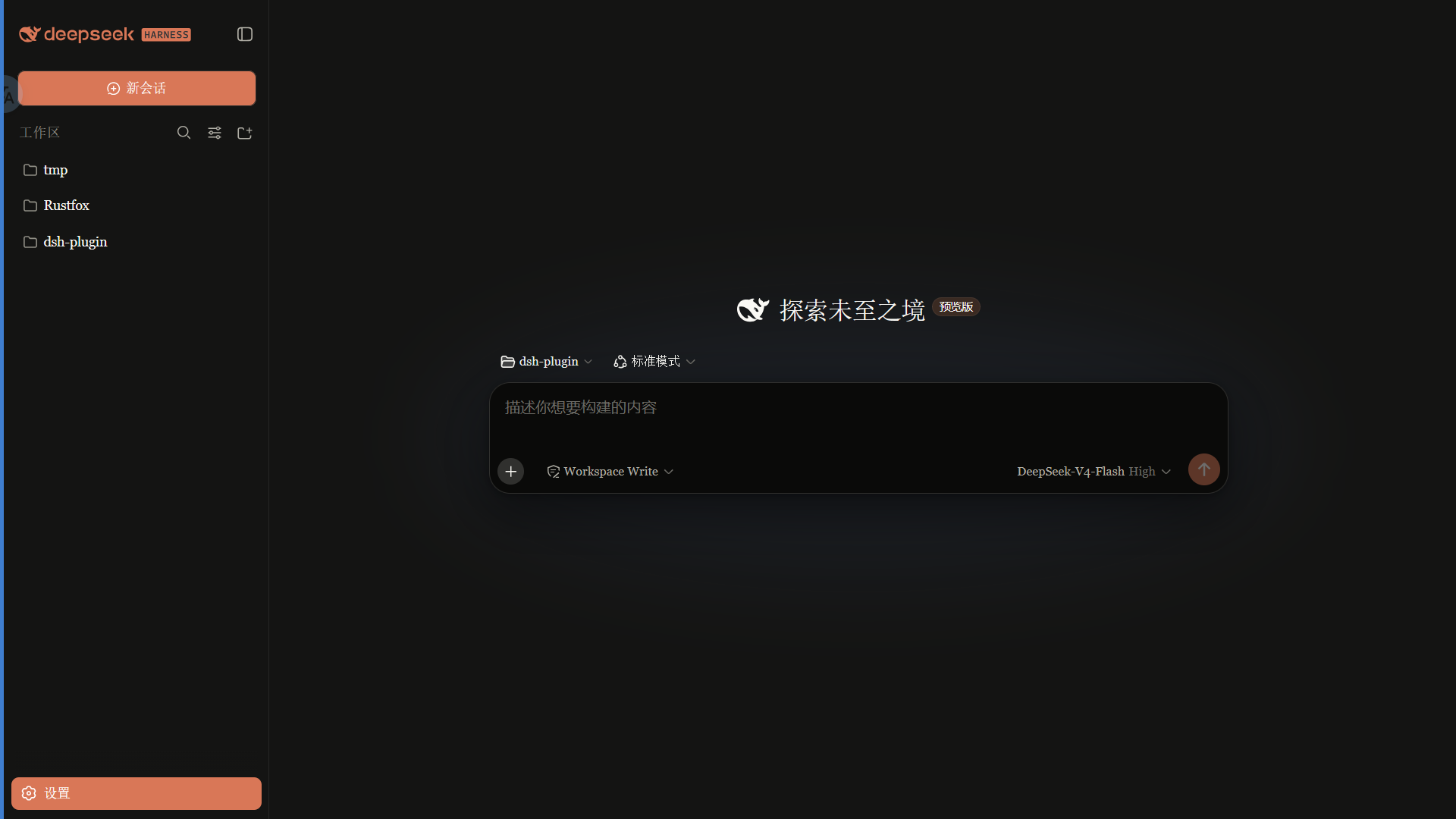
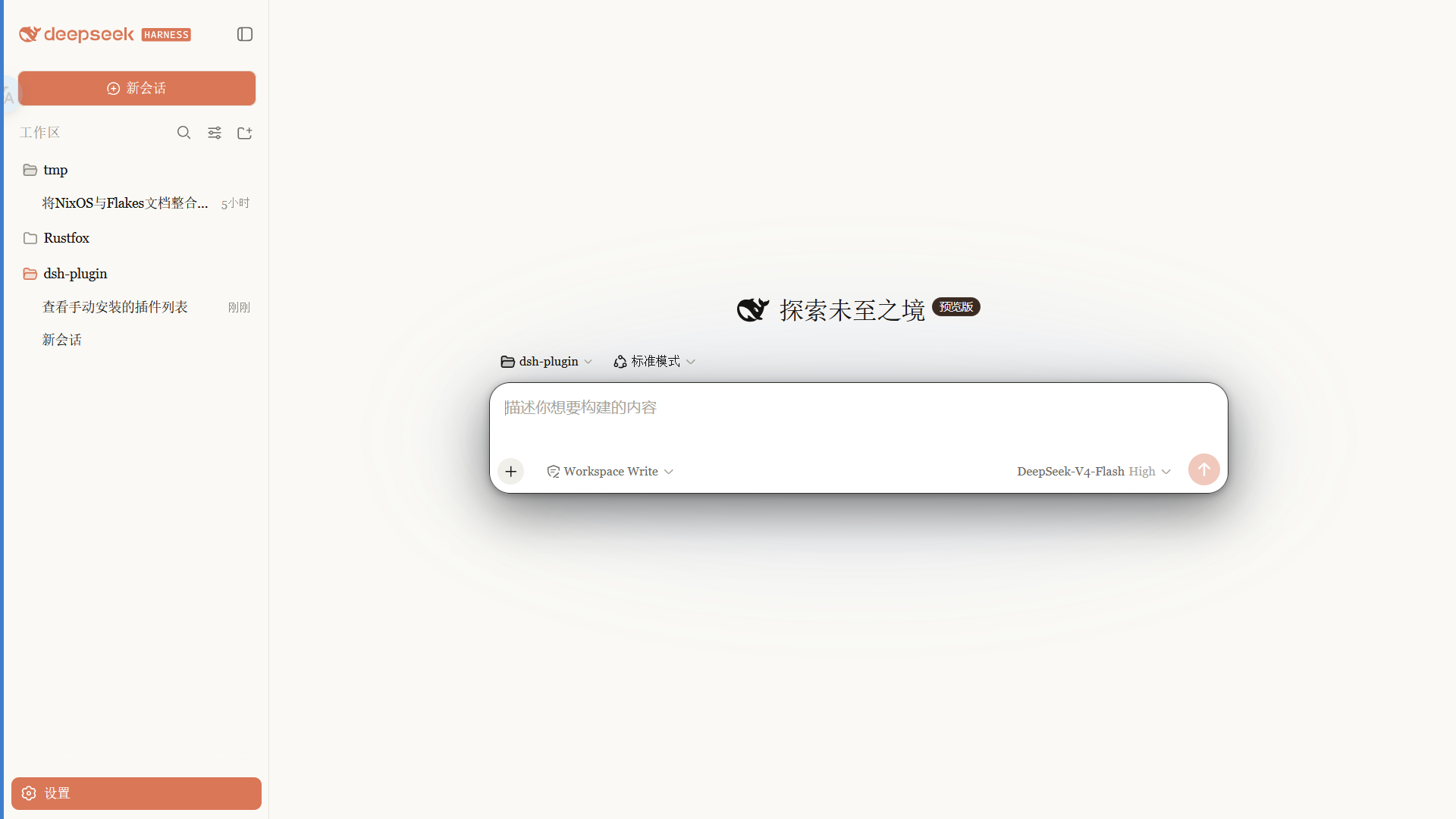
Claude 风格的 DSH Web 界面皮肤:暖黑画布、陶橙点缀、衬线 UI,跟随原生亮/暗主题。
 ·
· 
特性
- 暖黑(#141413)画布 + Anthropic 陶橙(#d97757)点缀
- 衬线界面字体(Georgia),代码用等宽栈
- 细滚动条、陶橙选中 / 焦点、胶囊徽章
- 亮 / 暗双主题,跟随系统切换
安装
从 npm 安装(推荐,预构建免授权):
dsh plugin --profile web add @pakiknowledge/dsh-client-ui-skin-claude
或从 GitHub 安装:
dsh plugin --profile web add github:PAKIKNOWLEDGE/dsh-client-ui-skin-claude
装完重启 dsh web,刷新页面。
切换
同一时刻只启用一个皮肤。编辑 ~/.dsh/cordis.patch.yml:
# dsh-skin managed 段之外
- insert:
    - id: ui-skin-claude
      name: '@pakiknowledge/dsh-client-ui-skin-claude'
(并把当前启用皮肤的 disabled: true 加上。)配置 watcher 几秒内热加载,刷新页面生效。
卸载
- 删除
~/.dsh/cordis.patch.yml里的ui-skin-claudeinsert 行 dsh plugin --profile web remove @pakiknowledge/dsh-client-ui-skin-claude- 重启
dsh web
许可
MIT
相关插件
-
 tt-a1i/archify
Agent skill for beautiful, verifiable architecture, workflow, sequence, data-flow, and lifecycle diagrams—self-contained…
tt-a1i/archify
Agent skill for beautiful, verifiable architecture, workflow, sequence, data-flow, and lifecycle diagrams—self-contained…
-
 zhu1090093659/dsh-web-ui
Plugin and skin collection for DeepSeek Harness (DSH) Web UI - task board, git graph, right-side panel, remote mobile UI…
zhu1090093659/dsh-web-ui
Plugin and skin collection for DeepSeek Harness (DSH) Web UI - task board, git graph, right-side panel, remote mobile UI…
-
 liustack/modlens
The first vision plugin for DeepSeek Harness, and the vision bridge for every text-only coding agent. Paste an image, ge…
liustack/modlens
The first vision plugin for DeepSeek Harness, and the vision bridge for every text-only coding agent. Paste an image, ge…
-
 omdsh-dev/DSH-better-sidebar
开放的侧边栏底座,支持三方拓展注册新侧边栏页面。内置文件渲染编辑/终端/Git/子代理页面 | Open sidebar foundation, supports third-party extensions to register new…
omdsh-dev/DSH-better-sidebar
开放的侧边栏底座,支持三方拓展注册新侧边栏页面。内置文件渲染编辑/终端/Git/子代理页面 | Open sidebar foundation, supports third-party extensions to register new…
-
 ccch1mneyyy/dsh-TUI
DSH 官方公众号收录的 TUI 补位插件:Claude Code 风,鲸鱼顶栏/实时状态/流式思考/双击 Esc 回滚/上下文进度+TPS。npm 一键装。 DSH official WeChat featured TUI plugin…
ccch1mneyyy/dsh-TUI
DSH 官方公众号收录的 TUI 补位插件:Claude Code 风,鲸鱼顶栏/实时状态/流式思考/双击 Esc 回滚/上下文进度+TPS。npm 一键装。 DSH official WeChat featured TUI plugin…
-
 agentrq/agentrq
AgentRQ: Human-in-loop realtime conversational task manager for AI Agents. Self-hosted! Control your own agents from whe…
agentrq/agentrq
AgentRQ: Human-in-loop realtime conversational task manager for AI Agents. Self-hosted! Control your own agents from whe…
-
 dsh-market/dsh-market
The plugin market inside DeepSeek Harness — browse, search, one-click install · DSH 可视化插件市场
dsh-market/dsh-market
The plugin market inside DeepSeek Harness — browse, search, one-click install · DSH 可视化插件市场
-
 ysr666/dsh-vision-router
Eyes for text-only DeepSeek Harness agents: built-in free vision chain (no key) + pixel-level vision tools (Q&A, groundi…
ysr666/dsh-vision-router
Eyes for text-only DeepSeek Harness agents: built-in free vision chain (no key) + pixel-level vision tools (Q&A, groundi…