哪款 AI 转录应用配得上头把交椅?Which AI Transcription App Deserves the Top Spot?
到了 2026 年还在手工敲转录稿,跟用传真发 PDF 差不多:技术上能做,但图什么呢?如今已经有几款确实过硬的 AI 应用,几分钟就能把语音变成文字,可它们各自瞄准的场景差别很大。下面对主流产品做一次直白评估,帮你找到一款真正能嵌进日常流程的工具。
Hand-typing transcripts in 2026 sits on the same shelf as faxing over a PDF: technically possible, but why? A handful of genuinely strong AI apps now finish speech-to-text within minutes, yet each one targets a noticeably different setting. Below is a straight assessment of the leading names, aimed at helping you land on something that slots into your existing routine.
戴着耳机、手指死死按着倒回键、手忙脚乱地追记别人刚说过的话——这种日子我熬的时间自己都不愿细算。活儿又慢又耗神,所以等我认真试过 AI 转录之后,就再也回不去了。这个品类本身也成熟得很快,光是过去一两年,转录稿的准确率就高到多数情况下只需顺手润一遍,而不必从头重敲。
但一款清爽的、通吃所有人的冠军并不存在。单干的播客主、逐条记录客户通话的销售团队、录讲座的学生、手里攒着采访录音的记者,他们对转录软件的要求相当不同。下面我会坦率地带你过一遍主要玩家:各自为谁设计、短板在哪里,以及按一个人的真实处境,我会把他往哪个方向推。
01快速通道:按场景挑选
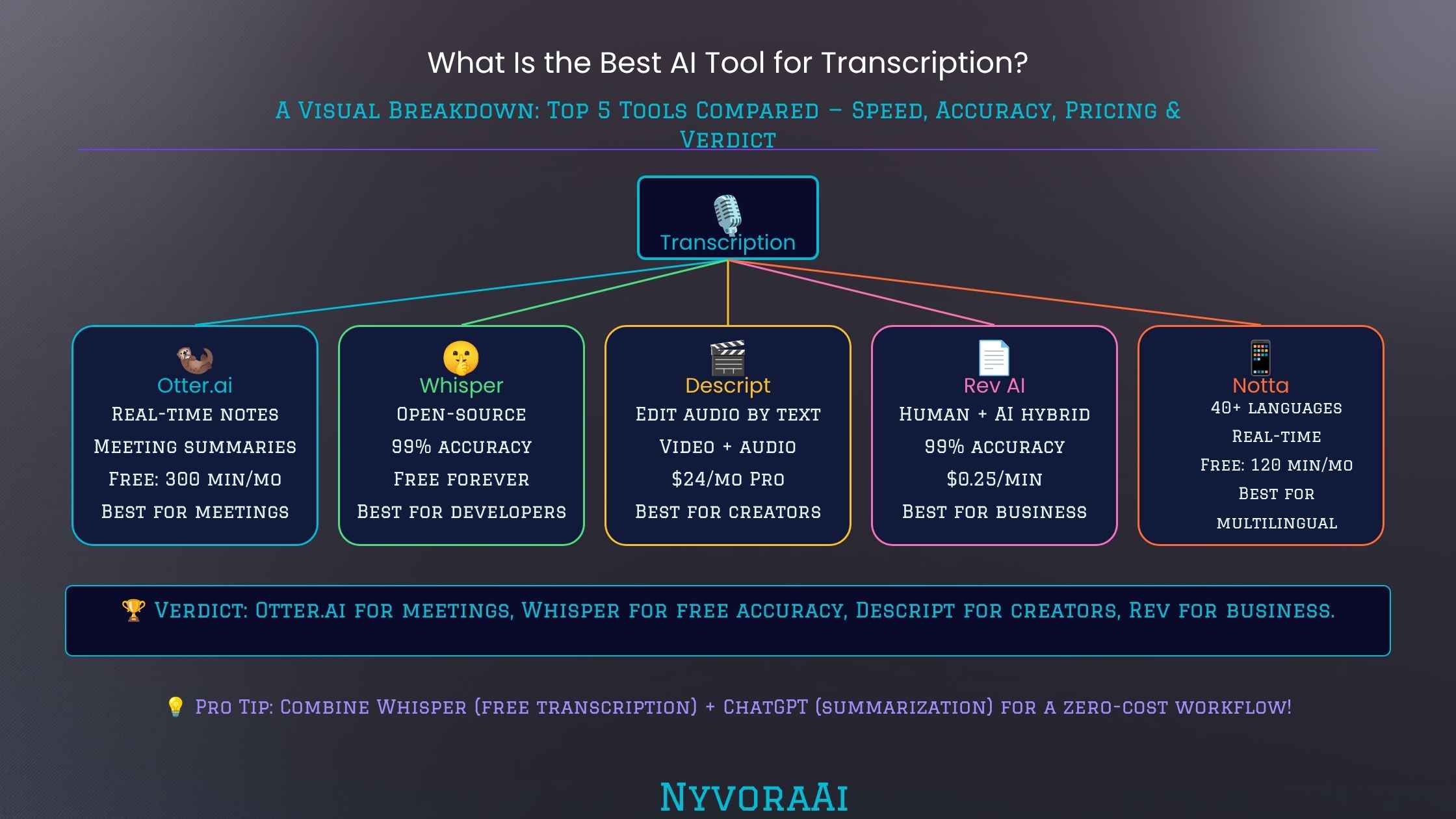
赶时间的话,先看浓缩版:开会和实时字幕选 Otter.ai;播客、视频剪辑和音频清理选 Descript;团队协作、销售电话和 CRM 流程占主导时选 Fireflies.ai;需要离线、高精度的多语言处理选 OpenAI Whisper。预算紧张的学生可以用 Otter.ai 的免费额度,或者套了简洁界面的 Whisper。
当然,这些一句话结论磨掉了大量细节。纯精度上的赢家,有时和最契合工作流程的并不是同一款,所以请跟着我把每个选项看全。
02AI 转录内部是怎么运转的
如今的转录工具核心是语音识别模型,它们在海量音频上训练而成,素材横跨各种语言、口音、嘈杂环境和录制档次。早期引擎把进来的声音和一套僵硬的音素表做比对;新一代系统则把声音与词、与整句之间的统计关系内化下来——口语化、自然的谈吐不再像过去那样难倒它们,主要原因就在这里。
主流应用里有很大一部分直接跑 OpenAI 的 Whisper,或采用同宗的架构。这个底层引擎确实是一次飞跃:口音、环境噪声和语言切换在它手下都比在任何旧产品手下从容得多。付费产品之间的差别,多半集中在它之上叠加的那一层——会议接入、说话人区分、摘要和待办提取、编辑界面,以及音频究竟存在厂商服务器上还是完全在本机处理。
如果这里的内部机制让你对语言模型整体如何理解语音和文字产生好奇,可以看我们这篇Perplexity AI 算不算研究级选择,它退一步纵览各类语言驱动工具;底层机器的共通之处比你以为的要多。
03逐款应用指南
OpenAI Whisper
Otter.ai
Fireflies.ai
Descript
Rev AI 与 Trint
04互动匹配器:哪款转录应用适合你?
还在权衡?回答两个小问题,就能得到为你调校过的推荐。
05并排对决
| 能力 | Whisper | Otter.ai | Fireflies | Descript |
|---|---|---|---|---|
| 边说边出字幕 | ❌ | ✅ | ✅ | ❌ |
| 免费额度 | ✅ 完全免费 | ✅ 300 分钟/月 | ⚠️ 仅限试用 | ✅ 含基础档 |
| 区分说话人 | ⚠️ 需借助附加组件 | ✅ | ✅ | ✅ |
| 接入会议软件 | ❌ | ✅ Zoom、Meet、Teams | ✅ 几乎所有平台 | ❌ |
| 英语之外的语言 | ✅ 99+ 种语言 | ⚠️ 以英语为主 | ⚠️ 覆盖有限 | ⚠️ 覆盖有限 |
| 音视频剪辑 | ❌ | ❌ | ❌ | ✅ 核心功能 |
| 本地处理带来的隐私 | ✅ 在本机运行 | ❌ 云端运行 | ❌ 云端运行 | ❌ 云端运行 |
| CRM 对接 | ❌ | ⚠️ 覆盖有限 | ✅ Salesforce、HubSpot | ❌ |
| 入门价格 | 免费 | 每月约 $16.99 | 每席每月约 $18 | 每月约 $24 |
06精度、盲区,以及仍会失手之处
把这些应用中的任何一款对准用像样的麦克风录下的干净单人语音,结果都相当惊人——92–96% 是常态,只剩零星几处要改。差错往往以几种可预见的形态出现,在定下来之前先认清这些形态,是值得花的时间。
声音彼此叠压
浓重口音与地方话
专业术语
环境噪声
标点与排版
语速飞快的人
07在任何转录应用上提升质量
应用本身不如喂给它的录音重要;平庸软件配上一条好录音,通常胜过最好工具配上一条烂录音。几个小习惯就能明显改变结果:
- 拉近与麦克风的距离——哪怕是手机录音,在六英寸而不是两英尺之外录,质量也会跃升。
- 剔除环境声——只要打算认真转录,就关上门、让键盘静音、关掉风扇。
- 让声音依次出现——凡是你能控制谈话形式的地方,杜绝叠话都会让说话人标注和准确度双双大幅改善。
- 插入章节或分段标记——Descript 和 Otter 都支持在录制时加标记,方便之后更快剪辑。
- 别跳过通读——鉴于转录如今快得很,直接发布原始稿很诱人。但花几分钟扫错几乎总是值得的,尤其是内容要面对受众时。
把这些工具用于讲座和学习材料的学生,可以在我们这篇学生首选 AI 应用里看到更全的版图,它把转录和其他在学业上真正有用的 AI 应用放在一起。如果转录稿还要喂给更宽的内容线——据文字写成文章或社媒帖子——我们的写作工具对比也可能帮得上。对于延伸到转录之外的长内容生产,我们测过Claude AI 与 ChatGPT 的写作对比以及Jasper AI 到底能提供什么、值不值得买。
另外值得一提:转录往往嵌在更宽的研究与内容流程里,在每个阶段配趁手的应用都很要紧——就像挑对图像生成器会决定视觉成品一样。如果你工具箱的这一角还有缺口,我们对2026 年领先 AI 图像生成器的盘点沿用了本文相同的结构。
08读者最常问的问题
哪款转录应用能胜出?
AI 转录稿在专业场合靠得住吗?
最强的免费转录应用是哪款?
这些应用应付得来好几个人说话吗?
开会最适合用哪一款?
AI 转录应用要花多少钱?
这些应用能处理英语之外的语言吗?
说实话,不存在孤立的唯一赢家,只有几款确实过硬、各自围绕特定工作流程打造的工具。会议从早排到晚的人,会觉得 Otter.ai 近乎改变生活;音视频创作者会发现 Descript 的学习曲线值得爬;处理文件、看重隐私或需要多语言又拒绝订阅的人,很难找到胜过 Whisper 的;而要把通话汇入 CRM 记录和可搜索档案的团队,正是 Fireflies 的目标受众。让应用对上你真实的节奏,拿一段实际音频小范围试一下,再据此决定。
Headphones on, finger glued to rewind, scrambling to capture words already spoken — I've logged more of those hours than I care to count. The work is draining and slow, which is why, after giving AI transcription a serious trial, there was no going back. The category itself has matured sharply; even across the past couple of years, transcripts now tend to arrive accurate enough that only a light tidy-up is needed instead of rebuilding them from scratch.
A neat, one-size-fits-all winner, though, simply doesn't exist. The solo podcaster, the sales crew logging every customer call, the student recording lectures, and the reporter sitting on interview files each demand something rather different from transcription software. What follows is a candid walk through the major players — the audience each one targets, the spots where they come up short, and where I'd actually steer someone given their day-to-day reality.
01Shortcut: Pick by Scenario
The condensed version, for anyone clock-watching: Otter.ai when meetings and live captions are the job. Descript for podcast work, video cuts and audio cleanup. Fireflies.ai where teams, sales calls and CRM pipelines dominate. OpenAI Whisper when you need offline, high-precision work in multiple languages. Students watching their wallet can lean on Otter.ai's no-cost allowance or on Whisper tucked behind a friendly wrapper app.
Those one-liners, of course, sand off a great deal. Raw accuracy crowns a different tool than workflow fit sometimes does, so stick with me for the fuller read on every option.
02What Goes On Inside AI Transcription
Speech-recognition models sit at the center of today's transcription tools, trained against vast audio troves that span languages, accents, noisy rooms and recording setups of every grade. Older engines compared incoming sound against a rigid phoneme inventory; these newer systems instead internalize the statistical relationships linking sounds to words and whole sentences — the main reason conversational, natural speech no longer defeats them the way it defeated earlier generations.
A large share of the leading apps run OpenAI's Whisper directly, or on architectures in the same neighborhood. That foundational engine is a genuine leap: accents, ambient noise and language switches all fare far better under it than under anything older. What separates the paid products is mostly what gets layered above — meeting hooks, telling speakers apart, pulling summaries and follow-ups, the editing workspace, and the divide between audio kept on vendor servers and audio handled entirely on your own machine.
If the internals here leave you curious about how language models more broadly make sense of speech and written text, our look at whether Perplexity AI is a research-grade pick steps back to survey language-driven tools in general; the underlying machinery shares more ground than you might assume.
03App-by-App Guide
OpenAI Whisper
Otter.ai
Fireflies.ai
Descript
Rev AI & Trint
04Interactive Matcher: Which Transcription App Fits?
Still weighing your options? Two quick questions produce a recommendation tuned to you.
05Side-by-Side Showdown
| Capability | Whisper | Otter.ai | Fireflies | Descript |
|---|---|---|---|---|
| Captions while people speak | ❌ | ✅ | ✅ | ❌ |
| No-cost allowance | ✅ Free without limits | ✅ 300 min/mo | ⚠️ Trial only | ✅ Entry tier included |
| Telling speakers apart | ⚠️ Through extras | ✅ | ✅ | ✅ |
| Hooks into meeting software | ❌ | ✅ Zoom, Meet, Teams | ✅ Nearly every platform | ❌ |
| Languages beyond English | ✅ 99+ languages | ⚠️ English-first | ⚠️ Thin coverage | ⚠️ Thin coverage |
| Audio and video cutting | ❌ | ❌ | ❌ | ✅ Central to the app |
| Privacy via on-device work | ✅ On your machine | ❌ Lives in the cloud | ❌ Lives in the cloud | ❌ Lives in the cloud |
| CRM bridges | ❌ | ⚠️ Thin coverage | ✅ Salesforce, HubSpot | ❌ |
| Entry price | Free | Around $16.99 monthly | Roughly $18 per seat monthly | Around $24 each month |
06Precision, Blind Spots, and Where Things Still Slip
Point any of these apps at clean, single-voice audio captured on a respectable mic and results are honestly striking — the 92–96% band is normal, leaving only a scattering of fixes. Failures tend to arrive in a handful of predictable shapes, and knowing those shapes before you commit is time well spent.
Voices Stacked on Top of Each Other
Thick Accents and Regional Speech
Specialist Jargon
Ambient Noise
Commas and Layout
Rapid Talkers
07Raising Quality on Any Transcription App
The app matters less than the recording feeding it; a great take on mediocre software usually beats a lousy take on the best tool available. A small set of habits shifts results noticeably:
- Close the gap to the mic — even a phone recording leaps in quality recorded from six inches rather than two feet away.
- Strip out ambient sound — shut doors, silence keyboards and kill fans whenever a recording is destined for serious transcription.
- Keep voices sequential — wherever you can shape the format, banning overlap sharpens both speaker labels and accuracy dramatically.
- Drop in chapter or section marks — Descript and Otter both support live markers that speed up the editing pass later.
- Never skip the read-through — raw output is tempting to publish given how fast transcription now runs, but a few minutes of scanning nearly always earns its keep, above all when an audience is waiting.
Students pointing these tools at lectures and study material can find the broader landscape in our guide to the top AI app for students, which pairs transcription with the other AI apps that genuinely pay off academically. And if transcripts feed a wider content line — articles or social posts spun from the text — our writing-tool comparisons may help too. We've tested both Claude AI against ChatGPT on writing and what Jasper AI actually offers and whether the bill is justified for work that stretches past transcription into long-form production.
Worth a note as well: transcription often sits inside a broader research and content operation, and fielding the right app at each stage matters — much as picking the right image generator shapes visual work. Our survey of the leading AI image generators in 2026 follows this same structure if that corner of your toolkit still has gaps.
08Questions Readers Ask Most
Which transcription app comes out on top?
Can AI transcripts hold up in professional settings?
What's the strongest transcription app that costs nothing?
Do these apps cope when several people speak?
Which one fits meetings best?
What do AI transcription apps cost?
Can these apps work outside English?
The plain truth: no solitary winner exists, just several genuinely strong tools, each engineered around a particular workflow. A day packed wall to wall with meetings makes Otter.ai close to life-changing; audio and video creators will find the Descript learning curve worth climbing; file-based transcribers, privacy sticklers and polyglots who refuse subscriptions will struggle to top Whisper; and teams funneling calls into CRM records and search archives are exactly Fireflies' target audience. Match the app to your real rhythm, test it on a slice of your actual audio, and decide from there.