搭建以 AI 为核心的每日工作流Designing an AI-Powered Daily Workflow
多数人对待 AI 的方式和搜索引擎一样:卡住了才临时抛出一个问题。这确实有用,但绝大部分价值没有被拿到。真正围绕这些工具组织起来的工作流,远不止回答更快——它会重新编排整个工作日的形态。下面讲清楚怎样从零搭出一套能长期坚持的流程。
For most people, AI behaves like a search bar: a single query, summoned on the spot, only once they're stuck. Helpful, sure — yet the bulk of the payoff never gets claimed. A genuine workflow organized around these tools goes well beyond quicker answers; it rewires the shape of the whole working day. What follows is a concrete way to build one that people actually keep using.
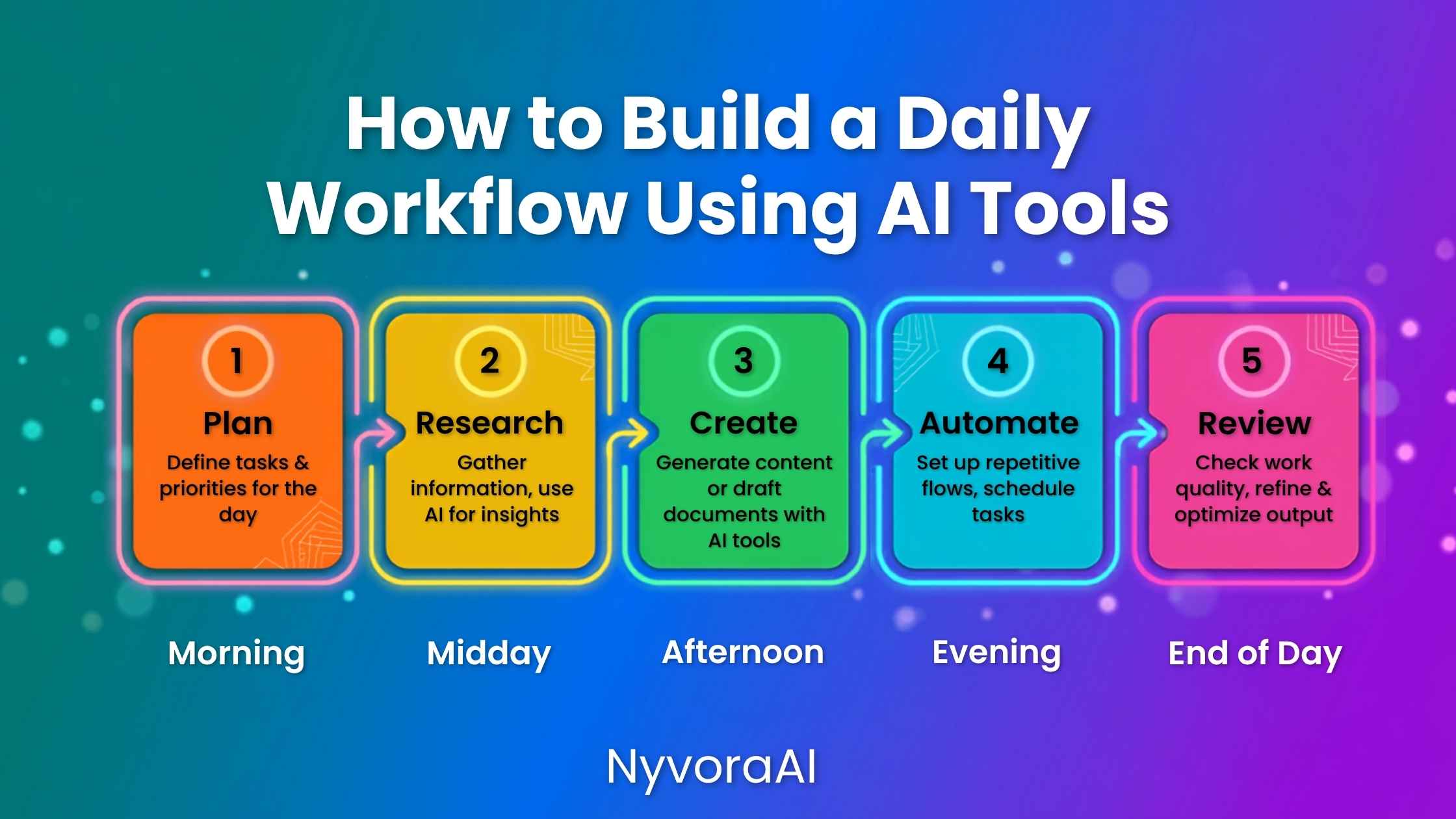
在试用几周后悄悄放弃的新用户身上,总有同一个故事。工具并非没用,而是不稳定:有时惊艳,有时让人摸不着头脑。时间一久,纠结问什么、怎么措辞、能不能信答案所花的力气,看起来还不如自己动手。
解决办法不是更高级的工具,而是更牢靠的结构。让 AI 在固定时间处理固定任务、提示词提前备好,这样的工作流几乎能消除全部阻力。你不再反复盘算要不要用 AI,它会像键盘一样成为不假思索的动作。真正的效率提升就来自这一转变,而任何人只要有意识地配置约两周,基本都能做到。
在动手设计之前,先搞懂这些工具底层在做什么会更有底气;我们用通俗语言写的什么是人工智能一文为此打好基础。
01为什么有章法的工作流胜过随手使用
没有结构时,每次使用都要做一次小判断:这任务适合 AI 吗?请求该怎么措辞?结果能用还是要整个重写?一整天下来,这些微小判断不断累积。单个看都不重,却悄悄形成认知阻力,最终让人离开这些最初其实很喜欢的工具。
清晰的工作流几乎消除了全部这类判断。哪些任务归模型已经定好,提示词已经存档,审阅时段也已写进日程。所有经得起压力考验的专业流程,靠的都是同一逻辑。外科医生不会在手术中临时决定器械怎么摆;飞行员不会在驾驶舱里现编起飞前检查单。可靠的 AI 工作流遵循同一条规则——压力到来之前先准备,执行才能又快又稳。
02引入 AI 之前先审计工作日
最常见的失败,是从工具而不是任务出发。人们到处寻找工具能干的活,而不是为真实工作匹配工具,结果工作流看起来完整,实际却省不下什么时间。
更好的起点是任务审计。用完整的一天,粗略记录每类任务耗时多少分钟;不必较真,每次切换工作时随手记一笔即可。到了晚上,总有几类任务会显得格外耗时——写邮件、查资料、总结文档、社媒文案、初步提纲。这些就是 AI 的目标,其余的等工作流跑顺后再说。
- 1
列出每天最耗时间的五件事
1 清单要真实而不是理想化——大多数日子里,时间到底消失在哪?
- 2
把需要原创判断的任务与其余任务分开
2 主要需要结构或初稿的任务很适合 AI;完全依赖你的判断或某段特定关系的工作则不然。
- 3
为每个候选任务匹配一个具体的 AI 动作
3 说清具体动作:起草、总结、提纲、改写、头脑风暴。模糊的指派每次都会换来模糊的产出。
- 4
在需要之前就写好每条提示词
4 把每条验证过的提示词存在五秒内能调出的地方——正是这种速度让工作流真正被用起来。
- 5
预约两周后的复盘
5 实际使用两周后,凡是费力多于帮忙的搭配就淘汰,在真正省时间的组合上加倍投入。
03上午时段
上午要做的是清掉积压的沟通、摸清一天的方向,而不是把最清醒的两小时耗在邮件和状态更新上。这类结构化、可重复的工作非常适合 AI;把它关进一个固定的早间时段,能把你最敏锐的思考留给真正需要的工作。
一个可用的上午时段干三件事:为昨天最棘手的消息分类并起草回复;根据关于当前项目与截止日期的简短说明,生成一份排好优先级的任务清单;把隔夜到达的文档、会议记录或简报浓缩成摘要,让你在当天第一通电话前就掌握全部背景。
- 邮件草稿:把邮件串上下文和你想要的结果交给 AI;骨架由它搭,语气和私人细节由你调整。
- 每日优先级清单:把在做的项目和硬性截止日期告知 AI,请它按影响力而非仅仅紧急程度排序。
- 文档摘要:把长报告或笔记贴进去,要求三条要点;中等长度的文档,九十秒对比二十分钟是合理的预期。
04深度工作与创作时段
大多数人正是在这里把安排整个弄反了:用 AI 快速赶内容,却把创作精力留给邮件。应该反过来。在深度时段——写作、战略、研究综述、设计思考——AI 应当充当初稿引擎,让你的精力用于打磨和判断,而不是一次次面对空白页面。
如果内容创作是你工作的一部分,用 AI 更快写博客文章中的工作流可以直接嵌入这个时段,尤其是逐节起草的做法——它稳定地胜过一次性索要整篇文章。其核心习惯是为每一节给出紧凑的需求说明,而非一条松散的总体指令;我们关于如何为 AI 工具写出更好的提示词的指南对此有详细讲解。
研究密集型任务最能在这个时段体现摘要的价值。不必把五份资料从头读到尾才形成观点,而是把每份丢进摘要提示词,两分钟内拿到核心论点和关键细节,再在这份压缩阅读之上构建自己的综合与判断。这不是把思考外包,而是压缩信息收集阶段,让真正的思考获得更多时间。
05下午沟通与审阅时段
下午留给产出审阅和对外沟通——这两件事通常零散地分布在全天,被动应付。把它们集中进一个固定时段、并用 AI 加快处理,几乎比任何其他调整都更能改变一天结束时的实际感受。
对社媒创作者和内容营销人员来说,AI 的帮助在这里最直观。一次约十五分钟、结构清晰的提示词会话,可以产出一整周的社媒文案;而逐条单独写通常要一小时以上。我们的AI 用于社媒的分步指南详细讲清了让批量创作真正提速的文案与排程方法。
当天起草或生成的所有内容,也都要在这个时段完成审阅,包括在发布或发送前对 AI 给出的具体说法做一次快速事实核查。核查 AI 生成内容的流程一旦成为习惯就很快;在上线前拦下一个错误数字或一处张冠李戴,其价值远超核查实际花掉的五分钟。
早间分拣
深度工作
沟通与审阅
当日收尾简报
每周重置
提示词库
06让每个时段更快的提示词
提示词库可能是日常 AI 工作流中杠杆最高的资产。当某条提示词能稳定服务于重复任务,就把它存档、起个记得住的名字,再也不重写。一个月下来,备好二十条可靠提示词,与每天从零现写之间,累计差距非常可观。
以下是在各个时段往往产出最佳的提示词结构,每次使用时把括号里的内容换成你的具体信息。
- 邮件起草:「为这封邮件写一封回复[粘贴邮件串]。我想要的结果是[具体结果]。语气:[专业/直接/亲切]。不超过 120 词。」
- 文档摘要:「把这份文档浓缩为恰好三个要点,每条一句话,并在末尾单独列出明确的待办事项。」
- 博客分节起草:「就[具体子主题]面向[受众类型]写约 250 词,含一个具体例子,不用术语,也不要出现 leverage 这个词。」
- 社媒文案批量:「围绕[主题]写五条 Instagram 文案,每条不超过 150 字符:一条提问、一条小技巧、一条幕后细节。」
- 优先级排序:「这是我今天的任务清单:[粘贴清单]。按对[本周主要目标]影响力大小排序,每个名次附一条简短理由。」
07需要避开的常见工作流错误
08动手试试:搭建你自己的 AI 每日工作流
点选一个时段,再从下面的列表中挑一个任务分配给它。把一天填满后,点 Generate 生成一份工作流摘要,可直接复制进笔记或任务管理工具。
09常见问题
怎样用 AI 工具搭建每日工作流?
哪些 AI 工具最适合日常效率工作流?
AI 工作流每天能省多少小时?
AI 每日工作流会让我的工作变得千篇一律吗?
搭好一套不错的 AI 工作流需要多久?
10结语
用 AI 工具搭建每日工作流,不是一个下午就能完工的项目,也不是要采用市场上最复杂的工具。它始于诚实地审视时间到底去了哪,挑出三四个 AI 能替你承担最重结构性负荷的任务,并围绕这些具体时刻建立可重复的习惯。习惯一旦就位,AI 就不再是需要刻意提醒自己使用的新鲜玩意,而成为工作日运转方式的常规组成部分。
当下从 AI 工具中获益最多的人,并不是订阅最多的人,而是习惯最清晰、提示词最具体的人。先做审计,再建时段,存好提示词,两周后回看。正是这个简单循环,区分了价值随时间复利增长的工作流,与第一周后就被悄悄放弃的工作流。
A familiar story repeats among first-time users who drift away after a few weeks. The tools never struck them as worthless; they struck them as erratic. Brilliant on certain days, baffling on others, until the effort of choosing a question, wording it, and weighing the answer began to look heavier than simply doing the job unaided.
The answer isn't a fancier tool. It's a sturdier structure. A workflow that parks AI against particular tasks at particular moments, prompts prepared in advance, dissolves nearly all that resistance. The internal debate over whether to reach for AI disappears; usage becomes as automatic as typing on a keyboard. That transition is where genuine productivity shows up, and nearly anyone can reach it after roughly two weeks of intentional configuration.
Before designing anything, it helps to know what these tools actually do internally; our jargon-free explanation of artificial intelligence in plain language lays that groundwork.
01Why a Deliberate Workflow Outperforms Random Usage
Without structure, every interaction carries a small judgment call. Does this task even suit AI? How should the request be worded? Is the result usable, or a complete do-over? Across a day, those micro-calls accumulate. Individually light, they build a quiet cognitive drag that pushes people away from tools they genuinely liked at the start.
A defined workflow removes nearly all of those calls. The tasks that belong to the model are settled, the prompt is already filed, and the review window is already on the calendar. Durable professional routines run on precisely this logic. Surgeons don't choose instrument layout while operating; pilots don't invent the pre-flight checklist in the cockpit. A sound AI workflow follows the same rule — preparation ahead of pressure, leaving execution quick and dependable.
02Audit the Workday Before Introducing Anything
The classic failure begins with the tool rather than the task. People hunt for jobs a product can do instead of matching a product to real work, ending with a workflow that appears finished yet returns little actual time.
Begin instead with a task audit. For one complete day, roughly log the minutes each task type consumes; obsession isn't required, just a quick note at every switch of context. By evening, a few categories will stand out as disproportionate consumers of hours — emails, research, document summaries, social copy, rough outlines. Those become AI targets; the rest waits until the workflow already runs.
- 1
Name the five tasks that devour the most time each day
1 Keep the list truthful rather than aspirational — where do hours really vanish most days?
- 2
Separate tasks requiring original judgment from the rest
2 Anything needing mainly structure or a rough first draft suits AI well; work resting wholly on your judgment or a particular relationship doesn't.
- 3
Pair every candidate with one concrete AI action
3 Name the exact action: draft, summarise, outline, rewrite, brainstorm. Fuzzy beget fuzzy, without exception.
- 4
Prepare each prompt before the moment it's needed
4 File each proven prompt somewhere retrievable within five seconds — that speed is what gets the workflow used.
- 5
Book a review two weeks out
5 After a fortnight of live use, discard any pairing that costs more effort than it returns and press harder on the genuine time-savers.
03Morning Block
Morning means clearing the communications pile and orienting yourself, without burning two peak hours on mail and status notes. Such structured, repeatable work fits AI neatly; confining it to one early slot reserves your sharpest thinking for the work that truly demands it.
A workable morning block does three jobs: sorting and drafting answers to yesterday's most demanding messages; producing a ranked task list from a short brief on current projects and deadlines; and condensing any documents, notes, or briefs that arrived overnight, so the day's first call finds you fully in context.
- Email drafts: hand over the thread and the result you're after; let the model build the skeleton, while you adjust voice and personal detail.
- Ranked daily list: brief the model on active projects and fixed deadlines, then ask for ordering by impact rather than urgency alone.
- Document summaries: feed in long reports or notes and request three bullets; for a medium-length document, ninety seconds versus twenty minutes is a fair expectation.
04Deep Work and Creation Block
Here most people invert the arrangement entirely: they speed-run content with AI while hoarding creative energy for email. Reverse that. In the deep block — writing, strategy, research synthesis, design work — AI belongs as the rough-draft engine, freeing your energy for shaping and deciding instead of repeatedly confronting a blank page.
When content creation fills part of the day, the workflow in drafting blog posts more quickly with AI drops straight into this block, especially the section-by-section method that reliably beats requesting a complete piece at once. Its central habit — a tight brief per section rather than one loose global instruction — is explored fully in our guide to crafting better prompts for AI tools.
Research-heavy work is where summarisation pays off most visibly in this block. Rather than reading five sources end to end before forming a view, run each through a summarisation prompt, extract its central claim and key details within two minutes, and build your own synthesis atop that compressed reading. Thinking isn't being outsourced; the gathering stage shrinks so the thinking stage can expand.
05Afternoon Communications and Review Block
Afternoon belongs to reviewing output and sending communications — the two activities usually smeared across the day and handled reactively. Folding both into one fixed window, with AI accelerating the pass, changes the felt quality of the day more than almost any other move.
For social creators and content marketers, AI's value is most immediate here. One disciplined prompt session of about fifteen minutes can yield a full week of captions, versus the hour-plus they take when written individually. Our walkthrough of AI for social media details the captioning and scheduling approach that makes such batching genuinely quick.
Anything drafted during the day also gets its review pass in this block, including a rapid fact-check of model-generated specifics before publication or dispatch. The routine for fact-checking AI output runs quickly once habitual, and stopping one false statistic or miscredited claim before it goes live repays the five minutes many times over.
Morning Triage
Deep Work
Comms and Review
End-of-Day Brief
Weekly Reset
Prompt Library
06Prompts That Speed Up Every Block
The prompt library may be the highest-leverage asset in a daily AI workflow. When a prompt reliably serves a recurring task, file it under a memorable name and never rebuild it. Across a month, twenty dependable prompts ready to fire versus daily reinvention is an enormous cumulative difference.
Below are prompt structures that consistently serve each block well; swap the bracketed details for your own on every use.
- Email draft: "Compose a reply to this message [paste thread]. Target outcome: [specific result]. Voice: [professional / direct / warm]. Stay below 120 words."
- Document summary: "Condense this document into exactly three bullets, one sentence each, and list distinct action items at the end."
- Blog section draft: "Produce roughly 250 words on [specific subtopic] for [audience type], with one concrete example, no jargon, and never using the word leverage."
- Social caption batch: "Create five Instagram captions about [topic], each under 150 characters: one question, one quick tip, one behind-the-scenes note."
- Priority sort: "Today's tasks: [paste list]. Rank them by impact on [your main weekly goal], with one brief reason per rank."
07Workflow Errors Worth Dodging
08Hands-On: Assemble Your Own AI Workflow
Select a block, then choose a task below to place inside it. When the day is filled, hit Generate for a summary you can paste into notes or a task manager.
09Frequently Asked Questions
What's the way to build a daily workflow with AI tools?
Which tools fit a daily productivity workflow best?
How many hours daily can such a workflow return?
Does an AI workflow make work feel generic?
How long until a good workflow is in place?
10Closing Thoughts
An AI daily workflow is neither an afternoon's project nor a race toward the fanciest tools. It begins with an honest look at where hours really go, then chooses three or four tasks in which AI can carry the heaviest structural weight, and builds repeatable habits around those moments. Once those habits settle, AI stops feeling like a novelty to remember and starts feeling like infrastructure.
The people winning with these tools today don't hold the most subscriptions; they hold the clearest habits and sharpest prompts. Run the audit, build the blocks, file the prompts, and revisit after two weeks. That small loop is exactly what separates a workflow whose value compounds from one abandoned within the week.