A2chitect/dsh-openviking-enhance
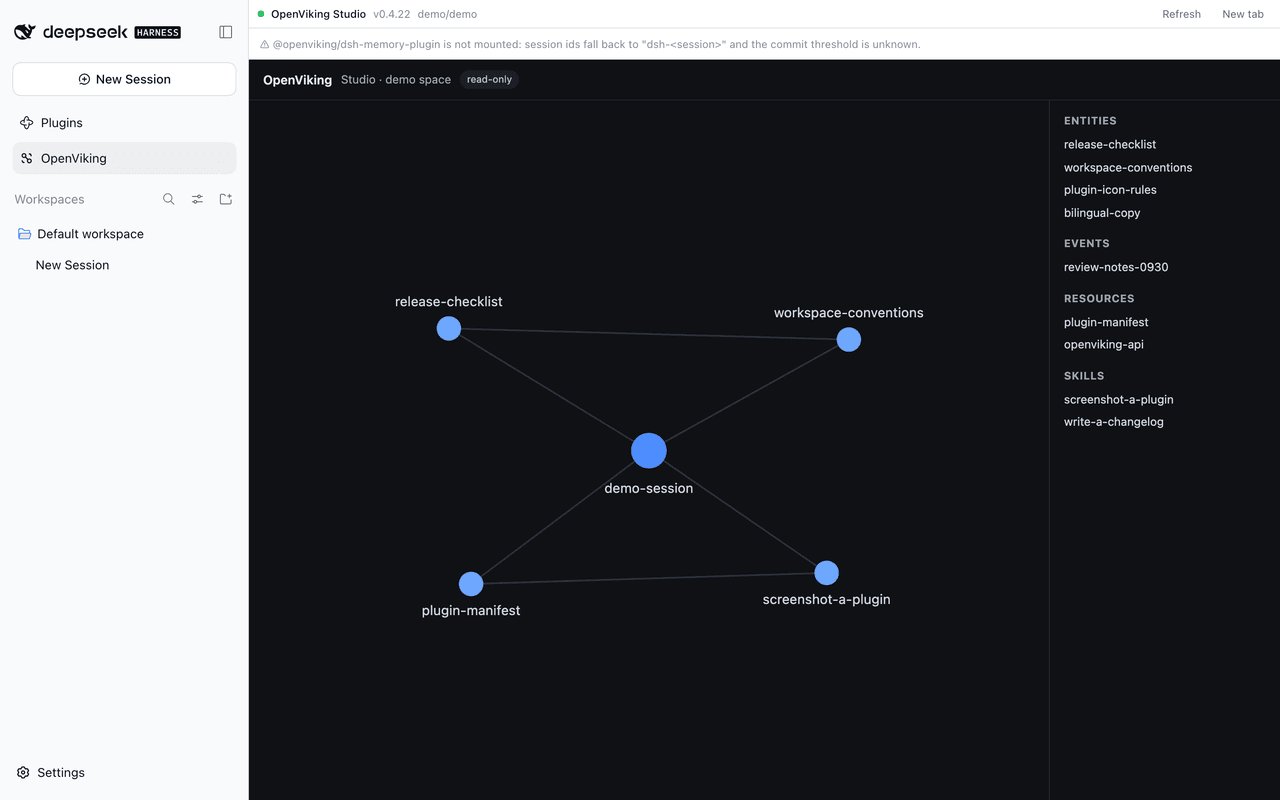
OpenViking in the DSH web GUI: a Studio panel, a per-session memory-commit status pill with its commit timeline, and a right-sidebar tab showing what the current session retrieves.
Project Overview项目介绍
dsh-openviking-enhance is a native DSH plugin that surfaces a local OpenViking memory server inside the DeepSeek Harness Web GUI and desktop profile. It installs as an ordinary DSH bundle via dsh plugin --profile desktop add dsh-openviking-enhance (npm) or the prebuilt tarball from the latest GitHub release, with no patching of DSH itself or the OpenViking plugin. After installation the host half loads on app startup while the client half reloads with the page, adding a Studio panel row to the left sidebar, a commit status pill under the composer, and a Memory recall tab in the right sidebar.
The intended workflow targets DSH users who rely on OpenViking for long-term, per-session memory: as a conversation unfolds, the pill reports token accumulation toward the commit threshold, the active extracting phase, the number of completed commits, or failures, and clicking it opens a timeline of the latest three commits with timestamps, added/updated/deleted counts, the exact viking:// paths each commit touched, and any extraction errors. The right-side recall tab lists what OpenViking retrieves for the session, showing hits across memories, resources, and skills with colour-graded scores, kinds, abstracts, and the underlying retrieval plan. The plugin is strictly read-only and never writes to or deletes from the OpenViking server.
Runtime requirements are DSH 0.2.0-rc.2 or newer, a reachable OpenViking server (0.4.22 tested, default http://127.0.0.1:1933, Studio served at /studio/), and the recommended @openviking/dsh-memory-plugin so commit thresholds are known. Configuration lives in ~/.dsh/profiles/desktop/cordis.patch.yml under openviking-enhance, with sensible defaults read from ~/.openviking/ovcli.conf and a cacheTtlMs of 2500. The project is MIT-licensed; installing directly from a Git URL is blocked by pnpm, so source checkouts must be packed first (pnpm pack), and a one-time app restart is needed after install, upgrade, or removal.
dsh-openviking-enhance 是一款专为 DeepSeek Harness(DSH)打造的原生插件,将本地 OpenViking 记忆服务器的能力嵌入 DSH 的 Web 与桌面端界面。它通过 dsh plugin --profile desktop add 命令或插件页面安装,作为普通 DSH bundle 挂载,无需修改 DSH 主机或 OpenViking 插件本身,左侧栏新增 Studio 面板、消息框下方出现提交状态徽标、右侧栏增加 Memory recall 标签。
该插件的典型使用场景是 DSH 中需要长期记忆的开发者和 AI 工程师:会话过程中可实时观察 OpenViking 累积的 token 进度、提交归档、记忆抽取结果,并查阅当前会话检索到的记忆、资源与技能命中。徽标状态覆盖未提交、累积中、抽取中、多次提交、抽取失败与服务不可达六种,点击后可查看最近三次提交的时间线、具体变更的 viking:// 路径与失败原因,插件全程只读,绝不写入或删除 OpenViking 数据。
运行依赖包括 DSH 0.2.0-rc.2 及以上、OpenViking 本地服务器(默认端口 1933,已测试 0.4.22)以及推荐的 @openviking/dsh-memory-plugin;项目以 MIT 协议发布,所有字段均有默认值,首次安装仅需重启应用一次即可生效。需注意:客户端半体依赖页面加载,主机半体仅在应用重启后重载;自 Git 源安装会因 pnpm 拒绝构建脚本而需先打包为 tarball;DSH 版本低于 0.2.0-rc.2 时右栏标签将自动跳过,但 Studio 面板与状态徽标仍可正常使用。
请帮我安装这个 DSH 插件。安装前先完成【兼容性检查 + 安全性检查】,检查通过再动手。

插件:dsh-openviking-enhance(A2chitect/dsh-openviking-enhance)
仓库:https://github.com/A2chitect/dsh-openviking-enhance
本站详情页:https://www.yhbd.top/plugins/a2chitect-dsh-openviking-enhance/
本站登记:类型 plugin · 归类 原生 DSH 插件 · 许可证 MIT · ⭐ 3 · 最近提交 2026-10-03 · 主语言 TypeScript

按下面顺序执行,每步先把结论告诉我,再进入下一步:

【1 兼容性检查】
① 我这边:DSH 版本、Node 版本、操作系统、当前 profile(web / desktop)。
② 读它的 README、package.json、插件 manifest,列出它要求的 DSH 版本 / Node 版本 / 操作系统 / 外部依赖 / 需要另外先装的运行时。
③ 逐条比对,结论只写「满足 / 不满足 / 未知」三种;不满足的给出可行替代方案。
④ 检查是否和我已装的插件冲突:命令名重复、skill / tool 重名、端口占用、重复注册的 MCP server。

【2 安全性检查】
① 仓库可信度:和上面「本站登记」是否一致;star / fork 数、创建时间、最近提交,是否归档或长期停更。
② 安装脚本:逐行看 package.json 的 preinstall / install / postinstall,以及 install.sh、setup.ps1 之类脚本。出现 curl|bash、下载后直接执行、混淆代码、访问与插件功能无关的域名,立刻停下来告诉我,不要继续装。
③ 依赖:列出新增依赖,标出无人维护、或与知名包拼写近似的可疑包(typosquatting)。
④ 权限与副作用:它会读写哪些目录、访问哪些域名、需要哪些 DSH 权限(filesystem / network / shell / clipboard 等),以及怎么卸载和回滚。
⑤ 如果它要求 sudo / 管理员权限,或权限明显超出功能所需,先停下来问我。

【3 安装】
上面两步没有「不满足」和「高危项」时才执行;用官方推荐方式安装,不要自行提权。

【4 汇报】
用表格输出:检查项 / 结论 / 依据 / 是否需要我决策。拿不准的一律写「未知」并说明要我怎么确认——不要猜,也不要替我决定。
Send this message to DSH in your current session: it verifies compatibility and security first (answering met / not met / unknown item by item) and only installs once everything checks out — it will stop and ask you if it finds a high-risk item. The box scrolls; the copy is the full prompt. CLI install commands may not be accurate across systems, so DSH is the safer route.把上面这条消息直接发给当前会话里的 DSH:它会先核对兼容性与安全性(逐条给「满足 / 不满足 / 未知」),确认没问题再安装,有高危项会停下来问你。框内可滚动,复制到的是完整提示词;安装命令不一定准确,发给 DSH 更稳。
- Only 3 stars - very few users, little community feedback星标只有 3,几乎没人在用,遇到问题缺少社区反馈
DSH walks through these 9 checksDSH 会逐条核对这 9 项
Compatibility兼容性
- DSH, Node, OS and profile requirementsDSH 版本 / Node 版本 / 操作系统 / profile 是否满足要求
- External dependencies and runtimes (Electron / Python / Docker, ...)外部依赖与运行时(Electron / Python / Docker 等)是否齐备
- Conflicts with installed plugins: command names, skill / tool names, ports, duplicate MCP registration与已装插件是否冲突:命令名、skill / tool 重名、端口占用、重复 MCP 注册
Security安全性
- Repo matches the facts registered here; archived or abandoned?仓库是否与页面登记一致,是否归档或长期停更
- Safety of preinstall / install / postinstall and install.sh / setup.ps1preinstall / install / postinstall 与 install.sh、setup.ps1 是否安全
- curl|bash, download-then-execute, obfuscation, unrelated domains → stop immediatelycurl|bash、下载即执行、混淆代码、无关域名 → 立刻停止
- Typosquatting or unmaintained packages among the new dependencies新增依赖里有没有 typosquatting 或无人维护的包
- Requested permissions vs. what the feature actually needs申请了哪些权限、是否超出功能所需(filesystem / network / shell / clipboard)
- Any sudo / admin requirement, plus uninstall and rollback是否要求 sudo / 管理员权限,以及卸载与回滚方式
Anything uncertain must be marked unknown with a note on how to confirm it. This site's signal screen is a static snapshot, not a security audit.拿不准的必须标「未知」并说明要我怎么确认。本站的信号筛查是静态快照,不能替代安全审计。
Or use CLI install (for developers)或使用命令行安装(适合开发者)
CLI Install命令行安装
dsh plugin --profile desktop add dsh-openviking-enhance把 A2chitect/dsh-openviking-enhance 加入你的 DSH 配置(web profile)即可启用。
READMEREADME
dsh-openviking-enhance
English | 中文
v0.2.0 · Changelog
Brings your local OpenViking memory server into the DeepSeek Harness (DSH) Web GUI: a Studio panel in the left sidebar, and a commit status pill under the message box that shows what each session commit did to your memories.
Nothing needs to be patched in DSH or in the OpenViking plugin — it mounts as an ordinary DSH bundle.
What you get
OpenViking Studio, inside DSH. A new row at the bottom of the left sidebar opens the OpenViking server's own Studio UI in the main area, so you can browse memories, sessions and retrieval without leaving the app or switching to a browser.
Per-session commit status. OpenViking writes memory in commits: a session's turns accumulate until a token threshold is reached (or the session ends), then they are archived and the memories are extracted. The pill under the message box tells you where the session you are looking at stands.
The pill follows the app's language (see Notes); in English it reads:
| Pill | Meaning |
|---|---|
OV · not committed |
Nothing from this session has been committed yet |
OV · 12.3k/20k |
Turns are accumulating towards the commit threshold |
OV · extracting… |
A commit is being archived and its memories extracted |
OV · 3 commits |
Three commits so far |
OV · extraction failed |
A commit was archived but its memories could not be extracted |
OV · unavailable |
The local OpenViking server cannot be reached |
Click the pill for details:
- a timeline of the most recent 3 commits — when each happened and how many memories it added, updated or deleted (the rest are one click away);
- clicking a commit lists the exact memories it changed, with their
viking://paths; - any failed extraction, with the time, how long it ran, and the reason the server reported.
The panel and the pill read only. This plugin never commits, writes or deletes anything in OpenViking.
What this session retrieves. The right sidebar gains a Memory recall tab: it shows what OpenViking pulls in for the session you are looking at
— the query it searched with (that session's most recent message, or one you type
yourself), every hit in each of its three sources (memories, resources, skills)
with its score — graded from red through orange to green — its file name, its kind
(entity, event, …) and its abstract. The full viking:// path is on hover, and
opening a row loads that entry's whole text. The plan the server retrieved with is there
too. Open it from the right sidebar's +
guide; it is per session, like the column itself.
Showing the opening section of the README — the full document lives in the repository以上为 README 开头摘要,完整文档在仓库内 · View the full README on GitHub →在 GitHub 查看完整 README →
Related相关推荐
- chen731215-dev/dsh-tavern-v2 DeepSeek Harness Tavern Plugin - character card roleplay, worldbook management, preset switching, dark theme, memory sum…
- BertramWang12399/dsh-projects-mode Project mode plugin for DSH Web GUI: sidebar entry, full-screen project manager, live per-project context injection (ins…
-
 vshulcz/deja-vu
The most accurate, cheapest and fastest memory for coding agents: searchable session history from Claude Code, Codex, Cu…
vshulcz/deja-vu
The most accurate, cheapest and fastest memory for coding agents: searchable session history from Claude Code, Codex, Cu…
-
 adoresever/graph-memory
Deepseek Harness、Openclaw知识图谱记忆插件。2026年4月受邀发布在清华大学讨论会。Knowledge Graph + Memory;Knowledge Graph Context Engine for OpenCl…
adoresever/graph-memory
Deepseek Harness、Openclaw知识图谱记忆插件。2026年4月受邀发布在清华大学讨论会。Knowledge Graph + Memory;Knowledge Graph Context Engine for OpenCl…
-
 mnemon-dev/mnemon
LLM-supervised persistent memory for AI agents — graph-based recall, cross-session knowledge, single binary. Works with …
mnemon-dev/mnemon
LLM-supervised persistent memory for AI agents — graph-based recall, cross-session knowledge, single binary. Works with …
-
 Phant0Meow/dsh-meow-memory
Cross-session memory plugin for DeepSeek Harness: seven-layer SQLite store (soul/user/project/fact/lesson/topic/rules), …
Phant0Meow/dsh-meow-memory
Cross-session memory plugin for DeepSeek Harness: seven-layer SQLite store (soul/user/project/fact/lesson/topic/rules), …
-
 slow-stack/mneme
🧠 The memory that dreams — cross-session memory for DeepSeek Harness. Offline & private, auto-consolidates in its sleep…
slow-stack/mneme
🧠 The memory that dreams — cross-session memory for DeepSeek Harness. Offline & private, auto-consolidates in its sleep…
- hg1048596-pixel/dsh-recall-unread DeepSeek Harness (DSH) 插件:在模型读取前撤回已发送的文字消息,支持单条与全部撤回。A DeepSeek Harness plugin that recalls sent-but-unread text message…