
GGboya/dsh-paper-reader
DeepSeek Harness (dsh) 插件:论文伴读工作台 —— PDF 转录 / 检索 / 流式问答 + 内置阅读器页面。
Project Overview项目介绍
dsh-paper-reader is a native npm plugin for the DeepSeek Harness (dsh) desktop client, published under the @ggboy123 scope and tagged with the dsh-plugin topic plus a bundle-manifest deliverable. It ships as a Cordis-style add-on whose default state leaves the official sidebar untouched: a single "📚 论文伴读" toggle is appended at the bottom of the workspace panel, and only when the user clicks it does the plugin swap the sidebar for a topic→paper library tree and inject a PDF.js-based reader pane plus a real dsh native chat session for the focused paper. The full feature set bundles PDF transcription in pure Node, semantic-rerankable search, select-to-ask injection into the live conversation, click-to-jump citation pages that flash the original PDF text, a reader "中" toggle that swaps original English for machine-translated Chinese, and a dedicated paper-reader agent preset that paces a study plan, quizzes the user, records grades into <paper>.study.json, and accumulates weak-topic memory across sessions.
A typical run begins after the user uploads a PDF and enters reading mode: clicking a paper opens its dsh native chat on the right, every answer carries page citations, and selecting a paragraph in the reader pops a small prompt box that injects the question into the live session stream. End users are pointed to the PaperReader desktop edition (a DSH Desktop DMG with this plugin pre-installed, drag-to-Applications, first-launch right-click-to-open) while developers can run dsh plugin add @ggboy123/dsh-paper-reader@1.1.0 inside DSH Desktop's bundled terminal or dsh plugin --profile web add @ggboy123/dsh-paper-reader on a raw CLI; the translation endpoint should be entered via the reader ⚙ form (which pre-flight tests the connection before writing it to disk) and the legacy pdfqa data/ tree can be reused as dataDir.
Dependencies are deliberately minimal: PDF.js covers transcription and reading without any Python toolchain, while Chinese rendering is handled by an auto-install chain of uv → managed Python 3.12 → babeldoc that lives entirely under $DSH_HOME and a per-user directory, so macOS, Linux and Windows all bootstrap on first translation request without touching the system interpreter. Babeldoc accepts OpenAI-compatible endpoints only, so Anthropic-protocol hosts such as api.kimi.com/coding/ need a translating proxy; credentials default to mode 0600 in ~/.dsh/.dsh-paper-reader/translate.json. Upgrades must pin an explicit version because pnpm resolves already-installed dependencies against the originally recorded range and silently no-ops a bare add; sites enforcing minimumReleaseAge should add minimum-release-age-exclude[]=@ggboy123/dsh-paper-reader under ~/.dsh/profiles/web/.npmrc to scope the carve-out. The project is MIT-licensed.
dsh-paper-reader 是 DeepSeek Harness(dsh)的原生插件 npm 包,作用域为 @ggboy123,定位于"论文伴读工作台"。它在不改动官方界面的前提下,于侧栏底部新增一行"📚 论文伴读"开关,开启后接管工作区侧栏变为文献库树,并在中央嵌入基于 PDF.js 的阅读器、最右挂载该论文对应的 dsh 原生会话。功能包括 PDF 转录(pdf.js 纯 Node、无需 Python)、语义可重排检索、选中即问、引用页码点击回跳 PDF 并闪烁高亮、阅读器顶栏"中"按钮的中英文切换,以及一个专用 agent preset"论文伴读",按计划带读、出题、批改并把成绩写入 <文献>.study.json 跨会话累积。
典型工作流:用户先上传 PDF 进入伴读模式,点击论文即唤起原生对话,左侧选中文字弹窗提问后注入当前会话;阅读器右侧的回答始终带页码标签,点击即平滑跳回原文献并闪烁对应文字。普通用户适合直接安装 PaperReader 桌面版(基于 DSH Desktop 预装本插件,DMG 拖入应用程序即可),开发者可在 DSH Desktop 内置终端执行 dsh plugin add @ggboy123/dsh-paper-reader@1.1.0,或用 dsh plugin --profile web add 命令行挂载;翻译端点优先在阅读器 UI 的 ⚙ 表单填写并保存前先做连接预检,旧 pdfqa 的 data/ 缓存目录可直接复用为 dataDir。
依赖方面,本地 PDF 提取与阅读器完全用 pdf.js,零 Python 预装;中文版生成走 uv→托管 Python 3.12→babeldoc 的自动安装链,全程落在 $DSH_HOME 与用户目录,不污染系统 Python,macOS/Linux/Windows 全平台均支持。babeldoc 仅接受 OpenAI 协议端点,Anthropic 协议(如 api.kimi.com/coding/)需自备兼容代理;端点与 API key 默认按 0600 权限写入 ~/.dsh/.dsh-paper-reader/translate.json。升级必须带显式版本号,否则 pnpm 对已存依赖按原范围解析不追新;开启 minimumReleaseAge 策略时需在 ~/.dsh/profiles/web/.npmrc 加 minimum-release-age-exclude[]=@ggboy123/dsh-paper-reader 单独豁免。license 为 MIT。
请帮我安装这个 DSH 插件。安装前先完成【兼容性检查 + 安全性检查】,检查通过再动手。

插件:dsh-paper-reader(GGboya/dsh-paper-reader)
仓库:https://github.com/GGboya/dsh-paper-reader
本站详情页:https://www.yhbd.top/plugins/ggboya-dsh-paper-reader/
本站登记:类型 plugin · 归类 原生 DSH 插件 · 许可证未声明 · ⭐ 8 · 最近提交 2026-09-24 · 主语言 TypeScript

按下面顺序执行,每步先把结论告诉我,再进入下一步:

【1 兼容性检查】
① 我这边:DSH 版本、Node 版本、操作系统、当前 profile(web / desktop)。
② 读它的 README、package.json、插件 manifest,列出它要求的 DSH 版本 / Node 版本 / 操作系统 / 外部依赖 / 需要另外先装的运行时。
③ 逐条比对,结论只写「满足 / 不满足 / 未知」三种;不满足的给出可行替代方案。
④ 检查是否和我已装的插件冲突:命令名重复、skill / tool 重名、端口占用、重复注册的 MCP server。

【2 安全性检查】
① 仓库可信度:和上面「本站登记」是否一致;star / fork 数、创建时间、最近提交,是否归档或长期停更。
② 安装脚本:逐行看 package.json 的 preinstall / install / postinstall,以及 install.sh、setup.ps1 之类脚本。出现 curl|bash、下载后直接执行、混淆代码、访问与插件功能无关的域名,立刻停下来告诉我,不要继续装。
③ 依赖:列出新增依赖,标出无人维护、或与知名包拼写近似的可疑包(typosquatting)。
④ 权限与副作用:它会读写哪些目录、访问哪些域名、需要哪些 DSH 权限(filesystem / network / shell / clipboard 等),以及怎么卸载和回滚。
⑤ 如果它要求 sudo / 管理员权限,或权限明显超出功能所需,先停下来问我。

【3 安装】
上面两步没有「不满足」和「高危项」时才执行;用官方推荐方式安装,不要自行提权。

【4 汇报】
用表格输出:检查项 / 结论 / 依据 / 是否需要我决策。拿不准的一律写「未知」并说明要我怎么确认——不要猜,也不要替我决定。
Send this message to DSH in your current session: it verifies compatibility and security first (answering met / not met / unknown item by item) and only installs once everything checks out — it will stop and ask you if it finds a high-risk item. The box scrolls; the copy is the full prompt. CLI install commands may not be accurate across systems, so DSH is the safer route.把上面这条消息直接发给当前会话里的 DSH:它会先核对兼容性与安全性(逐条给「满足 / 不满足 / 未知」),确认没问题再安装,有高危项会停下来问你。框内可滚动,复制到的是完整提示词;安装命令不一定准确,发给 DSH 更稳。
- No license declared - all rights reserved by default; ask the author before commercial use or redistribution未声明开源许可证 —— 默认「保留所有权利」,商用或再分发前先问作者
- Only 8 stars - very few users, little community feedback星标只有 8,几乎没人在用,遇到问题缺少社区反馈
DSH walks through these 9 checksDSH 会逐条核对这 9 项
Compatibility兼容性
- DSH, Node, OS and profile requirementsDSH 版本 / Node 版本 / 操作系统 / profile 是否满足要求
- External dependencies and runtimes (Electron / Python / Docker, ...)外部依赖与运行时(Electron / Python / Docker 等)是否齐备
- Conflicts with installed plugins: command names, skill / tool names, ports, duplicate MCP registration与已装插件是否冲突:命令名、skill / tool 重名、端口占用、重复 MCP 注册
Security安全性
- Repo matches the facts registered here; archived or abandoned?仓库是否与页面登记一致,是否归档或长期停更
- Safety of preinstall / install / postinstall and install.sh / setup.ps1preinstall / install / postinstall 与 install.sh、setup.ps1 是否安全
- curl|bash, download-then-execute, obfuscation, unrelated domains → stop immediatelycurl|bash、下载即执行、混淆代码、无关域名 → 立刻停止
- Typosquatting or unmaintained packages among the new dependencies新增依赖里有没有 typosquatting 或无人维护的包
- Requested permissions vs. what the feature actually needs申请了哪些权限、是否超出功能所需(filesystem / network / shell / clipboard)
- Any sudo / admin requirement, plus uninstall and rollback是否要求 sudo / 管理员权限,以及卸载与回滚方式
Anything uncertain must be marked unknown with a note on how to confirm it. This site's signal screen is a static snapshot, not a security audit.拿不准的必须标「未知」并说明要我怎么确认。本站的信号筛查是静态快照,不能替代安全审计。
Or use CLI install (for developers)或使用命令行安装(适合开发者)
CLI Install命令行安装
dsh plugin --profile web add @ggboy123/dsh-paper-reader把 GGboya/dsh-paper-reader 加入你的 DSH 配置(web profile)即可启用。
READMEREADME
dsh-paper-reader




English: README_EN.md
DeepSeek Harness (dsh) 插件:论文伴读工作台 —— PDF 转录 / 检索 + 原生对话伴读 + 内置阅读器。
👉 普通用户不用看这一页。 如果你只是想装一个能用的 App,请直接去 PaperReader 论文伴读桌面版 —— 那是把本插件预装好的桌面应用,下载 DMG 拖进「应用程序」就能用,不需要任何环境。本仓库面向的是想自己装插件、或想改代码的用户。
功能迁移自本地独立产品 pdfqa(Go 实现的论文伴读工具)。原则:agent 循环 / 模型层 / 会话持久化全部交给 dsh 框架,插件只做「转录 + 检索 + 阅读器 UI」的薄壳组合。
安装后不改动官方界面 —— 侧栏底部多一行「📚 论文伴读」开关,点击才进入伴读模式(左侧变为文献库树),再点即还原官方工作区列表:

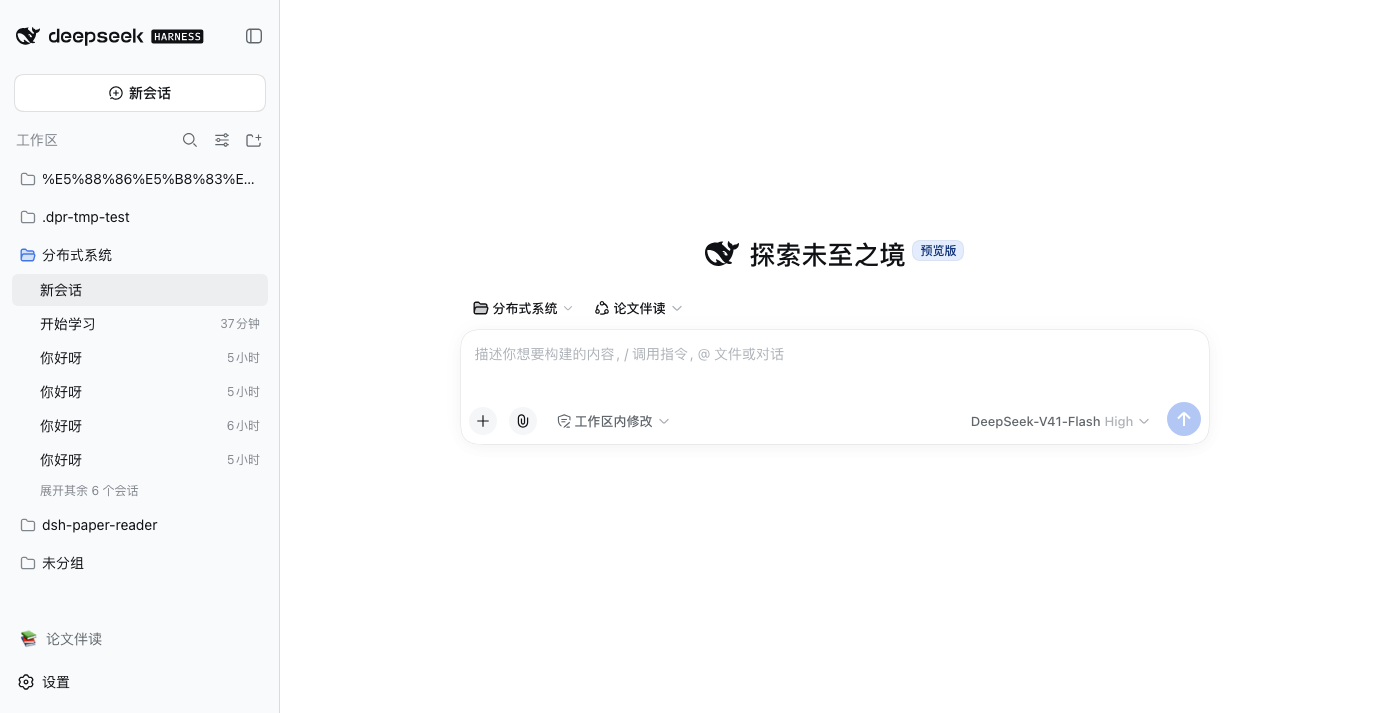
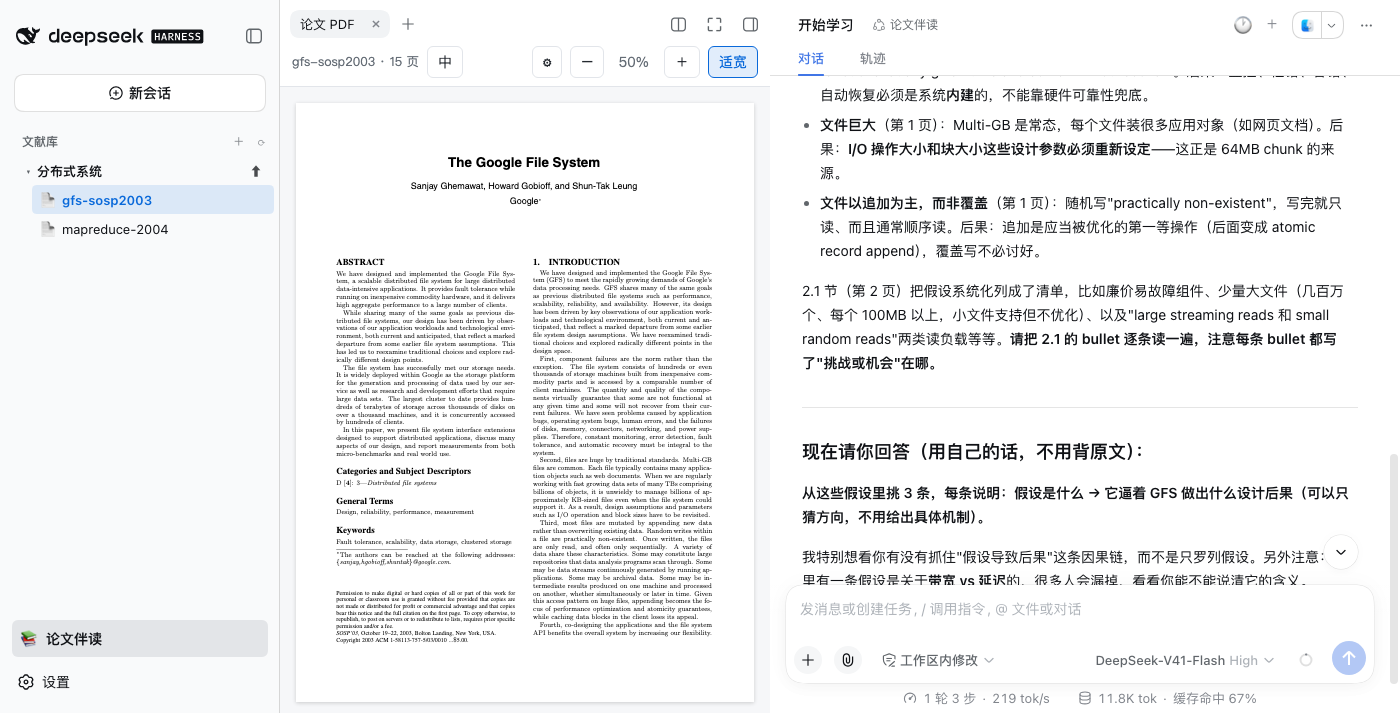
功能
- 📚 侧栏文献库树:「论文伴读」模式开启时接管工作区侧栏,专题 → 论文两级;支持新建专题、上传 PDF(默认关闭,不覆盖官方界面)
- 💬 原生对话伴读:点击论文即在右侧打开它的 dsh 原生会话(流式 / 工具卡 / 用量条全是官方 UI);默认只呈现当前对话,对话列头部的 🕐 下拉回看历史对话(真实标题+日期,点哪条进哪条),+ 新建对话
- 🔗 会话绑定论文:会话 id 编码文献身份,工具调用自动定位当前论文——直接在输入框提问无需点名论文,回答必带页码
- 🤖 专用 agent preset「论文伴读」:paper 会话自动使用专用 preset —— 像老师一样带读:制定分步阅读计划(每步带页码和思考题)→ 逐节指导、点评 → 出题检验、逐题批改 → 成绩与薄弱点记入
<文献>.study.json学习档案,跨会话累积;快速问答(选中即问)则直接回答,不上课 - 📖 PDF 阅读器居中:中间是论文(PDF.js 缩放 / Retina 高清 / 文本层选择 / 适宽模式),最右是该论文的原生对话 —— 视觉换位实现,列宽拖拽/折叠仍是 dsh 原生行为,关掉 PDF 页签即还原官方布局
- 💬 选中即问:阅读器里选中文字 → 弹出提问框 → 注入当前会话,原生对话区实时回答
- 📍 引用定位:回答里的「第 N 页」可点击,平滑跳回 PDF 对应页并闪烁
- 🀄 中英切换:顶栏「中」按钮原文 ↔ 纯中文切换;无译文时一键后台生成(babeldoc),生成需配置
translate端点;无需预装 Python——首次生成时自动下载 uv + 托管 Python + babeldoc(macOS / Linux / Windows,约几分钟),全程落在用户目录 - 🔍 PDF 转录 + 检索:本地提取(pdf.js,纯 Node 无需 Python),页眉页脚剔除 / 连字 / 断词愈合 / 段落重排,产出页码偏移表;可选接入 TypeSafe/Jev 语义重排(设置面板填端点即启用,不配置时退回纯关键词排序);兼容 pdfqa 的
data/缓存布局(旧缓存读取时自动补建页码索引)
Showing the opening section of the README — the full document lives in the repository以上为 README 开头摘要,完整文档在仓库内 · View the full README on GitHub →在 GitHub 查看完整 README →
Related相关推荐
-
 Ikalus1988/MisakaNet
📚 A zero-dependency, git-backed micro-lesson library for AI Agents to asynchronously share and search verified debuggin…
Ikalus1988/MisakaNet
📚 A zero-dependency, git-backed micro-lesson library for AI Agents to asynchronously share and search verified debuggin…
-
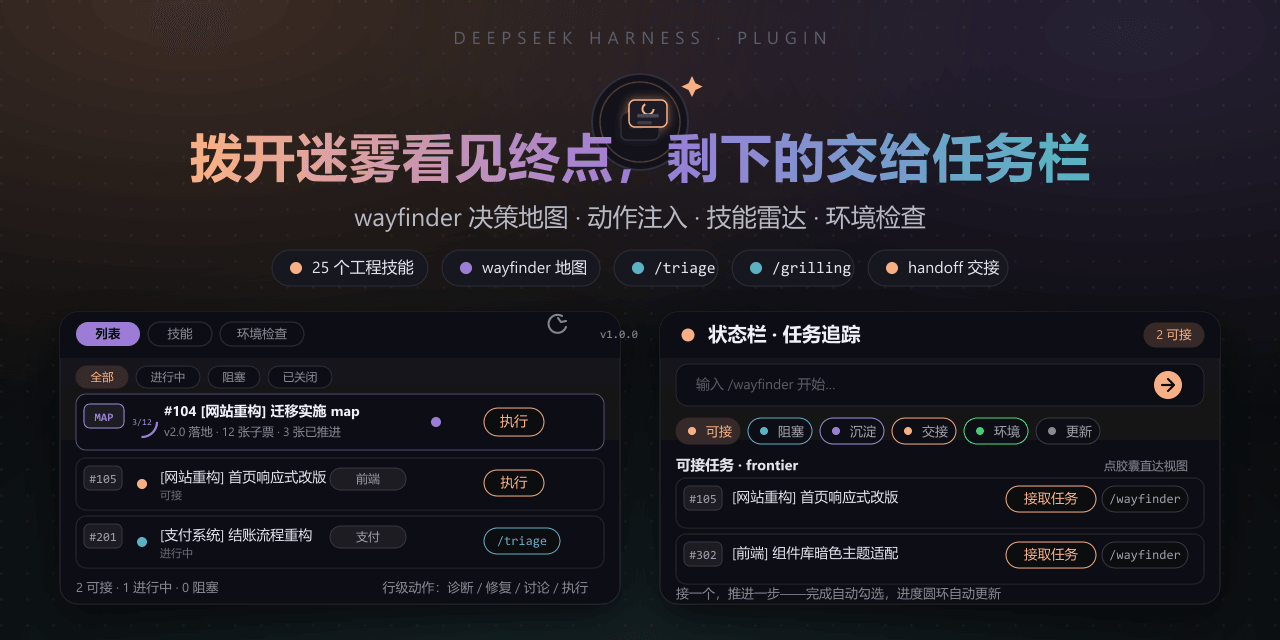 FeatherHunter/dsh-mattpocock-skills-deck
安装即自带mattpocock/skills v1.2.3的25个工程与效率技能,无需手动装技能。300亿token打造。本插件在原始技能之上提供10倍的开发效率。主力支持GitHub issue;Markdown为预览版;GitLab暂不…
FeatherHunter/dsh-mattpocock-skills-deck
安装即自带mattpocock/skills v1.2.3的25个工程与效率技能,无需手动装技能。300亿token打造。本插件在原始技能之上提供10倍的开发效率。主力支持GitHub issue;Markdown为预览版;GitLab暂不…
-
 yoli-mi/dsh-client-ui-custom
Configurable DSH web-surface plugin: wallpaper & frosted-glass themes, accent colors, custom keyboard shortcuts, app-usa…
yoli-mi/dsh-client-ui-custom
Configurable DSH web-surface plugin: wallpaper & frosted-glass themes, accent colors, custom keyboard shortcuts, app-usa…
-
 omdsh-dev/dsh-toolkit
DSH 零依赖工具包 collection —— time / encoding / json / calculator / csv / regex / markdown / diff / stat / schema 十个确定性工具,统一入…
omdsh-dev/dsh-toolkit
DSH 零依赖工具包 collection —— time / encoding / json / calculator / csv / regex / markdown / diff / stat / schema 十个确定性工具,统一入…
- seed-forge/harness-ai-kit Package manager for AI agent assets — 42 skills, 5 CLIs, 1 plugin. Skills for AI/LLM agent engineering, eval-driven dev,…
-
 XieZongChen/dsh-md-notes
A note-taking plugin for DeepSeek Harness (DSH). It provides a full MD notes manager and MD notes editor, letting you qu…
XieZongChen/dsh-md-notes
A note-taking plugin for DeepSeek Harness (DSH). It provides a full MD notes manager and MD notes editor, letting you qu…
- FNOSP/fnos-dsh DeepSeek Harness应用与harness插件 monorepo
-
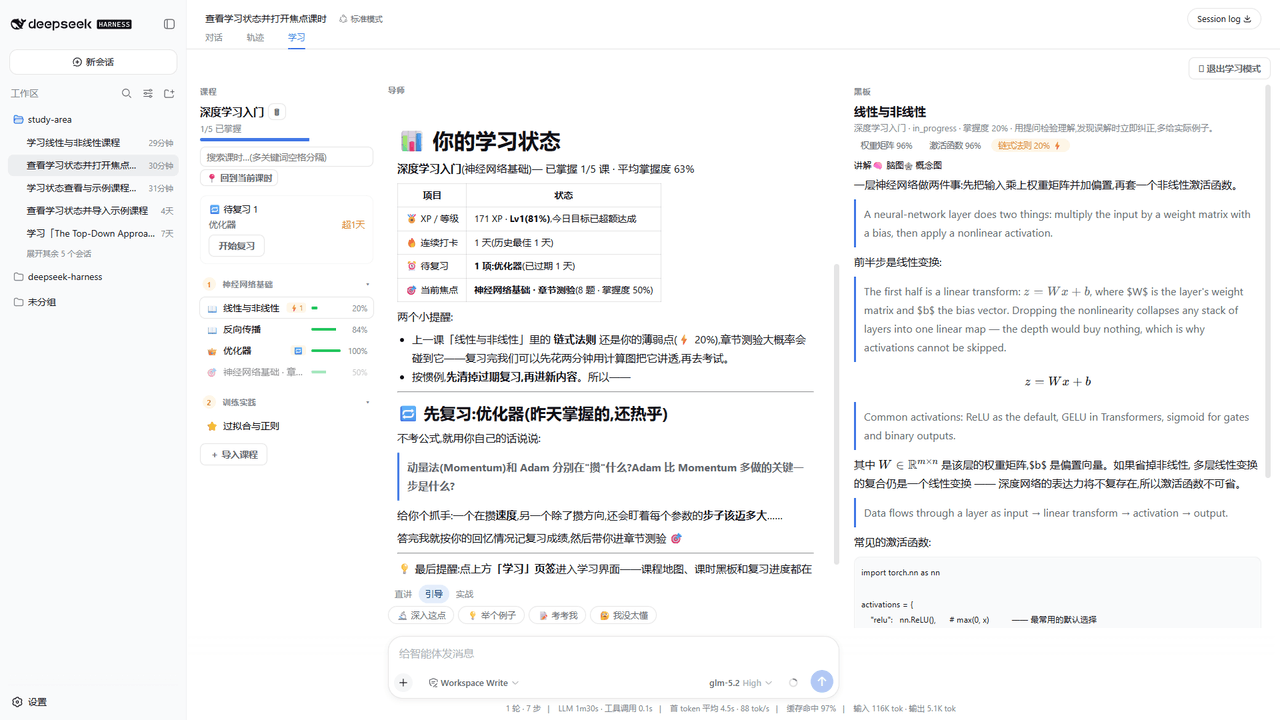 Kaiji-Z/dsh-plugin-lookatstudy
dsh community plugin: turn any markdown/folder/GitHub learning repo into a guided AI-tutor course (gated skill tree, BKT…
Kaiji-Z/dsh-plugin-lookatstudy
dsh community plugin: turn any markdown/folder/GitHub learning repo into a guided AI-tutor course (gated skill tree, BKT…