
GreatV/oardsh
Bring DeepSeek Harness to your desktop.
Project Overview项目介绍
oardsh is a Tauri-based desktop wrapper for DeepSeek Harness (dsh). It extends dsh's web UI with system tray residency, hover-activated context details, a local usage statistics dashboard (tokens, sessions, heatmap, trends), and a network proxy option. All features live inside dsh's Settings page and follow its theme, layout, and language. Use it when you want dsh as a standalone desktop app. Caveat: the hover-triggered context panel may conflict with click habits; restore session stats via Settings → General if preferred.
oardsh 是一款基于 Tauri 的 DeepSeek Harness (dsh) 桌面插件。它在 dsh 网页版基础上提供系统托盘常驻、悬停显示上下文详情、本地使用统计仪表盘(令牌、会话、热力图等)以及网络代理设置。功能集成在 dsh 的设置页中,遵循其主题、布局与语言。适用于希望将 dsh 用作独立桌面应用的用户。需注意:上下文面板悬停触发可能与点击习惯冲突,可在设置中调整。
请帮我了解并安装插件:【oardsh】【https://github.com/GreatV/oardsh】Send this message to DSH in your current session. CLI install commands may not be accurate across systems — DSH will figure it out for you.把上面这条消息直接发给当前会话里的 DSH,让它帮你了解并安装。安装命令不一定准确,发给 DSH 更稳。
Or use CLI install (for developers)或使用命令行安装(适合开发者)
CLI Install命令行安装
dsh plugin --profile web add github:GreatV/oardsh把 GreatV/oardsh 加入你的 DSH 配置(web profile)即可启用。
READMEREADME

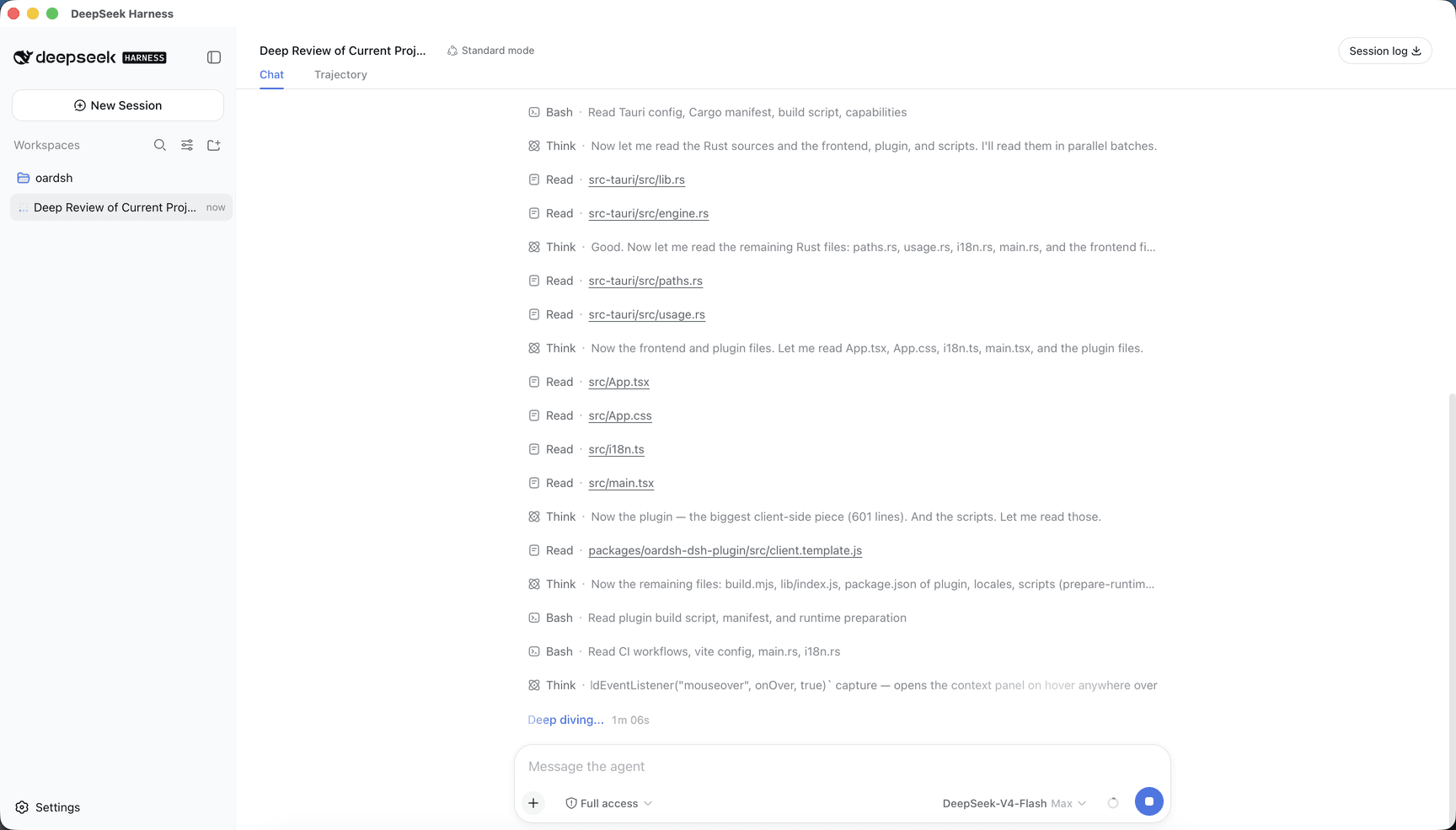
oardsh keeps the familiar dsh Web experience and adds what only a native app can. Everything it contributes lives inside dsh's own Settings page, follows its theme, layout and language, and wears the app's whale mark so oardsh's surfaces are always distinguishable from stock dsh.
- Tray residency — closing the window hides it to the tray; the session keeps running. The tray menu shows the window, restarts the server, or quits. A second launch focuses the existing instance.
- Context meter on hover — the composer's context ring opens its panel on hover rather than a click, and the panel gains each bucket's share of the used context plus the free remainder. dsh's session stats move in there by default, replacing the truncated line under the composer; Settings → General puts them back.
- Usage statistics — a dashboard built from local session transcripts: tokens, sessions, messages, active days and current streak over the last 7 or 30 days, a year-long activity heatmap, a daily token trend stacked by model, and each model's share.
- Network proxy — Settings → General can route network traffic through a proxy. Choose Off, System, or a manual address. Applying the change restarts the server.
Download
Grab the installer for your platform from GitHub Releases — macOS DMG (Apple Silicon or Intel), Windows x64 installer, or Linux x64 AppImage / Debian / RPM.
Development
npm install
npm run tauri dev     # run
npm run tauri build   # build installers for the current platform
Related相关推荐
-
 anywhere-labs/dsh-desktop
为 DeepSeek Harness (DSH) 插件生态打造的现代化桌面端解决方案。万物皆「插件」,桌面本身也是「插件」。
anywhere-labs/dsh-desktop
为 DeepSeek Harness (DSH) 插件生态打造的现代化桌面端解决方案。万物皆「插件」,桌面本身也是「插件」。
-
 ccch1mneyyy/dsh-TUI
DSH 官方公众号收录的 TUI 补位插件:Claude Code 风,鲸鱼顶栏/实时状态/流式思考/双击 Esc 回滚/上下文进度+TPS。npm 一键装。 DSH official WeChat featured TUI plugin…
ccch1mneyyy/dsh-TUI
DSH 官方公众号收录的 TUI 补位插件:Claude Code 风,鲸鱼顶栏/实时状态/流式思考/双击 Esc 回滚/上下文进度+TPS。npm 一键装。 DSH official WeChat featured TUI plugin…
- dsh-tauri/deepseek-harness-desktop DeepSeek Harness Tauri 桌面版 | Only 5mb installer, zero environment setup, preset plugins, Windows / macOS / Linux.
-
 shaobeichen/dsh-pocket
把 DeepSeek Harness 装进你的口袋:电脑上跑 dsh web,手机扫码即同步访问(局域网 + 公网,实时同屏)Put DeepSeek Harness in your pocket: run dsh web on your …
shaobeichen/dsh-pocket
把 DeepSeek Harness 装进你的口袋:电脑上跑 dsh web,手机扫码即同步访问(局域网 + 公网,实时同屏)Put DeepSeek Harness in your pocket: run dsh web on your …
-
 whitelonng/dshcode
Community desktop companion for DeepSeek Harness — one-click Electron app for macOS and Windows
whitelonng/dshcode
Community desktop companion for DeepSeek Harness — one-click Electron app for macOS and Windows
-
 myYangyunfan/dsh_desktop
DeepSeek Harness (dsh) Windows desktop client - bundled Node.js + dsh CLI, one-click launch
myYangyunfan/dsh_desktop
DeepSeek Harness (dsh) Windows desktop client - bundled Node.js + dsh CLI, one-click launch
-
 lencx/Minke
🐳 DeepSeek Harness Desktop
lencx/Minke
🐳 DeepSeek Harness Desktop
-
 Nagi-ovo/dsh-ads
把 DSH 变成 2005 年门户网站|Parody ads, fake games, and popups for the DSH Web UI
Nagi-ovo/dsh-ads
把 DSH 变成 2005 年门户网站|Parody ads, fake games, and popups for the DSH Web UI