jasonsun29/ds-balance-card
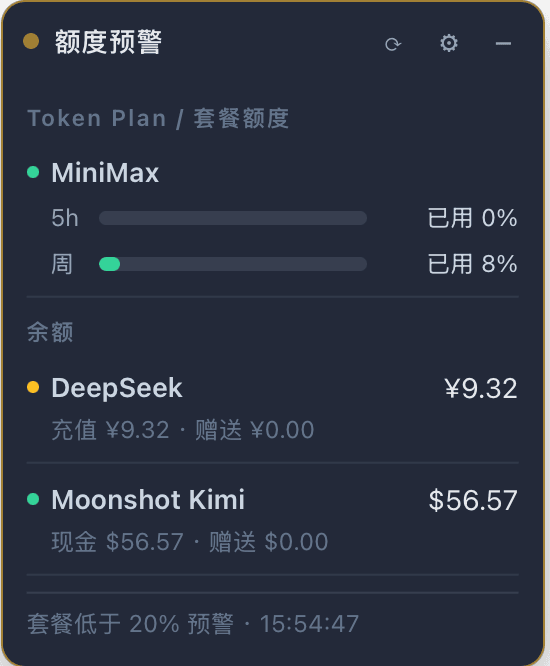
DeepSeek Harness 常驻额度卡片插件:在界面右下角持续显示各模型平台的账户余额与 Coding Plan 套餐额度。只要在 DSH 凭证库中配置了对应平台的 API Key,插件会自动识别并逐平台查询。
catalog descriptioncatalog 简介 / catalog description:DeepSeek Harness 常驻额度卡片插件:自动识别已配置的平台 API Key,显示余额与 Coding Plan 额度
Project Overview项目介绍
ds-balance-card is a DeepSeek Harness plugin that renders a persistent card in the web profile's lower-right overlay. It scans the credential store for configured platform keys and displays per-row balances and Coding Plan quotas, using green/yellow/red status dots and refreshing every 5 minutes, with an adjustable low-balance threshold. It targets the web profile only and is unnecessary on headless. Platforms such as OpenAI, Anthropic, and Gemini currently expose no query endpoints, so the card explicitly marks them as unsupported.
ds-balance-card 是 DeepSeek Harness 的常驻额度卡片插件,挂载在 web profile 右下角浮层,自动识别凭证库中已配置的平台 Key,逐行展示余额与 Coding Plan 套餐剩余,并以绿/黄/红圆点标示状态,每 5 分钟刷新,余额预警阈值可调。仅支持 web profile,headless 无需安装;OpenAI、Anthropic、Gemini 等暂未提供查询接口,卡片会显式标注「暂不支持查询」。
请帮我了解并安装插件:【ds-balance-card】【https://github.com/jasonsun29/ds-balance-card】Send this message to DSH in your current session. CLI install commands may not be accurate across systems — DSH will figure it out for you.把上面这条消息直接发给当前会话里的 DSH,让它帮你了解并安装。安装命令不一定准确,发给 DSH 更稳。
Or use CLI install (for developers)或使用命令行安装(适合开发者)
CLI Install命令行安装
dsh plugin --profile web add github:jasonsun29/ds-balance-card把 jasonsun29/ds-balance-card 加入你的 DSH 配置(web profile)即可启用。
READMEREADME
ds-balance-card
中文 | English
DeepSeek Harness 常驻额度卡片插件:在界面右下角持续显示各模型平台的账户余额与 Coding Plan 套餐额度。只要在 DSH 凭证库中配置了对应平台的 API Key,插件会自动识别并逐平台查询。

功能
- 🪟 右下角常驻卡片,跨会话始终可见(挂在
shell.overlay全帧浮动层) - 🔍 多平台自动识别:扫描凭证库,已配置 Key 的平台自动查询并逐行显示
- 💰 余额与 Coding Plan 额度分行区分显示
- ⚠️ 预警:余额低于阈值(⚙ 可调,默认 10)变黄、余额为 0/不可用变红;套餐剩余低于 20% 变黄、耗尽变红;预警状态圆点脉冲闪烁、刷新加速到 1 分钟
- ⏱️ 每 5 分钟自动刷新
- 🖱️ 可拖拽移动(带视口边缘保护,拖不出屏幕)、双击标题栏复位、可收起为最小条
- 🔒 安全:API Key 永不进入浏览器。Host 半通过 DSH
credentials服务解析各平台 Key,经环境变量传给 curl,仅把解析后的余额/配额字段发往页面
平台支持矩阵
凭证名精确匹配(大小写敏感),插件按表内顺序依次探测;不在名单里的名字不会被识别。
| 平台 | 扫描的凭证名(依次尝试) | 查询接口 | 余额 | Coding Plan / 套餐额度 |
|---|---|---|---|---|
| DeepSeek | DEEPSEEK_API_KEY |
api.deepseek.com/user/balance |
✅(CNY) | —(无套餐) |
| Moonshot Kimi | MOONSHOT_API_KEY → MOONSHOTAI_API_KEY |
api.moonshot.cn → api.moonshot.ai |
✅(国内站 CNY / 国际站 USD,含现金/赠送拆分) | — |
| 阶跃星辰 StepFun | STEPFUN_API_KEY |
api.stepfun.com/v1/accounts |
✅(含总充值/总赠送) | — |
| MiniMax | MINIMAX_API_KEY → MINIMAX_CN_API_KEY → MINIMAX_INTL_API_KEY |
api.minimaxi.com(CN Coding Plan)→ www.minimax.io(Token Plan)→ api.minimax.io |
— | ✅ 5h + 周窗口剩余 % |
| 智谱 Z.ai | ZAI_API_KEY → ZHIPU_API_KEY → BIGMODEL_API_KEY |
api.z.ai → open.bigmodel.cn |
— | ✅ 5h 窗口 / 周配额 / 工具额度剩余 %,含套餐档位 |
| OpenAI | OPENAI_API_KEY |
— | ❌ | ❌ 显示「暂不支持查询」 |
| Anthropic | ANTHROPIC_API_KEY |
— | ❌ | ❌ |
| Google Gemini | GEMINI_API_KEY → GOOGLE_API_KEY |
— | ❌ | ❌ |
| xAI Grok | XAI_API_KEY |
— | ❌ | ❌ |
| 火山方舟 | ARK_API_KEY → ARK_ACCESS_KEY → VOLC_ACCESSKEY |
— | ❌ | ❌ |
| 阿里云百炼 | DASHSCOPE_API_KEY |
— | ❌ | ❌ |
| 百度千帆 | QIANFAN_API_KEY → BAIDU_QIANFAN_API_KEY |
— | ❌ | ❌ |
| 腾讯混元 | HUNYUAN_API_KEY |
— | ❌ | ❌ |
| 讯飞星火 | SPARK_API_KEY → IFLYTEK_API_KEY |
— | ❌ | ❌ |
配置了 Key 但平台暂无官方查询接口时,卡片会明确标注「暂不支持查询」,不会静默忽略。
安装
插件本体放进任意位置,链接到 profile 的 node_modules,再在 cordis.patch.yml 里插入一行即可。
# 1. 克隆插件(以 web profile 为例)
mkdir -p "$DSH_HOME/profiles/web/plugins"
git clone https://github.com/jasonsun29/ds-balance-card.git "$DSH_HOME/profiles/web/plugins/ds-balance-card"

# 2. 链接到 profile 的 node_modules(无 node_modules 目录会自动创建)
mkdir -p "$DSH_HOME/profiles/web/node_modules"
ln -sfn ../plugins/ds-balance-card "$DSH_HOME/profiles/web/node_modules/ds-balance-card"
编辑 $DSH_HOME/profiles/web/cordis.patch.yml,追加:
- insert:
    - id: ds-balance-card
      name: ds-balance-card
最后刷新页面(或重启 dsh web)。首次安装后如需让补丁行立即生效,重启进程最稳妥。
用 npm 管理也可以:在 profile 目录执行
npm install ds-balance-card(或file:./plugins/ds-balance-card),补丁行同上。
使用
- 拖动标题栏移动;双击复位到右下角
−/+收起/展开;⟳立即刷新;⚙设置余额预警阈值- 每行 = 一个平台:状态点(绿=正常 / 黄=预警 / 红=耗尽或失败 / 灰=暂不支持)+ 平台名 + 余额或套餐剩余
- 余额行副行显示充值/赠送拆分;套餐行副行显示各窗口剩余百分比与套餐档位
前置条件
- 至少一个平台 API Key 已存入 DSH 凭证库(Web 界面 Models 页写入,或
$DSH_HOME/.credentials.yaml,键名见上方支持矩阵) - 本插件为 web profile 设计(需要浏览器界面);headless profile 无需安装
- Host 半的代码改动需要重启
dsh web生效(补丁行首次插入后同样建议重启)
原理
- Host 半(
lib/index.js):注册 loopback-only 的 Connection RPC 通道/dsbalance(fetch-all端点),扫描凭证库中已配置的平台 Key,经credentials+shell服务逐一调用各平台余额/配额接口 - Client 半(
lib/client.js):shell.overlay槽位的 React 卡片,通过ctx.connection.rpc与 Host 通信,timer服务驱动定时刷新
版本演进
- v1 — 右下角常驻余额卡片:可拖拽(视口边缘保护)、收起/展开、双击复位、每 5 分钟自动刷新;低余额预警(阈值可调、变色、圆点脉冲、预警时加速刷新);密钥不进入浏览器
- v1.1 — 多平台余额自动识别(DeepSeek / Moonshot Kimi / 阶跃星辰)+ 多平台 Coding Plan 额度查询(MiniMax / 智谱 Z.ai);暂不支持查询的平台显式标注
- v1.2 — 余额与套餐分区(套餐在上、余额在下);查询失败自动重试、服务重启自愈;接口与模型 provider 校准(凭证名兼容、Moonshot 国内/国际站适配、币种按站点区分);金额 2 位小数、双进度条(5h/周)、字体放大
License
MIT
Related相关推荐
-
 Stormycry-cryp/dsh-AuthInOne
Self-contained DeepSeek Harness (DSH) plugin for Provider/Auth login, model switching, image fallback, token/cost analyt…
Stormycry-cryp/dsh-AuthInOne
Self-contained DeepSeek Harness (DSH) plugin for Provider/Auth login, model switching, image fallback, token/cost analyt…
-
 welsione/dsh-mmx-bridge
一个工具 = MiniMax 全部多模态能力:DSH 纯文本模型看图/画图/生视频/说话/唱歌/翻唱/搜索/查额度 | One mmx_bridge tool = all MiniMax multimodal (VLM/image/vide…
welsione/dsh-mmx-bridge
一个工具 = MiniMax 全部多模态能力:DSH 纯文本模型看图/画图/生视频/说话/唱歌/翻唱/搜索/查额度 | One mmx_bridge tool = all MiniMax multimodal (VLM/image/vide…
-
 54xkeee/dsh-vision
Vision for DeepSeek Harness: Doubao Web by default (zero-cost, no API key), Antigravity IDE quota (flash/pro), any IDE C…
54xkeee/dsh-vision
Vision for DeepSeek Harness: Doubao Web by default (zero-cost, no API key), Antigravity IDE quota (flash/pro), any IDE C…
- ilps2/dsh-video-understand 低成本视频理解 dsh 插件:B站/本地视频 → AVIS 信息层 → 摘要+问答(token 压缩 99.95%+)。Low-cost video understanding tool for DeepSeek Harness.
- PerryLink/dsh-draw Unified static-image generation router for DeepSeek Harness: one image_generate tool with standard parameters, config-dr…
-
 hackerFish/dsh-video-studio
鲸影 DSH Video Studio:DeepSeek Harness 原生视频/漫剧生成插件——六段导演流水线、多供应商免费额度调度、四层提示词自优化,质量优先省钱第二
hackerFish/dsh-video-studio
鲸影 DSH Video Studio:DeepSeek Harness 原生视频/漫剧生成插件——六段导演流水线、多供应商免费额度调度、四层提示词自优化,质量优先省钱第二
- 1HelloMan1/dsh-usage-dashboard-plus DeepSeek Harness usage dashboard with API balance, daily spend, external vision-call accounting, per-model stats, call l…
- sixtysevenlf/dsh-save-balance-monitor 省钱+余额监控悬浮窗(DSH Web UI 插件):DeepSeek / OpenCode Go 双标签余额、限额监控(金额/tok/小时)、语音提醒、超限断点截断