lbl61/dsh-drop-in
将文件拖入/粘贴到DeepSeek Harness Web界面中,作为原生引用气泡显示——包含绝对路径,并渲染文件卡片。
Project Overview项目介绍
dsh-drop-in is a DeepSeek Harness plugin that wires native file drag-and-drop and clipboard paste into the web chat UI. Core capability: dragging or pasting any file/folder inserts an inline reference bubble at the caret when the composer is focused, otherwise shows a chip bar above the input; on send, absolute paths accompany the message and render as file cards the agent can read directly. Use it when you need to attach local files to a conversation. Caveat: in a plain browser (no Electron preload), text files fall back by being copied into the workspace .dsh-drops/, and pasted binaries are persisted as base64.
dsh-drop-in 是 DeepSeek Harness 插件,将系统文件管理器中的拖放与粘贴接入 Web 聊天界面。核心能力:拖入或粘贴任意文件/文件夹,在编辑器聚焦时以内联引用气泡插入文本,否则显示在输入框上方的芯片栏,发送时以绝对路径随消息发出,渲染为文件卡片供 Agent 直接读取。在需要向对话附加本地文件供模型访问时使用。注意:在普通浏览器(非 Electron)中,文本文件会回退复制到工作区 .dsh-drops/,且粘贴的二进制以 base64 持久化存储。
请帮我了解并安装插件:【dsh-drop-in】【https://github.com/lbl61/dsh-drop-in】Send this message to DSH in your current session. CLI install commands may not be accurate across systems — DSH will figure it out for you.把上面这条消息直接发给当前会话里的 DSH,让它帮你了解并安装。安装命令不一定准确,发给 DSH 更稳。
Or use CLI install (for developers)或使用命令行安装(适合开发者)
CLI Install命令行安装
dsh plugin --profile web add https://github.com/lbl61/dsh-drop-in/archive/refs/tags/v1.3.0.tar.gz把 lbl61/dsh-drop-in 加入你的 DSH 配置(web profile)即可启用。
READMEREADME
dsh-drop-in
🌐 中文版:README.zh.md
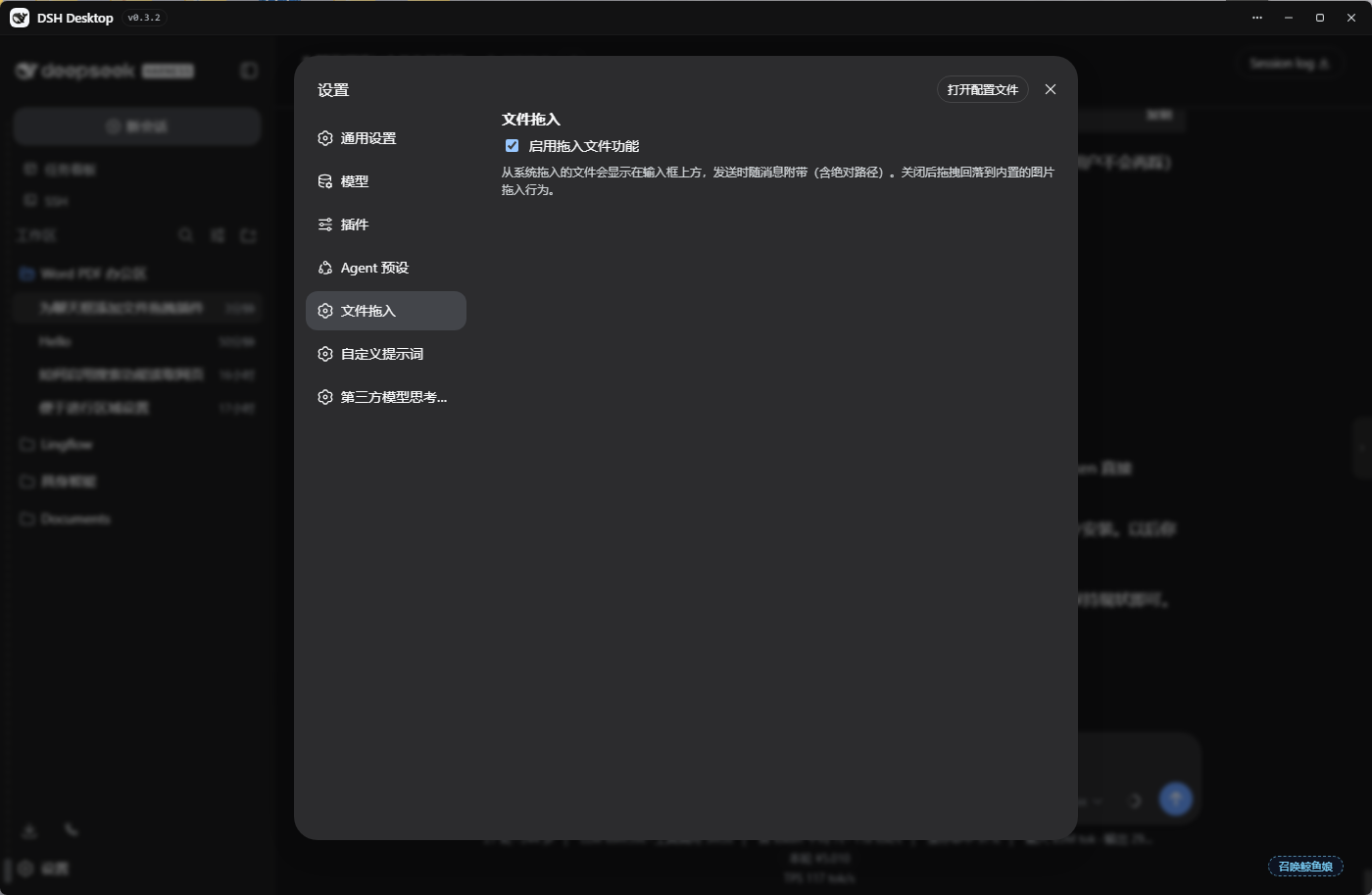
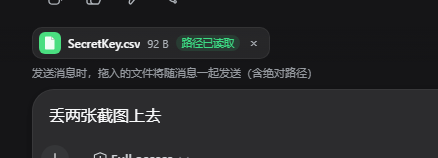
Drag files from your system file manager straight into the DeepSeek Harness web GUI. Files appear as a chip bar above the input box, or — with the composer focused — as a native reference bubble (file pill) embedded inline in the text you are typing; they are sent along with your message (including their absolute paths), and render as file cards inside the user bubble. The agent reads the real file paths — no upload, no content copy (plain-browser fallback copies small files into the workspace).
Features
- 📎 Drag in any file/folder (images are treated as files — the official image-drop overlay no longer steals the drag)
- 🫧 Inline file bubble: dropped/pasted files are inserted at the caret as a native reference pill (works mid-text); the pill shows
TYPE name(e.g.LNK 坚果云.lnk— the type survives name clipping, full name on hover) - 📤 Path on send: the pill expands to a reference carrying the absolute path (
@[filename](https://github.com/lbl61/dsh-drop-in/blob/HEAD/absolute-path)); the chat bubble renders it as a file card with a type badge — the agent can read the file straight from the path - 🔀 Messages sent while the agent is running ("interrupt-free") render the same file cards
- 🖼️ Clipboard paste: pasting an image/file into the composer goes through the same pipeline instead of the native image-attachment rail; pasted binaries are persisted (base64) under
.dsh-drops/<sessionId>/ - 🚀 Chip bar above the input: icon + name + size + path status, removable (×), deduplicated by path
- ✔️ Enter / Ctrl+Enter / the send button are all covered; chips clear automatically after sending
- 🔍 A
dropped_filestool lets the agent list still-unsent dropped files - 🖥️ Under DSH Desktop (Electron) absolute paths come from the preload bridge (
webUtils.getPathForFile— the only path source in modern Electron) - 🌐 Fallback: in a plain browser (no preload bridge) text files are copied to the workspace
.dsh-drops/
Install
dsh plugin --profile web add https://github.com/lbl61/dsh-drop-in/archive/refs/tags/v1.3.0.tar.gz
Manual (bundle) install:
- Extract
dsh-drop-ininto~/.dsh/profiles/web/node_modules/dsh-drop-in/ - Add
"dsh-drop-in"to thedsh.profile.bundlesarray in~/.dsh/profiles/web/package.json - Restart
dsh web(DSH Desktop: quit fully and reopen, or runwindow.dshDesktop.restartService()in DevTools)
Usage
- Drag files from Explorer into the chat page (or paste an image/file into the composer)
- Composer focused → files are inserted at the caret as native reference bubbles (file pills), mid-text allowed; otherwise they appear in the chip bar above the input
- Type your message and send (Enter / Ctrl+Enter / the send button all work; "interrupt-free" sending while the agent runs is supported too)
- The bubble shows file cards — the agent receives the absolute path (
@[name](https://github.com/lbl61/dsh-drop-in/blob/HEAD/path)or the📎 拖入文件block) and can read the files
How it works
- The client half intercepts file drags in the capture phase (the official image-upload flow never steals the events), keeps a per-session chip bar (
conversation.input.dock), renders user bubbles with file cards (conversation.chat.nodeuser/steeringkeys), and stitches the📎 拖入文件block into the draft before submit (Enter, Ctrl+Enter, and the send button are all covered); with the composer focused it inserts native reference bubbles via theslash/input-insert-referencescoped event (U+FFFC occurrences rendered by the composer backdrop) and the registeredinputTriggerscodec serializes them to@[filename](https://github.com/lbl61/dsh-drop-in/blob/HEAD/absolute-path)on submit - The host half keeps the per-session file registry behind the
dropped_filestool, writes fallback text copies to.dsh-drops/<sessionId>/, and persists pasted binaries via thefile-copyroute (base64, with an explicit workspace-write sandbox policy rooted at the session cwd) - Absolute paths under DSH Desktop rely on the preload bridge (see preload-bridge.md): Electron ≥ 32 removed
File.path
Configuration
| Setting | Description |
|---|---|
enabled |
Master switch (Settings → 文件拖入). When off, drag/paste falls back to built-in behavior. |
Uninstall
- Remove
dsh-drop-infrom thedsh.profile.bundlesarray in~/.dsh/profiles/web/package.json - Delete
~/.dsh/profiles/web/node_modules/dsh-drop-in/ - Restart
dsh web
License
MIT
Related相关推荐
-
 vibeinging/dsh-desktop
DeepSeek Harness Desktop App: a local AI desktop workspace for DSH Sessions, projects, files, web research, plugins, and…
vibeinging/dsh-desktop
DeepSeek Harness Desktop App: a local AI desktop workspace for DSH Sessions, projects, files, web research, plugins, and…
-
 chokwinlee/deepseek-harness-desktop
Compact DeepSeek Harness desktop host with a native SwiftUI iPhone Remote source preview.
chokwinlee/deepseek-harness-desktop
Compact DeepSeek Harness desktop host with a native SwiftUI iPhone Remote source preview.
-
 ZSeven-W/dsh-android
DeepSeek Harness plugin for Android — build, run, and interact with a live emulator or USB device stream inside a conver…
ZSeven-W/dsh-android
DeepSeek Harness plugin for Android — build, run, and interact with a live emulator or USB device stream inside a conver…
-
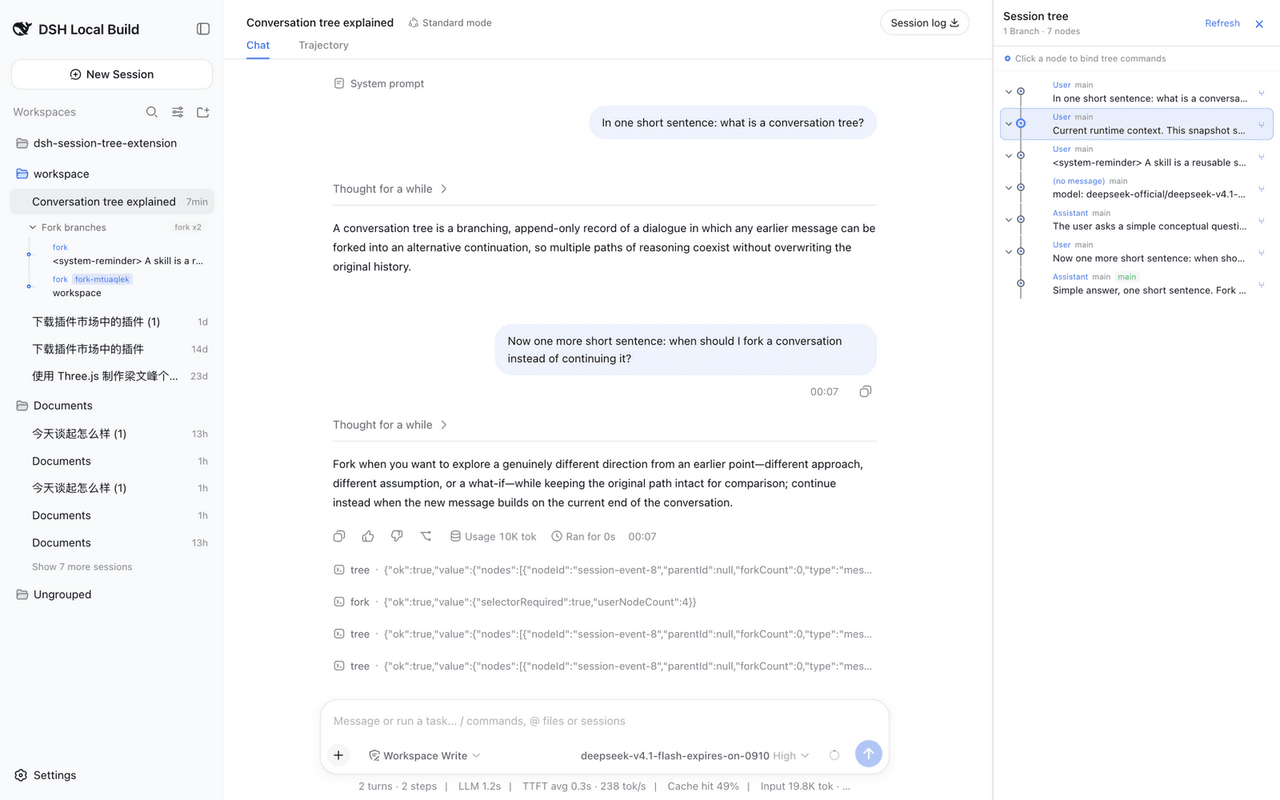 robiteame/dsh-session-tree-extension
dsh-session-tree-extension Append-only, multi-branch conversation trees for DeepSeek-Harness — a PI-Agent-style SessionT…
robiteame/dsh-session-tree-extension
dsh-session-tree-extension Append-only, multi-branch conversation trees for DeepSeek-Harness — a PI-Agent-style SessionT…
-
 baihejiangnan/dsh-session-context-menu
更好的右键:DeepSeek Harness 应用封装端的完整原生风格上下文菜单
baihejiangnan/dsh-session-context-menu
更好的右键:DeepSeek Harness 应用封装端的完整原生风格上下文菜单
-
 Hotsteel2901/dsh-client-ui-mobile-adapt
Your DeepSeek Harness web UI, rebuilt for the phone in your hand. Built for developers who code in Termux on Android: si…
Hotsteel2901/dsh-client-ui-mobile-adapt
Your DeepSeek Harness web UI, rebuilt for the phone in your hand. Built for developers who code in Termux on Android: si…
- lhh010/dsh-paste-input DSH WebUI 文件输入增强:Ctrl+V 粘贴(带首次告知弹窗)+ 拖拽 + 选择文件,发送时复制进会话工作区临时目录
-
 wallpap/dsh-compact-activity
compact reasoning and tool activity groups for DeepSeek Harness Web and DeepSeek Harness Desktop.
wallpap/dsh-compact-activity
compact reasoning and tool activity groups for DeepSeek Harness Web and DeepSeek Harness Desktop.