
lire1131/dsh-undo-savepoint
DSH crash-rescue plugin: undo config & plugin-code changes, secret-safe snapshots, one-click SAFE MODE, plus offline CLI/GUI that work even when DSH won't boot.
编辑导读Editor's Brief
## 核心特性
- 该插件会记录 DSH 启动关键配置文件和用户插件代码树的快照,支持通过 WebUI、聊天或离线 CLI 入口撤销、重做以及恢复到任意已保存版本。
- 快照创建可在配置或插件变更后自动触发,也可从面板或 CLI 手动触发;当包清单或锁文件受到影响时,恢复的版本可选择使用 pnpm install 重建依赖。
- .env 和凭据文件中的敏感值会在快照导出中被遮蔽,而真实值仍保留在本地 vault 中,使本地回滚能够恢复完整数据,同时不在导出的 ZIP 文件中暴露密钥。
- 当 DSH 无法启动时,安全模式会禁用除 undo 系统外的所有插件,创建自动快照和配置备份,并支持一键退出,同时处理 profile 和 home 级别的 patch 备份。
- 离线恢复工具包括 GUI 窗口、PowerShell CLI 命令和桌面快捷方式创建脚本,在 DSH 未运行时提供撤销、恢复、安全模式、崩溃横幅和回滚日志的访问能力。
## 使用场景
- 当配置变更或插件修改导致 DSH 无法启动时,安全模式入口或离线管理器可以恢复到先前状态并重新启动环境。
- 当用户插件代码树因编辑而损坏(包括 yield* 代码意外)时,快照可以恢复受影响文件,而无需手动重新安装或丢失会话。
- 在机器之间迁移快照时,导出和导入 ZIP 工作流以及恢复前的缺失插件检查会在恢复继续前识别依赖。
## 技术细节
- 宿主插件通过 createRequire 从 DSH 安装根目录加载 @deepseek-ai/dsh-tools,并可使用 DSH_ROOT 进行覆盖,避免在仓库本地安装依赖。
- 快照存储在可配置的根目录下区分手动库和自动库,保留最近 20 条自动条目,并在启动时将旧版扁平布局迁移到新版结构。
- 多 profile 支持从 DSH 启动参数推导当前激活的 profile,按 profile 隔离快照仓库,并允许离线工具使用 DSH_UNDO_PROFILE 或基于设置的 profile 名称。
- REST API 为 WebUI 暴露 status、list、settings、undo、redo、restore、remove、snapshot 和 directory-picker 端点,并为恢复操作提供可选的依赖同步标志。
## 注意事项
- 该插件需要已安装的 DSH 环境和 Node.js 20 或更高版本;本地安装说明包括通过 GitHub 添加插件,或手动克隆并使用 junction 和 patch-file 挂载。
- 快照包含可能含有密钥的配置副本,因此即使导出会遮蔽敏感值,也不应将快照目录和导出内容对外分享。
- 每个被引用快照的大小限制为 5 MB,超大的插件代码树会被标记为截断清单,并带有
## Core Features
- The plugin records snapshots of DSH startup-critical configuration files and user plugin code trees, supporting undo, redo, and restoration to any saved version through WebUI, chat, or offline CLI entry points.
- Snapshot creation can be triggered automatically after configuration or plugin changes, manually from the panel or CLI, and restored versions can optionally rebuild dependencies using pnpm install when package manifests or lockfiles are affected.
- Sensitive values in .env and credential files are masked in snapshot exports while real values remain in a local vault, allowing local rollback to restore complete data without exposing secrets in exported ZIP files.
- A safe mode disables all plugins except the undo system when DSH cannot start, creates an automatic snapshot and configuration backup, and supports one-click exit with profile and home-level patch backup handling.
- Offline recovery tools include a GUI window, PowerShell CLI commands, and a desktop shortcut creation script, providing access to undo, restore, safe mode, crash banners, and rollback logs when DSH is not running.
## Use Cases
- When a configuration change or plugin modification prevents DSH from starting, the safe mode entry or offline manager can restore a previous state and restart the environment.
- When a user plugin code tree is broken by edits, including yield* code accidents, a snapshot can restore the affected files without requiring manual reinstallation or session loss.
- When moving snapshots between machines, the export and import ZIP workflow and pre-restore missing-plugin checks identify dependencies before restoration proceeds.
## Technical Details
- The host plugin loads @deepseek-ai/dsh-tools through createRequire from the DSH installation root, with DSH_ROOT available as an override, avoiding repository-local dependency installation.
- Snapshot storage separates manual and automatic libraries under a configurable root, retains the most recent 20 automatic entries, and migrates legacy flat layouts into the newer structure at startup.
- Multi-profile support derives the active profile from DSH startup arguments, isolates snapshot repositories by profile, and allows offline tools to use DSH_UNDO_PROFILE or settings-based profile names.
- A REST API exposes status, list, settings, undo, redo, restore, remove, snapshot, and directory-picker endpoints for the WebUI, with optional dependency synchronization flags for restore operations.
## Notes
- The plugin requires an installed DSH environment and Node.js 20 or later, and local installation instructions include GitHub plugin addition or manual cloning with a junction and patch-file mount.
- Snapshots include configuration copies that may contain secrets, so snapshot directories and exports should not be shared externally even though exports mask sensitive values.
- Snapshot size is limited to 5 MB per referenced snapshot, and oversized plugin code trees are marked as truncated manifests, with
安装Install
dsh plugin --profile web add github:lire1131/dsh-undo-savepoint#master把 lire1131/dsh-undo-savepoint 加入你的 DSH 配置(web profile)即可启用。
READMEREADME
dsh-undo-savepoint — DSH 撤销/回退系统


DSH 崩溃急救插件:配置与插件代码一键回滚、快照密钥脱敏、一键安全模式,DSH 起不来时也能用(离线 CLI/GUI)。
还在为 DSH 崩溃而苦恼?还在担心小改动会带来大灾难?这款工具能帮到你!
为 DeepSeek Harness (DSH) 打造的撤销/回退系统:装插件、换皮肤、改设置,自动保存即存档;手动保存随时存档;一键撤销/恢复/回退到任意版本,DSH 启动不了时还有局外工具(GUI 窗口 + 命令行)兜底。
预览
| v0.3.5 会话头部:撤销/恢复/快照按钮全部图标化 + 自动快照状态徽章(点击徽章打开快照面板) |
|---|
 |
| WebUI 快照管理面板(差异/回退/删除/清理/导出/导入/安全模式) | WebUI 设置「快照」独立栏目(敏感模式/插件白名单/目录选择) |
|---|---|
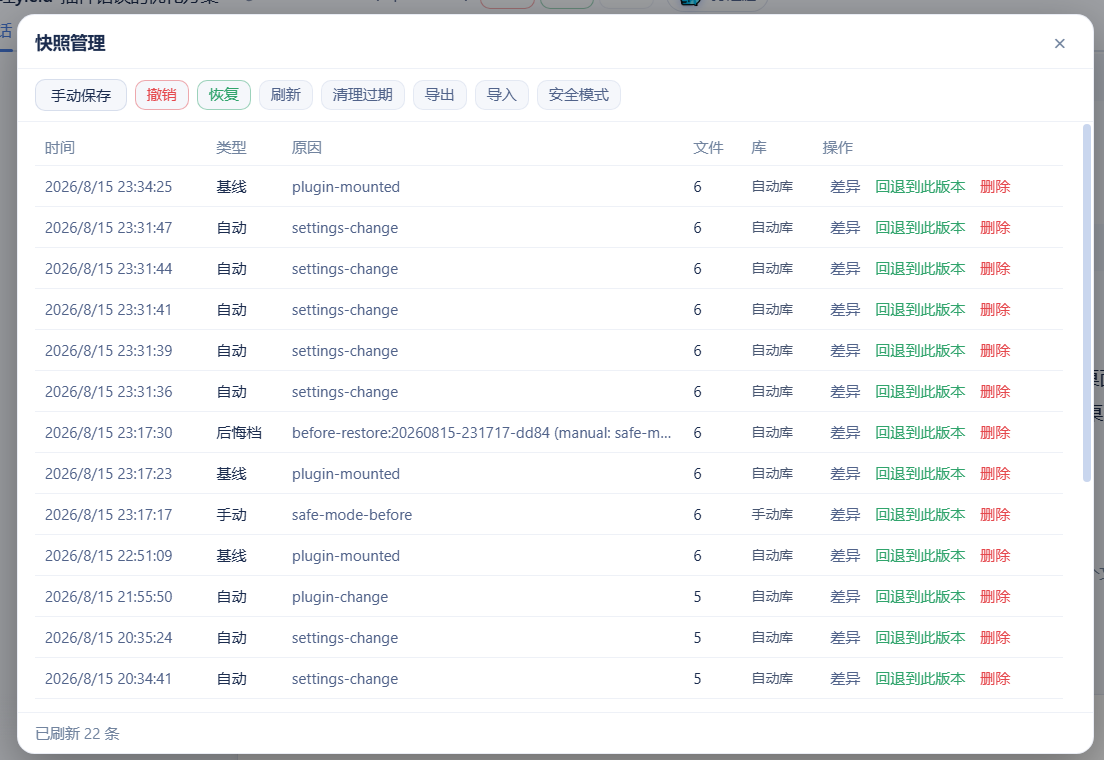 |
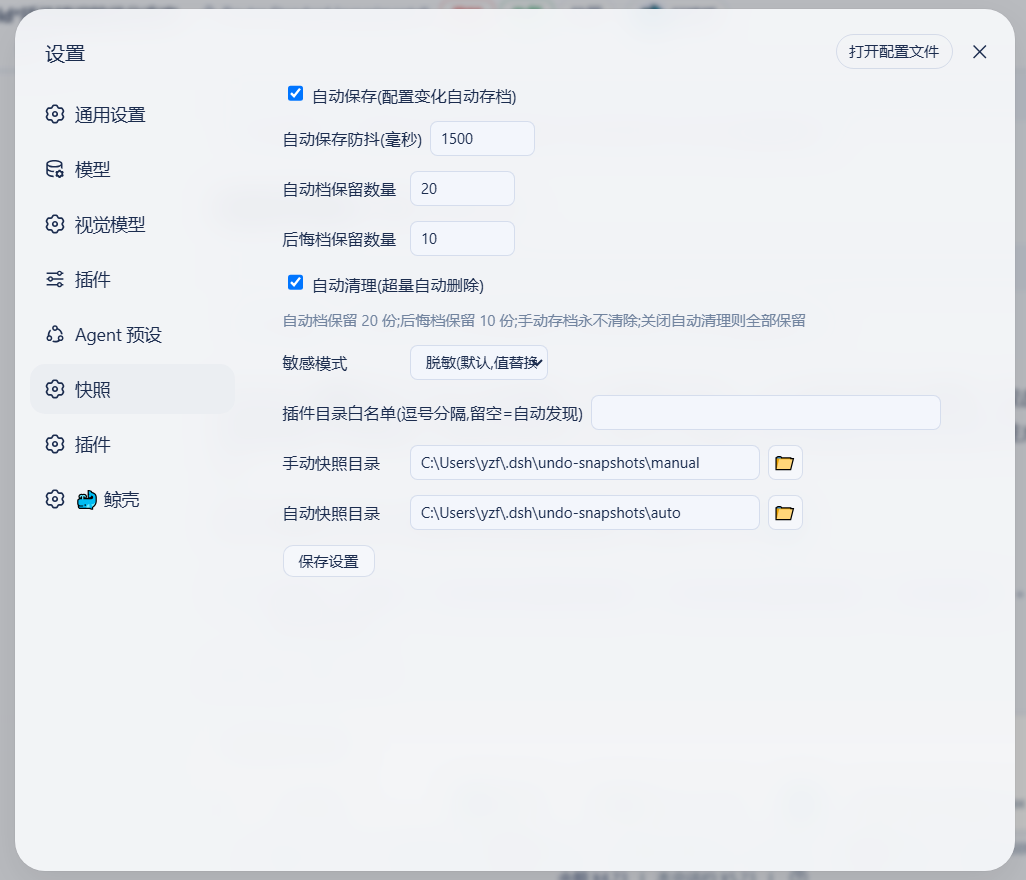 |
| 局外程序窗口(两行工具栏 + 安全模式按钮,DSH 挂了也能用) | 局外设置对话框(敏感模式/浏览选目录) |
|---|---|
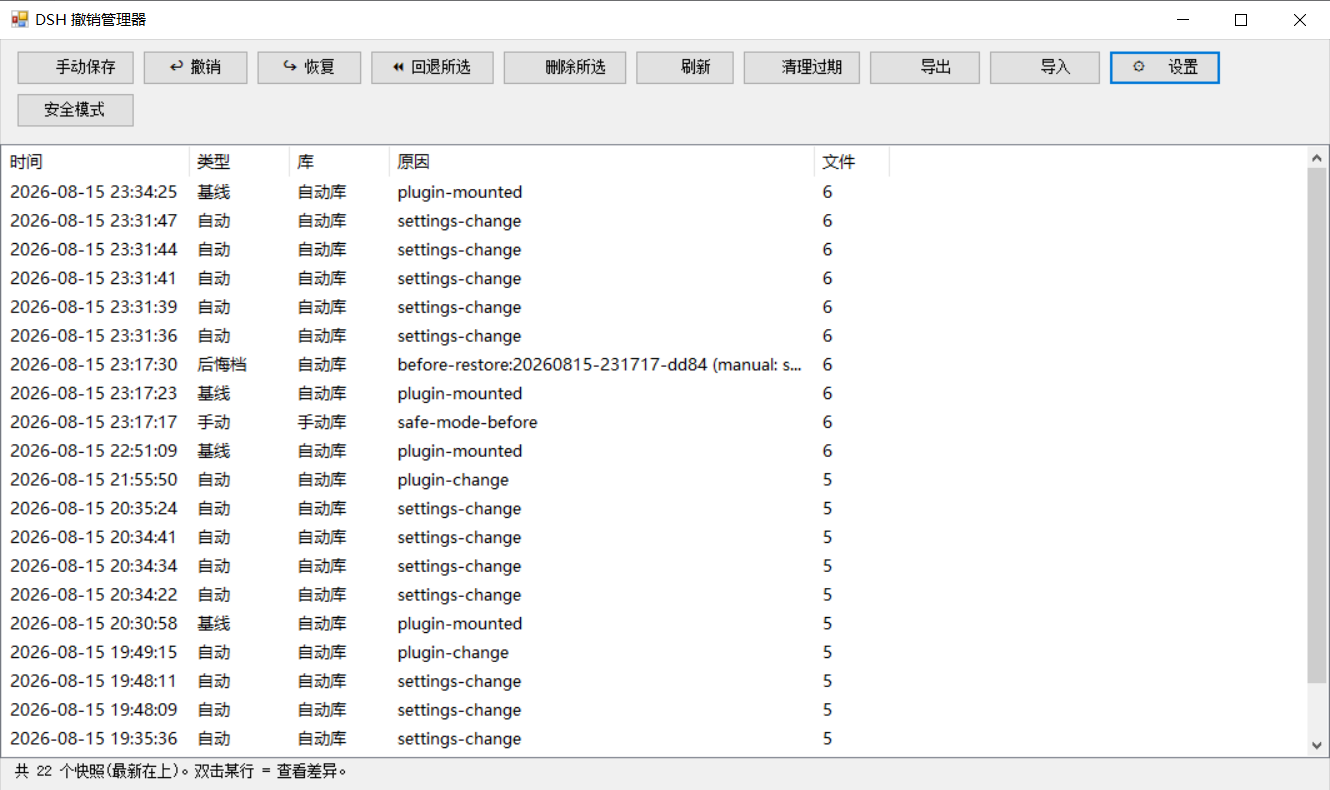 |
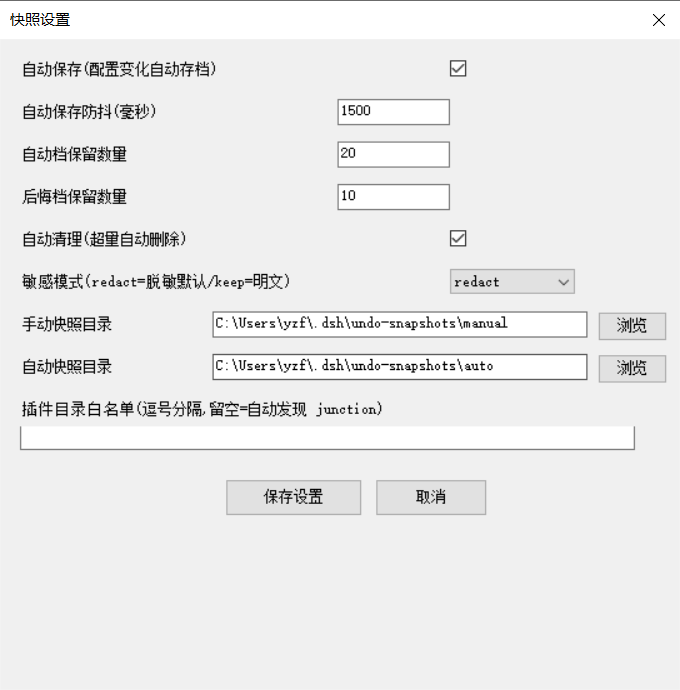 |
| 安全模式确认(进入/退出) | 安全模式状态提示 |
|---|---|
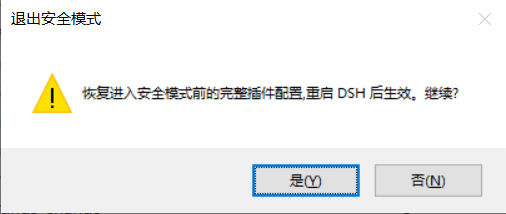 |
 |
功能一览
| 能力 | 说明 |
|---|---|
| 配置 + 插件代码一键回滚 | 快照覆盖配置与用户插件代码树,改坏任何一处都能撤销(含 yield* 类纯代码事故);支持 undo / redo / 回退任意版本,WebUI / 对话 / 离线 CLI 三入口 |
| 密钥脱敏 + 本机 vault | .env / 凭据进快照自动脱敏(结构保留),导出 ZIP 零泄露;真实值存本机 vault,本机回滚完整还原 |
| 一键安全模式 | DSH 完全起不来时,禁用除撤销系统外所有插件保证能启动,自动快照+备份配置,一键退出(v0.3.7 起:profile/home 双级 patch 一并备份恢复;patch 缺失自动写空备份 [],不再出现"备份悬空退不出";家目录被重建/换机时残留状态自动降级不激活) |
| 崩溃归因 | 上次异常退出时直接给出「最后正常快照」id + 一键回退按钮,不用自己猜回退到哪 |
| 跨机迁移安全 | 恢复前自动预检缺失插件并明确提示;快照可一键导出/导入 ZIP 迁移(见 docs/migration.md) |
| 局外急救(DSH 挂了也能用) | 离线 CLI + GUI 窗口 + 一键桌面快捷方式:撤销/回退/安全模式/崩溃横幅/回滚日志一应俱全 |
基础能力(键盘快捷键、对话指令、自动清理、双模式保存、可配置参数等)详见下文与 更新日志。
崩溃急救速查(按场景选工具)
| 场景 | 操作 |
|---|---|
| 配置/插件被改坏 | 对话/WebUI/CLI:undo 或 restore -Id <id> |
| 插件代码被改坏 | 同上(快照含插件代码树,一键还原) |
| 上次异常退出,不知回退到哪 | WebUI 横幅 / GUI 横幅 显示 last-good 快照,一键回退 |
| DSH 完全起不来 | 桌面「DSH撤销管理器」→ 安全模式按钮(或 CLI safe-mode -Label on)→ 重启 DSH 保证能启动 |
| 恢复后可能缺插件(跨机) | 恢复报告预检提示;先装插件或安全模式 |
| 配置"突然变了" | CLI recent / 对话 undo_recent 查回滚日志 |
| 撤销涉及插件/挂载 | 报告提示"重启 DSH 后生效" |
快照内容与存储
快照对象是 DSH 的启动关键配置:cordis.patch.yml、package.json、cordis.yml、pnpm-workspace.yaml、pnpm-lock.yaml(profile 下)+ cordis.patch.yml、settings.yaml、.env、.credentials.yaml($DSH_HOME 下,默认 ~/.dsh)。
恢复涉及 package.json / pnpm-lock.yaml 时,默认只报告 node_modules 可能不同步;需要真正重建依赖时加 -SyncDeps(离线 CLI)、sync_deps: true(对话工具)或 syncDeps: true(REST),插件会执行 pnpm install --frozen-lockfile(无 lockfile 时普通 pnpm install)。安装失败不影响已经还原的配置文件。
| 库 | 默认路径(可在设置中修改) | 内容 |
|---|---|---|
| 手动库 | <快照根>\manual\ |
手动保存的快照(永不自动清理) |
| 自动库 | <快照根>\auto\ |
自动快照、启动基线、撤销后悔档(自动档保留最近 20 份) |
| 旧库(兼容) | <快照根>\ 根 |
旧版扁平布局,读取兼容,启动时自动迁移到新库 |
⚠️ 快照含
.env等配置副本,可能含密钥——不要外传。
v0.3.7 体积约束:单个快照引用体积 ≤5MB(manifest 记录
totalBytes,undo_list展示)。插件代码树超限时只记清单 + 标记[truncated]告警,不丢任何数据,可手动快照/导出兜底;无外部插件时快照仅配置文件(KB 级)。
多 profile 支持(v0.3.3)
插件从启动参数自动识别当前 profile(dsh --profile mine / --profile=mine;dsh web 回退为 web),并按当前 profile 工作:
- 配置目录:默认
$DSH_HOME/profiles/<当前 profile>(DSH_HOME 默认 ~/.dsh;此前硬编码web——非 web profile 下快照读错、监听错、恢复写错位置); - 快照仓库:默认
<快照根>/<当前 profile>/{auto,manual}(按 profile 隔离);作用域目录不存在而旧版平铺目录存在时自动回退平铺,旧快照不会"隐身"; - 归属标识:快照 manifest 记录
profile字段,undo_list显示当前 profile。
离线 CLI/GUI 看不到启动参数,通过环境变量 DSH_UNDO_PROFILE 或 settings 里的 profileName 指定(默认 web)。
显式配置优先级不变:profileDir / manualDir / autoDir / profileName(config 或 settings)始终生效。
自定义家目录支持(v0.3.5,issue #6)
DSH 数据家目录的解析与官方启动器(@deepseek-ai/dsh-home-paths)完全一致:DSH_HOME 环境变量优先(空白视为未设置,支持 ~ / ~/ / ~\ 前缀),否则回退 <用户家目录>\.dsh。设置文件($DSH_HOME\undo\settings.json)、默认快照根($DSH_HOME\undo-snapshots)、profile 目录($DSH_HOME\profiles\<profile>)、home 根、插件发现路径全部基于它——第三方客户端(自定义 DSH_HOME)不再出现"设置写到 ~/.dsh、DSH 实际用 $DSH_HOME"的两套家分裂,重启后自定义目录稳定保留。
显式覆盖仍然保留:DSH_UNDO_SETTINGS / DSH_UNDO_ROOT / DSH_UNDO_EXPORT(环境变量)与 config 里的 homeDir / profileDir / manualDir / autoDir 优先级最高。
仓库标签 (Topics)
方便在 GitHub 搜索与 Explore 中被发现,仓库已设置以下 topics:
deepseek-harness · dsh · dsh-plugin · undo · rollback · snapshot · crash-recovery · backup · windows · powershell
安装
前置:已安装 DSH(@deepseek-ai/dsh)与 Node.js(≥20)。
方式 A(GitHub 直装) — 安装 master 最新提交:
dsh plugin --profile web add github:lire1131/dsh-undo-savepoint#master
安装完成后重启 DSH 即生效(快照目录、参数等均可在设置中修改)。
方式 B(本地源码/免发布) — clone 到本地目录并手工挂载:
- 把仓库放到本地插件目录(无中文路径更稳妥),例如
D:\dsh\plugins\dsh-undo-savepoint:
git clone https://github.com/lire1131/dsh-undo-savepoint.git D:\dsh\plugins\dsh-undo-savepoint
- 建立 junction,让 DSH 的模块解析器通过包名
dsh-undo-savepoint找到本地源码(host 插件与 WebUI client 插件都靠它):
mklink /J "<你的DSH安装>\node_modules\dsh-undo-savepoint" "D:\dsh\plugins\dsh-undo-savepoint"
说明:DSH 从它自己的
node_modules向上解析包名。默认安装位置是C:\Users\<用户名>\node_modules(npm 安装在用户目录时);若用 npx 缓存运行,则对 npx 缓存目录下的node_modules建 junction。执行npm root -g/ 检查 DSH 启动报错路径即可确认。
- 挂载到 profile 补丁层:编辑
<DSH_HOME>\profiles\web\cordis.patch.yml,追加:
- insert:
    - id: dsh-undo-savepoint
      name: dsh-undo-savepoint
- 生效:保存即热加载(host 部分);刷新页面出现头部按钮与设置项;重启 DSH 后一切进入稳态(旧版扁平快照会自动迁移)。
依赖说明:host 插件通过
createRequire('<DSH安装根>/package.json')加载@deepseek-ai/dsh-tools。若 DSH 安装在其他位置,设置环境变量DSH_ROOT=<DSH安装根>即可,无需额外安装依赖。
局外工具在哪(装完找不到?)
局外撤销工具(GUI 窗口 + 命令行)不装到桌面,而是随插件装在安装目录里:
| 安装方式 | 工具位置 |
|---|---|
方式 A:dsh plugin add |
$DSH_HOME\profiles\web\node_modules\dsh-undo-savepoint\tools\(DSH_HOME 默认 %USERPROFILE%.dsh) |
| 方式 B:clone + junction | 你 clone 的目录 ...\dsh-undo-savepoint\tools\ |
一键创建桌面快捷方式(推荐,以后从桌面直接打开):
双击 tools\make-desktop-shortcut.bat(它会自动定位插件目录),桌面出现「DSH撤销管理器」图标;
或者把下面整段复制到 PowerShell 窗口回车(无需先找文件,自动定位):
$dshHome = if ($env:DSH_HOME) { $env:DSH_HOME } else { "$env:USERPROFILE\.dsh" }
$d = @("$dshHome\profiles\web\node_modules\dsh-undo-savepoint", "$dshHome\profiles\node_modules\dsh-undo-savepoint", "$env:USERPROFILE\node_modules\dsh-undo-savepoint") | Where-Object { Test-Path (Join-Path $_ 'tools\dsh-undo-savepoint-gui.bat') } | Select-Object -First 1
if ($d) {
  $w = New-Object -ComObject WScript.Shell
  $s = $w.CreateShortcut((Join-Path ([Environment]::GetFolderPath('Desktop')) 'DSH撤销管理器.lnk'))
  $s.TargetPath = Join-Path $d 'tools\dsh-undo-savepoint-gui.bat'
  $s.WorkingDirectory = Join-Path $d 'tools'
  $s.Save()
  Write-Host "已创建桌面快捷方式:$($s.FullName)"
} else { Write-Host '未找到插件目录,请先安装:dsh plugin --profile web add github:lire1131/dsh-undo-savepoint#master' }
只想打开工具目录看一眼:
$dshHome = if ($env:DSH_HOME) { $env:DSH_HOME } else { "$env:USERPROFILE\.dsh" }
explorer "$dshHome\profiles\web\node_modules\dsh-undo-savepoint\tools"
之后双击桌面「DSH撤销管理器」即可打开局外工具(DSH 崩溃、启动不了时也能用)。
使用
- 撤销:头部「撤销」按钮 /
Ctrl+Alt+Z/ 对 AI 说"撤销上一步"。 - 恢复:「恢复」按钮 /
Ctrl+Alt+Y(仅当撤销后没有新操作)。 - 手动保存:面板里「手动保存」/ 对 AI 说"保存快照" / CLI
snapshot。 - 回退到指定版本:面板里点快照行「回退到此版本」;或对 AI 说"回退到 ";或 CLI
restore -Id <id>。 - 删除快照:面板里点「删除」;或 CLI
remove -Id <id>。 - 自定义快捷键:设置 → 通用 → 撤销/恢复快捷键(点击输入框后按组合键,Backspace 清除)。
- 保存参数:设置 → 通用 → 快照设置(自动保存开关、防抖、保留数、两个目录,目录旁 📁 按钮可打开系统目录选择器)。
局外工具(DSH 挂了也能用)
界面语言:程序窗口按系统 UI 语言自动显示中文/英文;可用环境变量
DSH_UNDO_LANG=zh|en强制指定。
进入仓库目录后:
# 程序窗口(推荐):双击 tools\dsh-undo-savepoint-gui.bat,或:
powershell -NoProfile -ExecutionPolicy Bypass -File "tools\dsh-undo-savepoint-gui.ps1"

# 命令行
powershell -NoProfile -ExecutionPolicy Bypass -File "tools\dsh-undo-savepoint.ps1" list
powershell -NoProfile -ExecutionPolicy Bypass -File "tools\dsh-undo-savepoint.ps1" snapshot -Label "原因"
powershell -NoProfile -ExecutionPolicy Bypass -File "tools\dsh-undo-savepoint.ps1" undo
powershell -NoProfile -ExecutionPolicy Bypass -File "tools\dsh-undo-savepoint.ps1" undo -SyncDeps
powershell -NoProfile -ExecutionPolicy Bypass -File "tools\dsh-undo-savepoint.ps1" redo
powershell -NoProfile -ExecutionPolicy Bypass -File "tools\dsh-undo-savepoint.ps1" restore -Id <id> -Force
powershell -NoProfile -ExecutionPolicy Bypass -File "tools\dsh-undo-savepoint.ps1" restore -Id <id> -Force -SyncDeps
powershell -NoProfile -ExecutionPolicy Bypass -File "tools\dsh-undo-savepoint.ps1" remove -Id <id>
powershell -NoProfile -ExecutionPolicy Bypass -File "tools\dsh-undo-savepoint.ps1" prune -KeepAuto 20

# 安全装插件(自动前后存档,失败自动回退)
powershell -NoProfile -ExecutionPolicy Bypass -File "tools\dsh-plugin.ps1" add <包名>
常见事故场景:DSH 启动报 duplicate loader entry id 之类错误 → 打开「DSH 撤销管理器」选中出问题前的快照 → 回退 → 重启 DSH。不用重装、不丢会话。
REST API(WebUI 的后端)
| 端点 | 说明 |
|---|---|
GET /api/undo/status |
{canUndo, canRedo, total} |
GET /api/undo/list |
快照列表(含 location: manual/auto/legacy) |
GET/POST /api/undo/settings |
读/写保存参数(自动保存、防抖、保留数、目录),POST 即时生效 |
POST /api/undo/undo |
撤销上一步;可选 body {syncDeps: true} 按还原后的 lockfile 重建 node_modules |
POST /api/undo/redo |
恢复;可选 body {syncDeps: true} |
POST /api/undo/restore |
body {id, syncDeps?} 回退到指定版本 |
POST /api/undo/remove |
body {id} 删除快照 |
POST /api/undo/snapshot |
body {reason} 手动保存 |
POST /api/undo/pick-dir |
弹出系统目录选择器,返回选中路径 |
设计要点
- 撤销语义:自动快照在变更之后生成,所以"恢复最新存档"是空操作;真实撤销 = 回退到与当前状态内容不同的最新快照;全部相同则明确提示"没有可撤销的变化"。
- 撤销不会撤销掉自己:恢复
cordis.patch.yml后自动检查并重新写入 dsh-undo-savepoint 挂载条。 - 自动存档不误伤撤销:watcher 记录恢复操作写入的内容哈希,恢复动作自己的文件变化不会被自动存档(否则会挡住 redo);真实变更照常存档。
- 格式互通:Node 插件与 PowerShell 工具共用快照仓库与 manifest 格式;Windows PowerShell 5.1 与 PowerShell 7 均兼容。
开发
- 依赖解析:host 插件通过
createRequire(<DSH安装根>/package.json)加载@deepseek-ai/dsh-tools(环境变量DSH_ROOT可覆盖),无需在仓库内安装依赖。 - 测试(不需要 DSH 运行,在仓库目录执行):
node tools\smoke-test.mjs     :: 114 项逻辑测试(快照/撤销/重做/存储分流/无变化提示)
node tools\e2e-watch.mjs      :: 10 项真实时序回归(自动存档/撤销不误伤/重做)
相关推荐Related
- deepseek-ai/deepseek-harness DeepSeek Harness (dsh) — 由 DeepSeek AI 开发的开源 agent harness(智能体框架)。一切皆插件:核心 + 插件 + 技能 = 可热插拔的 AI 编程工作台。DeepSeek Harness: …
-
 amruthpillai/reactive-resume
A one-of-a-kind resume builder that keeps your privacy in mind. Completely secure, customizable, portable, open-source a…
amruthpillai/reactive-resume
A one-of-a-kind resume builder that keeps your privacy in mind. Completely secure, customizable, portable, open-source a…
-
 tt-a1i/archify
Agent skill for beautiful, verifiable architecture, workflow, sequence, data-flow, and lifecycle diagrams—self-contained…
tt-a1i/archify
Agent skill for beautiful, verifiable architecture, workflow, sequence, data-flow, and lifecycle diagrams—self-contained…
-
 zhu1090093659/dsh-web-ui
Plugin and skin collection for DeepSeek Harness (DSH) Web UI - task board, git graph, right-side panel, remote mobile UI…
zhu1090093659/dsh-web-ui
Plugin and skin collection for DeepSeek Harness (DSH) Web UI - task board, git graph, right-side panel, remote mobile UI…
-
 strukto-ai/mirage
The World's First Unified Virtual Filesystem For AI Agents
strukto-ai/mirage
The World's First Unified Virtual Filesystem For AI Agents
-
 liustack/modlens
The first vision plugin for DeepSeek Harness, and the vision bridge for every text-only coding agent. Paste an image, ge…
liustack/modlens
The first vision plugin for DeepSeek Harness, and the vision bridge for every text-only coding agent. Paste an image, ge…
-
 omdsh-dev/DSH-better-sidebar
开放的侧边栏底座,支持三方拓展注册新侧边栏页面。内置文件渲染编辑/终端/Git/子代理页面 | Open sidebar foundation, supports third-party extensions to register new…
omdsh-dev/DSH-better-sidebar
开放的侧边栏底座,支持三方拓展注册新侧边栏页面。内置文件渲染编辑/终端/Git/子代理页面 | Open sidebar foundation, supports third-party extensions to register new…
-
 ccch1mneyyy/dsh-TUI
DSH 官方公众号收录的 TUI 补位插件:Claude Code 风,鲸鱼顶栏/实时状态/流式思考/双击 Esc 回滚/上下文进度+TPS。npm 一键装。 DSH official WeChat featured TUI plugin…
ccch1mneyyy/dsh-TUI
DSH 官方公众号收录的 TUI 补位插件:Claude Code 风,鲸鱼顶栏/实时状态/流式思考/双击 Esc 回滚/上下文进度+TPS。npm 一键装。 DSH official WeChat featured TUI plugin…