MIHassan3/DSH-Launcher
this is a launcher for the official DeepSeek Harness. no modifications it just launches what DeepSeek develops.
Project Overview项目介绍
DSH Launcher is a simple launcher for DeepSeek Harness, supporting one-click launch, automatic updates, silent background running, and opens DSH as a desktop app without browser chrome. Use it when you don't want to run DSH via terminal. It only supports 64-bit Windows 10/11 and requires Microsoft Edge.
DSH Launcher是DeepSeek Harness的简易启动器,支持一键启动、自动更新、静默后台运行,可将DeepSeek Harness以无浏览器边框的桌面应用形式打开。适合不想通过终端命令行启动DSH的用户,仅支持64位Windows 10/11,需要安装Microsoft Edge。
请帮我了解并安装插件:【DSH-Launcher】【https://github.com/MIHassan3/DSH-Launcher】Send this message to DSH in your current session. CLI install commands may not be accurate across systems — DSH will figure it out for you.把上面这条消息直接发给当前会话里的 DSH,让它帮你了解并安装。安装命令不一定准确,发给 DSH 更稳。
Or use CLI install (for developers)或使用命令行安装(适合开发者)
CLI Install命令行安装
dsh plugin --profile web add github:MIHassan3/DSH-Launcher把 MIHassan3/DSH-Launcher 加入你的 DSH 配置(web profile)即可启用。
READMEREADME
DSH-Dock
Your launchpad for the DeepSeek Harness.




DSH-Dock is a desktop launcher for the official DeepSeek Harness (@deepseek-ai/dsh). It runs the harness in the background and shows its UI in a native window — no terminal, no copy-pasting commands, no losing your harness when you close the launcher.
DSH-Dock is a wrapper, not a fork. It manages the harness's lifecycle without ever modifying the harness itself.
What it looks like
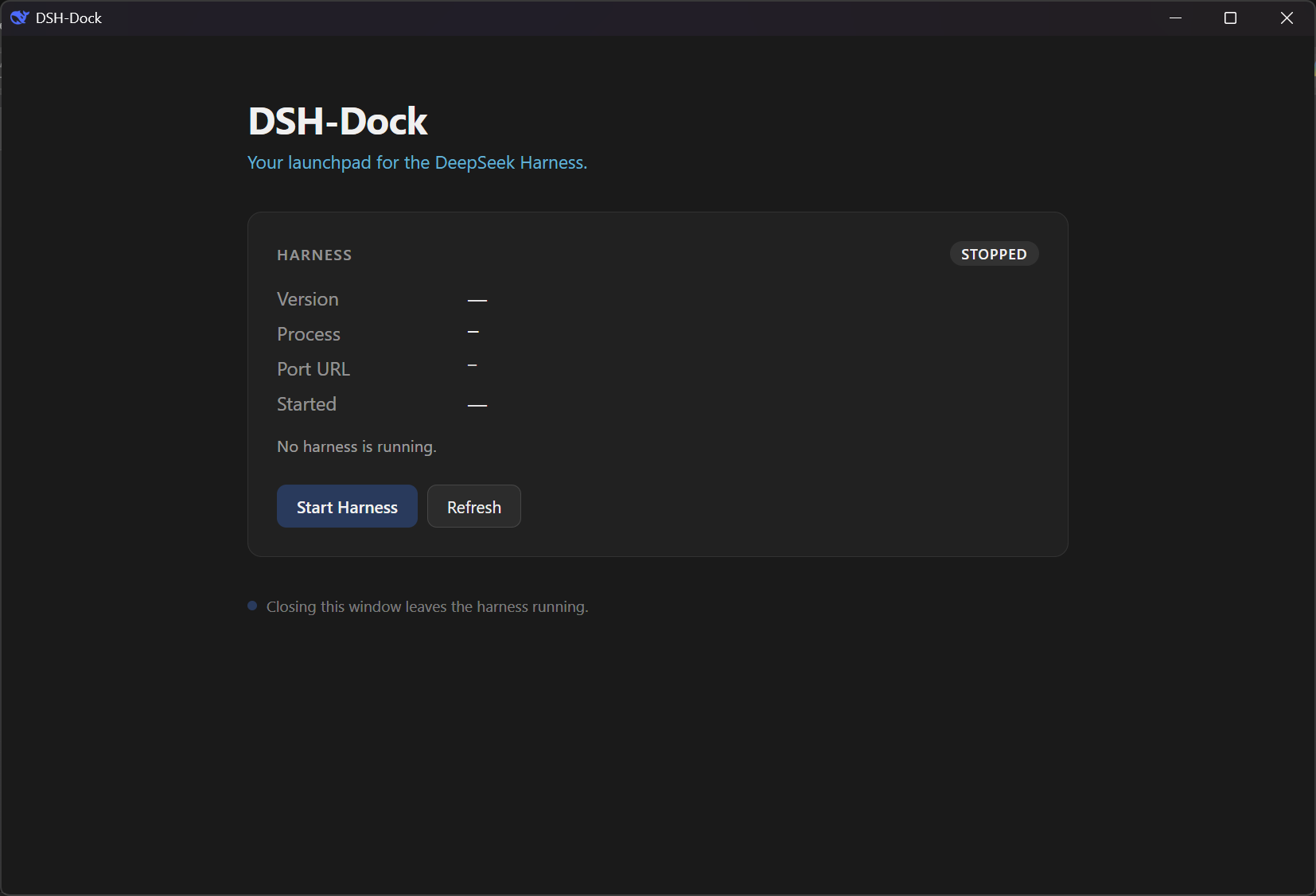
The dashboard
Control the harness from a clean native window — start it, stop it, see what version is running, and open its UI when you're ready.
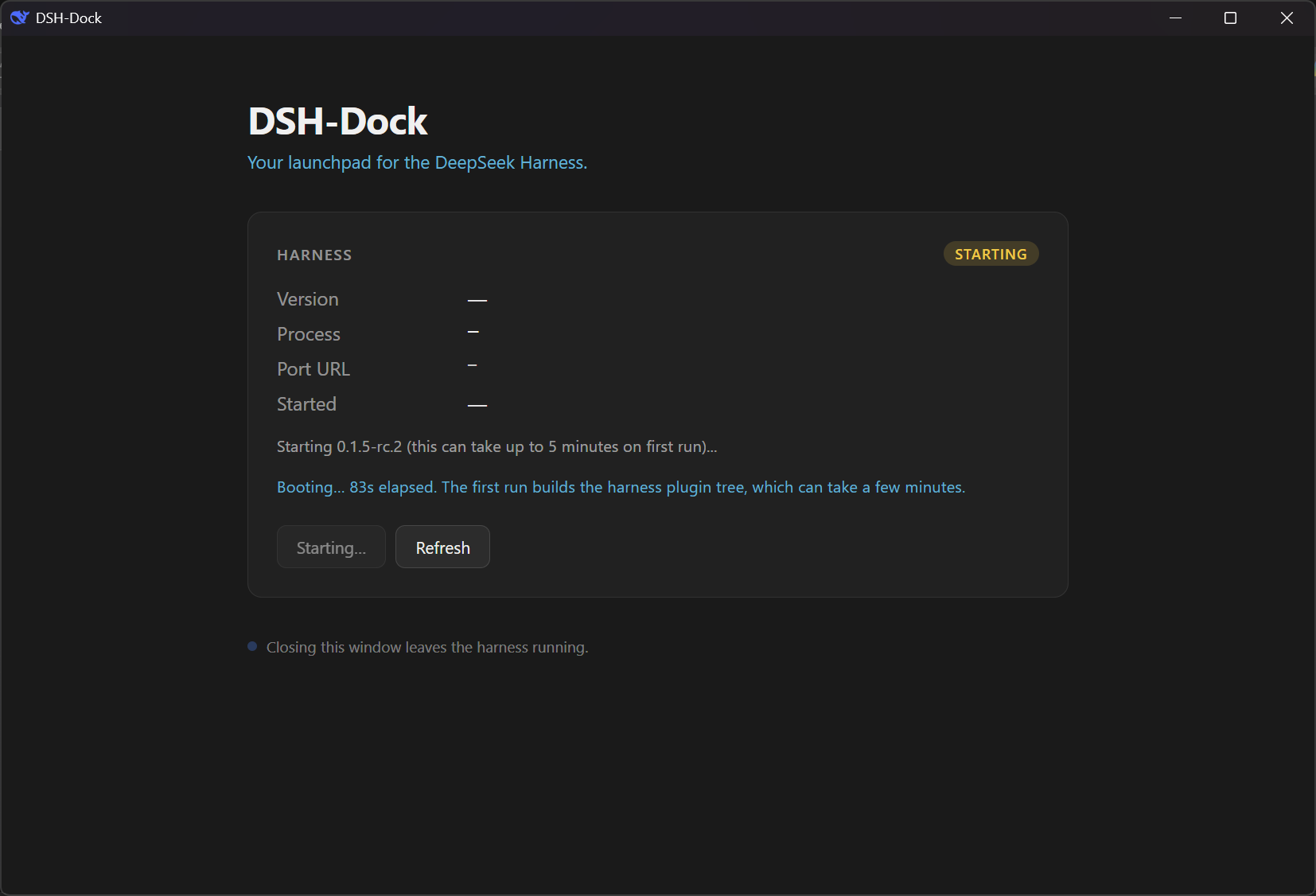
Starting the harness
Click Start Harness and the dashboard shows live progress while the harness boots. First boot installs the harness; subsequent boots are much faster.
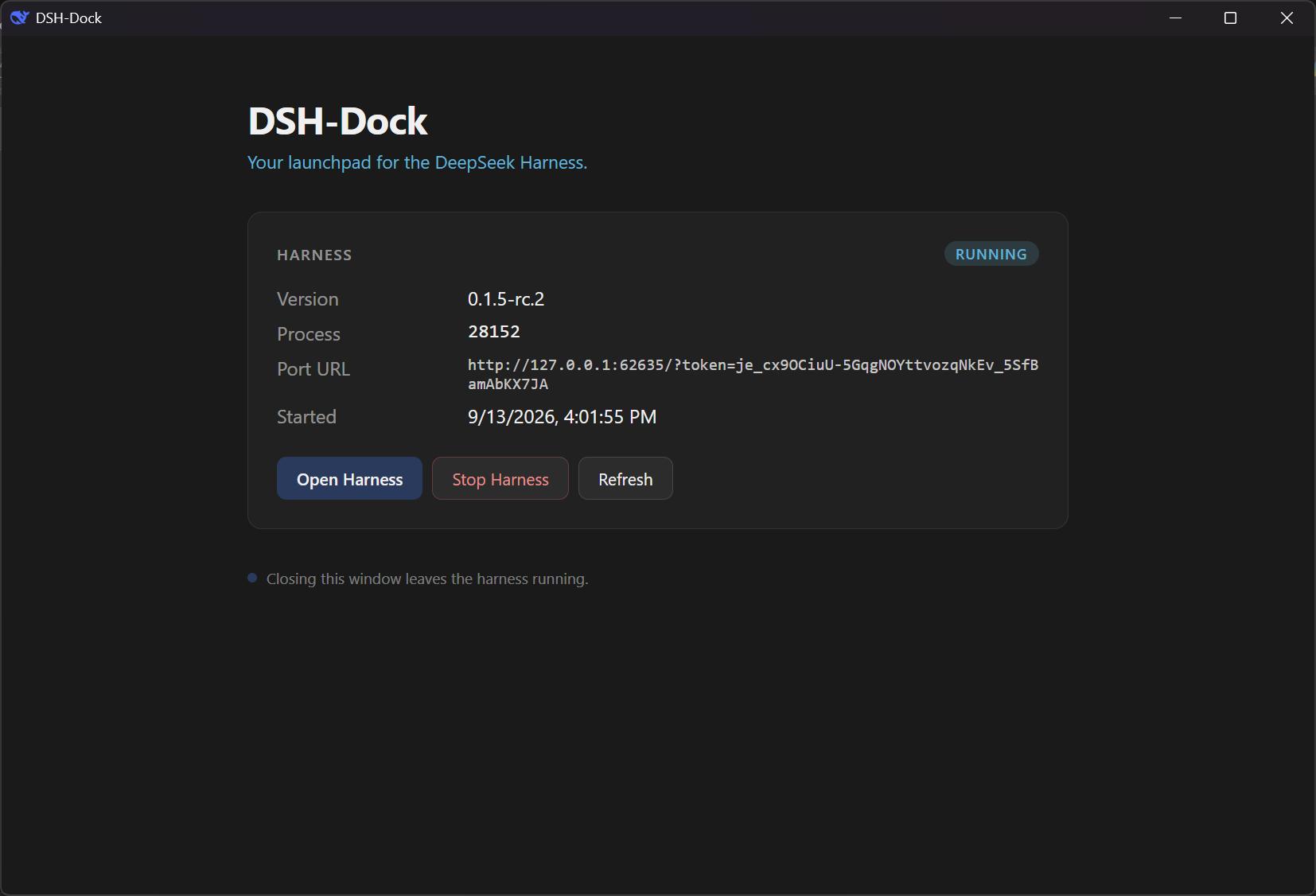
Running
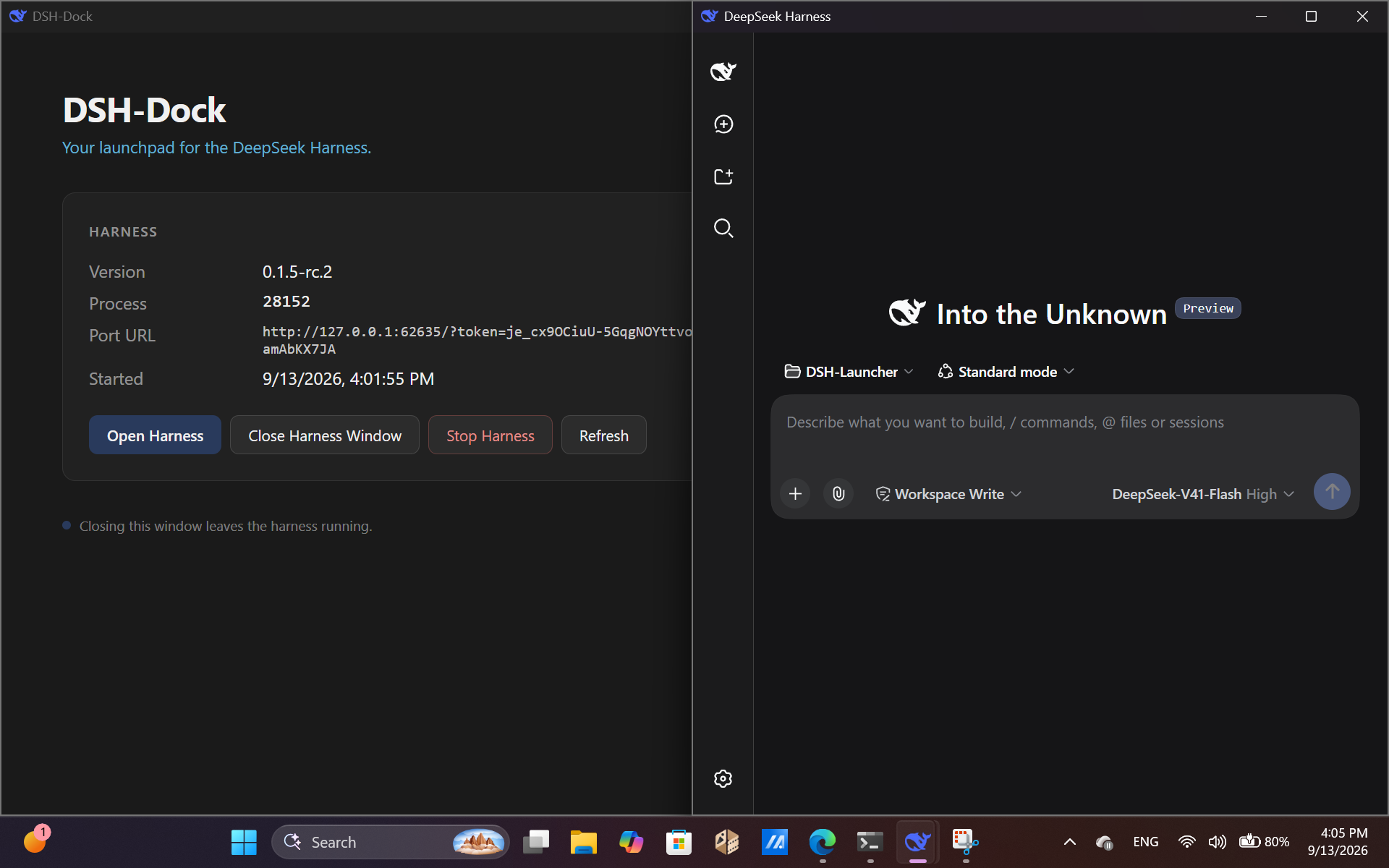
Once the harness is up, the dashboard shows its version, process ID, port URL, and start time. The harness runs in the background — closing the launcher doesn't stop it.
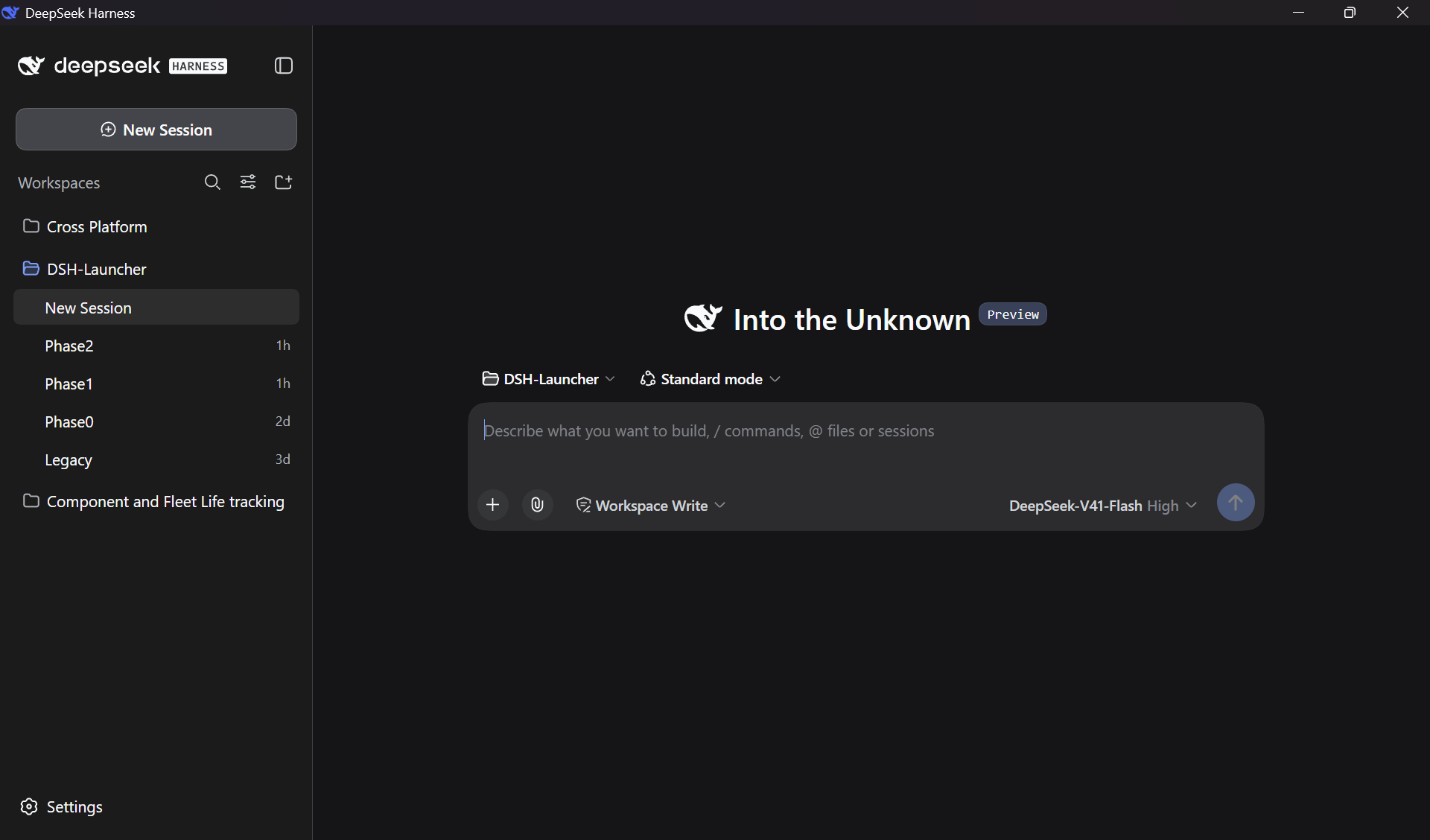
The DeepSeek Harness UI
The harness opens in its own native window, running inside an embedded webview. It's the official UI — unmodified.
Both windows
The launcher stays as a control panel. The harness gets its own space.
Status: Technical Preview (v0.5.0)
This is a Phase 1 milestone. The launcher works end-to-end for its core use case, but the surrounding features are not yet built.
✅ What works
- One-click launch of the DeepSeek Harness in a native window
- The harness runs detached in the background
- The harness survives the launcher closing — reopening the launcher adopts it instantly
- Installs the latest RC of
@deepseek-ai/dshautomatically on first run - Native dashboard with start / stop / open controls
❌ What is not in this preview
- No version picker — always uses the latest RC channel
- No settings UI
- No system tray icon
- No auto-update for the launcher itself
- Windows only — macOS and Linux come in Phase 4
- Unsigned binaries — expect SmartScreen warnings on first launch
- Node.js v22.19+ must be installed manually (bundled runtime is Phase 4)
The full version-management library, channel picker, and settings surface arrive in later phases. See docs/PROJECT_DSH-DOCK.md for the roadmap.
Installation
Prerequisites
| Requirement | Why | Where to get it |
|---|---|---|
| Windows 10 or 11 (x64) | The launcher is Windows-only for now | — |
| Node.js v22.19+ LTS | The harness itself runs on Node; DSH-Dock invokes it during Phase 1 | nodejs.org |
| WebView2 Runtime | The launcher renders its UI inside WebView2 | Preinstalled on Win 10/11. Get it here if missing |
Steps
Download the installer.
Go to the latest release and download
DSH-Dock_0.5.0_x64-setup.exe.Note: The binary is unsigned, so Windows SmartScreen will warn you on first run. Click More info → Run anyway.
Run the installer.
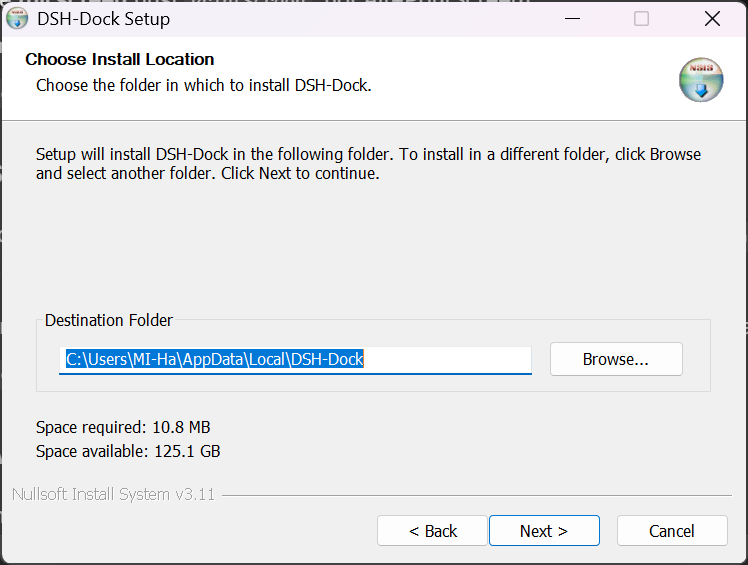
The installer is per-user, so it does not require administrator rights. It installs DSH-Dock into
%LOCALAPPDATA%\Programs\DSH-Dock\and adds a Start-menu shortcut.Launch DSH-Dock.
The first launch downloads and installs the latest DeepSeek Harness release (~370 MB). This takes a few minutes depending on your connection.
First run is slow. This is expected. Subsequent launches are instant — the harness is already on disk.
Click
Start Harness.The dashboard will show progress as the harness boots. Once the badge reads
RUNNING, click Open Harness to launch the DeepSeek Harness in its own window.
Common questions
Where does my data live?
DSH-Dock keeps its own state in:
%LOCALAPPDATA%\DSH-Dock\
├── runtime-state.json     # which harness is running, on what port
├── versions\              # installed harness versions
├── logs\                  # launcher and harness logs
└── .npm-cache\            # npm download cache
Your DeepSeek Harness data is never touched. Sessions, configuration, credentials, and plugins live in %USERPROFILE%\.dsh\ (or wherever $DSH_HOME points), and DSH-Dock never reads, writes, or caches inside that directory.
Can I run the official DeepSeek Harness and DSH-Dock at the same time?
In theory yes, but both would use the same %USERPROFILE%\.dsh\ profile and could conflict during the plugin tree build. Recommended: close the official harness before launching DSH-Dock.
Phase 2 will add explicit profile isolation.
What if something goes wrong?
Logs are in %LOCALAPPDATA%\DSH-Dock\logs\:
launcher.log— the launcher's own lifecycle eventsharness-<id>.log— the harness's stdoutharness-<id>.launcher.log— the launcher's diagnostics about the harness
If the dashboard shows an error, check launcher.log first. When reporting a bug, attach both launcher.log and the most recent harness-*.log.
How do I uninstall?
Use Settings → Apps → DSH-Dock on Windows, or run the uninstaller in the Start menu.
To remove your harness data too, delete %USERPROFILE%\.dsh\ manually.
Does DSH-Dock phone home?
No. No telemetry, no analytics, no cloud sync. The only outbound requests are to the npm registry (registry.npmjs.org) when installing or checking for harness updates.
Building from source
You'll need:
- Rust 1.84+ — rustup.rs
- Node.js v22.19+ LTS — nodejs.org
- Tauri CLI v2 —
cargo install tauri-cli --version "^2" - MSVC C++ build tools — Visual Studio 2022 Build Tools, "Desktop development with C++" workload
Then:
git clone https://github.com/MIHassan3/DSH-Launcher.git
cd DSH-Launcher
npm install
cargo tauri build
The installer ends up in src-tauri\target\release\bundle\nsis\.
For architecture details, the phases plan, and development constraints, see docs/PROJECT_DSH-DOCK.md.
Roadmap
| Phase | Status | What it delivers |
|---|---|---|
| Phase 0 — Foundation | ✅ Done | Tauri shell, sidecar IPC, "hello world" |
| Phase 1 — MVP Core | ✅ Done | Install + spawn + adopt, embedded webview, v0.5.0 preview |
| Phase 2 — Version Library | 🔄 Next | Multi-version download, switching, cache limits |
| Phase 3 — Settings & Updates | ⏳ Planned | Version Manager UI, update preferences, self-updater |
| Phase 4 — Polish & Release | ⏳ Planned | System tray, macOS + Linux builds, v1.0.0 |
Security
DSH-Dock only talks to 127.0.0.1 (and the npm registry). It never modifies the harness, never touches your $DSH_HOME, and the harness window has no access to the launcher's internals.
See SECURITY.md for the full security policy.
Legacy
This repository previously shipped a Windows-only PowerShell launcher (v0.1.1 and earlier). It has been superseded by DSH-Dock and is preserved, unmaintained, in legacy/.
If you're still using the old launcher, you can switch to DSH-Dock safely — your harness data in %USERPROFILE%\.dsh\ is untouched.
License
MIT — see LICENSE.
Related相关推荐
-
 anywhere-labs/dsh-desktop
为 DeepSeek Harness (DSH) 插件生态打造的现代化桌面端解决方案。万物皆「插件」,桌面本身也是「插件」。
anywhere-labs/dsh-desktop
为 DeepSeek Harness (DSH) 插件生态打造的现代化桌面端解决方案。万物皆「插件」,桌面本身也是「插件」。
-
 ccch1mneyyy/dsh-TUI
DSH 官方公众号收录的 TUI 补位插件:Claude Code 风,鲸鱼顶栏/实时状态/流式思考/双击 Esc 回滚/上下文进度+TPS。npm 一键装。 DSH official WeChat featured TUI plugin…
ccch1mneyyy/dsh-TUI
DSH 官方公众号收录的 TUI 补位插件:Claude Code 风,鲸鱼顶栏/实时状态/流式思考/双击 Esc 回滚/上下文进度+TPS。npm 一键装。 DSH official WeChat featured TUI plugin…
- dsh-tauri/deepseek-harness-desktop DeepSeek Harness Tauri 桌面版 | Only 5mb installer, zero environment setup, preset plugins, Windows / macOS / Linux.
-
 shaobeichen/dsh-pocket
把 DeepSeek Harness 装进你的口袋:电脑上跑 dsh web,手机扫码即同步访问(局域网 + 公网,实时同屏)Put DeepSeek Harness in your pocket: run dsh web on your …
shaobeichen/dsh-pocket
把 DeepSeek Harness 装进你的口袋:电脑上跑 dsh web,手机扫码即同步访问(局域网 + 公网,实时同屏)Put DeepSeek Harness in your pocket: run dsh web on your …
-
 whitelonng/dshcode
Community desktop companion for DeepSeek Harness — one-click Electron app for macOS and Windows
whitelonng/dshcode
Community desktop companion for DeepSeek Harness — one-click Electron app for macOS and Windows
-
 myYangyunfan/dsh_desktop
DeepSeek Harness (dsh) Windows desktop client - bundled Node.js + dsh CLI, one-click launch
myYangyunfan/dsh_desktop
DeepSeek Harness (dsh) Windows desktop client - bundled Node.js + dsh CLI, one-click launch
-
 lencx/Minke
🐳 DeepSeek Harness Desktop
lencx/Minke
🐳 DeepSeek Harness Desktop
-
 Nagi-ovo/dsh-ads
把 DSH 变成 2005 年门户网站|Parody ads, fake games, and popups for the DSH Web UI
Nagi-ovo/dsh-ads
把 DSH 变成 2005 年门户网站|Parody ads, fake games, and popups for the DSH Web UI