moyu-good/dsh-lark-bridge
🕊️ Run a full DeepSeek Harness coding agent inside Feishu/Lark — native thinking process (CoT), interactive approval cards, live reactions, slash commands, WS long-connection. No public callback URL. (云鹊桥)
Project Overview项目介绍
dsh-lark-bridge is a Feishu/Lark channel plugin for DeepSeek Harness, embedding the coding agent inside chat conversations. Core capabilities include native reasoning messages, interactive approval cards, live goal/todo cards, subagent fan-out, and WebSocket long-connection transport that eliminates the need for a public webhook. A bilingual slash panel auto-switches between English and Chinese. Use it to drive dsh coding tasks directly from Feishu DMs or groups without exposing a public endpoint. Caveat: file delivery is default-deny and requires configuring outbound.allowedFileDirs.
dsh-lark-bridge 是飞书/Lark 平台的 DeepSeek Harness 通道插件,把编码代理接入聊天会话。核心能力:原生思维链卡片、审批卡片、实时目标/待办卡片、子代理流、WebSocket 长连接免公网回调,中英斜杠面板自动切换。适用:想在飞书对话中驱动 dsh 完成编码任务,无需公网 IP 或反向代理。提醒:文件外发默认拒绝,需配置 outbound.allowedFileDirs。
请帮我了解并安装插件:【dsh-lark-bridge】【https://github.com/moyu-good/dsh-lark-bridge】Send this message to DSH in your current session. CLI install commands may not be accurate across systems — DSH will figure it out for you.把上面这条消息直接发给当前会话里的 DSH,让它帮你了解并安装。安装命令不一定准确,发给 DSH 更稳。
Or use CLI install (for developers)或使用命令行安装(适合开发者)
CLI Install命令行安装
dsh plugin --profile web add github:moyu-good/dsh-lark-bridge把 moyu-good/dsh-lark-bridge 加入你的 DSH 配置(web profile)即可启用。
READMEREADME






🕊️ dsh-lark-bridge
Run a full DeepSeek Harness coding agent inside Feishu / Lark
Native thinking process · approval cards · web/desktop/CLI fleet sync · one-tap
account switching · balance & peak/off-peak awareness — no public webhook URL needed.
中文文档 · Quick Start · User Guide · Features · Extend It · FAQ
🖼️ Screenshots
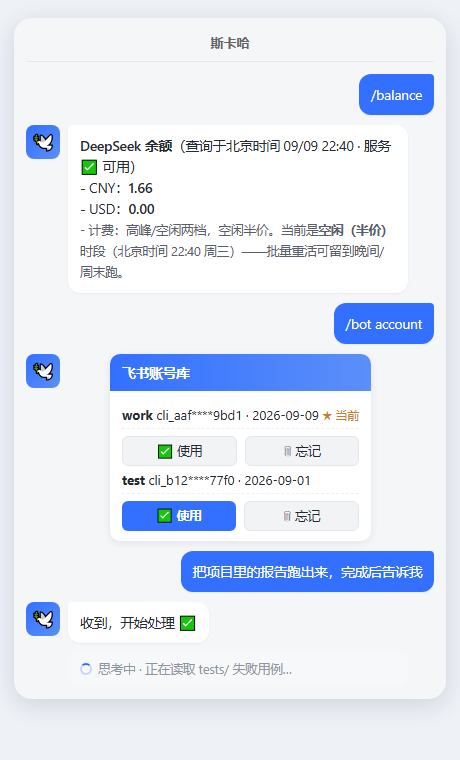
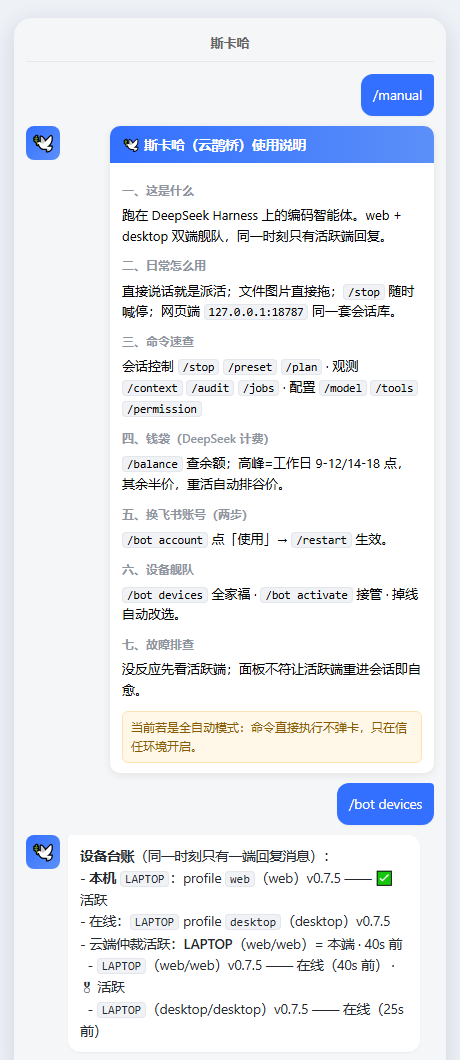
Illustrative Feishu-style renders. Left: /balance (live balance + peak/off-peak phase), the /bot account switcher card, task ack and the thinking state. Right: /manual — the full in-chat user guide — and the /bot devices fleet roster.
🤔 What is this?
dsh-lark-bridge is a Feishu/Lark IM channel for DeepSeek Harness — a plugin that makes
your coding agent work right inside a chat. Each conversation (DM or group) drives its own
dsh agent, and everything the desktop UI shows lives in the chat:
- 🧠 Native thinking process — reasoning renders as Feishu's own "thinking" message; tool calls with icons, results as code blocks. No black box.
- ✅ Interactive approval cards — risky operations become Allow-once / Deny cards, decision and decider written back.
- 🎯 Live goal & todo cards — long-running tasks update a card in real time instead of going silent; goals auto-resume after restarts.
- 🔌 WebSocket long connection — no public callback URL, no reverse proxy.
- 🌐 Three-surface fleet sync — web (browser), desktop (DSH Desktop) and the CLI share one
~/.dshsession library; cloud arbitration keyed per ENDPOINT (deviceId:form:profile) means exactly one surface replies, and if the active one goes silent the fleet elects a successor automatically. - 🔄 One-tap account switching —
/bot accountrenders an interactive card of saved Feishu-app credentials; two taps to switch, synced to every surface. - 💰 Balance & peak/off-peak awareness —
/balancequeries the DeepSeek open-platform balance live (per currency, timestamped); the model prompt carries the peak/off-peak tariff table so deferrable heavy work lands in the half-price windows. - 📖
/manualin chat — the full eight-section user guide, one command away.
Feishu is the carrier; the work is still done by DeepSeek Harness itself.
🚀 Quick Start in 60 Seconds
Prerequisites: Node 18+, pnpm (recommended, see note), a DeepSeek API key, and the Feishu app on your phone.
Harness version: this bridge targets DeepSeek Harness >= 0.1.5-rc.2. It talks to the harness through the plugin seam, and 0.1.5 moved the user-questions seam from a provider registry to the user-questions/request waterfall — see the CHANGELOG for the one-line compatibility note.
# 1. install the plugin into a dsh profile & boot (pnpm — ~20s, parallel install)
pnpm dlx @deepseek-ai/dsh plugin --profile web add @moyu-good/dsh-lark-bridge \
  && pnpm dlx @deepseek-ai/dsh web

# 2. a QR code prints → scan it with Feishu
#    (this creates the app + event subscription automatically)

# 3. open the dsh console → Settings → Models → paste your DeepSeek API key

# 4. DM the bot, or @ it in a group. That's it.
[!NOTE] First-time
plugin addfails once withERR_PNPM_IGNORED_BUILDS ... protobufjs— pnpm 11 blocks the postinstall ofprotobufjs(a Feishu SDK dependency; its script is a harmless no-op). Open<your-home>/.dsh/profiles/web/pnpm-workspace.yamland change the placeholder line toprotobufjs: true, then re-run the same command. This is a one-time step per profile.
[!TIP] Not sure what the bot can do? Send it
/manual— the full eight-section user guide arrives right in the chat./helplists every command. The only skill you need is "say what you want".
[!WARNING] Use pnpm, not bare npx/npm, to run the upstream dsh CLI. Measured on the same machine:
pnpm dlxinstalls dsh's dependency tree (197 packages, ~250 MB) in ~20 s including downloads, whilenpx/npm installtakes ~25 minutes (npm's serial reify) even with a warm cache — and on machines with ≤4 GB RAM the npm process itself dies with "JavaScript heap out of memory" mid-install. If you must use npm, pre-setNODE_OPTIONS=--max-old-space-size=2048.Do NOT
npm i -g dsh-lark-bridge— that name on npm belongs to an unrelated project. This plugin is published as@moyu-good/dsh-lark-bridge(the GitHub source also works, but installing a git-hosted plugin makes pnpm block itspreparescript until you whitelist it underallowBuildsin the profile'spnpm-workspace.yaml— the registry package needs no build at all).
Daily ops: run pnpm dlx @deepseek-ai/dsh web again (subsequent runs hit the
pnpm store, so they're fast), or host it under systemd/supervisor.
The package ships prebuilt (lib/ committed) — nothing compiles on install.
📦 Moving to a new machine
The bridge carries its own migration path — on the old machine:
/bot export include-secrets --to-feishu   # uploads to the app's own Feishu drive
/bot export include-secrets               # or a local file, credentials masked
The Feishu route needs no copying at all: the file lands in the app's own
cloud space (visible only to this app), and the new machine pulls it with
/bot import --from-feishu. For the local-file route, copy the printed file
(the sync directory, e.g. ~/.dsh/dsh-lark-bridge/migrate.json) to the same
path on the new machine, install the plugin there (Quick Start above), then:
/bot import                       # preview: settings + plugin plan + warnings
/bot import apply                 # execute (add --from-feishu for the cloud slot)
What travels: shared settings and per-profile plugin lists (installed through
the upstream CLI, so cross-platform moves just work). What never travels:
peer heartbeats, control tokens, node_modules, session history — sessions
live under ~/.dsh (upstream-owned); copy that directory to carry them.
Device lifecycle: every machine mints a stable deviceId on first boot
(/bot devices shows the roster: this machine, heartbeat-live peers, the
cloud-active endpoint, and migration provenance). Instead of stopping the old
service by hand, retire it — /bot retire on the old machine puts it out of
the reply path (messages get a one-line notice, not an agent turn; the flag
is per-machine local state and is never synced), and /bot activate brings
it back — and when the cloud carrier is available it also claims the active
slot, so other machines stand down on their next message. Every live machine
renews its presence in the cloud ledger each minute; if the active machine
goessilent, the freshest machine with the smallest deviceId is elected
automatically on the next inbound message. /bot name <readable-name> names
a device for the roster.
🗨️ Use it like a user
- Just say what you want: "why are the tests failing in this project?" — drag files and images straight into the chat.
- Three surfaces, one conversation: open
http://127.0.0.1:18787for the web UI (same session library as the Feishu side); once DSH Desktop runs the plugin it joins the same fleet. Exactly one surface replies;/bot devicesshows who. - Switch Feishu apps in two taps:
/bot account→ tap Use on the card →/restart. - Guidance is built in: new chats get a short starter guide;
/manualis the full one;/balanceis the wallet.
The complete handbook lives at docs/用户手册.md (Chinese; /manual serves the same content in chat).
✨ Features
Highlights — the ones other bridges don't have:
| 🧠 Native Feishu CoT | Reasoning renders as the platform's own thinking message (cot), typewriter card fallback (stream) |
| 📋 Approval cards + decider trail | Click to decide; who decided is written back |
| 🎯 Live goal / todo cards + auto-resume | Phase changes stream into chat; autoResumeGoals re-arms after restarts |
| 🔍 Session history search | /sessions <keyword> full-text search over this chat's stored history |
| 🌐 Bilingual slash panel | English on international Lark, Chinese on domestic Feishu — auto |
| 🌐 Three-surface fleet sync | web/desktop/CLI share one session library; per-endpoint cloud arbitration (deviceId:form:profile) — no double replies, automatic failover election |
| 🔄 Interactive account switcher | /bot account stores/switches/forgets Feishu-app credentials from a card; shared settings push it to every surface |
| 💰 Balance & peak/off-peak awareness | /balance live DeepSeek balance (per currency, timestamped); the prompt embeds the tariff table so batch work lands in half-price windows |
| 🛠️ Native Feishu agent tools | feishu_notify proactive messages, feishu_drive_* cloud-drive scratchpad reachable from any device |
| 🖥️ Self-healing slash panel | the panel has a single writer (the arbitration-active endpoint), bilingual, kept in step with what actually runs |
All capabilities
| 🗂️ One agent per conversation | sessionScope: whole chat / topic thread / single sender; sessions persist across restarts |
| ✅ Live reactions | OK → THINKING → DONE/ERROR, states replace each other, configurable |
| 📦 Compaction transparency | "Compacting…" → summary + released tokens; prunes report trimmed count |
| 🧑💻 Subagent fan-out | Workflow runs stream as text lines: run start, child open/end, run end |
| ⏰ Scheduled reminders | /schedules view (compose @deepseek-ai/dsh-schedule for the model-side tools) |
| ⚙️ Background job notifications | run_in_background jobs announce their terminal outcome |
| 🧩 Skill ecosystem surface | /skills lists workspace skills, /skills <name> peeks at one |
| 🤖 Model switching | /model <provider>/<model> through the host saveSelection seam (persistent) |
| 🖥️ PC-parity tooling | Compose dsh-terminal* / code-runtime-worker-thread / dsh-mcp-client → persistent PTY, Code Mode, external MCP servers |
| 🗺️ Workspace visibility | /ws lists workspaces and marks where new sessions land |
| 🖼️ Image input (opt-in) | attachImages passes chat images to the model |
| 📎 File delivery | Agent send_file delivers artifacts with caption (default-deny local dirs) |
| 🔑 QR onboarding | First boot prints a QR; scanning creates the app with event subscription |
| 🔒 Authorization narrowing | senderAllowlist / groupAllowlist / approvers |
| 🧩 Chronicle hook | chronicleEndpoint: fire-and-forget full-transcript POST per inbound message |
| 🛡️ Deep dsh adaptation | Everything through host service contracts — self-contained, no host source needed |
vs. other Feishu/Lark bridges
Verification basis: re-checked against each project's public README on 2026-09-09 (links under Listings & Community). "Not found" means not seen in public docs — not proof of absence. Different bets: dsh-im is a multi-platform gateway (8+ channels) where breadth is the point; this bridge bets on single-platform depth plus a multi-surface fleet.
| Capability | dsh-lark-bridge | xmanrui/dsh-im | omdsh-dev/dsh-lark | AX1202/ax-feishu-bridge |
|---|---|---|---|---|
| Positioning | Feishu depth + multi-surface fleet | Multi-platform gateway (Feishu/DingTalk/WeCom/WhatsApp/Discord/QQ…) | Feishu depth, multi-agent groups | Feishu × Pi agent |
| Thinking display | Feishu-native "thinking" message | Streaming card (thinking/tool progress) | Native (needs PC 7.70+/mobile 7.74+) | Streaming card output |
| Approvals | Cards + decider written back | Text reply (approve/deny) | Cards + decider resolution | Not documented |
| Live goal/todo cards | ✅ | Not found | Not found | Not found |
| Compaction transparency | ✅ (progress + freed tokens) | /compact command |
/compact (host passthrough) |
Not found |
| Multi-surface fleet + endpoint arbitration | ✅ shared library, automatic failover | DM text two-way sync (opt-in) | — | — |
| Interactive account switcher | ✅ two taps, propagates everywhere | — | — | — |
| Balance + peak/off-peak awareness | ✅ | — | — | — |
| Slash panel | Bilingual registration + active-writer self-heal | Native panel (/repair grants) |
Host passthrough | Not found |
💬 Slash Commands
| Command | Description |
|---|---|
/stop |
Cancel the running turn |
/help |
Show this listing |
/manual |
The full user guide (start here if you're new) |
/balance |
DeepSeek API balance (with the live peak/off-peak phase) |
/preset |
View / switch agent preset (standard / code / minimal / cordis) |
/permission |
View / switch permission mode (host) |
/goal |
View / set the goal (host) |
/plan |
Enter / leave plan mode (host) |
/compact |
Compact older history (host) |
/sessions |
Search this chat's session history |
/tools |
View / deny / allow tools at runtime |
/skills |
List skills, or peek at one |
/model |
View / switch the default model |
/ws |
List registered workspaces |
/jobs |
This chat's background jobs |
/schedules |
This chat's scheduled reminders |
/context |
Current context token pressure |
/audit |
Operation audit summary |
/config |
The bridge's live configuration |
/feedback |
Rate the last answer |
Set locale: zh|en to force a language; otherwise it follows the platform domain.
/bot subcommands (bridge admin): set / unset / peers / sync-plugins / account (save·use·forget, interactive card) / export / import / devices / retire / activate / name. The slash panel has a single writer — the arbitration-active endpoint — so it always matches what actually runs.
⚙️ Configuration
Essentials:
| Field | Default | Meaning |
|---|---|---|
appId, appSecret |
first-boot QR registration | Feishu/Lark app credentials |
cwd |
host process cwd | Absolute workspace directory for chat agents |
provider, model |
host default | Model routing for chat agents |
output |
cot |
Native thinking message vs typewriter card |
requireMention |
true |
In groups, respond only when @-mentioned |
outbound.allowedFileDirs |
unset → disabled | Local dirs send_file may read from |
chronicleEndpoint |
'' |
Optional external full-transcript ledger |
Full option reference: README.zh.md 配置 · credentials resolve in three layers (bundle patch config → settings document plugin section → first-boot QR registration).
Required app permissions (manual app creation)
| Scope | Needed for |
|---|---|
application:app_slash_command (read + write) |
Slash panel — without it sync fails with 99991672 |
im:message / im:message:readonly |
Send / read messages |
im:message.receive_v1 event |
Receive messages (Events → long connection) |
im:resource |
Upload images and files |
im:chat:read |
Group info |
im:message.reactions:read / write_only |
Reaction feedback |
QR onboarding grants these automatically; manually created apps must publish a new version after adding scopes. Panel sync runs on session create/resume — send the bot one message after granting.
🧭 Architecture
Feishu / Lark ── WebSocket long connection ──►  dsh-lark-bridge (feishu-channel plugin
   (chat/approval/images)                        INSIDE the dsh process)
                                                      │  host service contracts:
                                                      │  agents / sessions / tools /
                                                      ▼  approval / goal / settings
                                              DeepSeek Harness itself
Any launcher works (shell, systemd, supervisor) — no dependency on any other agent framework.
🧩 Extend It
Three invariants keep the bridge maintainable:
- Grafted channel, not re-integration — the bridge only normalizes messages; every capability comes from official opt-in dsh plugin families composed in your profile. Zero bridge code = zero upgrade cost when upstream ships features.
- Everything through host service contracts —
agents,agentPresets,approval,goals,settings… self-contained against published packages only. - Every change archives a design card first — see
docs/design/; implementation notes are backfilled, and blocked investigations are archived as assets too.
Repo map
src/
  bridge.ts        message pipeline: normalize → authorize → ack → agent turn → render
  commands.ts      slash commands (i18n bilingual)
  cot.ts outbound.ts  thinking-process & answer rendering
  feishu-tools.ts    native Feishu agent tools (notify / cloud drive)
  sync/              dual-end sync: settings source of truth, peers, control API,
                     migration, account book, endpoint arbitration
  pricing.ts         live DeepSeek peak/off-peak phase
  user-guide.ts      single source of the /manual content
  chronicle.ts     optional external-ledger ingest hook (integration example)
  config.ts        schema + defaults
tests/             vitest suites (397) incl. harness-based fakes
scripts/           verify-dsh-contract.mjs — asserts no drift vs upstream master
plugin-contract-test.mjs   43 assertions on the host contract surface
Quality gates
pnpm test                        # 397 unit/integration tests
node plugin-contract-test.mjs    # 43 host-contract assertions
node scripts/verify-dsh-contract.mjs   # drift check against upstream master
pnpm typecheck && pnpm run build # tsc + tsdown (lib/ is committed)
CI runs all of the above on every push and pull request, with the upstream drift check pinned to dsh master — if upstream changes a contract, the build tells you before users do.
Adding a feature? Write the design card first (template in docs/design/), implement,
backfill the change record. For an integration that only needs message visibility, prefer
the chronicleEndpoint hook over modifying the pipeline — see src/chronicle.ts.
🧱 Development & MR Flow
main is the stable baseline and only receives reviewed merge requests. All development happens on feature branches (feat/<name>), never directly on main.
Per-MR checklist:
- Branch from
main; keep the change small and single-purpose. - Full quality gate green (
pnpm hygiene,pnpm test,node plugin-contract-test.mjs,node scripts/verify-dsh-contract.mjs,pnpm typecheck && pnpm build). - Repo hygiene scan —
pnpm hygiene— must exit 0. Deployment-specific terms go in a local.leak-patternsfile (see.leak-patterns.example), never in the repo. - Reviewer approves → merge to
main→ deploy frommain. - Production incidents revert on the spot (history stays in git); the reverted branch is rebased and re-MR'd with a fix.
Releases are tags. Pushing a v* tag runs the same gate as CI, verifies the tag matches package.json, and publishes the CHANGELOG section as the release notes — so a tag can never point at a commit that would have failed CI.
This is enforced because past direct-to-main experiments had to be rolled back as a multi-commit revert in one batch — feature branches keep main shippable at all times.
📦 Version & Release Policy
Two tracks, written down so nobody guesses:
- preview track — development/experimentation. Pull the latest upstream (GitHub releases including alpha/rc, or
master) and the newest bridge features; breakage is expected here. - stable track — production deployments. Pin the npm
latest/ release-candidate line. Production never runs analpha.
Moving to a new harness version
The bridge consumes the harness through the plugin seam, so a harness upgrade can move the seam under it. The check is one command:
node scripts/verify-dsh-contract.mjs # compares the bridge's host mirrors with upstream
It fetches the harness source it declares a contract against and fails when an
entry the bridge mirrors has moved or vanished — run it before and after an
upgrade. When it fails, the fix belongs in the bridge (src/bridge.ts,
src/questions.ts), not in a pin: the bridge follows the newest harness, and the
host-contract mirrors in those files are the single place that records what the
seam looked like when it was last verified.
Two rules keep the upgrade honest:
- Upgrade the engine by switching trees, not by layering one on top. A dsh
profile resolves the harness's own packages from the tree the CLI runs out of,
so pointing the launcher at a new checkout is the whole switch. Side-by-side
trees fight over the profile's
node_modules. - A profile declares only its own additions (this bridge, extra plugins). Harness packages are not profile dependencies — declaring them pins the profile to a version and hides the seam behind a stale copy.
Promoting preview → stable requires the full quality gate to pass:
pnpm test → node plugin-contract-test.mjs → node scripts/verify-dsh-contract.mjs → pnpm typecheck && pnpm run build → live smoke.
❓ FAQ
Do I need a public IP or webhook?
No. The transport is a WebSocket long connection; the app must use long-connection event subscription (self-built app).Which models work?
Any model routable by your dsh deployment — the bridge is model-agnostic and `/model` switches at runtime.The agent says it sent a file but nothing arrives
File delivery is default-deny: configureoutbound.allowedFileDirs. URLs and
raw buffers always work.
The slash panel is empty or partial after a restart
Boot registers constant commands; the full panel sync runs on the first message of a session. Send the bot anything. If it stays empty, check theapplication:app_slash_command scope and publish an app version.
Will multiple machines / surfaces double-reply?
No. Cloud arbitration is keyed per endpoint (deviceId:form:profile): exactly one surface
replies at any moment, and if the active one goes silent the freshest endpoints elect a
successor automatically on the next message.
How do I switch to a different Feishu app?
/bot account save <name> archives the current credentials; later /bot account and tap
Use on the card, then /restart (web) or restart Desktop. Multiple credential sets can
live side by side.
What survives a restart?
Sessions resume from their logs; active goals re-arm (autoResumeGoals);
permission and preset choices ride with the session state.
🌍 Listings & Community
- dshbase.com — listed & verified (headless L3: install + load + Q&A) · 中文页
- awesome-dsh-plugin — merged
- dsh-suite catalog — accepted (orchestration)
Issues and PRs welcome — design cards first, please.
📋 Known limitations
- Transport-level config (credentials, requireMention, allowlists) is read once at startup;
other config edits hot-reload via dsh Config-only HMR (
/configshows live values) - Events during a long-connection outage are not replayed (no cursor); outbound sends are queued by the replay port
schedule_*model tools need composing@deepseek-ai/dsh-schedulein your profile
📄 License
BSD-3-Clause. Architecture inspired by dsh-lark (also BSD-3-Clause).
Related相关推荐
-
 toby-bridges/api-relay-audit
Local security audit for AI API relays and LLM proxies: detects prompt injection, model substitution, tool-call rewritin…
toby-bridges/api-relay-audit
Local security audit for AI API relays and LLM proxies: detects prompt injection, model substitution, tool-call rewritin…
-
 saya-ch/dsh-mobile
DeepSeek Harness 的 Android App 与安全远程访问插件,支持局域网/远程连接和高度自定义的移动界面与扩展能力。
saya-ch/dsh-mobile
DeepSeek Harness 的 Android App 与安全远程访问插件,支持局域网/远程连接和高度自定义的移动界面与扩展能力。
-
 liguobao/ds-harness-remote
一个基于 DeepSeek Harness 插件机制构建的多端远程访问方案,通过安全、低延迟、端到端加密的 P2P 优先网络,支持从 PC、Android 和 Web 随时访问并操作远程 Harness 和 CodeX。 (A multi-…
liguobao/ds-harness-remote
一个基于 DeepSeek Harness 插件机制构建的多端远程访问方案,通过安全、低延迟、端到端加密的 P2P 优先网络,支持从 PC、Android 和 Web 随时访问并操作远程 Harness 和 CodeX。 (A multi-…
-
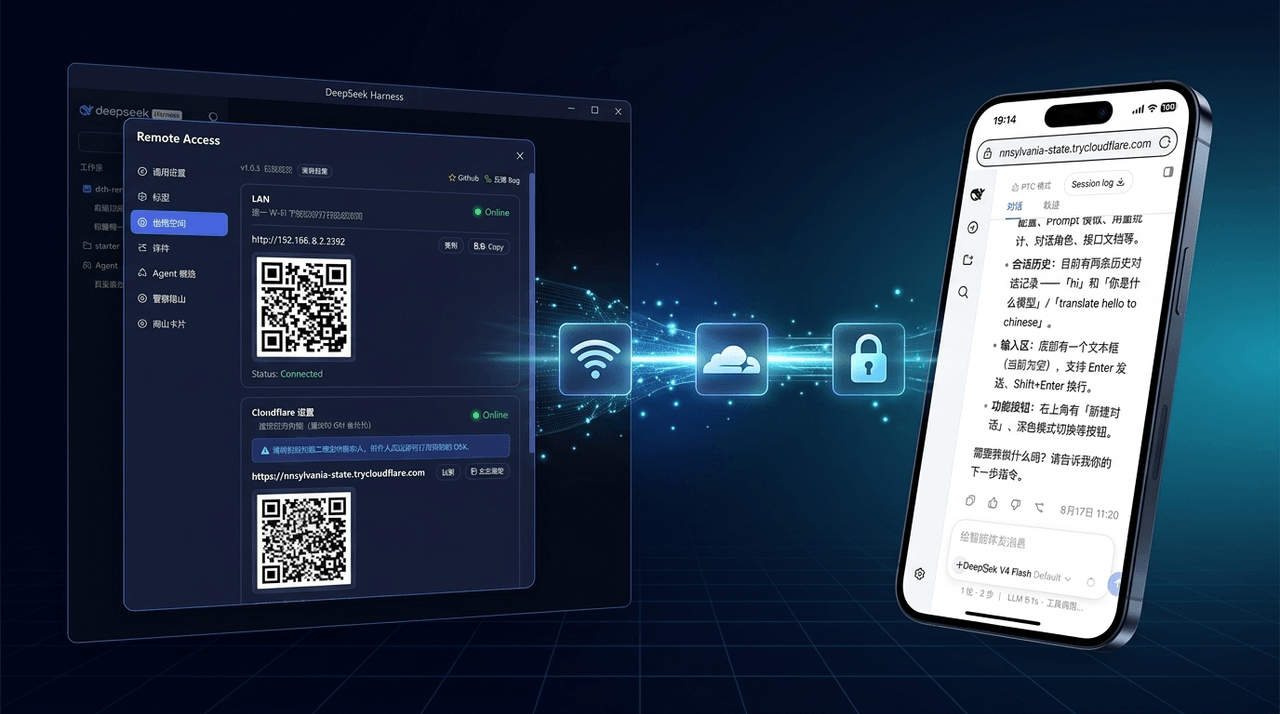 wenbin-wb/dsh-bridge
🚀 DeepSeek Harness 多通道远程访问与安全守护插件 | 局域网扫码直连、Cloudflare / 自建公网隧道、微信 / QQ / 飞书 / Telegram 机器人全生命周期对话 | 内置全协议访问安全认证、后台防篡改与…
wenbin-wb/dsh-bridge
🚀 DeepSeek Harness 多通道远程访问与安全守护插件 | 局域网扫码直连、Cloudflare / 自建公网隧道、微信 / QQ / 飞书 / Telegram 机器人全生命周期对话 | 内置全协议访问安全认证、后台防篡改与…
-
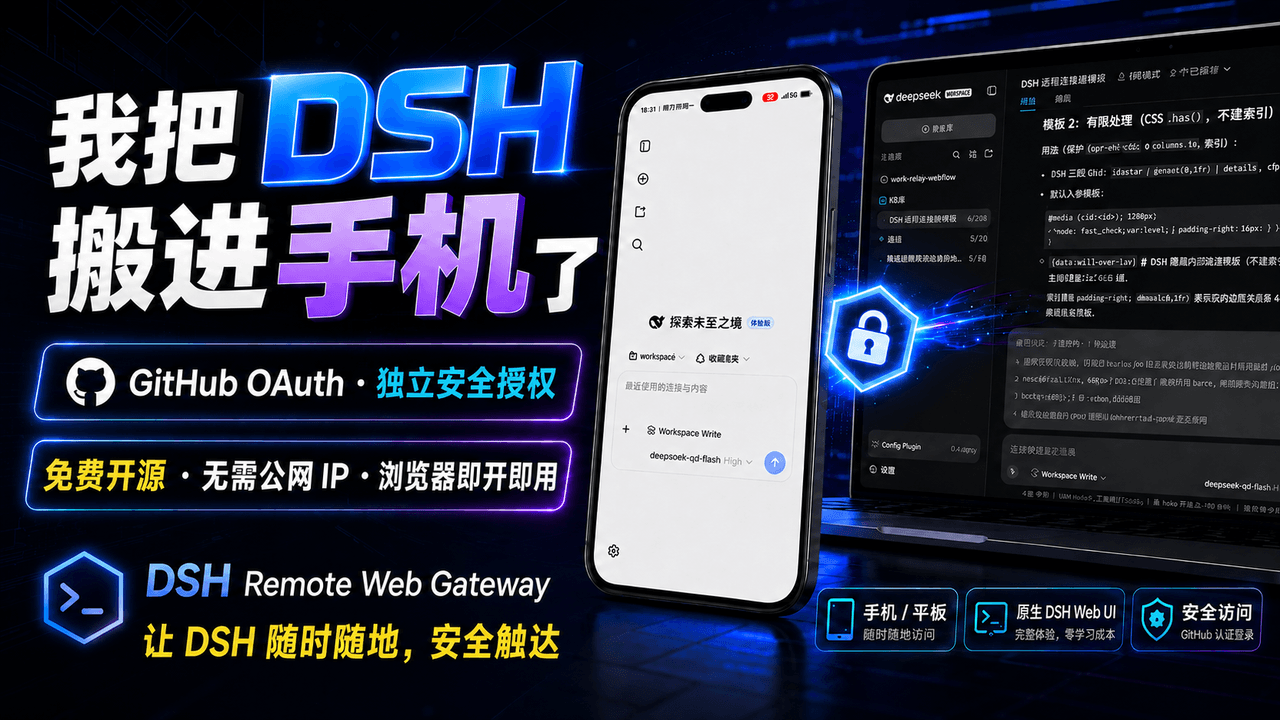 summer1238/dsh-remote-web-gateway
手机平板远程 DeepSeek Harness:扫码即可继续使用电脑上的 DSH,无需远程桌面 / SSH / 公网 IP,支持一次性配对、Github授权加密登录,独立设备授权与随时撤销,实现远程连接很简单,但安全才是我们所想要的。
summer1238/dsh-remote-web-gateway
手机平板远程 DeepSeek Harness:扫码即可继续使用电脑上的 DSH,无需远程桌面 / SSH / 公网 IP,支持一次性配对、Github授权加密登录,独立设备授权与随时撤销,实现远程连接很简单,但安全才是我们所想要的。
-
 sorsama/deepseek-harness-mobile
Android companion for DeepSeek Harness | chat, goals, approvals & notifications from your phone, over your LAN. Kotlin +…
sorsama/deepseek-harness-mobile
Android companion for DeepSeek Harness | chat, goals, approvals & notifications from your phone, over your LAN. Kotlin +…
-
 THEWOLFWALKER/dsh-notifier
Unified notification and remote-control plugin for DeepSeek Harness (DSH): one zero-dependency notify() API across 27 ch…
THEWOLFWALKER/dsh-notifier
Unified notification and remote-control plugin for DeepSeek Harness (DSH): one zero-dependency notify() API across 27 ch…
-
 PlutoKeating/dsh-lark-bot
DeepSeek Harness (dsh) 接入飞书/Lark bot,扫码即用:流式卡片、项目工作区、并行任务、多角色 Agent、跨会话通知、对话内模型/密钥管理与安全网守护(dsh 崩溃后飞书仍可自救)。A scan-to-conn…
PlutoKeating/dsh-lark-bot
DeepSeek Harness (dsh) 接入飞书/Lark bot,扫码即用:流式卡片、项目工作区、并行任务、多角色 Agent、跨会话通知、对话内模型/密钥管理与安全网守护(dsh 崩溃后飞书仍可自救)。A scan-to-conn…