mqhe2007/dsh-pm
dsh-pm is the ChunSun × DeepSeek Harness reference plugin: an AI-native project-delivery loop driven by ChunSun. Requirements / Runs / Steps / acceptance scenarios & cases / work-memory, a session delivery panel, and 28 chunsun_* model tools — with the platform as the single source of truth. MIT.
项目介绍Project Overview
dsh-pm 是 DSH 插件,把春笋 AI 项目交付平台接入 DSH Agent。核心能力:以"需求"为对象自动开 Run、报 Step、维护场景用例与工作记忆,并通过 composer 上方状态条与"项目管理"视图实时看交付进度。适用场景:用 DSH 跑端到端需求交付。注意事项:必须先用 tsc 构建(不能 tsdown),并自备自部署春笋实例与 CHUNSUN_SECRET_KEY。
dsh-pm is a DSH plugin that integrates the ChunSun AI project delivery platform into DSH Agent. It treats requirements as work objects, autonomously opening Runs, reporting Steps, managing acceptance scenarios and working memory, and surfacing progress via a composer status bar and a project management view. Use it to run end-to-end requirement delivery through DSH. Caveat: build with tsc only (tsdown is unsupported), and a self-hosted ChunSun instance plus CHUNSUN_SECRET_KEY are required.
请帮我了解并安装插件:【dsh-pm】【https://github.com/mqhe2007/dsh-pm】把上面这条消息直接发给当前会话里的 DSH,让它帮你了解并安装。安装命令不一定准确,发给 DSH 更稳。Send this message to DSH in your current session. CLI install commands may not be accurate across systems — DSH will figure it out for you.
或使用命令行安装(适合开发者)Or use CLI install (for developers)
命令行安装CLI Install
dsh plugin --profile web add github:mqhe2007/dsh-pm把 mqhe2007/dsh-pm 加入你的 DSH 配置(web profile)即可启用。
READMEREADME
dsh-pm
中文 | English


dsh-pm(pm = project management)由 春笋(ChunSun) 驱动 —— 把「春笋」AI 原生项目交付平台的能力,作为 DeepSeek Harness(DSH)的一等插件深度接入。
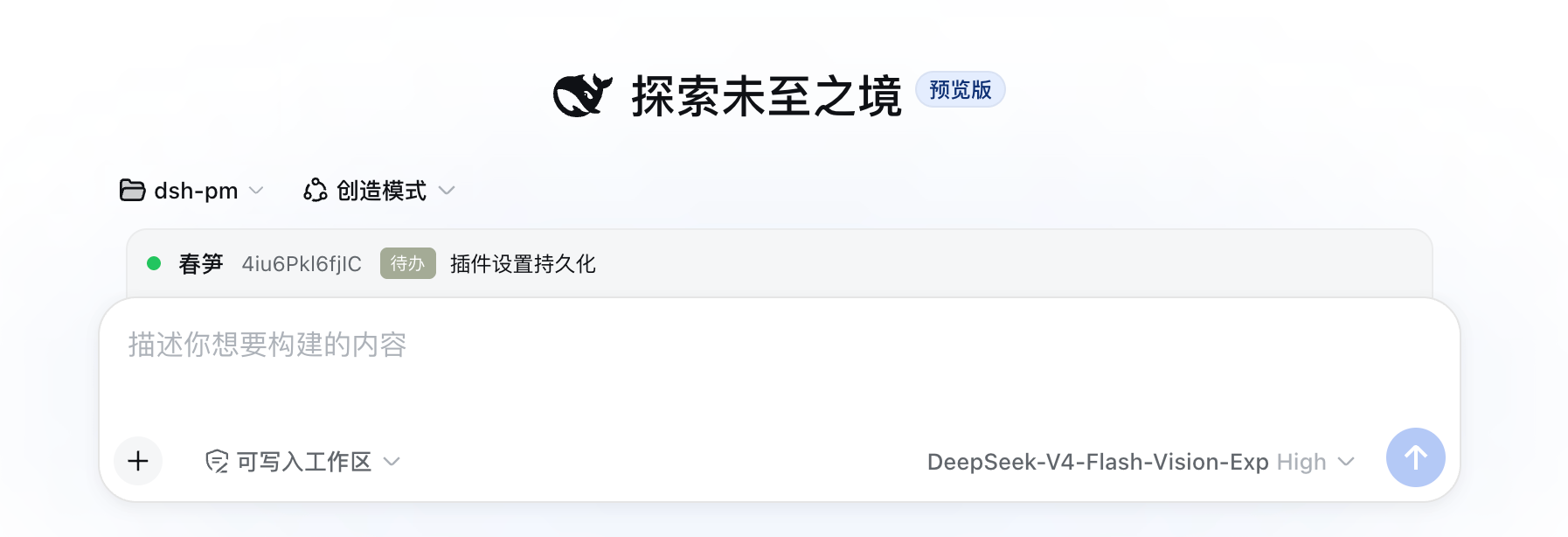
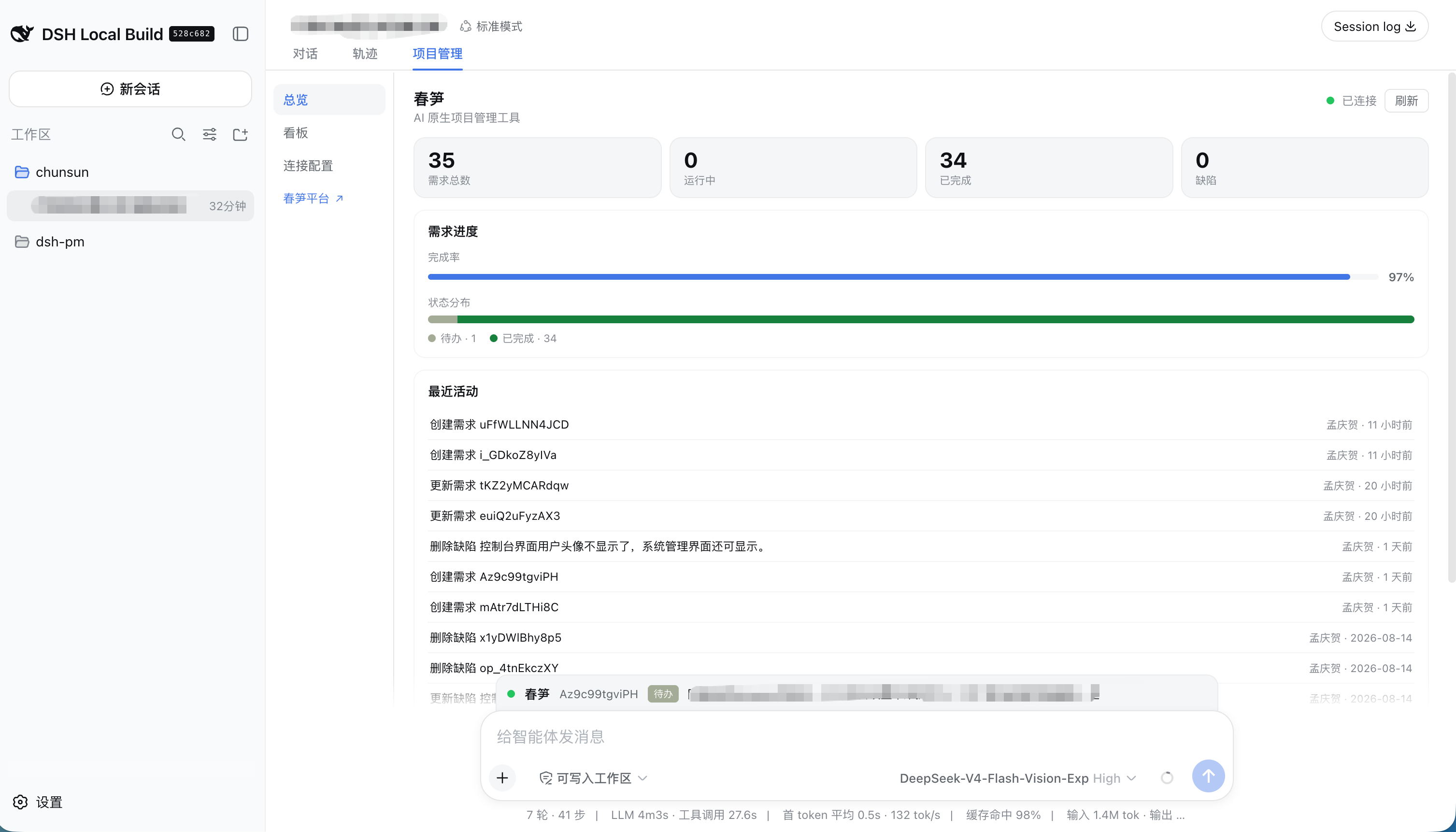
dsh-pm 让 DSH Agent 以「需求」为工作对象自主交付:开 Run、上报 Step、维护验收场景/用例、读写工作记忆、过 completed 硬门禁,并在 GUI 的会话级交付面板(composer 上方状态条 + 「项目管理」视图)实时看交付进度。工作记忆与状态以春笋自部署实例为 SSOT。
结构
src/index.ts——ChunsunService(TypertRemoteService,@Remote方法)src/tools.ts—— 28 个chunsun_*模型工具src/typert.ts/src/remote.ts—— Host./typert与 Client./remote(仓库外需自备;dsh-api-remotes不会替你 mount)src/client/index.ts—— 会话级交付 GUI(lazy-CJS):conversation.input.dock状态条(实时当前需求/Run 轮次/Step)+conversation.view「项目管理」视图(总览页);apply内$mount(./remote)后再用ctx.remote.chunsuncordis.patch.yml—— 组合包 patch(service + tools 两行)lib/——npm run build的产物(被 .gitignore 忽略)
已提供(Host 工具)
28 个 chunsun_* 工具,覆盖:连接/状态 · 需求 · Run · Step · 场景/用例 · 工作记忆 · 环境变量 · 缺陷 · reset。
完整列表见 docs/tools.md。
环境变量
| 变量 | 必填 | 默认值 | Secret | 说明 |
|---|---|---|---|---|
CHUNSUN_API_URL |
否 | http://localhost:11111/api/v1 |
否 | 春笋 API 根地址 |
CHUNSUN_SECRET_KEY |
是(接入后) | — | 是 | 项目密钥(Bearer) |
可在工作区 .env 配置,或在 GUI「项目管理」视图中「保存并测试连接」。详见 docs/configuration.md。
快速开始:安装到 DSH
前置条件
- Node.js ≥ 24 + npm(本仓库构建用;与 CI / DSH 运行时一致;Stage 3 装饰器需
tsc构建);pnpm(DSH profile 管理插件用) - 一个可启动的 DSH(下文以
webprofile 为例) - 可选:春笋自部署实例(否则只能看到「未连接」状态)
1. 构建插件(在 dsh-pm 目录内)
npm install
npm run build      # tsc 转译,产物输出到 lib/(与 package.json exports 对齐)
构建必须用
tsc(不能用 tsdown):@Remote是 Stage 3 装饰器,DSH 用原生 Node ESM 加载组合包入口,需要tsc降级成__esDecorate。tsdown/oxc 目前不支持 Stage 3 装饰器,会把@Remote原样留在.js里导致Invalid or unexpected token。
2. 装进 DSH profile
dsh plugin --profile web add ./dsh-pm # 在 dsh-pm checkout 目录执行
这条命令等价于:在 ~/.dsh/profiles/web/ 里执行 pnpm add <checkout 绝对路径>,成功后自动把声明了 dsh.bundle 的 dsh-pm 追加到 package.json 的 dsh.profile.bundles。
pnpm 对本地路径依赖创建符号链接(node_modules/dsh-pm -> 你的 checkout),因此之后每次改动只需重新构建,无需重新 add。
如果
dsh不在 PATH(如从 monorepo checkout 直接跑),用完整路径:node <dsh-checkout>/apps/cli/lib/bin.js plugin --profile web add ./dsh-pm
手动方式(效果相同):编辑
~/.dsh/profiles/web/package.json,在dependencies加"dsh-pm": "file:/绝对路径/dsh-pm",在dsh.profile.bundles加"dsh-pm",然后在 profile 目录pnpm install。
从 GitHub 安装:
dsh plugin --profile web add github:mqhe2007/dsh-pm
会跑 prepare 构建脚本;若 pnpm 拦截,把报错里给出的 key 加进 profile 的 pnpm-workspace.yaml 的 allowBuilds 后重试。
3. 启动并接入
dsh web # 或 dsh --profile web
首次接入:把 CHUNSUN_API_URL + CHUNSUN_SECRET_KEY 写进工作区 .env(与 chunsun CLI 同源)。也可以在 GUI 的「项目管理」视图(conversation.view)里填写并「保存并测试连接」——composer 上方状态条仅作实时状态展示,不含「配置」入口。
开发调试
迭代循环
改 src/*.ts  →  npm run build  → 生效
                                   ├─ Host 侧(服务/工具):重启 DSH
                                   └─ Client 侧(面板):刷新浏览器页面
- Host 侧改动(
src/index.ts、src/tools.ts):DSH 启动时加载lib/index.js/lib/tools.js,必须重启 DSH 才生效。 - Client 侧改动(
src/client/index.ts):webServer 直接服务lib/client.js(lazy-CJS /__ModuleLoader__.load),重新构建 + 刷新浏览器即可;若同时跑着 DSH 的dev:web监视构建,会自动广播重载。 - 依赖变更(package.json):
npm install后再构建。
提交前快速校验
npx tsc --noEmit     # 必须 0 错误
npm run build        # 必须无 UNRESOLVED_IMPORT 之类警告
node --check lib/index.js && node --check lib/tools.js
head -1 lib/client.js | grep -q '__ModuleLoader__'
npm test
ls lib/              # index.js / tools.js / client.js(+ 对应 .d.ts)
调试手段
| 层 | 手段 |
|---|---|
| 构建/类型 | npx tsc --noEmit;检查 lib/ 产物是否更新、路径/扩展名是否与 package.json exports 一致;lib/client.js 必须以 window.__ModuleLoader__.load({ 开头 |
| Host 服务/工具 | 看 DSH 启动日志;在 DSH 会话里直接让 Agent 调用 chunsun_* 工具,观察返回 JSON;需要时在源码里加日志 |
| Client 面板 | 浏览器 DevTools:Console 看报错、Network 看 remote.chunsun.* RPC 请求与响应 |
| 接线自检 | 面板「保存并测试连接」→ 依次触发 config-read / config-save / status;curl 春笋实例 /health 可区分是插件问题还是实例问题 |
注意事项与常见坑
- 构建后用
node --check lib/index.js校验 Host:产物里不应再出现@Remote;应看到__esDecorate/Remote('status')这类降级代码。若仍有裸@,说明没用tsc构建。 - Client 必须是 lazy-CJS:
exports["./client"]指向的lib/client.js必须调用window.__ModuleLoader__.load({ id: "dsh-pm", factory });普通 ESM(import/export)会报loaded without registering ... via __ModuleLoader__.load。 remote.chunsun不会自动出现:仓库外插件必须导出./remote,并在 Clientapply里await ctx.remote.$mount(...);不要inject: ['remote.chunsun']却无人 mount(会一直 pending)。react保持 external:客户端 factory 里通过require("react")取壳层播种的 React,不要试图打包它。- 工具参数是 DSL 不是 JSON Schema:
defineTool的parameters是「属性名 → 值 schema」映射,必填以逐属性required: true标注(src/tools.ts的regTool已封装)。 - npm 缓存 EPERM:若报
Your cache folder contains root-owned files,执行sudo chown -R 501:20 ~/.npm,或临时用npm install --cache <本地目录>。 - profile 位置:默认
~/.dsh/profiles/<name>/(可用DSH_HOME环境变量改)。
文档
| 文档 | 说明 |
|---|---|
| docs/configuration.md | 环境变量、GUI 连接、Secret 审批 |
| docs/tools.md | 28 个 chunsun_* 工具 API 参考 |
| docs/architecture.md | Host / Client / 春笋 SSOT 架构 |
| CONTRIBUTING.md | 贡献指南 |
| CHANGELOG.md | 版本变更 |
| SECURITY.md | 安全报告 |
License
相关推荐Related
-
 sandbaseai/sandbase-harness
Local-first AI agent runtime with sandboxed sessions, MCP tools, memory, credentials, audit/replay, and a built-in conso…
sandbaseai/sandbase-harness
Local-first AI agent runtime with sandboxed sessions, MCP tools, memory, credentials, audit/replay, and a built-in conso…
-
 adoresever/graph-memory
Deepseek Harness、Openclaw知识图谱记忆插件。2026年4月受邀发布在清华大学讨论会。Knowledge Graph + Memory;Knowledge Graph Context Engine for OpenCl…
adoresever/graph-memory
Deepseek Harness、Openclaw知识图谱记忆插件。2026年4月受邀发布在清华大学讨论会。Knowledge Graph + Memory;Knowledge Graph Context Engine for OpenCl…
-
 mnemon-dev/mnemon
LLM-supervised persistent memory for AI agents — graph-based recall, cross-session knowledge, single binary. Works with …
mnemon-dev/mnemon
LLM-supervised persistent memory for AI agents — graph-based recall, cross-session knowledge, single binary. Works with …
- hg1048596-pixel/dsh-recall-unread DeepSeek Harness (DSH) 插件:在模型读取前撤回已发送的文字消息,支持单条与全部撤回。A DeepSeek Harness plugin that recalls sent-but-unread text message…
-
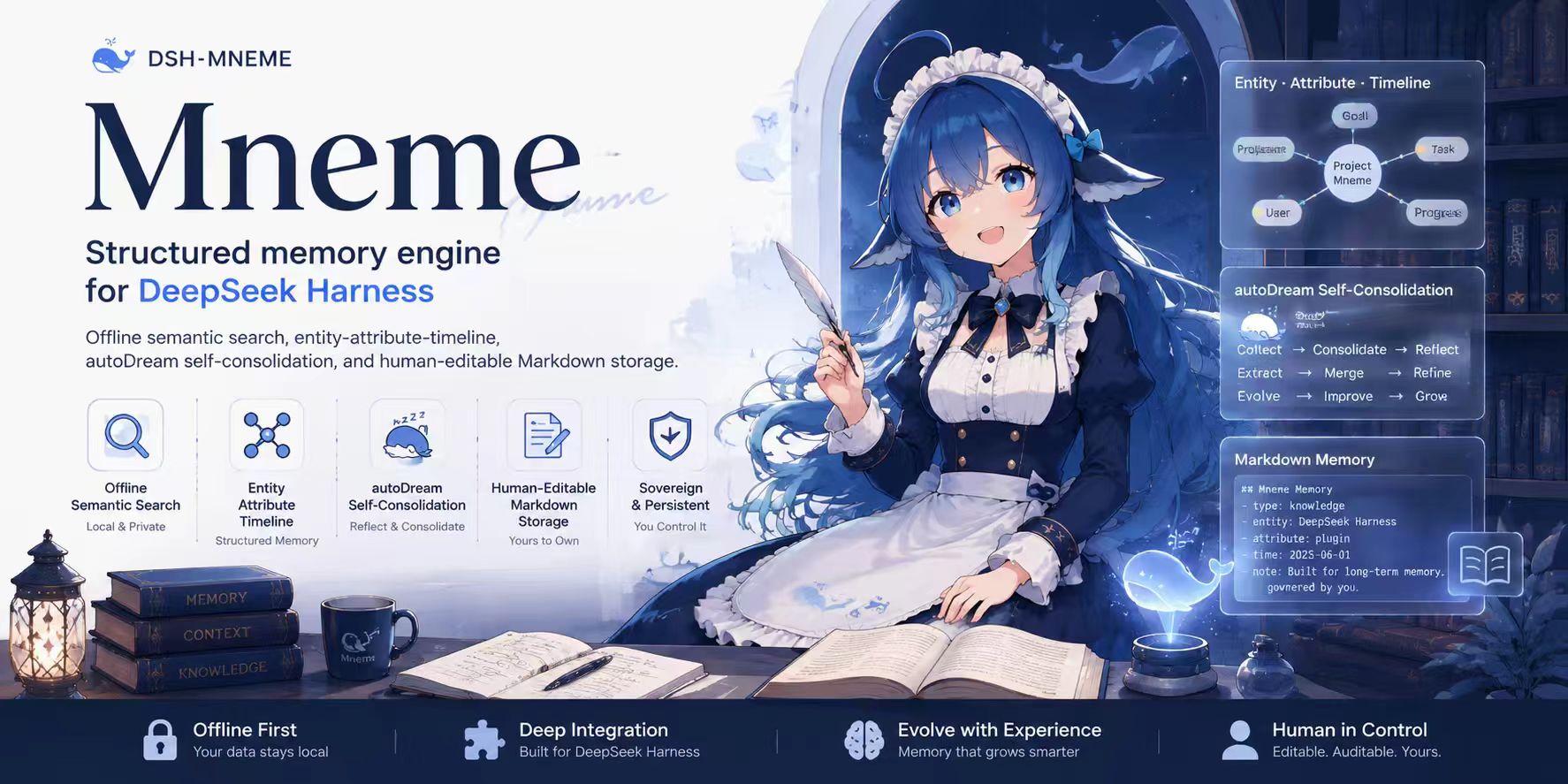 modusensus/dsh-mneme
🧠 The memory that dreams — self-evolving memory for DeepSeek Harness: your AI remembers across sessions, consolidates i…
modusensus/dsh-mneme
🧠 The memory that dreams — self-evolving memory for DeepSeek Harness: your AI remembers across sessions, consolidates i…
- Tasihi89/dsh-talk-map Visual conversation map for DeepSeek Harness — sessions as cards on a whiteboard: drag to arrange, double-click to chat,…
-
 Phant0Meow/dsh-meow-memory
Cross-session memory plugin for DeepSeek Harness: seven-layer SQLite store (soul/user/project/fact/lesson/topic/rules), …
Phant0Meow/dsh-meow-memory
Cross-session memory plugin for DeepSeek Harness: seven-layer SQLite store (soul/user/project/fact/lesson/topic/rules), …
-
 limbo947/dsh-recall-plugin
DSH 消息撤回插件:回到发送该消息时的状态 DSH Message Recall Plugin: Return to the state when the message was sent
limbo947/dsh-recall-plugin
DSH 消息撤回插件:回到发送该消息时的状态 DSH Message Recall Plugin: Return to the state when the message was sent