
mtty-ai/mmx-quota-tool
MiniMax 令牌计划额度坞站,适用于 DSH 网页版 — 下拉显示 5 小时使用百分比,点击查看详情面板,非 MiniMax 模型时自动隐藏。
Project Overview项目介绍
This is a native plugin built exclusively for the web version of DeepSeek Harness (DSH), designed to track and display MiniMax model quota usage. It can be installed in one line via the DSH CLI plugin command: dsh plugin --profile web add github:mtty-ai/mmx-quota-tool, after which you just need to restart the dsh web process to activate it. For development, you can manually clone the repository, copy it to your DSH profile's node_modules, and add an entry to the cordis patch config to register it. It mounts a UI indicator directly into DSH's conversation input area next to the existing model selector.
After installation, you need to configure your MiniMax API key as an environment variable before launching dsh web. You can export it directly in your shell before starting DSH, or add it to your shell rc file like ~/.zshrc or ~/.bashrc for persistent configuration. The plugin adds a drop-shaped icon that fills based on your 5-hour usage percentage, changing color from green under 50% to yellow under 80% and red above 80% to give you at-a-glance context. When you click the icon, a detail panel opens showing all MiniMax models' 5-hour and weekly usage, plus reset countdowns.
The plugin follows an MIT open-source license, with no associated costs or closed-source restrictions. It uses a split host-client architecture: the host side runs a scheduled poll of MiniMax's upstream API every 60 seconds by default (configurable via an environment variable) and exposes two HTTP endpoints for the client. The client side polls the host every 5 seconds to get the latest quota data, and automatically hides the indicator if the active default model is not a MiniMax model. It also supports DSH's locale system, switching UI text between Chinese and English based on your DSH interface settings.
这是一款专为 DeepSeek Harness(DSH)网页端开发的原生插件,用于展示 MiniMax 模型的配额使用情况。它会在对话输入区的模型选择器旁添加一个水滴形状的配额指示器,通过填充百分比和不同颜色直观显示当前 5 小时额度的使用占比。它支持通过 DSH 官方插件命令一键安装,也支持手动克隆源码后打补丁完成开发环境的安装。
安装配置完成后,用户在使用 MiniMax 模型时即可看到配额指示器,点击即可展开详情面板,查看所有 MiniMax 模型的 5 小时额度、每周额度使用数据以及重置倒计时。如果当前激活的默认模型不是 MiniMax 模型,插件会自动隐藏指示器,避免占用不必要的界面空间。它适合所有在 DSH 中使用 MiniMax 大模型的用户,帮助实时掌握配额消耗情况。
该插件遵循 MIT 开源协议,使用前需要用户配置自己的 MiniMax API 密钥,可通过环境变量导出密钥,也可将其写入 shell 配置文件永久生效。支持配置 MiniMax 的区域(中国区或全球区)、上游拉取间隔、客户端轮询间隔等参数。插件本身采用前后端分离架构,后端定时拉取配额数据,前端轮询更新界面显示。
请帮我安装这个 DSH 插件。安装前先完成【兼容性检查 + 安全性检查】,检查通过再动手。

插件:mmx-quota-tool(mtty-ai/mmx-quota-tool)
仓库:https://github.com/mtty-ai/mmx-quota-tool
本站详情页:https://www.yhbd.top/plugins/mtty-ai-mmx-quota-tool/
本站登记:类型 plugin · 归类 原生 DSH 插件 · 许可证 MIT · ⭐ 2 · 最近提交 2026-08-16 · 主语言 JavaScript

按下面顺序执行,每步先把结论告诉我,再进入下一步:

【1 兼容性检查】
① 我这边:DSH 版本、Node 版本、操作系统、当前 profile(web / desktop)。
② 读它的 README、package.json、插件 manifest,列出它要求的 DSH 版本 / Node 版本 / 操作系统 / 外部依赖 / 需要另外先装的运行时。
③ 逐条比对,结论只写「满足 / 不满足 / 未知」三种;不满足的给出可行替代方案。
④ 检查是否和我已装的插件冲突:命令名重复、skill / tool 重名、端口占用、重复注册的 MCP server。

【2 安全性检查】
① 仓库可信度:和上面「本站登记」是否一致;star / fork 数、创建时间、最近提交,是否归档或长期停更。
② 安装脚本:逐行看 package.json 的 preinstall / install / postinstall,以及 install.sh、setup.ps1 之类脚本。出现 curl|bash、下载后直接执行、混淆代码、访问与插件功能无关的域名,立刻停下来告诉我,不要继续装。
③ 依赖:列出新增依赖,标出无人维护、或与知名包拼写近似的可疑包(typosquatting)。
④ 权限与副作用:它会读写哪些目录、访问哪些域名、需要哪些 DSH 权限(filesystem / network / shell / clipboard 等),以及怎么卸载和回滚。
⑤ 如果它要求 sudo / 管理员权限,或权限明显超出功能所需,先停下来问我。

【3 安装】
上面两步没有「不满足」和「高危项」时才执行;用官方推荐方式安装,不要自行提权。

【4 汇报】
用表格输出:检查项 / 结论 / 依据 / 是否需要我决策。拿不准的一律写「未知」并说明要我怎么确认——不要猜,也不要替我决定。
Send this message to DSH in your current session: it verifies compatibility and security first (answering met / not met / unknown item by item) and only installs once everything checks out — it will stop and ask you if it finds a high-risk item. The box scrolls; the copy is the full prompt. CLI install commands may not be accurate across systems, so DSH is the safer route.把上面这条消息直接发给当前会话里的 DSH:它会先核对兼容性与安全性(逐条给「满足 / 不满足 / 未知」),确认没问题再安装,有高危项会停下来问你。框内可滚动,复制到的是完整提示词;安装命令不一定准确,发给 DSH 更稳。
- Only 2 stars - very few users, little community feedback星标只有 2,几乎没人在用,遇到问题缺少社区反馈
DSH walks through these 9 checksDSH 会逐条核对这 9 项
Compatibility兼容性
- DSH, Node, OS and profile requirementsDSH 版本 / Node 版本 / 操作系统 / profile 是否满足要求
- External dependencies and runtimes (Electron / Python / Docker, ...)外部依赖与运行时(Electron / Python / Docker 等)是否齐备
- Conflicts with installed plugins: command names, skill / tool names, ports, duplicate MCP registration与已装插件是否冲突:命令名、skill / tool 重名、端口占用、重复 MCP 注册
Security安全性
- Repo matches the facts registered here; archived or abandoned?仓库是否与页面登记一致,是否归档或长期停更
- Safety of preinstall / install / postinstall and install.sh / setup.ps1preinstall / install / postinstall 与 install.sh、setup.ps1 是否安全
- curl|bash, download-then-execute, obfuscation, unrelated domains → stop immediatelycurl|bash、下载即执行、混淆代码、无关域名 → 立刻停止
- Typosquatting or unmaintained packages among the new dependencies新增依赖里有没有 typosquatting 或无人维护的包
- Requested permissions vs. what the feature actually needs申请了哪些权限、是否超出功能所需(filesystem / network / shell / clipboard)
- Any sudo / admin requirement, plus uninstall and rollback是否要求 sudo / 管理员权限,以及卸载与回滚方式
Anything uncertain must be marked unknown with a note on how to confirm it. This site's signal screen is a static snapshot, not a security audit.拿不准的必须标「未知」并说明要我怎么确认。本站的信号筛查是静态快照,不能替代安全审计。
Or use CLI install (for developers)或使用命令行安装(适合开发者)
CLI Install命令行安装
dsh plugin --profile web add github:mtty-ai/mmx-quota-tool把 mtty-ai/mmx-quota-tool 加入你的 DSH 配置(web profile)即可启用。
READMEREADME
mmx-quota-tool
MiniMax token-plan quota dock for DeepSeek Harness (DSH) web.
Shows a drop-shape icon + 5h usage % in the conversation input area (next to the model selector). Click for a detail panel listing every model's 5h & weekly usage, reset countdown, and absolute numbers. Auto-hides when the active default model is not a MiniMax model.
Install
dsh plugin --profile web add github:mtty-ai/mmx-quota-tool
Then restart dsh web once.
Manual install (development)
git clone https://github.com/mtty-ai/mmx-quota-tool
cd mmx-quota-tool
# copy or link the package into your profile's node_modules
cp -R . ~/.dsh/profiles/web/node_modules/mmx-quota-tool/
Then add the row to ~/.dsh/profiles/web/cordis.patch.yml:
- insert:
    - id: mmx-quota-tool
      name: mmx-quota-tool
Configuration
This plugin requires a MiniMax API key. Export it before launching dsh web:
export MMX_API_KEY='sk-cp-your-key-here'
dsh web
Or put it in your shell rc (~/.zshrc, ~/.bashrc).
Optional environment variables:
| Var | Default | Purpose |
|---|---|---|
MMX_API_KEY |
(required) | MiniMax Bearer + x-api-key |
MMX_REGION |
cn |
cn (api.minimaxi.com) or global (api.minimax.io) |
MMX_REFRESH_MS |
60000 |
Host poll interval against upstream |
MMX_POLL_INTERVAL_MS |
5000 |
(client bundle) Client fetch interval |
The client bundle polls the host every 5 s so model-switch visibility is
within 5 s; the actual upstream fetch runs every MMX_REFRESH_MS.
Behavior
- The dock appears in the conversation input area (
conversation.input.left), adjacent to the model selector. - Icon is a drop/water shape, filled by 5h usage % (lower bar = better):
< 50%green< 80%yellow≥ 80%red
- Click toggles a detail panel; mouse-leave the dock or panel closes it.
- Shift+click forces an immediate upstream refresh.
- The dock is hidden entirely when the active default model is not a MiniMax
model — matched providers
minimax / minimax-cn / minimax-global / MiniMax*or model prefixesMiniMax- / minimax-. - Model name labels follow the active DSH UI locale:
- zh: 通用 / 视频 / 图像 / 音频 / 语音 / 音乐 / 视觉 / 向量 / 实时 / 长文本
- en: General / Video / Image / Audio / Speech / Music / Vision / Embedding / Realtime / Long context
- The dock label, panel header / headline / footer hint all switch language when the user changes DSH's interface language.
- The default is
zh(Chinese) — the language the upstream token-plan model names resolve to most naturally. If the locale service is unavailable the dock still renders.
Showing the opening section of the README — the full document lives in the repository以上为 README 开头摘要,完整文档在仓库内 · View the full README on GitHub →在 GitHub 查看完整 README →
Related相关推荐
-
 MeteorNOX/DeepSeek-Balance-Whale-Widget
DeepSeek Harness(DSH)一只住在 DSH 界面右下角的小鲸鱼娘,帮你盯着DeepSeek账户余额。QQ弹弹,支持拖拽吸附、左吸附翻转、数字滚动动画,随界面自动启用,建议直接喊来你的dsh安装
MeteorNOX/DeepSeek-Balance-Whale-Widget
DeepSeek Harness(DSH)一只住在 DSH 界面右下角的小鲸鱼娘,帮你盯着DeepSeek账户余额。QQ弹弹,支持拖拽吸附、左吸附翻转、数字滚动动画,随界面自动启用,建议直接喊来你的dsh安装
-
 edison7009/EchoBird
Manage ChatGPT, Codex CLI, and Claude Code accounts and track quota in one place. Use multi-model smart routing with pri…
edison7009/EchoBird
Manage ChatGPT, Codex CLI, and Claude Code accounts and track quota in one place. Use multi-model smart routing with pri…
-
 Han-1413141/dsh-cost-meter
Cost tracking for DeepSeek Harness: session and model costs, token usage, budgets, provider balances, and coding-plan qu…
Han-1413141/dsh-cost-meter
Cost tracking for DeepSeek Harness: session and model costs, token usage, budgets, provider balances, and coding-plan qu…
-
 wssfk12138/dsh-damage-pulse
DeepSeek Harness Token 余额监控插件:鲸鱼娘待机/扣费/复苏动画、峰谷计费、连续扣费飘字与会话费用统计。
wssfk12138/dsh-damage-pulse
DeepSeek Harness Token 余额监控插件:鲸鱼娘待机/扣费/复苏动画、峰谷计费、连续扣费飘字与会话费用统计。
-
 zh667/TokenLedger
Relay-site attributed token usage for DeepSeek Harness — zero config, no credentials
zh667/TokenLedger
Relay-site attributed token usage for DeepSeek Harness — zero config, no credentials
-
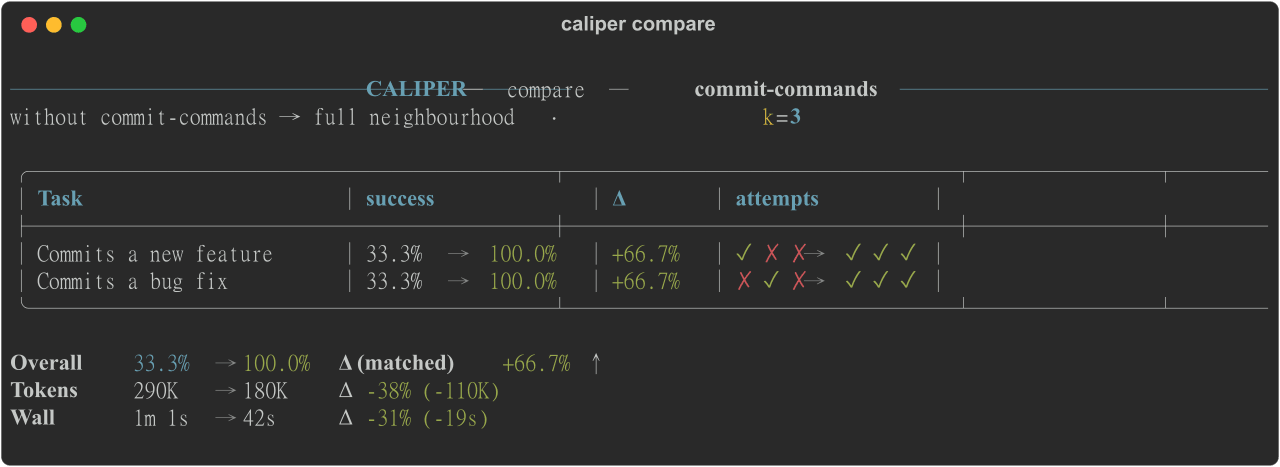 edonadei/caliper
Run your real agent with and without your skills, MCPs, and rules. See which ones actually help, and what they cost in t…
edonadei/caliper
Run your real agent with and without your skills, MCPs, and rules. See which ones actually help, and what they cost in t…
-
 Ychris12138/dsh-usage-stats
Provider balances, subscription quotas, and token-usage analytics for the DeepSeek Harness Web GUI (dsh web).
Ychris12138/dsh-usage-stats
Provider balances, subscription quotas, and token-usage analytics for the DeepSeek Harness Web GUI (dsh web).
-
 Aisland-SJL/dsh-usage
🌊 Persistent dock & fully-customizable balance/usage panel for DeepSeek Harness — activity heatmap, dual-channel compar…
Aisland-SJL/dsh-usage
🌊 Persistent dock & fully-customizable balance/usage panel for DeepSeek Harness — activity heatmap, dual-channel compar…