nautahakk/jev-codex-router
A DeepSeek Harness plugin that asks TypeSafe Jev to choose a Codex model and reasoning effort for each substantive prompt. You use Harness's web interface; the router changes the model used for the request.
catalog descriptioncatalog 简介 / catalog description:Jev-powered model and reasoning-effort router for Codex in DeepSeek Harness
Project Overview项目介绍
Jev Codex Router is a plugin purpose-built for DeepSeek Harness that consults TypeSafe's Jev service on every substantive prompt to pick a Codex model and reasoning effort among Luna, Terra, Sol, and Astra, then rewrites the request so the chosen route runs while the user stays inside Harness's normal web UI. Installation demands Node.js 22 or newer, Git, pnpm, a ChatGPT account with Codex access, and a TypeSafe API key, and proceeds by cloning the repository, running npm install, registering the third-party @syncended/dsh-codex provider at version 0.0.10 with npx dsh plugin --profile web add, then executing npm run router:install followed by npm run harness. A new Jev Router settings pane stores the TypeSafe key through Harness's credential service, and the README insists this is an unofficial community project with no endorsement from DeepSeek, TypeSafe, or OpenAI.
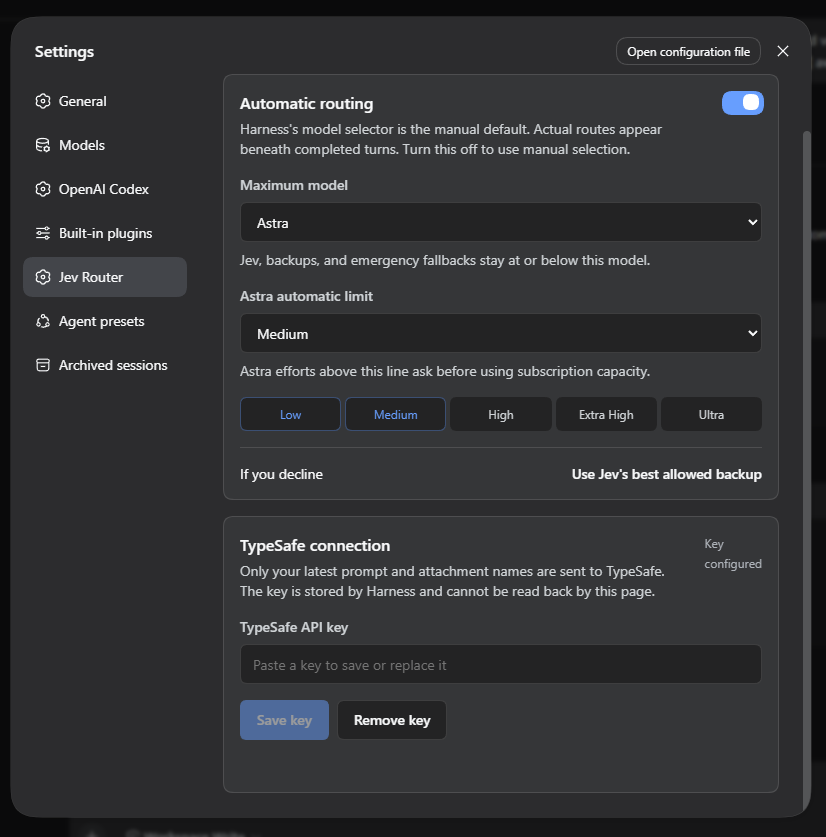
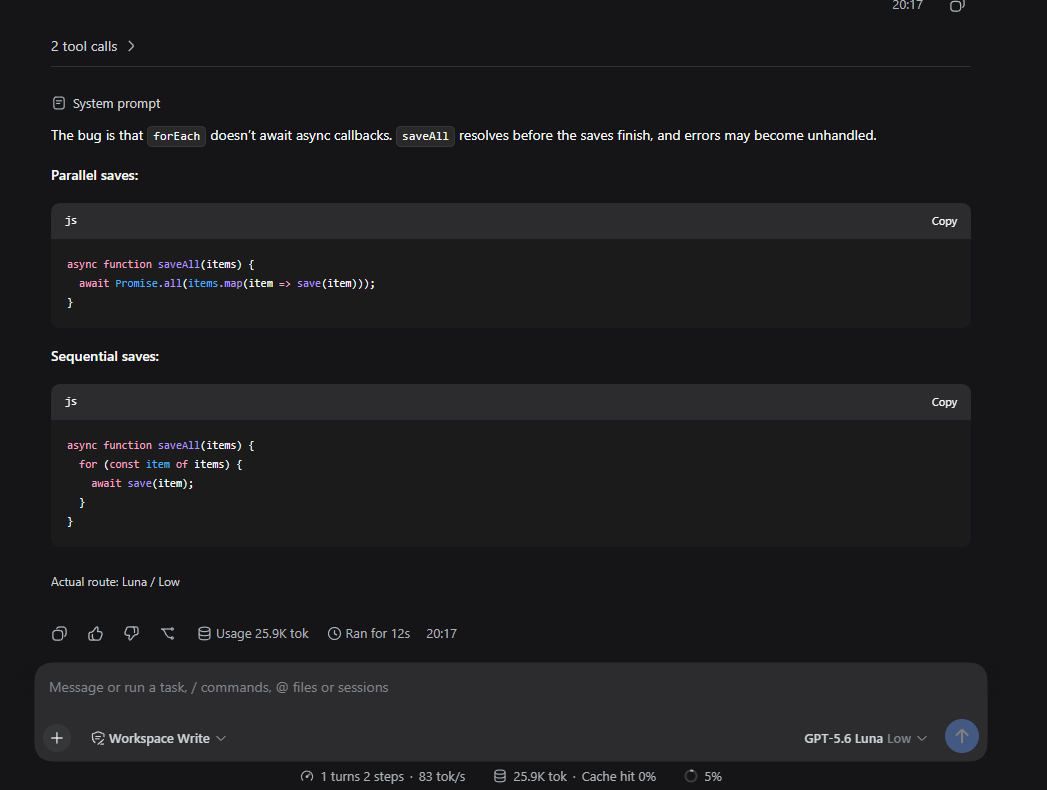
The intended audience is Harness users who want automatic, per-turn model selection without manually editing configuration between requests, and the workflow centers on a single settings page where operators cap the maximum eligible model (for example setting Sol to exclude Astra from Jev's choices, backups, and emergency fallbacks) and tune the Astra automatic threshold up to which it can run unattended, with any higher Astra effort asking for that turn's approval and a declined approval falling back to the best permitted model. Each completed Codex turn displays the actual model and reasoning effort used beneath the response, short acknowledgements such as "yes" or "continue" keep the previous route unless the maximum was lowered, and turning routing off restores Harness's manual selector, which makes the plugin attractive for users benchmarking routing policies, managing subscription costs, or sharing a Harness instance across teammates with different model budgets.
Hard dependencies include Node.js 22+, Git, and pnpm, while the repo pins @deepseek-ai/dsh to 0.1.6-alpha.2, the TypeSafe SDK to 0.6.0, and the Codex provider to 0.0.10; Jev receives at most the first 8,000 characters and last 4,000 characters of the latest user-authored prompt plus attachment type and display-name metadata, never file contents, tool output, OAuth tokens, or the full conversation. Licensing is MIT under the standard LICENSE file, but operators must budget TypeSafe usage separately from the ChatGPT subscription, and a documented upstream advisory warns that the pinned Harness stack pulls fflate@0.8.2 through its office-to-PDF pipeline, which can stall on malformed ZIP64 files, so the README recommends avoiding untrusted document uploads until upstream ships a fix. The first-run caveat is to restart Harness after installing or updating any plugin and to keep the checkout in place so that the Windows npm run launcher:install desktop shortcut and the locally linked plugin continue to resolve.
Jev Codex Router 是一个专为 DeepSeek Harness 设计的插件,其核心功能是在用户每次发送重要提示词时,调用 TypeSafe 的 Jev 服务,自动从 Luna、Terra、Sol、Astra 四款 Codex 模型中选择最合适的型号与推理强度。安装过程需要 Node.js 22+、pnpm、ChatGPT 账号以及 TypeSafe API 密钥,先通过 npx dsh plugin --profile web add @syncended/dsh-codex@0.0.10 注册第三方 Codex 登录提供方,再执行 npm run router:install 与 npm run harness 启动 Harness。整个交互完全留在 Harness 的 Web 界面中,路由所选模型会在每次回复下方显示实际结果。
典型使用场景是希望精细化控制 ChatGPT Codex 路由、并对模型成本与质量进行权衡的开发者或高级用户。用户可以在设置中设定最大允许模型,将 Astra 自动执行的上限调整到指定强度,并启用手动最大模型切换;低于最大模型限制时,路由器会复用上一轮的路径来减少中断。如果 Jev 服务不可用,插件会公开声明一个允许的回退方案;若当前设定下不存在任何符合要求的路径,则会停止该轮回复,而不是超出用户在设置中的限制。
依赖项包括 Node.js 22+、Git 与 pnpm,代码仓库固定 @deepseek-ai/dsh 为 0.1.6-alpha.2、TypeSafe SDK 为 0.6.0、Codex 提供方为 0.0.10。Jev 仅接收用户最新提示词的部分文本与附件元数据,不收集文件内容、工具输出或 OAuth 令牌;TypeSafe 密钥通过 Harness 的凭据服务保存。需要注意上游存在已知问题:固定的 Harness 栈通过 office 转 PDF 功能引入 fflate@0.8.2,存在被恶意 ZIP64 文件卡住的公开漏洞,建议在 Harness 更新前避免上传不可信文档。Windows 用户可通过 npm run launcher:install 创建可选桌面快捷方式,仓库必须保留在原位置。项目以 MIT 许可证发布,并明确声明其为独立项目,与 DeepSeek、TypeSafe 或 OpenAI 均无官方关联。
请帮我安装这个 DSH 插件。安装前先完成【兼容性检查 + 安全性检查】,检查通过再动手。

插件:jev-codex-router(nautahakk/jev-codex-router)
仓库:https://github.com/nautahakk/jev-codex-router
本站详情页:https://www.yhbd.top/plugins/nautahakk-jev-codex-router/
本站登记:类型 plugin · 归类 原生 DSH 插件 · 许可证 MIT · ⭐ 4 · 最近提交 2026-09-22 · 主语言 JavaScript · 未检测到 DSH 插件清单

按下面顺序执行,每步先把结论告诉我,再进入下一步:

【1 兼容性检查】
① 我这边:DSH 版本、Node 版本、操作系统、当前 profile(web / desktop)。
② 读它的 README、package.json、插件 manifest,列出它要求的 DSH 版本 / Node 版本 / 操作系统 / 外部依赖 / 需要另外先装的运行时。
③ 逐条比对,结论只写「满足 / 不满足 / 未知」三种;不满足的给出可行替代方案。
④ 检查是否和我已装的插件冲突:命令名重复、skill / tool 重名、端口占用、重复注册的 MCP server。

【2 安全性检查】
① 仓库可信度:和上面「本站登记」是否一致;star / fork 数、创建时间、最近提交,是否归档或长期停更。
② 安装脚本:逐行看 package.json 的 preinstall / install / postinstall,以及 install.sh、setup.ps1 之类脚本。出现 curl|bash、下载后直接执行、混淆代码、访问与插件功能无关的域名,立刻停下来告诉我,不要继续装。
③ 依赖:列出新增依赖,标出无人维护、或与知名包拼写近似的可疑包(typosquatting)。
④ 权限与副作用:它会读写哪些目录、访问哪些域名、需要哪些 DSH 权限(filesystem / network / shell / clipboard 等),以及怎么卸载和回滚。
⑤ 如果它要求 sudo / 管理员权限,或权限明显超出功能所需,先停下来问我。

【3 安装】
上面两步没有「不满足」和「高危项」时才执行;用官方推荐方式安装,不要自行提权。

【4 汇报】
用表格输出:检查项 / 结论 / 依据 / 是否需要我决策。拿不准的一律写「未知」并说明要我怎么确认——不要猜,也不要替我决定。
Send this message to DSH in your current session: it verifies compatibility and security first (answering met / not met / unknown item by item) and only installs once everything checks out — it will stop and ask you if it finds a high-risk item. The box scrolls; the copy is the full prompt. CLI install commands may not be accurate across systems, so DSH is the safer route.把上面这条消息直接发给当前会话里的 DSH:它会先核对兼容性与安全性(逐条给「满足 / 不满足 / 未知」),确认没问题再安装,有高危项会停下来问你。框内可滚动,复制到的是完整提示词;安装命令不一定准确,发给 DSH 更稳。
- Only 4 stars - very few users, little community feedback星标只有 4,几乎没人在用,遇到问题缺少社区反馈
- No DSH plugin manifest detected - it may only carry the dsh-plugin topic, so the install method must be confirmed on the spot未检测到 DSH 插件清单:可能只是打了 dsh-plugin 话题,安装方式要现场确认
DSH walks through these 9 checksDSH 会逐条核对这 9 项
Compatibility兼容性
- DSH, Node, OS and profile requirementsDSH 版本 / Node 版本 / 操作系统 / profile 是否满足要求
- External dependencies and runtimes (Electron / Python / Docker, ...)外部依赖与运行时(Electron / Python / Docker 等)是否齐备
- Conflicts with installed plugins: command names, skill / tool names, ports, duplicate MCP registration与已装插件是否冲突:命令名、skill / tool 重名、端口占用、重复 MCP 注册
Security安全性
- Repo matches the facts registered here; archived or abandoned?仓库是否与页面登记一致,是否归档或长期停更
- Safety of preinstall / install / postinstall and install.sh / setup.ps1preinstall / install / postinstall 与 install.sh、setup.ps1 是否安全
- curl|bash, download-then-execute, obfuscation, unrelated domains → stop immediatelycurl|bash、下载即执行、混淆代码、无关域名 → 立刻停止
- Typosquatting or unmaintained packages among the new dependencies新增依赖里有没有 typosquatting 或无人维护的包
- Requested permissions vs. what the feature actually needs申请了哪些权限、是否超出功能所需(filesystem / network / shell / clipboard)
- Any sudo / admin requirement, plus uninstall and rollback是否要求 sudo / 管理员权限,以及卸载与回滚方式
Anything uncertain must be marked unknown with a note on how to confirm it. This site's signal screen is a static snapshot, not a security audit.拿不准的必须标「未知」并说明要我怎么确认。本站的信号筛查是静态快照,不能替代安全审计。
Or use CLI install (for developers)或使用命令行安装(适合开发者)
CLI Install命令行安装
dsh plugin --profile web add github:nautahakk/jev-codex-router把 nautahakk/jev-codex-router 加入你的 DSH 配置(web profile)即可启用。
READMEREADME
Jev Codex Router
A DeepSeek Harness plugin that asks TypeSafe Jev to choose a Codex model and reasoning effort for each substantive prompt. You use Harness's web interface; the router changes the model used for the request.
This is an independent project, not an official DeepSeek, TypeSafe, or OpenAI plugin. DeepSeek Harness is in developer preview, so upstream updates may break compatibility.
What it does
- Routes among Luna, Terra, Sol, and Astra with the reasoning efforts advertised by the installed Codex provider.
- Lets you set a maximum model. Setting Sol excludes Astra from Jev's choices, backups, and emergency fallbacks.
- Lets Astra run automatically up to your chosen effort. Higher Astra efforts ask for approval for that turn; declining uses the best permitted backup.
- Shows the actual model and effort recorded for each completed Codex turn beneath the response. Harness's model selector remains its manual default and may show something different while routing is on.
- Reuses the previous route for short replies such as “yes” and “continue,” unless the maximum model has since been lowered.
If Jev is unavailable, the router announces a permitted fallback. If no permitted route exists, the turn stops rather than exceeding your model or Astra-effort limit. Turning routing off restores Harness's manual model selection.
Demo
Benchmark
In a 60-prompt routing and nine-task coding benchmark, Jev preferred Luna 38 times, Terra once, Sol 13 times, and Astra eight times. It applied Luna/Low to eight coding tasks and Sol/High to one; Jev, fixed Sol/Medium, and fixed Astra/Medium each passed all nine. This small sample does not establish subscription savings or a universally best route. Switching models or efforts between turns may reduce prompt-cache reuse; that effect was not measured.
Showing the opening section of the README — the full document lives in the repository以上为 README 开头摘要,完整文档在仓库内 · View the full README on GitHub →在 GitHub 查看完整 README →
Related相关推荐
- voyager-crew/voyager Enhancement suite for Gemini, AI Studio, Claude, ChatGPT & DeepSeek — plus a prompt manager for any website, DeepSeek Ha…
-
 Q00/ouroboros
Agent OS: the agent gets smarter on its own. We just hold the line: Interview-gated, staged evaluation, budgeted evoluti…
Q00/ouroboros
Agent OS: the agent gets smarter on its own. We just hold the line: Interview-gated, staged evaluation, budgeted evoluti…
-
 crafter-station/petdex
A public gallery of animated pets for Codex, Claude Code, DeepSeek Harness, Hermes, OpenCode, Gemini CLI, and more.
crafter-station/petdex
A public gallery of animated pets for Codex, Claude Code, DeepSeek Harness, Hermes, OpenCode, Gemini CLI, and more.
-
 whiteguo233/OpenBiliClaw
本地私有、开源的自进化跨平台 AI 内容发现 Agent:先理解你,再主动从 B站、小红书、抖音、YouTube、X、知乎、Reddit、微博等平台与开放 Web 寻找内容。(支持 deepseek harness 插件) | Local-…
whiteguo233/OpenBiliClaw
本地私有、开源的自进化跨平台 AI 内容发现 Agent:先理解你,再主动从 B站、小红书、抖音、YouTube、X、知乎、Reddit、微博等平台与开放 Web 寻找内容。(支持 deepseek harness 插件) | Local-…
-
 anywhere-labs/Agents-Anywhere
跨设备的开源Agent工作台
anywhere-labs/Agents-Anywhere
跨设备的开源Agent工作台
-
 agentrq/agentrq
AgentRQ: Human-in-loop realtime conversational task manager for AI Agents. Self-hosted! Control your own agents from whe…
agentrq/agentrq
AgentRQ: Human-in-loop realtime conversational task manager for AI Agents. Self-hosted! Control your own agents from whe…
-
 freestylefly/wesight
Open-source desktop AI agent workspace with one-click Claude Code, Codex, OpenClaw, Hermes Agent setup and custom LLM mo…
freestylefly/wesight
Open-source desktop AI agent workspace with one-click Claude Code, Codex, OpenClaw, Hermes Agent setup and custom LLM mo…
- zouyuxuan122/dsh-our-free-model 在 dsh 里装上这个插件即可,无需登录、注册或填 API Key,就能使用包括 Muse Spark 1.3、MiMo V2.6 在内的前沿模型——完全免费,不限量。 All you do is install this plugin i…