Quimos-M/dsh-turn-cost
本项目目的是制作一个简单的计价显示,使用与DSH本体用量、用时显示一致的外观,显示单轮对话及整个会话按 DeepSeek 官方 API 价格计算的花费。 本项目代码及文档由 WSL 环境 DSH 中调用 deepseek-v4-flash-vision-exp 路由的 deepseek-v4.1-flash 开发或生成,人类只进行了需求、审查和文档微调。
catalog descriptioncatalog 简介 / catalog description:适用于 DSH Web 的计价插件:按 DeepSeek 官方 API 价格统计并显示每轮 / 每会话花费,含子代理计价与分页明细
Project Overview项目介绍
dsh-turn-cost isnative DSH (DeepSeek Harness) pricing plugin that surfacesper-turn and session-total DeepSeek 官方 API pricing. It appends one cost pill into the composer stats row beneath the input box and another into each turn’s tail action row, both styled to match DSH’s native "token usage / cache hit rate" controlspop-up dialog shows per-request model, cache-hit ratio, andthree-bucket breakdown (cached input, non-cached input, output) in tokens and CNY. Installation is donevia dsh plugin --profile web add link:~/dsh-plugins/dsh-turn-cost or an npm pack tgz; the bundle is listed in profiles/web/package.json under dependencies and the dsh.profile.bundles array. The plugin does not modify DSH source, only contributes a pure folding function to the session projection registry, and removal leaves no residue.
Typical usage begins the moment a turn completes: the per-turn pill showscost, the session pill accumulates across turns, scrolling, pagingcontext compaction, and forking do not alter the totals. Sub-agents run as independent sessions whose costs are folded into the parent’s bill via the official useSessions seat; the dialog pages through the total, the main agent, and each sub-agent, with arrows, ←/→, Enter cycling, and Esc closing.The plugin is intended for DSH users running multi-agent workflows whorequire granularmonitoring of DeepSeek spending, including those paying peakoff-peakflash idle rates of ¥0.02/¥1/¥4 per million tokens.
Dependencies are confined to public DSH seams: the session projection registry, two list slots, the client platform module table (react, @deepseek-ai/dsh-client-ui-primitives), and standard seat props; no runtime imports mean no load-failure paths. The build, web platform, and two CSS modules are derivedfrom officialDSH source (MIT, DeepSeek copyright 2026); the dialog’s paging control and height rules are original. Verified on DSH 0.1.5-rc.1 and 0.2.0-rc.2 desktop,MIT licensed, priced provider ids listed in src/providers.ts (DeepSeek-official,eepSeek-account). Limitations: numbers are estimates based onpublicprice sheet and reported tokens, do not equalDeepSeek Open Platform bills; title generation and web/deepseek-search side-channel calls are excluded; un-priced providers are surfaced as "未计价" rather than silently zeroed.
dsh-turn-cost 是一款面向 DeepSeek Harness(DSH)的原生计价插件。它在 DSH 输入框下方的会话统计行与每轮回答尾部动作行各追加一个花费 pill,外观与原生"用量 / 缓存命中率"一致;点开弹窗可逐轮、按请求查看基于 DeepSeek 官方 API 价格的明细。插件以 link: 路径或 npm pack 产出的 tgz 形式挂载到 profiles/web 的 bundles,不改动 DSH 源码,卸载即净。
典型工作流:用户与 DSH 完成一轮对话后,pill 即时显示本轮花费;子代理产生的费用会被按请求时刻归入对应轮次,弹窗分页可逐个查看总计、主代理、各子代理的 token 三桶与金额。所有数字按版本化价格表(峰价 = 谷价 × 2,flash 空闲 ¥0.02/¥1/¥4)以微元整数累加,无浮点漂移。适合需要实时核算 DSH 用量成本的个人用户与多代理工作流使用者。
依赖仅限 DSH 公共接缝:session 投影注册表、两个 list 槽位、客户端平台模块表,无运行时 import。已在 DSH 0.1.5-rc.1 与 0.2.0-rc.2(桌面端)实测通过,MIT 协议发布。需要警惕:所示数字为官方价目表推算的估算值,不含标题生成与 web/deepseek-search 等旁路调用,未收录 provider 会显式标"未计价"而非静默归零。
请帮我安装这个 DSH 插件。安装前先完成【兼容性检查 + 安全性检查】,检查通过再动手。

插件:dsh-turn-cost(Quimos-M/dsh-turn-cost)
仓库:https://github.com/Quimos-M/dsh-turn-cost
本站详情页:https://www.yhbd.top/plugins/quimos-m-dsh-turn-cost/
本站登记:类型 plugin · 归类 原生 DSH 插件 · 许可证 MIT · ⭐ 3 · 最近提交 2026-10-02 · 主语言 TypeScript

按下面顺序执行,每步先把结论告诉我,再进入下一步:

【1 兼容性检查】
① 我这边:DSH 版本、Node 版本、操作系统、当前 profile(web / desktop)。
② 读它的 README、package.json、插件 manifest,列出它要求的 DSH 版本 / Node 版本 / 操作系统 / 外部依赖 / 需要另外先装的运行时。
③ 逐条比对,结论只写「满足 / 不满足 / 未知」三种;不满足的给出可行替代方案。
④ 检查是否和我已装的插件冲突:命令名重复、skill / tool 重名、端口占用、重复注册的 MCP server。

【2 安全性检查】
① 仓库可信度:和上面「本站登记」是否一致;star / fork 数、创建时间、最近提交,是否归档或长期停更。
② 安装脚本:逐行看 package.json 的 preinstall / install / postinstall,以及 install.sh、setup.ps1 之类脚本。出现 curl|bash、下载后直接执行、混淆代码、访问与插件功能无关的域名,立刻停下来告诉我,不要继续装。
③ 依赖:列出新增依赖,标出无人维护、或与知名包拼写近似的可疑包(typosquatting)。
④ 权限与副作用:它会读写哪些目录、访问哪些域名、需要哪些 DSH 权限(filesystem / network / shell / clipboard 等),以及怎么卸载和回滚。
⑤ 如果它要求 sudo / 管理员权限,或权限明显超出功能所需,先停下来问我。

【3 安装】
上面两步没有「不满足」和「高危项」时才执行;用官方推荐方式安装,不要自行提权。

【4 汇报】
用表格输出:检查项 / 结论 / 依据 / 是否需要我决策。拿不准的一律写「未知」并说明要我怎么确认——不要猜,也不要替我决定。
Send this message to DSH in your current session: it verifies compatibility and security first (answering met / not met / unknown item by item) and only installs once everything checks out — it will stop and ask you if it finds a high-risk item. The box scrolls; the copy is the full prompt. CLI install commands may not be accurate across systems, so DSH is the safer route.把上面这条消息直接发给当前会话里的 DSH:它会先核对兼容性与安全性(逐条给「满足 / 不满足 / 未知」),确认没问题再安装,有高危项会停下来问你。框内可滚动,复制到的是完整提示词;安装命令不一定准确,发给 DSH 更稳。
- Only 3 stars - very few users, little community feedback星标只有 3,几乎没人在用,遇到问题缺少社区反馈
DSH walks through these 9 checksDSH 会逐条核对这 9 项
Compatibility兼容性
- DSH, Node, OS and profile requirementsDSH 版本 / Node 版本 / 操作系统 / profile 是否满足要求
- External dependencies and runtimes (Electron / Python / Docker, ...)外部依赖与运行时(Electron / Python / Docker 等)是否齐备
- Conflicts with installed plugins: command names, skill / tool names, ports, duplicate MCP registration与已装插件是否冲突:命令名、skill / tool 重名、端口占用、重复 MCP 注册
Security安全性
- Repo matches the facts registered here; archived or abandoned?仓库是否与页面登记一致,是否归档或长期停更
- Safety of preinstall / install / postinstall and install.sh / setup.ps1preinstall / install / postinstall 与 install.sh、setup.ps1 是否安全
- curl|bash, download-then-execute, obfuscation, unrelated domains → stop immediatelycurl|bash、下载即执行、混淆代码、无关域名 → 立刻停止
- Typosquatting or unmaintained packages among the new dependencies新增依赖里有没有 typosquatting 或无人维护的包
- Requested permissions vs. what the feature actually needs申请了哪些权限、是否超出功能所需(filesystem / network / shell / clipboard)
- Any sudo / admin requirement, plus uninstall and rollback是否要求 sudo / 管理员权限,以及卸载与回滚方式
Anything uncertain must be marked unknown with a note on how to confirm it. This site's signal screen is a static snapshot, not a security audit.拿不准的必须标「未知」并说明要我怎么确认。本站的信号筛查是静态快照,不能替代安全审计。
Or use CLI install (for developers)或使用命令行安装(适合开发者)
CLI Install命令行安装
dsh plugin --profile web add github:Quimos-M/dsh-turn-cost把 Quimos-M/dsh-turn-cost 加入你的 DSH 配置(web profile)即可启用。
READMEREADME
dsh-turn-cost
本项目目的是制作一个简单的计价显示,使用与DSH本体用量、用时显示一致的外观,显示单轮对话及整个会话按 DeepSeek 官方 API 价格计算的花费。 本项目代码及文档由 WSL 环境 DSH 中调用 deepseek-v4-flash-vision-exp 路由的 deepseek-v4.1-flash 开发或生成,人类只进行了需求、审查和文档微调。
| 会话累计 | 每轮花费 |
|---|---|
 |
 |
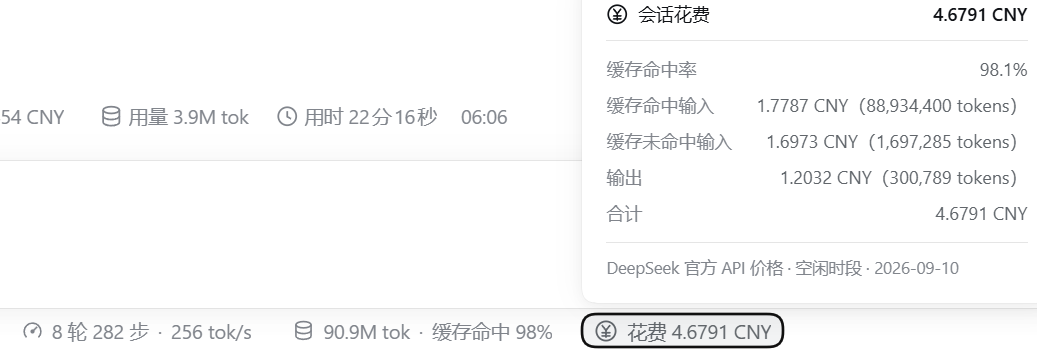
左图:输入框下方与「轮/步 · 速度」「总 token · 缓存命中率」同排的会话花费,点开是整段会话的累计明细。
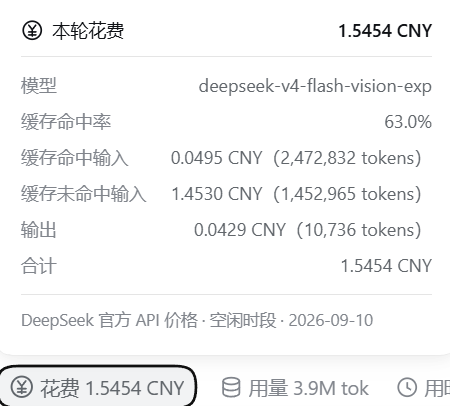
右图:每轮回答尾部动作行里的花费 pill(标签末尾的 含子代理 N 表示该轮有 N 个子代理计入),点开是本轮明细。
截图为早期开发版本内容,仅用于粗略展示功能,实际UI请以使用实测为准。
界面截图中 DSH / DeepSeek 商标归其所有者。
插件功能
- 每轮花费:读取该轮实际发生的每次模型请求,按请求时刻的官方单价计价后求和;弹窗给出本轮用的模型、缓存命中率,以及缓存命中输入 / 缓存未命中输入 / 输出三项各自的 token 数与对应金额、合计。该轮调用的子代理也会计入本轮(见下条)。
- 会话累计:把各轮花费逐轮累加,每一轮用的是当次请求的模型与价格;翻页、滚动、上下文压缩、分叉都不会让数字变化。
- 弹窗可以翻页看总计与每个代理的明细:点开任意一个花费弹窗,明细区下方就是一条极简翻页控件
‹ 2/4 ›。有子代理时第 1 页是总计(三桶与合计,末尾一行由 N 个代理构成 : 主 Agent x CNY + 子代理 y CNY说明钱花在谁身上)、第 2 页是主 Agent(会话 pill 是"本会话自身",每轮 pill 是"本轮自身")、第 3 页起每个子代理一页(名称 / 模型 / 三桶 / 合计 / 归属轮次)。没有子代理时弹窗就是单页(与分页前逐条一致),不出现任何翻页控件。 - 翻页怎么操作:点
‹/›,或按←/→前后翻(到两端就停住);按Enter循环翻到下一页(最后一页回到第 1 页),连按即可把每页过一遍;Esc关闭弹窗(Esc是原生弹窗本来就有的行为)。子代理个数变化导致页数变少时,当前页会自动夹到最后一页,不会看到空白页。 - 子代理(subagent):子代理是独立会话,花费记在它自己的日志里。插件按官方会话列表把全部后代子会话(含孙代)的花费聚合进来:会话 pill 的金额 = 本会话自身 + 各子代理自身,弹窗按上面的页序逐页查看总计与各代理明细,并在标签上标
含子代理 N;每轮 pill 分页里的子代理页只包含该轮调用的子代理。归属规则是"按子代理那一轮的开始时刻落进本会话的对应轮次",取不到时刻时退回它被创建的轮次并在弹窗里标注按创建轮归属。 - 两个弹窗底部都有一行脚注说明计价依据,例如
DeepSeek 官方 API 价格 · 空闲时段 · 2026-09-10;每一页都保留这行脚注,翻到哪一页都知道数字是按什么价算的。
实现方式
插件不改动DSH官方源码,不覆盖任何原生UI:
- host 侧注册一个 session「投影单元」——DSH 原生的投影接缝(与官方
tokenUsage/sessionStats同一种机制)。订阅、水位、变更推送、持久缓存全由框架负责,插件只贡献一个纯折叠函数;这正是数字不受分页 / 压缩影响的原因。 - client 侧只向两个 list 槽位(输入框下的会话统计行、每轮的动作行)追加条目,并只移动自己的节点去对齐到原生「用量」pill 旁边;不替换、包裹或隐藏任何原生元素。
- 卸载即净:移出插件后两个 pill 与投影一起消失,无残留。插件内任何一环失败(找不到锚点、注册冲突、渲染异常)都只会降级为"自己不显示"或"退回原位",在设计上不会影响 DSH 本身。
如何计价
- 区分消耗token类型:缓存命中输入(
prompt_cache_hit_tokens)、缓存未命中输入(prompt_tokens − 命中)、输出(completion_tokens;思维链已含在输出内,不重复计费)。 - 单价:DeepSeek官方API价格,以人民币计价,按「模型家族 + 生效时间」版本化,并按请求时刻自动区分高峰 / 空闲(峰价 = 谷价 × 2;高峰为北京时间周一至周五 09:00–12:00、14:00–18:00)。例如 flash 系列当前空闲价为 ¥0.02 / ¥1 / ¥4(每百万 token 的命中 / 未命中 / 输出),
deepseek-v4-pro按其自身价。历史会话用当时的价格(8/17 峰谷启用、8/23 起周末全天谷价、9/10 flash 降价,均已收录)。 - 精度:金额以微元整数累加(
round(tokens × 元/百万)),无浮点漂移;显示为花费 1.1451 CNY,不足 0.0001 元显示<0.0001 CNY。 - 与原生口径逐条对齐:同一
(turn, step)的流式样本会被最终样本替换;失败重试的每一次请求都真实累加(llm/retry-started之后不清零)。 - 未收录模型按同类价估算并在弹窗标注;非官方 provider 的路由(例如经 DSH 官方
llm-pi-ai适配器接入的第三方模型)默认不计价(其他被计价的请求照常累计),可用插件配置pricedProviders放开(配置写在 profile 的cordis.patch.ymlinsert 行config里;'*'= 全部放开)。官方 provider id 显式列举在src/providers.ts(唯一维护点):目前收录deepseek-official(DSH 0.1.5-rc.1 及更早)与deepseek-account(DSH 0.2.0-rc.2 起账号登录 / 桌面端)。 - 未计价会显式标出(不会静默显示 0):只要有请求因 provider 未收录而没计价,pill 标签就写
· 未计价 provider <id>;若整个会话/这一轮完全没有可计价的金额,则写花费 未计价(<id>)而不是0 CNY,弹窗脚注也说明金额不含这些 provider。这样"钱花了但没算进来"一眼可见——DSH 0.2.0-rc.2 把官方 provider 改名时,旧版正是静默失效的。 - 口径边界(重要):以上数字是「官方公开价目表 × provider 上报 token」推算出的估算值,不等于 DeepSeek 开放平台的最终账单,以开放平台为准。会话花费与每轮花费已包含子代理会话(按官方会话列表聚合全部后代子会话,见上条);仍不包含标题生成、联网搜索(
web/deepseek-search-llm-request)这类同会话内但不走计价请求的旁路调用——平台会为这些请求扣费,但本插件的「会话花费」看不到。
Showing the opening section of the README — the full document lives in the repository以上为 README 开头摘要,完整文档在仓库内 · View the full README on GitHub →在 GitHub 查看完整 README →
Related相关推荐
-
 wssfk12138/dsh-damage-pulse
DeepSeek Harness Token 余额监控插件:鲸鱼娘待机/扣费/复苏动画、峰谷计费、连续扣费飘字与会话费用统计。
wssfk12138/dsh-damage-pulse
DeepSeek Harness Token 余额监控插件:鲸鱼娘待机/扣费/复苏动画、峰谷计费、连续扣费飘字与会话费用统计。
-
 Ychris12138/dsh-usage-stats
Provider balances, subscription quotas, and token-usage analytics for the DeepSeek Harness Web GUI (dsh web).
Ychris12138/dsh-usage-stats
Provider balances, subscription quotas, and token-usage analytics for the DeepSeek Harness Web GUI (dsh web).
-
 JingbiaoMei/Tokdash
Agent Dashboard: Visualization and analytics for Sessions and Quota Usage. Track, analyze, and optimize token usage acro…
JingbiaoMei/Tokdash
Agent Dashboard: Visualization and analytics for Sessions and Quota Usage. Track, analyze, and optimize token usage acro…
-
 yxxbc/dsh-balance-plugin
deepSeek 余额监控与用量统计(DSH 动态 Cordis 插件):余额监控 · 官方充值入口 · 用量统计 · 三方插件管理
yxxbc/dsh-balance-plugin
deepSeek 余额监控与用量统计(DSH 动态 Cordis 插件):余额监控 · 官方充值入口 · 用量统计 · 三方插件管理
-
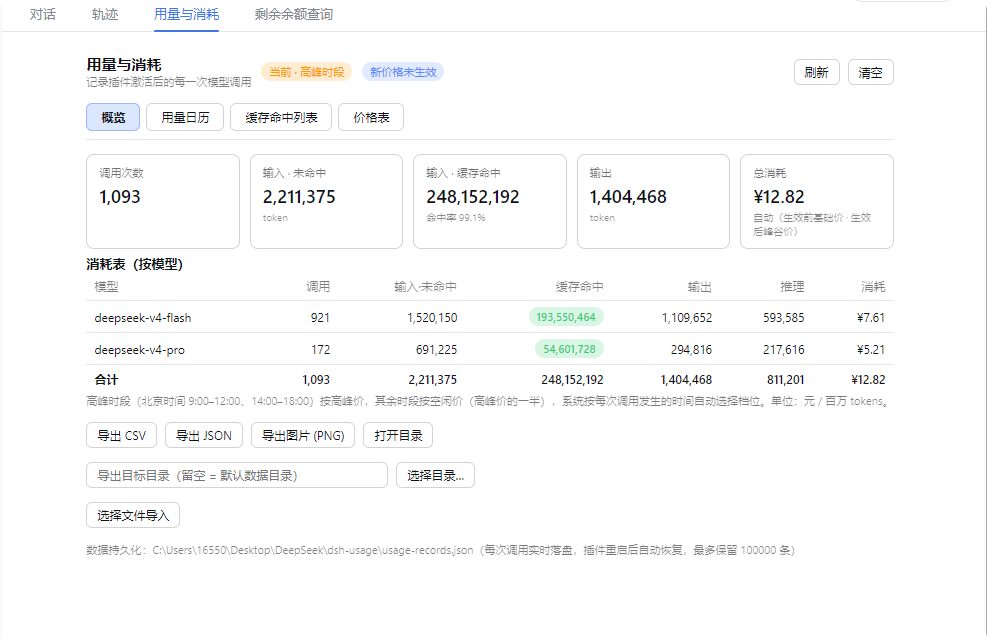 feiyang-dev/dsh-usage-plugin
DeepSeek Harness 用量与消耗插件(dsh-usage-plugin)—— 每次调用的 token 用量/缓存命中统计、峰谷计费、余额查询、CSV/JSON/PNG 导出,可经桌面端一键安装或命令行 dsh plugin ad…
feiyang-dev/dsh-usage-plugin
DeepSeek Harness 用量与消耗插件(dsh-usage-plugin)—— 每次调用的 token 用量/缓存命中统计、峰谷计费、余额查询、CSV/JSON/PNG 导出,可经桌面端一键安装或命令行 dsh plugin ad…
-
 LaoYueHanNi/dsh-token-usage
贴近 DSH 原生设计风格的 token 用量统计插件:实时记录每次请求的用量与费用,在 Web UI 中提供趋势图表、按模型定价明细和供应商配额显示。
LaoYueHanNi/dsh-token-usage
贴近 DSH 原生设计风格的 token 用量统计插件:实时记录每次请求的用量与费用,在 Web UI 中提供趋势图表、按模型定价明细和供应商配额显示。
-
 lanlandeli/dsh-usage-stats
DeepSeek Harness 使用统计插件|Token 总量与构成、7/30 天趋势、年度活跃热力图、模型占比、工作区/任务筛选、CSV/JSON 导出
lanlandeli/dsh-usage-stats
DeepSeek Harness 使用统计插件|Token 总量与构成、7/30 天趋势、年度活跃热力图、模型占比、工作区/任务筛选、CSV/JSON 导出
-
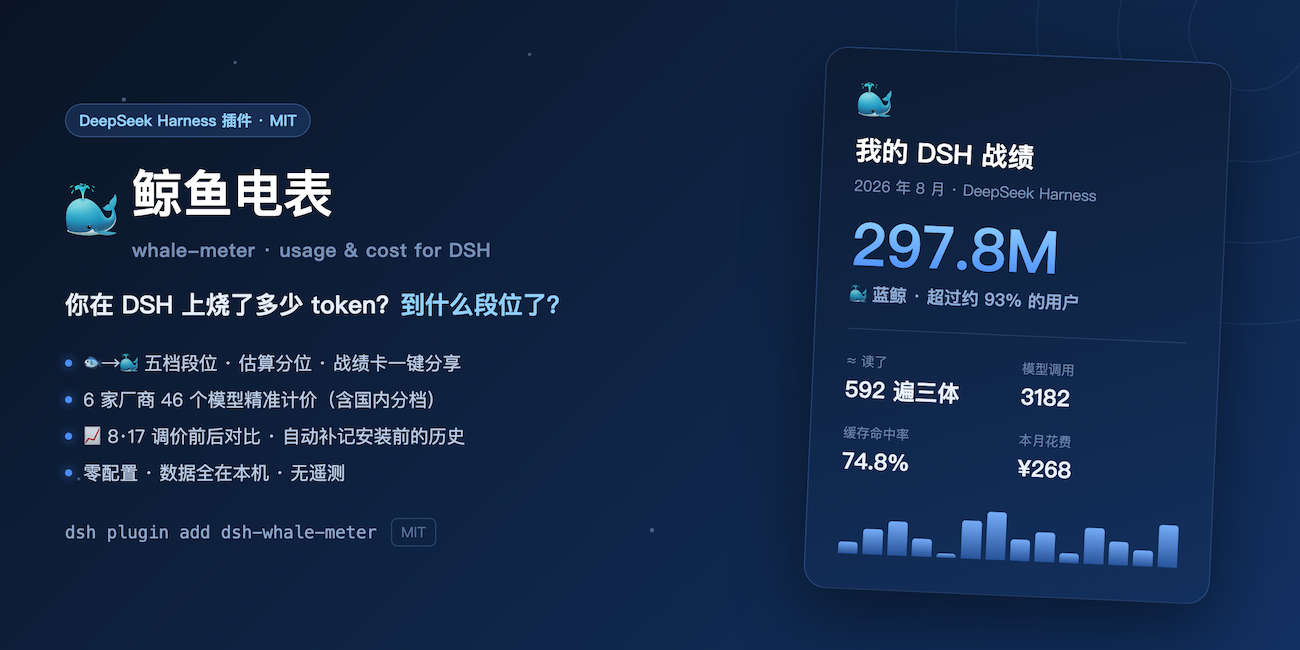 Shiye-10Pages/dsh-whale-meter
🐳 鲸鱼电表:你在 DeepSeek Harness 上烧了多少 token?消耗量段位、可晒的战绩卡、6 家厂商 46 个模型精准计价(含国内分档)、8·17 调价前后对比。零配置,数据全在本机 | Token usage tiers …
Shiye-10Pages/dsh-whale-meter
🐳 鲸鱼电表:你在 DeepSeek Harness 上烧了多少 token?消耗量段位、可晒的战绩卡、6 家厂商 46 个模型精准计价(含国内分档)、8·17 调价前后对比。零配置,数据全在本机 | Token usage tiers …