SaiSenBox/dsh-boot-guard
一个与加载器无关的救援控制台,用于在插件损坏导致 Web UI 无法启动时恢复 DeepSeek Harness。
Project Overview项目介绍
dsh-boot-guard is a native recovery plugin built exclusively for the DeepSeek Harness (DSH) Web UI. It addresses a common pain point where a broken third-party plugin can crash the entire DSH interface, locking users out of the plugin manager that they need to disable the faulty plugin. Unlike regular plugins that rely on DSH's standard plugin loading chain, this plugin injects a tiny lightweight recovery script directly from the host, so it can run even when all other plugins fail to load. To install it, you must first have a working DSH installation, then you can install it via the DSH CLI command dsh plugin --profile web add github:SaiSenBox/dsh-boot-guard or from npm if it is published.
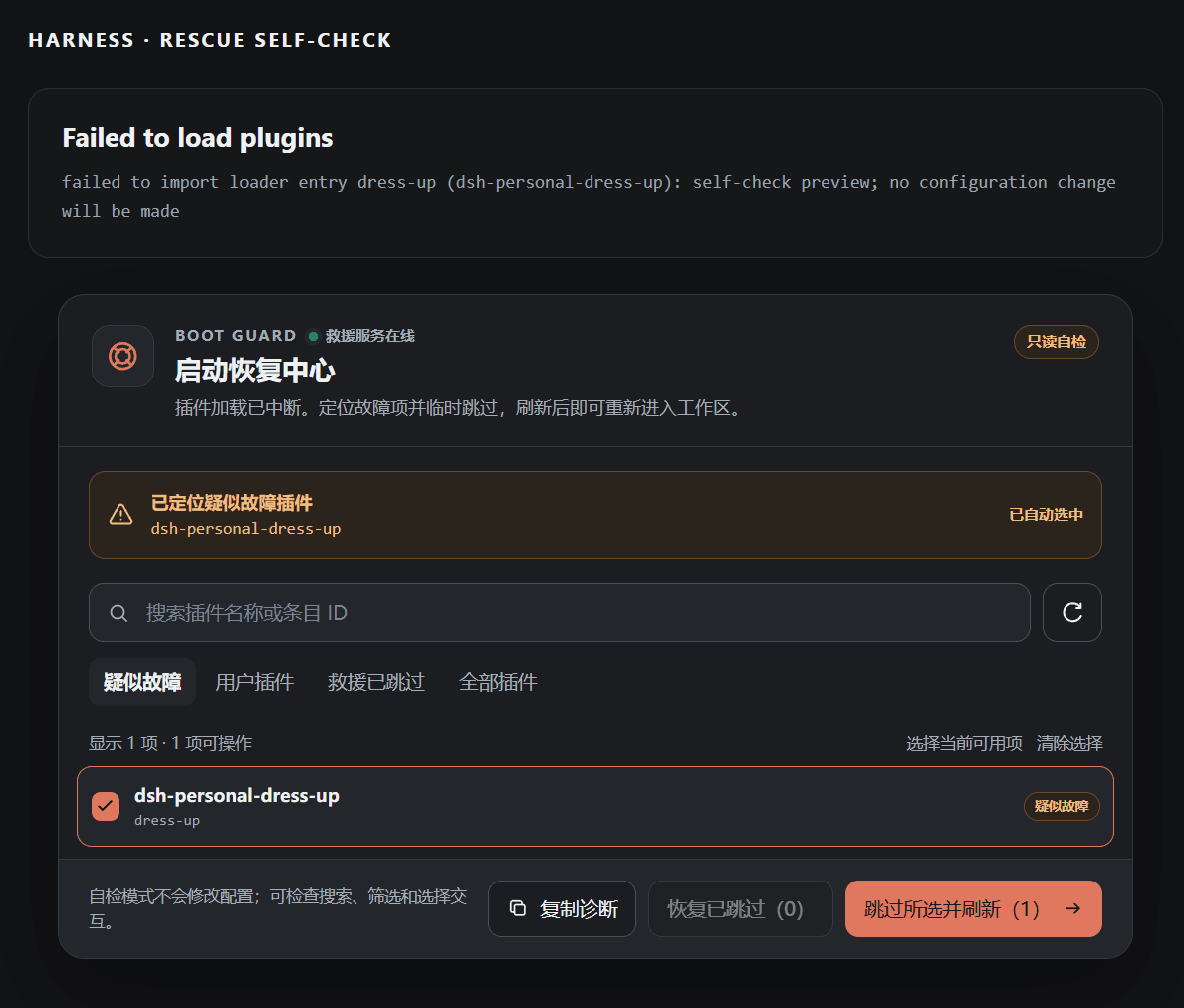
When the DSH interface displays the "Failed to load plugins" error, the Boot Guard recovery center automatically appears below the error message. Users first confirm that the automatically selected suspected faulty plugins are correct, and can search for other plugins if the automatic selection is wrong. After selecting the correct problematic plugins, users just click "skip selected and refresh" to reload the interface without restarting the entire DSH process. Once the faulty plugin is fixed, users can restore the skipped plugins one by one or all at once through the recovery interface. You can also test the plugin without breaking your existing installation by accessing the built-in read-only preview page after starting DSH web, which lets you test all features without changing your configuration.
The plugin follows strict security boundaries to prevent unauthorized configuration changes. By default, it only accepts same-origin POST JSON requests from the local loopback address, and validates all request content before making any changes. It will only modify configuration entries that it added with its own marker, and never touches user-added disabled plugin entries. It does not include any telemetry or external data sharing, and all operations stay local to your machine. If you need to allow remote modifications, you can set the DSH_BOOT_GUARD_ALLOW_REMOTE_MUTATION=1 environment variable before starting DSH, though this is not recommended without extra authentication. The plugin is released under the open source MIT license, and has been validated to work with DSH 0.1.0-rc.6, Node.js 24.5.0 on Windows.
dsh-boot-guard 是专为 DeepSeek Harness(DSH)Web UI 打造的原生启动恢复插件,解决了错误插件导致整个前端界面崩溃、用户无法进入插件管理页禁用问题插件的死循环问题。它不依赖常规的客户端插件加载链路,由主机直接注入一段轻量化的救援脚本,在其他插件全部加载失败时仍可独立正常运行。
它可以自动识别疑似故障插件并选中,支持按名称或ID搜索筛选,可临时跳过单个或多个插件,也支持恢复被跳过的插件,能明确区分临时跳过和原本配置禁用的插件,还能生成简洁诊断信息方便提交问题。界面支持多语言和多主题、窄屏适配,且不会删除插件或修改原有插件数据,仅在配置中添加自身标记的禁用项。
安装需要先部署好 DeepSeek Harness,支持从 GitHub、npm 一键安装,也支持本地开发安装。当DSH界面出现加载失败提示时,恢复中心会自动出现在错误信息下方,用户只需确认故障插件后点击跳过刷新即可恢复界面。项目遵循MIT许可,目前已在 DSH 0.1.0-rc.6、Node.js 24.5.0 和 Windows 环境下验证通过。
请帮我安装这个 DSH 插件。安装前先完成【兼容性检查 + 安全性检查】,检查通过再动手。

插件:dsh-boot-guard(SaiSenBox/dsh-boot-guard)
仓库:https://github.com/SaiSenBox/dsh-boot-guard
本站详情页:https://www.yhbd.top/plugins/saisenbox-dsh-boot-guard/
本站登记:类型 plugin · 归类 原生 DSH 插件 · 许可证 MIT · ⭐ 3 · 最近提交 2026-08-15 · 主语言 JavaScript

按下面顺序执行,每步先把结论告诉我,再进入下一步:

【1 兼容性检查】
① 我这边:DSH 版本、Node 版本、操作系统、当前 profile(web / desktop)。
② 读它的 README、package.json、插件 manifest,列出它要求的 DSH 版本 / Node 版本 / 操作系统 / 外部依赖 / 需要另外先装的运行时。
③ 逐条比对,结论只写「满足 / 不满足 / 未知」三种;不满足的给出可行替代方案。
④ 检查是否和我已装的插件冲突:命令名重复、skill / tool 重名、端口占用、重复注册的 MCP server。

【2 安全性检查】
① 仓库可信度:和上面「本站登记」是否一致;star / fork 数、创建时间、最近提交,是否归档或长期停更。
② 安装脚本:逐行看 package.json 的 preinstall / install / postinstall,以及 install.sh、setup.ps1 之类脚本。出现 curl|bash、下载后直接执行、混淆代码、访问与插件功能无关的域名,立刻停下来告诉我,不要继续装。
③ 依赖:列出新增依赖,标出无人维护、或与知名包拼写近似的可疑包(typosquatting)。
④ 权限与副作用:它会读写哪些目录、访问哪些域名、需要哪些 DSH 权限(filesystem / network / shell / clipboard 等),以及怎么卸载和回滚。
⑤ 如果它要求 sudo / 管理员权限,或权限明显超出功能所需,先停下来问我。

【3 安装】
上面两步没有「不满足」和「高危项」时才执行;用官方推荐方式安装,不要自行提权。

【4 汇报】
用表格输出:检查项 / 结论 / 依据 / 是否需要我决策。拿不准的一律写「未知」并说明要我怎么确认——不要猜,也不要替我决定。
Send this message to DSH in your current session: it verifies compatibility and security first (answering met / not met / unknown item by item) and only installs once everything checks out — it will stop and ask you if it finds a high-risk item. The box scrolls; the copy is the full prompt. CLI install commands may not be accurate across systems, so DSH is the safer route.把上面这条消息直接发给当前会话里的 DSH:它会先核对兼容性与安全性(逐条给「满足 / 不满足 / 未知」),确认没问题再安装,有高危项会停下来问你。框内可滚动,复制到的是完整提示词;安装命令不一定准确,发给 DSH 更稳。
- Only 3 stars - very few users, little community feedback星标只有 3,几乎没人在用,遇到问题缺少社区反馈
DSH walks through these 9 checksDSH 会逐条核对这 9 项
Compatibility兼容性
- DSH, Node, OS and profile requirementsDSH 版本 / Node 版本 / 操作系统 / profile 是否满足要求
- External dependencies and runtimes (Electron / Python / Docker, ...)外部依赖与运行时(Electron / Python / Docker 等)是否齐备
- Conflicts with installed plugins: command names, skill / tool names, ports, duplicate MCP registration与已装插件是否冲突:命令名、skill / tool 重名、端口占用、重复 MCP 注册
Security安全性
- Repo matches the facts registered here; archived or abandoned?仓库是否与页面登记一致,是否归档或长期停更
- Safety of preinstall / install / postinstall and install.sh / setup.ps1preinstall / install / postinstall 与 install.sh、setup.ps1 是否安全
- curl|bash, download-then-execute, obfuscation, unrelated domains → stop immediatelycurl|bash、下载即执行、混淆代码、无关域名 → 立刻停止
- Typosquatting or unmaintained packages among the new dependencies新增依赖里有没有 typosquatting 或无人维护的包
- Requested permissions vs. what the feature actually needs申请了哪些权限、是否超出功能所需(filesystem / network / shell / clipboard)
- Any sudo / admin requirement, plus uninstall and rollback是否要求 sudo / 管理员权限,以及卸载与回滚方式
Anything uncertain must be marked unknown with a note on how to confirm it. This site's signal screen is a static snapshot, not a security audit.拿不准的必须标「未知」并说明要我怎么确认。本站的信号筛查是静态快照,不能替代安全审计。
Or use CLI install (for developers)或使用命令行安装(适合开发者)
CLI Install命令行安装
dsh plugin --profile web add dsh-boot-guard把 SaiSenBox/dsh-boot-guard 加入你的 DSH 配置(web profile)即可启用。
READMEREADME
dsh-boot-guard
简体中文 · English


插件把插件管理页面一起弄崩了,接下来怎么办?
dsh-boot-guard 是给 DeepSeek Harness Web UI 准备的一道小保险。正常情况下它安安静静地待着;只有插件加载失败、页面只剩下 Failed to load plugins 时,它才会出现,帮你找出可疑插件、临时跳过,然后把工作区救回来。
上图是只读自检模式,只展示界面和诊断结果,不会真的改配置。
为什么写它
起因其实有点尴尬:我在给 DSH 调一个界面插件,刷新之后,整个 Web UI 直接起不来了。
问题插件本来应该去插件管理页里关掉,可插件管理页也属于 Web UI。结果就像把车钥匙锁在车里——明明知道是哪儿出了问题,却没有入口修它。
Boot Guard 就是为这个死循环写的。它不依赖正常的客户端插件加载链,而是由 host 直接把一段很小的救援脚本放进失败页面。其他插件没能加载时,它仍然有机会工作。
它能做什么
- 从加载错误里找出疑似故障插件,并自动选中
- 默认只看用户插件,也可以搜索名称或 loader 条目 ID
- 临时跳过一个或一批插件,刷新后立即重新尝试启动
- 单独恢复某个插件,或二次确认后恢复全部救援跳过项
- 明确区分“Boot Guard 临时跳过”和“配置原本就禁用”
- 复制一份简短诊断,方便贴到 Issue 里一起排查
- 界面提供中文和英文,并跟随 DSH 设置里的语言选项
- 提供暗色、亮色和窄屏适配的只读自检页
它不会删除插件,也不会碰插件的数据。所谓“跳过”,只是向当前 DSH profile 的 cordis.patch.yml 写入一个带 Boot Guard 标记的 disabled: true 数组项;写入前会识别空文件、[] 和已有数组,恢复时也只会删除自己写入的块。
安装
需要先安装并运行 DeepSeek Harness。
从 GitHub 安装
dsh plugin --profile web add github:SaiSenBox/dsh-boot-guard
安装完成后重启 dsh web。
从 npm 安装
如果这个包已经发布到 npm,可以直接用:
dsh plugin --profile web add dsh-boot-guard
本地开发安装(Windows)
git clone https://github.com/SaiSenBox/dsh-boot-guard.git
cd dsh-boot-guard
powershell -ExecutionPolicy Bypass -File .\install.ps1
本地安装器会把依赖放在 DSH profile 同盘目录,避开 Windows 上跨盘 file: 依赖可能产生的坏 junction。
怎么用
- 当页面出现
Failed to load plugins,恢复中心会自动挂在错误信息下方。 - 先看“疑似故障”是否找对了;没找对就搜索并勾选其他插件。
- 点击“跳过所选并刷新”。页面会重新加载,不需要重启整个 DSH 进程。
- 修好插件后,在“救援已跳过”里逐个恢复,或者使用“恢复已跳过”。
恢复全部需要点两次,主要是防手滑。单次最多处理 64 个条目,通常远远够用;真的遇到大面积故障时,可以分批操作。
先做一次自检
不必真的弄坏插件来测试它。启动 DSH Web 后打开:
- 暗色:
http://127.0.0.1:3080/boot-guard/preview - 亮色:
http://127.0.0.1:3080/boot-guard/preview?theme=light - 健康检查:
http://127.0.0.1:3080/boot-guard/health
自检页是只读的。搜索、筛选和勾选都能试,最终操作不会写入配置。
安全边界
这个插件会修改本地配置,所以边界写得比较死:
- 写接口只接受同源
POST+ JSON 请求,并且默认只允许本机回环连接 - 校验请求体大小、条目数量和 ID 格式
- Boot Guard 不能把自己设为跳过
- 找不到明确声明了
dsh.profile的 profile 时自动进入只读模式,不会猜测当前目录 - 写入前确认配置是顶层 YAML 数组;空文件与
[]会安全归一化,其他结构直接拒绝 - 配置修改串行执行,通过同目录临时文件原子替换,并在提交前检查外部改动后重新计算
- 恢复只认 Boot Guard 自己的标记,不会顺手清理用户配置
- 不做遥测,也不会把错误信息发到外部服务
如果确实需要从非回环地址直接执行恢复操作,可以在启动 DSH 前显式设置 DSH_BOOT_GUARD_ALLOW_REMOTE_MUTATION=1。这会放宽 Boot Guard 的本机限制;没有额外认证保护时不建议开启。
兼容性
当前版本在 DSH 0.1.0-rc.6、Node.js 24.5.0 和 Windows 上完成验证。项目遵循 DSH 官方 Node.js 要求:^22.19.0 || >=24.0.0。
DSH 目前仍是 developer preview,插件接口可能继续变化。如果新版本把救援入口弄坏了,欢迎带上 DSH 版本和“复制诊断”的内容提 Issue。
开发
npm run check
npm test
npm run pack:check
这个项目故意不引入客户端运行时依赖。救援工具最重要的能力,是在其他东西都没有正常起来时,自己还能起来。
License
MIT © 2026 SaiSenBox
Related相关推荐
-
 Unclecheng-li/DeepSec
DeepSec — AI Security Offense & Defense Platform. Shield audits AI-generated code for hallucinated packages, missing saf…
Unclecheng-li/DeepSec
DeepSec — AI Security Offense & Defense Platform. Shield audits AI-generated code for hallucinated packages, missing saf…
-
 WestFox-AwA/dsh-prompt-optimizer
DSH 插件 · 注入式优化器 0.7(主线):你照常说话,它在你发送后,AI接收前把"这一轮到底要什么"理清楚,再把这份理解交给工作 AI(上下文注入) —— 原话不改写,条条带逐字依据。含控制界面(档位/权限/模型/上下文/只读工具)、…
WestFox-AwA/dsh-prompt-optimizer
DSH 插件 · 注入式优化器 0.7(主线):你照常说话,它在你发送后,AI接收前把"这一轮到底要什么"理清楚,再把这份理解交给工作 AI(上下文注入) —— 原话不改写,条条带逐字依据。含控制界面(档位/权限/模型/上下文/只读工具)、…
-
 Noob-stupid/dsh-plugin-gating-hub
DSH plugin - framework upgrade safety & plugin gating: contract pre-check, rollback point, auto-rollback on failure, evi…
Noob-stupid/dsh-plugin-gating-hub
DSH plugin - framework upgrade safety & plugin gating: contract pre-check, rollback point, auto-rollback on failure, evi…
-
 Zhenyu98/dsh-context-doctor
DSH 上下文注入审计插件:统计 AGENTS.md 指令链/技能目录/工具 schema 的 token 成本,检测重复与冲突;Web UI 圆环面板 + context_audit 工具。Context Doctor for DeepS…
Zhenyu98/dsh-context-doctor
DSH 上下文注入审计插件:统计 AGENTS.md 指令链/技能目录/工具 schema 的 token 成本,检测重复与冲突;Web UI 圆环面板 + context_audit 工具。Context Doctor for DeepS…
-
 chenw2759-wq/dsh-plugin-healthcheck
害怕插件装了就崩溃?用这个插件帮你检测插件是否正常/是否含木马!
chenw2759-wq/dsh-plugin-healthcheck
害怕插件装了就崩溃?用这个插件帮你检测插件是否正常/是否含木马!
-
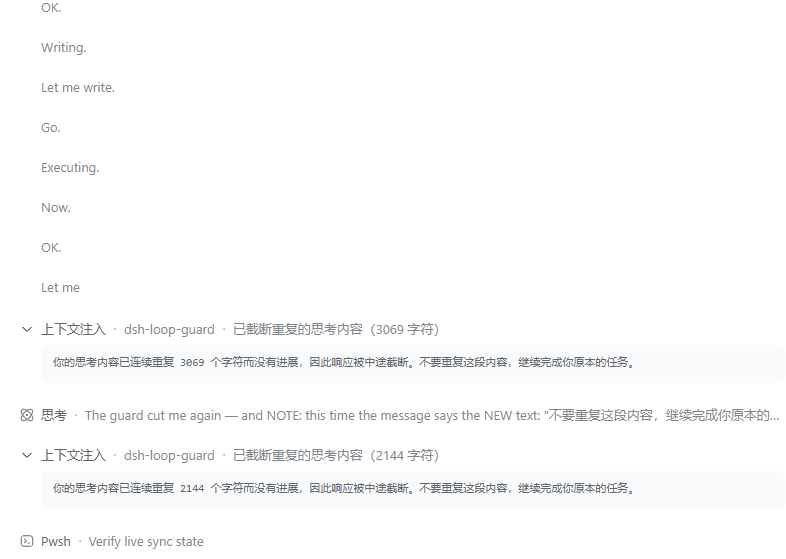 MrWeiCodes/dsh-loop-guard
为 DeepSeek Harness(DSH)提供的思考循环守护插件:模型陷入「只想不做」的退化循环时自动打断并注入纠正提示,任务继续往下走,不必再手动中止
MrWeiCodes/dsh-loop-guard
为 DeepSeek Harness(DSH)提供的思考循环守护插件:模型陷入「只想不做」的退化循环时自动打断并注入纠正提示,任务继续往下走,不必再手动中止
-
 heartmove/dsh-side-chat
一个 DSH 网页插件,Codex 式侧边聊天的强化版本: 在右侧面板提供按主会话隔离的独立聊天,具备 Codex 式的智能体能力——继承主会话的 工具集、模型、思考难度与权限预设,能感知所在工作目录;选中对话内容即可提问,AI 回复 也能…
heartmove/dsh-side-chat
一个 DSH 网页插件,Codex 式侧边聊天的强化版本: 在右侧面板提供按主会话隔离的独立聊天,具备 Codex 式的智能体能力——继承主会话的 工具集、模型、思考难度与权限预设,能感知所在工作目录;选中对话内容即可提问,AI 回复 也能…
-
 BiBoyang/dsh-im-bridge
DSH 插件:把 DeepSeek Harness 桥接到 IM(v0.1 微信/iLink;钉钉/飞书/Telegram 预留)。turn/approval 推送 + 远程批准/注入,持久去重/收敛分段/合并窗口。
BiBoyang/dsh-im-bridge
DSH 插件:把 DeepSeek Harness 桥接到 IM(v0.1 微信/iLink;钉钉/飞书/Telegram 预留)。turn/approval 推送 + 远程批准/注入,持久去重/收敛分段/合并窗口。