songoao25/dsh-bottom-info-bar
Bottom Info Bar — an information bar plugin for DeepSeek Harness: provider/model, live balance, peak/off-peak pricing with countdown, and real persisted per-session spend in a single line.
安装Install
dsh plugin --profile web add dsh-bottom-info-bar把 songoao25/dsh-bottom-info-bar 加入你的 DSH 配置(web profile)即可启用。
READMEREADME
Bottom Info Bar
English | 中文




The best-adapted bottom info bar for DeepSeek Harness, and a drop-in replacement for the native stats row under the composer. It shows live balance and subscription quota (ChatGPT & OpenCode Go) at a glance, alongside provider & model, peak/off-peak pricing, and real spend — smart and concise, conflict-free, and native in look and feel: it auto-detects the billing mode, replaces the native row instead of duplicating it, and matches the model switcher exactly. Install once; it activates automatically on every launch.
Preview
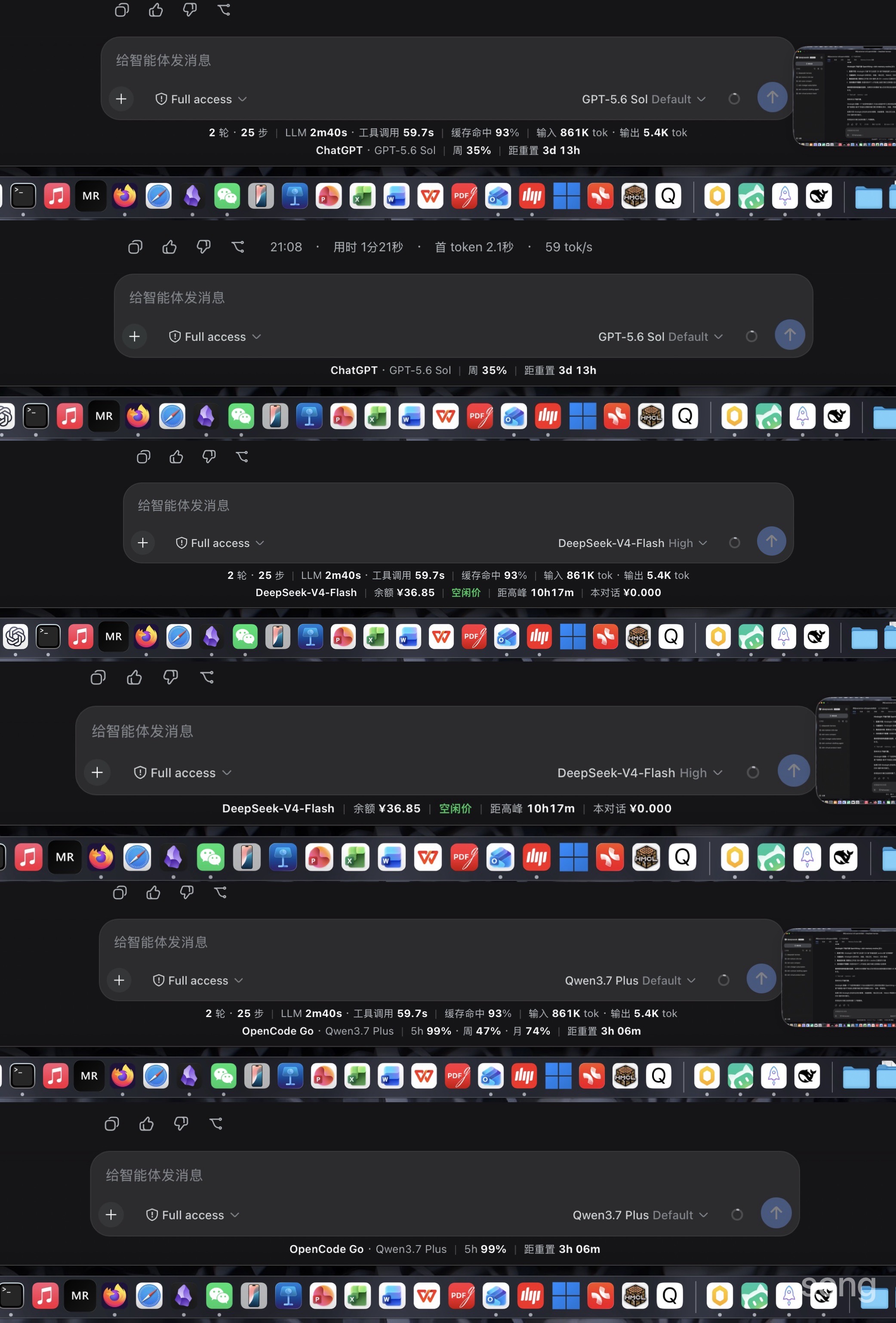
From top to bottom, the combined screenshot shows ChatGPT subscription, DeepSeek API, and OpenCode Go subscription. Each account is shown in full view followed by compact view.
Features
- Dual-mode billing bar — Auto-detects whether the active provider is subscription-based (Codex / OpenCode Go) or balance-based. The two modes replace each other, never overlap; balance mode stays exactly as before.
- Subscription quota display (ChatGPT & OpenCode Go) — When the active provider is a subscription service, the bar shows the subscription service · model (e.g.
OpenCode Go · V4 Flash), the 5-hour / weekly / monthly quota remaining per window (remaining = 100 − used), and a countdown to the next reset (e.g.距重置 1d 21h). Remaining quota is neutral by default; at 20% or less, the percentage and adjacent低status turn alert red, so the warning doesn’t rely on color alone. In compact mode the shortest-duration window is shown (5-hour preferred; falls back to weekly/monthly if unavailable); in full mode all three windows appear. Quota is pulled from two subscription sources:- ChatGPT / Codex — reads your ChatGPT subscription quota (Plus / Pro / Team / Enterprise) read-only from
~/.codex/auth.json. Binding, token refresh and theopenai-codexmodel route are not part of this plugin — install the companion plugin dsh-chatgpt-subscription (separate repo) to bind your ChatGPT account; this bar only reads the token to display quota. Missing/expired token → "not bound / re-bind" hint instead of an error. Hover over刷新失败for details on auto-retry behavior. - OpenCode Go — reads quota from
opencode.ai/zen/go/v1/usageviaOPENCODE_GO_API_KEY(Settings → Models) or the opencode CLI login (~/.local/share/opencode/auth.json); missing key → "not configured" hint instead of an error. Both sources show the remaining quota and the reset time for each of the 5-hour / weekly / monthly windows, so you always know when your quota renews. Quota and countdown always match — both come from the same window.
- ChatGPT / Codex — reads your ChatGPT subscription quota (Plus / Pro / Team / Enterprise) read-only from
- Drop-in replacement — Replaces the native stats row while keeping its core original information (turns/steps, LLM latency, tool calls, cache hit rate, in/out tokens) with a native-consistent layout. Speed metrics (TTFT, tok/s) move to the hover tooltip so the row stays on a single line.
- Provider & model detection — Always shows provider and model separately, exactly as in the DSH LLM catalog (for example,
DeepSeek · V4-Flash). The provider is bold; when a catalog model name repeats its provider prefix, only that duplicate prefix is removed from the model part. - Live balance — Fetches real balance from DeepSeek's
/user/balanceAPI, auto-refreshes every 60 s, and keeps the last known snapshot on failure so usage is never interrupted. - Peak / off-peak pricing — Shows peak (alert red, bold) and off-peak (green, bold) prices with a countdown to the next switch; hidden automatically for providers without tiered pricing. The text labels remain visible in both appearances.
- Real spend tracking — Records every
llm/streamrequest (usage × unit price) and aggregates precisely by this conversation / today / this month / all time. Records are persisted to disk — nothing is lost on restart. - Bold numbers — Balance, countdown, spend, and all stats are rendered with bold numerals for instant readability.
- Full / compact toggle — Click the bar to switch between two strict modes (debounced).
- Low-balance alert — When the balance drops below ¥20, its amount and adjacent
低status turn alert red.
Requirements
- DeepSeek Harness (
dshCLI) installed and used via the web interface (dsh web) - pnpm (used by
dsh plugin)
Installation
Option 1 — One-command script (recommended)
git clone https://github.com/songoao25/dsh-bottom-info-bar.git
cd dsh-bottom-info-bar
./install.sh                # installs to the "web" profile; use --profile <name> to override
Option 2 — NPM package (recommended for future updates)
dsh plugin --profile web add dsh-bottom-info-bar
To update later:
dsh plugin --profile web update dsh-bottom-info-bar --latest
Option 3 — dsh plugin command from a local checkout
git clone https://github.com/songoao25/dsh-bottom-info-bar.git
dsh plugin --profile web add /path/to/dsh-bottom-info-bar/plugin
Restart
dsh webafter installing or updating. Plugins are composed when the host process starts; a page refresh alone is not enough.
For detailed installation, troubleshooting, and upgrade instructions, see docs/INSTALL.md.
Usage
- Hover the bar for details: balance, per-token pricing, next price-switch time, and this-conversation spend (today / this month / all time).
- Click the bar to toggle between full and compact modes.
- Version reminder: once per full DSH startup, the plugin checks NPM; if a newer version exists, it shows a red
↑ vX.Y.Zlabel. The label only reminds you and never updates code automatically; tell an Agent with local terminal access to help update it.
Configuration
- API key: configure the DeepSeek API key under Settings → Models (environment variable
DEEPSEEK_API_KEY). Without it, the plugin shows a hint and every other feature keeps working. - Data scope: peak hours are 09:00–12:00 and 14:00–18:00 (Beijing time). Built-in pricing covers DeepSeek V4 models plus OpenAI reference prices; models not in the table are excluded from spend statistics.
- Mode: the bar switches automatically between balance mode and subscription mode based on the active provider (
codex/chatgpt/opencode-go/opencode/openai-codex→ subscription; everything else → balance). An internalbillingMode: 'auto' | 'balance' | 'subscription'setting (defaultauto) allows forcing a mode. - Subscription sources:
- ChatGPT (Codex): install the companion plugin dsh-chatgpt-subscription (separate repo) and bind your ChatGPT account once — it maintains the token in
~/.codex/auth.json(mode0600) and registers the ChatGPT models. This bar only reads that token to fetch quota (chatgpt.com/backend-api/wham/usage); it never refreshes, writes back, or injects credentials. Without a token the bar shows a "not bound — install dsh-chatgpt-subscription to authorize" hint; an expired token shows a "re-bind" hint. - OpenCode Go: set
OPENCODE_GO_API_KEYunder Settings → Models, or log in with the opencode CLI (writes theopencode-goentry in~/.local/share/opencode/auth.json). Without a key the bar shows a "not configured" hint instead of an error.
- ChatGPT (Codex): install the companion plugin dsh-chatgpt-subscription (separate repo) and bind your ChatGPT account once — it maintains the token in
ChatGPT subscription: known limitations
- The
chatgpt.combackend is an undocumented interface — it may change or stop working at any time; failures degrade gracefully (last snapshot kept, auto-retry), never a crash. - Available models depend on your subscription plan; model access is provided by the companion plugin dsh-chatgpt-subscription.
Data storage (plugin-owned directory)
All spend data lives in the plugin's own data directory, isolated from other plugins and DSH configuration:
~/.dsh/dsh-bottom-info-bar/
├── usage-records.json           # the complete, human-readable bill to open
├── usage-records.journal.jsonl  # recovery journal; do not edit manually
└── usage-records.json.bak       # previous complete snapshot for recovery
- Location:
~/.dsh/dsh-bottom-info-bar/(directory mode0700, file mode0600— readable only by the current user). - Override: set the environment variable
DSH_BOTTOM_INFO_BAR_DATA_DIRto relocate the whole data directory (e.g. an external drive or a synced folder). - View and migrate: open
usage-records.jsonin any text editor to inspect every recorded model response. To back up or move to another computer, copy the entire~/.dsh/dsh-bottom-info-bar/directory while DSH is closed. - Contents: one entry per model response (
id / ts / model / provider / sessionId / input / cacheRead / cacheWrite / output / currency / cost / status).statusiscompletedorinterrupted; an interrupted response can still have confirmed billable usage. The billed price is fixed when the response completes, so later price-table updates never rewrite historical totals. Unknown-price models keep their token usage withpricingStatus: "unpriced"and are not given an invented cost. No conversation content, prompts, or API keys are ever stored. - Durability: the journal is synchronously confirmed before the UI includes a new bill. If that write fails, the bar says “账单未保存” and the amount is not added. The readable JSON snapshot is rebuilt in the background; if it is damaged after an interruption, the last good snapshot and every intact journal line are recovered automatically. Do not manually edit the journal or backup file.
- Retention: no silent entry cap. Keep the directory in normal user backups if you need long-term retention beyond this machine.
- Spend scope: money is aggregated only in the active provider's currency (CNY for DeepSeek, USD for the OpenAI reference prices); records in other currencies are not mixed in. Models absent from the pricing table remain visible in the ledger but are excluded from money totals.
- Reset: delete the whole
~/.dsh/dsh-bottom-info-bar/directory to clear all statistics. Uninstalling the plugin does not delete your data.
Uninstall
cd dsh-bottom-info-bar
./uninstall.sh                       # remove the plugin only
# or: dsh plugin --profile web remove dsh-bottom-info-bar
ChatGPT subscription (binding & token maintenance) is owned by the separate plugin dsh-chatgpt-subscription; uninstalling this info bar does not touch it.
After restarting, the native stats row returns automatically with no residue (the ledger file under ~/.dsh/dsh-bottom-info-bar/ is your data and is kept; remove it manually if you want to reset the statistics).
FAQ
| Symptom | Fix |
|---|---|
| Bar does not appear after a page refresh | Restart dsh web (the host process loads plugins) |
| Balance shows "DEEPSEEK_API_KEY not configured" | Add the key under Settings → Models |
| Balance shows "刷新失败" while a balance remains visible | Transient network/key issue; retries automatically after 60 s. The last successful data is kept so the bar never goes blank. Hover over the warning for a detailed explanation and retry timing. |
| Shows "OpenCode Go not configured" | Add OPENCODE_GO_API_KEY under Settings → Models, or configure OpenCode Go in the opencode CLI |
| How do I bind my ChatGPT subscription? | Install the companion plugin dsh-chatgpt-subscription and authorize on the official page — it maintains the token this bar reads for quota display |
| ChatGPT quotas look wrong or empty | The wham endpoint is undocumented and may change; failures keep the last snapshot and retry every 60 s. Hover over 刷新失败 to see the retry explanation. |
| Why does compact mode show a different window? | Compact mode prioritizes the shortest-duration window (5-hour > weekly > monthly) because it refreshes fastest. If the 5-hour window is unavailable, it falls back to weekly or monthly. Quota and countdown always match — both come from the same window. |
| Why is the model's reasoning process not shown? | DSH does not render the model's internal reasoning in the UI — a DSH interface-layer limitation, not the plugin's |
| Want the original stats row back | Uninstall the plugin and restart |
Development
- Source:
plugin/src/host.js(host) +plugin/src/client-bundle.js(client) - Build:
cd plugin && npm run build(generateslib/) - Test:
node tests/run-all.mjs
License
MIT © 2026 songoao25
相关推荐Related
-
 freestylefly/awesome-gpt-image-2
Prompt as Code | GPT-Image2 工业级提示词引擎与模板库,470+ 个案例逆向工程,20+ 套工业级模板,并提炼出Skills,持续更新中
freestylefly/awesome-gpt-image-2
Prompt as Code | GPT-Image2 工业级提示词引擎与模板库,470+ 个案例逆向工程,20+ 套工业级模板,并提炼出Skills,持续更新中
-
 awesome-dsh-plugin/awesome-dsh-plugin
A curated list of plugins for DeepSeek Harness (dsh) · DeepSeek Harness 插件精选列表
awesome-dsh-plugin/awesome-dsh-plugin
A curated list of plugins for DeepSeek Harness (dsh) · DeepSeek Harness 插件精选列表
-
 dsh-market/dsh-market
The plugin market inside DeepSeek Harness — browse, search, one-click install · DSH 可视化插件市场
dsh-market/dsh-market
The plugin market inside DeepSeek Harness — browse, search, one-click install · DSH 可视化插件市场
-
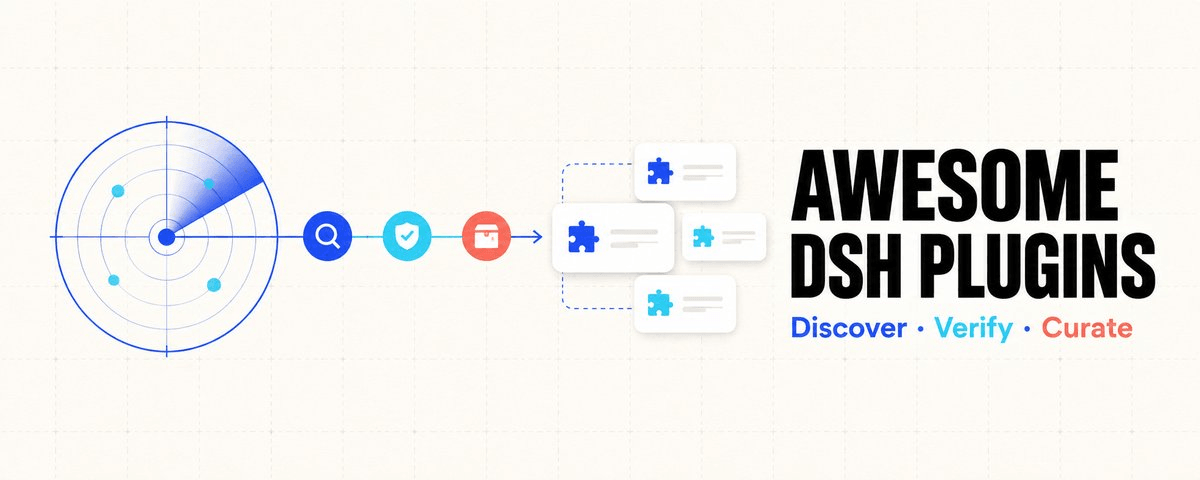 AdamPlatin123/awesome-dsh-plugins
DSH 插件雷达与精选榜:多路自动发现 9000+ 候选,容器真实安装路径运行级实测(四档判定),精选 Top 50 · 11 类人工策展,全量索引 PLUGINS-ALL.md,自动更新。
AdamPlatin123/awesome-dsh-plugins
DSH 插件雷达与精选榜:多路自动发现 9000+ 候选,容器真实安装路径运行级实测(四档判定),精选 Top 50 · 11 类人工策展,全量索引 PLUGINS-ALL.md,自动更新。
-
 Anil-matcha/awesome-dsh-plugin
A curated list of plugins for DeepSeek Harness (dsh) - DeepSeek Harness plugin ecosystem
Anil-matcha/awesome-dsh-plugin
A curated list of plugins for DeepSeek Harness (dsh) - DeepSeek Harness plugin ecosystem
-
 0xsline/awesome-deepseek-harness
DeepSeek Harness (DSH) ecosystem: curated plugins, tools, and infrastructure from dsh-external/hub and the public dsh-pl…
0xsline/awesome-deepseek-harness
DeepSeek Harness (DSH) ecosystem: curated plugins, tools, and infrastructure from dsh-external/hub and the public dsh-pl…
-
 superdesigndev/treg
OpenRouter for agent tools. Join community here: https://discord.gg/6mQYYfFMAn
superdesigndev/treg
OpenRouter for agent tools. Join community here: https://discord.gg/6mQYYfFMAn
- bruc3van/awesome-dsh-plugin 用 30 秒为你的 DeepSeek Harness找到合适的插件。 仓库由脚本每天自动抓取,再经人工逐个核实——真插件进目录,蹭热度的进黑名单,每条剔除理由公开可查。并告诉你每个插件适合谁、从哪里开始。