ThinkofRain1213/dsh-smooth-cursor-patched
dsh-smooth-cursor 的社区修补分支:为 DSH Web 聊天输入框提供平滑彗星光标,覆盖提问卡片的作答输入框,并修复空输入光标、双向划词跟手、软换行光标定位与滚动越界等问题。
Project Overview项目介绍
dsh-smooth-cursor-patched is a caret / cursor / DSH cosmetic plugin built specifically for DeepSeek Harness (DSH) Web. It replaces the native text caret with a glowing comet that slides smoothly toward the input position and supports a configurable comet trail, accent color, thickness, and a 500ms breathing blink rhythm. The package is published on npm and tagged dsh-plugin, and it bundles a DSH manifest so that dsh plugin --profile web add dsh-smooth-cursor-patched installs it from npm or dsh plugin --profile web add github:ThinkofRain1213/dsh-smooth-cursor-patched installs it from GitHub.
This repository is a personal patched fork of Lacquervii/smooth-cursor, maintained because the upstream has not shipped since 2026-09-09; the author warns that maintenance is best-effort, issue response may be slow, and the fork will be retired if upstream resumes active releases. The patch fixes five reproducible upstream bugs: zero-height rects on empty or freshly focused rich-text inputs, forward-selection caret that does not follow the mouse, Chromium-snapped rects on empty soft-wrapped lines, viewport overflow where the caret floats over the chat area or toolbar, and coverage limited to textarea[data-phase] instead of the ask_user_question answer card. It also adds the 500ms breathing blink effect that mirrors VS Code's native cursor cadence.
The intended audience is DSH Web power users who want a smoother, more polished caret while chatting or prompting. After refreshing or restarting dsh web, the configuration surface lives only on the bundle's own plugin settings page between the description and the "included components" block, where the overall effect, comet trail, breathing blink, accent color (palette or custom picker), and caret thickness can be toggled, with preferences written immediately and without reload. The plugin requires DSH 0.1.6-alpha.2 or later because the settings slot plugins.bundle.config ships from @deepseek-ai/dsh-client-ui-plugin-manager introduced in that version; on older hosts the configuration area is silently absent while the visual effect itself keeps working via localStorage.
Dependencies and limits are explicitly documented in the README. There is no automated test suite; CI only enforces type checking, the tsdown build, register-id consistency between the bundle and cordis.patch.yml, and freshness of the committed lib/ artifacts against src/, so cross-browser caret behavior must still be verified manually. The bundle's id and name must match the npm package name exactly; renaming them to the upstream smooth-cursor / dsh-smooth-cursor will collide with the official entry and cause DSH to raise Failed to load plugins. Local development uses pnpm with --ignore-scripts, then pnpm run typecheck, pnpm run build, pnpm run check:register-id, and pnpm run watch, and the README insists that contributors keep lib/ in sync before pushing because CI rejects stale products. Inspiration comes from VS Code's smooth caret plus the Obsidian animated-cursor plugin by Kotaindah55, while the rendering and DSH integration are an independent rewrite released under the MIT license.
dsh-smooth-cursor-patched 是面向 DSH(DeepSeek Harness)的 Web 端光标美化插件,把原生输入光标替换为随输入平滑滑动的发光彗星,并支持拖尾、强调色、粗细与 500ms 呼吸节拍。本仓库是 Lacquervii/smooth-cursor 的个人修补分支,因上游自 2026-09-09 起未再更新,作者在此维护一份可用版本;精力有限,可能断更或回复较慢,若上游恢复维护则优先回归上游。可通过 dsh plugin --profile web add dsh-smooth-cursor-patched 从 npm 安装,或以 dsh plugin --profile web add github:ThinkofRain1213/dsh-smooth-cursor-patched 从 GitHub 安装。
本插件在空内容与初次聚焦保活、双向划词跟手、换行空行精准拦截、视口物理纵向裁剪以及覆盖询问界面等五个场景上修复了上游缺陷,并新增 500ms 光标呼吸闪烁效果。典型用户是希望为 DSH Web 客户端带来顺滑视觉反馈的日常使用者,配置入口集中在「插件 → 本插件」的 bundle 详情页描述与「包含的组件」之间,可开关整体特效、彗星拖尾、呼吸闪烁、调整强调色与光标粗细,偏好即时写入浏览器 localStorage。版本要求 DSH 0.1.6-alpha.2 及以上,因为插件设置页依赖首次发布于该版本的 @deepseek-ai/dsh-client-ui-plugin-manager。
依赖与限制方面,本仓库不附带自动化测试,CI 仅校验类型、构建、注册 id 一致性与产物新鲜度,跨浏览器行为需手动验证;id 与 name 必须与包名同名以避免与官方 smooth-cursor 条目冲突,否则 DSH 会因 loader id 重复而报 Failed to load plugins。本地开发需 pnpm 执行 pnpm install --ignore-scripts、pnpm build、pnpm run typecheck、pnpm run check:register-id 与 pnpm run watch,并保持 lib/ 与 src/ 同步提交。灵感来源于 VS Code smooth cursor 与 Obsidian 社区 animated-cursor,渲染与集成是面向 DSH Web 的独立重写,项目以 MIT 许可证开源。
请帮我安装这个 DSH 插件。安装前先完成【兼容性检查 + 安全性检查】,检查通过再动手。

插件:dsh-smooth-cursor-patched(ThinkofRain1213/dsh-smooth-cursor-patched)
仓库:https://github.com/ThinkofRain1213/dsh-smooth-cursor-patched
本站详情页:https://www.yhbd.top/plugins/thinkofrain1213-dsh-smooth-cursor-patched/
本站登记:类型 plugin · 归类 原生 DSH 插件 · 许可证 MIT · ⭐ 2 · 最近提交 2026-09-29 · 主语言 TypeScript

按下面顺序执行,每步先把结论告诉我,再进入下一步:

【1 兼容性检查】
① 我这边:DSH 版本、Node 版本、操作系统、当前 profile(web / desktop)。
② 读它的 README、package.json、插件 manifest,列出它要求的 DSH 版本 / Node 版本 / 操作系统 / 外部依赖 / 需要另外先装的运行时。
③ 逐条比对,结论只写「满足 / 不满足 / 未知」三种;不满足的给出可行替代方案。
④ 检查是否和我已装的插件冲突:命令名重复、skill / tool 重名、端口占用、重复注册的 MCP server。

【2 安全性检查】
① 仓库可信度:和上面「本站登记」是否一致;star / fork 数、创建时间、最近提交,是否归档或长期停更。
② 安装脚本:逐行看 package.json 的 preinstall / install / postinstall,以及 install.sh、setup.ps1 之类脚本。出现 curl|bash、下载后直接执行、混淆代码、访问与插件功能无关的域名,立刻停下来告诉我,不要继续装。
③ 依赖:列出新增依赖,标出无人维护、或与知名包拼写近似的可疑包(typosquatting)。
④ 权限与副作用:它会读写哪些目录、访问哪些域名、需要哪些 DSH 权限(filesystem / network / shell / clipboard 等),以及怎么卸载和回滚。
⑤ 如果它要求 sudo / 管理员权限,或权限明显超出功能所需,先停下来问我。

【3 安装】
上面两步没有「不满足」和「高危项」时才执行;用官方推荐方式安装,不要自行提权。

【4 汇报】
用表格输出:检查项 / 结论 / 依据 / 是否需要我决策。拿不准的一律写「未知」并说明要我怎么确认——不要猜,也不要替我决定。
Send this message to DSH in your current session: it verifies compatibility and security first (answering met / not met / unknown item by item) and only installs once everything checks out — it will stop and ask you if it finds a high-risk item. The box scrolls; the copy is the full prompt. CLI install commands may not be accurate across systems, so DSH is the safer route.把上面这条消息直接发给当前会话里的 DSH:它会先核对兼容性与安全性(逐条给「满足 / 不满足 / 未知」),确认没问题再安装,有高危项会停下来问你。框内可滚动,复制到的是完整提示词;安装命令不一定准确,发给 DSH 更稳。
- Only 2 stars - very few users, little community feedback星标只有 2,几乎没人在用,遇到问题缺少社区反馈
DSH walks through these 9 checksDSH 会逐条核对这 9 项
Compatibility兼容性
- DSH, Node, OS and profile requirementsDSH 版本 / Node 版本 / 操作系统 / profile 是否满足要求
- External dependencies and runtimes (Electron / Python / Docker, ...)外部依赖与运行时(Electron / Python / Docker 等)是否齐备
- Conflicts with installed plugins: command names, skill / tool names, ports, duplicate MCP registration与已装插件是否冲突:命令名、skill / tool 重名、端口占用、重复 MCP 注册
Security安全性
- Repo matches the facts registered here; archived or abandoned?仓库是否与页面登记一致,是否归档或长期停更
- Safety of preinstall / install / postinstall and install.sh / setup.ps1preinstall / install / postinstall 与 install.sh、setup.ps1 是否安全
- curl|bash, download-then-execute, obfuscation, unrelated domains → stop immediatelycurl|bash、下载即执行、混淆代码、无关域名 → 立刻停止
- Typosquatting or unmaintained packages among the new dependencies新增依赖里有没有 typosquatting 或无人维护的包
- Requested permissions vs. what the feature actually needs申请了哪些权限、是否超出功能所需(filesystem / network / shell / clipboard)
- Any sudo / admin requirement, plus uninstall and rollback是否要求 sudo / 管理员权限,以及卸载与回滚方式
Anything uncertain must be marked unknown with a note on how to confirm it. This site's signal screen is a static snapshot, not a security audit.拿不准的必须标「未知」并说明要我怎么确认。本站的信号筛查是静态快照,不能替代安全审计。
Or use CLI install (for developers)或使用命令行安装(适合开发者)
CLI Install命令行安装
dsh plugin --profile web add dsh-smooth-cursor-patched把 ThinkofRain1213/dsh-smooth-cursor-patched 加入你的 DSH 配置(web profile)即可启用。
READMEREADME
dsh-smooth-cursor-patched
中文 | English




一个为 DSH(DeepSeek Harness)打造的平滑彗星光标(社区修补版)——把原生输入光标替换成一枚会随输入平滑滑动的发光彗星,支持自定义拖尾、强调色、粗细及 500ms 呼吸节拍。
关于本仓库 这是 Lacquervii/smooth-cursor 的个人修补分支。上游自 2026-09-09 起未再更新,故在此维护一份可用版本。
- 精力有限,不保证及时关注这个仓库,且随时可能断更
- 欢迎提 issue,但回复可能很慢
- 上游若恢复维护,我会优先回归上游
相对上游的改动
上游 dsh-smooth-cursor 在以下场景存在可复现的缺陷,本分支逐项修复:
- 空内容与初次聚焦保活 — 上游在空输入框或初次点击时,光标测量拿到零高度矩形,导致光标不显示。本分支为富文本输入框增加了分层测量与空行兜底。
- 双向划词跟手 — 上游固定取选区第 0 个矩形,正向拖选(从左往右)时光标不跟鼠标。本分支按选区方向(
selectionDirection)选择首/末矩形,并把选区终点与方向纳入重测签名。 - 换行空行精准拦截 — 上游依赖
range.getBoundingClientRect(),在空行上会拿到 Chromium 回溯吸附的矩形,光标停留在上一行末尾。本分支在软换行与空段落处优先实测该行自身的<br>高度。 - 视口物理纵向裁剪 — 上游没有裁剪,长文本滚动时超界光标会漂浮到聊天区或工具栏上方。本分支按输入框滚动视口剔除并裁切。
- 覆盖询问界面 — 上游只覆盖
textarea[data-phase]。本分支同时覆盖ask_user_question交互卡片的作答输入框。
此外新增:光标呼吸(闪烁),对齐 VS Code / 原生 500ms 节拍(无操作 0.5 秒后呼吸,打字时常亮),可在设置中独立开关。
核心特性
- 平滑彗星光标 — 平滑缓动,移动时光标优雅滑向目标字符位置。
- 彗星拖尾 — 移动光标时带有渐细渐隐的粒子拖尾。
- 光标呼吸开关 — 500ms 节拍,可独立开关。
- 浏览器本地持久化 — 设置保存于
localStorage,即开即用。
安装与使用
从 npm 安装(推荐)
dsh plugin --profile web add dsh-smooth-cursor-patched
从 GitHub 安装
dsh plugin --profile web add github:ThinkofRain1213/dsh-smooth-cursor-patched
安装后刷新或重启 dsh web,在 插件 → 本插件 的 bundle 详情页里配置:配置区位于描述与「包含的组件」之间。
版本要求:DSH 0.1.6-alpha.2 及以后。 插件自有设置页由
@deepseek-ai/dsh-client-ui-plugin-manager提供,该包首次发布于0.1.6-alpha.2,并从中提供plugins.bundle.config槽位。0.1.5 及更早的版本没有插件管理界面,因此没有这个槽位——插件会安静地不渲染配置区(光标特效本身不受影响,走localStorage的既有偏好继续生效)。从本版本起,本插件只提供插件页这一处配置入口:先前注册在「设置 → 通用」的输入光标行已移除,避免同一组开关出现两次。
Showing the opening section of the README — the full document lives in the repository以上为 README 开头摘要,完整文档在仓库内 · View the full README on GitHub →在 GitHub 查看完整 README →
Related相关推荐
- HuanLinOTO/dsh-plugin-mcp-manager MCP 服务器管理面板:GUI 增删改 MCP 服务器配置(写入 cordis.patch.yml + HMR 实时挂载)+ 工具浏览 + agent 面 mcp_* 管理工具 | MCP server management panel: …
- cynch18/plugin-switch DSH web plugin: toggle plugins on/off from the GUI without restarting the server
- shuimo07/xiaoliuren 小六壬占卜 + DeepSeek Harness 插件(时间/报数/随机起卦,结论优先)
- shine-233/dsh-waimao 外贸获客插件 for DeepSeek Harness (dsh): Google 三层搜客 + WhatsApp 客服审核台 + 邮件触达闭环 (ICP 评分/跟进序列/CRM/报价PDF), 零依赖
-
 Ycet/dsh-my-plugins
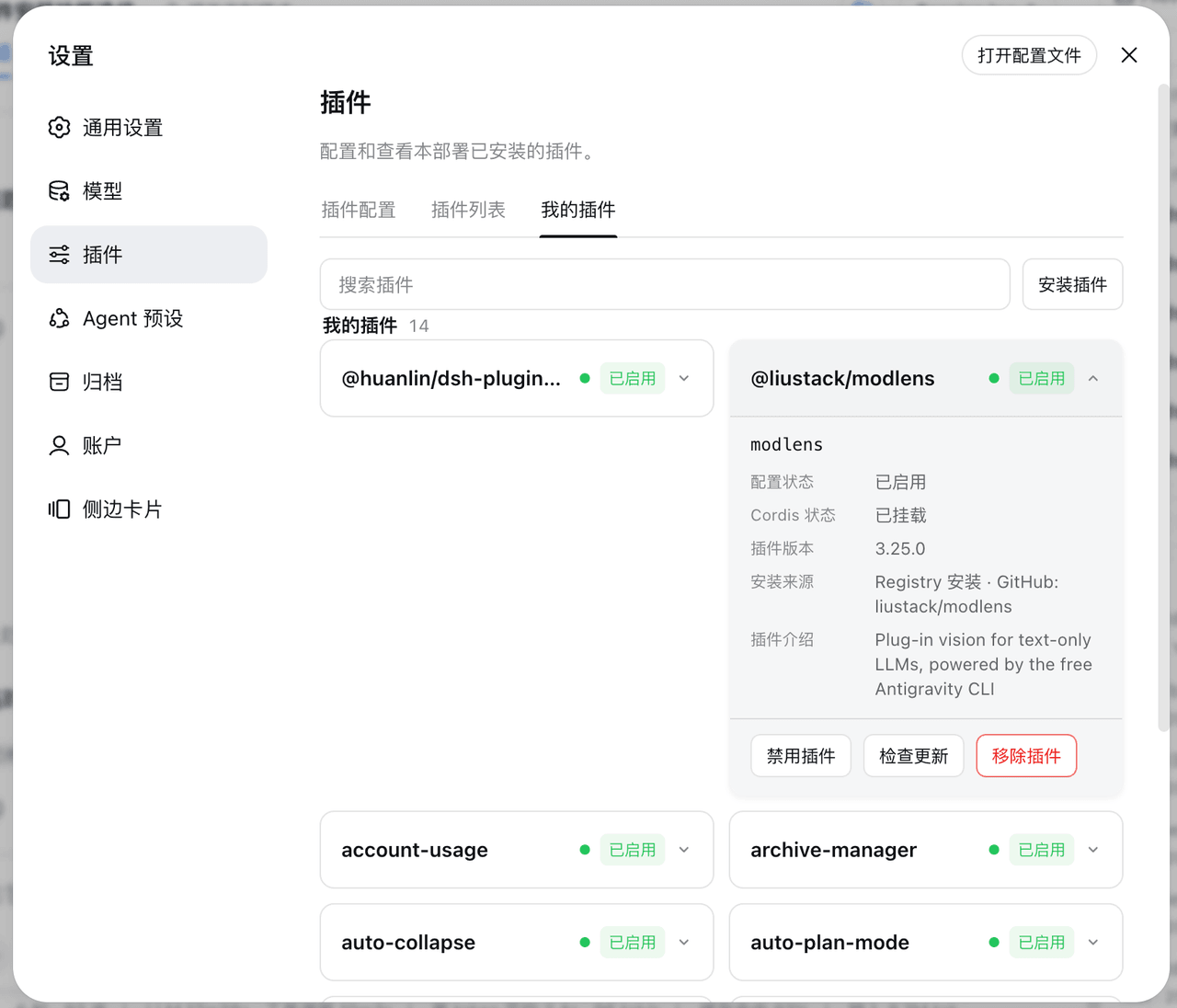
DSH 设置-插件页新增「我的插件」标签:双列卡片展示用户自己安装的插件(配置状态、Cordis 状态、插件介绍)。Add a "My Plugins" tab to the DSH settings plugins page, listi…
Ycet/dsh-my-plugins
DSH 设置-插件页新增「我的插件」标签:双列卡片展示用户自己安装的插件(配置状态、Cordis 状态、插件介绍)。Add a "My Plugins" tab to the DSH settings plugins page, listi…
- tsingshitao-nuke/dsh-set-workspace Right-click a folder in Windows File Explorer to open it as a DeepSeek Harness (DSH) workspace: register, launch DSH, an…
- Jaylor-Wang/dsh-tool-lsp LSP action surface for DeepSeek Harness: diagnostics, formatting, rename, code actions and symbols over real language se…
- cyj0920/dsh-jlink-plugin