thissensen/dsh-agent-studio
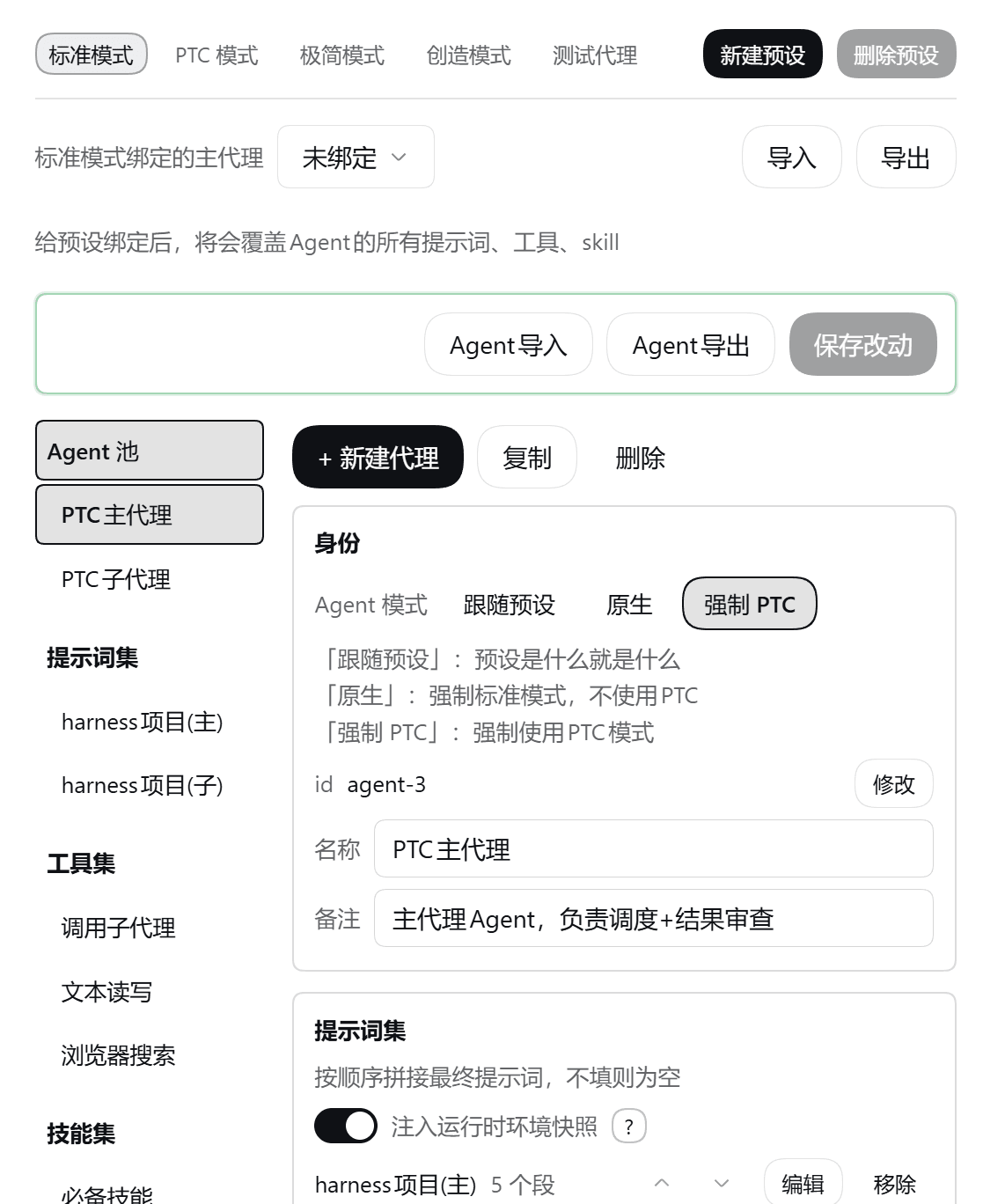
可视化地自定义配置 Agent 的提示词(prompt)、工具(tools)、可见技能(skills)、子代理、备用模型,轻松创建团队。
Project Overview项目介绍
dsh-agent-studio is a graphical plugin built specifically for DeepSeek Harness (DSH) that treats an Agent as composable building blocks. It exposes a panel where administrators assemble prompt sets, tool sets, skill sets, and model choices into discrete Agents, and lets every sub-agent receive its own prompt, tool whitelist, skill whitelist, model assignment, and background-mode override. Installation is performed through dsh plugin --profile web add dsh-agent-studio; alternatively a prebuilt .tgz from the GitHub Releases page or a source-tree link: mount works equally well, and the --profile desktop flavor of DSH is also supported. After install the user must restart DSH and the new panel appears under Settings → Agent Center, with dark and light themes following the host UI.
Typical workflows revolve around letting one DSH instance handle heterogeneous jobs without bloating the model prompt: define several Agents in the pool, attach independent prompt/tool/skill whitelists to each, then bind a preset to whichever Agent should serve as the primary for the current task. A configurable fallback candidate chain lets a request jump across providers when the main model fails. Sub-agents can independently opt into native or PTC presentation, opt out of the per-step runtime snapshot, and carry their own delegate-tool identity so the host respects their per-role configuration. Pairing with the dsh-context companion reveals exactly what the model sees each turn.
Dependencies are declared as optional peerDependencies: dsh-agent-presets, dsh-scope, dsh-settings, dsh-system-prompt, dsh-tools, and schemastery; if any service is missing on a newer DSH build, the plugin degrades that single layer without crashing. The minimal persona carries a complete: true segment that DSH post-processing overrides, so its prompt surface is not editable, but tool and skill surfaces are unaffected. Concurrent one-shot sub-agents are matched to delegate calls in creation order because the agent/created event carries no causation data; resumable sub-agents receive a pre-generated childId and match exactly. License is MIT.
dsh-agent-studio 是 DeepSeek Harness(DSH)的图形化插件,主打"积木拼装 Agent":在面板里把提示词集、工具集、技能集与模型组合成独立 Agent,并为每个子代理单独配置提示词、工具、技能、模型与后台模式。通过 dsh plugin --profile web add dsh-agent-studio 安装,也可从 GitHub Release 下载 .tgz 或源码以 link: 方式挂载,桌面版(--profile desktop)同样支持;面板路径为设置 → Agent 中心,离线/内网环境用 Release 包即可。
典型场景是为不同任务分配不同模型与提示词组合:在池中新建多个 Agent,给每个 Agent 绑定独立的提示词、工具与技能白名单,再通过预设切换主代理;启用备用候选链可在主模型限流时按顺序跨供应商顶替。子代理走 PTC 还是原生模式、是否关闭 runtime 快照,都可在面板里逐项设定。可搭配 dsh-context 查看模型本轮实际收到的内容,方便调参。面向需要精细控制 Agent 行为、解决提示词/工具冗余拖垮模型表现的本地与团队用户。
依赖方面,宿主服务(dsh-agent-presets、dsh-scope、dsh-settings、dsh-system-prompt、dsh-tools、schemastery)均作为 optional peerDependencies,任一缺席时逐项降级;minimal 预设因 complete: true 段被官方后处理覆盖,工具面与技能面不受影响;多并发一次性子代理按创建顺序配对,Resumable 子代理按预生成 childId 精确匹配。License 为 MIT,首次安装后需重启 DSH,改面板(client/parts/panel.js)刷新即生效,改 package.json 入口字段则必须重启。
请帮我安装这个 DSH 插件。安装前先完成【兼容性检查 + 安全性检查】,检查通过再动手。

插件:dsh-agent-studio(thissensen/dsh-agent-studio)
仓库:https://github.com/thissensen/dsh-agent-studio
本站详情页:https://www.yhbd.top/plugins/thissensen-dsh-agent-studio/
本站登记:类型 plugin · 归类 原生 DSH 插件 · 许可证 MIT · ⭐ 20 · 最近提交 2026-09-23 · 主语言 TypeScript

按下面顺序执行,每步先把结论告诉我,再进入下一步:

【1 兼容性检查】
① 我这边:DSH 版本、Node 版本、操作系统、当前 profile(web / desktop)。
② 读它的 README、package.json、插件 manifest,列出它要求的 DSH 版本 / Node 版本 / 操作系统 / 外部依赖 / 需要另外先装的运行时。
③ 逐条比对,结论只写「满足 / 不满足 / 未知」三种;不满足的给出可行替代方案。
④ 检查是否和我已装的插件冲突:命令名重复、skill / tool 重名、端口占用、重复注册的 MCP server。

【2 安全性检查】
① 仓库可信度:和上面「本站登记」是否一致;star / fork 数、创建时间、最近提交,是否归档或长期停更。
② 安装脚本:逐行看 package.json 的 preinstall / install / postinstall,以及 install.sh、setup.ps1 之类脚本。出现 curl|bash、下载后直接执行、混淆代码、访问与插件功能无关的域名,立刻停下来告诉我,不要继续装。
③ 依赖:列出新增依赖,标出无人维护、或与知名包拼写近似的可疑包(typosquatting)。
④ 权限与副作用:它会读写哪些目录、访问哪些域名、需要哪些 DSH 权限(filesystem / network / shell / clipboard 等),以及怎么卸载和回滚。
⑤ 如果它要求 sudo / 管理员权限,或权限明显超出功能所需,先停下来问我。

【3 安装】
上面两步没有「不满足」和「高危项」时才执行;用官方推荐方式安装,不要自行提权。

【4 汇报】
用表格输出:检查项 / 结论 / 依据 / 是否需要我决策。拿不准的一律写「未知」并说明要我怎么确认——不要猜,也不要替我决定。
Send this message to DSH in your current session: it verifies compatibility and security first (answering met / not met / unknown item by item) and only installs once everything checks out — it will stop and ask you if it finds a high-risk item. The box scrolls; the copy is the full prompt. CLI install commands may not be accurate across systems, so DSH is the safer route.把上面这条消息直接发给当前会话里的 DSH:它会先核对兼容性与安全性(逐条给「满足 / 不满足 / 未知」),确认没问题再安装,有高危项会停下来问你。框内可滚动,复制到的是完整提示词;安装命令不一定准确,发给 DSH 更稳。
- 20 stars - an early-stage project星标 20,属于早期项目
DSH walks through these 9 checksDSH 会逐条核对这 9 项
Compatibility兼容性
- DSH, Node, OS and profile requirementsDSH 版本 / Node 版本 / 操作系统 / profile 是否满足要求
- External dependencies and runtimes (Electron / Python / Docker, ...)外部依赖与运行时(Electron / Python / Docker 等)是否齐备
- Conflicts with installed plugins: command names, skill / tool names, ports, duplicate MCP registration与已装插件是否冲突:命令名、skill / tool 重名、端口占用、重复 MCP 注册
Security安全性
- Repo matches the facts registered here; archived or abandoned?仓库是否与页面登记一致,是否归档或长期停更
- Safety of preinstall / install / postinstall and install.sh / setup.ps1preinstall / install / postinstall 与 install.sh、setup.ps1 是否安全
- curl|bash, download-then-execute, obfuscation, unrelated domains → stop immediatelycurl|bash、下载即执行、混淆代码、无关域名 → 立刻停止
- Typosquatting or unmaintained packages among the new dependencies新增依赖里有没有 typosquatting 或无人维护的包
- Requested permissions vs. what the feature actually needs申请了哪些权限、是否超出功能所需(filesystem / network / shell / clipboard)
- Any sudo / admin requirement, plus uninstall and rollback是否要求 sudo / 管理员权限,以及卸载与回滚方式
Anything uncertain must be marked unknown with a note on how to confirm it. This site's signal screen is a static snapshot, not a security audit.拿不准的必须标「未知」并说明要我怎么确认。本站的信号筛查是静态快照,不能替代安全审计。
Or use CLI install (for developers)或使用命令行安装(适合开发者)
CLI Install命令行安装
dsh plugin --profile web add dsh-agent-studio把 thissensen/dsh-agent-studio 加入你的 DSH 配置(web profile)即可启用。
READMEREADME
dsh-agent-studio




一个 DeepSeek Harness 图形化插件:可视化地精确配置 Agent 的提示词(prompt)、工具(tools)、可见技能(skills)、子代理、备用模型,轻松创建团队,根据不同任务分配不同模型。
模型每一轮看到的东西就三份:系统提示词、工具目录、技能目录。随着插件、工具、MCP 越装越多,这三份只会越来越大,拖累模型表现。另外 DSH 目前给子代理的配置极其简陋,没法轻松配置它的提示词、工具、技能、模型和思考强度。
本插件的配置存在自己的数据里,不改动宿主既有的预设定义,卸载即恢复原状。
它把 Agent 拆成可随意拼装的积木:提示词、工具、技能、模型拼成一个完整 Agent,子代理也一样能高度定制;预设可以随手新建;兼容官方 PTC 模式;支持设备备用模型。
可以搭配 dsh-context 一起用,查看模型这一轮实际收到的提示词、工具和 skill 到底长什么样。
它解决什么
| 你可能遇到过的问题 | 平台的默认行为 | 装上之后 |
|---|---|---|
| 系统提示词越堆越长,关不掉也用不上 | 预设里注册了哪些段就投递哪些段 | 按 agent 编一份白名单,名单外的段不进上下文 |
| 工具越装越多,同类工具一大堆,模型挑不准 | 工具面按已装的插件全量下发 | 挑出这个 agent 要用的,其余收起来 |
| 技能多了不好管 | 所有 modelInvocable 的 skill 都进目录 |
勾哪些就给哪些,不勾的模型看不见 |
| 每个 step 都塞一段运行时快照 | 官方按 step 动态注入,没有开关 | 代理级开关,关掉就不用再收 |
| 子代理只能整套继承主代理,占用大量上下文 | 官方 subagent 既没有条目标识,也没法按角色裁剪 |
每个子代理独立配:模型 / 提示词 / 工具 / 技能 / 后台模式 |
| PTC 模式下创建的子代理也是 PTC | 官方默认继承主代理的模式 | 子代理走原生还是 PTC,你说了算 |
| 干不同的活想用不同的提示词、工具、Skill,切来切去很麻烦 | 预设只管提示词组合,工具和 skill 是全局一套,换个预设照旧全量下发 | 给预设挂的 Agent 一切换即可 |
| 本地部署模型上下文紧张,根本对话不了几轮 | 做不到提示词全清,只能创造模式自己建一个 | 创建一个什么都不挂的Agent,给预设绑上就行,真 · 0提示词 |
| 主模型限流了 / 挂了,整轮直接失败 | 只在一个 provider 里重试到上限,然后放弃 | 配一条备用候选链(可跨供应商),失败按顺序顶上 |
Showing the opening section of the README — the full document lives in the repository以上为 README 开头摘要,完整文档在仓库内 · View the full README on GitHub →在 GitHub 查看完整 README →
Related相关推荐
-
 tt-a1i/archify
Agent skill for beautiful, verifiable architecture, workflow, sequence, data-flow, and lifecycle diagrams—self-contained…
tt-a1i/archify
Agent skill for beautiful, verifiable architecture, workflow, sequence, data-flow, and lifecycle diagrams—self-contained…
-
 ZSeven-W/openpencil
The world's first open-source AI-native vector design tool and the first to feature concurrent Agent Teams. Design-as-Co…
ZSeven-W/openpencil
The world's first open-source AI-native vector design tool and the first to feature concurrent Agent Teams. Design-as-Co…
-
 omdsh-dev/dsh_workflow
把Claude Code的UltraCode模式带给DSH,把 DSH 的一次性多 Agent 调度,升级为可生成、可保存、可治理、可观察、可恢复的 Workflow 层
omdsh-dev/dsh_workflow
把Claude Code的UltraCode模式带给DSH,把 DSH 的一次性多 Agent 调度,升级为可生成、可保存、可治理、可观察、可恢复的 Workflow 层
-
 zenx0x/allinluna
Resource-aware multi-agent orchestration for Codex and DeepSeek Harness (All in Flash DSH plugin)
zenx0x/allinluna
Resource-aware multi-agent orchestration for Codex and DeepSeek Harness (All in Flash DSH plugin)
-
 CheshireJCat/blender
DeepSeek Harness plugin for complete Blender 3D modeling, reconstruction, rendering, validation, and export workflows
CheshireJCat/blender
DeepSeek Harness plugin for complete Blender 3D modeling, reconstruction, rendering, validation, and export workflows
-
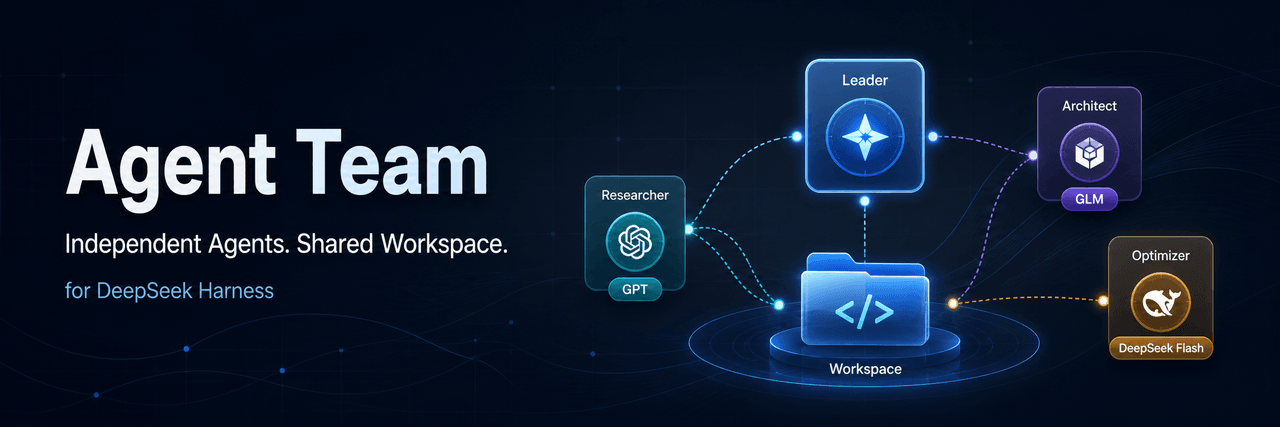 limuyang2/agent-team
Multi-agent team collaboration for DeepSeek Harness, with independent models, skills, MCP tools, contexts, and a shared …
limuyang2/agent-team
Multi-agent team collaboration for DeepSeek Harness, with independent models, skills, MCP tools, contexts, and a shared …
-
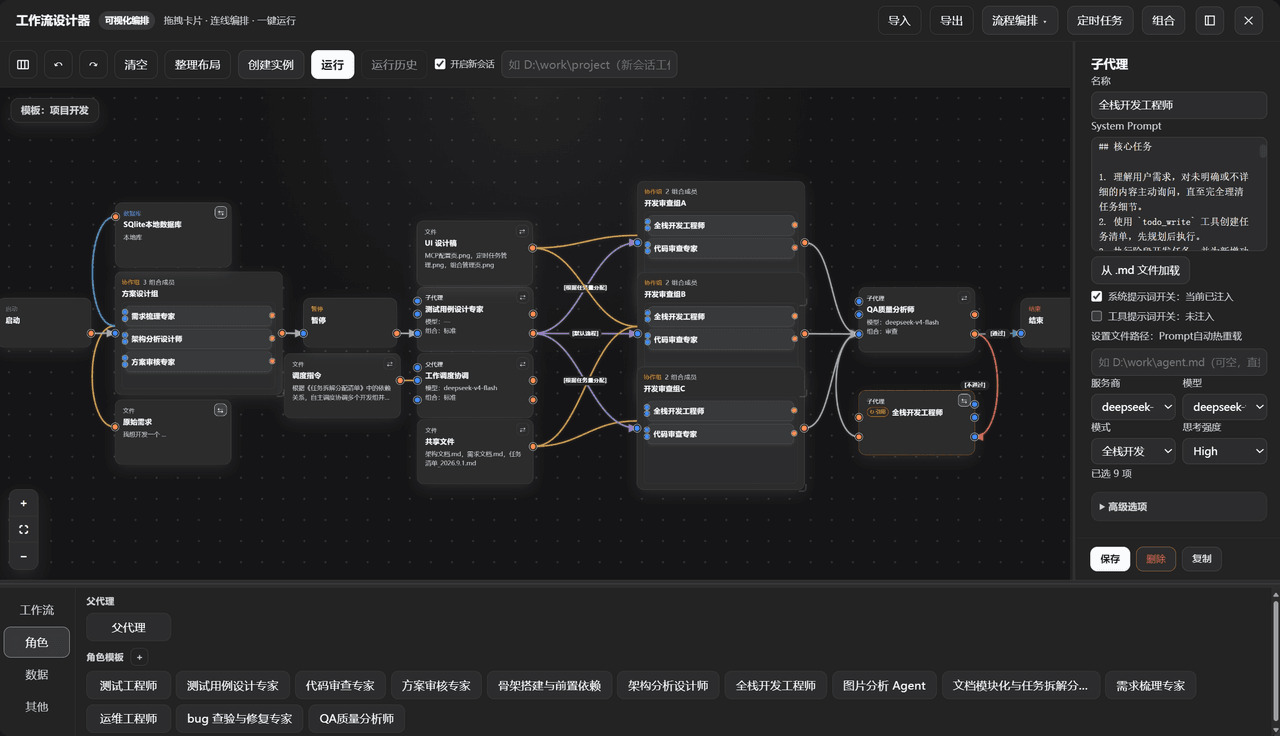 GZX2211/dsh-Visual-Workflow
基于 DeepSeek Harness 体系打造的:可视化 Agent 编排平台。更新:该插件目前已对齐最新候选版 dsh v0.2.0-rc.2,不适配 Alpha 版。
GZX2211/dsh-Visual-Workflow
基于 DeepSeek Harness 体系打造的:可视化 Agent 编排平台。更新:该插件目前已对齐最新候选版 dsh v0.2.0-rc.2,不适配 Alpha 版。
-
 sailoumili/novel-writer
小说创作模式:一个统筹队长统领全局,5 个专职子代理各司其职——架构世界、策划剧情、管理人物、执笔写文、质检复核——协同写作。
sailoumili/novel-writer
小说创作模式:一个统筹队长统领全局,5 个专职子代理各司其职——架构世界、策划剧情、管理人物、执笔写文、质检复核——协同写作。